Narrative 14: The magic bazaar of Desk
Behind the scenes of a successful ticketing system: BTS Series
Narrative 14: The magic bazaar of Desk
Marketplace is a centralized platform where users can discover Zoho and third-party applications that can be integrated with their Desk account to facilitate various business processes. It's straightforward: Admins can search for, install, and manage the installed extensions directly from the Marketplace.
How extensions empower teams that use Desk
A popular customer service company began using Desk to help business clients deliver exceptional service. As more companies adopted Zoho Desk for its powerful ticketing and multichannel messaging tools, managers and agents discovered a hidden challenge: every team worked a little differently. One day, a curious help desk manager named Ananya wished she could connect Desk to her favorite CRM, translate messages instantly, and automate ticket follow-up with just a tap. Still, these features were nowhere to be found.
Determined to find a solution, Ananya embarked on a quest. She soon stumbled upon the Marketplace, a lively bazaar filled with hundreds of extensions, like magical artifacts, each crafted by developers around the globe. In the Marketplace, Ananya discovered tools that extended Your Desk’s capabilities beyond her imagination: integrations with web products and ERP systems, project management widgets, private apps designed specifically for her company, and even connectors to keep up with customer reviews on social channels like TripAdvisor and Instagram.
Ananya's team quickly installed helpful extensions: a translation app to respond to international customers, a calendar sync never to miss a follow-up, and a ticket insights tool to visualize performance trends with a single click. Every challenge she faced now had a ready-made solution, and her agents rejoiced as work became easier, customers were happier, and collaboration was more enjoyable.
Thanks to the ever-growing Marketplace, Ananya turned her help desk into a central hub where everything connected, every workflow flowed smoothly, and every customer felt listened to and valued.
Moreover, the story continues. As more businesses join Your Desk, the Marketplace grows richer, with new integrations appearing each season, each one a step closer to the perfect help desk experience, limited only by the imagination of the people who use it.
How to explore Desk's Marketplace
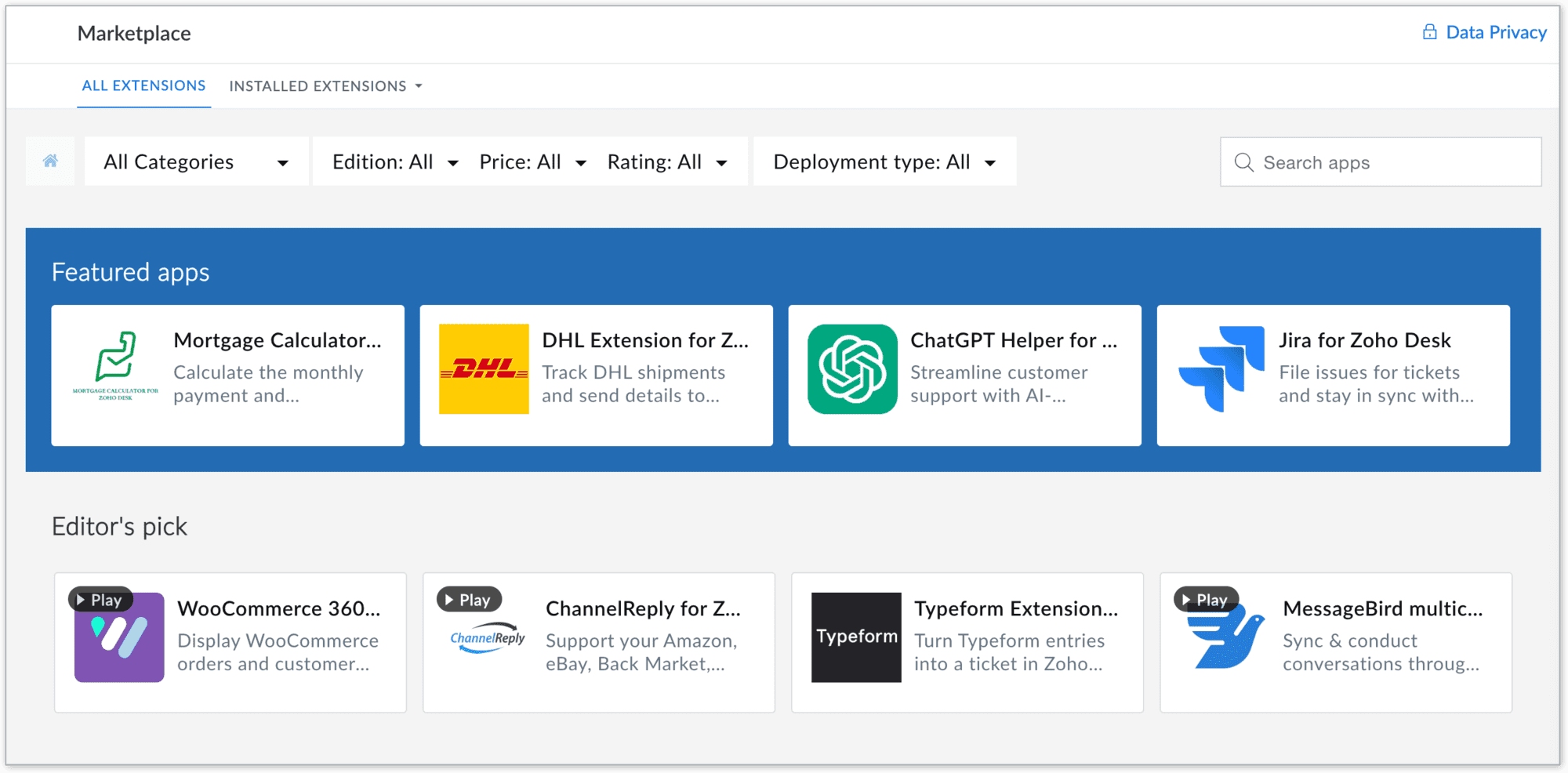
The Marketplace home page is a library of applications that users can install to amplify their business processes.
Marketplace benefits
For users
- Provide a wide range of solutions to access hundreds of ready-to-use apps and extensions across categories like CRM, finance, IM, HR management, marketing and analytics, catering to your business needs
- Quick integrations: All the apps are designed for seamless integration with simplified workflows, eliminating the need for complex development or switching between platforms
- Easy automation of routine tasks, breaking data silos, streamlining processes, and improving team collaboration, resulting in better productivity
- Apps in Zoho Desk Marketplace are thoroughly vetted for quality and security, ensuring that your business data remains safe and reliable
- Enables easy customization and deployment of new functionalities to address unique requirements without requiring coding expertise
- Reduce time and cost by providing out-of-the-box integrations and reducing dependency on expensive custom solutions
For developers
- Showcase expertise by creating solutions for various business needs and industries, enhancing credibility and opportunities
- Access developer resources, sandbox environments, and a streamlined publishing process for hassle-free app deployment
Takeaway
In summary, Zoho Desk's Marketplace is a central hub where businesses can discover, install, and manage apps that extend the functionality of their business, making it easier to meet their diverse needs while unlocking opportunities for growth and increased efficiency.
Please stay tuned for more in the Desk behind-the-scenes series.
Regards,
Kavya Rao
The Zoho Desk Team

Also, read:
Behind the scenes of a successful ticketing system (BTS Series)
- Narrative 13: Importing your data
- Narrative 12: Sandbox - Testing without the risk
- Narrative 11: Are your customers happy?
- Narrative 10: Assignment Rules - Streamlining Ticket Management
- Narrative 9 - GC—Meaningful conversations that benefit your customers
- Narrative 8 - Intelligent in-app support that's instantly available anytime and anywhere
- Narrative 7 - The importance of data sharing
- Narrative 6 - The impact of rebranding
- Narrative 5 - The essential role of SLAs
- Narrative 4 - Exploring the support channels
- Narrative 3 - Comprehending user management
- Narrative 2 - Understanding organizational departments
- Narrative 1 - The significance of a business account
Topic Participants
Kavya Rao Addepalli
Recent Topics
Are there settings for hyperlinks?
Clicking a hyperlinked cell in Sheet creates this little pop-up with the actual hyperlink inside. Is it possible to have a 1-click link where if you click the cell it opens the link directly with no pop-up?Automatically include all ticket attachments in the ticket resolution email
Hello Zoho Community, We are implementing Zoho Desk in a real customer-facing production environment and have run into a limitation that is becoming a blocking requirement for our clients. The problem When a ticket is closed or resolved, Zoho Desk sendsKeep Zoho People Feature Requests in the Zoho People Forum
Hello Zoho People Product Team, Greetings. We would like to submit a feature request regarding the handling of feature requests themselves, specifically for Zoho People. Issue: Feature Requests Being Moved to Zoho One Zoho People feature requests areZoho Sheet for Desktop
Does Zoho plans to develop a Desktop version of Sheet that installs on the computer like was done with Writer?Finding text within a ticket: Expand All or Search this Ticket
The auto-collapse feature within a ticket is nice for screen scrolling, however it makes it difficult to find text within the ticket if the email is collapsed. In fact you cannot find text if it is collapsed. I would like to propose a feature that allowsBooks & Desk. Client mapping
Hi, I’ve been using Zoho Books for several years and am now looking to improve my customer service. I'm experimenting with Zoho Desk and want to sync and map my client data from Zoho Books. However, it seems that mapping requires both contacts to haveString handling
If I cut a currency string from a quote and try and paste it into the Deal "Amount", it will fail unless I manually delete any commas. Dollar signs are no problem, but comma's seem to fail. Please correct this Input Validation error.Feature Request - Allow Customers To Pick Meeting Duration
Hi Bookings Team, It would be great if there was an option to allow customers to pick a duration based on a max and minimum amount of time defined by me and in increments defined by me. For example, I have some slots which are available for customersYouTube Live streaming? how to? Zoom has this feature, built-in. Can't find it on zoho meetings.
YouTube Live streaming? how to? Zoom has this feature, built-in. Can't find it on zoho meetings.Feature Request - A Way To Search Item Groups
Hi Inventory Team, I can't find any way to filter or search by fields of Item Groups. It would be great to see that functionality added. I have a use case where a single product might come from 5 or more suppliers and each supplier's item is an Item inFeature Reqeust - Include MPN In Selectable FIelds
I have noticed that the MPN is not available to show in the list view of Items. Please consider adding it as EAN, UPC and ISBN are all available, so it doesn't make much sense to exclude this similar option. Thanks for considering my feedback.Feature Request - Option To Hide Default System Fields on Items
Hi Zoho Inventory Team, As far as I know it is not possible to hid some of the defult system fields on Items, such as UPC, MPN, EAN, ISBN. A good use case is that in many cases ISBN is not relevant and it would be an improved user experience if we couldMaking an email campaign into a Template
I used a Zoho Campaign Template to create an email. Now I want to use this email and make it a new template, but this seems to be not possible. Am I missing something?Campaigns does not work!
I am running into so many problems trying to use Zoho Campaigns, that I am seriously considering dropping the app from my (shrinking) list of Zoho applications I actually use. Apart from having to fight the software trying to create a design and email,Feature Request - Make Available "Alias Name" Field In Item List View
Hi Zoho Inventory Team, I have noticed that the "Alias Name" field does not appear on the list of selectable columns in the Customise Columns feature in the Items module. This would be very useful to see for businesses who are using the Alias Name fieldHow to filter Packages in zoho inventory api
Hi Team, I want to perform some tasks in a schedular on the packages which are in "Shipped" state. I tried to use filter_by in my api call but in return I get response as {"code":-1,"message":"Given filter is not configured"} My Api request is as followsCRM
Is anyone else experiencing this issue? Our company is not moving out of using Gmail's web app. It just has more features and is a better email program than Zoho Mail. Gmail has an extension (Zoho CRM for Gmail) that we're using but we've found some seriousSyncing with Google calendar, Tasks and Events
Is it possible to sync Zoho CRM calendar, task and events with Google Calendar's tasks and events. With the increasing adoption by many major tool suppliers to sync seamlessly with Google's offerings (for instance I use the excellent Any.do task planningHow can i view "Child" Accounts?
It can be very useful in our field of business to know the parent-child account relationship. However, there seems to be a shortcoming in the parent account view: no child account list. How can we view the child accounts per each account?Ability to assign Invoice Ownership through Deluge in FSM
Hi, As part of our process, when a service appointment is completed, we automated the creation of the invoice based on a specific business logic using Deluge. When we do that, the "Owner" of the invoice in Zoho FSM is defaulted to the SuperAdmin. ThisEasily perform calculations using dates with the new DATEDIF function
Hey Zoho Writer users! We've enhanced Zoho Writer's formula capabilities with the new DATEDIF function. This allows you to calculate the difference between dates in days, months, and years. Function syntax: =DATEDIF(start_date, end_date, unit) Inputs:Adding Comments Using Workflows - How to Change User Attributed
We have worklflows in Desk where a comment is added to a ticket based on certain criteria. It seems that the comment added is always attributed to the user who last edited the workflow. This does not make sense for us because: - It's misleading to otherAdd Attachment Support to Zoho Flow Mailhook / Email Trigger Module
Dear Zoho Support Team, We hope you are well. We would like to kindly request a feature enhancement for the Mailhook module in Zoho Flow. Currently, the email trigger in Zoho Flow provides access to the message body, subject, from address, and to address,Conect chat of salesiq with zoho cliq
Is there any way to answer from zoho cliq the chat of salesiq initiated by customers?Les dernières avancées en saisie de données et collaboration
Après une année dédiée à la recherche et au développement, notre équipe est prête à dévoiler des améliorations majeures pour Zoho Sheet. Ces nouveautés seront lancées par étapes afin d’en assurer une prise en main optimale. Nous commençons avec des fonctionnalitésRich Text For Notes in Zoho CRM
Hello everyone, As you know, notes are essential for recording information and ensuring smooth communication across your records. With our latest update, you can now use Rich Text formatting to organize and structure your notes more efficiently. By usingImplement Meeting Polls in Zoho Bookings
Dear Zoho Bookings Support Team, We'd like to propose a feature enhancement related to appointment scheduling within Zoho Bookings. Current Functionality: Zoho Bookings excels at streamlining individual appointment scheduling. Users can set availabilityZoho Bookings and Survey Integration through Flow
I am trying to set up flows where once an appointment is marked as completed in Zoho Bookings, the applicable survey form would be sent to the customer. Problem is, I cannot customise flows wherein if Consultation A is completed, Survey Form A would beService Account Admin for API Calls and System Actions
Hello, I would like to request the addition of a Service Account Admin option in Zoho product. This feature would allow API calls and system actions to be performed on behalf of the system, rather than an active user. Current Issue: At present, API callsPlease can the open tasks be shown in each customer account at the top.
Hi there This has happened before, where the open tasks are no longer visible at the top of the page for each customer in the CRM. They have gone missing previously and were reinstated when I asked so I think it's just after an update that this featureHow to Customize Task Creation to Send a Custom Alert Using JavaScript in Zoho CRM?
Hello Zoho CRM Community, I’m looking to customize Zoho CRM to send a custom alert whenever a task is created. I understand that Zoho CRM supports client scripts using JavaScript, and I would like to leverage this feature to implement the alert functionality.Send Whatsapp with API including custom placeholders
Is is possible to initiate a session on whatsapp IM channel with a template that includes params (placeholders) that are passed on the API call? This is very usefull to send a Utility message for a transactional notification including an order numberAdd Israel & Jewish Holidays to Zoho People Holidays Gallery
Greetings, We hope you are doing well. We are writing to request an enhancement to the Holidays Gallery in Zoho People. Currently, there are several holidays available, but none for Israel and none for Jewish holidays (which are not necessarily the sameZO25: The refreshed, more unified, and intelligent OS for business
Hello all, Greetings from Zoho One! 2025 has been a remarkable year, packed with new features that will take your Zoho One experience to the next level! From sleek, customizable dashboards to an all-new action panel for instant task management, we’veIntroducing Multi-Asset Support in Work Orders, Estimates, and Service Appointments
We’re excited to announce a highly requested enhancement in Zoho FSM — you can now associate multiple assets with Work Orders, Estimates, and Service Appointments. This update brings more clarity, flexibility, and control to your field service operations,[Product Update] Locations module migration in Zoho Books integration with Zoho Analytics
Dear Customers, As Zoho Books are starting to support an advance version of the Branches/Warehouses module called the Locations module, users who choose to migrate to the Locations module in Zoho Books will also be migrated in Zoho Analytics-Zoho BooksIntroducing Schedules for smarter availability management
Greetings from the Zoho Bookings team! We’re excited to introduce Schedules, a powerful enhancement to manage availability across your workspace. Schedules are reusable working-hour templates that help you define and maintain consistent availability acrossWhy Zoho Contracts Prefers Structured Approvals Over Ad-hoc Approvals
Approvals are one of the most important stages in a contract’s lifecycle. They determine whether a contract moves forward, gets revised, or needs further discussion. The approval process also defines accountability within the organization. Zoho ContractsWhatsapp Connection Status still "Pending" after migration
Hello, I migrated my WhatsApp API to Zoho from another provider a day ago. So far the connection status is still “Pending”. There is a problem? How long does it usually take?Kaizen #226: Using ZRC in Client Script
Hello everyone! Welcome to another week of Kaizen. In today's post, lets see what is ZRC (Zoho Request Client) and how we can use ZRC methods in Client Script to get inputs from a Salesperson and update the Lead status with a single button click. In thisNext Page