Updates in Zoho Workplace applications | Oct and Nov 2023
Hello Workplace Community,
We wish you all a Merry Christmas! 🎄
Hope you're all doing good and staying safe. This Christmas, we have quite a few treats in the form of new features and enhancements across the applications in Zoho Workplace.
Let's take a quick look at them.
Zoho Mail
Mail Reading Formats: Plain & Rich Text
In Zoho Mail, it is now possible to read emails in the preferred mode of your choice. Enabling Plain or Rich text mode from the Mail View Options within settings allows you to choose between a visually enhanced and formatted text or a simple, unformatted text format to read your emails.
Send personalized Out-of-Office messages for internal and external contacts
You can now set distinct Out-of-Office replies to senders within your organization and those outside it. Manage your professional communications effectively, ensuring that your messages are not only automated but also finely tuned to the expectations of both internal and external audiences.
Admin Configured Out-of-Office response for internal and external senders
Now, administrators can also configure distinct Out-of-Office responses for emails from senders within the organization and external senders, ensuring that both internal and external contacts receive responses crafted to their respective needs and contexts.
Users can create email-enabled Groups with admin approval
Organizations users now have the option to create a group as an email-enabled group directly from their group management page if the admin has granted permission through the admin console.
Add email event invitations to Zoho CRM Calendar
You can now choose to add event invitations from your emails directly to the Zoho CRM Calendar instead of the Zoho Calendar for more efficient and consolidated management of your business events or activities related to customer relationship management.
New DRE Gallery function alert!
Now, our gallery of pre-defined DRE functions has a new addition, bringing even more flexibility to manage your inbox. A pre-written script to automatically add attachments from an email to CRM when the sender is listed as a CRM lead or contact is added to the Gallery function.
Associate Contact card to your email signatures
No more copying and pasting your contact information repeatedly. You can now include contact cards directly into your email signature. Recipients can easily save your contact details directly from your signature, eliminating the hassle of manual entry. It's a one-time setup for a lasting impact on every email you send.
Seamless language translation for your emails
No need to worry about missing out on important information or struggling to understand emails in different languages. In Zoho Mail, you can now translate all your emails to your preferred language. Enhance your email communication experience, fostering global collaboration and ensuring that language diversity is no longer a barrier to effective communication.
Admins can now recall sent emails
No more worrying about emails sent by mistake. Admins can now recall emails sent by users within the organization. This ensures that any unintended or erroneous messages are swiftly corrected, providing enhanced control and flexibility over email communications.
Shared Mailbox support in email Retention and Backup
In Admin Console, the ability to retain, backup, or recover emails now extends to shared mailboxes. Administrators can now have the same level of control and security for shared mailboxes as they have for individual user accounts and make sure that critical data is protected and accessible when needed, even for collaborative spaces within Zoho Mail.
Zoho Calendar
Audio Meeting or Video Meeting - Pick your style
With the Zoho Meeting integration, you can now choose to create either audio or video conferencing while scheduling an event. When Zoho Meeting is selected as a Conference option, a meeting will be set up in Zoho Meeting and the conference link will be emailed to the attendees.
Zoho WorkDrive
Video and audio preview enhancements
We have enhanced video and audio previews by adding sneak forward (Shift+Right arrow) and sneak backward (Shift+Left arrow) options. We have also introduced shortcut options for muting/unmuting (M), entering/exiting full-screen mode (F), and playing/pausing your content (space bar).
Additionally, we have introduced picture-in-picture (PIP) support for video files.
Experience WorkDrive in your preferred Indian language
India's rich linguistic diversity is now fully accommodated by WorkDrive. No matter which region you're from or which language you speak, WorkDrive is here to support your collaboration and document management needs.
We have expanded our language support to include all 22 official Indian languages. This means that you can now access and interact with WorkDrive in your preferred Indian language for a more convenient and user-friendly experience.
Locate files quickly with our recent search enhancements
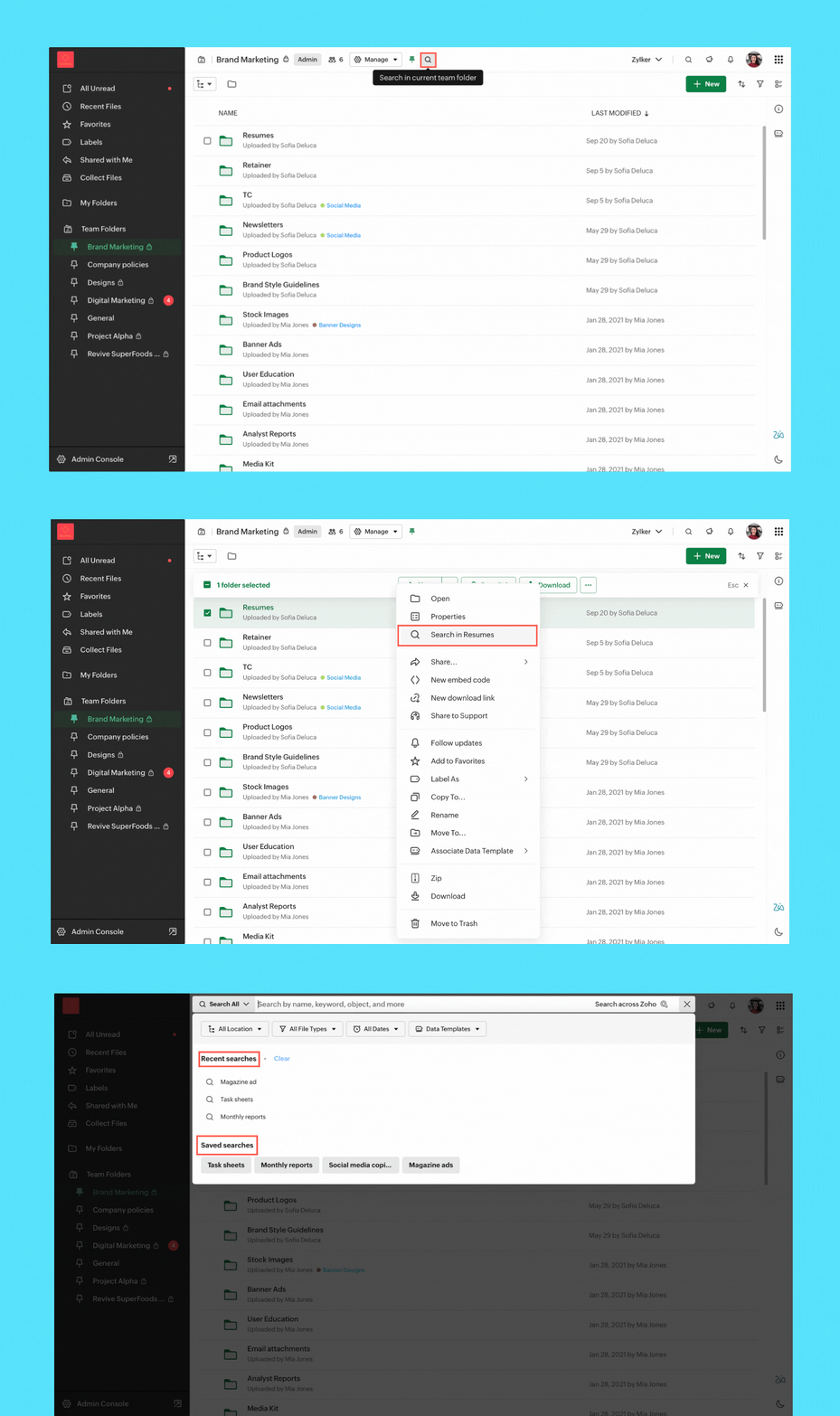
- Streamlined search: We've enabled quick search options to help you find files in your My Folder, Team Folder, Org Folder, and any other specific subfolder.
- Save search: You can now save search keywords along with the applied filters, making the process of generating future search results effortless.
- Recent search listings: Your recent searches are now at your fingertips within the search UI. Quickly access them to find the information you need.
Zoho Cliq
Enhancements in Admin Panel
- eDiscovery and data retention: Retrieve and clean up your organization’s data and assets with eDiscovery and data retention policies. These are necessary for compliance audits, lawsuits, and intellectual property theft, as you can quickly locate and provide the required supporting evidence.
- Audit trails: Get a snapshot of all user activities across chats and channels at a glance and maintain a record of all critical actions performed by specific users across different modules.
- Usage reports: Measure adoption rates and the hours spent on different modules. Admins can get a clear picture of the organization's interactions and how everyone uses Cliq.
- Media IP versioning: With this new tool, you can track which of Cliq's media servers are whitelisted within your organization's network. This ensures continuous and seamless connectivity in your calls and meetings.
- Status configuration across the organization: Manage your organization's status configurations by customizing the text, setting time limits for each status, and availability of custom statuses.
- Centralized management for your channels: Get better control over every channel within your organization by performing detailed actions like changing channel admins, adding or removing participants, and adjusting the roles available to a channel admin from a single centralized location.
AI advancements
- Meeting summary & action items: Effortlessly review discussions with AI-generated meeting transcripts, pinpointing critical details and follow-up tasks for actionable insights.
- Unread message summary: Missed a group chat and overwhelmed by hundreds of unread messages? Now generate message summaries to quickly catch up on what is going on.
- Writing assistant: Receive support in composing messages with tone analysis and grammar correction while also gaining additional insights about your texts from our AI, Zia. Explore details like writing quality, word count, and readability for a comprehensive writing experience.
Updates in the Collaboration corner
- Auto response: Set an auto-response in Cliq to keep your colleagues informed of your unavailability and return time with the out-of-office responder.
- Pin multiple messages: Effortlessly pin multiple important messages in a chat to ensure essential information remains at the forefront.
Channel permission to close threads
With our latest addition to channel permissions, you can efficiently designate who can close threads, offering improved control over your channel's discussions.
Zoho Meeting
Import webinar registrants with a CSV
Streamline your webinar registration process by uploading a CSV file containing attendee names and emails. You can effortlessly import your webinar registrations, saving time and simplifying the process. To import registrations, navigate to the registrations tab of the scheduled webinar and click Import CSV in the top right corner.
End of session notification
With the end-of-session notification, you can choose to remind all participants or only the host about the scheduled end time of a meeting. You can also choose when and how many times you'd like to be reminded about the scheduled end time. This can be customized under the Meeting settings.
Zoho Writer
Visualize, summarize, and transform data in mail merge templates
Display data exactly the way you want and highlight key insights with group by and aggregate in Zoho Writer's mail merge templates.
Zoho Sheet
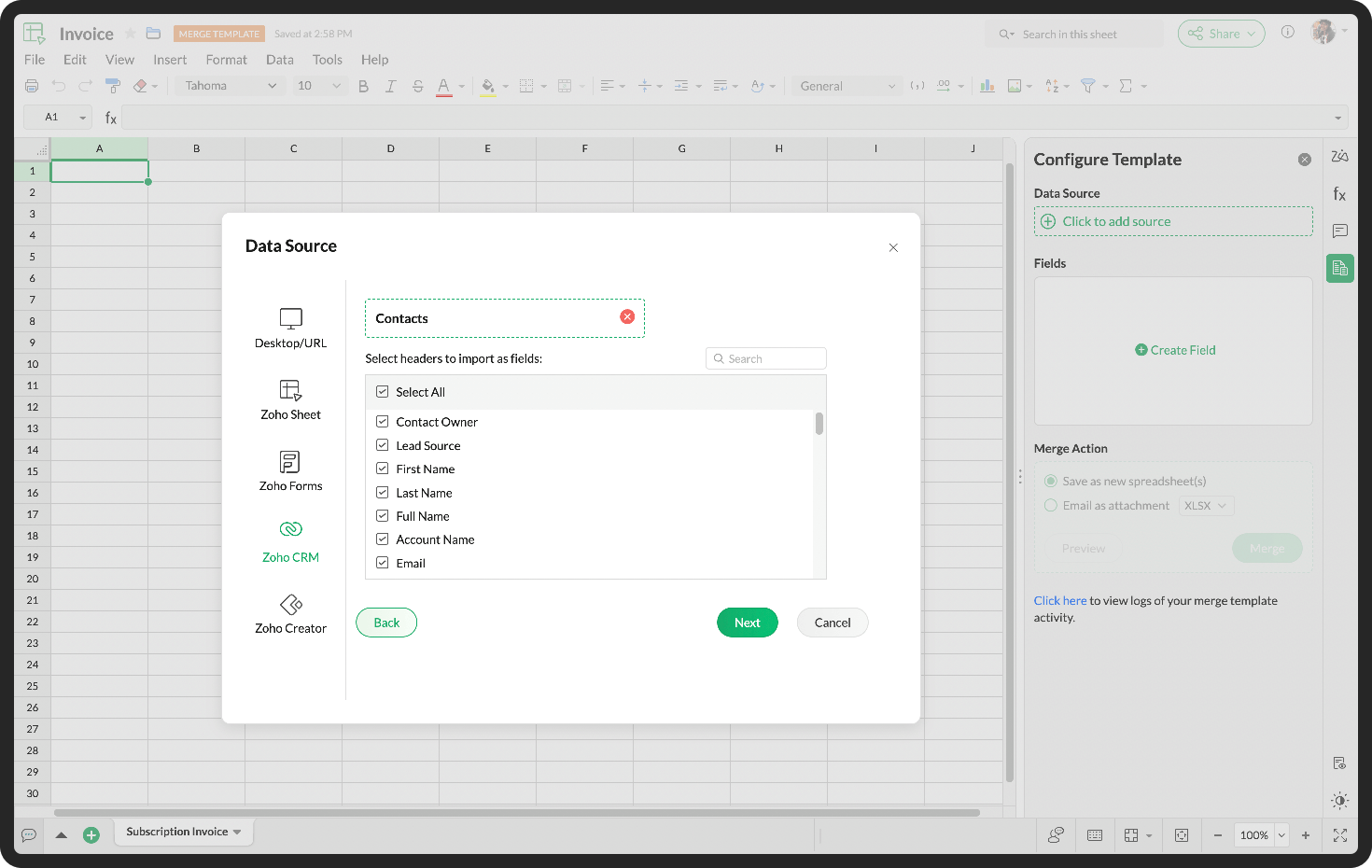
Create and share bulk spreadsheets seamlessly using Merge Templates
Do you spend hours drafting new records and copy-pasting data from other sources? You can efficiently create and share bulk data records with the Merge Template in Zoho Sheet.
Zoho Connect
Get instant reminders for live broadcasts
With the convenience of reminders, you can get notified about live broadcasts to help you plan your participation effectively.
Boost task activity with the fun Arcade feature
Get points for performing certain task activities. From creating a task to changing the task status, earn points for your active participation on the board.
Get detailed insights on your posts
Understand user sentiment and interaction on your posts, such as views, comments, and reactions to help you keep track of your post-related engagement at all times.
Do try out the features, enhancements and let us know your feedback and suggestions in the comments section given below.
Topic Participants
Ranadive E
Sticky Posts
Product Updates in Zoho Workplace applications | December 2025
Hello Workplace Community, Let’s take a look at the new features and enhancements that went live across all Workplace applications this December. Zoho Mail Block emails without notifying the sender Block emails without sending a rejection notificationProduct Updates in Zoho Workplace applications | November 2025
Hello Workplace Community, Let’s take a look at the new features and enhancements that went live across all Workplace applications this November. Zoho Mail Format comments easily using Slash Commands With Slash commands, you can easily format text, insertProduct Updates in Zoho Workplace applications | October 2025
Hello Workplace Community, Let’s take a look at the new features and enhancements that went live across all Workplace applications this October. Zoho Mail Create Signature from Compose window You can now effortlessly create a Signature using the CreateProduct Updates in Zoho Workplace applications | September 2025
Hello Workplace Community, Let’s take a look at the new features and enhancements that went live across all Workplace applications this September. Zoho Mail Attach email as EML file in Compose Effortlessly attach emails as EML file in Compose by simplyAI in Zoho Workplace: A Sneak Peek into What’s Coming!
Hello everyone, We’re super excited to share something we’ve been working on and we want you to be part of it! You may have seen our announcement blog post introducing a major evolution in how AI works within Zoho Workplace. Want to be among the first
Recent Topics
Really want the field "Company" in the activities module!
Hi team! Something we are really missing is able to see the field Company when working in the activities module. We have a lot of tasks and need to see what company it's related to. It's really annoying to not be able to see it.🙈 Thx!Delay in rendering Zoho Recruit - Careers in the ZappyWorks
I click on the Careers link (https://zappyworks.zohorecruit.com/jobs/Careers) on the ZappyWorks website expecting to see the job openings. The site redirects me to Zoho Recruit, but after the redirect, the page just stays blank for several seconds. I'mIs Desk Down?
Across department - always an error. [Status Mode] - error [Table View and the rest] - workingWe Asked, Zoho Delivered: The New Early Access Program is Here
For years, the Zoho Creator community has requested a more transparent and participatory approach to beta testing and feature previews. Today, I'm thrilled to highlight that Zoho has delivered exactly what we asked for with the launch of the Early AccessCan the Product Image on the Quote Template be enlarged
Hello, I am editing the Quote Template and added ${Products.Product Image} to the line item and the image comes up but it is very tiny. Is there anyway that you can resize this to be larger? Any help would be great! ThanksHow do I change the wording of the tile of SignForm?
When my user opens a SignForm url, the title that is presented is always "SignForm signer Information" and a form is displayed asking for the username and email address. This can be confusing to the end user. How can I change the title at least (Or atHow to link tickets to a Vendor/Vendor Contact (not Customer) for Accounting Department?
Hi all, We’re configuring our Accounting department to handle tickets from both customers and vendors (our independent contractors). Right now, ticket association seems to be built around linking a ticket to a Customer / Customer Contact, but for vendor-originatedProblem with CRM Connection not Refreshing Token
I've setup a connection with Zoom in the CRM. I'm using this connection to automate some registrations, so my team doesn't have to manually create them in both the CRM and Zoom. Connection works great in my function until the token expires. It does not refresh and I have to manually revoke the connection and connect it again. I've chatted with Zoho about this and after emailing me that it couldn't be done I asked for specifics on why and they responded. "The connection is CRM is not a feature toAutomatic Matching from Bank Statements / Feeds
Is it possible to have transactions from a feed or bank statement automatically match when certain criteria are met? My use case, which is pretty broadly applicable, is e-commerce transactions for merchant services accounts (clearing accounts). In theseClone Recurring Expenses
Our bookkeeping practices make extensive use of the "clone" feature for bills, expenses, invoices, etc. This cuts down significantly on both the amount of typing that needs to be done manually and, more importantly, the mental overhead of choosing theUnify Overlapping Functionalities Across Zoho Products
Hi Zoho One Team, We would like to raise a concern about the current overlap of core functionalities across various Zoho applications. While Zoho offers a rich suite of tools, many applications include similar or identical features—such as shift management,Automation #7 - Auto-update Email Content to a Ticket
This is a monthly series where we pick some common use cases that have been either discussed or most asked about in our community and explain how they can be achieved using one of the automation capabilities in Zoho Desk. Email is one of the most commonlyTicket to article and Ticket to template
Hello! I would like to know if it is possible (and how) to do the following actions: 1. To generate an article from a ticket (reply + original message) 2. Easy convert an answer to an email templateIs there API Doc for Zoho Survey?
Hi everyone, Is there API doc for Zoho Survey? Currently evaluating a solution - use case to automate survey administration especially for internal use. But after a brief search, I couldn't find API doc for this. So I thought I should ask here. ThanWindows Desktop App - request to add minimization/startup options
Support Team, Can you submit the following request to your development team? Here is what would be optimal in my opinion from UX perspective: 1) In the "Application Menu", add a menu item to Exit the app, as well as an alt-key shortcut for these menusCreating Parent Child relationship in Accounts
We have customers with multiple locations, I setup the HQ as an account, then I setup the different sites marking the HQ as the parent to that location. If I then do a Deal for one of the locations, is there a way to show by looking at the parent accountKaizen #225 - Making Query-based Custom Related Lists Actionable with Lookups and Links
Hello everyone! Welcome back to another post in the Kaizen series! This week, we will discuss an exciting enhancement in Queries in Zoho CRM. In Kaizen #190, we discussed how Queries bridge gaps where native related lists fall short and power custom relatedWebDAV / FTP / SFTP protocols for syncing
I believe the Zoho for Desktop app is built using a proprietary protocol. For the growing number of people using services such as odrive to sync multiple accounts from various providers (Google, Dropbox, Box, OneDrive, etc.) it would be really helpfulCRM x WorkDrive: We're rolling out the WorkDrive-powered file storage experience for existing users
Release plan: Gradual rollout to customers without file storage add-ons, in this order: 1. Standalone CRM 2. CRM Plus and Zoho One DCs: All | Editions: All Available now for: - Standalone CRM accounts in Free and Standard editions without file storageNon-responsive views in Mobile Browser (iPad)
Has anyone noticed that the creator applications when viewed in a mobile browser (iPad) lost its responsiveness? It now appears very small font size and need to zoom into to read contents. Obviously this make use by field staff quite difficult. This is not at all a good move, as lots of my users are depending on accessing the app in mobile devices (iPads), and very challenging and frustrating.[Free Webinar] Learning Table Series - AI-Enhanced Logistics Management in Zoho Creator
Hello Everyone! We’re excited to invite you to another edition of Learning Table Series, where we showcase how Zoho Creator empowers industries with innovative and automated solutions. About Learning Table Series Learning Table Series is a free, 45-60Learner transcript Challenges.
Currently i am working on a Learner Transcript app for my employer using Zoho Creator. The app is expected to accept assessment inputs from tutors, go through an approval process and upon call up, displays all assessments associated with a learner inCustomizable UI components in pages | Theme builder
Anyone know when these roadmap items are scheduled for release? They were originally scheduled for Q4 2025. https://www.zoho.com/creator/product-roadmap.htmlFeature Request - Set Default Values for Meetings
Hi Zoho CRM Team, I would be very useful if we could set default values for meeting parameters. For example, if you always wanted Reminder 1 Day before. Currently you need to remember to choose it for every meeting. Also being able to use merge tags toAnalytics <-> Invoice Connection DELETED by Zoho
Hi All, I am reaching out today because of a big issue we have at the moment with Zoho Analytics and Zoho Invoice. Our organization relies on Zoho Analytics for most of our reporting (operationnal teams). A few days ago we observed a sync issue with theHow to use Rollup Summary in a Formula Field?
I created a Rollup Summary (Decimal) field in my module, and it shows values correctly. When I try to reference it in a Formula Field (e.g. ${Deals.Partners_Requested} - ${Deals.Partners_Paid}), I get the error that the field can’t be found. Is it possibleZoho Creator to Zoho CRM Images
Right now, I am trying to setup a Notes form within Zoho Creator. This Notes will note the Note section under Accounts > Selected Account. Right now, I use Zoho Flow to push the notes and it works just fine, with text only. Images do not get sent (thereCRM gets location smart with the all new Map View: visualize records, locate records within any radius, and more
Hello all, We've introduced a new way to work with location data in Zoho CRM: the Map View. Instead of scrolling through endless lists, your records now appear as pins on a map. Built on top of the all-new address field and powered by Mappls (MapMyIndia),Error Logs / Failure logs for Client Scripts Functions
Hi Team, While we are implementing client scripts for the automation, it is working fine in few accounts but not working for others. So, it would be great if we can have error Logs for client scripts also just like custom functions. Is there any way thatAutomate pushing Zoho CRM backups into Zoho WorkDrive
Through our Zoho One subscription we have both Zoho CRM and Zoho WorkDrive. We have regular backups setup in Zoho CRM. Once the backup is created, we are notified. Since we want to keep these backups for more than 7 days, we manually download them. TheyZoho Books blocks invoicing without VeriFactu even though it is not mandatory until 2027
I would like to highlight a very serious issue in Zoho Books for Spain. 1. The Spanish government has postponed the mandatory start of VeriFactu to January 1st, 2027. This means that during all of 2026 businesses are NOT required to transmit invoicesProblem : Auto redirect from zoho flow to zoho creator
Hi there, I've been waiting for zoho team to get back on this for last couple of days. Anyone else have the problem to access zoho flow? everytime I click on zoho flow it redirects me to zoho creator. I tried incognito mode but it still direct me to zohoClient and Vendor Portal
Some clients like keeping tabs on the developments and hence would like to be notified of the progress. Continuous updates can be tedious and time-consuming. Zoho Sprints has now introduced a Client and Vendor Portal where you can add client users and#7 Tip of the week: Delegating approvals in Zoho People
With Zoho People, absences need not keep employees waiting with their approval requests. When you are not available at work, you can delegate approvals that come your way to your fellow workmate and let them take care of your approvals temporarily. Learn more!Trouble with using Apostrophe in Name of Customers and Vendors
We have had an ongoing issue with how the system recognizes an apostrophe in the name of customers and vendors. The search will not return any results for a name that includes the mark; ie one of our vendors names is "L'Heritage" and when entering theWhy am I seeing deleted records in Zoho Analytics syncing with Zoho CRM?
I have done a data sync between Zoho CRM and Zoho Analytics, and the recycle bin is empty. Why do I see deleted leads/deals/contacts in Zoho Analytics if it doesn't exist in Zoho CRM? How can I solve this problem? ThanksNueva edición de "Ask The Expert" en Español Zoho Community
¡Hola Comunidad! ¿Te gustaría obtener respuestas en directo sobre Zoho CRM, Zoho Desk u otra solución dentro de nuestro paquete de CX (Experiencia del Cliente? Uno de nuestros expertos estará disponible para responder a todas tus preguntas durante nuestraHow to use MAIL without Dashboard?
Whenever I open Mail, it opens Dashboard. This makes Mail area very small and also I cannot manage Folders (like delete/rename) etc. I want to know if there is any way to open only Mail apps and not the Dashboard.Peppol: Accept Bill (Belgium)
Hi, This topic might help you if you're facing the same in Belgium. We are facing an issue while accepting a supplier bill received by Peppol in Zoho Books. There is a popup with an error message: This bill acceptance could not be completed, so it wasclick to call feature
I've Zoho CRM and in that i want click to call feature.Next Page