Beyond months: Zoho CRM now supports custom fiscal year formats
Hello (again) folks !
You can now set your CRM's fiscal year to follow the 4-5-4 calendar and other widely used 52-week fiscal year formats.
Why this change?
As you know, the fiscal year of an organization may not coincide with the Gregorian calendar (spanning from January 1 to December 31). There could be multiple reasons for this: legal regulations in a region, seasonal patterns in sales, lower cost of auditing services, and so on. In Zoho CRM, you already have the option of choosing the starting month of the fiscal year. This lets businesses shift their fiscal year based on their specific needs.
In many industries, there is an additional need to divvy up the fiscal year into periods that are more uniform than calendar months. So, they look at a fiscal year as 52 weeks instead of 12 months.
For example, in the retail industry, the contribution of weekend sales usually outstrips weekday sales. In such cases, retail businesses would like to split the fiscal year into periods that include the same number of weekends. This enhances the comparability of sales data (across weeks, periods, and quarters), improves forecasting, eases payroll calculation, and simplifies accounting work. So, many retail businesses have adopted the 4-5-4 fiscal year format.
To address the needs of businesses that follow such calendars, we've now added custom fiscal year formats in Zoho CRM. These include:
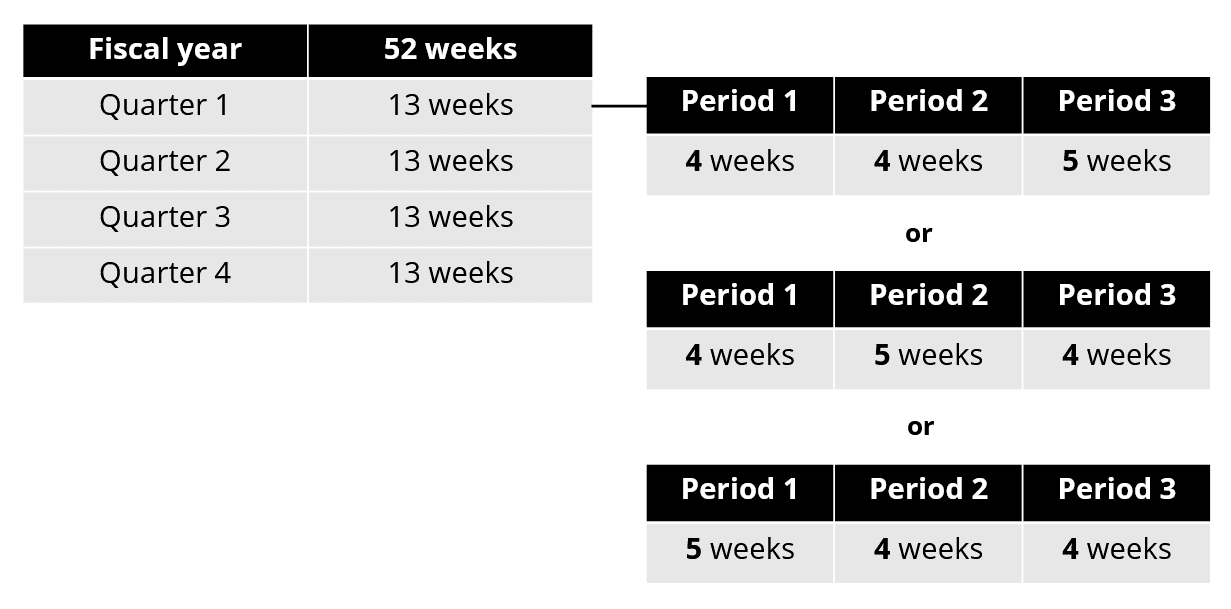
4-4-5, 4-5-4, or 5-4-4: In these quarter-based formats, each quarter has 13 weeks. Within a quarter, these 13 weeks are spread across 3 periods. The number of weeks in these three periods gives the names of these formats: 4-4-5, 4-5-4, and 5-4-4.
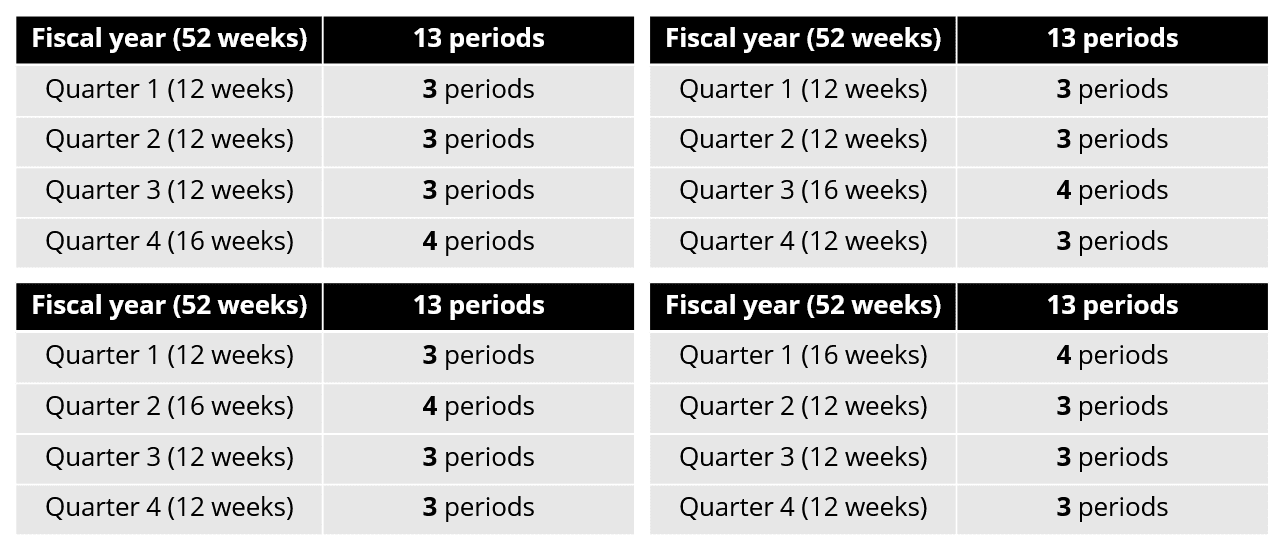
3-3-3-4, 3-3-4-3, 3-4-3-3, or 4-3-3-3: In these year-based formats, each period consists of 4 weeks. A fiscal year consists of 13 such periods. These periods are distributed across 4 quarters in 3-3-3-4, 3-3-4-3, 3-4-3-3, and 4-3-3-3 formats. The names indicate the number of periods in each of those four quarters.
What's changed?
Choose your fiscal year type
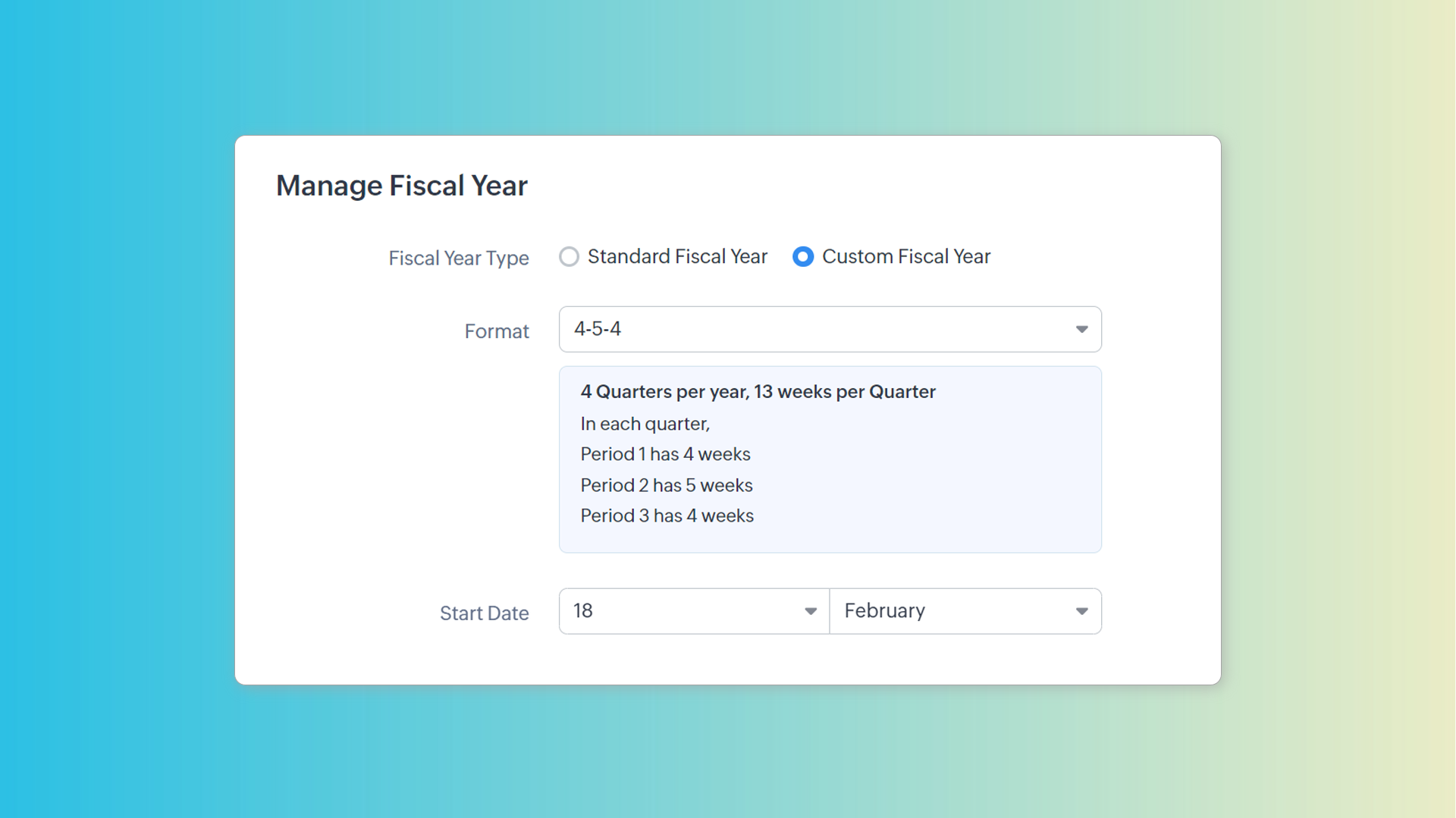
A new option called Custom Fiscal Year will be available on the Fiscal Year tab. The previous option of choosing the starting month and following the Gregorian calendar will be available under the Standard Fiscal Year option.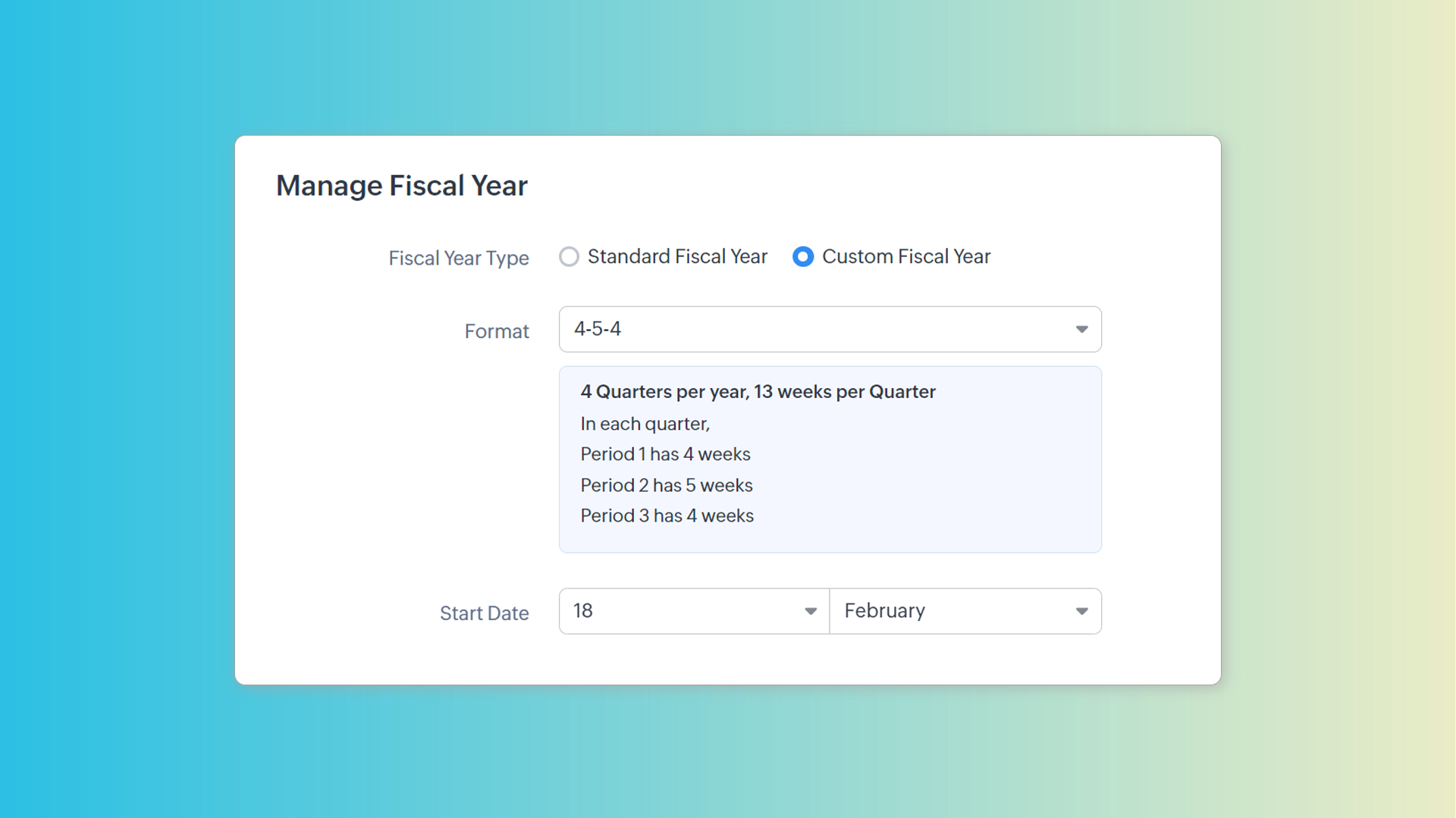
Pick a format and start date that works for you
You can choose one of the seven formats we'd described before. The preview section tells you what each format means in terms of quarters, periods, and weeks.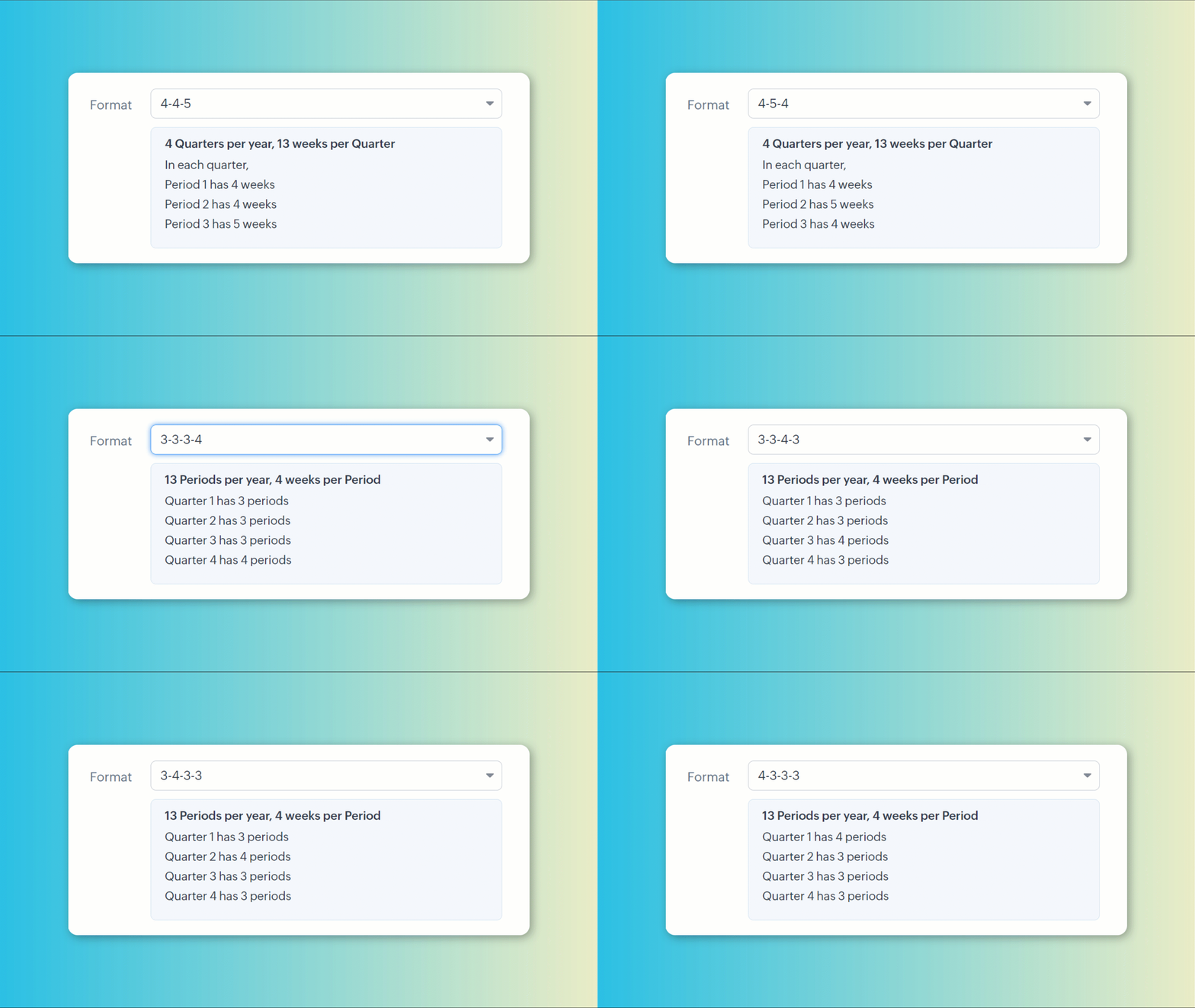
A start date can be set to precisely align your CRM's fiscal year to your organization's calendar.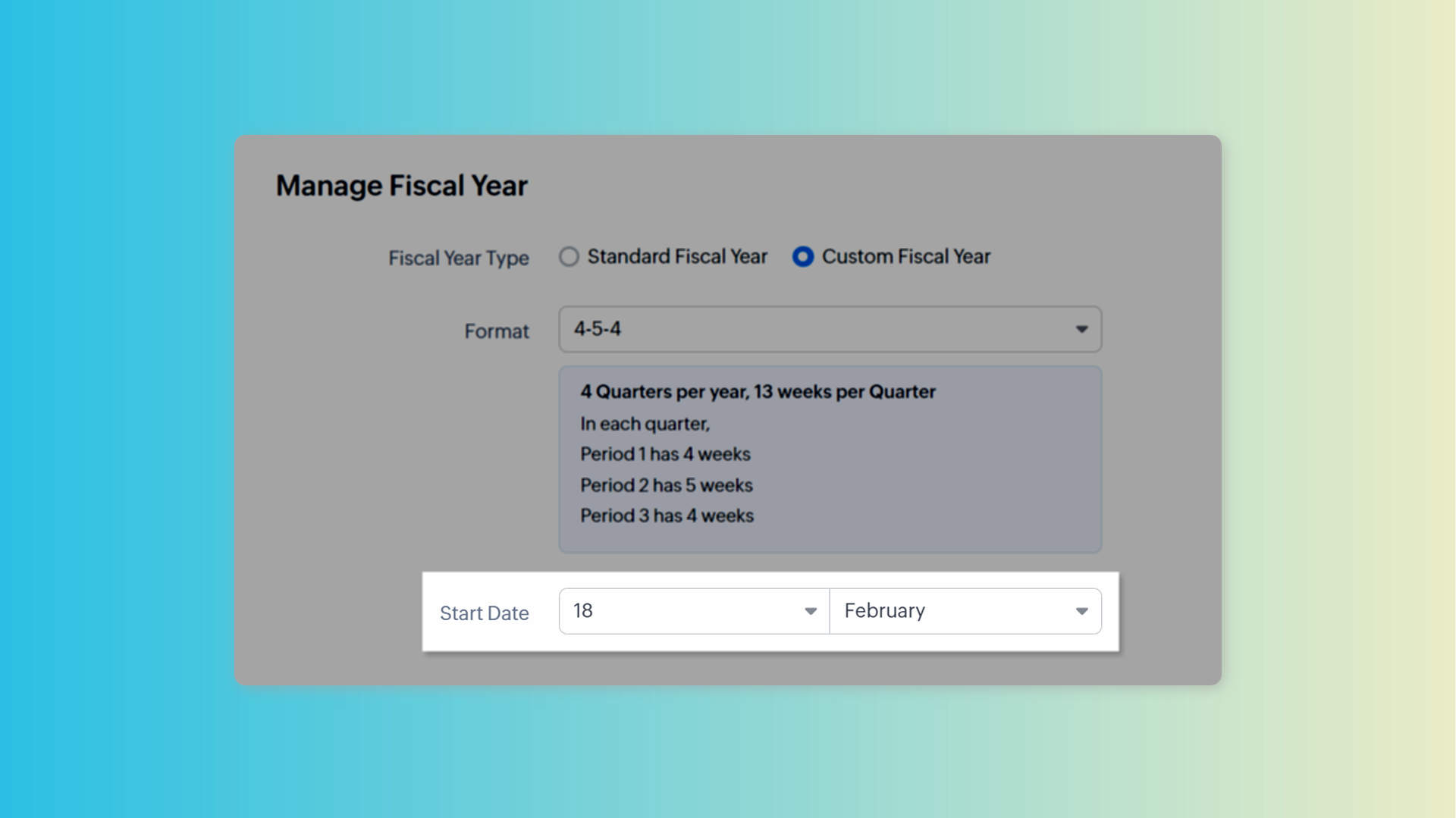
Check your fiscal year visually
You can preview in calendar to know which dates fall in which period and to get a visual representation of your fiscal year. If you're not satisfied, you can change the pattern and check the preview again.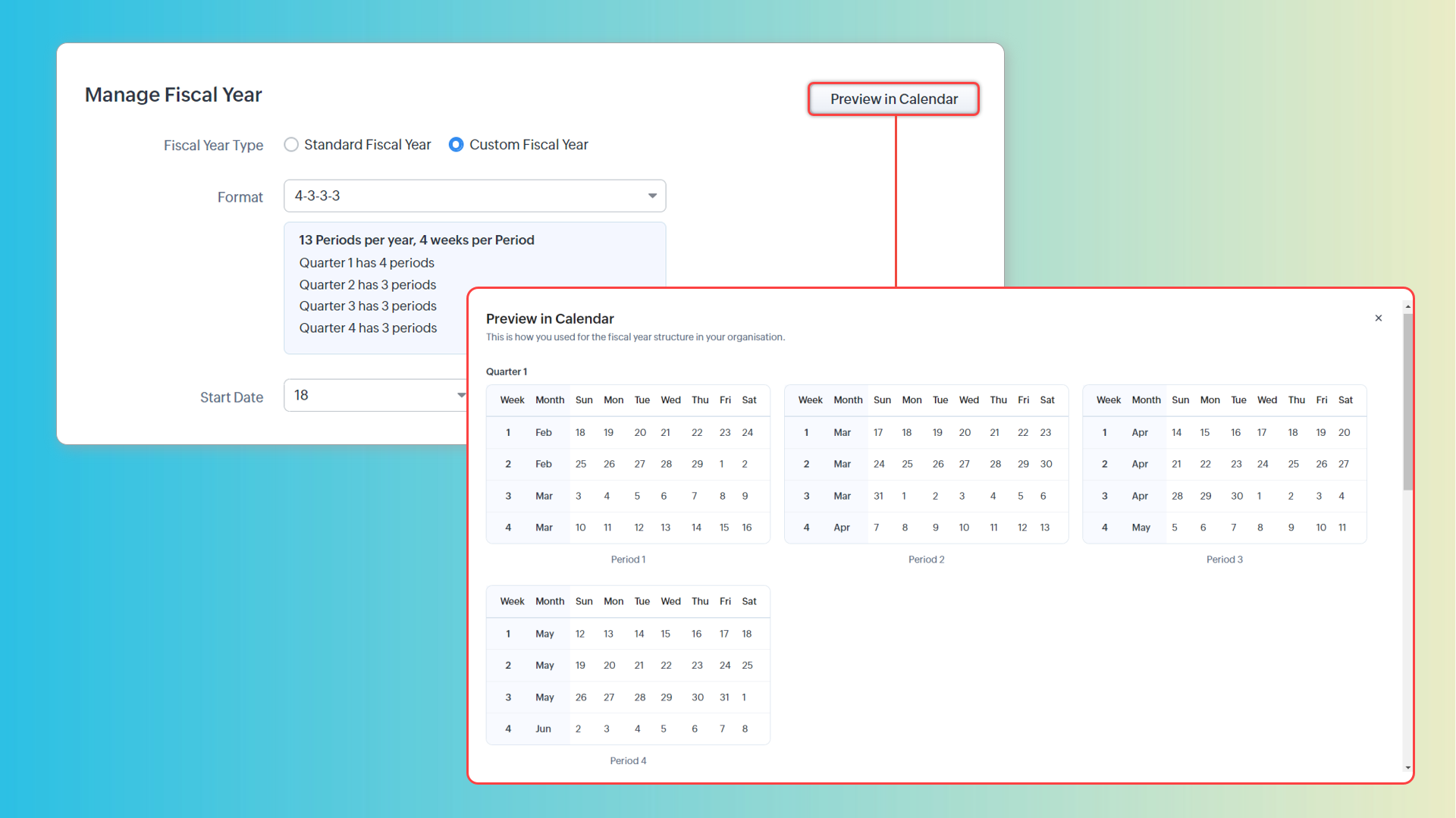
Configure display options
You can also choose how you want the fiscal periods to be displayed in CRM.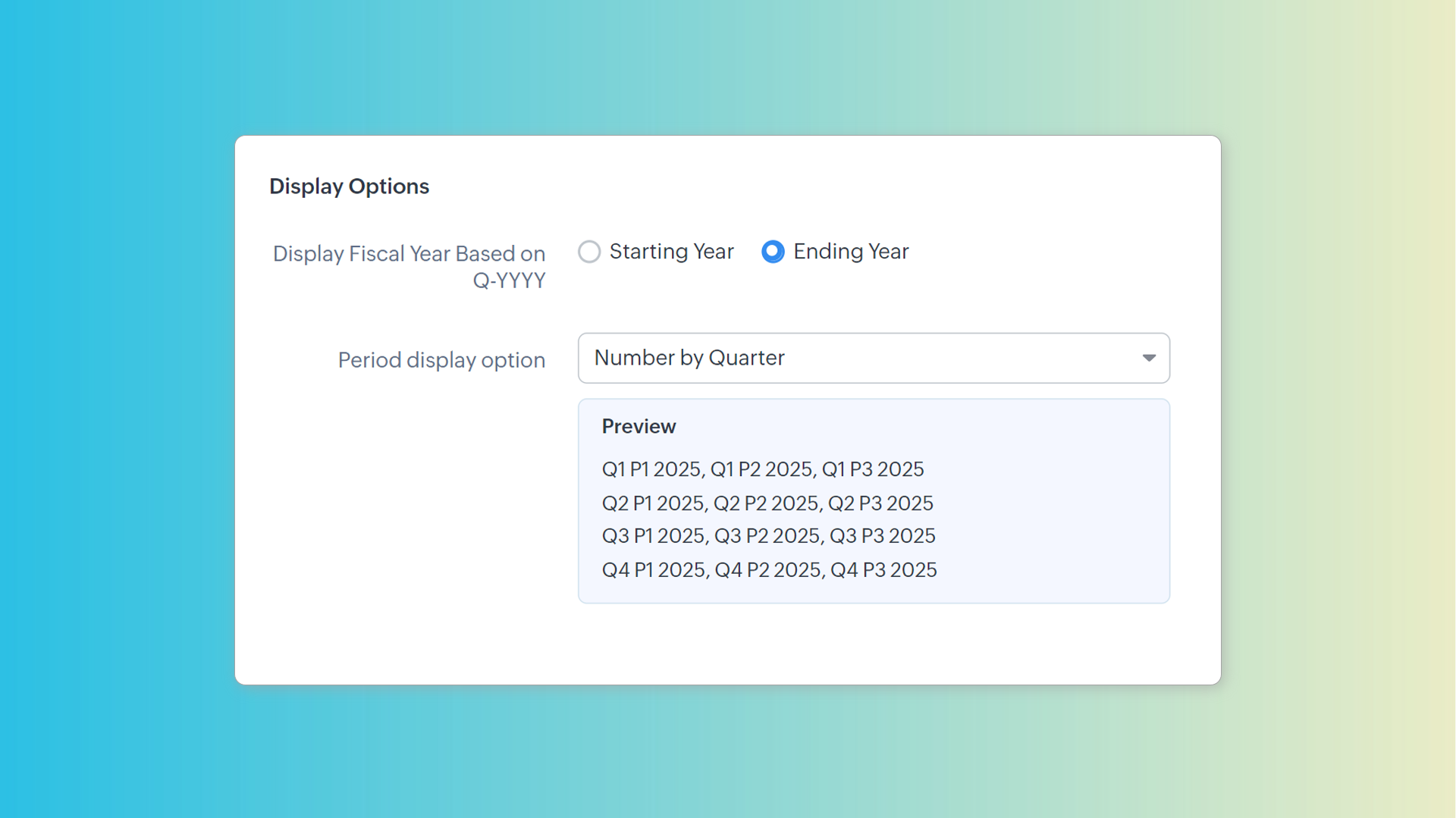
Manage the surplus week
Since these formats split the year into 52 weeks (364 days), there is always a slip of a day each year. Depending on your needs, you may need to add an extra week to a financial period. For example, you may need to do this if you want your fiscal year to begin on the first Monday of April always. You can add an extra week to any of the upcoming fiscal periods to correct for this.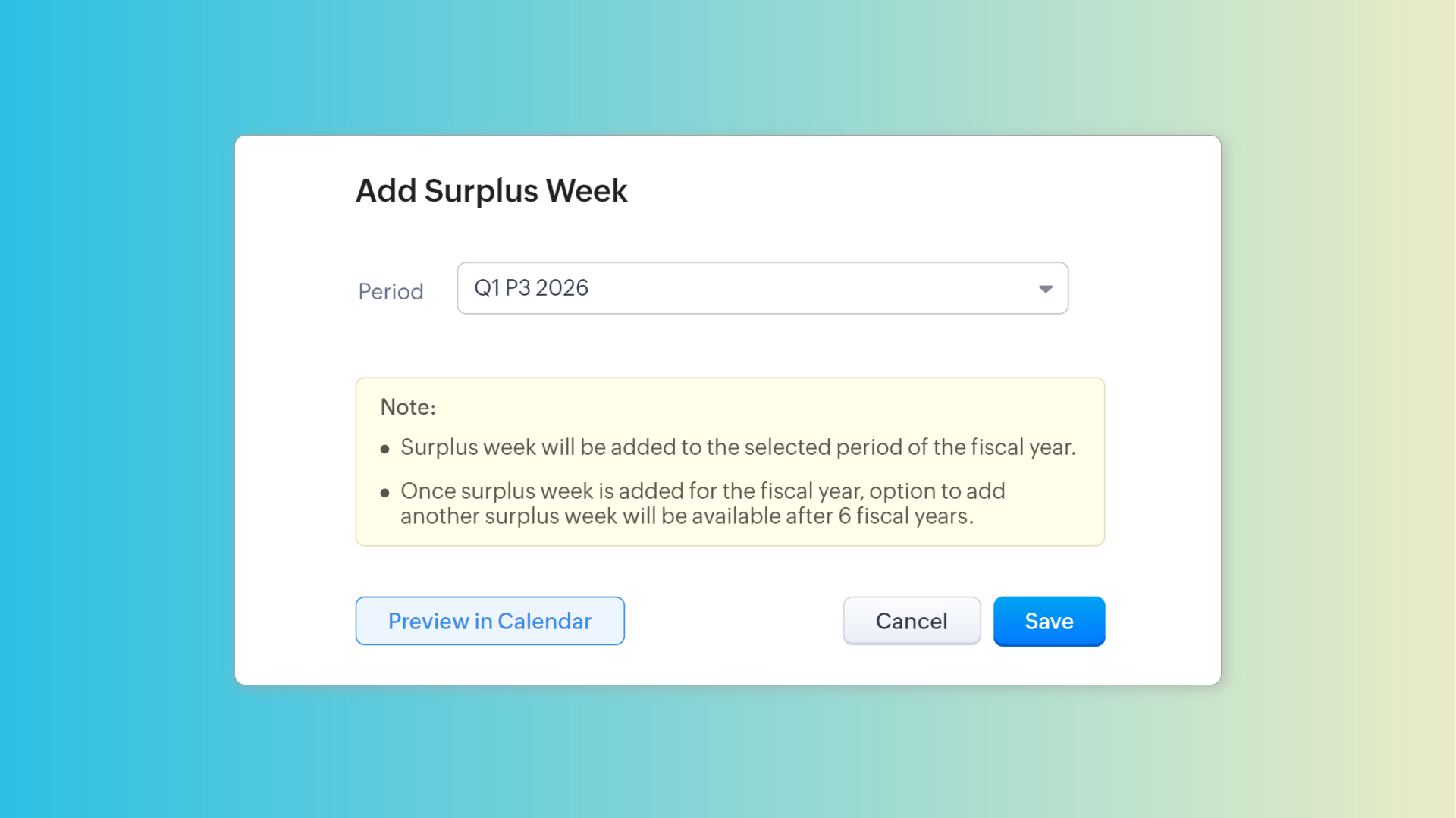
Track fiscal year changes
You can also view the history of fiscal year changes in the Fiscal Year tab. For entries with custom fiscal year formats, you can preview them in calendar.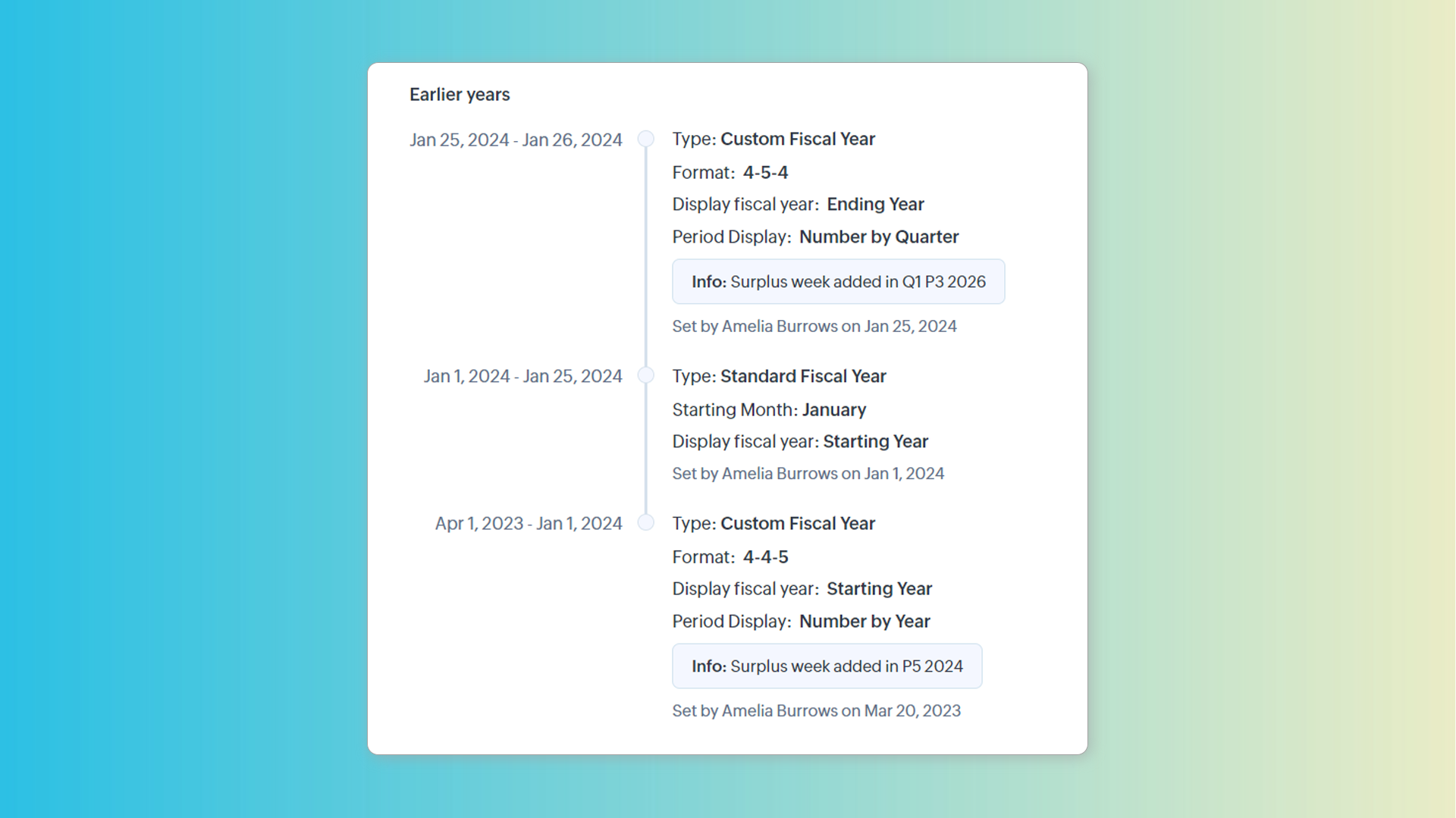
Custom fiscal year and forecasts
Once set, fiscal years can be managed only from the Fiscal Year page. Previously, it was managed in the Forecast Configuration page. Once a custom fiscal year is chosen, we can create forecasts based on quarters or periods. The Monthly option will be replaced by the Periodly option.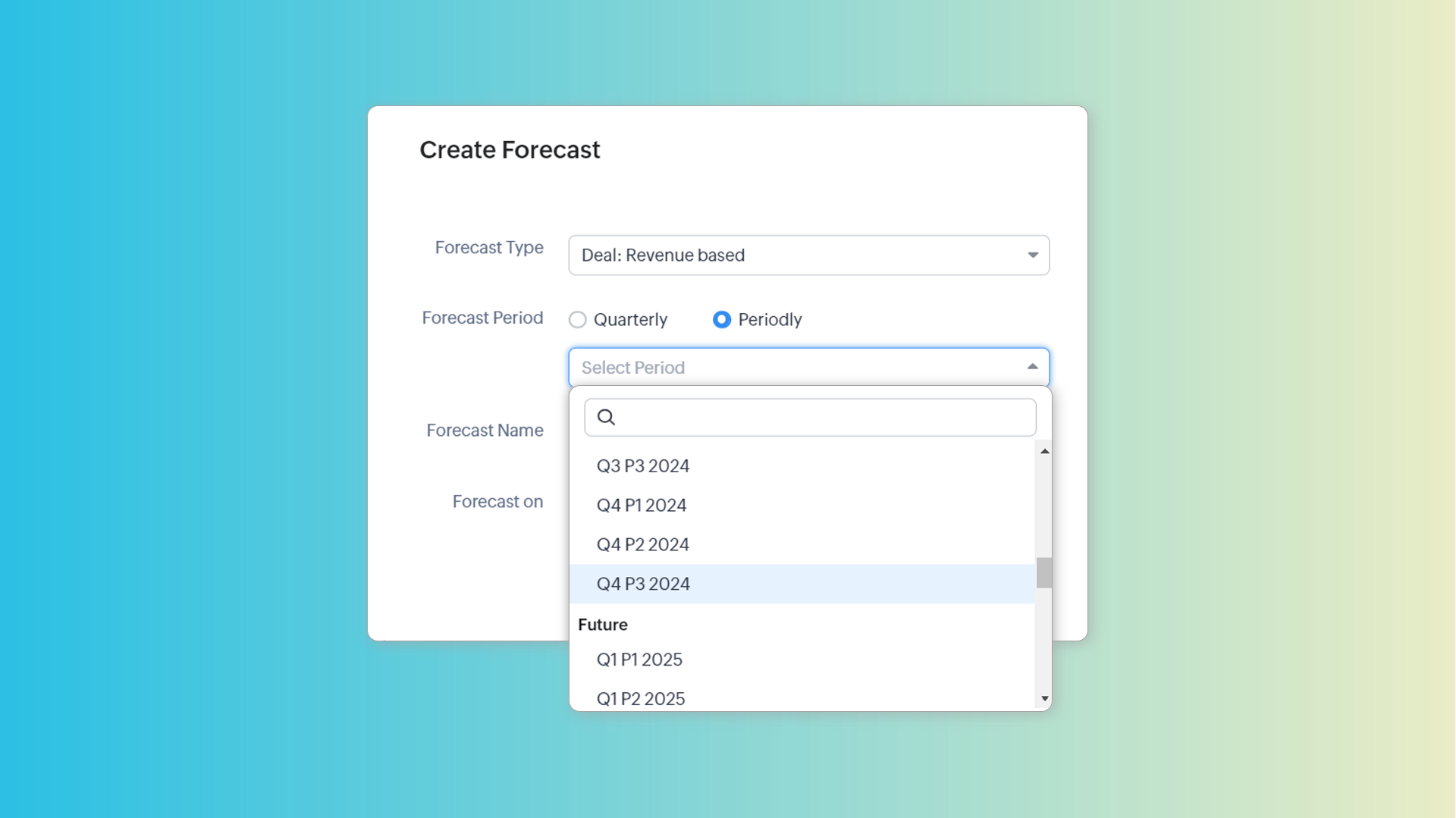
Note: Changing the fiscal year type will delete all existing forecasts.
To learn more about custom fiscal year, see: Set up fiscal year in Zoho CRM.
Zoho Campaigns Resources





Topic Participants
Kiran Karthik P
Donna Waterman
Pheranda Nongpiur
Sticky Posts
Good news! Calendar in Zoho CRM gets a face lift
Dear Customers, We are delighted to unveil the revamped calendar UI in Zoho CRM. With a complete visual overhaul aligned with CRM for Everyone, the calendar now offers a more intuitive and flexible scheduling experience. What’s new? Distinguish activitiesVoC in Zoho CRM is now data savvy: Explore response drilldown, summary components and participation in CRM criteria
VoC has all the goods when it comes to customer intelligence—which is why we're constantly enhancing it. We recently added the following: A customer drilldown component that shows you the list of prospects and customers behind a chart's attribute ExpandedWrapping up 2025 on a high note: CRM Release Highlights of the year
Dear Customers, 2025 was an eventful year for us at Zoho CRM. We’ve had releases of all sizes and impact, and we are excited to look back, break it down, and rediscover them with you! Before we rewind—we’d like to take a minute and sincerely thank youPresenting ABM for Zoho CRM: Expand and retain your customers with precision
Picture this scenario: You're a growing SaaS company ready to launch a powerful business suite, and are looking to gain traction and momentum. But as a business with a tight budget, you know acquiring new customers is slow, expensive, and often deliversCreate and populate a record in an instant: Introducing zero-shot field prompting to Zia's ICR
A couple of months ago, we upgraded our in-house AI image detection and validation tool, Zia Vision, with intelligent character recognition (ICR). By training Zia with sample images, you could create and enrich CRM records with data extracted from standard
Zoho CRM Plus Resources
Zoho Books Resources
Zoho Subscriptions Resources
Zoho Projects Resources
Zoho Sprints Resources
Zoho Orchestly Resources
Zoho Creator Resources
Zoho WorkDrive Resources


Zoho CRM Resources
Get Started. Write Away!
Writer is a powerful online word processor, designed for collaborative work.
-
オンラインヘルプ
-
Webセミナー
-
機能活用動画
-
よくある質問
-
Ebook
-
-
Zoho Campaigns
- Zoho サービスのWebセミナー
その他のサービス コンテンツ
ご検討中の方
Recent Topics
What they mean with "Portal"?
I just downloaded this app to take my personal notes on digital art studio because it seemed to me the most comfortable app to do it, I use it very often, what do they mean by “no activity on your portal”? I have about 1 year of work here and I don'tfavorites no longer listed
Hello, I can no longer navigate to my Favorites from the pulldown at the top of my grid view (see attached screenshot). I wasn't able to find it anywhere! Please help me display my Favorites. Thank you!Notecards Disappeared
Got a new phone. Downloaded and signed in Zoho Notebook. Not finding the Note cards. Just Empty Note books. Frustrating.Table Errors
Hello, I'm new to Zoho Notebook and using it on several Mac/Apple devices. My question is regarding tables: Why do they become broken, and how to fix the error without retyping all my data? (Please see the screenshot attached.)Online Calculator with Zoho Forms?
I'd like to build a custom calculator on my website. Zoho Forms seems to offer all the fields for basic calculations performed live without pressing any "Calculate" buttons. Unfortunately, there is still that "Submit" button at the bottom. There is nothingZoho Tables instead of Zoho Creator Spreadsheet reports <3
That would make my day for sure. Zoho Creator is create, but miss data entering as AirTable/Spreadsheet can. Seeing Zoho putting effort in this makes me think maybe one day we could see a similar interface for Zoho Creator spreadsheet reports. B.Notebook Stack
Hi Everyone I Hope you´re fine, I´m sorry if this idea was posted before (I made a search but I haven´t find anything related). So, Having the possibility of stacking notebooks would be an interesting way to order notebooks that correspond to the sameWriting on sketch cards is bugged when zoomed in
When zoomed in, it writes a noticeable distance above or to the side of where you're actually trying to write. The further you're zoomed in, the more noticeable it is. Zooming is also entirely absent on the desktop version.Swipe between notes on iPhone
It'd be convenient if I could move from one note to the next in a notebook simply by swiping left to right.Sales IQ chat is not working in signed android apk
I have integrated ZOHO sales IQ support chat and i have followed each step and its working fine in my development build but when i create signed APK for it. Chat does not work in it and showing awaiting for detail. I previously asked the same query butCOQL order by COUNT not working
Dear community, I am trying to get a list of deal amounts per planner working on it and sorted to get see who has the least amount of deals. For some reason, I am unable to use sort by in combination with a COUNT. My original code was: query = "selectI want to duplicate a report and name it something else
Hi, I have created a report, and now want to reproduce it and call it something else. so that I will end up with TWO separate reports with different titles. Please tell me how do I copy / reproduce a report pleaseZoho CRM: Sales Rep Professional Certification Program on Coursera
We are happy to share that we have published the Zoho Sales Representative Professional Certificate in partnership with Coursera, a leading platform for online learning and career development that offers access to courses and degrees from leading universitiesOS X Notebook quits immediately upon launch
NoteBook for OS X (Sequoia, but also under Sonoma) always quits immediately upon launch (so I cannot use the "Attach user log" option). I've restarted my MacBook but the problem persists. If it helps, attached is a diagnostic report from Library>LogCan External users upload files or images to WorkDrive?
I want to know if it is possible for someone externally through a link and PW be able to upload files and images onto WorkDrive?Multi-line fields character limits
Is there a way to set the character limit higher on multi-line fields so that we are not losing information pasted into the field? When the text is entered or pasted, there is no error to say that the text is too large. After saving and going back to view most of the text is gone. Also, when viewing the resume, the text is not wrapped in the multi line fields and can t be read without scrolling across the page.Taz bot not working — What should I do to resolve this issue?
I am experiencing issues with the Taz bot in Zoho Cliq—not receiving responses or it does not seem to work as expected. Could you please explain why the Taz bot might not be functioning and what steps I should take to resolve this issue? Thank you!OneNote Migration
I am trying to migrate two notebooks from OneNote. For five days now I have had no notification that migration has completed and the migration page show 50% complete - one notebook completed one not finished. It just stays like this. I am unable to cancelSet various time slot reminders for task and event
Hi I would like known if there is possibility to set various time reminders for a task or event like we have the possibility to do in google calendar or google task. For example I'am creating an event or task and I want to be alerted before 30min andZoho Calendar not functioning---cannot edit, add attendees, etc.
Hello, My calendar is acting strange. I'm using Chrome as my browser and pop ups are not blocked (the calendar worked fine yesterday). When creating an event, I'm not able to "edit" the event and add attendees, etc. The link is non-responsive. I cannotSpilt Axis for stacked column and line graph
Each month around this time I prepare a business review deck. One of the biggest annoyances I have with Zoho, also happens to be something that most other platforms have provided for a long time now, and that is being able to create a chart with stackedPin a note on top
Dear Zoho Notebook Team, Please highly consider adding ability to pin a note on top and arrange pinned notes. I have a lot of notes that I want to pin important ones on top and this feature is missing badly. Thank you.Windows 11 app ver 2.2.8
I have been trialing Zoho Notes syncing between my PC and iphone. No problems with iphone but the Windows 64 bit app ver 2.2.8 was very buggy and would lock up completely, needing a Control Alt Delete etc to close it down. It seemed to be connected toDeluge Script: Onboarding → Access Form
Hello everyone, Edit: Sorry, I think I put this topic in the wrong section. I’ve recently run into an issue that’s been giving me a bit of a headache for the past few weeks. Context: This is my first time using Deluge to create a script, but it’s notWindows Device Authentication
We have recently started using ManageEngine, and my boss saw a device management feature in the Zoho One directory. We thought it would either help give us more intergration into Zoho one through bringing ManageEngine services through Zoho one. Or, itHow can I change spell check language?
I cannot find the way to change spell check language. My "display language" is English, and I want to have the same one for Spell Check, but it is Russian!!! How can I change it? In one of your explanations you mentioned that I have to choose it fromMail is so slow - doesn't even work!
Mail has been getting slower and slower - and today it's not even pulling up emails in either Inbox or Unread. This is beyond frustrating since email is a big part of business. Sent a request through the useless help portal - no response. Called the uselessUser marked as SPAMMER. Mail Fetch has also been disabled for any active POP accounts.
I am the administrator for joelles.com One of our accounts has been blocked saying this: User marked as SPAMMER. Mail Fetch has also been disabled for any active POP accounts. I cannot change the disabled account in the control panel as it says that itIs there a way to sync Tags between CRM and Campaigns/Marketing Hub?
I wonder if there is a way to synch the tags between CRM and Marketing-Hub / Campaigns?how to see if a specific contact opened an email in zoho campaign?
how to see if a specific contact opened an email in zoho campaign?Revenue Management: #8 Revenue Recognition in Educational & Training Institutions
Educational Institutions and training centres typically collect course fees at the time of enrolment, sometimes for a one-day workshop and sometimes for a year-long certification course. You might also charge separately for course materials or evaluation.Maximum file limit in zoho people LMS
Dear Team, I am having approximately 4.9 GB of material, including PPTs and videos for uploading in zoho people LMS course. May I know what is the maximum limit limit for the course files Thanking you, With regards, Logeswar V Executive _ OperationsDynamically prefill ticket fields
Hello, I am using Zoho Desk to collect tickets of our clients about orders they placed on our website. I would like to be able to prefill two tickets fields dynamically, in this case a readonly field for the order id, and a hidden field for the sellerOptimize your Knowledge Base for better visibility by allowing search engine crawling and indexing
All you need to know about no-follow and no-index in KB. What are article crawlability and indexability? Crawlability and indexability are vital for making an article visible and accessible to search engines. When a search engine crawls an article, itHas anyone created a public ASAP Guide that I can check out?
I am thinking of adding an ASAP guide to my web application, but I have noticed that the ASAP widget itself can be really slow to load sometimes. Has anyone created a public ASAP Guide that I can check to see how performant it is? I don't want to spendWhat’s New in Zoho Analytics – September 2025
Hello Users!! In this month’s update, we’re raising the bar across multiple touchpoints, from how you bring in data, plan and track projects to how you design and brand your dashboards. We’ve added the all-new Gantt chart for project visualization, expandedZoho MCP has no tools for Creator or 3rd Party Apps?
I don't see a Zoho MCP community forum so putting this here. Two big problems I see: 1) Although Zoho advertises "over 950 3rd party apps" as available through their MCP, when I go to "Add Tools" there are ZERO 3rd party apps available to choose from.Zoho Forms - Zoho Drive connection - Shared Drives not supported
Hello i am stuck with Google Drive Connection There is no supported shared drives Connection is not support shared drives boolean Query Parameters - supportsAllDrives=true&supportsTeamDrives=true to activate fetch files from the shared drives. Ahat needCan't create package until Bill created?
I can't understand why we cannot create a package until a Bill is created? We are having to created draft Bills to create a package when the item is received, but we may not have received a Bill from the supplier. Also, Bill # is required, but we normallyWhats the Time out Limit for API Calls from Deluge?
Hi Creator Devs, We are making API calls to third party server via Deluge. Getting this error message: Error at line : 24, The task has been terminated since the API call is taking too long to respond. Please try again after sometime. Whats the defaultNext Page