Bidirectional sync between Zoho Bookings and Zoho CRM - Part 2
Hey community members,
Welcome again!
This post continues our discussion of the bidirectional sync between Zoho Bookings and Zoho CRM, focusing on how to reschedule appointments in Zoho Bookings from Zoho CRM. If you've arrived at this community post directly, we recommend checking out Part 1 of this topic for a better understanding. You can access Part 1 through the following link: Bidirectional sync between Zoho Bookings and Zoho CRM - Part 1
How we're approaching this reschedule action:
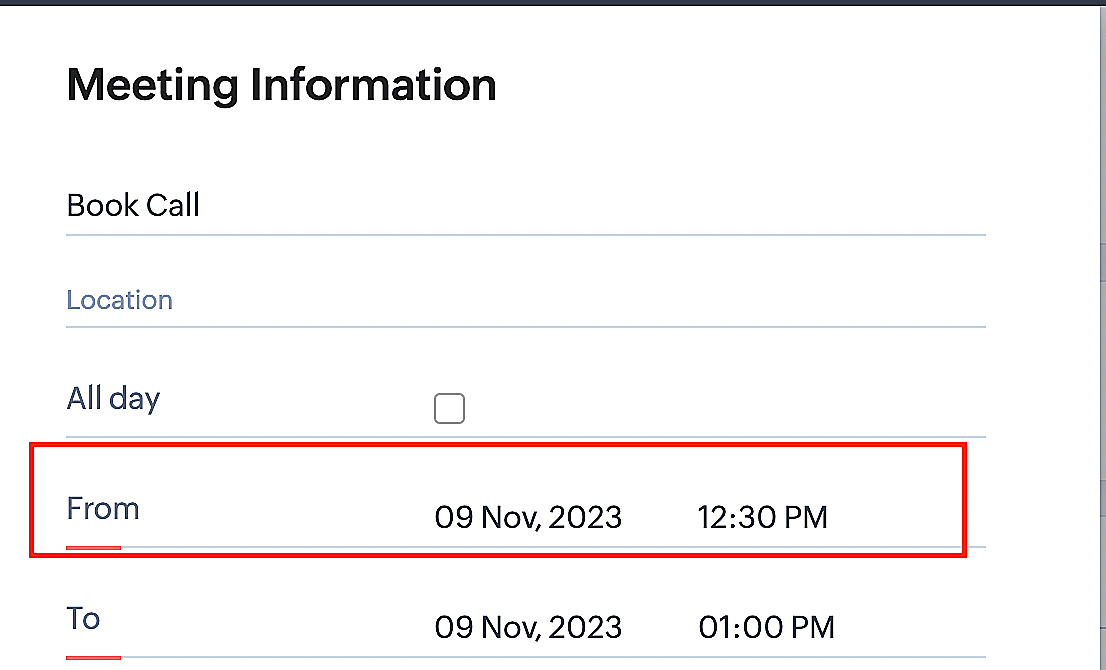
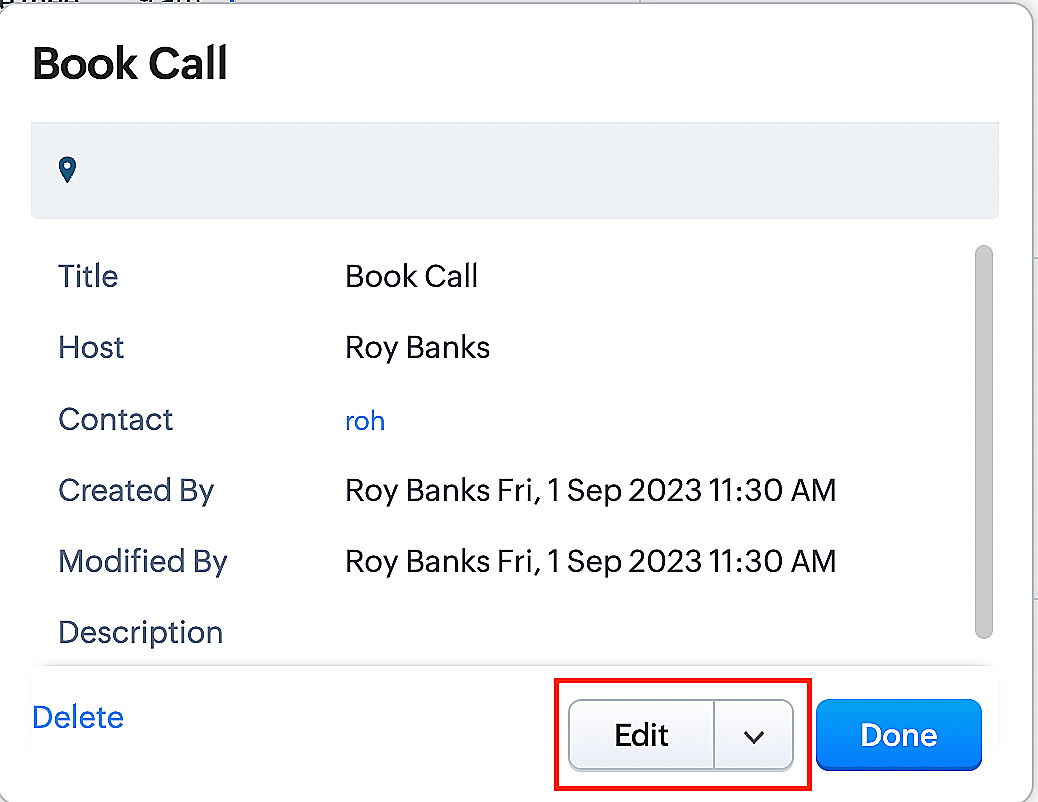
Whenever a meeting initially scheduled through the Zoho Bookings application is rescheduled either within the Meetings module or through the CRM calendar, the changes are recorded and the corresponding appointment within Zoho Bookings is also rescheduled.
Create a function for rescheduling appointments
Complete these steps in Zoho CRM.
Step 1: Creating connections
You don't need to create a separate connection for the reschedule action. You can utilize the same connection name that we established in Part 1 of the Zoho Bookings - Zoho CRM bidirectional sync.
Step 2: Creating functions
Configuring a function that reschedules appointments differs slightly from the functions we discussed in Part 1 of the Zoho Bookings - Zoho CRM bidirectional sync.
Note: Here, we'll fetch the time zone in which the customer scheduled the appointment so that when we reschedule the booking, it will be rescheduled within the same time zone the customer initially chose.
Here are the steps:
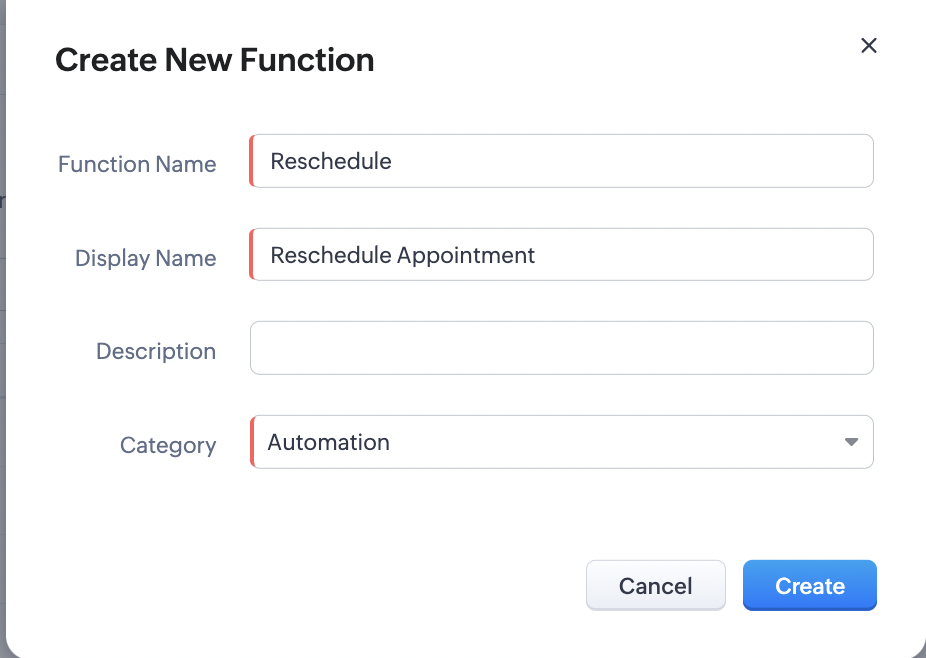
1. Go to Setup > Developer Space > Functions.
2. In the Functions page, click + Create New Function.

3. Configure the function name, display name, and description.
4. Set the category as automation.
Reference
Reference
5. Next, configure the function's arguments. For the reschedule function, we'll have to pass two arguments: bookingID
as a string, and from as a date.
a. Click on Edit Arguments on the Deluge script page.

b. Set the Parameter Name as bookingID. (Please note that the "bookingID" value is case sensitive and must match
the term used in the code).
c. Set the type as string.
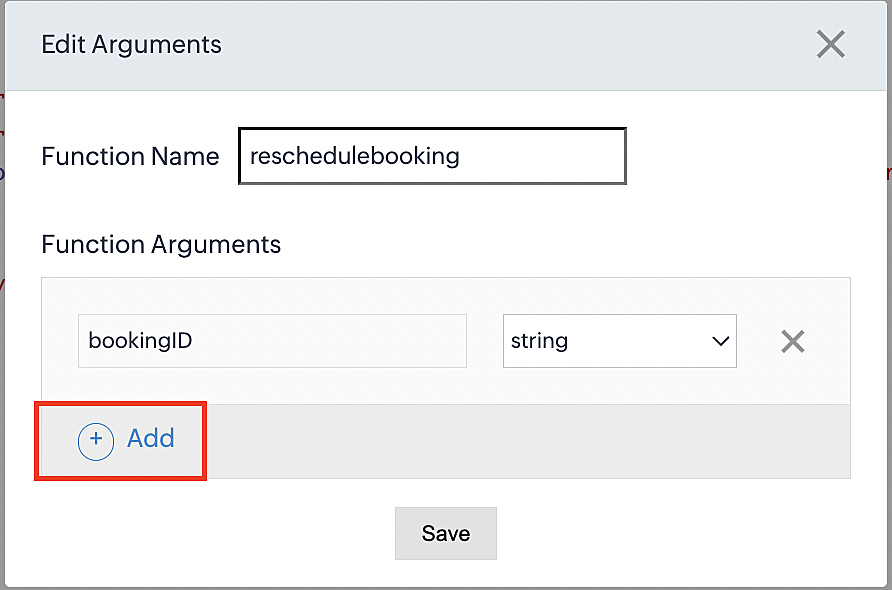
d. Click the +Add button to add a second argument.
e. Set the Parameter Name as from and its type as date.
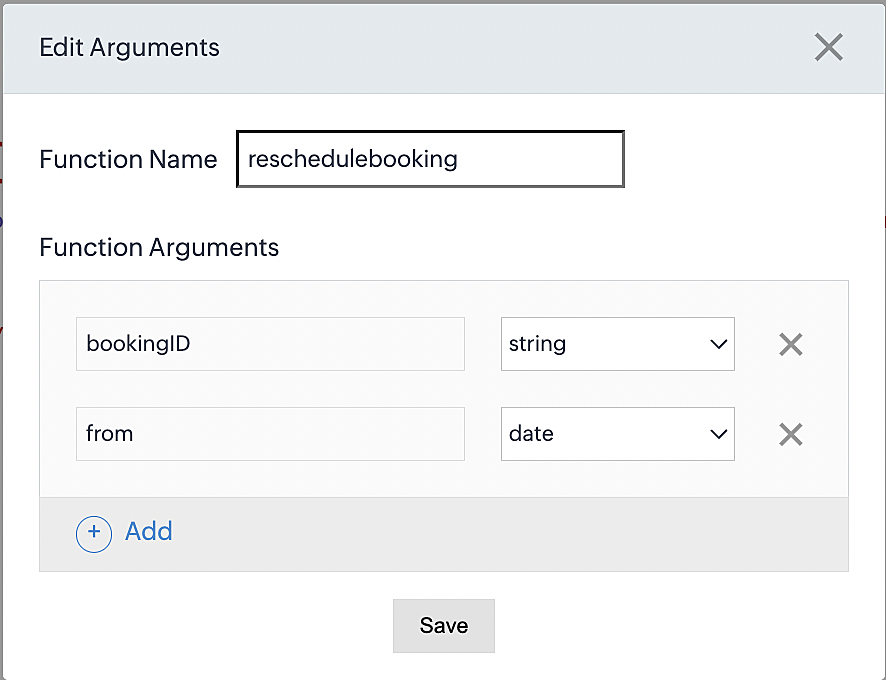
Here, we're using the reschedule appointment API. The term "from" specifically denotes the appointment's start time. In the reschedule API, the booking ID is a required parameter, and we must provide either the staff ID or the start time. Given that we're rescheduling based on the start time, we'll pass the start time as an argument and use "from" as the reference point.
More details: Reschedule Appointment API
Please configure the following code on the Deluge script page.
Code link: Rescheduling an appointment
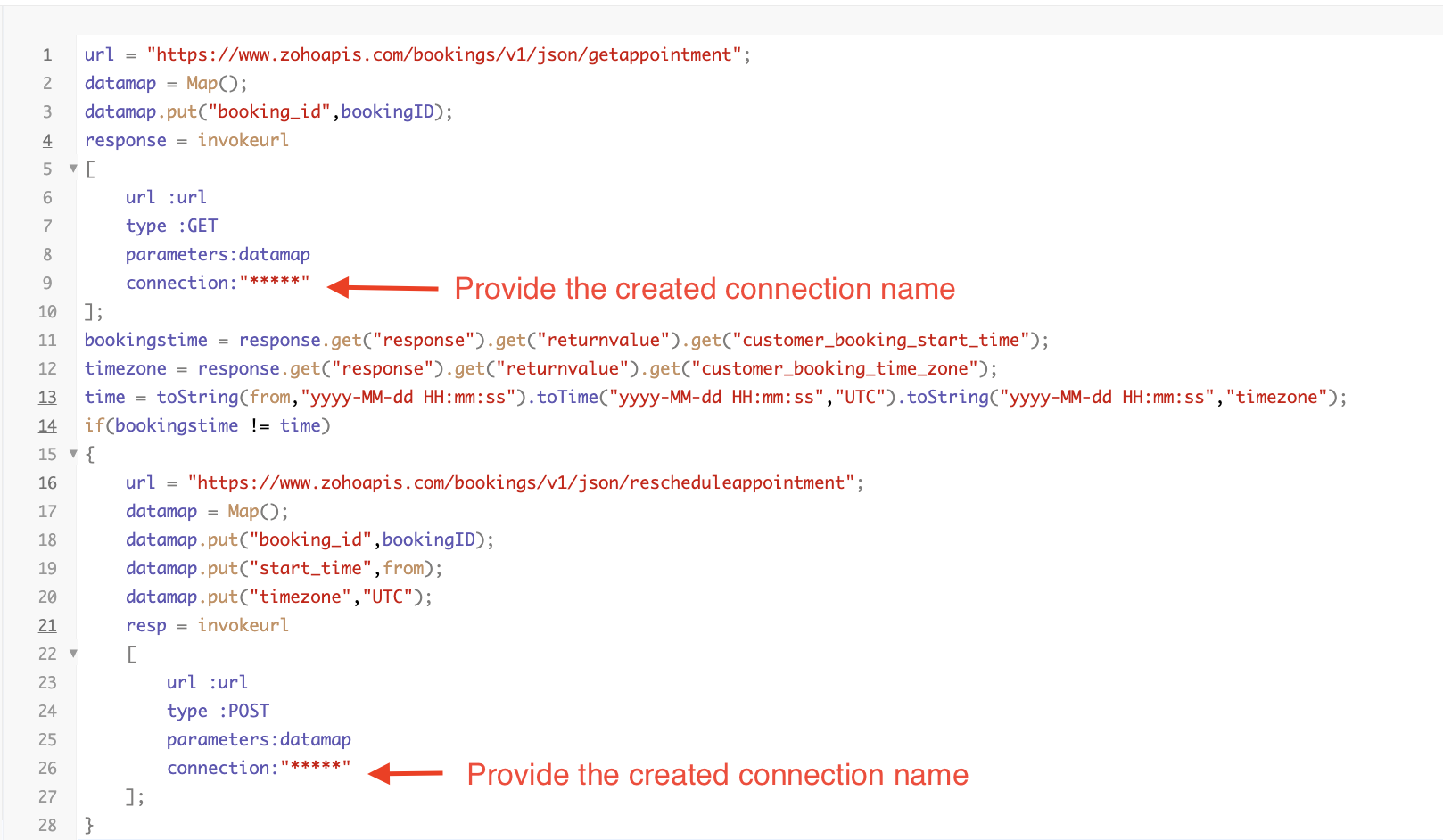
Here's an explanation of the code used for the reschedule function, split into three parts for purposes of clarity:
Lines 1-10 serve to invoke the "get appointment" API to retrieve the relevant booking ID and obtain the associated details. The purpose behind fetching this booking data is to access the actual booking start time and the time zone in which the customer initially scheduled the appointment using the Zoho Bookings application. This information is essential for comparing it with the rescheduled date and time.
- Line 1: Based on the Zoho Bookings account's data center, we'll set up the API endpoint URL configuration. More
details: Domain-specific API URLs
- Line 3: To obtain appointment details, we utilize the GET Appointment API. In this API, the booking ID is a mandatory
field, so we retrieve the booking ID from the Meetings module and subsequently pass it into the code to
retrieve the corresponding booking details.
- Lines 4-10: We use the invokeURL task for API calls. To learn more about the invokeURL task, please refer to the
following document: InvokeURL task for API calls
In lines 11-13, we execute booking data retrieval and date-time format conversion operations.
- Line 11: Here, we're fetching the booking's exact start time as scheduled by the customer.
- Line 12: Here, we're fetching the time zone in which the customer scheduled the appointment.
- Line 13: We perform the date-time format conversion to ensure compatibility with the reschedule appointment API. This API requires the appointment's start time to be in the format dd-MMM-yyyy HH:mm:ss. We retrieve the start time from the Zoho CRM Meetings module, match it to your CRM application's date and time format, and convert it to the format Zoho Bookings' reschedule appointment API supports.
Lines 14-27 serve to perform comparison and rescheduling operations.
- Line 14: Here, we're implementing an "if" condition to compare the actual booking start time (bookingstime) and the rescheduled time (time). We do this in order to execute the reschedule API function only if there is any change in the appointment's start date and time. If we don't implement the "if" condition to compare both inputs, the reschedule API function would enter a loop, continuously executing and potentially exceeding the API count limit.
- Lines 15-27: We use the reschedule appointment API, which requires the booking ID as a mandatory parameter, along with either the staff ID or start time. In this case, as we're rescheduling appointments based on the start time, we provide both the booking ID and the start time. The reschedule appointment API functions similarly to the APIs we've previously discussed, such as the cancel, mark as completed, and no-show APIs.
By reaching the end of these final steps, we've successfully created a function that executes rescheduling actions.
Now, let's proceed with creating a workflow and linking the reschedule function to it. This enables us to automate the syncing of appointment rescheduling actions from Zoho CRM to Zoho Bookings.
Creating a workflow
Create a workflow that handles appointment rescheduling in Zoho Bookings whenever a corresponding meeting is rescheduled within the Zoho CRM application
Part 1: Creating the rule
1. Go to Setup > Automation > Workflow Rules.
2. In the Workflow Rules page, click Create Rule.

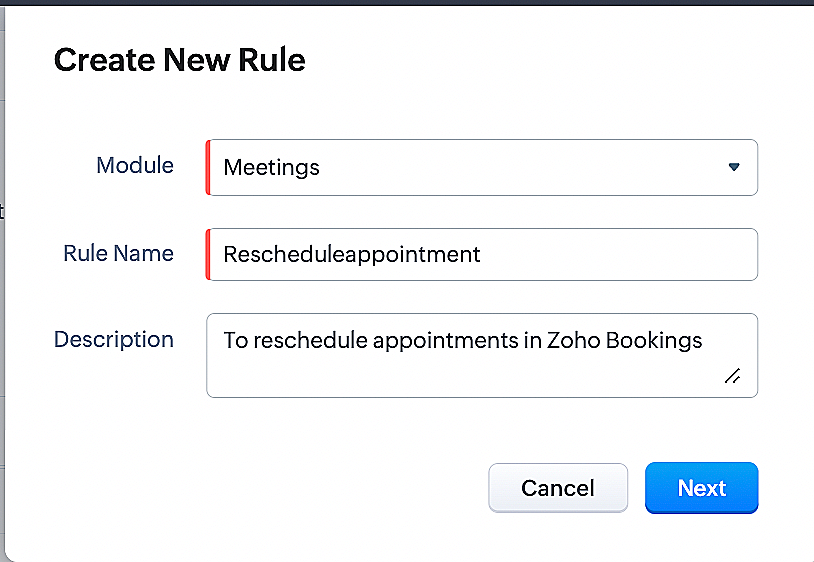
3. Select Meetings under Module and configure the rule name and description as required.
Reference:
Part 2: Specifying the rule trigger
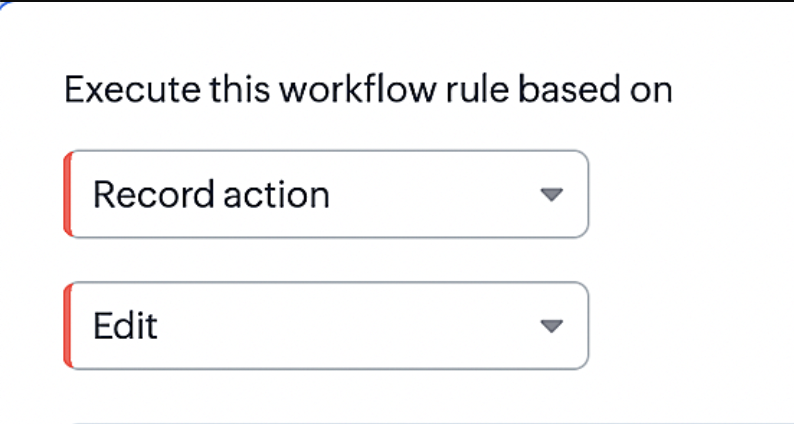
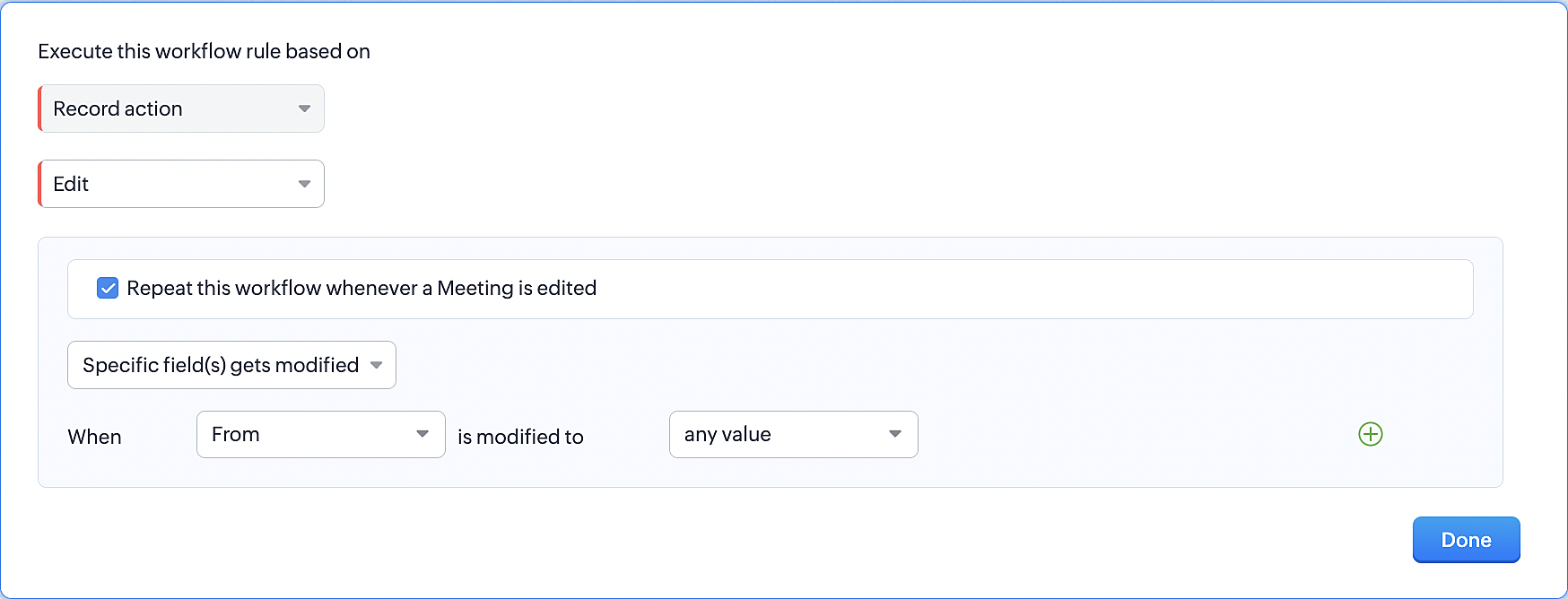
1. Record Action > Edit.
2. Enable the Specific field(s) gets modified setting and configure it per the screenshot below.
This serves to ensure that the workflow is executed only when the "From" field of the meeting is edited.
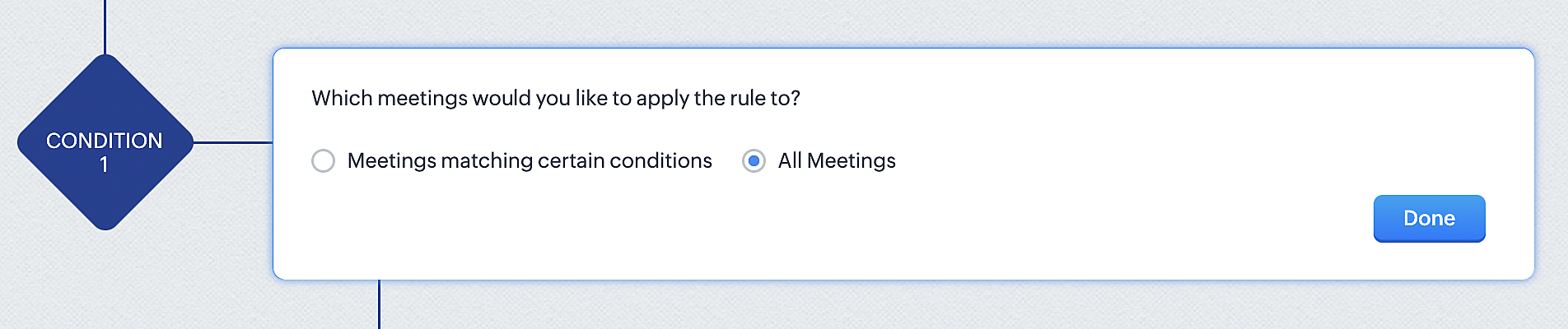
3. Configure condition > All Meetings.
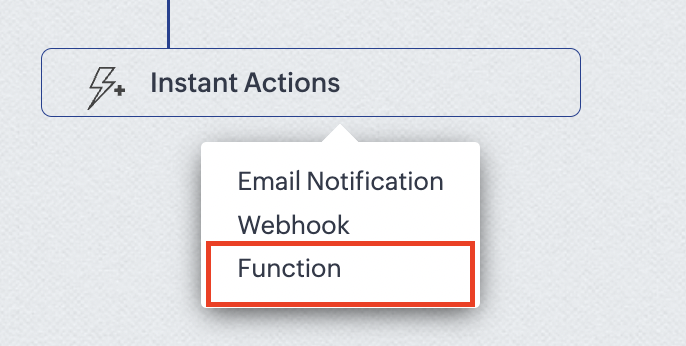
4.Instant Actions > Function.
5. Click the New Function button.

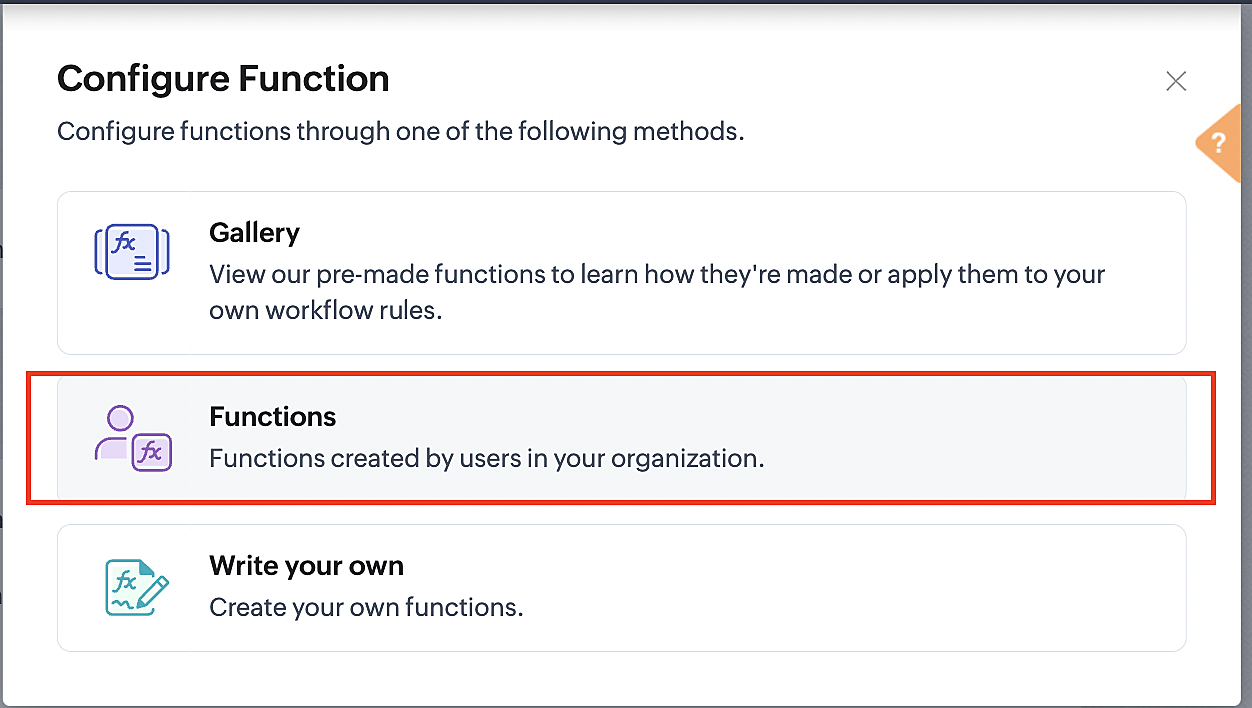
6. In the Configure custom function page, select the "reschedule" function you created from among the functions users in your organization have created.
More details: Specify rule triggers
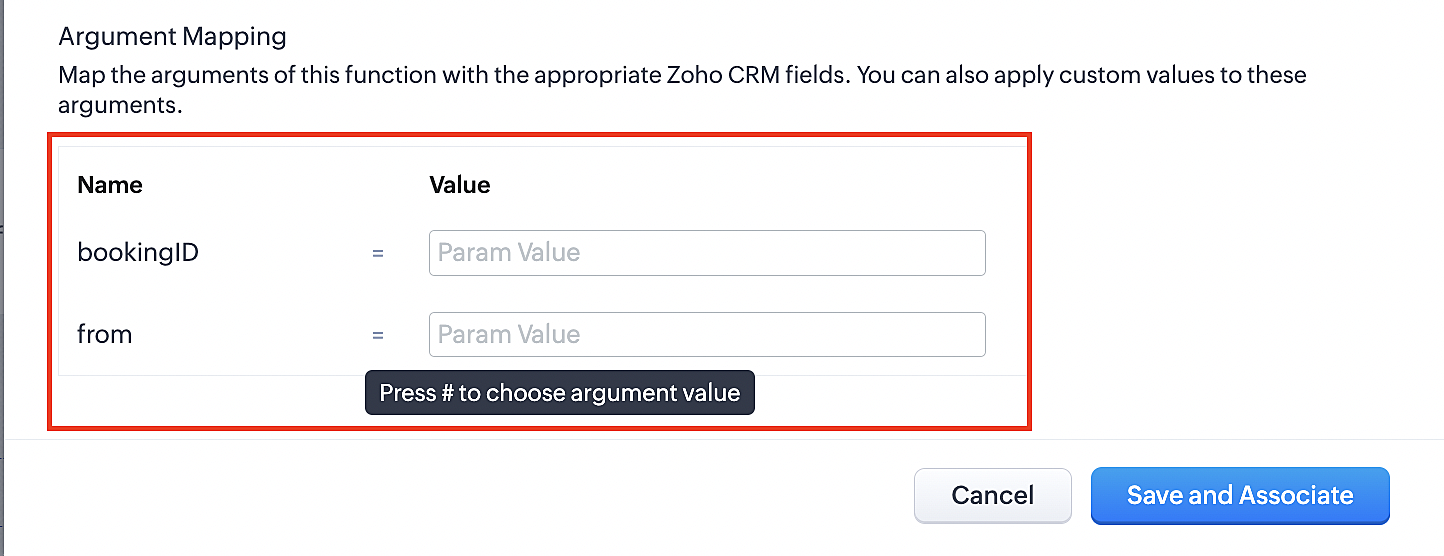
Part 3: Argument mapping
1. Press # to choose an argument value.
2. Select Meetings under Module and configure the field as "BookingId".
3. Select Meetings under Module and configure the field as "From".
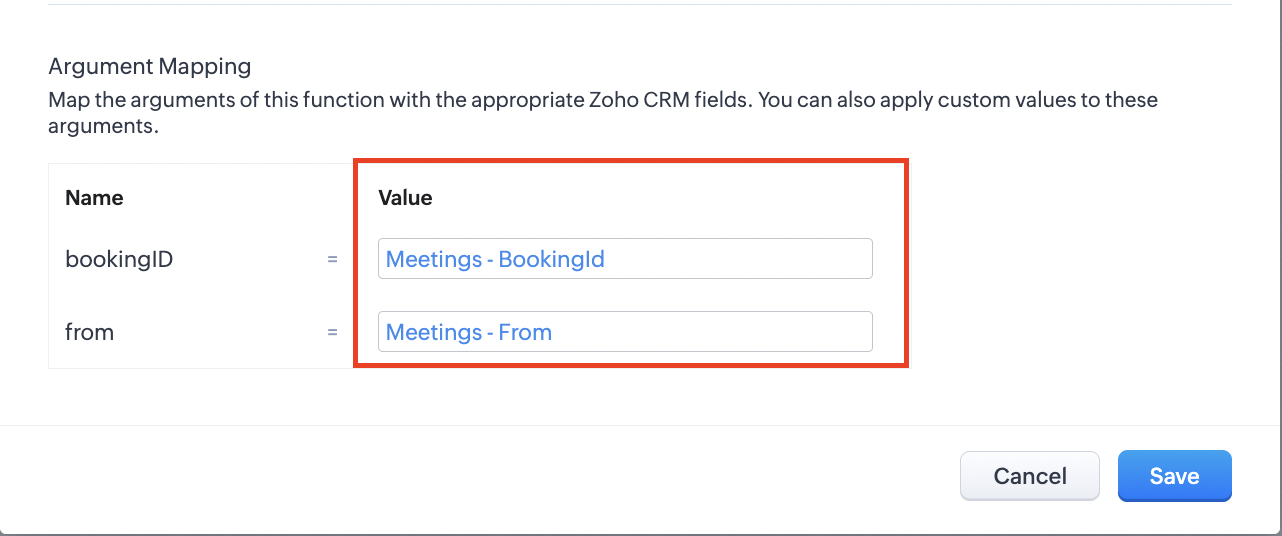
4. Click the Save and Associate button.
Reference:
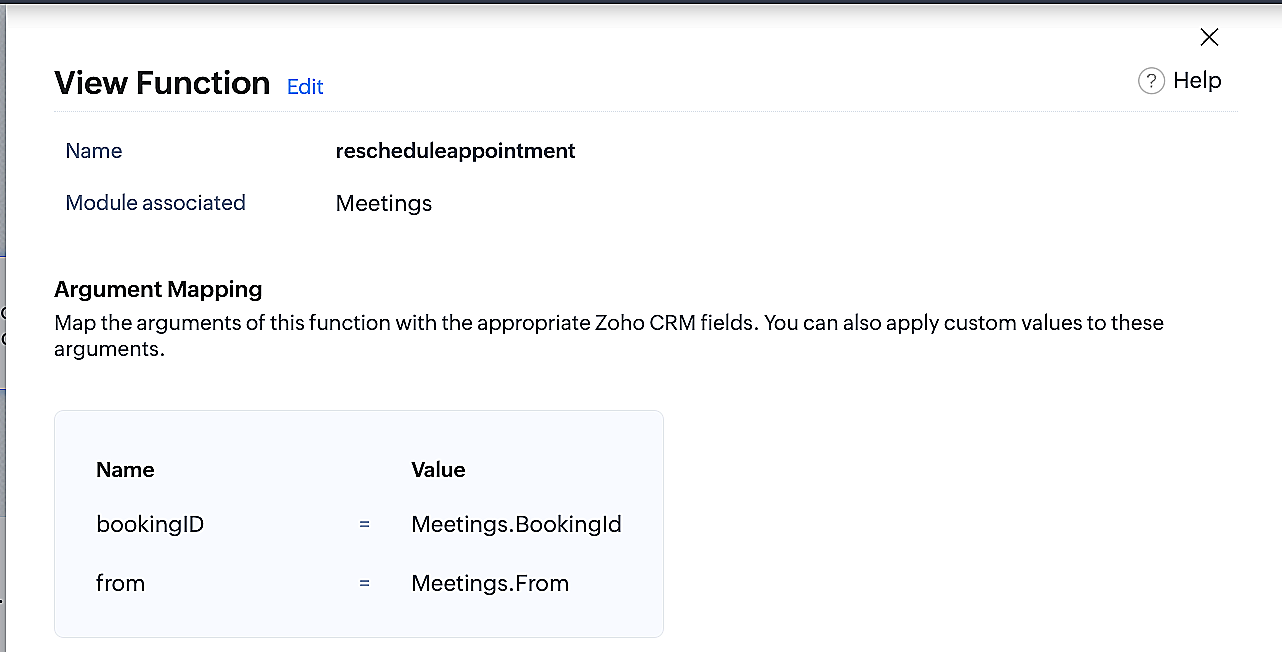
Below is the final flow of the reschedule appointment workflow:
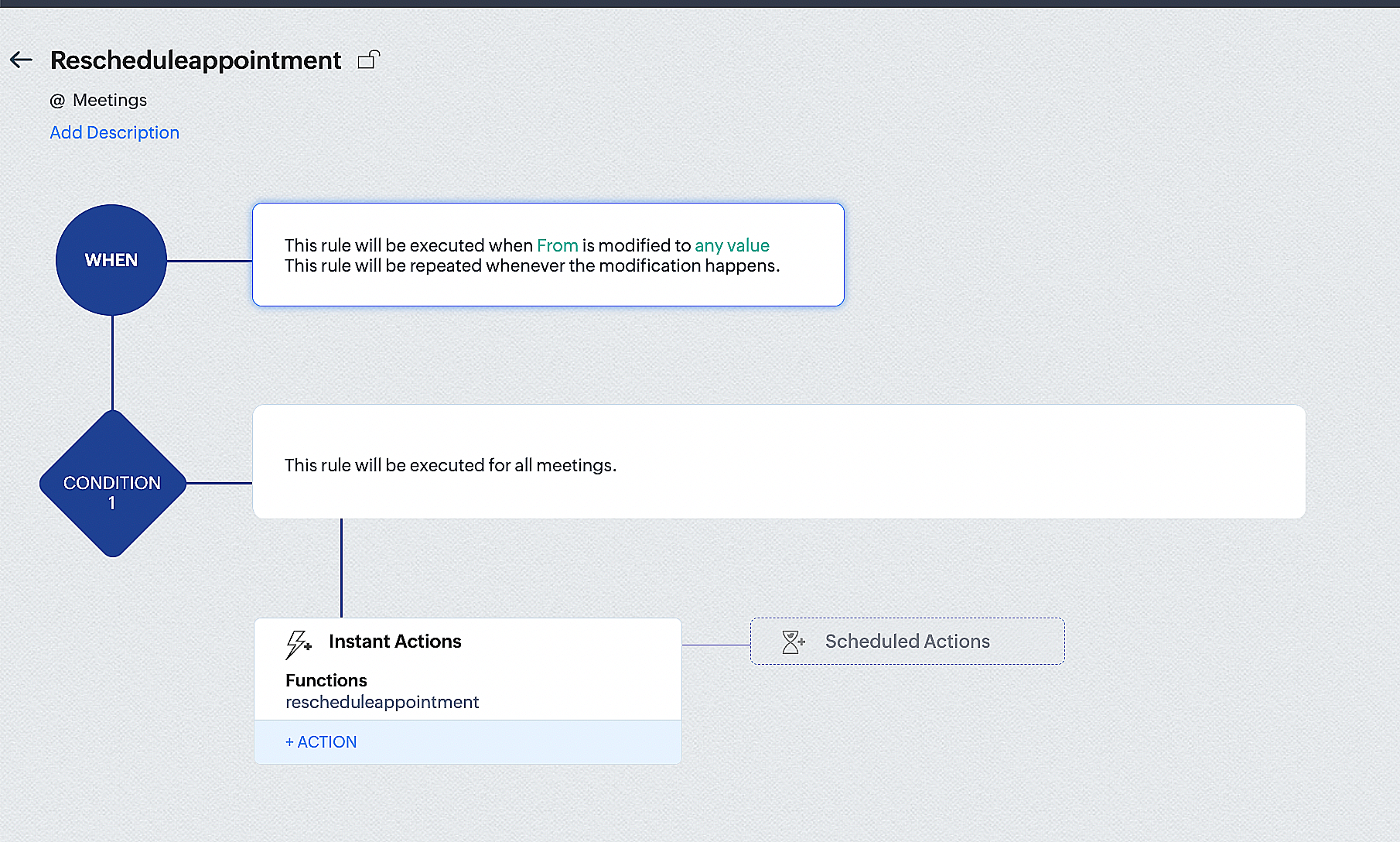
By the end of this process, we will have created a workflow that automatically executes when the "From" field in the Zoho CRM Meetings module is edited with a new date and time. As a result, this workflow will also reschedule the associated bookings for that meeting to the new date and time in Zoho Bookings.
Conclusion
We've arrived at the end of the community post. As mentioned in Part 1 of the Zoho Bookings—Zoho CRM bidirectional sync community post, with all of these configurations in place, you'll be able to book, cancel, reschedule, and update the status of appointments in Zoho Bookings directly from your Zoho CRM application. Which will make your appointment management easier.
If you have any questions or need assistance with your configuration, please email us at hello@zohobookings.com or support@zohobookings.com.
New to Zoho Recruit?
Zoho Campaigns Resources





Topic Participants
Kaushik S
Zoho CRM Plus Resources
Zoho Books Resources
Zoho Subscriptions Resources
Zoho Projects Resources
Zoho Sprints Resources
Zoho Orchestly Resources
Zoho Creator Resources
Zoho WorkDrive Resources


Zoho CRM Resources
Get Started. Write Away!
Writer is a powerful online word processor, designed for collaborative work.
Zoho CRM コンテンツ
-
オンラインヘルプ
-
Webセミナー
-
機能活用動画
-
よくある質問
-
Ebook
-
-
Zoho Campaigns
- Zoho サービスのWebセミナー
その他のサービス コンテンツ
ご検討中の方
Recent Topics
i keep see there is a connetion issue connecting 3rd party api on zoho when using zia
hi there , i have set up open ai api to zoho zia (copied and pasted to zoho zia) but I keep getting notificaiton "there is a connetion issue connecting 3rd party api on zoho" when using zia on top when click zia and try to type in word thereDeleting Fields in CRM Deletes Views in Analytics
Hey friends! I'm having some issues when we modify some fields within ZohoCRM. There are times where we need to sunset a field and eventually completely remove it. In these instances, it seems like a lot of views are removed in Analytics. This rangesZoho Desk Android and iOS app update: Access multilingual templates on the IM module
Hello everyone! We have introduced multilingual templates on the IM module of the Zoho Desk mobile app allowing you to send IM template messages in translated versions. iOS: Android: Please update the app to the latest version directly from the App Store/Does Zoho offer a full WhatsApp Marketing Platform (like WATI / GallaBox)?
lm exploring WhatsApp marketing and I’d like to understand what options are available within the Zoho ecosystem. Currently, I see: Zoho SalesIQ has a broadcast option, but it seems very limited — for example, it doesn’t support uploading contacts viaCustom buttons
Getting Error "You can only create 10 custom buttons per module" ! I already have more than 10 for 1 module before trying to create another. Is this a new restriction brought about by the all knowing what's best for businesses Zoho guru ? It would beThe Social Wall: October 2025
Hello everyone, As we head toward the end of the year, we’re bringing you a few updates to help give your social media efforts a strong finish. This month, we’re rolling out new enhancements across both the web and mobile app. Post Preview Have you everClient Script | Update - Support for List Page (Canvas) and Notes
Hello everyone! We are glad to announce two exciting updates in Client Script. Client Script support for List Page (Canvas) Client Script support for Notes These open the door to more dynamic and interactive customizations! 1. Client Script support forPincode Based Pricing
We want to give extra discount to customers within city limits because our shipping and packing costs are less. My proposal is assign list of pincodes to price list and assign the price list to customers whenever they sign up with pincodes. Also showfeature question: lookup field in Projects task layout
Hello, Below we have interface to configure a custom task layout, however, we need a lookup field to let pickup data from other apps, such as Zoho CRM Products module, is that possible or already in your roadmap? or a workaround to achieve it? Thanks in advance.What's New in Zoho Analytics - October 2025
Hello Users! We're are back with a fresh set of updates and enhancements to make data analysis faster and more insightful. Take a quick look at what’s new and see how these updates can power up your reports and dashboards. Explore What's New! ExtremeZoho Analytics & SQL Server - Live connect
Below are the steps I did Created a fresh database and table in my own virtual server Created a new data source connection with live connect I was able to select the tables and created the data source successfully I am getting the error when I try toExplore the Redesigned Quotes Module in Zoho Billing
Dear users, We’re excited to introduce a refreshed look for the Quotes details page in Zoho Billing! This update brings you a more efficient user interface experience without changing your existing workflow. We've enhanced layouts with organized tabs,Latest updates in Zoho Meeting | Create departments, Share PDF files
Hello all, You can now create departments to group team members within your organization. This will make it easier for you to organize department-level meetings and invite members. In webinars, use the Share material feature to share PDF files directlyUnify All Zoho Video Meeting Experiences into One Standardized Platform
Hi Zoho Team, We would like to share an important user experience concern regarding the current state of video meeting functionality across the Zoho ecosystem. The Problem Within Zoho, there are multiple ways to initiate or schedule a video meeting: ZohoImport VAT Kenya
Hi. I am quite lost on how to account for VAT when importing. We are an import and distribution company and when importing we get a customs entry with VAT which we pay and claim for this VAT as we do our monthly sales. My question is how to record this[Free Webinar] Product Updates: Quick Catch-Up Session - Part I - Creator Tech Connect
Hello Everyone! We welcome you all to the upcoming free webinar on the Creator Tech Connect Series. The Creator Tech Connect series is a free monthly webinar featuring deep-dive technical sessions designed for developers, administrators, and app builders.Project expenses in Zoho Books
Just the way timesheet is used to calculate labour cost for a particular project, how do i record other expenses against a project such as materials and consumables used for the project? So that under report, I can view the total amount expended on eachBlueprint status change
I want to change the Blueprint status of a workflow. The status is completed automatically when I added the record through API call. But I want to make it active, I don't see any options for this. Even if I draw transition from any stage , it is not visibleWhat is going on with GMail extension.
Suddenly, it is popping up and saying "Please wait while we work our magic... 10%" and it sits there. Yesterday I waited for an entire hour call and it never got further. Today, it's not resolved. Is there a fix I can do? I've tried all the typicalMarketing Tip #6: Cross-sell with related products
Don’t let customers stop at just one product. Suggesting related or complementary items improves the shopping experience and increases order value. Try this today: Use the Item Recommendations feature in Zoho Commerce and add two to three suggested itemsi cannot use <b></b> to bold the message in Creator C6!!!!???What?
Dear experts and friends, Now Creator 6 blocking us from using <b></b> Anyone facing this issue? I faced it on Creator C6 Previously, it used to work. Now failed to work. Faint~ Seek guidance from everyone on how to bold the message. The super simpleZoho Writer - Option to Export as .zdoc format
I've noticed that it's not possible to export a Zoho Writer Document in the .zdoc format. Isn't zdoc, Zoho Writer's own format? My use case is that I sometimes need to create quite complex documents with floating elements, which sometimes need to become[Announcement] Enhanced Merge APIs of Zoho Writer for automating document generation using Zoho Apps data
Hi users, With the record_id parameter in Zoho Writer's Merge APIs, fields related to the given record id is automatically fetched from the Zoho app. You don't have to spend time manually mapping the records and fields in the Deluge code. Here is a samplePin multiple columns and adjust column widths in CRM subforms
Hello all, Subforms act as secondary forms or tables in which you can associate multiple line items to a primary record and thereby ensure more structured and comprehensive data organization. We've made some recent enhancements to subforms. Here's what's[Webinar] Automate sales and presales workflows with Writer
Sales involves sharing a wide range of documents with customers across the presales, sales, and post-sales stages: NDAs, quotes, invoices, sales orders, and delivery paperwork. Generating and managing these documents manually slows down the overall salesAutomate insurance document workflows with Zoho Writer
Insurance companies have to deal with creating and managing complex documents and forms, such as policy applications, explanation of benefits documents, brochures, renewals, and claim forms. Handling all of this manually is hugely time and effort intensive,Latest updates in Zoho Meeting | New End of session notification to remind everyone about the session end time
Hello everyone, We’re excited to share a new feature for Zoho Meeting ; End of session notification. With this new setting, you can choose to remind all participants or only the host about the scheduled end time of a meeting. You can also choose when[Webinar] Zoho Writer for SCM and logistics
Creating, sharing, and distributing complex documents are constant challenges in the SCM and logistics industry. That's why our next webinar is focused on how to simplify these document workflows. Join us on Jul 10, 2025 for a Zoho Writer webinar designed[Webinar] Zoho Writer for the manufacturing industry
Creating, sharing, and distributing complex documents are constant challenges in the manufacturing services industry. That's why our next webinar is focused on how to simplify these document workflows. Join us on May 8, 2025, for a Zoho Writer webinarAdd Comprehensive Accessibility Features to Zoho Writer
Hello Zoho Writer Team, We hope you are doing well. We would like to submit a feature request to enhance Zoho Writer with a full set of accessibility tools, similar to the accessibility options already available in the Zoho Desk agent interface. 🚧 Current[Webinar] Simplifying document workflows in financial services with Zoho Writer
Creating, sharing, and distributing complex documents are constant challenges in the financial services industry. That's why our next webinar is focused on how to simplify these document workflows. Join us on April 10, 2025, for a Zoho Writer webinar[Zoho Writer Webinar] Learn how to simplify your HR operations: Part 2
Hi Zoho Writer users, We're excited to announce the Zoho Writer webinar for July 2024: Learn how Zoho Writer can simplify your HR operations: Part 2. This webinar will focus on how Zoho Writer can help HR teams streamline and automate their entire hiring[Zoho Writer Webinar] Learn how to simplify your day-to-day HR operations
Hi Zoho Writer users, We're excited to announce the Zoho Writer webinar for June 2024: Learn how Zoho Writer can simplify your day-to-day HR operations. This webinar will focus on how to automate your entire hiring process and generate various types ofBranding of native system emails
Make system emails adjustable in terms of branding. We want our system to be completely white label, because it is not a CRM anymore, it's way more than that. We are following the strategy of "CRM for everyone" to use the CRM in all departments, not onlySupport “Never End” Option for Recurring Meetings in Zoho Meeting
Hello Zoho Meeting Team, Hope you are doing well. We would like to request support for creating recurring meetings with no end date in Zoho Meeting. Currently, when scheduling a recurring meeting, Zoho Meeting requires us to select a specific end date.[Important announcement] Removal of Zoho Writer's DocuFiller Add-on
Hi users, Effective 21st Feb. 2025, we will be removing the DocuFiller add-on for Zoho Writer's Fillable Templates. From that point on, the add-on's functionalities, such as sharing or publishing fillable forms for data collection and receiving submissionsWeekly Tips: Manage External Images in Zoho Mail
When you receive emails every day, whether from clients, newsletters, or services, many of them contain external images that automatically load when you open the message. While this can make emails look more engaging, it can also impact your privacy andImplementing a Self-Invoicing/Vendor Portal in Zoho Creator
Hello Zoho Community / Creator Experts, We would like to build a Self-Invoicing Portal (Vendor Portal) in Zoho Creator for our external contractors. Our goal is to allow approved contractors to log in, submit their invoice details (hours worked, projectFunction #32: Schedule low stock notifications on a timely basis to specific users of the organization
Hello everyone and welcome back to our series! For a business that heavily relies on inventory, monitoring the stock levels and getting timely notifications of low stock items will ensure a smooth sail. Zoho Books allows you to always keep a check onSINCH HUB MESSAGEMEDIA with ZOHO DESK
1) what I need from MessageMedia, 2) what I want to confirm on the Zoho Desk Dev Forum. MessageMedia – needs and requirements Goal: Send SMS from a Zoho Desk widget for EU users. Auth: HTTP Basic (API Key + Secret). Keys must not live in the browser.Next Page