Connect - Messages et flux
Zoho Connect vous permet de créer des messages à deux niveaux : celui de l'organisation et celui du groupe.
Le mur de l'entreprise ou du réseau est un endroit idéal pour découvrir toutes les activités pertinentes qui se font. Tenez tous les membres de votre réseau au courant de ce qui se passe dans l'entreprise en partageant des mises à jour sur le mur du réseau. Tous les messages publiés sont accessibles à tous les membres du réseau. Les messages peuvent également être consultés sur la page Mon fil d'actualité de chaque membre.
Le mur du groupe est un espace de communication au sein du groupe. Le mur du groupe est réservé aux membres des groupes privés, alors que dans un groupe public, les personnes extérieures au groupe peuvent également consulter le mur du groupe et y publier des messages.
Mon Flux
La page Mon flux vous donne un aperçu de toutes les conversations et mises à jour qui vous concernent. Cette page vous permet de voir les mises à jour des groupes auxquels vous appartenez, des membres que vous suivez, des messages et des commentaires qui vous @mentionnent et des messages publiés sur le mur du réseau.
Publier une annonce
Les annonces sur le mur de l'entreprise ou du groupe de Zoho Connect permettent aux équipes de ne rater aucune mise à jour importante. Vous pouvez fixer une date jusqu'à laquelle l'annonce s'affichera au-dessus de tous les autres messages sur le mur en question. Dès qu'une annonce est faite, une notification par e-mail est envoyée à tous les membres du réseau (pour les annonces sur le mur de l'entreprise) ou aux membres du groupe (pour les annonces sur le mur du groupe).
À partir de l'onglet "Permissions" sous la page paramètres, les administrateurs du réseau et du groupe peuvent décider qui peut publier des annonces sur leurs murs respectifs.
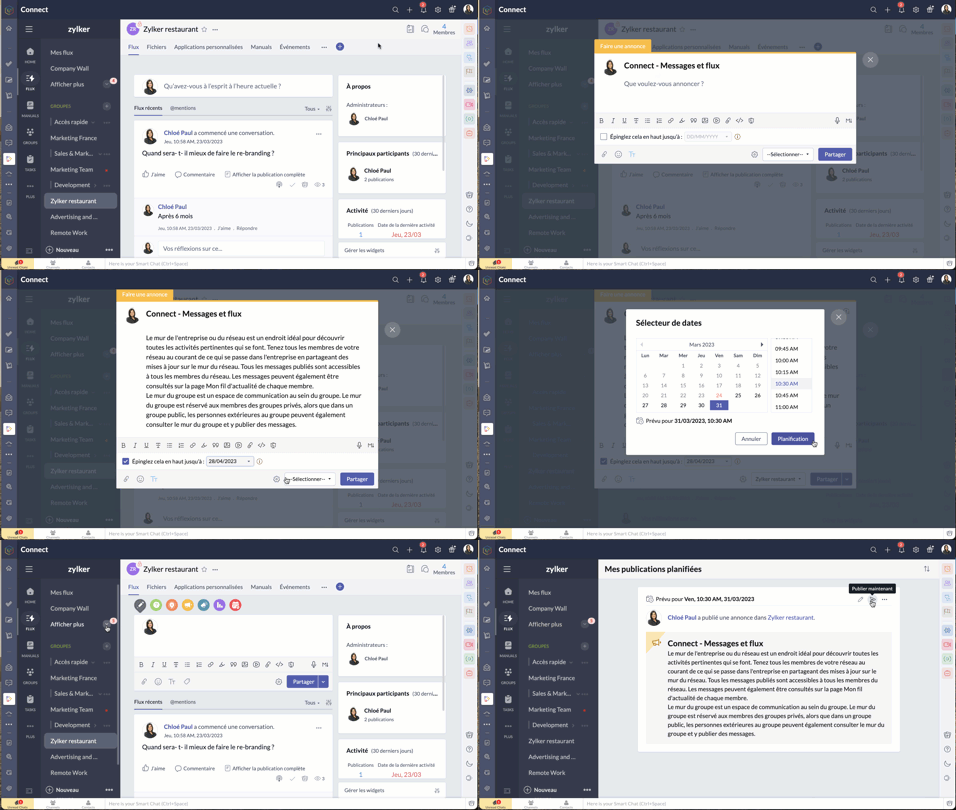
- Passez par l'icone "+" en haut à droite de votre portail Zoho Connect.
- À partir de la liste déroulante, sélectionnez "Faire une annonce".
- Saisissez votre annonce, joindre des documents si nécessaire à partir de l'icône du trombone. La limite de taille par fichier est de 30 Mo.
- Vous pouvez épingler l'annonce en haut jusqu'à une date précise. Après avoir défini la date, l'annonce s'affichera en haut de tous les autres messages publiés sur ce mur particulier jusqu'à la date définie. Cela permet de s'assurer que personne ne rate les annonces.
- Sélectionnez le mur du groupe ou de l'entreprise sur lequel vous souhaitez publier.
- Cliquez sur la flèche à côté du bouton de partage pour programmer une publication à un moment précis et partagez.
- Pour connaître la liste des membres qui ont consulté votre annonce, cliquez sur l'icône en forme d'œil dans le coin en bas à droite de l'annonce.
Poser votre question dans Zoho Connect
Pour trouver des réponses à vos questions, il vous suffit de les poster dans votre réseau. Les réponses sont ajoutées sous forme de commentaires et vous pouvez choisir la meilleure réponse à votre question.
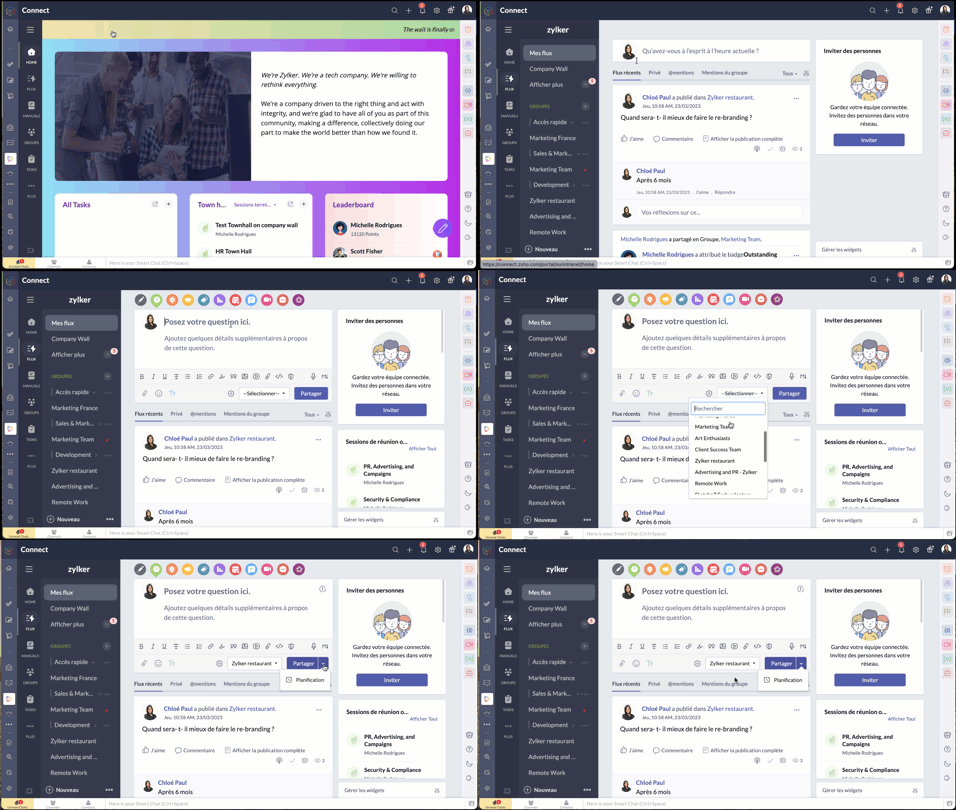
- Passez par l'onglet "flux" depuis le panneau à gauche.
- Cliquez sur l'icône de question dans l'éditeur de message en haut de la page. Les réponses partagées sont ajoutées en tant que commentaires.
Démarrer un sondage
- Organisez un sondage et demandez aux membres de votre réseau de voter pour la meilleure idée ou solution.
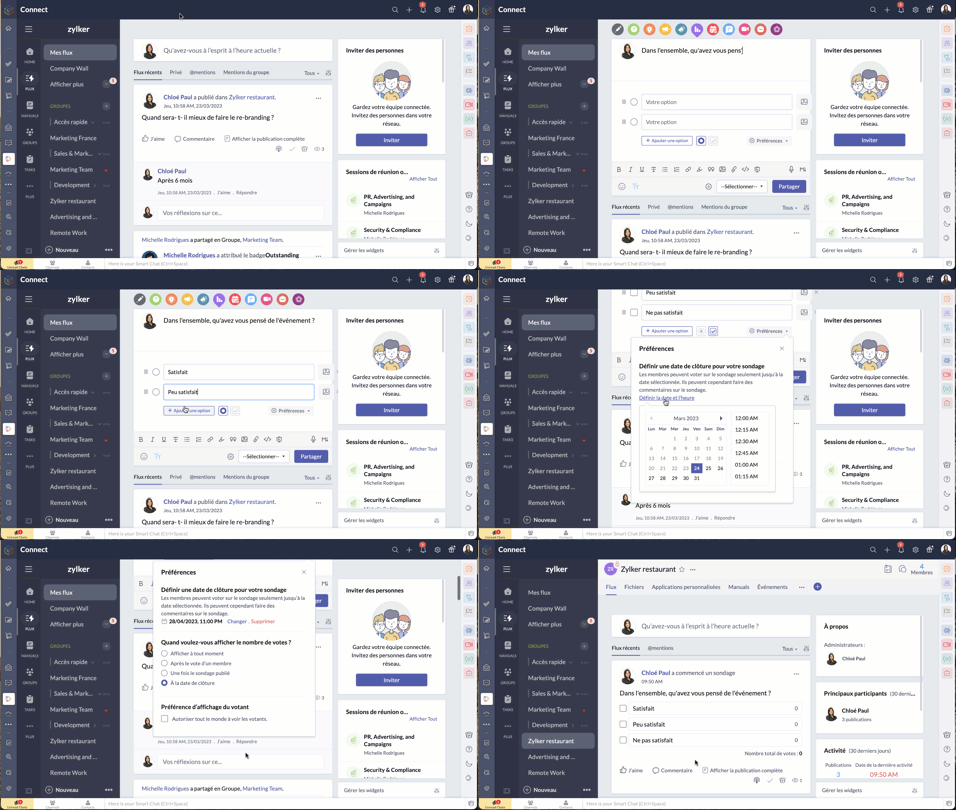
- Comme expliqué ci-dessus, à partir de l'éditeur de message, sélectionnez l'icône de sondage.
- Saisissez la question et les options.
- Le bouton "Preferences" vous permet de définir la date et l'heure de la clôture, préférences d'affichage du votant et plus encore.
- Choisissez le groupe à qui s'adresser, et partagez.
Bon à savoir
- La limite de caractères pour la question du sondage est de 10 000, et celle pour les options du sondage est de 200. Il est possible d'ajouter jusqu'à 25 options à un sondage.
- Si vous n'avez pas fixé de date de clôture pour le sondage, vous pouvez le cesser à tout moment.
- Zoho Connect vous permet de prolonger la date de clôture du sondage.
- Vous pouvez choisir d'afficher en permanence le nombre de votes reçus pour chaque option ou de ne pas afficher le nombre de votes jusqu'à la clôture du sondage.
- Si vous souhaitez permettre aux membres de modifier leur choix après avoir voté pour une option, utilisez la case à cocher dans la section "Préférences" du sondage.
Partager des commentaires et des messages par e-mail
Les messages par e-mail
Vous pouvez ajouter des messages sur Zoho Connect par e-mail à l'adresse indiquée dans la page de configuration d'un groupe.
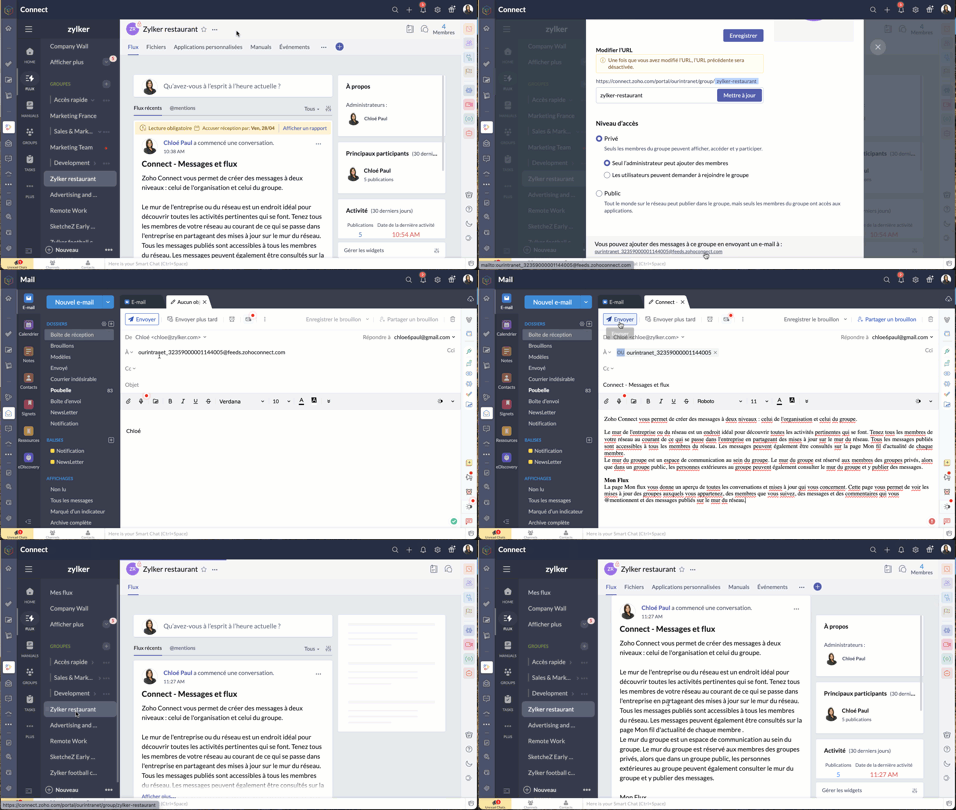
Les commentaires par e-mail
Vous pouvez ajouter des commentaires dans les messages et les forums en répondant à la notification par e-mail que vous avez reçue. Cette option est disponible par défaut si les notifications par e-mail est activée dans le réseau, si bien qu'il n'est pas nécessaire que les administrateurs la configurent séparément pour leur réseau.
Bien à savoir
- Bien que cette fonctionnalité soit disponible par défaut, les réseaux qui utilisent des adresses e-mail avec le domaine de leur entreprise (exemple : user@zylker.com) doivent ajouter un enregistrement SPF et un signe DKIM dans le gestionnaire de domaine pour s'assurer que cette fonctionnalité fonctionne.
- Cette option n'est pas prise en charge pour la réponse automatique et la redirection d'e-mail.
Messages à lire obligatoires
Comme son nom l'indique, un message marqué comme obligatoire doit être lu par les membres. Cela permet aux organisations de tenir leurs employés informés de certaines annonces essentielles. Il est également possible pour les administrateurs de savoir qui a lu ce message et d'envoyer des rappels aux membres qui ne l'ont pas encore lu.
Il n'y a que les administrateurs de réseau qui peuvent marquer un message comme lecture obligatoire dans le mur du réseau, tandis que les administrateurs de groupe peuvent marquer un message en lecture obligatoire dans leurs groupes respectifs.
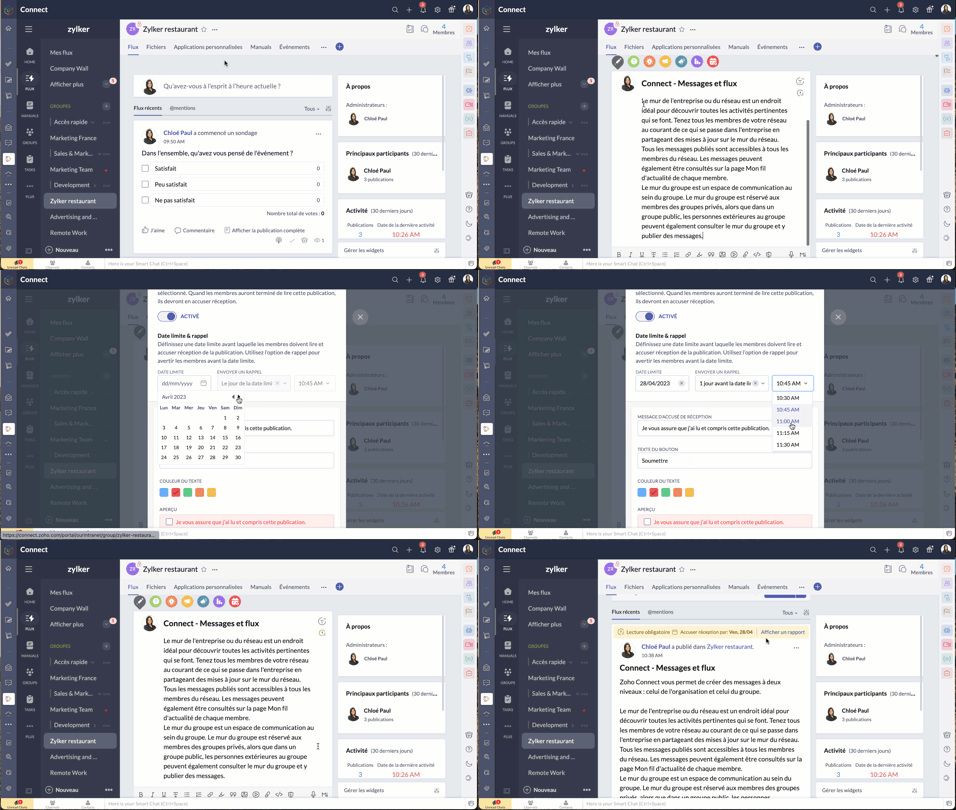
- À partir de l'éditeur de message, passez par le bouton "Lecture obligatoire", activez-le.
- Configurez la date limite et le message de rappel.
- Choisissez le thème de couleur que vous souhaitez utiliser pour les accusés de réception et enregistrez.
- Le message aura une étiquette obligatoire pour aider les utilisateurs à le distinguer des autres messages. Les membres recevront une notification concernant le message. Après avoir lu le message, ils devront compléter l'action d'accusé de réception. Celle-ci ne s'applique pas à l'utilisateur qui a créé ou marqué le message à lecture obligatoire.
N'hésitez pas à nous faire part de la fonctionnalité de Zoho Connect que vous utilisez le plus dans votre organisation et de quelle manière.
L'équipe Zoho France
New to Zoho Recruit?
Zoho Campaigns Resources





Topic Participants
Kinjal Lodaya
Stéphanie
Sticky Posts
Collaboration sans faille avec Zoho One
Bonjour à tous, Dans cet article nous allons voir comment Zoho One permet une collaboration à différents niveaux . La façon dont nous travaillons évolue. À mesure que les entreprises se mondialisent, la plupart des activités sont menées en équipe.
Zoho CRM Plus Resources
Zoho Books Resources
Zoho Subscriptions Resources
Zoho Projects Resources
Zoho Sprints Resources
Zoho Orchestly Resources
Zoho Creator Resources
Zoho WorkDrive Resources


Zoho CRM Resources
Get Started. Write Away!
Writer is a powerful online word processor, designed for collaborative work.
Zoho CRM コンテンツ
-
オンラインヘルプ
-
Webセミナー
-
機能活用動画
-
よくある質問
-
Ebook
-
-
Zoho Campaigns
- Zoho サービスのWebセミナー
その他のサービス コンテンツ
ご検討中の方
Recent Topics
Keeping track of project expenses
I have talked to a few support techs and it is very hard for me to believe that Zoho's project accounting software can't keep accounts for my projects. I must not understand what they're saying. We get a contract to build something. So the project revenueMailbox delegation - A secure way to enable collaboration
Admins often encounter scenarios where a user needs another team member to access and manage their mailbox during extended leave, role transitions, or while handling high email volumes. In such situations, ensuring business continuity without sharingCanvas View bug
I would like to report a bug. When clone a canvas view from an existing canvas view, if the original canvas view have canvas button with client script. Then the new create canvas view will have canvas button, it is make sense. But when I try to deleteExport blueprint as a high-resolution PDF or image file
This would be a good feature for organizations that want to share the blueprint process with their employees but don't want them to have access to the blueprint in the system settings. At the moment all that users can do is screenshot the blueprint orZoho Recruit Community Meetup - London 🇬🇧 (Venue Finalised)
Hello Recruiters! We’re excited to announce that the Zoho Recruit team is coming to the UK for an in-person Zoho User Group (ZUG) Meetup in London! This is your chance to connect with fellow Zoho users, learn from experts, and walk away with actionableUsers may not pick the fields to be shown as columns in the Choose Account window when creating a new Deal record
Hi there, by talking with other users I found out that I, as an Admin, am the only one who can pick fields to be shown as columns in the Choose Account window when creating a new Deal record. In fact, if other users click on the "Add Column" symbol onCreate custom rollup summary fields in Zoho CRM
Hello everyone, In Zoho CRM, rollup summary fields have been essential tools for summarizing data across related records and enabling users to gain quick insights without having to jump across modules. Previously, only predefined summary functions werepush notification to Cliq when user is @mentioned in CRM notes
push notification to Cliq when user is @mentioned in CRM notes. Currently users that is @mentioned gets an email to be notified. User/s that is @mentioned should get a Cliq notification.【参加無料】東京 Zoho ユーザ交流会 NEXUS ー AI エージェント (Zia Agents)の活用事例 / CRMで実現するマーケティング業務効率化
ユーザーの皆さま、こんにちは。コミュニティチームの藤澤です。 3月27日(金)に東京、新橋で「東京 Zoho ユーザー交流会 NEXUS」を開催します! ーーーーーーーーーーーーーーーーーーーーーーーーーーーーーーーーーーーー ✒️申し込みはこちらから:https://www.zohomeetups.com/tokyo2026vol1#/?affl=communityforumpost2 ーーーーーーーーーーーーーーーーーーーーーーーーーーーーーーーーーーーー ★参加のおすすめポイント ✅ AIエージェント(Zia)のリアルに使える実例を知るZoho CRM for Everyone's NextGen UI Gets an Upgrade
Hello Everyone We've made improvements to Zoho CRM for Everyone's Nextgen UI. These changes are the result of valuable feedback from you where we’ve focused on improving usability, providing wider screen space, and making navigation smoother so everythingMultiple header in the quote table???
Hello, Is it possible in Zoho CRM to add multiple headers or sections within the Quote product table, so that when the quote is printed it shows separate sections (for example “Products” and “Services”)? To clarify, I’m asking because: This does not appearOne Support Email Managed By Multiple Departments
Hello, We use one support email (support@company.com). Incoming emails come to the "Support Department" and based on what the customer is asking, we route that ticket to different departments (billing, technical support, etc.). When users in these differentError AS101 when adding new email alias
Hi, I am trying to add apple@(mydomain).com The error AS101 is shown while I try to add the alias.ZOHO.CRM.UI.Record.open not working properly
I have a Zoho CRM Widget and in it I have a block where it will open the blocks Meeting like below block.addEventListener("click", () => { ZOHO.CRM.UI.Record.open({ Entity: "Events", RecordID: meeting.id }).catch(err => { console.error("Open record failed:",Python - code studio
Hi, I see the code studio is "coming soon". We have some files that will require some more complex transformation, is this feature far off? It appears to have been released in Zoho Analytics already🚀 WorkDrive 6.0 (Phase 1): Empowering Teams with Content Intelligence, Automation, Accessibility, and Control
Hello, everyone! WorkDrive continues to evolve from a robust file management solution into an intelligent, secure, and connected content collaboration platform for modern businesses. Our goal remains unchanged: to simplify teamwork, strengthen data security,Introducing Workqueue: your all-in-one view to manage daily work
Hello all, We’re excited to introduce a major productivity boost to your CRM experience: Workqueue, a dynamic, all-in-one workspace that brings every important sales activity, approval, and follow-up right to your fingertips. What is Workqueue? SalesDepartment Overview by Modified Time
We are trying to create visuals to show the work our agents do in Zoho Desk. Using Zoho Analytics how can we create a Department Overview per modified time and not ticket created time? In order for us to get an accurate view of the work our agents areZoho Commerce
Hi, I have zoho one and use Zoho Books. I am very interested in Zoho Commerce , especially with how all is integrated but have a question. I do not want my store to show prices for customers that are not log in. Is there a way to hide the prices if notSupport Custom Background in Zoho Cliq Video Calls and Meetings
Hello Zoho Cliq Team, We hope you are doing well. We would like to request an enhancement to the video background capabilities in Zoho Cliq, specifically the ability to upload and use custom backgrounds. Current Limitation At present, Zoho Cliq allowsUpload own Background Image and set Camera to 16:9
Hi, in all known online meeting tools, I can set up a background image reflecting our corporate design. This doesn't work in Cliq. Additionally, Cliq detects our cameras as 4:3, showing black bars on the right and left sides during the meeting. WhereISO 27001 Compliance
What are people doing to ensure ISO 27001 compliance for their Zoho environments? It would make sense for Log360 Cloud to integrate natively with the Zoho suite, but that is not the case. It requires a gateway cluster, which is not an option for a fullyZoho People - Retrieve the Leave Details - get("LeaveCount")
Hi, Zoho People I need to collect all of an employee's leave requests for the calendar year and check how many half-days they have taken. If I run the script on the query he just modified, I can retrieve the information related to that query and use theImporting into Multiselect Picklist
Hi, We just completed a trade show and one of the bits of information we collect is tool style. The application supplied by the show set this up as individual questions. For example, if the customer used Thick Turret and Trumpf style but not Thin Turret,What's new in Zoho Sheet: Simplify data entry and collaboration
Hello, Zoho Sheet community! Last year, our team was focused on research and development so we could deliver updates that enhance your spreadsheet experience. This year, we’re excited to deliver those enhancements—but we'll be rolling them out incrementallyMarketer's Space: New to Campaigns? Some common early mistakes that might occur
Hello Marketers, Welcome back to another post in Marketer's Space. If you're just getting started with Zoho Campaigns, things can feel exciting and slightly confusing at the same time. You're not alone. Most early frustrations come from setup gaps ratherThis user is not allowed to add in Zoho. Please contact support-as@zohocorp.com for further details
Hello, Just signed up to ZOHO on a friend's recommendation. Got the TXT part (verified my domain), but whenever I try to add ANY user, I get the error: This user is not allowed to add in Zoho. Please contact support-as@zohocorp.com for further details I have emailed as well and writing here as well because when I searched, I saw many people faced the same issue and instead of email, they got a faster response here. My domain is: raisingreaderspk . com Hope this can be resolved. Thank youWorkflow Rule - Field Updates: Ability to use Placeholders
It will be great if you can use placeholder tags to update fields. For example if we want to update a custom field with the client name we can use ${CONTACT.CONTACT_FIRSTNAME}${CONTACT.CONTACT_LASTNAME}, etcNeed a Universal Search Option in Zohobooks
Hello Zoho, Need a Universal Search Option in Zohobooks to search across all transactions in our books of accounts. Please do the needful ThanksImplement Date-Time-Based Triggers in Zoho Desk
Dear Zoho Desk Support Team, We are writing to request a new feature that would allow for the creation of workflows triggered by specific date-time conditions. Currently, Zoho Desk does not provide native support for date-time-based triggers, limitingWhy is my Lookup field not being set through Desk's API?
Hello, I'm having trouble setting a custom field when creating a Ticket in Zoho Desk. The endpoint I'm consulting is "https://desk.zoho.com/api/v1/tickets" and even though my payload has the right format, with a "cf" key dedicated to all custom fields,How exactly does "Reply assistance" work in Zoho Desk? What context is sent to the LLM?
Hi, Im trying to better understand the technical behavior of the feature "Reply assistance" in Zoho Desk, and I couldn’t find detailed information in the current documentation. Specifically, I have questions about what data is actually being sent to theDeletion Workflows
Hello, Unless I missed it, we can't create deletion workflows. My usecase is to auto-delete junk leads. We have field called lead status, and an agent qualify all our new leads. When it's a junk lead she chose the correspondant value in the picklist. My goal is that the system delete them automatically. Is that possible? Planed ?URGENTImpossible to book an appointement
J'essaie plusieurs fois mais aucun créneau n''est disponible Message d'erreur lorsque j'essaie de sélectionner une dateSendpulse SMTP/IMAP Issues
It’s possible Zoho made some changes on their side. Sometimes, even if your regular password works, Zoho requires an app-specific password for external apps like SendPulse to connect via IMAP. You can create this in Zoho’s security settings and use itInsane mail security
I cannot access my email... anywhere. For some reason the password for the Mail app on my Mac is being rejected, it worked yesterday but now it doesn't? Ok let's try the web interface. I can access my general Zoho login with the password but if I wantUI issue with Organize Tabs
When looking at the organize Tabs window (bellow) you can see that some tabs are grayed out. there is also a "Add Module/Web Tab" button. When looking at this screen it's clear that the grayed out tabs can not be removed from the portal user's screenTask list flag Internal/External for all phases
Phases are commonly used in projects to note milestones in the progression of a project, while task lists can be used to group different types of tasks together. It makes sense to be able to define a task list as either internal or external however theHAVING PROBLEM WITH SENDING EMAIL
Hi all, I'm unable to receive emails on info@germanforgirls.eu. I'm getting an error code 550. 5.1.1. invalid email recipients. Moreso, I would like info@germanforgirls.eu to be the default "send from" email and not solomon@germanforgirls.eu. Kindly seeSharing my portal URL with clients outside the project
Hi I need help making my project public for anyone to check on my task. I'm a freelance artist and I use trello to keep track on my client's projects however I wanted to do an upgrade. Went on here and so far I'm loving it. However, I'm having an issue sharing my url to those to see progress. They said they needed an account to access my project. How do I fix this? Without them needing an account.Next Page