Creating a Gmail integration using custom connectors
Hello everyone!
Greetings from Deluge. Following up on our series aimed at exploring the capabilities of Deluge, today we'll take an in-depth look into the Deluge custom connections that can be created across Zoho services.
Deluge boasts an extensive range of over 260 built-in integrations spanning more than 35 Zoho services. These integrations streamline data access and modification with these services, from a single point in Zoho, without having to toggle between services. However, we understand that the needs of our users vary widely, and sometimes existing integrations may not cover every scenario.
That's where custom connections come in. Think of them as the Swiss Army Knife of integrations, enabling connections with hundreds of services—such as Gmail and Outlook—and seamlessly integrating them with your favorite Zoho services. With custom connections, you have the power to build your own integrations with virtually any third-party service and tailor them to meet your requirements. Moreover, since the custom connections use the OAuth 2.0 authentication mechanism, you're getting best-in-class security while integrating with third-party services.
What are connections?
Before we dive into the details of custom connectors, let's take a glimpse at what connections are in Deluge. Connections are a means to connect your Zoho account and any third-party accounts you wish to integrate with. Once a connection is created and connected, you can use it in Deluge integration tasks or invokeURL scripts to perform REST operations on the target service from the required Zoho service. For more information, visit our Connections help doc.
Use case
Assume the sales team of an organization uses Zoho CRM for managing leads, customer retention, and customer acquisition, and uses Gmail for communication purposes, like following up with potential clients via email. While the system works as is, it's time-consuming and prone to error, so an integration between Gmail and Zoho CRM is necessary to improve efficiency.
A custom connection to your Google account will enable you to sync your Zoho CRM and Google accounts, allowing you to perform actions related to your Google account from Zoho CRM. For example, you can invoke the connection using the invokeURL task in Zoho CRM and send an email to your leads from your Gmail address.
Steps to configure the Google custom connection
Configuration video
Configuration steps
Creating Google OAuth credentials
- Visit https://console.cloud.google.com/.
- Click the dropdown and choose the required project.

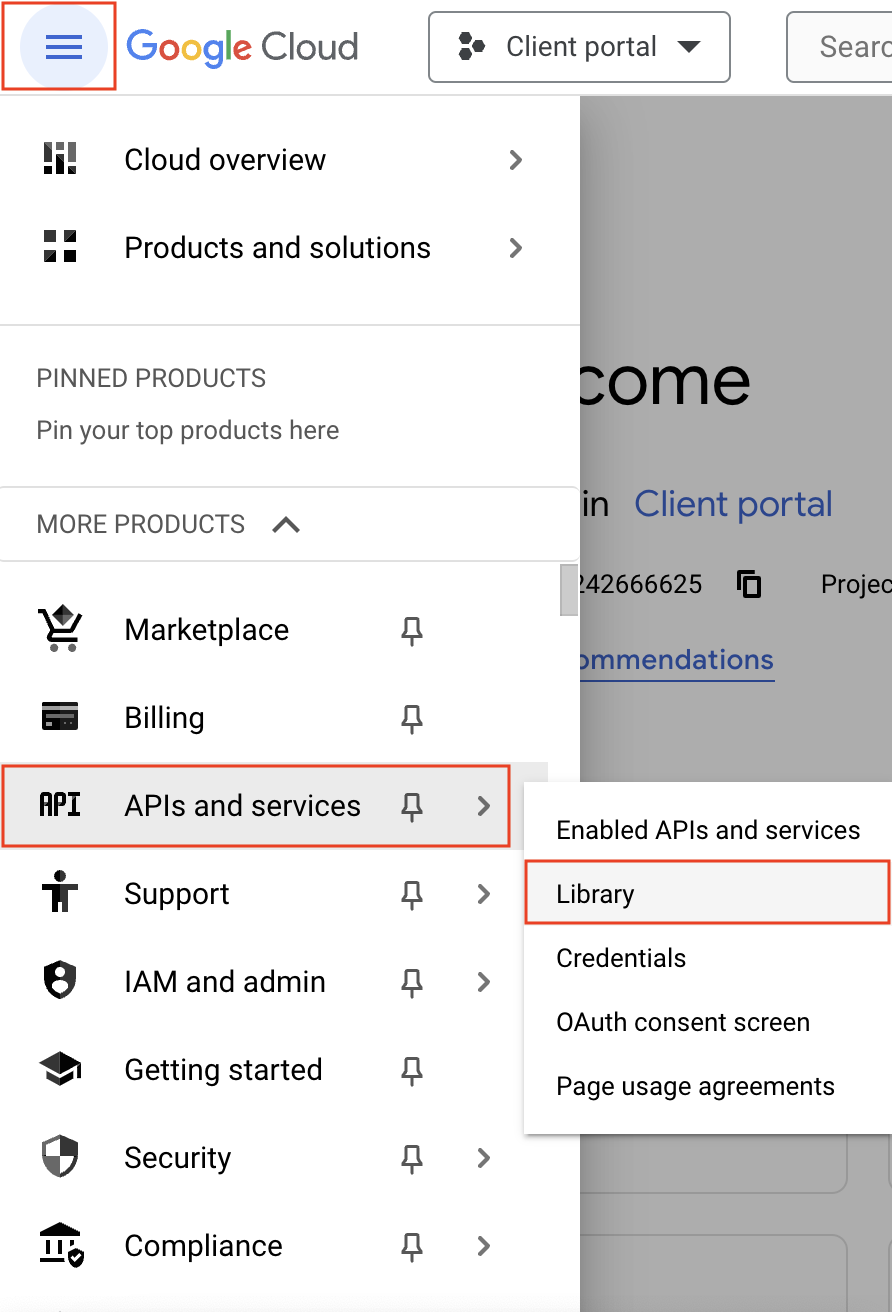
- Navigate to the hamburger menu on the left and click APIs and services -> Library.
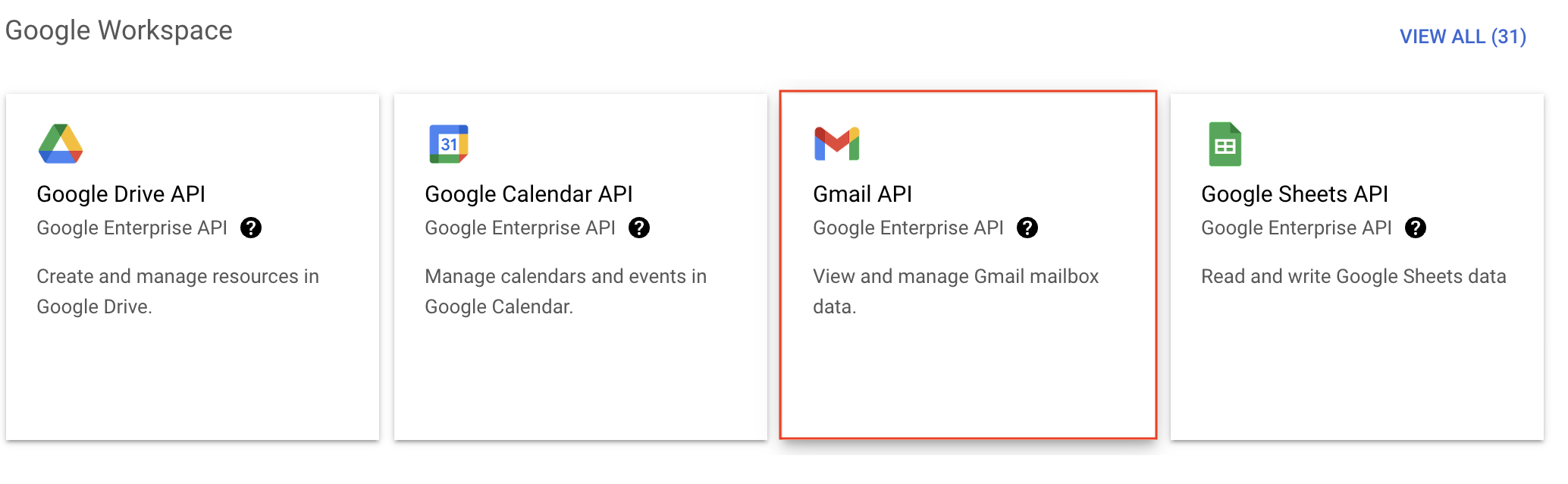
- You'll be taken to the API library page. Navigate to the Google Workspace section and click Gmail API.
- Next, click Enable on the Gmail API product details page.
- In order to use this API, you'll need to create credentials. Click CREATE CREDENTIALS.

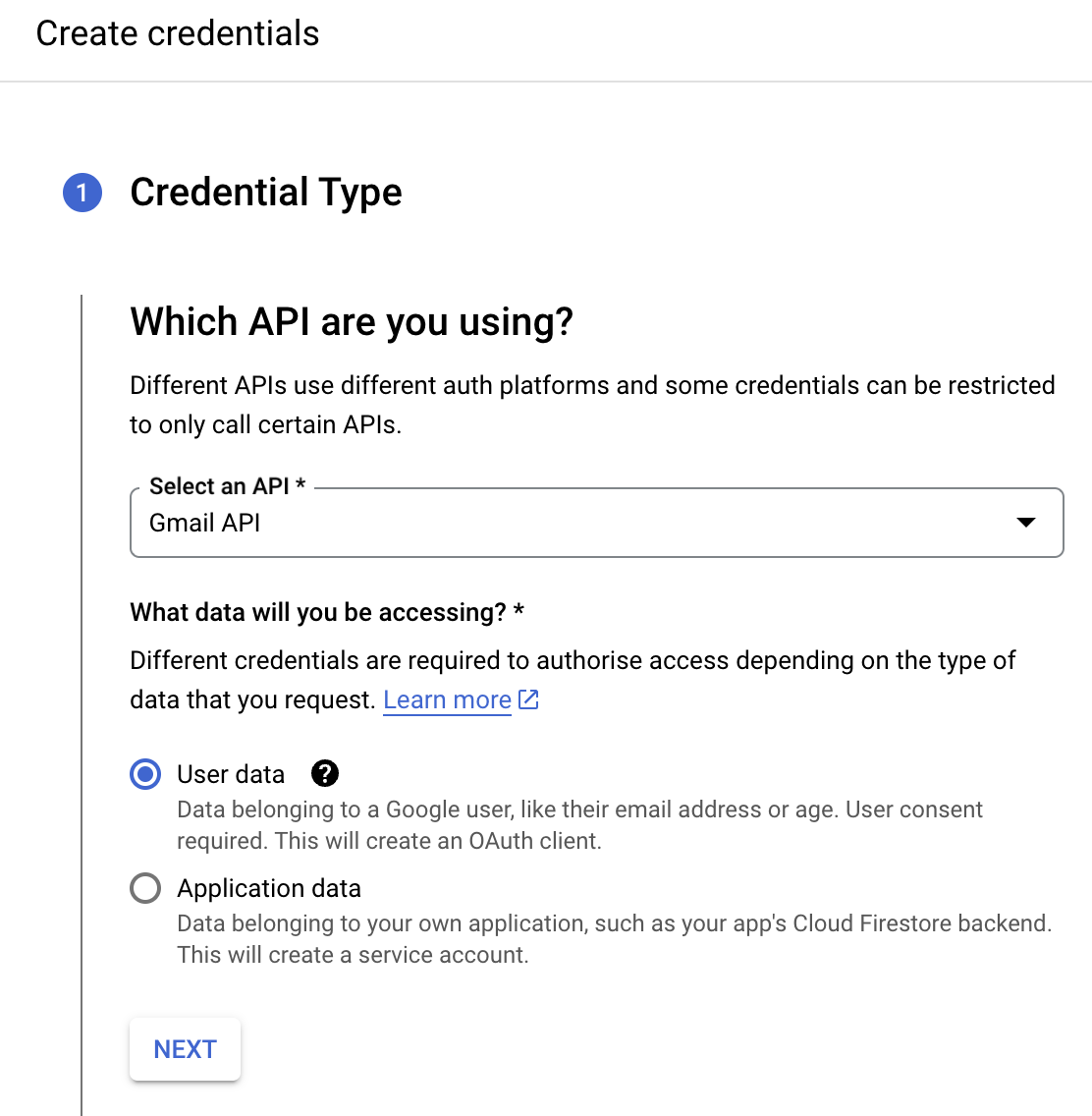
- On the Create credentials page, choose Gmail API in the Select an API dropdown and User Data under the What data will you be accessing? section. Click Next.
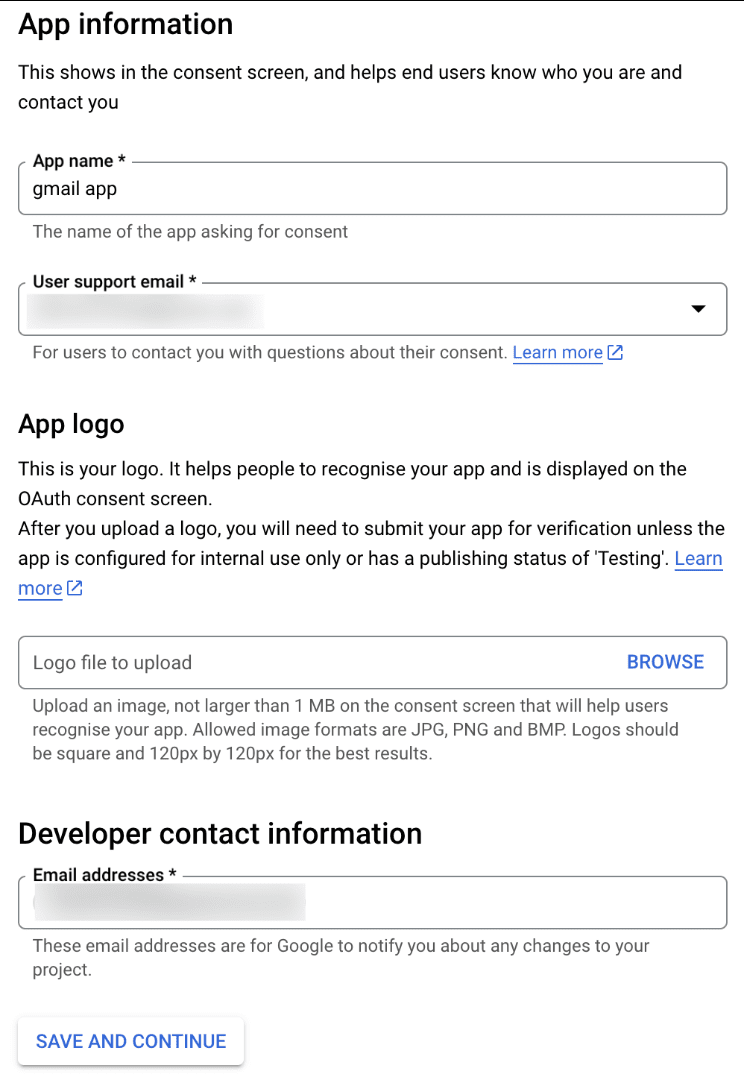
- Next, on the OAuth consent screen, enter the App name, User support email, and Developer contact email address. Then click Save and Continue.
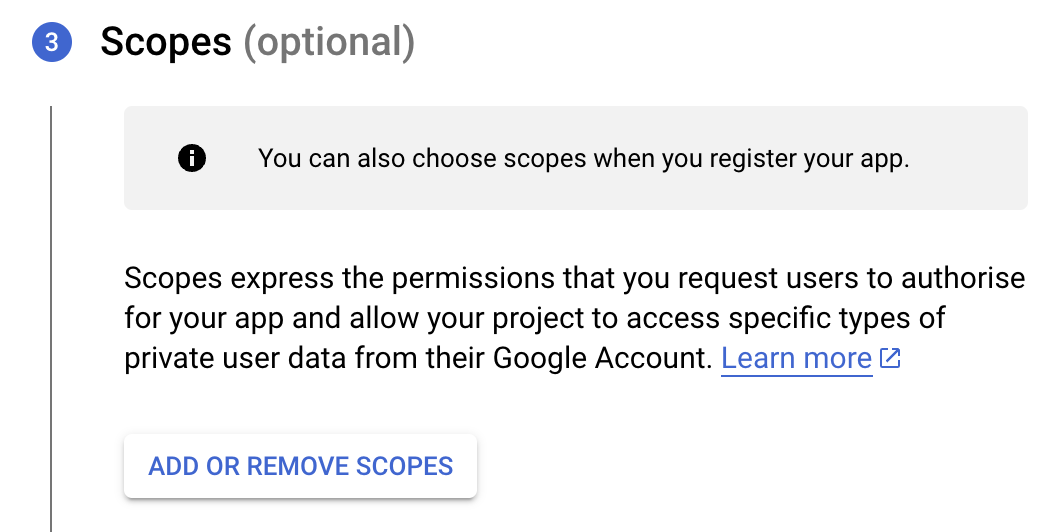
- Next, under the Scopes section, click the ADD OR REMOVE SCOPES button.
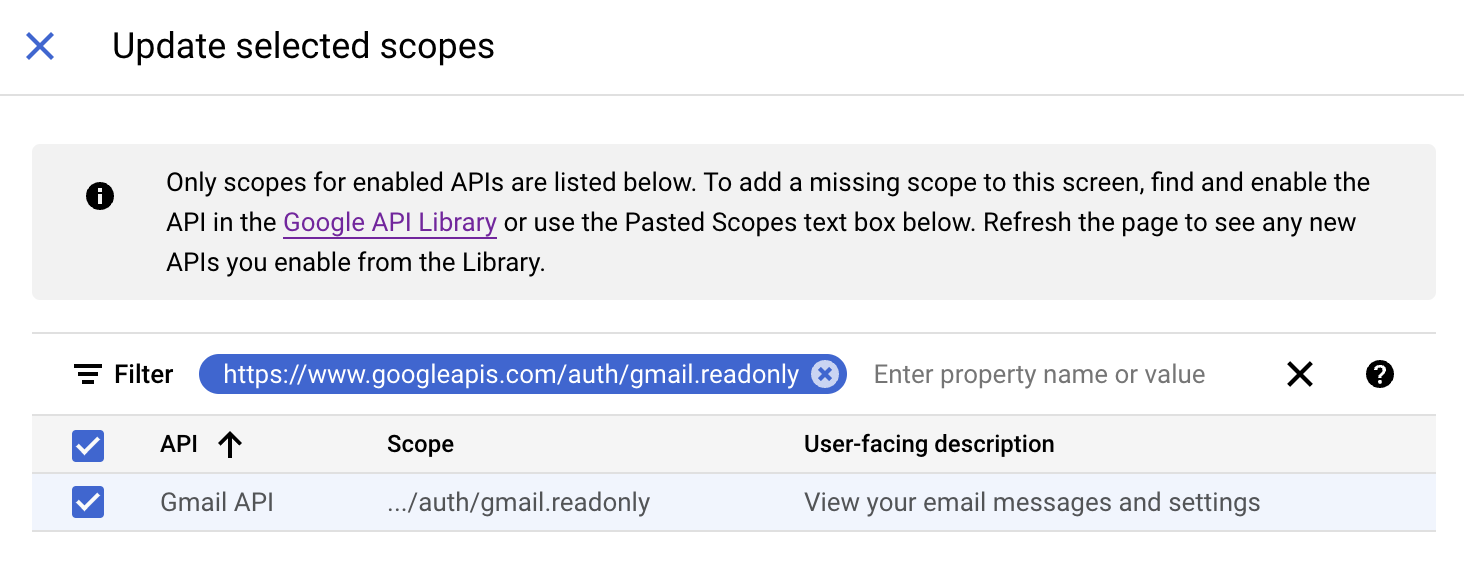
- In the Update selected scopes pane, search and select the gmail.readonly scope. Click Update, and then click Save and continue.
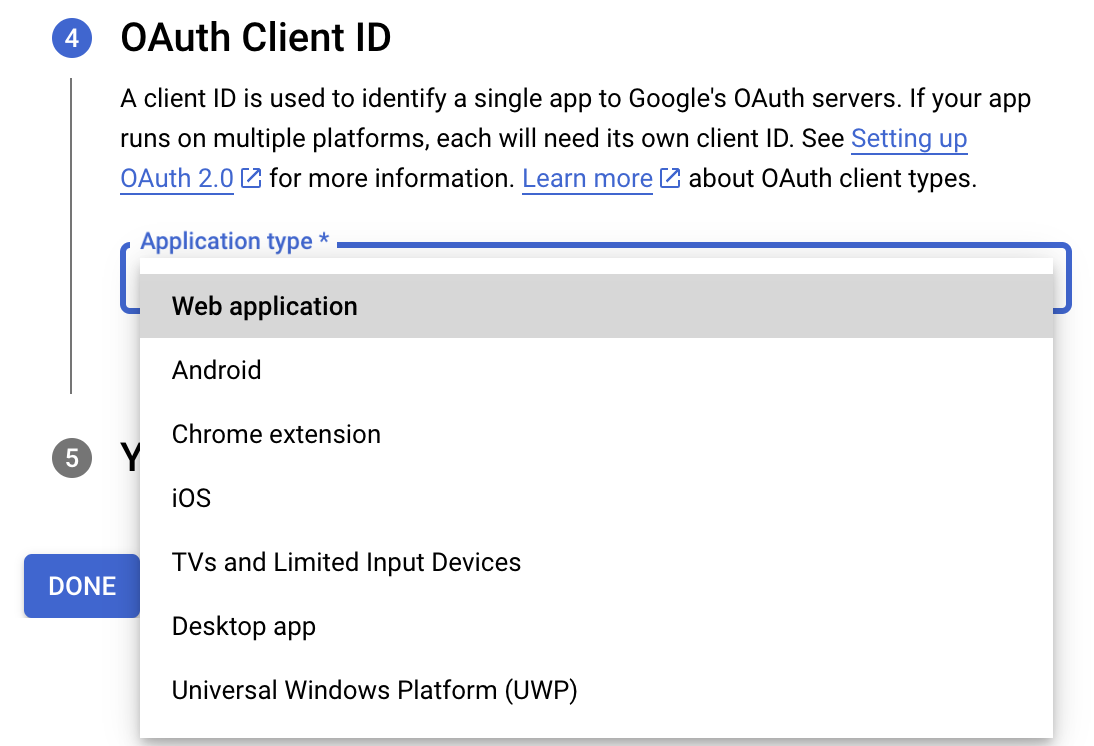
- Now, under the OAuth Client ID section, choose Web application in the Application type dropdown. Then name your app.
- Enter https://deluge.zoho.com/delugeauth/callback as the Authorized redirect URI.
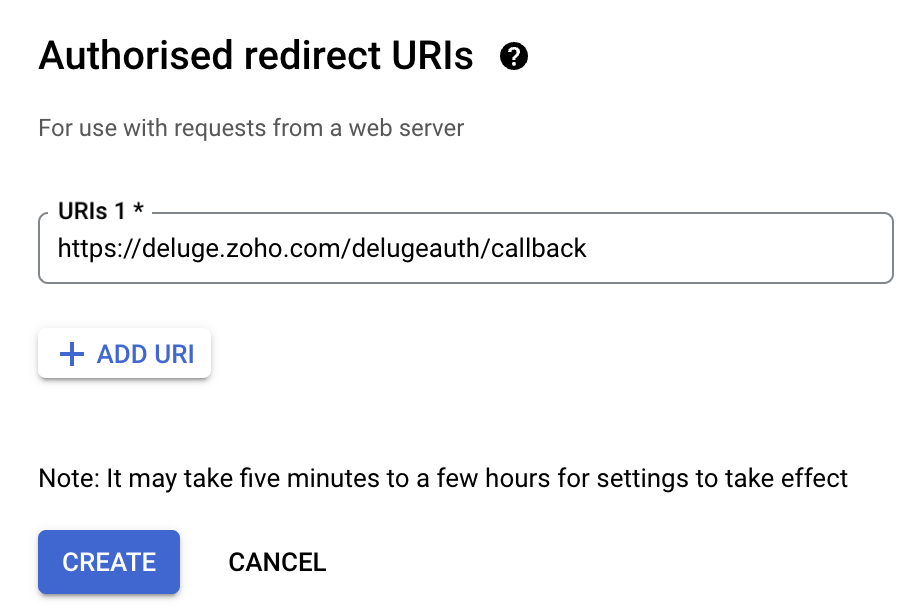
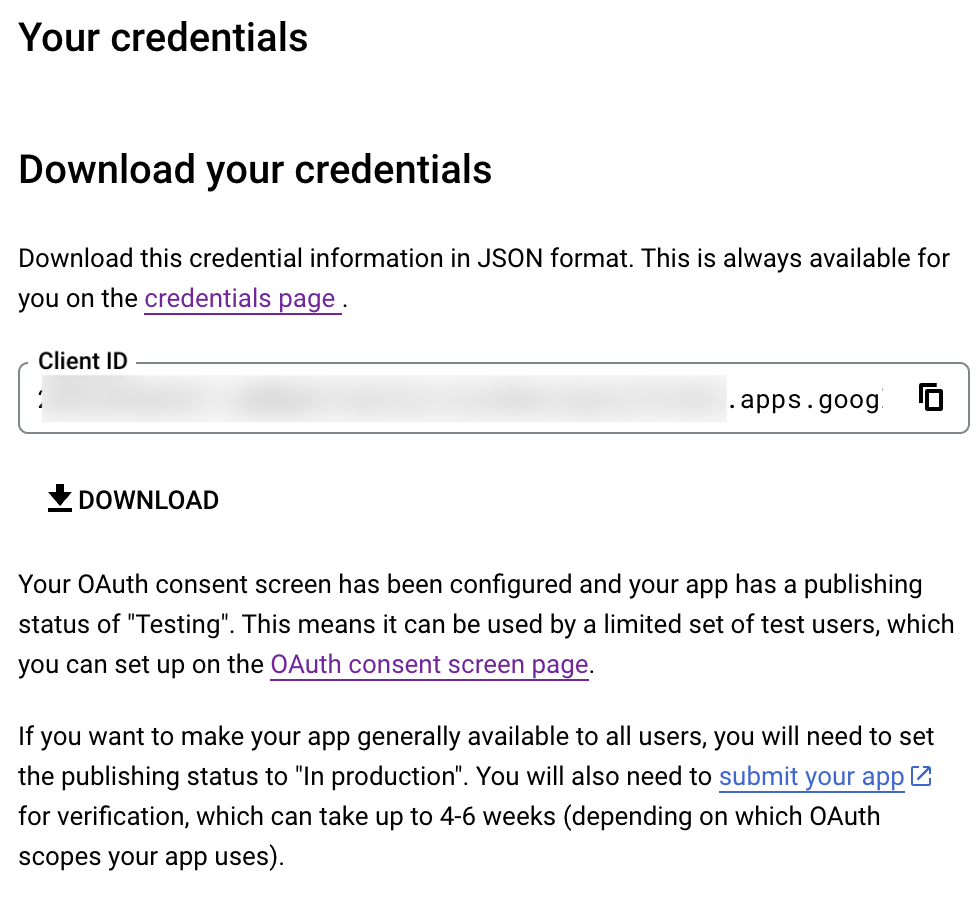
- Click Create and download your credentials. This Client ID and others will be required later, while creating a connection in Zoho CRM.
- Navigate to the OAuth consent screen and click Add users under Test users. Enter the user's email address and click Save.
Creating a custom connector for Gmail
- Now the action shifts to Zoho CRM. Navigate to crm.zoho.com -> Settings -> Connections.
- Choose Custom Services and click Create Service.
- On the Create Service screen, choose OAuth 2.0 as the Authentication type and Header as the Parameter.
- Enter the Client ID, Client Secret, and Authorize URL generated from Google as shown in step 12 above.
Tip: Having the Offline access type will allow your application to refresh tokens even when the user is not actively using the application. - Then enter https://oauth2.googleapis.com/token as the Access token URL and Refresh token URL.
- Specify the necessary scopes like read and create, etc. and then click Create Service.
- On the next page, click Create Connection. Give the connection name and choose the scopes. Then click Create and Connect.
- Finally, authenticate the connection on the Google accounts page. Your custom connection will be created, and the two services can be integrated!
Now that the connection between Zoho CRM and Gmail has been established, you can use the invokeURL task to access and modify data in Gmail using the different APIs.
Sample
You can use the below code in invokeURL task to get the latest emails from Gmail.

userId = "emailaddress@gmail.com";
get_gmail = invokeurl
[
url: "https://gmail.googleapis.com/gmail/v1/users/"+userId+"/messages"
type: GET
connection : "connectionname"
];
messageID = get_gmail.get("messages").get(0).get("id");
get_gmail_withID = invokeurl
[
url: "https://gmail.googleapis.com/gmail/v1/users/"+userId+"/messages/"+messageID
type: GET
connection : "connectionname"
];
Content_of_the_mail = get_gmail_withID.get("snippet");
info "Mail Content : " + Content_of_the_mail;
gmail_values = get_gmail_withID.get("payload").get("headers");
for each headers in gmail_values
{
if ( headers.get("name") == "Subject" )
{
info "Subject of the Mail : " + headers.get("value");
}
if ( headers.get("name") == "From" )
{
info "From Address : " + headers.get("value");
}
}
get_gmail = invokeurl
[
url: "https://gmail.googleapis.com/gmail/v1/users/"+userId+"/messages"
type: GET
connection : "connectionname"
];
messageID = get_gmail.get("messages").get(0).get("id");
get_gmail_withID = invokeurl
[
url: "https://gmail.googleapis.com/gmail/v1/users/"+userId+"/messages/"+messageID
type: GET
connection : "connectionname"
];
Content_of_the_mail = get_gmail_withID.get("snippet");
info "Mail Content : " + Content_of_the_mail;
gmail_values = get_gmail_withID.get("payload").get("headers");
for each headers in gmail_values
{
if ( headers.get("name") == "Subject" )
{
info "Subject of the Mail : " + headers.get("value");
}
if ( headers.get("name") == "From" )
{
info "From Address : " + headers.get("value");
}
}
References
----
And that's a wrap for today! We hope you found this post informative and start using custom connections to experience the full capabilities of Deluge and Zoho.
Kindly let us know if you have any questions, feedback, or suggestions in the comments, or write to us at support@zohodeluge.com!
Regards,
The Deluge Team
New to Zoho Recruit?
Zoho Campaigns Resources





Topic Participants
Ashwin Vishal R
Kaushal
Anand M B
Zoho CRM Plus Resources
Zoho Books Resources
Zoho Subscriptions Resources
Zoho Projects Resources
Zoho Sprints Resources
Zoho Orchestly Resources
Zoho Creator Resources
Zoho WorkDrive Resources


Zoho CRM Resources
Get Started. Write Away!
Writer is a powerful online word processor, designed for collaborative work.
Zoho CRM コンテンツ
-
オンラインヘルプ
-
Webセミナー
-
機能活用動画
-
よくある質問
-
Ebook
-
-
Zoho Campaigns
- Zoho サービスのWebセミナー
その他のサービス コンテンツ
ご検討中の方
Recent Topics
Appointment booking is temporarily unavailable
Embeded Zoho booking page in my WordPress website. When someone starts a booking, after choosing time and date, an error appears before payment - "Appointment booking is temporarily unavailable due to restricted settings." Used the embeded code givenCannot connect to 365 business calendar and Teams, says personal but it is not.
hi I have a number of users connected to their 365 business accounts. Adding a new user and it thinks hes got 365 personal edition. He does not.... Anyone know what's going on. Trying for days now. Bookings go into his MS calendar but as its thinks itsLimited review (/questions) for Bookings 2.0
Hi all, I'm writing this review of Bookings 2.0 for two reasons: 1) it may be of interest to others, and 2) I'd like to be corrected if I'm wrong on any points. It's a very limited review, i.e. the things that have stood out as relevant, and particularlyZoho Bookings - Reserve with Google
Does Zoho Bookings plan to to integrate with Reserve with Google?Tip #3: How to change your booking page language
Displaying your booking page in your target audience's language can greatly increase customer satisfaction. By speaking their language, you will help customers feel more comfortable scheduling with you and create a stronger connection with them. Let'sBigin Android app update: Alerts while creating tasks outside of working days, conflicting events and calls.
Hello everyone! In the most recent version of the Bigin Android app, we have brought in support to display an alert if task is being scheduled outside of the working days. Also, when scheduling an event or call in the Activities module, a conflict alertBigin update: Link email messages to pipeline records.
Hello everyone! In the latest version of the Bigin iOS(v1.11.9) and macOS(1.8.9) app, we have brought in support for an option to link email to pipeline records. This helps you to view emails specific to a deal, especially when a contact is associatedBigin Android app update: Custom buttons and widgets
Hello everyone! We are excited to introduce custom buttons and widgets on the Bigin Android app. Widgets: A widget is a customizable UI component in Bigin that improves efficiency and user experience. It lets businesses embed components, streamline interactions,Collective-booking event not added to all staff calendars
We assign two staff to certain events. When the client books this event, it adds it to one staff calendar (the 'organiser') but not the other. How can I ensure all staff assigned to a collective booking get the event in their calendar? (A side note: itProject Management Bulletin: October, 2025
Every need leads to innovation. Project Management tools were developed out of sheer necessity to drive large projects. With wide usage, the specifications grew precise, and so did the refinement. Over years we’ve crafted one of the best project managementZoho Sheets saying locked when not locked
Zoho Sheets won't let me add more rows to sheet because it's saying the sheet is locked, but the sheet is not locked. I tried using a different browser but I still have the same issue.Identifying and Merging Accounts with Similar (Non-Exact) Names
Hello everyone, I’m aware of the built-in deduplication feature in Zoho CRM that allows merging records with exactly matching values for selected fields. However, I’m running into a situation where our migrated data contains multiple variations of theOption for super admin to recover the deleted chats in Zoho Cliq
Currently, in Zoho Cliq, if a user accidentally deletes their chats, there is no option for the Super Admin to recover or view those deleted messages. I believe it would be helpful if Super Admins had a recovery option, perhaps within a certain time frame,Zoho CRM iOS app updates: the Homepage, Zoho Survey integration, and support for multiple file uploads in subform
Hello everyone! The Zoho CRM mobile app continues to evolve to bring you a smoother and more powerful CRM-on-the-go experience. We're excited to share some important updates now available in the iOS app. Here's what's new: Homepage support Zoho SurveyI am trying to integrate my module in sandbox environment to add data via API
I went through the documents and tried to setup the API for adding the module via the api but the problem is the token setup is done on "https://accounts.zoho.in/oauth/v2/token" domain and the bulk write is done on "https://content.zohoapis.com/crm/v8/upload"Setting up primary mobile number.
Hi Sir Earlier I joined IIFL team and got an organizational email of zoho services. Later i quit and now my account is deactivated with IIFL but i am unable to link my mobile number to my own email id with zoho.Guided Conversations - Ticket Creation
Hi there, Using Guided Conversations to Take Customer Data and apply it into a Support Ticket for internal use, Is there a way to take multiple Textual Variables Inputs (A series of questions), and have the answers all appear in the Description of theHow to send certain invoices for Approval based on condition?
To streamline operations, I need the invoices to go for approval when certain conditions are met. For example, if my staff gives a discount of x amount, it must go for approval. If there is no discount, then the invoice will be approved automatically.Unable to continue payment
Hi, I want to make a payment for my email subscription, but I cannot proceed with the payment because my NITKU is invalid. In Indonesia, the NITKU consists of 22 digits, but Zoho only provides 20 digits, causing my NITKU to be invalid. Please help meMassive spam pretending to come from our address – is this a Zoho security issue?
Hi, We’ve been receiving more and more suspicious emails lately — many of them clearly look like scams. But yesterday, we got an email that appeared to be sent from our own address, which was very concerning. We're starting to wonder if this might beCant recieve mails
I’m having an issue with my external IMAP account not fetching any emails into Zoho Mail, even though the connection test says “Success”. I can send, if someone sends an email to me. my original directory (home.pl host) recieves it in their portal butZoho Sheet Autofit Data
While using Autofit Data function in Zoho Sheets with Devnagri Maratji or Hindi Fonts, a word or a number, it keeps couple of characters outside the right side border.Enhancements to finance suite integrations
Update on the migration (October 28, 2025): Starting this week (October 29 tentatively), we’ll begin migrating Zoho CRM users to Zoho Books as integration users. This means actions will now run under each user’s own Zoho Books access, instead of the admin’s.Edit 'my' Notes only
The permissions around Notes should be more granular, and allow to user to be able to edit the notes he created only. The edit Notes permission is useful as it allows the user to correct any mistakes or add information as needed. However, with this sameEnhancing Task Accuracy: Automatically notify the owners upon Task duplication.
Hello Everyone, A Custom function is a user-written set of code to achieve a specific requirement. Set the required conditions needed as when to trigger using the Workflow rules (be it Tasks / Project) and associate the custom function to it. The requirementNodemailer not working with Zoho
Hi All, I'm having issues with Zoho working with Nodemailer. It works as expected when using gmail as the service. Below is the code I get when using zoho. Error sending email: Error: connect ECONNREFUSED 127.0.0.1:587 at TCPConnectWrap.afterConnect [asdesktop app for TODO
Is there a desktop app for Zoho TODO?Show/ hide specific field based on user
Can someone please help me with a client script to achieve the following? I've already tried a couple of different scripts I've found on here (updating to match my details etc...) but none of them seem to work. No errors flagged in the codes, it justWhere are Kanban swimlanes
So i've been playing with Zoho Projects Kanban view a bit more. It appears that task lists are being used as the Kanban columns, which makes sense from the implementation point of view but not the logical one. Kanban columns are statuses that a task can flow through, while a task list has been a logical way to organize related tasks and relate them to a mislestone. In other words a task in a particular task can go through several stages while remaining in the same task list. After doing some researchTip 19: How to display images in Pages using ZML snippets
Hi folks, We're back with another tip on how to use Zoho Markup Language (ZML) to create interactive pages in Zoho Creator. You can use ZML snippets to add various kinds of components to your pages and structure them in meaningful ways. That's not all, though—using ZML you can ensure your application is automatically compatible with all kinds of devices without any inconsistencies. We often get questions from users about how to invoke Deluge scripts within ZML code. Here's a simple use case for addingCan zoho swign format block text spacing automatically when prefilled from zoho crm?
I'm sending zoho sign template from zoho crm, so that zoho crm pre-populates most fields. I have existing pdf documents that i am having signed. I have no ability to change the pdf documents, they are standardized government forms. The problem I am facingReference lookup field values in Client script
hello all, I'm using a "ZDK.Apps.CRM.Products.searchByCriteria" function call, which is returning the matching records correctly; however, one of the fields is a lookup field which I need the associated data. I believe there is a way to get this dataHow can I filter a field integration?
Hi, I have a field integration from CRM "Products" in a form, and I have three product Categories in CRM. I only need to see Products of a category. Thanks for you answers.Zoho CRM - Portal Users Edit Their Own Account Information
Hi Community, I'm working on a client portal and it seems like the only I can make the Account record editable to the Contact, is if I add another lookup on the Account to the Contact record. Am I missing something as the account already has a list ofConnecting Zoho Mail with Apollo.io
Hi, I am trying to connect my Zoho Mail account with my Apollo.io account to start sending cold email for prospecting purposes. I have activated the IMAP setting but I am still unable to connect to the Apollo account. I am using my email credentials butWhere does this report come from in the Zoho One ecosystems?
Is this directly from MA, Analytics or ??? ???Contact's title in "Contact Role Mapping"
When I'm creating a deal, I'd like to see the contacts title in the listing. Right now, I only see this: How can I get the contact's title in there?Zoho CRM - Client Portal - Hide Notes Related List
Hi Community, I'm building a customer portal and I can't find a way to hide the notes related list. I don't want the client to see the notes I have about them. Is there a way to do this as it is no bin/trash icon when I hover over."Pivot Table" Conditional Formatting
Team, I there a way to use conditional formatting a "Pivot Table" report? Thanks, Arron Blue Pumpkin Hosting | Solutions Made SimpleHow many clients can be added to Zoho Practice?
How many clients can be added to Zoho Practice without having their zoho app?Next Page