CRM : La validation des données
Soyons honnête : il est difficile d'avoir un CRM parfaitement organisé. Le garder dénué d'erreur demande du temps et de l'organisation. La bonne nouvelle est qu'avec une méthode adaptée, vous pouvez arriver à tout et sans trop de difficulté.
En l'occurence, l'une des tâches les plus ardues d'un CRM est de garantir la validité des données qu'il contient.
C'est simple : ce que vous retirerez de votre CRM sera le reflet de ce que vous y mettez. Si des données de mauvaises qualités se retrouvent dans votre CRM, vous pouvez vous attendre à des résultats mitigés. La meilleure façon d'éviter cela est d'utiliser la validation des données.
Qu'est-ce que la validation des données ?
La validation des données est tout simplement un système de processus mis en place pour garantir que toutes les informations saisies dans votre CRM sont correctes et d'actualités. Sans ces données "propres", un CRM peut devenir vulnérable aux erreurs et aux lacunes dans les informations fournies, ce qui se répercute sur votre équipe, et directement sur vos activités.
Zoho CRM possède justement une solution pour répondre à cette exigence : elle se nomme "Règles de validation", et vous aide à surmonter ce problème en stoppant l'insertion de mauvaises données avant même qu'elles ne puissent entrer dans le CRM.
Les données insérées par vos collaborateurs peuvent être automatiquement soumises à l'approbation d'un supérieur, en se basant sur des fonctions personnalisées.
Les règles de validation dans Zoho CRM vous permettent ainsi de définir l'exactitude et la validité des données qui entrent dans le système CRM. Vous allez pouvoir définir les valeurs indésirables d'un champ : si une valeur saisie pour un enregistrement correspond aux critères définis dans la règle, le CRM lancera une alerte et stoppera l'enregistrement.
Prenons cet exemple, que nous allons par la suite vous démontrer à travers des captures d'écran :
- Votre entreprise désire s'introduire sur le marché français, ou y lance un nouveau produit. À cette occasion, elle décide d'offrir une offre promotionnelle de 25% à ses clients Français. Vous pouvez ainsi paramétrer une règle n'autorisant cette réduction uniquement pour le marché "France", et une seconde qui n'autorise aucun dépassement de remise.
Si quelqu'un saisi alors une remise pour un autre pays, ou une remise qui dépasse 25%, l'action sera automatiquement bloquée, et le manager du service sera automatiquement alerté. Pratique non ?
Voici comment appliquer la validation des données, étape par étape :
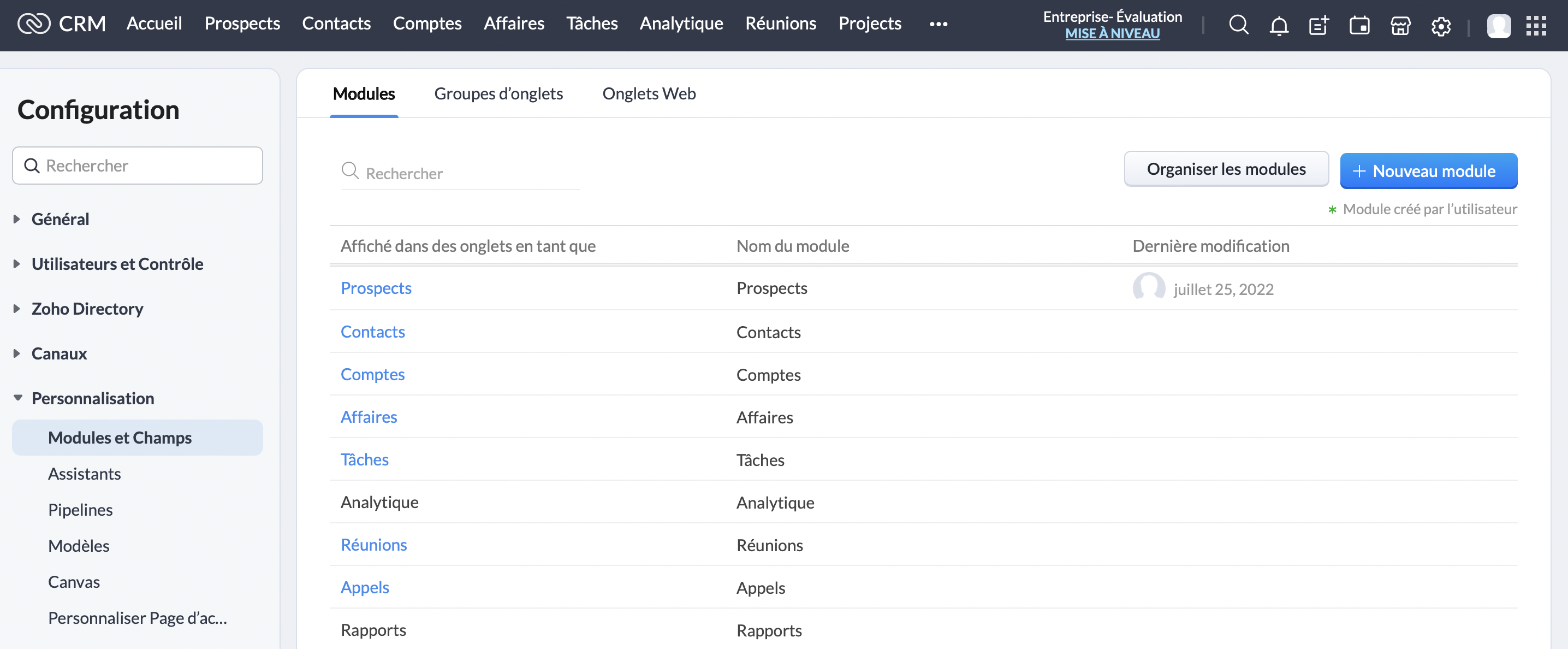
Cliquez sur le module "Prospects" :
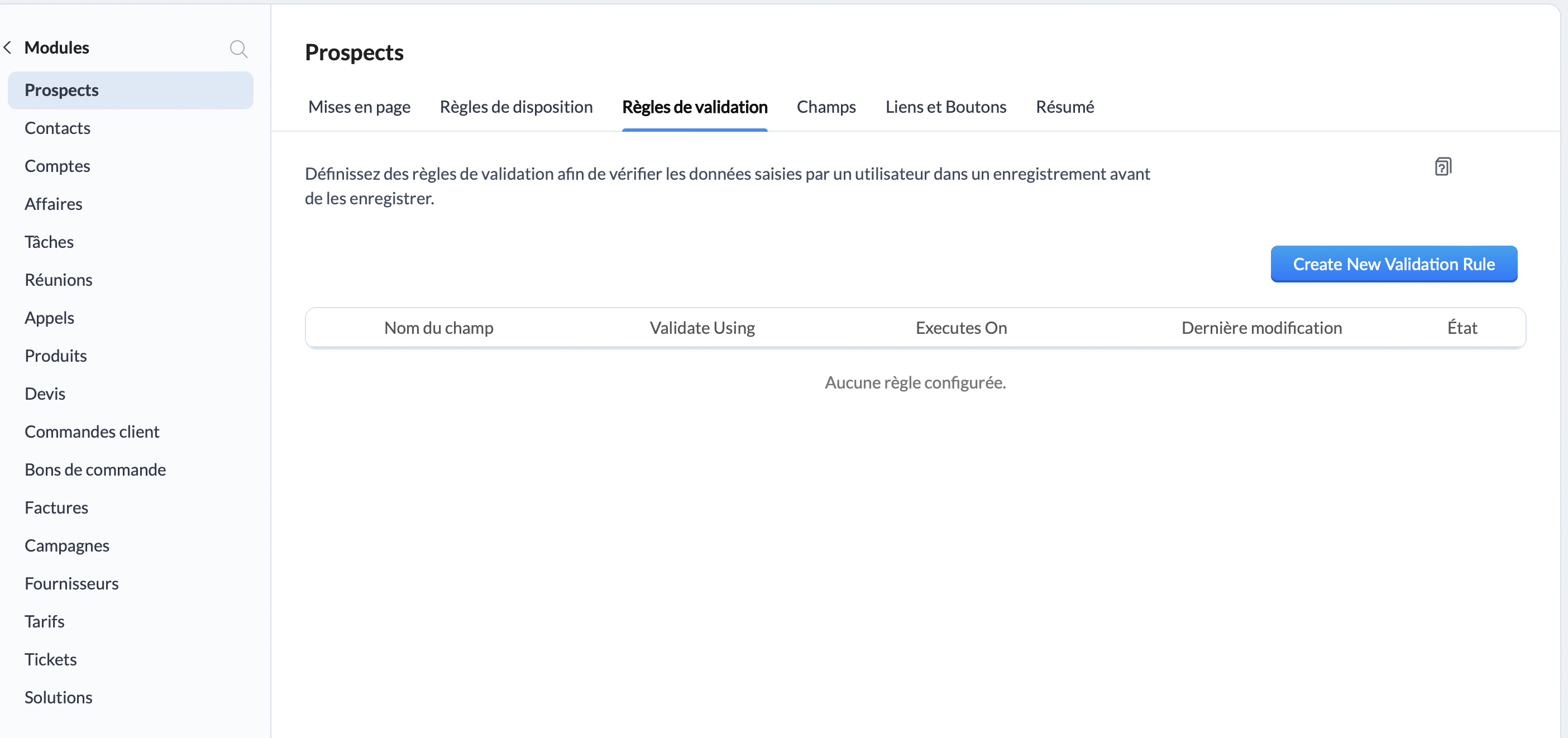
Une fois sur l'interface "Prospects", rendez-vous sur "Règles de validation", et cliquez sur le bouton "Create New Validation Rule" :
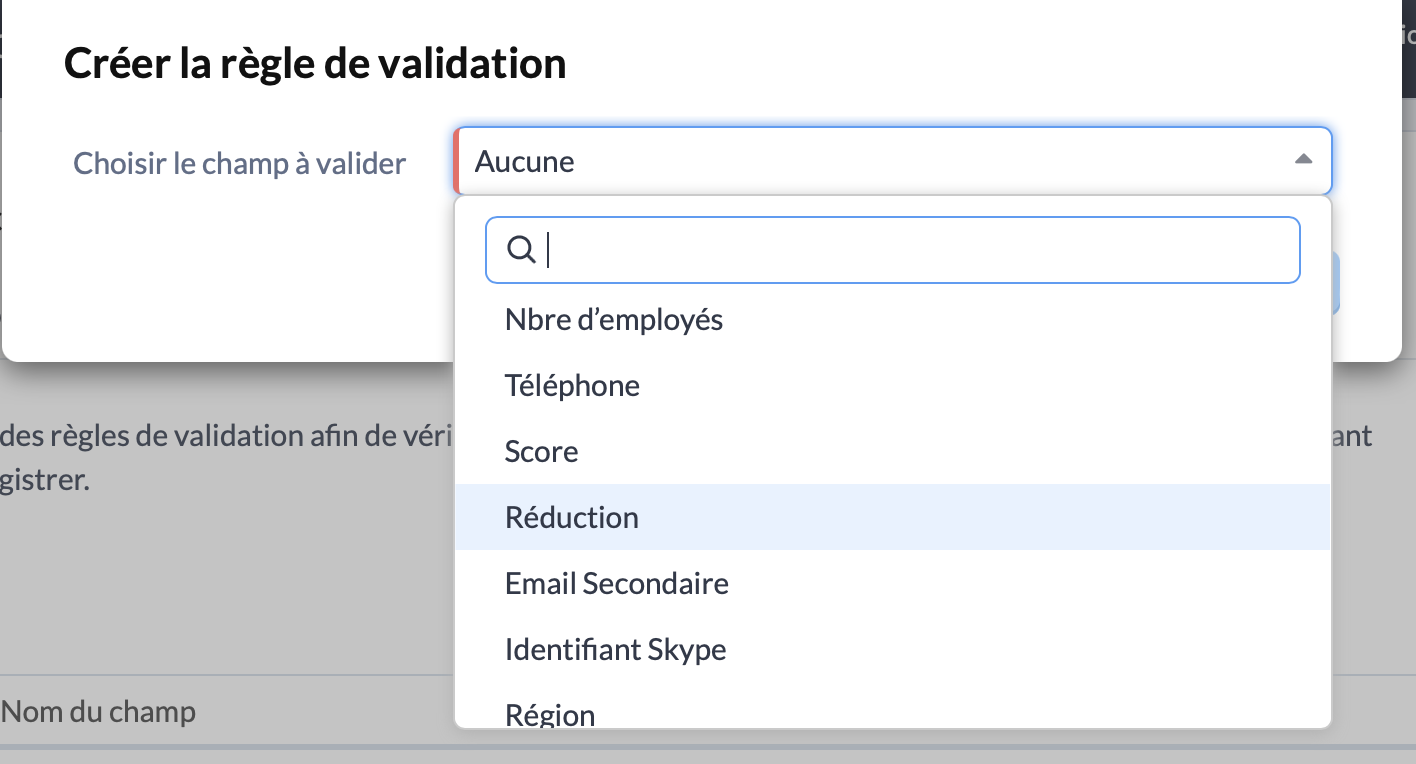
Une fenêtre va alors s'ouvrir, à travers laquelle vous allez pouvoir choisir le champs pour lequel vous souhaitez ajouter une règle de validation. Pour cet exemple, nous allons choisir "Réduction" :
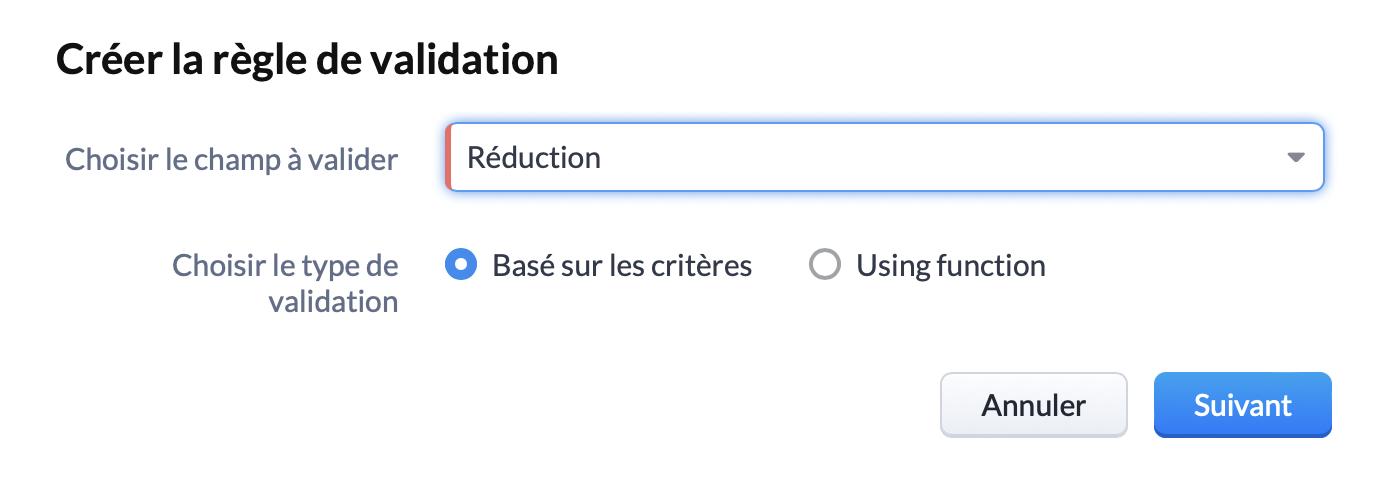
Choisissez le type de validation "Basé sur les critères" et cliquez sur "Suivant" :
Vous y êtes presque ! Vous voilà arrivé sur l'interface qui nous intéresse. Ici, vous pouvez spécifier le critère de validation. Pour rappel, pour notre exemple nous choisissons une limite de réduction de 25%. Nous allons donc sélectionner "Réduction, Supérieure >, 25."
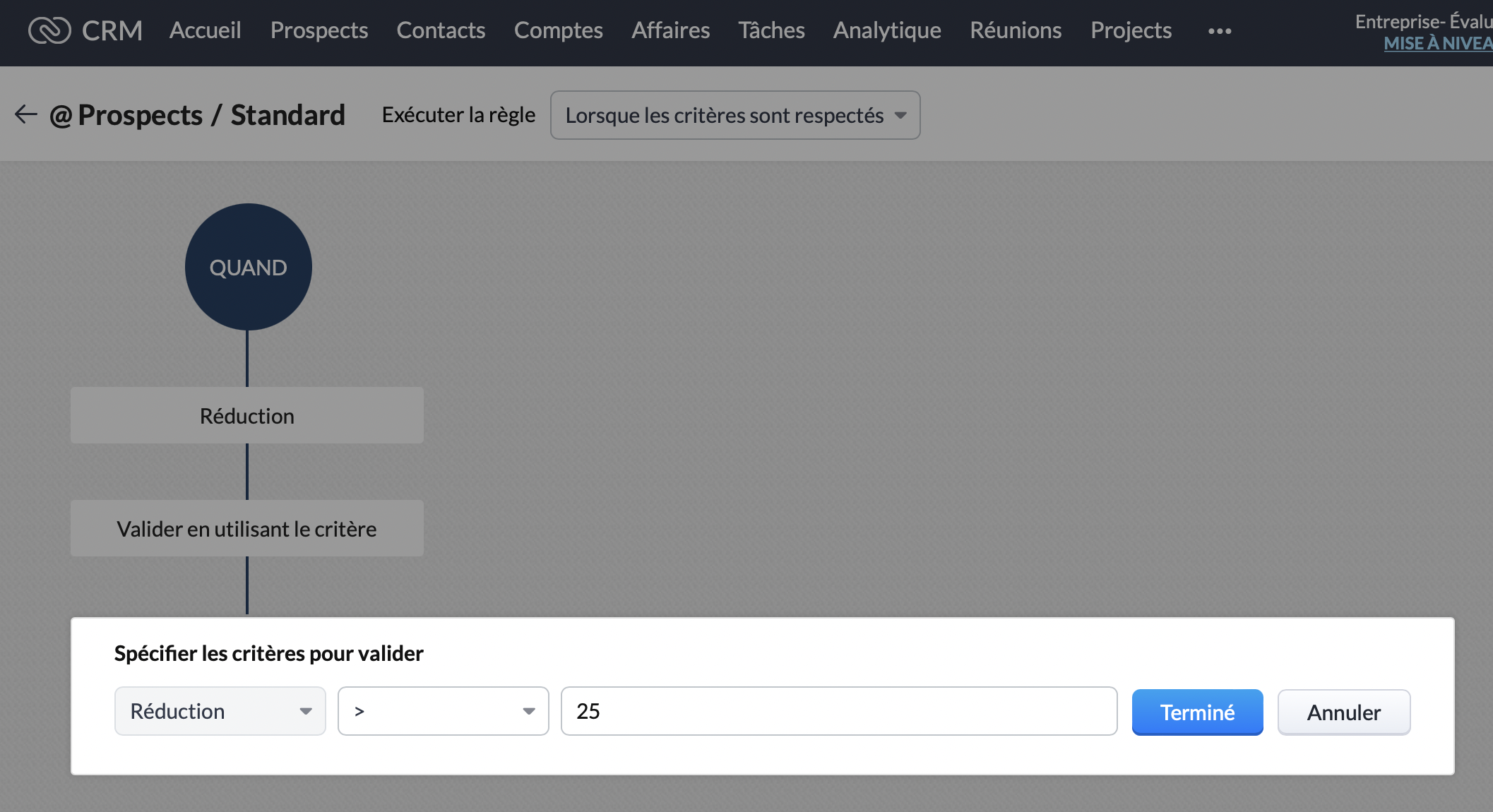
Ensuite, nous souhaitons que cette remise ne soit applicable que pour le marché Français. Dans le bloc "Cette règle sera appliquée pour tous les enregistrements", cliquez sur modifier :
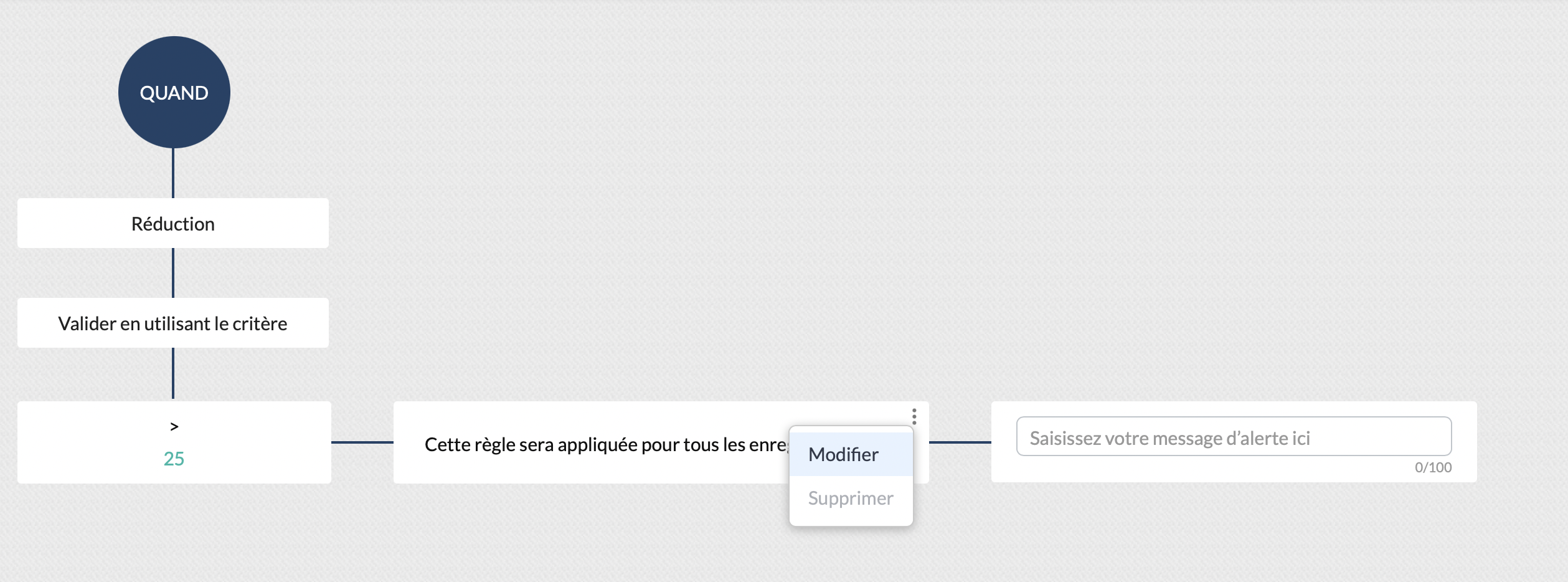
Vous pouvez ainsi sélectionner le critère "Pays, est, "France". Cliquez sur "Terminé" :
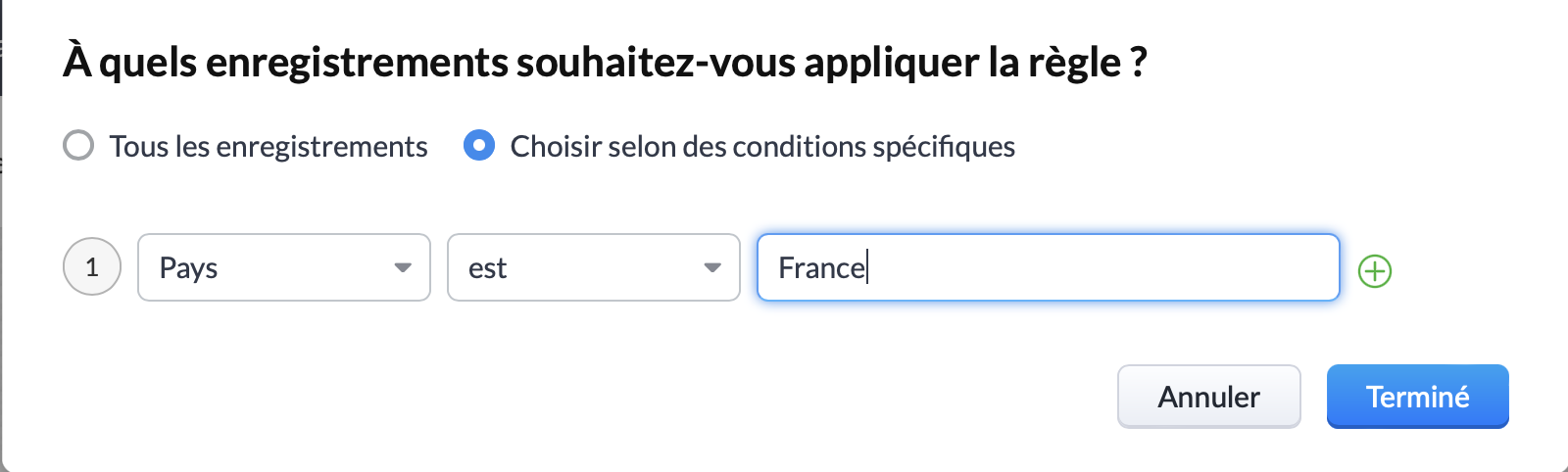
Vous pouvez ainsi constater que le critère de réduction est correctement appliqué, et qu'il s'applique bien pour la France. La prochaine et dernière étape consiste à rédiger le message qui sera affiché si l'un de vos collaborateurs dépasse ces critères :
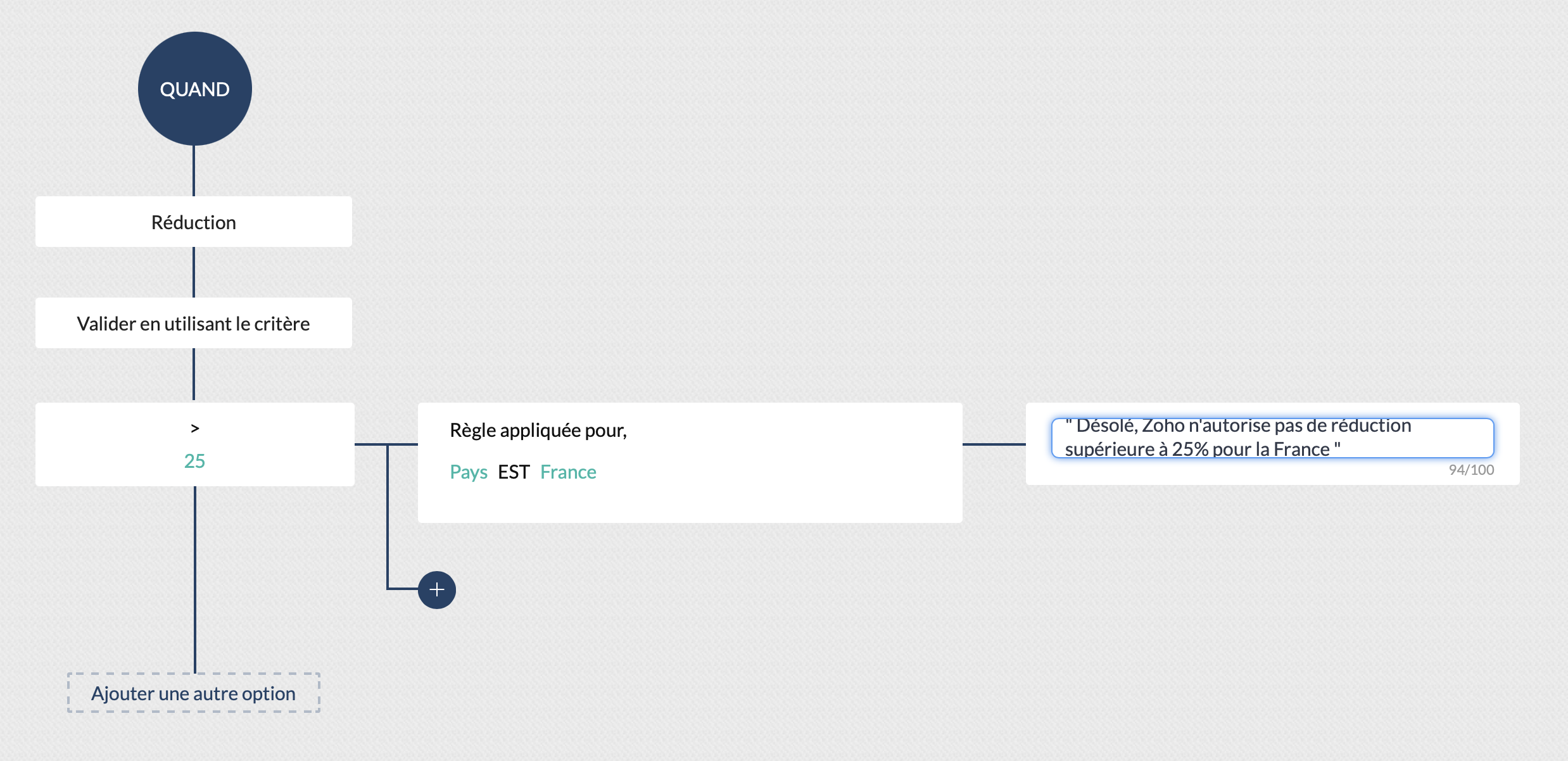
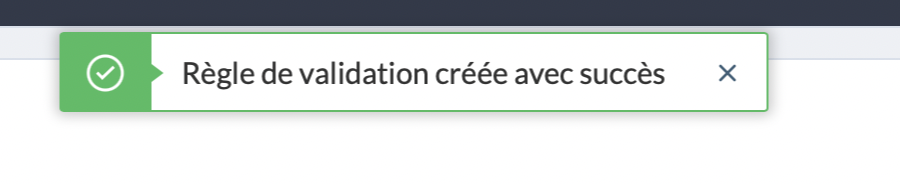
Cliquez sur "Valider" et... Félicitations ! Vous avez créé votre première règle de validation !
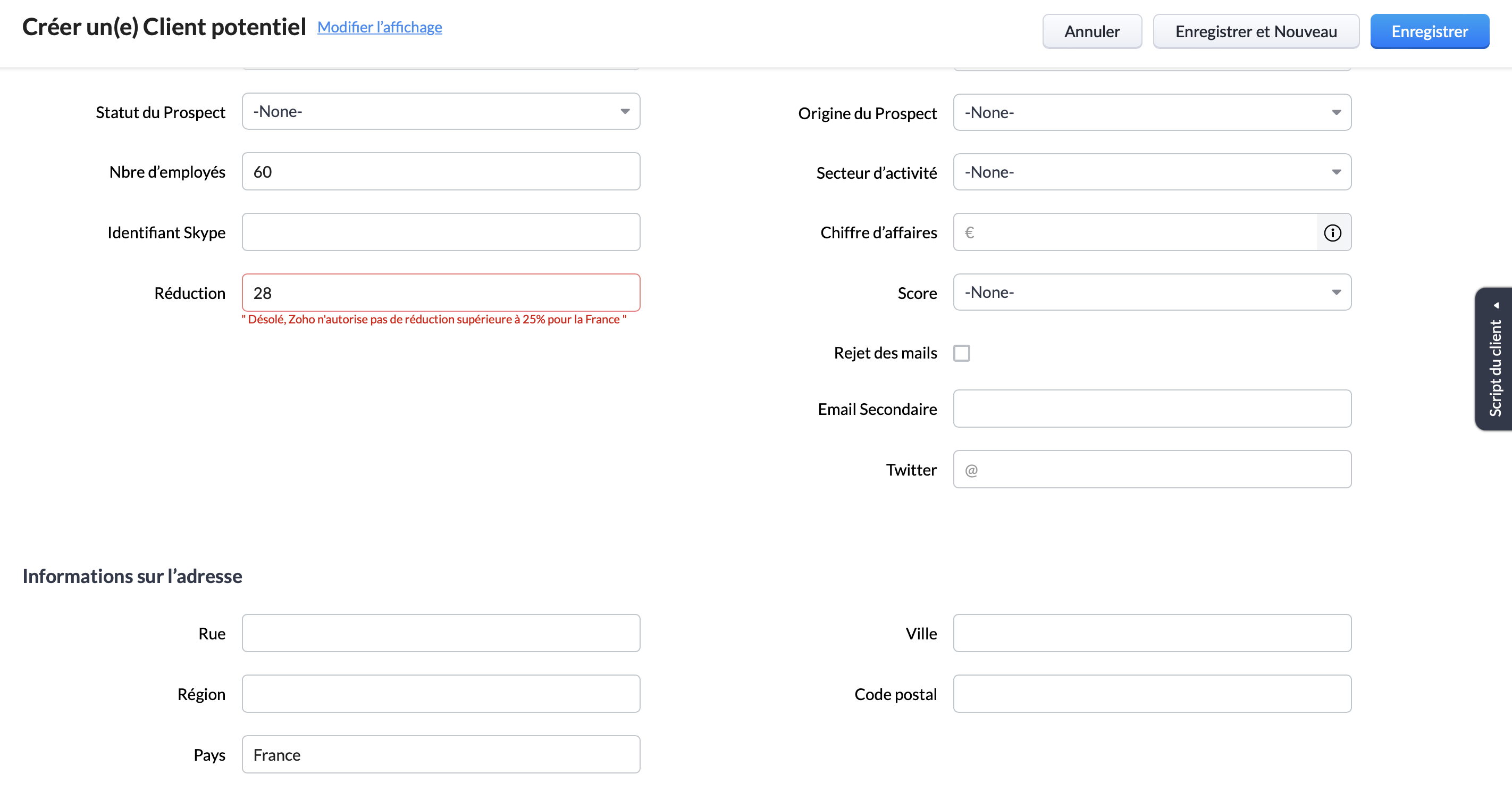
Pour s'assurer qu'elle est bien valide, vous pouvez créer un nouveau prospect remplissant la condition d'appartenir au marché Français, et tenter d'appliquer une réduction supérieure à 25%. Ici, nous pouvons voir le message d'erreur s'afficher, la règle de validation est donc bien appliquée :
Pour conclure, il est important de rappeler que bien que nous ayons choisi pour cet exemple les critères "pays" et "remise", les règles de validation peuvent être paramétrées pour tout type de critères. Par exemple : numéro de téléphone, nombre d'utilisateur, origine du prospect etc.
Vous pouvez ainsi vous assurer du respect de l'intégralité de vos processus, d'une manière totalement automatisée.
New to Zoho Recruit?
Zoho Campaigns Resources





Topic Participants
Antoine Perrault
Sticky Posts
CRM - Astuce #5 : Effectuer des actions en masses
Bonjour à tous, Au programme du jour : éviter les répétitions grâce à la fonction "en masse". Gagnez du temps sur ces actions simples pour vous concentrez sur votre entreprise. Allez dans le module concerné et cliquer sur les : (...) Suppression enZoho CRM - Il y a du nouveau chez les modèles d'e-mails
Bonjour à tous, Nous sommes ravis d'annoncer que les modèles d'email dans Zoho CRM sont désormais adaptés au design pour tous les ordinateurs et mobiles. Le responsive design désigne une méthode selon laquelle les pages sont conçues pour s'afficherNouveautés Zoho CRM : la page d'accueil et le tableau de bord actualisés !
Bonjour à tous, Nous avons apporté quelques améliorations à la page d'accueil des utilisateurs et à l'onglet Tableau de bord, en voici un aperçu. Des composants supplémentaires dans la page d'accueil pour les nouveaux inscrits : Dans l'onglet Accueil,CRM Blueprint #5: Glossaire
Bonjour à tous, Voici le dernier volet de notre série sur les Blueprints : un glossaire pour comprendre tous les termes nécessaire à l'automatisation de votre process. État : fait référence à chaque étape de votre processus. Par exemple : qualification,CRM : Ajoutez de la couleur à vos balises CRM
Bonjour à tous, Les tags sont des identifiants uniques qui peuvent être associés à différents enregistrements ce qui permet de rechercher, trier, catégoriser, filtrer et segmenter efficacement les enregistrements. Cette nouvelle amélioration a pour but
Zoho CRM Plus Resources
Zoho Books Resources
Zoho Subscriptions Resources
Zoho Projects Resources
Zoho Sprints Resources
Zoho Orchestly Resources
Zoho Creator Resources
Zoho WorkDrive Resources


Zoho CRM Resources
Get Started. Write Away!
Writer is a powerful online word processor, designed for collaborative work.
Zoho CRM コンテンツ
-
オンラインヘルプ
-
Webセミナー
-
機能活用動画
-
よくある質問
-
Ebook
-
-
Zoho Campaigns
- Zoho サービスのWebセミナー
その他のサービス コンテンツ
ご検討中の方
Recent Topics
CRM gets location smart with the all new Map View: visualize records, locate records within any radius, and more
Hello all, We've introduced a new way to work with location data in Zoho CRM: the Map View. Instead of scrolling through endless lists, your records now appear as pins on a map. Built on top of the all-new address field and powered by Mappls (MapMyIndia),PDF Annotation is here - Mark Up PDFs Your Way!
Reviewing PDFs just got a whole lot easier. You can now annotate PDFs directly in Zoho Notebook. Highlight important sections, add text, insert images, apply watermarks, and mark up documents in detail without leaving your notes. No app switching. NoBulk update Profile Permissions
Dears, What should we do if we add new forms or reports and need to update more than 20 permissions? Updating them one by one feels pretty harsh, doesn’t it?From Zoho CRM to Paper : Design & Print Data Directly using Canvas Print View
Hello Everyone, We are excited to announce a new addition to your Canvas in Zoho CRM - Print View. Canvas print view helps you transform your custom CRM layouts into print-ready documents, so you can bring your digital data to the physical world withUnify Overlapping Functionalities Across Zoho Products
Hi Zoho One Team, We would like to raise a concern about the current overlap of core functionalities across various Zoho applications. While Zoho offers a rich suite of tools, many applications include similar or identical features—such as shift management,Filter in fields from Jira extension
We have installed the Jira extension so we can maken Jira issues from Zoho desk. In Zoho desk I can also see the Jira issue status for example but I can not filter on this field. I would like to setup an filter showing me the closed Jira issues. How cantext length in list report mobile/tablet
Is there a way to make the full text of a text field appear in the list report on mobile and tablet? With custom layouts, the text is always truncated after a certain number of characters.Zoho Creator customer portal limitation | Zoho One
I'm asking you all for any feedback as to the logic or reasoning behind drastically limiting portal users when Zoho already meters based on number of records. I'm a single-seat, Zoho One Enterprise license holder. If my portal users are going to add records, wouldn't that increase revenue for Zoho as that is how Creator is monetized? Why limit my customer portal to only THREE external users when more users would equate to more records being entered into the database?!? (See help ticket reply below.)Link Contacts to Billed Accounts
Hello, I want to do a survey on all my customers of 2025. For that I want to select all contacts linked to accounts who where billed in 2025. How to I create this link to I can then use Zoho Survey with this database of contacts?Export all of our manuals from Zoho Learn in one go
Hi, I know there's a way to export manuals in Zoho Learn, but I want to export everything in one go so it won't take so long. I can't see a way to do this, can I get some assistance or is this a feature in the pipeline? Thanks, HannahBring Zoho Shifts Capabilities into Zoho People Shift Module
Hello Zoho People Product Team, After a deep review of the Zoho People Shift module and a direct comparison with Zoho Shifts, we would like to raise a feature request and serious concern regarding the current state of shift management in Zoho People.Historical Sales Info - Blend with Finance Invoice Line Items, Access in CRM and Desk
My company has been using Zoho One since 2021, with sales data going back through 2020. However, we have been in business much longer, and we have historical sales information that we want to have at our fingertips when talking with customers (usuallyPre-Zoho Sales Info - Best Way to Add to Desk / CRM
My company has been using Zoho One since 2021, with sales data going back through 2020. However, we have been in business much longer, and we have historical sales information that we want to have at our fingertips when talking with customers (usuallyShift-Centric View for Assigning and Managing Shifts in Zoho People
Hello Zoho People Product Team, Greetings and hope you are doing well. This feature request is related to Zoho People - please don't move it to zoho one! We would like to submit a feature request regarding the shift assignment and management view in ZohoCRM function REST API response format
Is there a way to control the JSON response returned by the CRM function REST API? If I call a function using either OAuth or an API key it returns a 200 OK response with a string in the format shown below. I am using a particular feature of an externalAdd Employee Availability Functionality to Zoho People Shift Module
Hello Zoho People Product Team, Greetings and hope you are doing well. We would like to submit a feature request to enhance the Zoho People Shift module by adding employee availability management, similar to the functionality available in Zoho Shifts.Using MPN across multiple SKUs and inventory tracking
I have several different SKU's that share a common MPN and would like to track inventory by MPN. SKU1 has MPN1 assigned SKU2 has MPN1 assigned Here is an example If I start with 5 of MPN 1 in stock I want each SKU1 and SKU2 to show as 5 in stock, If IUnable to Access Application:
Whenever I try to access my application from the desktop, say I am editing it and want to test something in the desktop environment I get: An error has occurred. An internal error has occurred. Please check the URL , or try refreshing the page I can editCannot see Application from Lookup field
Hi all, I am trying to access data for an application on our account via a lookup field; however, the application doesn't appear in the dropdown at all. Can anyone shed any light on this, please? I have asked Zoho support; however, they're just as confused,Cannot see correct DNS config for mail after moving domain to another provider
I have moved my domain from one provider to another and after that zoho mail stopped working (expected). Problem is, zoho mail admin panel still shows (10 hours after move) that all records are correct while I haven't changed anything in my domain DNSZoho CRM Meetings Module Issues
We have a use-case that is very common in today's world, but won't work in Zoho CRM. We have an SDR (Sales Development Rep) who makes many calls per day to Leads and Contacts, and schedules meetings for our primary Sales Reps. He does this by loggingZoho Books integration sync from Zoho CRM does not work
Hi Zoho Community & Zoho Support We just tried to get a sync some products into Zoho Books from CRM using the native sync and we're getting an error: "It looks like some mandatory fields you're trying to map are empty. Please provide valid field namesP & L Sub-categorized accounts
How can I show sub-categorized Income and Expense accounts on the P & L report?Report showing Bill Details with Project and Sales Invoice Number
Hi There, I am hoping that someone can help, I am looking for report that can show the bill and expense details along with project its as assigned to and the invoice number that the sales has been raised in. The goal is I can filter a customer/projectAdvanced Payment for Inventory Items with serial numbers
Hello, We sell equipment that we track the unique serial numbers on using Sales Orders. We can charge the customers an advanced payment, then the balance on delivery. We cannot figure out a way to do this in Books/Inventory: - Cannot part invoice a SOIs it possible to restrict ZCRM user to see only custom views created by administrator
I have segmented data in my CRM and I want to allow different users to be able to see only parts of it based on some criteria. I've tried to create and share a custom view, but then there is always an option for user to see all open lead for example.Issues Logging into ZOHO
Hello, one of my coworkers is having issues logging into ZOHO, she has requested a code when entering and the email is correct but she has not received the code. can you help us with this?Google Fonts Integration in Pagesense Popup Editor
Hello Zoho Pagesense Team, We hope you're doing well. We’d like to submit a feature request to enhance Zoho Pagesense’s popup editor with Google Fonts support. Current Limitation: Currently, Pagesense offers a limited set of default fonts. Google FontsAdd Popup Rejection Metrics to Reports
Hello Zoho PageSense Team, We would like to request improved reporting for popup interactions. Current Limitation: PageSense currently provides conversion data, but there is no clear visibility into: Popup rejections Popup closes (✕ button clicks) DismissalsAbility to Reset / Reinitialize Popup Cookies
Hello Zoho PageSense Team, We would like to request the ability to manually reset popup cookies. Current Limitation: At the moment, it is not possible to initiate a new popup cookie from the our side. Visitors who rejected or closed a popup will not seeControl Popup Cookie Expiration Duration
Hello Zoho PageSense Team, We would like to request an enhancement related to popup cookie management. Current Limitation: Currently, PageSense popup cookies remain active for 365 days, and this duration cannot be modified by us. If a visitor closes orClone / Export Popup Design Across PageSense Projects
Hello Zoho PageSense Team, We hope you’re doing well. We would like to request an enhancement that allows popup designs to be reused across different PageSense projects. Problem Statement: Currently, Zoho PageSense allows popups to be duplicated onlyAre there settings for hyperlinks?
Clicking a hyperlinked cell in Sheet creates this little pop-up with the actual hyperlink inside. Is it possible to have a 1-click link where if you click the cell it opens the link directly with no pop-up?Automatically include all ticket attachments in the ticket resolution email
Hello Zoho Community, We are implementing Zoho Desk in a real customer-facing production environment and have run into a limitation that is becoming a blocking requirement for our clients. The problem When a ticket is closed or resolved, Zoho Desk sendsFinding text within a ticket: Expand All or Search this Ticket
The auto-collapse feature within a ticket is nice for screen scrolling, however it makes it difficult to find text within the ticket if the email is collapsed. In fact you cannot find text if it is collapsed. I would like to propose a feature that allowsBooks & Desk. Client mapping
Hi, I’ve been using Zoho Books for several years and am now looking to improve my customer service. I'm experimenting with Zoho Desk and want to sync and map my client data from Zoho Books. However, it seems that mapping requires both contacts to haveZoho Creator to Zoho CRM Images
Right now, I am trying to setup a Notes form within Zoho Creator. This Notes will note the Note section under Accounts > Selected Account. Right now, I use Zoho Flow to push the notes and it works just fine, with text only. Images do not get sent (thereString handling
If I cut a currency string from a quote and try and paste it into the Deal "Amount", it will fail unless I manually delete any commas. Dollar signs are no problem, but comma's seem to fail. Please correct this Input Validation error.What's new in Zoho Sheet: Simplify data entry and collaboration
Hello, Zoho Sheet community! Last year, our team was focused on research and development so we could deliver updates that enhance your spreadsheet experience. This year, we’re excited to deliver those enhancements—but we'll be rolling them out incrementallyWebDAV / FTP / SFTP protocols for syncing
I believe the Zoho for Desktop app is built using a proprietary protocol. For the growing number of people using services such as odrive to sync multiple accounts from various providers (Google, Dropbox, Box, OneDrive, etc.) it would be really helpfulNext Page