CRM gets location smart with the all new Map View: visualize records, locate records within any radius, and more
Hello all,
We've introduced a new way to work with location data in Zoho CRM: the Map View. Instead of scrolling through endless lists, your records now appear as pins on a map.
Built on top of the all-new address field and powered by Mappls (MapMyIndia), the Map View turns your records into an interactive map for smarter planning, faster visits, and better field execution.
Why Map View?
Until now, even if addresses were stored in Zoho CRM, users had to search through lists manually or run broad filters to find location insights. There was no quick way to spot nearby leads, contacts, or other opportunities while traveling, or to plan visits efficiently.
Map View solves this by plotting records on an interactive map based on the coordinates available in the address field. You can zoom in, filter for records within a radius, sort by distance, and launch navigation—all without leaving the module.
You can enable Map View via Setup > Modules and Fields > Preferences.
Once enabled, Map View appears in the module's view selector.
What will this update offer?
1. Create, plot, and manage records with geographic coordinates
Map View plots every record with coordinates as a pin on the map. A quick glance shows you exactly where your customers, leads, or deals are.
Records without coordinates appear in the left pane, ready for updates.
You can add or correct coordinates in multiple ways, each designed to save time and improve accuracy:
- Type with auto-suggestions
Start entering an address and select from the suggestions provided. The system captures the complete address along with the coordinates in your address field, reducing the occurrence of typos and misplaced pins. - Drop a pin on the map
In cases when the exact address is unclear or unavailable, you can mark the correct spot directly, ensuring the record reflects the actual location without manual entry. - Import pre-mapped data
When large sets of records already contain latitude and longitude, importing them ensures pins are placed correctly at scale, avoiding the need for future manual updates. - Update through APIs
Integrations can keep coordinates in sync with external systems. This prevents mismatches and ensures map data remains reliable over time.
You can also move a pin to update only the geo-coordinates instead of the entire address.
These controls keep both the visual map and the address field aligned, and reduce the need for users to manually rearrange pins later.
2. Apply nearby filters and sort by distance
Custom views and smart filters now include a "nearby" condition that helps narrow down records based on proximity. You can instantly focus on the records that matter most.
Simply choose your reference location and then set a radius (preset or custom).
You can choose the reference point in different ways:
- Current device location
Use your live position to see which records are closest while you're on the move—say, when you're traveling between meetings and client visits. This makes it easy to fit in additional visits without backtracking. - Typed address
Enter a specific location to filter around. This is useful for planning ahead from the office or targeting records near a branch, warehouse, or event venue. - Point on the map
Select any location directly on the map and set a radius. This provides flexibility in targeting areas without formal street addresses, like localities or industrial zones.
When a nearby filter is applied, a radius circle appears on the map, and a distance column is added in the list view. You can also choose to display this distance on map pin cards. These details help prioritize visits, deliveries, or follow-ups based on how far records are from your chosen point.
3. Customize the view for quick decisions
You can decide which fields are shown both in the left pane and on the map pins. This ensures the most useful information is always visible at a glance.
- Left pane highlights
Along with the primary field, you can choose two additional fields. This makes it easier to scan records in the list to spot deal value, industry, or upcoming activities without opening each record. - Map pin card details
Each pin can display one field from the layout. Showing a critical value directly on the map—such as deal size—helps you decide which locations to prioritize during a route. - Clustering records at the same address
If you have multiple records at the same address—like clients from the same company or businesses located at the same IT park—they'll be clustered into a single pin. Upon clicking on the clustered pin, you can see the list of available contacts (or records).
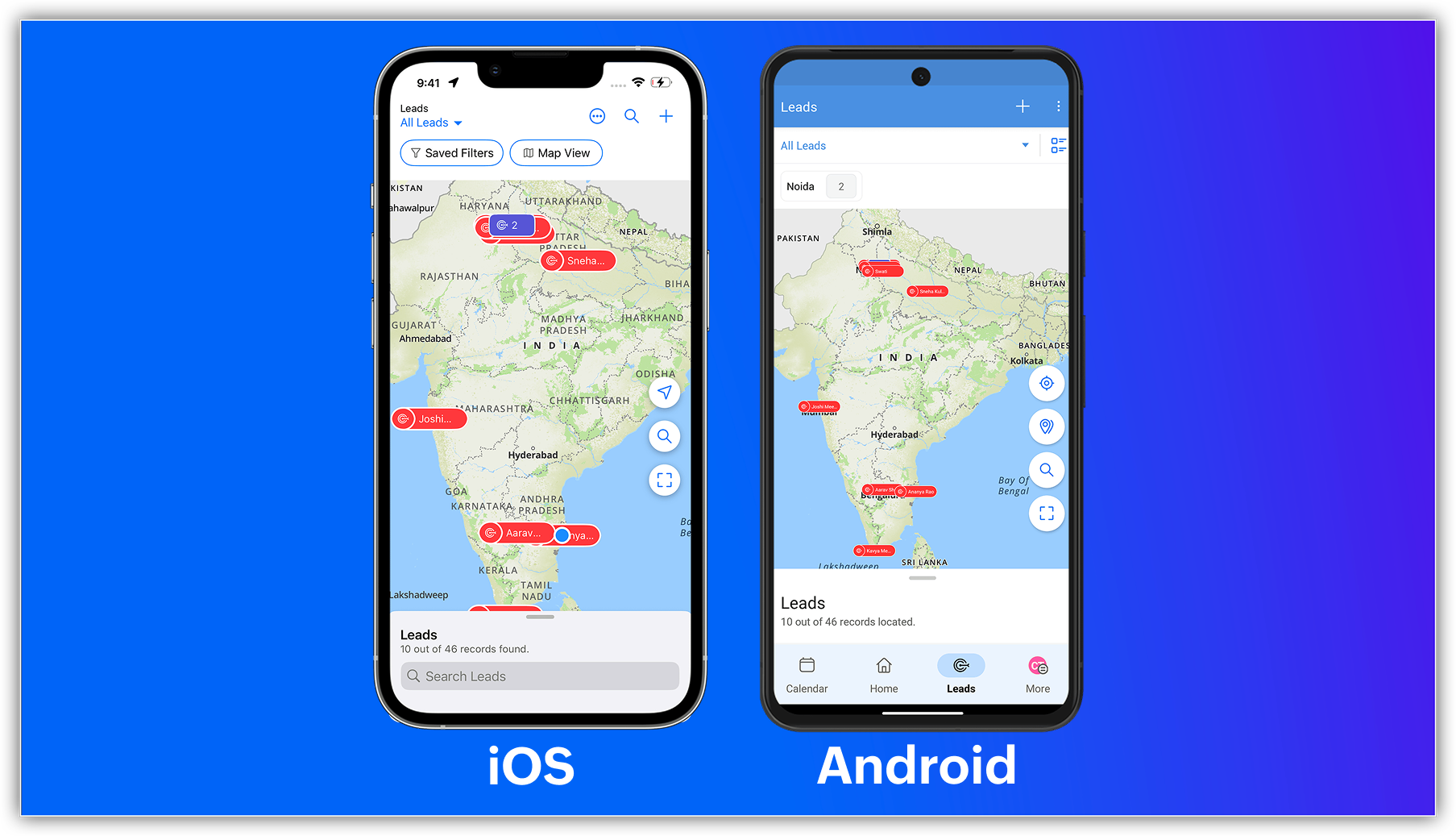
New map view in mobile apps
The capabilities of Zoho CRM's all-new address field and map view aren't just limited to your web app; they're now supported in the mobile app as well.
Previously, you could use the Near Me mobile feature in the map view, which uses Google Maps (Android and iOS) or Apple Maps (iOS) to show records within a 100 KM radius of your current location or a custom location.
With the latest enhancements, you can now access the Mappls-powered map view in Zoho CRM's mobile app. Simply enable the map view and address suggestions for the address field in the web app, and turn on the in-app map view from the app's map settings.
Once enabled, you can:
- View your record's location as a pin on the map.
- Group pins (available for Android).
- See location suggestions while searching.

Feature availability and limits
- Editions supported: All paid editions.
- Modules supported: Any module with at least one address field.
- Availability: Only the IN DC.

Resources: Help Documentation (CRM New UI)
 P.S. Map View is currently available for users in the IN DC.