Export data using advanced export options and customizable settings

Export data using advanced export options and customizable settings

Hello everyone,

The user interface for exporting data has been revamped with updates to make data exports more flexible and efficient for users. 

These updates not only enhance usability but also bring advanced capabilities to help users extract precise data effortlessly. Whether analyzing ticket trends, migrating to another platform, or creating backups, these enhancements simplify the export process for greater efficiency.


What’s new in the revamped export page?

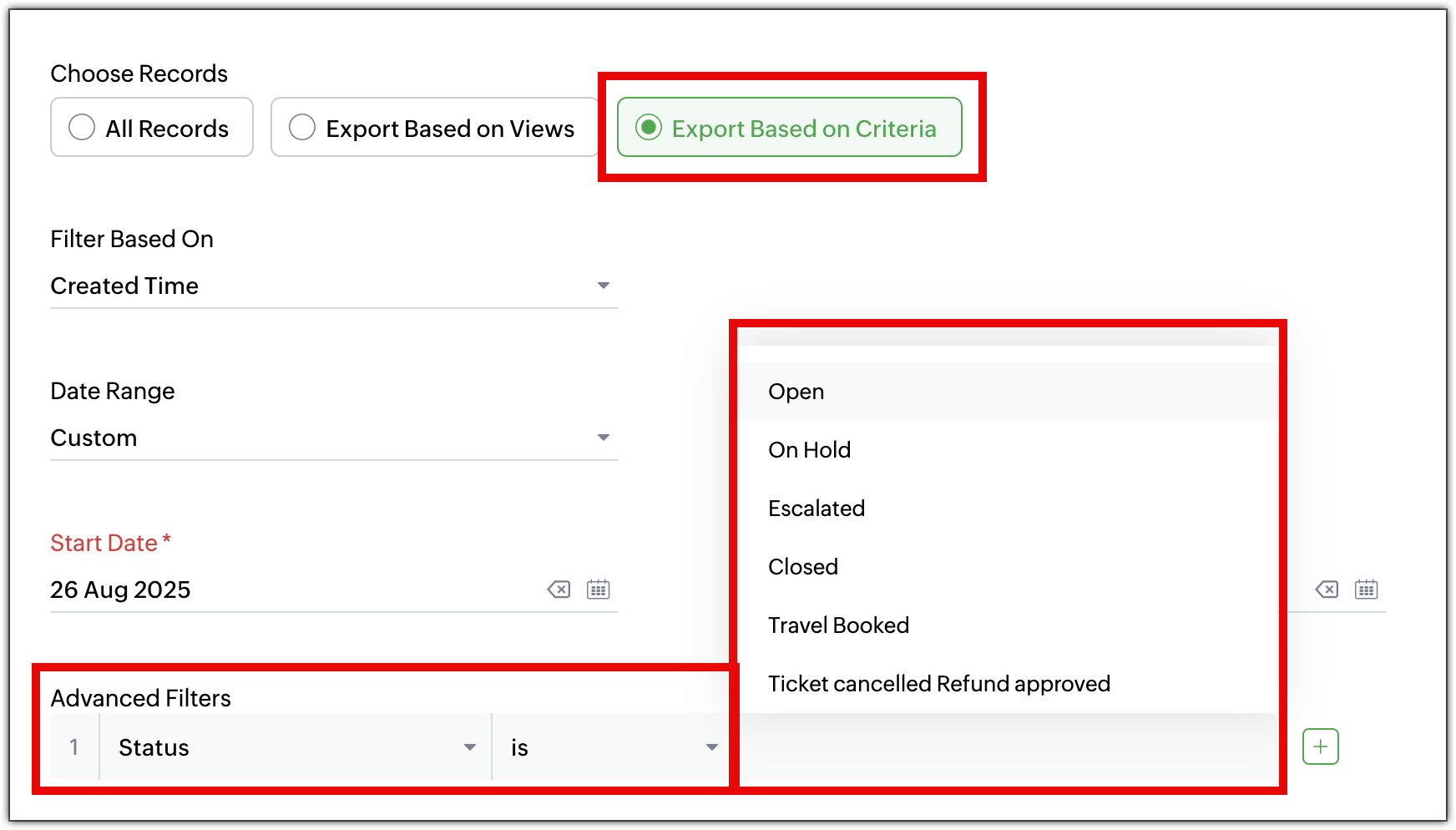
  1. Export records based on criteria
    Previously, users were able to export all records within a module. Now, they can export specific records by defining the criteria. For instance, users can export: 
    1. The list of agents added last month
    2. Tickets from the last month that were marked high priority.
  2. Select fields to export
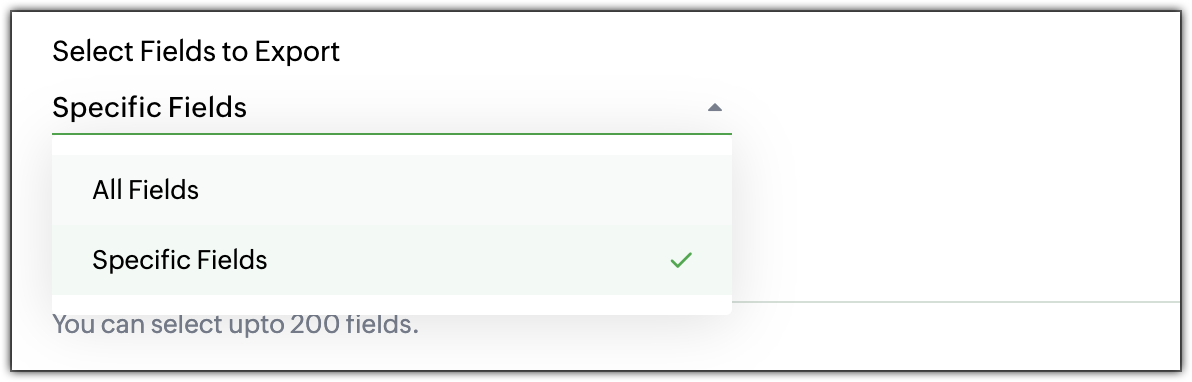
    Users no longer have to export all fields. They can choose specific fields to export, giving them complete control over the data. They can select: 
    1. All Fields: Export all available fields.
    2. Specific Fields: Select only the fields that are needed, including fields from multiple layouts.
  3. Time frame and date range options
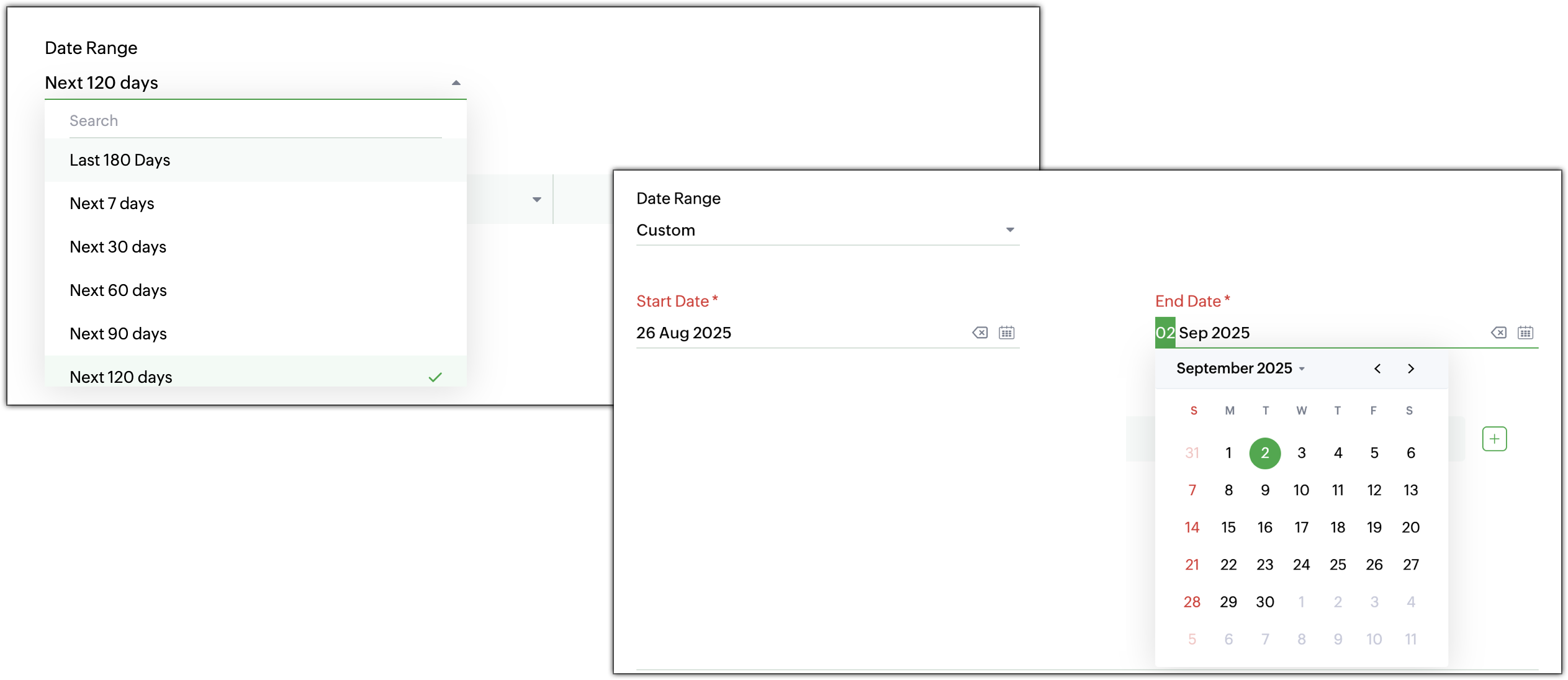
    When exporting data, users can specify a time frame from where the records are needed.
    1. Time-based filters: Choose records based on created time, modified time, closed time, or completed time.
    2. Custom or predefined date range: Select a specific date range or pick from predefined options for faster filtering. For example, users can export all high-priority tickets closed in the last 30 days.

  4. Increased export record limit
    The export record limit has been increased from 3,000 to 50,000 records per export. Need to export more records at a time? Use Zoho Desk’s Data Backup to retrieve the complete dataset.
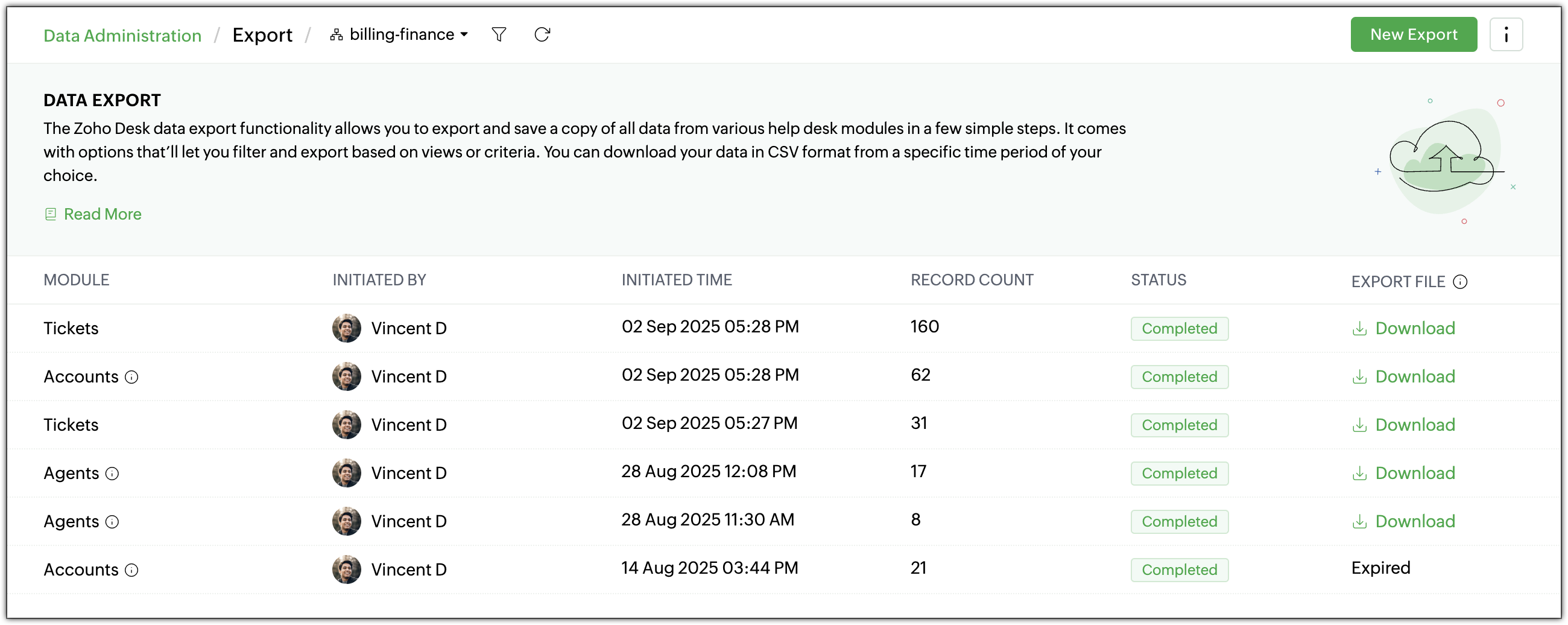
  5. Redesigned export history page
    The Export History page has undergone a complete makeover for a cleaner, more intuitive look and feel. View details such as record count, export time, and download links in a tabular form at a glance.
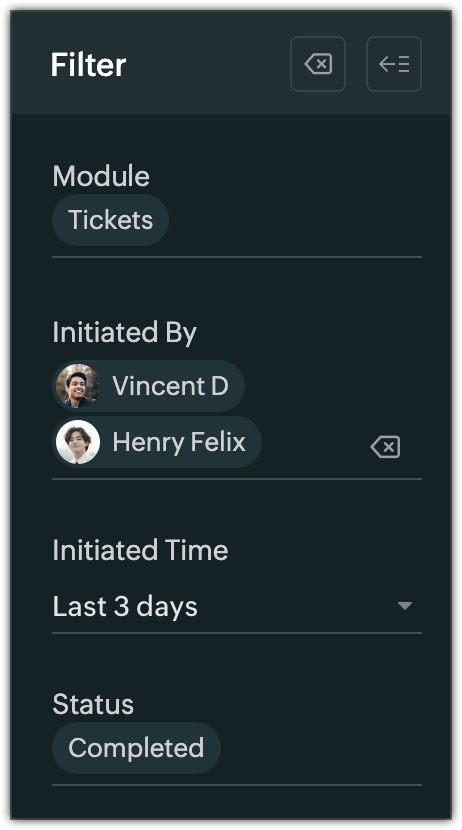
  6. Filters for export history
    Quickly find previous exports with new filters based on:
    1. Module
    2. Initiated By
    3. Initiated Time
    4. Status (In Progress, Completed, or Failed)
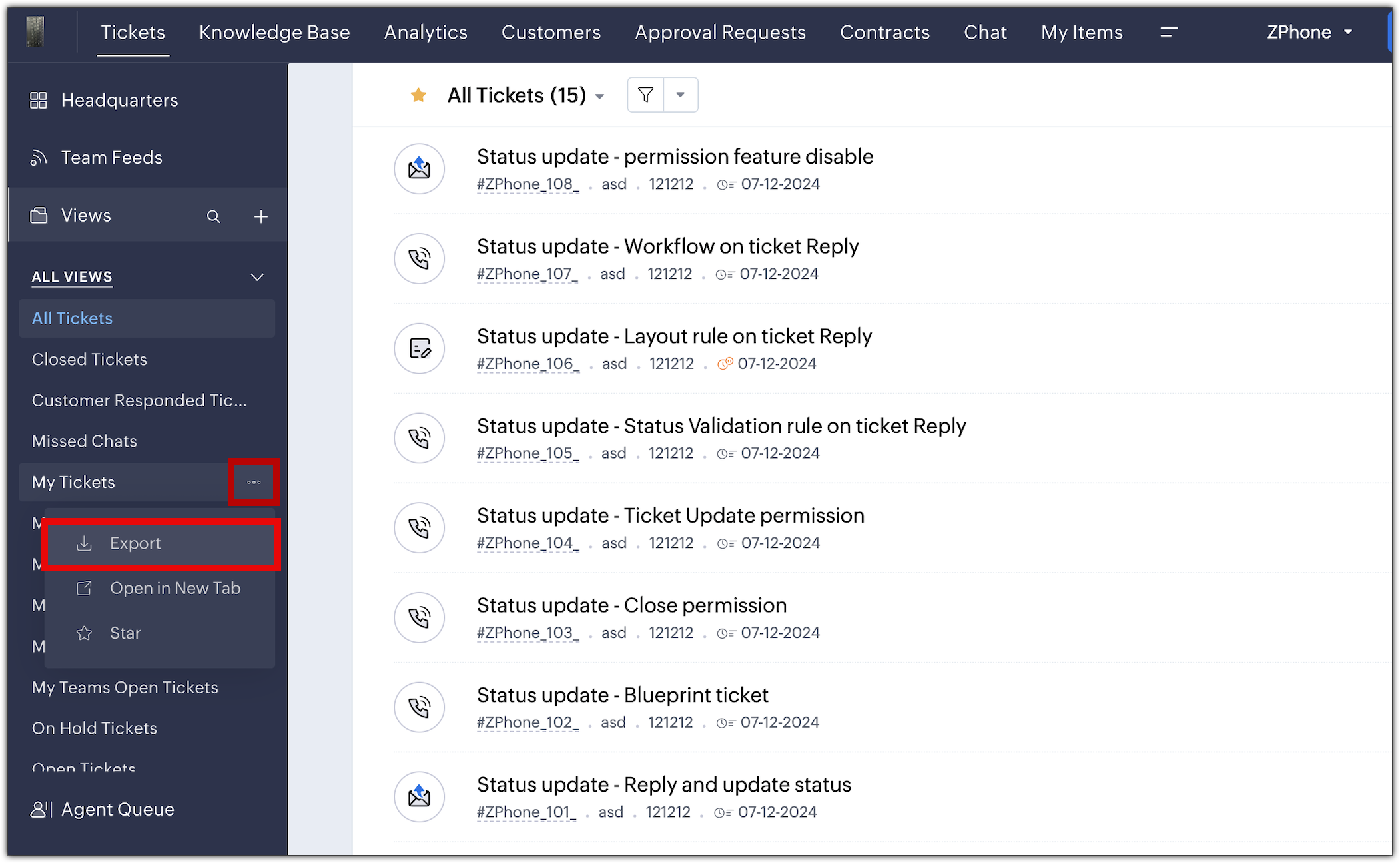
  7. Export standard and custom list views
    Export View lets users export specific record sets directly from a module’s list view, there's no need to export the entire dataset or apply filters manually. Both standard and custom list views can be exported. For example, a support manager can export the “Overdue Tickets” view for a team review, without reapplying filters or reformatting data.
The new export UI is available in all data centers. For more details, please refer to the help doc.

PM: @Nivedhan Senthilkumar 

Regards,
Velantina V
User Ed | Zoho Desk

      Zoho Campaigns Resources


        • Desk Community Learning Series


        • Digest


        • Functions


        • Meetups


        • Kbase


        • Resources


        • Glossary


        • Desk Marketplace


        • MVP Corner


        • Word of the Day


        • Ask the Experts


          • Sticky Posts

          • 2024 Email Authentication Standards: Elevating Security with Google and Yahoo

            In contemporary email communication, email authentication plays a pivotal role in mitigating email fraud, spam, and phishing attacks. Brace yourself for a new level of security. Starting February 2024, Gmail and Yahoo will be implementing robust email
          • Using Agent Email Address as From Address

            Currently, while replying to a ticket, it is possible for agents to choose their own email addresses as 'from' addresses. Although we built this just for that little extra flexibility, in hindsight, it hasn't figured much in conventional usage.  Almost all businesses prefer that responses to their customers' tickets be sent from the common support/service email address and NOT from those of individual agents. During personal interactions at events, some of you have even made passing mentions about
          • Edit and Delete options in Comments

            A lot of teams have been using ticket comments extensively to collaborate everyday. Notification Center further improved this experience by bringing real-time updates. As we continue to build more improvements to this experience, we've shipped a small-yet-important
          • Webinar 2: Supercharged customer support for growing business

            Join us for this webinar and learn how to step up your support game using a real-time communication platform to generate happier, more successful customers. In this live webinar, we will will discuss the importance of SalesIQ for your support team and how it can help you:  Understand your customers better and their journeys to proactively support and engage them even before they ask for help.  Integrating real time conversations into Zoho Desk’s Support, providing a conversational customer service
          • Customize Colors of your Customer Self Service Portal

            You asked for it. We heard you. We're happy to roll out the most sought after feature request, Customizing the Colors of your Customer Self-service Portal. Now you can set the color of your customer portal to mimic your company's web site, so that your customers visiting the portal will not feel alienated by the default theme.  Go ahead and configure the color of the header, tabs, fonts and background according to your needs. You can either choose between default color themes like Blue, Grey, Green

          Zoho CRM Plus Resources

            Zoho Books Resources


              Zoho Subscriptions Resources

                Zoho Projects Resources


                  Zoho Sprints Resources


                    Zoho Orchestly Resources


                      Zoho Creator Resources


                        Zoho WorkDrive Resources


                          Zoho CRM Resources

                          • CRM Community Learning Series

                            CRM Community Learning Series


                          • Tips

                            Tips

                          • Functions

                            Functions

                          • Meetups

                            Meetups

                          • Kbase

                            Kbase

                          • Resources

                            Resources

                          • Digest

                            Digest

                          • CRM Marketplace

                            CRM Marketplace

                          • MVP Corner

                            MVP Corner


                            Zoho Writer Writer

                            Get Started. Write Away!

                            Writer is a powerful online word processor, designed for collaborative work.

                              Zoho CRM コンテンツ


                                ご検討中の方

                                  • Recent Topics

                                  • Related list Mobile Device

                                    Hello, We use an the Zoho creator application to make reports linked to Accounts. On the computer: it's easy to go the Account and see all the created reports in the related list below On iPad/Phone ZOHO CRM APP: we cannot see the reports on those accounts
                                  • Zoho Quartz Screen Recording

                                    Hello, can we get access to Quartz, please, as a standalone solution? It would be great for creating training videos for current and future staff on how to use Zoho software according to our company requirements. Thank you
                                  • auto close automated alert tickets which are similar

                                    Hello ZOHO Community, we are using ZOHO Desk to process automated monitoring alerts. Scenario: Our monitoring system creates a ticket when a threshold is exceeded, e.g. Subject: Computer 1 – CPU usage 100% – Error A few minutes later, once the issue resolves
                                  • Maintain knowledge base integrity by moderating article comments

                                    Hello everyone, A knowledge base provides a self-service platform where customers can refer to articles, user manuals, and other resources to learn about the company's products or services and troubleshoot problems. Often, readers leave a comment on the
                                  • Making another calendar your default calendar

                                    I am trying to make another calendar my default calendar when I add events to it. It keep going to a single calendar, I need it to go to my google calendar by default, as this is linked to other services / websites. I cannot find an option to make it
                                  • Customer ticket creation via Microsoft Teams

                                    Hi all, I'm looking to see if someone could point me in the right direction. I'd love to make it so my customers/ end users can make tickets, see responses and respond within microsoft teams. As Admin and an Agent i've installed the zoho assist app within
                                  • Option to Delete Chats in IM

                                    Currently, there is no option to delete any chats in IM, regardless of their source.
                                  • Restrict Users access to login into CRM?

                                    I’m wanting my employees to be able to utilize the Zoho CRM Lookup field within Zoho Forms. For them to use lookup field in Zoho Forms it is my understanding that they need to be licensed for Forms and the CRM. However, I don’t want them to be able to
                                  • Shifts in Zoho People vs Zoho Shifts?

                                    Hello Zoho People Team, We hope you are doing well. We are evaluating the Shifts functionality within Zoho People and comparing it to the standalone Zoho Shifts product. We’ve encountered comments and discussions suggesting that the Shifts feature inside
                                  • Referencing a cell from another sheet

                                    My workbook has multiple sheets. Each sheet has some calcluated totals in certain cells. The front master sheet has a list of everything that is detailed on the other sheets, with the totals. These could change at any time, so the totals need to be references to the other cell's value, not a fixed number. So on the master sheet, I put in =, then go the other sheet and choose the cell and hit Enter. In regular Excel, this works. But in the Zoho sheet, it doesn't work. I have to edit the result by
                                  • Group mail for external email addresses

                                    Hello, I was just wondering if the Group mail feature works with external email addresses - e.g. gmail.com or a completely different domain? it seems only internal addresses (hosted with Zoho) receive the mail. Thanks, Oliver
                                  • Is Zoho Shifts included in the Zoho One plan?

                                    In case the answer is no: there's any plan to make it available via One? Thank you
                                  • Marketing Automation Requirements Questions

                                    I would like to set up a multi-email drip campaign- please see the structure below and confirm if I can achieve this set up in Zoho marketing automation. Where applicable, highlight gaps and workarounds. Thanks Drip email campaign- Can I create one drip
                                  • The email address you have entered belongs to a different deployment/region.

                                    Hi, I am trying to create the user - mprust@crombiecomputers.co.uk but keep getting the message below -  The email address you have entered belongs to a different deployment/region. Please contact support@zohoaccounts.com for assistance. Look forward
                                  • Use Zoho Flow Credits for CRM ‘Actions by Zoho Flow’

                                    Hello Team, We would like to submit a feature request regarding credit usage for “Actions by Zoho Flow” in Zoho CRM. Use Case: We are Zoho One users and actively use Zoho Flow, where our organization has 52,000 Flow tasks per month. In Zoho CRM, we use
                                  • Unusual activity detected from this IP. Please try again after some time.

                                    Hello Zoho admin and IT team We are a registered website in Eloctronic services and we been trying to add our users to the zoho system but this issue faced us ,, hope you unlocked us please.
                                  • Alert if a field is ticked.

                                    Hi There, We have two modules named Opportunities (Deals) and End Users (CustomModule1), as per the image below. Within Opportunities, we have a lookup field that looks up from the End Users Module. We are looking to get an alert either via email or another
                                  • CRM x WorkDrive: We're rolling out the WorkDrive-powered file storage experience for existing users

                                    Release plan: Gradual rollout to customers without file storage add-ons, in this order: 1. Standalone CRM 2. CRM Plus and Zoho One DCs: All | Editions: All Available now for: - Standalone CRM accounts in Free and Standard editions without file storage
                                  • Syncing with Google calendar, Tasks and Events

                                    Is it possible to sync Zoho CRM calendar, task and events with Google Calendar's tasks and events. With the increasing adoption by many major tool suppliers to sync seamlessly with Google's offerings (for instance I use the excellent Any.do task planning
                                  • Zoho CRM Analytics - Allow To Reorder Dashboards

                                    I would like to suggest that you add the ability to reorder dashboards in the Analytics Module. I can see that this has been requested some time ago, the latest 9 years ago. I am not sure if this is a big or small endeavor, but such a small fix can go
                                  • Plans to allow more columns of monitoring, and monitoring not only your own channels?

                                    Are their any plans to allow more columns of monitoring, and monitoring not only your own channels? Here's why - I'm sure I'm not alone in that we sell other brands products, so not only am I interested in my own brand social channels, but also the social
                                  • Managing functions

                                    Can someone let me know if there are any plans to improve the features for managing functions in CRM? I have lots of functions and finding them is hard. The search only works on the function name and the filter only works on function type. I have created
                                  • Kaizen #194 : Trigger Client Script via Custom buttons

                                    Hello everyone! Welcome back to another interesting and useful Kaizen post. We know that Client Scripts can be triggered with Canvas buttons and we discussed this with a use case in Kaizen#180. Today, let us discuss how to trigger Client Script when a
                                  • Adding Choices in a Sub-Form Dropdown

                                    Hi, Has anybody tried Adding Choices to a Dropdown in a Zoho Creator Sub-Form programmatically? My Deluge code adds rows to a subform with 2 fields A and B. A - text field. B - dropdown. My Deluge script adds the row and displays A successfully. For the
                                  • Zoho CRM Email Templates 100% Width No Background How?

                                    Hi, On the Zoho CRM Email Templates in setup > customization > templates > new templates > I choose blank template, but still it puts in a gray background and a max width for the email. I just want to make an email that looks like an email I would send from gmail that has no background or max width. How do you do this? 
                                  • Checking client unsubscribe details

                                    Hi team, Can you please let me know where we can check if a client has unsubscribed, along with the date and time it was done? If this information is not available at our end, please help confirm the unsubscribe date for the below email ID from the backend:
                                  • Email forwarding setup fails

                                    I'm trying to set up email forwarding from my Zoho email to my gmail address. I followed the directions to set up email forwarding here: https://www.zoho.com/mail/help/email-forwarding.html. I did only steps 1-6. After doing this, rather than setting
                                  • Integration with...

                                    Dear Zoho Commerce team, Please could you consider the integration within Zoho Commerce / Inventory and Qapla'? (https://www.qapla.it/en/) This app is better than Aftership in many ways: - Aftership integration require PRO plan and price start from more
                                  • Scan and Fill CRM Lookup Field

                                    Not sure if there is a reason why this isn't possible or if I'm just missing it. But I would like to be able to use the scan and fill feature on the mobile app to prefill the CRM lookup field and fetch the rest of the data in the form.
                                  • Customer Management: #2 Organize Customers to Enhance Efficiency

                                    When Ankit started his digital services firm, things felt simple. A client would call, ask for a website or a one-time consultation, Ankit would send an invoice, get paid, and move on. "Just one client, one invoice. Easy.", he thought. Fast forward a
                                  • Zoho Mail and Zoho Flow integration to automatically create ToDo tasks from outbound emails

                                    How do i setup Zoho Mail and Zoho Flow integration to automatically create ToDo tasks from outbound emails
                                  • Attachments between Zoho and Clickup, using Flow.

                                    Olá suporte Flow, tudo bem ? Estamos usando o flow para integrar Zoho Desk com o clickup. Não localizamos a opção de integrar anexos entre do zoho Desk para o clickup. Gostaríamos de saber se migrando para o plano pago, teremos suporte para fazer a integração
                                  • Adding an Account on Zoho Mail Trigger in Zoho Flow

                                    I'm trying to create a flow using the zoho mail trigger "Email Receive". My problem is that when I select this trigger, it only shows one account from the account dropdown. I'm planning to assign it on a different email. How can I add other email ad
                                  • Linnworks

                                    Unless I am missing something, the Linnworks integration is very basic and limited. I have reached out to support but the first response was completely useless and trying to get a reply in a timely manner is very difficult. Surely I should be able to
                                  • Test data won't load

                                    I am using a Flow to receive orders from WooCommerce and add them to a Zoho Creator app. I recently received an order which failed, and when attempting to test the order I found that it just shows a loading animation and shows up in the history as "queued."
                                  • AddHour resets the time to 00:00:00 before adding the hour.

                                    Based on the documentation here: https://www.zoho.com/deluge/help/functions/datetime/addhour.html Here's my custom function: string ConvertDateFormat(string inputDate) { // Extract only the date-time part (before the timezone) dateTimePart = inputDate.subString(0,19);
                                  • WhatsApp Report in Bigin CRM

                                    Reporting feature for Bigin CRM’s integrated WhatsApp that provides insights such as: Number of WhatsApp conversations closed Number of messages sent and received Number of conversations replied to Response and closure metrics for WhatsApp chats More
                                  • How to Hide System-DefinedTemplates in Service Report

                                    Is there any option available to hide system-defined templates? these templates are causing confusion for field users.
                                  • WhatsApp Link is not integrating

                                    Hello, I am using zoho flow. when new row added in google sheet it sends email to respected person. In email body I have a text "Share via WhatsApp". behind this text I putted a link. But when the recipient receives email and wants to share my given info
                                  • Zoho flow - Webhook

                                    If I choose an app as a trigger in Zoho Flow, is it still possible to add a webhook later in the same flow?
                                  • Next Page