Revenue Management: #3 Revenue Recognition Simplified
In continuation of the previous post on how to compute revenue recognition, let's explore a solution that helps businesses handle real-world complexities. While the Accounting Standards provide a clear framework for recognizing revenue, the real challenge lies in implementing that guidance in daily practice. Managing multiple contracts, bundled offerings, and varying billing models can quickly complicate things and delay financial reporting.
To bridge the gap between the guidelines and the actual business routine, you need a tool that can automate the entire process. Zoho Billing brings the five-step model to life through its full-fledged, automated revenue reporting.
Zoho Billing flexes into Revenue Recognition reporting by adopting the Accounting Standards of IFRS 15 and ASC 606. With Zoho Billing, one can define when and how revenue can be recognized. Its reporting provides businesses with a detailed breakdown of when revenue is recognized, when it is kept as deferred, and its projections.
In Zoho Billing, you can define a "Recognition Rule" where you can create and assign different rules for your services. The attributes, while configuring the rules, are:
Recognition Period:
Define how often you wish to recognize your revenue.
Monthly: The revenue will be recognized every month. This is ideal for subscription-based services that offer monthly or weekly renewals.
Quarterly: Revenue will be recognized every three months, which aligns with most businesses' standard financial reporting cycle.
Yearly: The revenue will be recognized after every year. This is suitable for long-term contracts and high-value payments.
Once: The revenue will be recognized once and for all. This is suitable for milestone-based businesses or one-time service deliveries.
Recognition Method:
This will help you determine what and how revenue is recognized. For your simple understanding, we will provide one example for each of these recognition methods.
Daily: Total revenue is divided over the service period and recognized based on the number of days in the service period.
Evenly Distributed: Total revenue is divided evenly across the subscription or recognition period.
Evenly Distributed (with Prorated Values): Revenue that is recognized will be prorated based on the start date of the subscription.
Recognition Time:
Businesses need to define when to recognize revenue. You can determine whether revenue is recognized at the period's start or end.
If you choose,
Period Start: Revenue will be recognized when the service period begins. Prepaid subscription-based services commonly follow this. In this way of recognition, January's revenue is recognized in January itself.
Period End: Revenue will be recognized when the service period ends. This is suitable for contacts who bill quarterly.
These rules ensure that the revenue is recognized automatically and periodically as and when the service is delivered.
Zoho Billing automatically allocates the revenue between Recognized Revenue and Deferred Revenue. Over the contract term, the deferred revenue decreases as recognized revenue increases. The system will auto-generate:
Recognized Revenue Report: This report reflects income from completed performance obligations, providing insights into current financial performance. We have narrowed it down to give recognized revenue by customers as well as items.
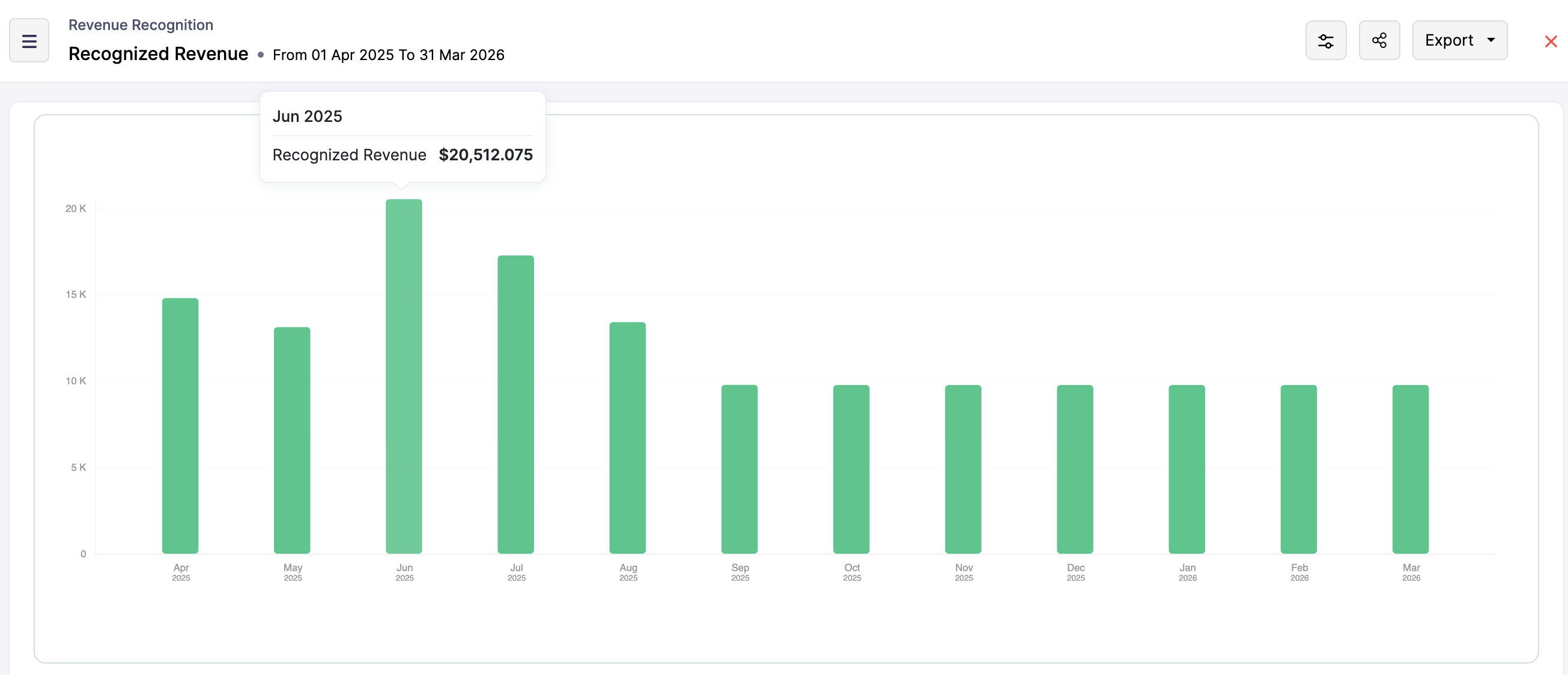
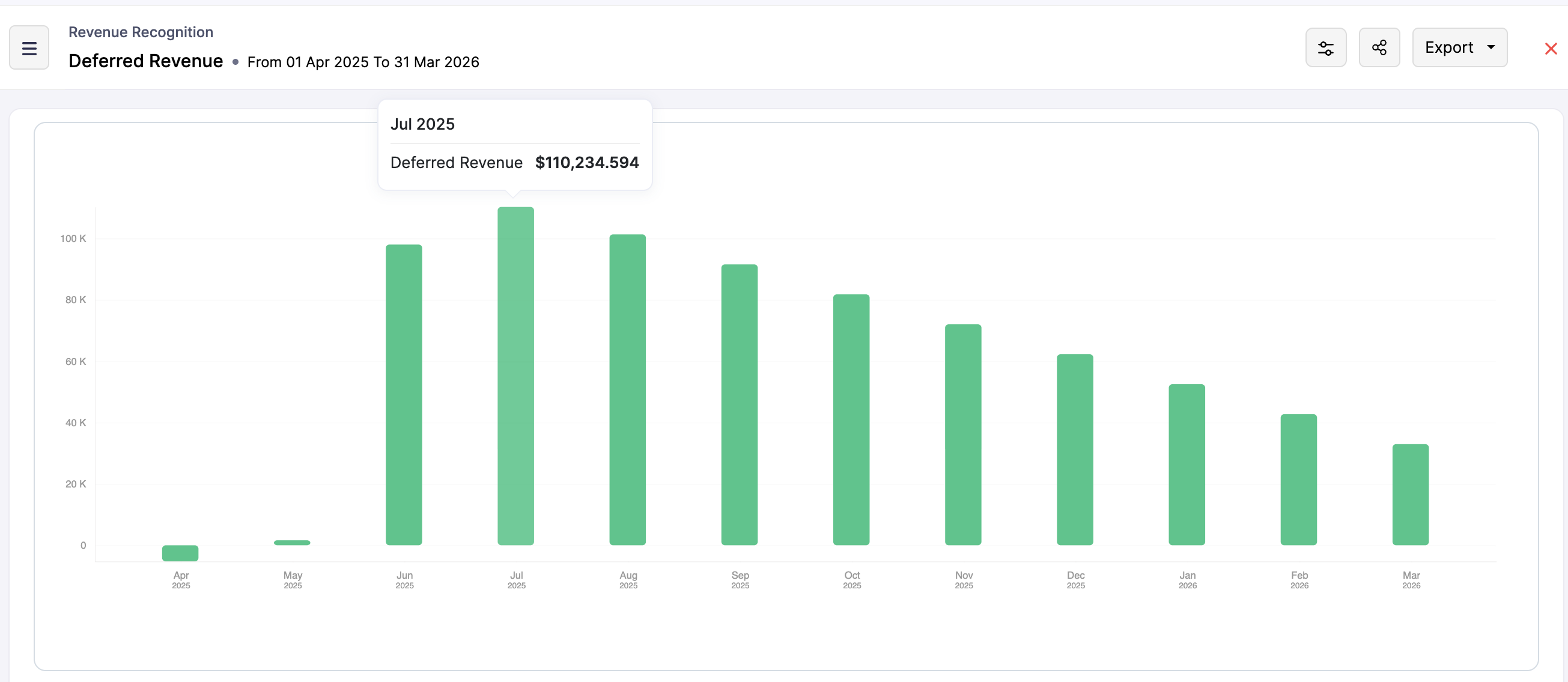
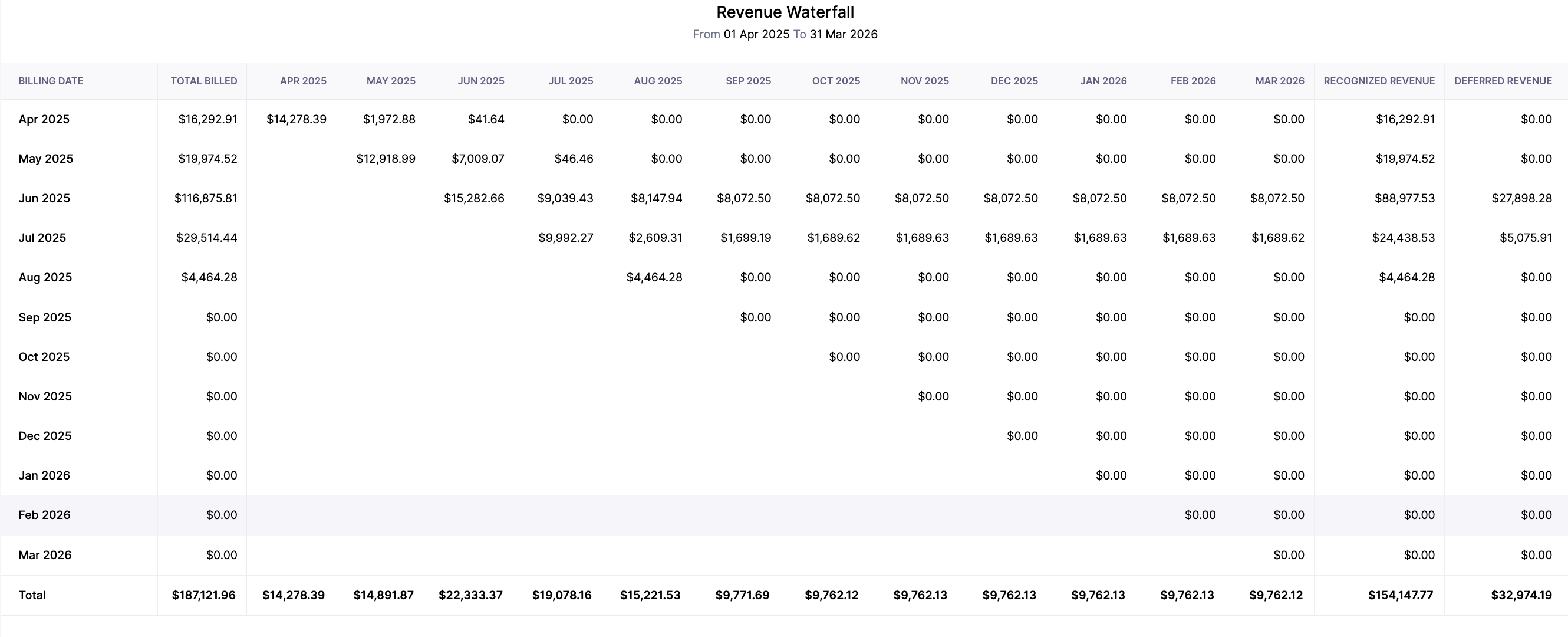
Zoho Billing simplifies revenue recognition by transferring complex accounting standards into practical, automated processes. With configurable rules, flexible methods, and in-depth reporting, businesses can ensure that their recognized and deferred revenue is tracked accurately and transparently. This automated process removes guesswork for a subscription-based model and helps the finance team stay on top of their revenue reporting.

In the next post, we will understand the logic behind the Manual Revenue Recognition that Zoho Billing offers.
Zoho Campaigns Resources





Topic Participants
Hari Hara Sudhan. S
Sticky Posts
Community Learning Series | Digest #5 — September 2020
Dear customers, We're happy to bring you the September edition of our #CommunityDigest! Keep track of your subscription KPIs right from your smartphone: Last month, we enhanced our Android mobile app to help our customers get daily updates on their business health. We got to know from a lot of customers that this has made their job much more easier because they no longer have to keep a reminder to manually check on the previous day's revenue or activations. If you have not downloaded it yet, here'sCommunity Learning Series | Digest #4 - August 2020
Dear customers, We hope you're staying safe and healthy. I'm happy to bring you the fourth edition of our #CommunityDigest with some brand-new updates from us. 1. Daily Business Updates (for Android users) The Zoho Subscriptions Android app has got a cool new update: You can now get a push notification to your smartphone that lets you know how many activations and cancellations have taken place, and what's the net revenue for the previous day. The best part is, you can tell the app when exactly youCommunity Learning Series | Digest #3 - July 2020
Dear customers, We hope you're staying safe and healthy. We're glad to bring you the July edition of our #CommunityDigest. New community members can view our previous newsletters here. This time, we have two major updates and three interesting topics for you: 1. Zoho Subscriptions Developer Community Since the inception of Zoho Subscriptions, our team believed that the recurring billing platform we provide should be able to offer an extensive API library that empowers businesses to automate mostIntroducing: Community Learning Series | Digest #1 - May 2020
Dear customers, We hope you are staying safe and healthy. Helping businesses manage their customer subscriptions more efficiently has always been, and always will be, our goal at Zoho Subscriptions. We strongly believe this is possible if we grow together as a community and share what we know with each other. To nurture this shared learning experience, here is our brand-new Community Learning Series! Welcome to the first edition of our digest! Each edition of our community digest includes guides
Zoho CRM Plus Resources
Zoho Books Resources
Zoho Subscriptions Resources
Zoho Projects Resources
Zoho Sprints Resources
Zoho Orchestly Resources
Zoho Creator Resources
Zoho WorkDrive Resources


Zoho CRM Resources
Get Started. Write Away!
Writer is a powerful online word processor, designed for collaborative work.
-
オンラインヘルプ
-
Webセミナー
-
機能活用動画
-
よくある質問
-
Ebook
-
-
Zoho Campaigns
- Zoho サービスのWebセミナー
その他のサービス コンテンツ
ご検討中の方
Recent Topics
How to make rule to filter out some emails from receiving the notification "Receiving a new ticket"?
Good Morning, We are currently using the "Receiving a new ticket" notification rule to provide that auto reply template to a customer that emails us for support. However, there are some emails we don't want to receive this auto-reply. Where can I setZoho Signatures Missing
In the past after collecting signatures from two different PDFs I would merge them by calling an api and the signatures would appear in the combined PDF. Recently the signatures have disappeared whenever I combine the PDFs together. Why did this randomlyAutomate pushing Zoho CRM backups into Zoho WorkDrive
Through our Zoho One subscription we have both Zoho CRM and Zoho WorkDrive. We have regular backups setup in Zoho CRM. Once the backup is created, we are notified. Since we want to keep these backups for more than 7 days, we manually download them. TheyExciting Updates to the Kiosk Studio Feature in Zoho CRM!
Hello Everyone, We are here again with a series of new enhancements to Kiosk Studio, designed to elevate your experience and bring even greater efficiency to your business processes. These updates build upon our ongoing commitment to making Kiosk a powerfulNew activity options for workflows
Greetings, We are excited to announce the addition of two new dynamic actions to our workflow functionality: Create Event and Schedule Call. These actions have been thoughtfully designed to enhance your workflow processes and bring more efficiency toRemove the “One Migration Per User” Limitation in Zoho WorkDrive
Hi Zoho WorkDrive Team, Hope you are doing well. We would like to raise a critical feature request regarding the Google Drive → Zoho WorkDrive migration process. Current Limitation: Zoho WorkDrive currently enforces a hard limitation: A Zoho WorkDriveKaizen #228 - Process Large-Scale Migrated Data Using Catalyst Solutions
Howdy, tech wizards! This week’s Kaizen explores how Catalyst Solutions in the Zoho CRM Developer Hub help import large volumes of data into Zoho CRM while improving data quality and simplifying the migration process. Why Catalyst Solutions? CatalystZoho Expense Import Reports Won't Work Because Default Accounts Already Exist
Im trying to import reports from another Zoho expense account to mine and im getting errors that won't allow the import to happen The account name that you've entered 'Ground Transportation' already exists. Enter another name for the account and try again.z2026 Product Roadmap and Upcoming Features
This is your guide to what is coming in Zoho Vertical Studio throughout 2026. We’ll update this post throughout the year as items move from development to release, and as and when new initiatives are added. Once a feature is released, it will be reflectedSyncing zoho books into zoho crm
I was wondering how I can use zoho books in crm as I have been using them separately and would like to sync the two. Is this possible and if so, how? ThanksAnnouncing new features in Trident for Mac (1.34.0)
Hello everyone! We’re excited to introduce the latest updates to Trident, which are designed to take workplace communication to the next level. Let’s take a quick look at what’s new. Connect with customers using Zoho Voice integration. You can now easilyHow Zoho Contracts Makes Negotiations Clear, Secure, and Transparent
Negotiation is one of the most critical—and often most chaotic—stages of the contract lifecycle. Multiple stakeholders review the same document, propose changes, debate terms, and exchange feedback. Without the right tools, this collaborative processError: Invalid Element tax_override_preference
In both Books and Inventory, we're getting the following error whenever we try to enter any Bill: I think this is a bug. Even cloning an old bill (that obviously was entered just fine), this error occurs.Assign Income to Project Without Invoice
Hello, Fairly new user here so apologies if there is a really obvious solution here that I am just missing... I have hundreds of small deposits into a bank account that I want to assign to a project but do not want to have to create an invoice every timeHow to Print the Data Model Zoho CRM
I have created the data model in Zoho CRM and I want the ability to Print this. How do we do this please? I want the diagram exported to a PDF. There doesnt appear to be an option to do this. Thanks Andrewour customers have difficult to understand the Statements
our costumers have big problems to understand Zohos Statements. we need a text box after the payment number to explain what the payments are for. Is it possible to develop a version of the Statement with that kind of box and if so whu can do itHow to track a list of ALL the items that ONE customer bought?
Hello, I am interested in getting a list of all the items that only ONE of my customers bought, and the invoices are what show up instead. It's very tedious to go through every single invoice when we sell a lot of items to this customer. Surely thereExchange Rate Updates
Hi, It would be great that when you work with multiple currencies, the exchange rate updates automagically every day (as seen on Zoho Books) or at least that when you create/update an opportunity the exchange rate could be manually updated, or maybe both!Locked Out of Super Admin Account
I'm locked out of my Super Admin account and the external e-mail is no longer associated with it. There seems to be a problem during set up, the system ought to ask to assign a new password instead of using Google accounts. Please help me get back access.Emails are going to notification folder and not in inbox
emails are going to notification folder and not into inbox550 5.4.6 Unusual sending activity detected. Please try after sometime
Hi, I am receiving this error message when trying to send my emails. The only reason I can think why this is happening is my previous two emails were bounced back to me due to a non working mailbox error. I have followed the online links for unblockingProjects Home Customization
Hello! We've been in Zoho One since July of last year, and my team has started providing feedback on what they'd like to do. Their latest wish is that they could have more control over the Projects Home content. For example, they want a card that showsIMAP search support
Does Zoho Mail support IMAP search? https://www.rfc-editor.org/rfc/rfc9051.html#name-search-command TEXT <string> Messages that contain the specified string in the header (including MIME header fields) or body of the message. Servers are allowed to implementPerformance is degrading
We have used Mail and Cliq for about three years now. I used to use both on the browser. Both have, over the past 6 months, had a severe degradation in performance. I switched to desktop email, which appeared to improve things somewhat, although initialCannot reorder fields in Page Layout in Expenses and Purchase Requests
It is very inconvenient that the custom fields in Page Layout cannot be re-ordered. The only way is to remove the fields and re-create them; however, it is impractical. This would affect the reports and dashboards we are having. Not able to re-order thebouncing emails
My recurring invoices have bounced backProbable Scam / Phising attempt from email pretending to be Zoho
I think this is a scam email right? It says "zohCworkplace.com". I'm on the Mail Free plan The link in the CTA button seems to go to a redirect. Just wanted to bring it up to the security team.Feature Request: Ability to set Default Custom Filters and apply them via URL/Deluge
I've discovered a significant gap in how Zoho Creator handles Custom Filters for reports, and I'm hoping the Zoho team can address this in a future update. This limitation has been raised before and continues to be requested, but remains unresolved. TheEmail Address Search in "To" Field Search is broken, Zoho refuses to fix it
Typing a part of the email address string other than the beginning of the string does NOT work, I kindly urge Zoho to fix this. Let's say you remember writing an email so someone called "smith" from company "corp.com", but can't remember their first name,Emails not being received by @hotmail.com, @outlook.com and a few others
When I try to send emails from zoho mail to people with email addresses ending @outlook.com and @hotmail.com (and a few others), I get a 'delayed' automatic email and then a few hours later, an 'undelivered' automatic email. This has started a few monthsscroll bar for far left of screen
I am unable to even see the scroll bar to the right of "inbox" etc on the left; it is stuck at "streams" and I can't get to inbox or anything else. It would help if it could be made a lighter color as the black or dark grey can't bee seen.OUt of office every friday
Hi, I tryed to configure my out of office, because i'm not working or emailing on fridays. But when i select only friday as unavailable day, the out of office still sets for the whole week. What am I doing wrong?Signature line
How do I set signature line in emailZoho email
I cannot send email to mail.ru【参加無料】東京 Zoho ユーザ交流会 NEXUS ー CRMで始めるマーケティング事例 / AI活用法(Zia Agents)
ユーザーの皆さま、こんにちは。コミュニティチームの藤澤です。 3月27日(金)に東京、新橋で東京 Zoho ユーザー交流会 NEXUS を開催します! 昨年度までより、さらにパワーアップして戻ってきました! ユーザー活用事例は、2人のユーザーさんからお話しいただきます。Zoho サービスの活用の幅を広げたい方や、他のユーザーの利用法を気軽に知りたい方など、多くの方にとって学びのあるセッションになること間違いなしです✨ また今年は、これまで以上に、AI機能にも焦点を当てて行く予定です。 初回として、Zoho社員からZohoIssue Exporting Data – CSRF Token Invalid Error
Dear Zoho Team, We are experiencing an issue when exporting data from our Analytics workspace. Whenever we attempt to export data from our analytical pool, the system displays the following alert message: Alert Message: The CSRF token is invalid. It couldDeluge Learning Series – Client functions in Deluge | January 2026
We’re excited to kick-start the first session of the 2026 Deluge Learning Series (DLS) with Client functions in Deluge. For those who are new to DLS, here’s a quick overview of what the series is all about: The Deluge Learning Series takes place on theZoho Mail 505 error I can not send email
Hi, I’m having issues sending emails from my custom domain email address. When I send emails to Outlook addresses, I receive an “Undeliverable 505” error. However, emails send and receive correctly when I use Gmail. This is important for my business,Multiple MFA Methods
With SMS-based MFA methods being discontinued, there is now no way to have mutliple MFA methods. I'd like to add my zoho account on two seperate phones using the Google Authenticator app. In the https://accounts.zoho.com/home#multiTFA/modes you can onlyReuse Standalone Function
I noticed that there's a missing information in documentation to reuse a standalone function and it is because the parameters require an argument. Here is my code and it is working. response = invokeurl [ url: "https://people.zoho.com/api/v3/function/sample/execute"Next Page