Tip #28: Pin the top row of a table as a header
Hello!
When you're viewing and analyzing data in tables, it can be challenging to remember which data each column contains or represents. This is especially true when your table takes up multiple pages. You have to scroll to the top of the table every time you need to view the top row.
Writer helps you overcome this challenge with the option to set the top row as your header. The header is displayed on all pages of the table, making it easier for you to view and understand the data.
How to set the top row of a table as a header
- Open your document in Writer.
- To add a table to the document:
a. Click the menu in the top left corner of your window.
b. Click Insert --> Table --> Select your desired number of rows and columns. Use the Specify Rows and Columns option if you know the exact number of rows and columns needed. - Click anywhere on the table, and then click the
 icon. Or, click the table icon on the left band.
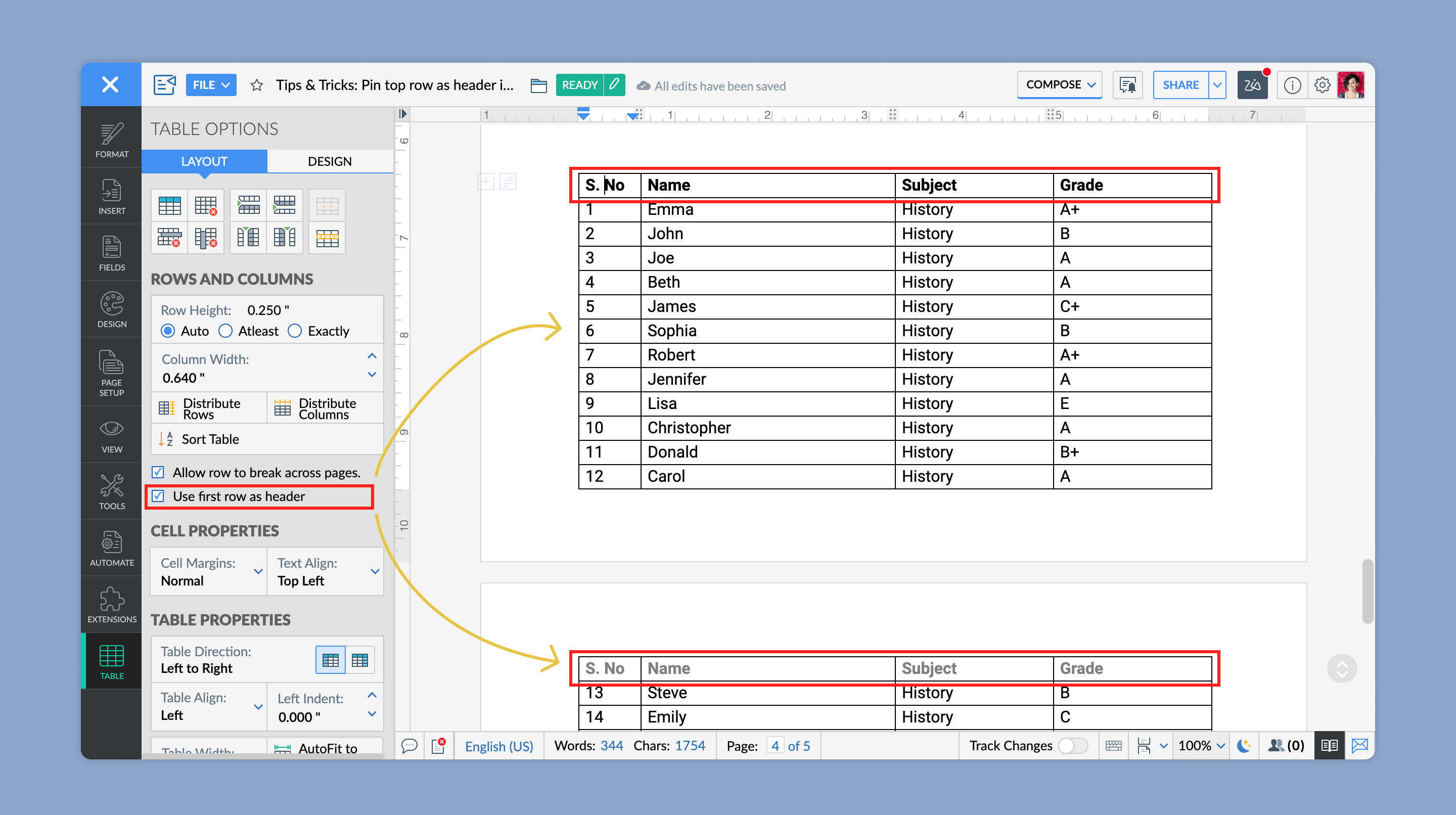
- In the Table Options pane on the left side of your screen, enable the Use first row as header option.
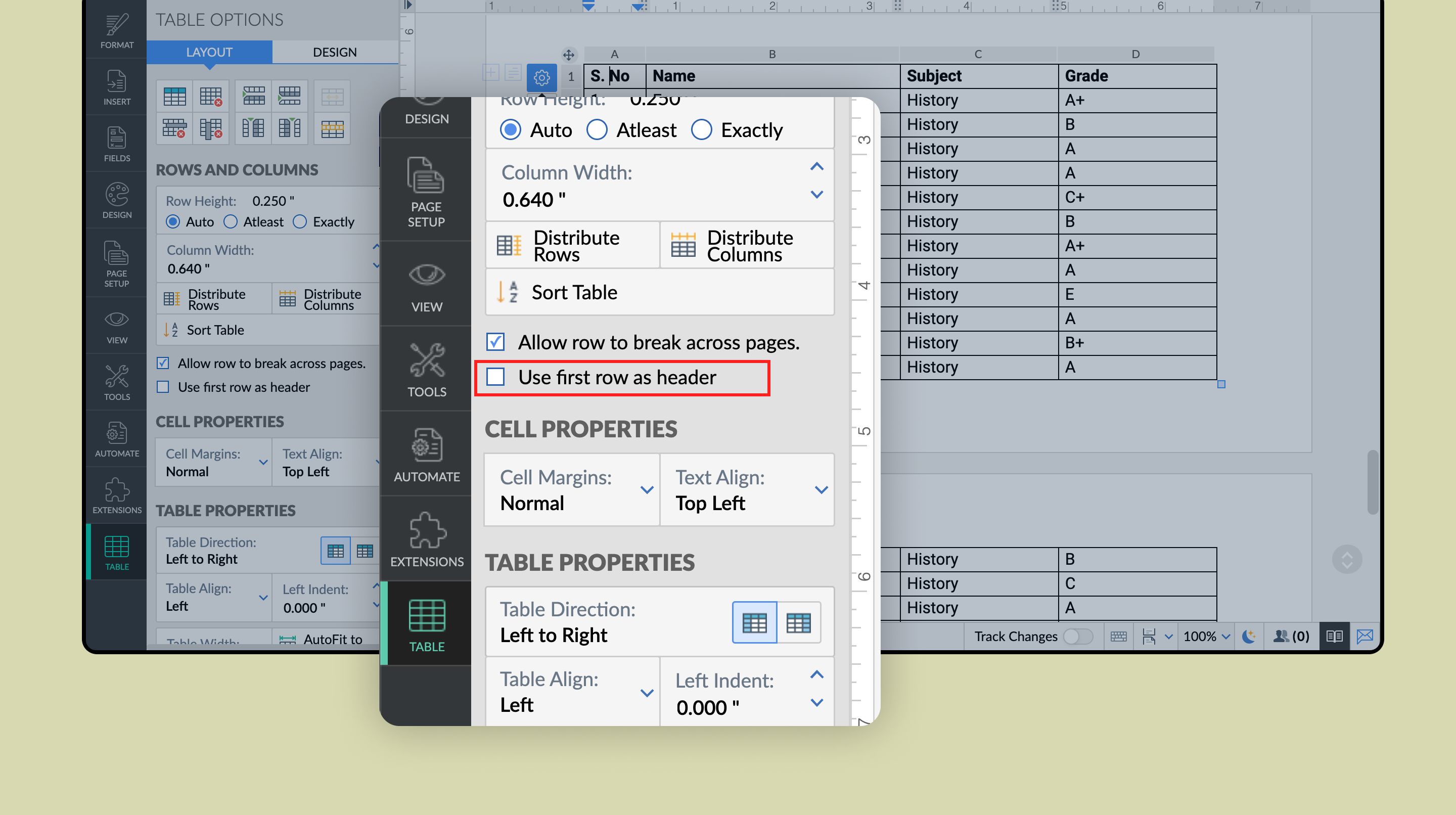
This will set the first row as your header. The header will be displayed on all pages that the table is spread across.
Follow this space for more articles on the many helpful features and options in Writer. If you need any assistance or additional information, simply write to support@zohowriter.com
Happy writing!
New to Zoho Recruit?
Zoho Campaigns Resources





Topic Participants
Shri Rakkshaa Gk
Sticky Posts
8 Neat Tricks in Writer You Should Know About
Want to get the most out of Writer and speed up your work? You've come to the right place. We've compiled some productive shortcuts in Writer that can help you get work done more quickly: 1. Look up synonyms No more need for a bulky thesaurus! Use Writer's synonym suggestions to explore different word choices, and find the one that fits your style and tone the best. All you have to do is right-click on a word, and select Synonyms from the dropdown list. 2. Insert images, tables and more TypingTip #26: Filter your records before merging a document
Tom is an HR executive who has to send onboarding emails every month to newly joined employees. He has a master spreadsheet with all the employee details, and new employees are added to them as they join. It's the month of March and Tom has to send onboarding emails to employees who've joined this month. But, how is Tom going to go through a big spreadsheet with multiple new and past information, and send onboarding emails to the set of newly joined employees? Simple, by filtering and mergingTip: #11 Collaboratively fill documents with your colleagues and clients
Last week we talked about how Fillable Fields can help you create contracts and proposal templates you can repurpose across your processes. This week, we'll talk in detail about how to collaboratively fill those templates with your clients and team. Say you've entered into a contract with multiple clients but the final contract amount is still under negotiation. Using fillable fields, partners can quote their contract fee directly in the template document without affecting other areas of the document. YouTip #07: Five best defaults in Writer you can change to complement the way you work
Find yourself adjusting settings to the way you like every time you create a new document? Try tweaking the default settings instead. From font styles to auto correct options and more, here are the five best defaults settings you can control. 1. Default font style Use your favorite typography across all your documents. You can customize a font style by adding a color, adjusting its size and more, and then set it as default. To do this, go to More Options > Format > Font. Choose a font styleTip #06: Make the best use of Zia in Writer
About to share your work with your team? Looking to get a second opinion quickly before that? Let Zia do it. Zia, Zoho's AI-powered intelligent assistant is now part of Writer. She's trained to check and polish your work. She doesn't just read, she understands. So apart from grammar and spelling checks, she'll let you know when you've used a wrong adjective, or have missed out words based on the context of your piece. Every time you write, Zia makes a scorecard after carefully assessing your
Zoho CRM Plus Resources
Zoho Books Resources
Zoho Subscriptions Resources
Zoho Projects Resources
Zoho Sprints Resources
Zoho Orchestly Resources
Zoho Creator Resources
Zoho WorkDrive Resources


Zoho CRM Resources
Get Started. Write Away!
Writer is a powerful online word processor, designed for collaborative work.
Zoho CRM コンテンツ
-
オンラインヘルプ
-
Webセミナー
-
機能活用動画
-
よくある質問
-
Ebook
-
-
Zoho Campaigns
- Zoho サービスのWebセミナー
その他のサービス コンテンツ
ご検討中の方
Recent Topics
system not picking my default custom service report template
Can you tell me why when we create a service report always pick the (standard old) template? Even when I have a custom service report selected as Default.Introducing Auto-trigger for Screening Bot
Still manually sending screening tests after every application? Not anymore. With Auto-trigger for Screening Bot, screening now begins automatically. When a candidate applies for a job that has an attached assessment, Recruit checks whether the test hasSEO for your Zoho Sites Website
Join our live webinar to learn how to use Zoho Sites' SEO tools to boost your website's ranking. Our product specialist will demonstrate everything you need to know about optimizing your web pages to make them search engine friendly. Register here for free: https://www.zoho.com/sites/webinars/Importing into Multiselect Picklist
Hi, We just completed a trade show and one of the bits of information we collect is tool style. The application supplied by the show set this up as individual questions. For example, if the customer used Thick Turret and Trumpf style but not Thin Turret,New 2026 Application Themes
Love the new themes - shame you can't get a little more granular with the colours, ie 3 different colours so one for the dropdown menu background. Also, I did have our logo above the application name but it appears you can't change logo placement positionAdd line item numbers to sales order/invoice creation page
It would be really helpful if there were line numbers visible as we are creating a sales order and/or invoice. There are line numbers visible in the PDF once the sales order is created. I would like to be able to see the line numbers as I am buildingAPI to Apply Retainer invoice payment to Invoice
Hi Team, I could not find API to apply the Retainer invoice payment to existing Invoice. Can you please help ? Attaching the screenshotReconciling a month with no transactions
I'm treasurer for a small non profit cemetery association and I'm trying to reconcile a bank statement for a month that did not have any transactions. Do I skip the month entirely and go a month with transactions?push notification to Cliq when user is @mentioned in CRM notes
push notification to Cliq when user is @mentioned in CRM notes. Currently users that is @mentioned gets an email to be notified. User/s that is @mentioned should get a Cliq notification.Customize your Booking page using Zia
We’re excited to introduce an AI-based enhancement that automatically customizes your booking page effortlessly. By simply providing your business website URL, Zoho Bookings can automatically design a booking page that matches or complements your brandMultiple header in the quote table???
Hello, Is it possible in Zoho CRM to add multiple headers or sections within the Quote product table, so that when the quote is printed it shows separate sections (for example “Products” and “Services”)? To clarify, I’m asking because: This does not appearFeature Request: Render Markdown (.md) files in Zoho Cliq
Hi, We regularly share Markdown (.md) files in Zoho Cliq. However, when we open these files in Cliq, the content does not render as Markdown—it displays as plain text. This forces us to copy/paste the content into an external Markdown viewer to read itZoho Workdrive download was block by security software
Hi Team, Recently workdrive download was blocked by huorong security. Could you please advise how to put zoho workdrive as white list? every time we put "*.zohoexternal.com" or "workdrive.zohoexternal.com", the warning msg will still pop in next dowMerged cells are unmerging automatically
Hello, I have been using Zoho sheets from last 1 year. But from last week facing a issue in merged cells. While editing all merged cells in a sheet became unmerged. I merged it again, but it again unmerged. In my half an hour work I have to do this 3-4Zoho mail to contacts and leads, but not to accounts?
We use the accounts tab a lot for our business because they can be linked to the sales orders. Now we want to use the mail add on to link communication of our emails to our accounts. However this is only possible for contacts and leads? It would be convenientAPI keys not showing in ZeptoMail dashboard
Hi there, I'm hoping someone can provide some assistance as support isn't replying. I am trying to configure my transactional emails, but the dashboard doesn't show any of my API details - the `div` is there but it's emtpy. Every time I click "GenerateDoes Zoho Learn integrate with Zoho Connect,People,Workdrive,Project,Desk?
Can we propose Zoho LEarn as a centralised Knowledge Portal tool that can get synched with the other Zoho products and serve as a central Knowledge repository?Reading from and writing to Zoho Projects Custom Module with Deluge
Does anyone know if there is a way to read from and write to the Custom Modules that Zoho now supports. I would love to be able to loop through a set of data and create the entities I need to for this new custom module I'm looking to put together.How Does Knowledge Base Search and Article Recommendation Work?
Hello, I would like to understand how the Knowledge Base search engine works. Specifically, does it search based on: The article title only? The full article content? Both, the article and the content? Keywords? Tags? Also, how does the system determineZoho Books/Inventory - Restrict Items With Pricebook
Hi Zoho Team, I'm trying to address as use case where a client needs to restrict which products certain customers can purchase. I have been able to find a way to do this based on the current Zoho Books or Zoho Inventory configuation. My feature requestBest Way to Integrate Zoho Campaigns with Amazon SES Without Third-Party Tools
I am looking for the most seamless and efficient method to integrate Zoho Campaigns with Amazon SES. My goal is to avoid using any third-party automation tools like Zapier, Make, or Pabbly, and instead, leverage Zoho's native capabilities for this integration.Release Notes | January 2026
We have rolled out a set of powerful new enhancements across Zoho Vertical Studio that bring several long-awaited capabilities to your applications. These updates focus on deeper customization, smarter automation, better reporting, and improved usabilityscope for phonebridge in CRM and phonebridge API documentation
Hi I cannot find the scope to be used for phonebridge in CRM API V2 calls. I am getting OAUTH_SCOPE_MISMATCH for scope group ZohoCRM.modules.ALL,ZohoCRM.setttings.ALL Also I am not able to locate the documentation for the same, All I have is phonebridge API documentation for desk and url [ https://www.zohoapis.com/crm/v2/phonebridge/ ] from a web forum. It makes a reply and error in case of missing arguments, but scope error is returned when all arguments are provided. Regards Devel DevHow to charge Convenience fee OR payment gateway charges to the end client who is paying the invoice?
Hello, I am creating this topic after having discussions with various sets of users and have understood that with people moving more and more to digital payments, it is important for the client to enable the "Convenience fee" kind of scenario. I haveCard payment surcharge?
Hi, I would like to offer my customers the ability to pay invoices by card (using the PayPal integration). However, PayPal charges me around 5% to receive a card payment, and I would like to pass on this cost to my customer by way of a card payment surcharge. Is there any way for Zoho Invoice to be set up to automatically add a defined "card processing fee", say 5% of the invoice total, if the customer elects to pay by card? I don't want to add this on to invoice manually, since most of my clientsAutomate Credit Card Surcharge
Is there a way to create an automation that will add a 3.0% credit card surcharge to a subscription whenever a customer pays via credit card?Zoho Books | Product updates | January 2026
Hello users, We’ve rolled out new features and enhancements in Zoho Books. From e-filing Form 1099 directly with the IRS to corporation tax support, explore the updates designed to enhance your bookkeeping experience. E-File Form 1099 Directly With theZoho POS App Hanging Issue – Sales Becoming Difficult
The Zoho POS app frequently hangs and becomes unresponsive during billing, making it very difficult to complete sales smoothly. This commonly happens while adding items, during checkout, or at payment time, especially during peak hours. These issues causeTip #62- Exploring Technician Console: Send Ctrl + Alt + Del- 'Insider Insights'
Hello Zoho Assist Community! This week, we’ll be exploring the Send Ctrl + Alt + Del option in the Technician Console. Let’s jump right in. System administrators often rely on Ctrl + Alt + Del when managing remote devices that have unresponsive applicationsSKUs for Invoices, POs, etc.
It doesn't appear that one can enable SKU display on invoices, POs, etc. This is problematic, and I don't see a good reason why this shouldn't be an option. Some of our vendors and customers use this in their system. Every other identifier code is availablehow to avoid duplicate customer
How can i avoid to create a duplicate customer. I charged a same customer with two different plans and it showed up twice in my customer list and subsequently in Zoho books contacts. It creates confusion to have a same customer appears multiple times in customer or contact list. How can i avoid it.RSC Connectivity Linkedin Recruiter RPS
It seems there's a bit of a push from Linkedin Talent Solutions to keep integrations moving. My Account Manager confirmed that Zoho Recruit is a Certified Linkedin Linkedin Partner but does not have RSC as of yet., (we knew that :-) She encouraged meim facing issue on generate the Estimate price
i couldn't understand what is the issue , i cant generate Estimate price where is the issuecannot be able to add user
Dear team I tried to add a new user for sales team, but after entering the OTP its showing error message cannot add nowChanging an existing item to different accounts & inventory-tracked
Hi everyone, I have an item in Zoho Books that was originally set up as a non-inventory item. Over time, I associated it with different sales and purchase accounts, and I now have many invoices, bills, and reports that use this item. My business processHow do I edit the Calendar Invite notifications for Interviews in Recruit?
I'm setting up the Zoho Recruit Interview Calendar system but there's some notifications I don't have any control over. I've turned off all Workflows and Automations related to the Calendar Scheduling and it seems that it's the notification that is sentBookings duration - days
Hi team, Is there any way to setup services/bookings that span multiple days? I am using Zoho Bookings for meeting room bookings. Clients may wish to book a room for more than one day, for up to a month. If not, is there a plan to allow services to be setup with durations of Days as well as hours and minutes? Many thanks, Anna.big 5 accounts
how do you find what accounts are listed as Big 5 ?Zoho recruit's blueprint configuration is not functioning as mapped
Current Status: Zoho Blueprint is not functioning as configured. Issue: We are moving a Candidate status in Zoho Recruit "for active file" but we encountered: "Status cannot be changed for records involved in Blueprint." This happens to various clientActual vs Minimum
Hi all, I am sure I am not the only one having this need. We are implementing billing on a 30-minute increment, with a minimum of 30 minutes per ticket. My question is, is there a way to create a formula or function to track both the minimum bill vs theNext Page