Announcing Bigin's integration with Zoho Directory
As a Bigin admin, you play an important role in managing your organization's user accounts and ensuring secure access to important data. To streamline and enhance your user management operations, Zoho Directory can be a powerful tool. Zoho Directory offers a range of advanced features, including IP restriction, password policies, multi-factor authentication, and Active Directory sync. In this post, we'll discuss how you can leverage Zoho Directory to perform these operations effectively and secure your Bigin account.
1. IP restriction
With Zoho Directory, you can enforce IP restrictions to allow access to Bigin only from specific IP addresses or ranges. This helps protect your organization's data by ensuring that users can only access Bigin from approved locations. You can easily configure IP restrictions within Zoho Directory's user management settings, providing an additional layer of security.
2. Password policies
Implementing strong password policies is vital for maintaining the security of your Bigin accounts. Zoho Directory enables you to define and enforce password complexity rules, such as minimum length and character requirements. By configuring these policies, you can enhance the overall security posture of your organization and reduce the risk of unauthorized access.
3. Multi-factor authentication (MFA)
To add an extra layer of security to user logins, Zoho Directory supports multi-factor authentication. You can enable MFA for Bigin users, requiring them to verify their identities through a secondary method, such as the following options:
- Authenticating with our industry-standard authentication app, Zoho OneAuth
- Enabling hardware-based MFA with YubiKey
- Using authenticator apps like Google Authenticator or Authy
This significantly reduces the chances of unauthorized access, even if the user's password gets compromised.
4. Active Directory sync
You can synchronize user accounts, groups, and attributes between your existing LDAP and Zoho Directory, enabling centralized management across platforms. This integration ensures that changes made, such as user additions or modifications, are automatically reflected in Bigin, saving time and reducing administrative overhead.
5. Single sign-on
Zoho Directory supports single sign-on (SSO) integration, enabling seamless authentication and session management across multiple applications, including Bigin. By configuring SSO, users can log in once using their credentials and subsequently access Bigin and other integrated applications without needing to provide their login information again.
6. Web session management
Zoho Directory provides comprehensive session monitoring capabilities, such as the following:
- Session lifetime - Users will automatically be signed out of their accounts after the defined period.
- Session timeout - Users will signed out of their accounts if they stay inactive for longer than the defined period.
- Concurrent sessions - Users will be allowed only the chosen number of active sessions at a time.
7. User session history
Zoho Directory keeps a record of user session history, allowing you to track and review past sessions. This feature enables you to monitor user behavior, investigate any suspicious activities, and perform audit trails if required. By having visibility into past sessions, you can maintain accountability and identify any security incidents or policy violations.
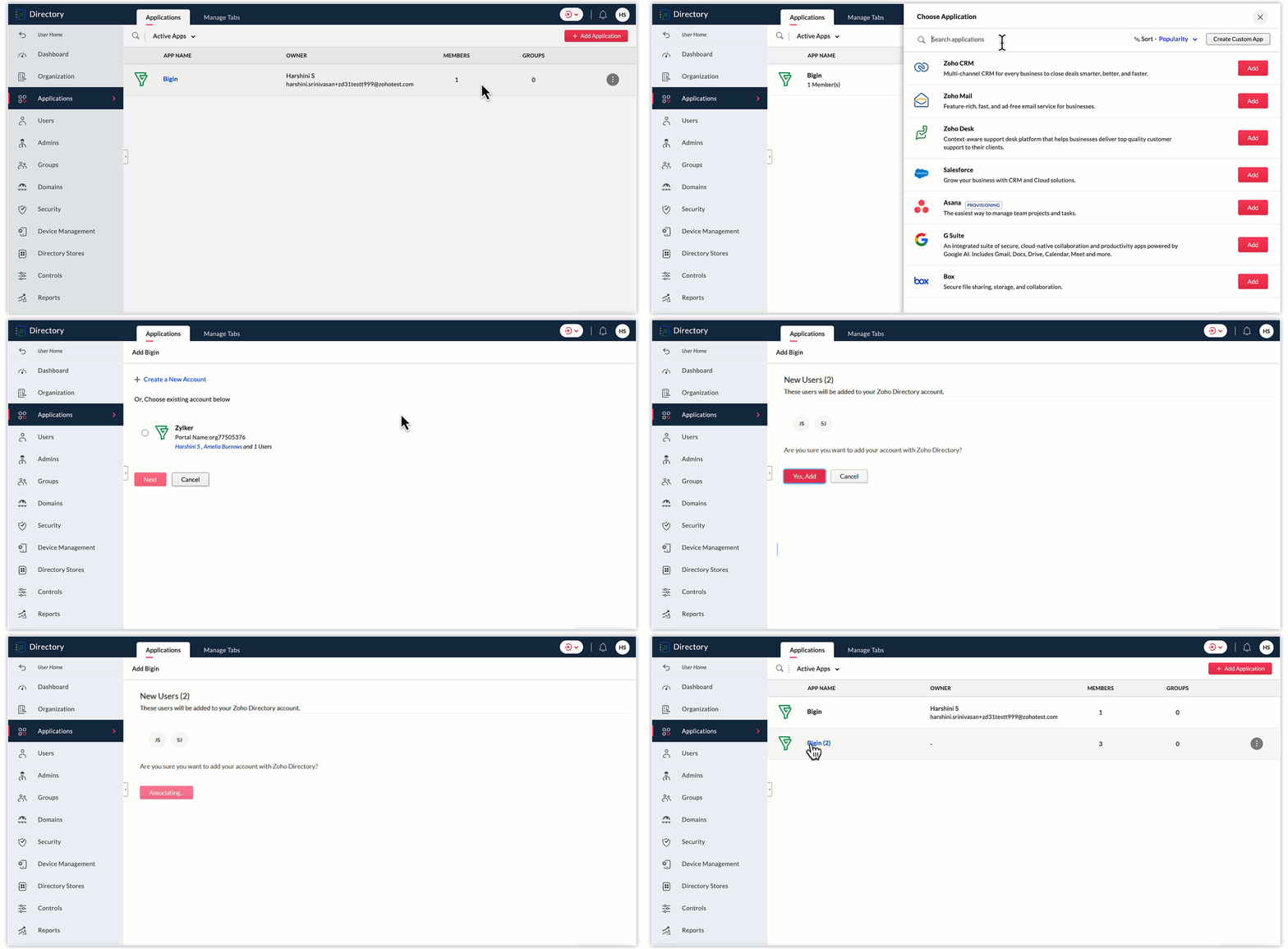
To add Bigin to Zoho Directory, follow these steps:
- Log in to your Zoho Directory account. Once logged in, navigate to the Zoho Directory Admin Panel.
- In the Admin Panel, look for the Applications section.
- Within the Applications section, search for "Bigin" and click on the Add button to initiate the process of adding Bigin to your Zoho Directory.
- Follow the on-screen instructions to configure the settings for the Bigin integration. Choose any of your Bigin accounts displayed, or create a new one. Click Next.
- In the next screen, select the Bigin users you wish to add to Zoho Directory, and click Yes, add.
- Once you've completed the configuration, Bigin will be added to your Zoho Directory.
- You can now manage user access and permissions for Bigin through the Zoho Directory Admin Panel. You can assign users to Bigin, control their roles and privileges, and ensure secure access to the application.
As a Bigin administrator, you can significantly improve the security and access management of your company's data by utilizing Zoho Directory's advanced user management features. From implementing IP restrictions and enforcing password policies to enabling multi-factor authentication and syncing with Active Directory, Zoho Directory provides comprehensive tools for effective user management. You can protect your organization's data, streamline user management, and ensure a positive user experience in Bigin.
Thank you,
Sai Shree | User Education
Sai Shree | User Education
New to Zoho Recruit?
Zoho Campaigns Resources





Topic Participants
Saishree T K
Sticky Posts
Schedule mass emails, view mass emails status and more!
Hello everyone, Mass emails help you communicate with multiple customers in a couple of clicks. We have introduced a Mass Emails dashboard in Bigin so that users can see the status of the mass emails like how many emails were opened, clicked and bounced.Introducing Bigin 360: Our new pricing edition with increased feature limits and pre-installed toppings
Dear Biginners Club, Today, we're pleased to launch a brand-new pricing edition called Bigin 360, our highest pricing edition that will sit on top of Express and Premier editions. It's been over four years since our launch, and we're receiving some great[New] Create invoices and contracts in minutes with Zoho Writer's Merge Templates for Bigin!
Do you often find yourself manually entering customer information in your business documents like invoices and contracts? This can be a time-consuming process that can take up valuable time from your business operations. With Zoho Writer's Merge TemplatesAnnouncing #BiginnersClub meetups in US, Middle East, India & UK (Free Event)
Exciting news, Bigin enthusiasts! #BiginnersClub meetups are back, and we're hitting some major cities this time, starting from October. Here's what you can expect: Meet our experts face-to-face Deep dive into Bigin and its advanced features PersonalisedIntroducing Forms: Streamline data collection with Bigin's new form builder.
Hello everyone, Bigin's web forms just got a makeover! We are excited to introduce Forms: an online form builder designed to meet all your data collection need. This revamp was inspired by your feedback, resulting in an upgraded and versatile version
Zoho CRM Plus Resources
Zoho Books Resources
Zoho Subscriptions Resources
Zoho Projects Resources
Zoho Sprints Resources
Zoho Orchestly Resources
Zoho Creator Resources
Zoho WorkDrive Resources


Zoho CRM Resources
Get Started. Write Away!
Writer is a powerful online word processor, designed for collaborative work.
Zoho CRM コンテンツ
-
オンラインヘルプ
-
Webセミナー
-
機能活用動画
-
よくある質問
-
Ebook
-
-
Zoho Campaigns
- Zoho サービスのWebセミナー
その他のサービス コンテンツ
ご検討中の方
Recent Topics
Why am I seeing deleted records in Zoho Analytics syncing with Zoho CRM?
I have done a data sync between Zoho CRM and Zoho Analytics, and the recycle bin is empty. Why do I see deleted leads/deals/contacts in Zoho Analytics if it doesn't exist in Zoho CRM? How can I solve this problem? ThanksMaking Tags Mandatory
When creating an expense, is it possible to make the Tags field mandatory? I see the option in settings to make other fields mandatory, like Merchant, Description, Customer, etc, but nothing about Tags. Thanks! KevinCustom Fonts in Zoho CRM Template Builder
Hi, I am currently creating a new template for our quotes using the Zoho CRM template builder. However, I noticed that there is no option to add custom fonts to the template builder. It would greatly enhance the flexibility and branding capabilities ifAll new Address Field in Zoho CRM: maintain structured and accurate address inputs
The address field will be available exclusively for IN DC users. We'll keep you updated on the DC-specific rollout soon. It's currently available for all new sign-ups and for existing Zoho CRM orgs which are in the Professional edition. Latest updateCollaboration with customers made easy with Zoom Meeting and Zoho Desk integration
Hello everyone! We are happy to announce that you can now integrate your Zoho Desk account with Zoom Meeting. The integration bridges the gap between digital communication and human connection, empowering teams to deliver timely support when it mattersCRM Canvas - Upload Attachments
I am in the process of changing my screens to Canvas. On one screen, I have tabs with related lists, one of which is attachments. There doesn't appear to be a way to upload documents though. Am I missing something really obvious? Does anyone haveTrueSync regularly filling up my local disk
Seems that WorkDrive's TrueSync randomly starts filling up my local hard drive space. None of the folders have been set as "Make Offline" but still it seems to randomly start making file offline. The settings of the app is so minimal and is of no realKaizen #194 : Trigger Client Script via Custom buttons
Hello everyone! Welcome back to another interesting and useful Kaizen post. We know that Client Scripts can be triggered with Canvas buttons and we discussed this with a use case in Kaizen#180. Today, let us discuss how to trigger Client Script when a[Webinar] A recap of Zoho Writer in 2025
Hi Zoho Writer users, We're excited to announce Zoho Writer's webinar for January 2026: A recap of Zoho Writer in 2025. This webinar will provide a recap of the features and enhancements we added in 2025 to enhance your productivity. Choose your preferredPicklist field shows "none" as default
Hello, Is there an option to avoid showing "none" as the default value in a picklist field? I also don't want to see any option displayed. My expectation is to have a blank bar, and then when I display the drop-down list, I can choose whichever I waStage-probability mapping feature in custom module
Hi, I'm building a custom module for manage projects. I would like to implement the stage-probability feature that Potentials has. Is this possible?Field Description is very small
Hello, The field Description in the activity is very small. Why don't try open a new window, or a bigger popup, or increase the width of the "popup". Example:StatusIQ
Please add StatusIQ to data sources. We using site24x7 and StatusIQ together and site24x7 integration is already there. Thanks and regards, TorstenIn Zoho People, the Operations buttons are frequently not visible or do not appear consistently.
In Zoho People, the Operations buttons are frequently not visible or do not appear consistently. We request you to please investigate and address this issue, as it is affecting daily HR operations and user access.Marketing Tip #14: Increase cart value with product bundles
Bundling products is a great way to increase average order value while giving customers more convenience. Think “camera + tripod + memory card” or “soap + lotion + bath salts.” Bundles make shopping easier and feel like a better deal. It’s a win-win forProblem with Workdrive folders
I'm having a problem a problem accessing files in a Zoho work drive folder when using the Zoho writer app. The problem folder appears grayed out in the Zoho work drive window in both the online and writer application. However I can open the folder inAdd RTL and Hebrew Support for Candidate Portal (and Other Zoho Recruit Portals)
Dear Zoho Recruit Team, I hope you're doing well. We would like to request the ability to set the Candidate Portal to be Right-to-Left (RTL) and in Hebrew, similar to the existing functionality for the Career Site. Currently, when we set the Career SiteZoho Bookings form pre-filled with Zoho Forms in
Hi, I've got a contact page on my website and I'd like to have the option to book an appointment (redirected to zoho bookings page) after an option is submitted on the contact form. how would I go about doing this? thanksPre-orders at Zoho Commerce
We plan to have regular producs that are avaliable for purchase now and we plan to have products that will be avaliable in 2-4 weeks. How we can take the pre-orders for these products? We need to take the money for the product now, but the delivery willZoho Books' 2025 Wrapped
Before we turn the page to a new year, it’s time to revisit the updates that made financial management simpler and more intuitive. This annual roundup brings together the most impactful features and enhancements we delivered in 2025, offering a clearCan multiple agents be assigned to one ticket on purpose?
Is it possible to assign one ticket to two or more agents at a time? I would like the option to have multiple people working on one ticket so that the same ticket is viewable for those agents on their list of pending tickets. Is something like this currentlyEdit default "We are here to help you" text in chat SalesIQ widget
Does anyone know how this text can be edited? I can't find it anywhere in settings. Thanks!Can't change form's original name in URL
Hi all, I have been duplicating + editing forms for jobs regarding the same department to maintain formatting + styling. The issue I've not run into is because I've duplicated it from an existing form, the URL doesn't seem to want to update with the newFeature Request: Sync Leave Tracker to Zoho Mail / Calendar or provide option to download information
Zoho Leave Tracker offers the option to sync the leave Calendar to Microsoft 365 and Google Calendar. Adding an option to sync to Zoho-Mail Calendar would avoid duplication and add significant value for users. An alternative would be to allow users toCompensation | Salary Packages - Hourly Wage Needed
The US Bureau of Labor Statistics says 55.7% of all workers in the US are paid by the hour. I don't know how that compares to the rest of the world, but I would think that this alone would justify the need for having an hourly-based salary package option.Multiple currencies - doesn’t seem to work for site visitors / customers
I am trying to understand how the multiple currency feature works from the perspective of the website visitor who is shopping on my Zoho Commerce site. My site’s base currency is US Dollars (USD) but my store is for customers in Costa Rica and I wouldArchiving Contacts
How do I archive a list of contacts, or individual contacts?How do people handle using Outlook and Zoho Project calendar at the same time?
We have an ongoing problem in our organisation where we use Zoho Projects to plan all of our projects tasks and that also allows us to look forward using the workload report to see which of our consultants are overstretched etc and which are available.10GB Email Storage Limits in Zoho CRM
We’ve had Zoho One for almost 5 years and have always synced our emails from Gmail via IMAP… As of late, we’ve run into issues with our emails not syncing, due to being over the 10GB storage cap… What’s very odd is that we haven’t changed a thing? I knowPerformance is degrading
We have used Mail and Cliq for about three years now. I used to use both on the browser. Both have, over the past 6 months, had a severe degradation in performance. I switched to desktop email, which appeared to improve things somewhat, although initialHow to set page defaults in zoho writer?
hi, everytime i open the zoho writer i have to change the default page settings to - A4 from letter, margins to narrow and header and footer to 0. I cannot set this as default as that option is grayed out! so I am unable to click it. I saved the documentUnable to Send Different Email Templates for Different Documents in Zoho Sign
Hello Zoho Community, I am facing a limitation with Zoho Sign regarding email notifications sent to customers when a document is sent for signing. Currently, whenever I send any template/document for signing, the email notification that goes to the customerEnable History Tracking for Picklist Values Not Available
When I create a custom picklist field in Deals, the "Enable History Tracking for Picklist Values" option is not available in the Edit Properties area of the picklist. When I create a picklist in any other Module, that option is available. Is there a specific reason why this isn't available for fields in the Deals Module?ZO25: The refreshed, more unified, and intelligent OS for business
Hello all, Greetings from Zoho One! 2025 has been a remarkable year, packed with new features that will take your Zoho One experience to the next level! From sleek, customizable dashboards to an all-new action panel for instant task management, we’veVault crashes on Android Devices
Vault is continuously closing after entering the master password on my Android device. After several attempts I get a system message that says there is a bug in the app. I've uninstalled and reinstalled the app, and cleared the app cache, but nothing¿Cómo puedo configurar las contraseñas creadas bajo una directiva para que nunca caduquen y no aparezcan como caducadas en los informes?
¿Cómo puedo configurar las contraseñas creadas bajo una directiva para que nunca caduquen y no aparezcan como caducadas en los informes? La razón por la cual contraseña estas no deben caducar es porque su actualización depende de mi cliente y no de mí.Camera access
My picture doesn't appear in a group discussion. (The audio is fine.) The guide says "Click the lock icon on address bar," but I can't find it. Advise, pleaseAre static links available
I'm still using Zoho Meeting in trial mode. My previous webinar software provided a static link, and I made the mistaken assumption that I could send out my link and start a meeting later. Mass confusion, but my fault. With a paid version do you get aWhy is Zoho Meeting quality so poor?
I've just moved from Office 365 to Zoho Workplace and have been generally really positive about the new platform -- nicely integrated, nice GUI, good and easy-to-understand control and customisation, and at a reasonable price. However, what is going onHow to print a label from zoho creator app?
Hello, I would like to print a label from zoho creator app record similar to attached one. Size 74mm x 102mm. I tried record template. It leaves plenty of space around the content and also I couldn't set the height of the page. So it is not printing properly. Could someone please direct me to right direction for this requirement?Next Page