Zoho Writer's WordPress extensions

Zoho Writer's WordPress extensions

Hey Zoho Writer users!
 
Say goodbye to all your WordPress content publishing woes with Zoho Writer's WordPress extensions. Publish content with all your formatting and images, republish content when you update a document, and more—from a single window in Zoho Writer.
 
Before we dive into how to post your content to WordPress easily, here's a quick overview of the two types of WordPress blogs and their purposes.

WordPress.com 

WordPress.org 
Simple option for individuals to set up a blog for personal use
 
More complex option suited for organizations and professionals
 
Managed hosting is built-in
You must find and pay for a hosting provider yourself
Individuals can easily create blogs and post content
 
Admins need to add users to the self-hosted blog
 
Not dependent on any external plugin for posting content
 
Dependent on external plugins to set up and post content
 

Zoho Writer offers extensions for both types of WordPress blogs. You can install the extensions for WordPress and WordPress.org from Zoho Marketplace.

How to integrate and post documents to WordPress.org with Zoho Writer

To integrate Zoho Writer with your self-hosted WordPress blog, you need a plugin. You can use our Zoho Flow plugin for a simple, seamless process.
 
Steps to integrate WordPress.org with Zoho Writer:

1. Install the Zoho Flow plugin in your WordPress.org account.
2. Install the WordPress.org extension in Zoho Writer and complete the authentication process.

Installing the Zoho Flow plugin in WordPress.org account
 
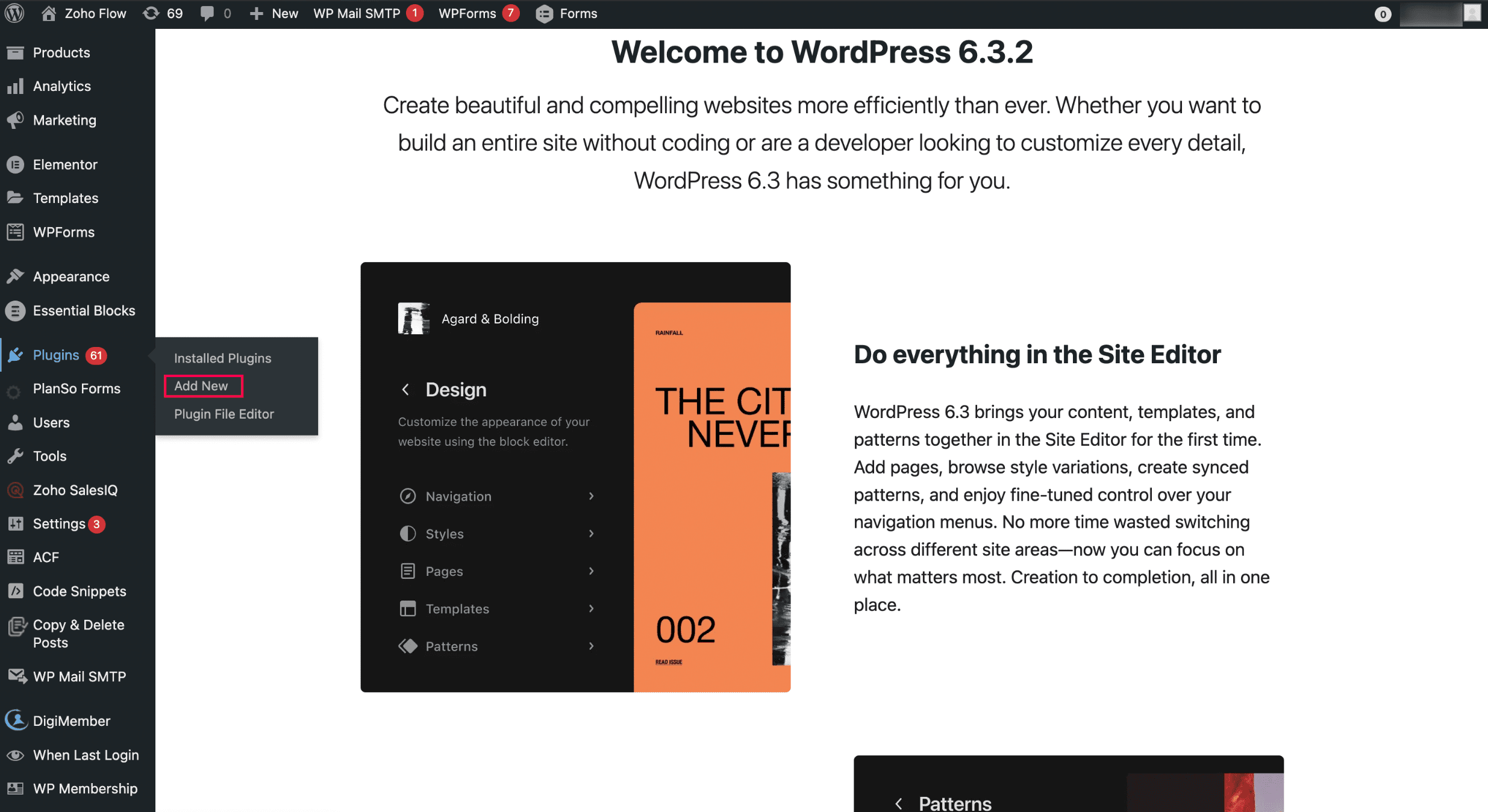
  • To install it from the Plugins menu:
i. Open WordPress and click Add New in the Plugins menu.
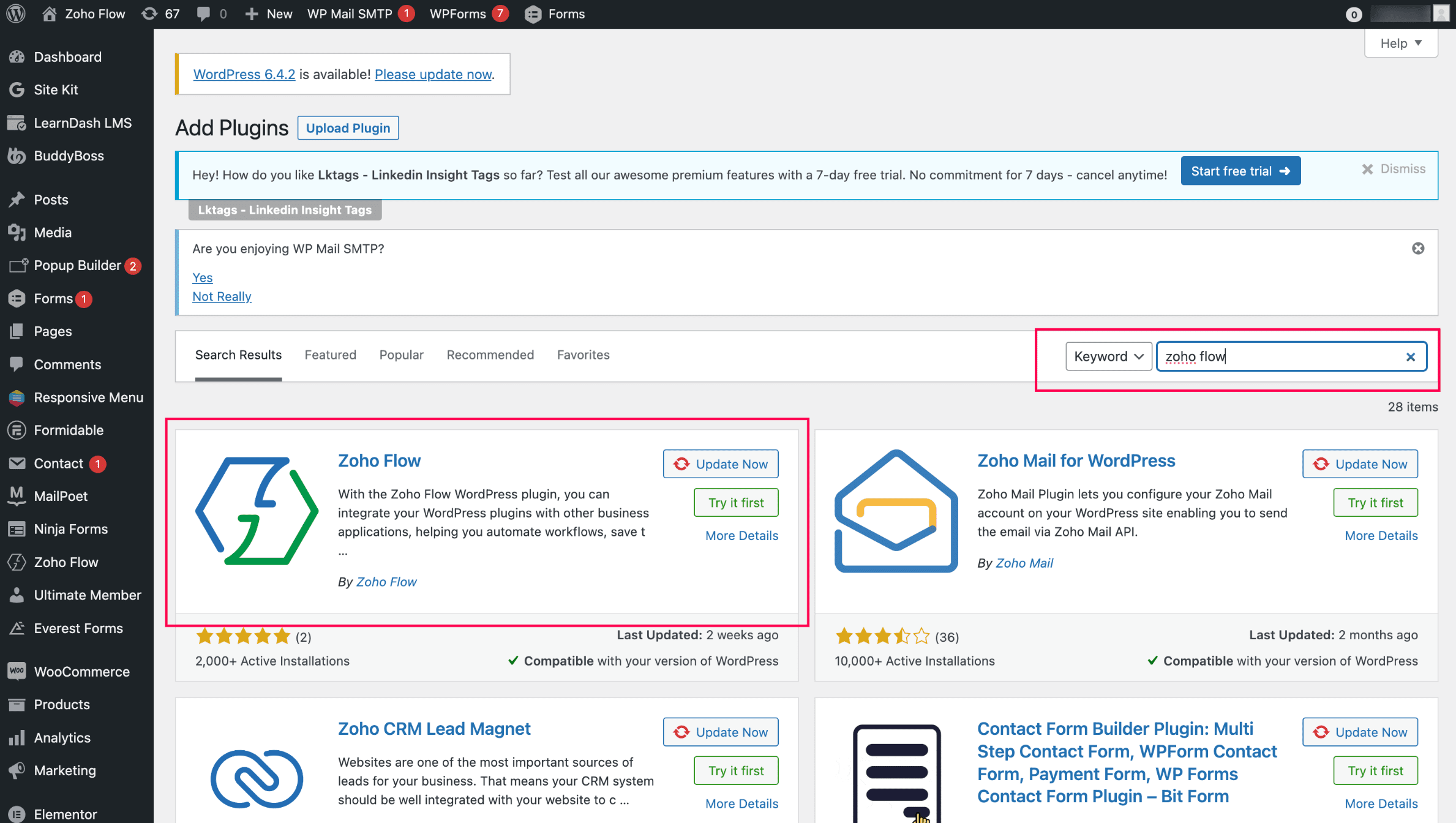
ii. Search for Zoho Flow and click Zoho Flow plugin to initiate the installation.

Installing the WordPress.org extension in Zoho Writer and completing the authentication: 
  1. Install the WordPress.org extension from Zoho Marketplace in Zoho Writer. (By default, it'll be pre-installed for all Zoho Writer users)
  2. Authenticate the extension with your base URL and API key(Note: You can authenticate only one WordPress site at a time)
  3. To generate the base URL and API key, click Zoho Flow in your WordPress site and choose WordPress.org.
Posting content from Zoho Writer: 
  1. Open the WordPress.org extension from the right pane of your document in Zoho Writer.
  2. Add important metadata to your blog posts, such as title, description, and tags, and choose from a list of categories.
  3. Click Publish to publish the content. 
When posting content from Zoho Writer, SEO-friendly image names will help increase visibility in search engines.
You can customize and change the theme of your WordPress blog from Appearance > Themes in the right side of your WordPress blog. Choose a new design or customize the existing design by clicking the Customize button.


Updating blog content from Zoho Writer: 
  1. Click View Published History in the WordPress.org extension in your Writer document.
  2. Choose the document version you want to update the content to from the list of options displayed and click Republish Current Version.

Switch to the Zoho Flow plugin from Jetpack and continue posting to your WordPress.org from Zoho Writer. 


Try Zoho Writer's WordPress and WordPress.org extension and let us know your suggestions and feedback in the comments or email us at support@zohowriter.com or support@eu.zohowriter.com. You can also add your feedback about the Zoho Flow plugin here. It will help us improve the plugin and smoothen your experience.


Regards,

Team Writer


      Zoho Campaigns Resources


        • Desk Community Learning Series


        • Digest


        • Functions


        • Meetups


        • Kbase


        • Resources


        • Glossary


        • Desk Marketplace


        • MVP Corner


        • Word of the Day


        • Ask the Experts


          • Sticky Posts

          • Zoho Writer's WordPress extensions

            Hey Zoho Writer users! Say goodbye to all your WordPress content publishing woes with Zoho Writer's WordPress extensions. Publish content with all your formatting and images, republish content when you update a document, and more—from a single window
          • Easily perform calculations using dates with the new DATEDIF function

            Hey Zoho Writer users! We've enhanced Zoho Writer's formula capabilities with the new DATEDIF function. This allows you to calculate the difference between dates in days, months, and years. Function syntax: =DATEDIF(start_date, end_date, unit) Inputs:
          • Date-based conditions and filters

            Configure conditions with date  Hi everyone! We are excited to announce that you can now compare and filter data with date-based conditions. This update lets you compare date fields in a document to a reference date and display a text or value if the
          • Introducing group by, aggregation, and repeating regions in mail merge templates

            Display data exactly the way you want and highlight key insights with Zoho Writer's enhanced merge templates. We've supercharged Zoho Writer's merge templates with the capability to dynamically group, aggregate, and repeat data as blocks. You can now
          • Say hello to an improved way to merge documents!

            Automating all your documents from start to finish is now easier than ever with Writer's new merge tools.   If you haven't seen it yet, you can read the main announcement here. Here is the full list of the features we've rolled out: 1. Dynamic Table Headers

          Zoho CRM Plus Resources

            Zoho Books Resources


              Zoho Subscriptions Resources

                Zoho Projects Resources


                  Zoho Sprints Resources


                    Zoho Orchestly Resources


                      Zoho Creator Resources


                        Zoho WorkDrive Resources


                          Zoho CRM Resources

                          • CRM Community Learning Series

                            CRM Community Learning Series


                          • Tips

                            Tips

                          • Functions

                            Functions

                          • Meetups

                            Meetups

                          • Kbase

                            Kbase

                          • Resources

                            Resources

                          • Digest

                            Digest

                          • CRM Marketplace

                            CRM Marketplace

                          • MVP Corner

                            MVP Corner


                            Zoho Writer Writer

                            Get Started. Write Away!

                            Writer is a powerful online word processor, designed for collaborative work.

                              Zoho CRM コンテンツ


                                ご検討中の方

                                  • Recent Topics

                                  • Zoho CRM for Everyone's NextGen UI Gets an Upgrade

                                    Hello Everyone We've made improvements to Zoho CRM for Everyone's Nextgen UI. These changes are the result of valuable feedback from you where we’ve focused on improving usability, providing wider screen space, and making navigation smoother so everything
                                  • is it possible to add more than one Whatsapp Phone Number to be integrated to Zoho CRM?

                                    so I have successfully added one Whatsapp number like this from this User Interface it seems I can't add a new Whatsapp Number. I need to add a new Whatsapp Number so I can control the lead assignment if a chat sent to Whatsapp Phone Number 1 then assign
                                  • Can’t find fsm in zoho one

                                    Every other app is available to me in Zoho one except fsm
                                  • Posibility to add Emoticons on the Email Subject of Templates

                                    Hi I´ve tried to add Emoticons on the Subject line of Email templates, the emoticon image does show up before saving the template or if I add the Emoticon while sending an Individual email and placing it manually on the subject line. Emoticons also show
                                  • Task Deletion Restriction & Strict Stage Control

                                    Hello Zoho Community, We have the following two issues currently pending and under testing, for which we require a workable and reliable solution: 1. Task Deletion Restriction We are testing ways to ensure that staff users are not able to delete tasks
                                  • Unable to mass update a picklist field

                                    Hello, I have the records within our Accounts module divided between two account types: Parent Accounts & Member Accounts. I am attempting to mass update accounts from one picklist value to the other (within other specific criteria in our custom fields)
                                  • Process checklist in CRM

                                    Hi We've created a new sales process that I'm mapping into the CRM - issue I have is that some of the tasks / milestones I would like to capture require very simple tick box responses but there are quite a few under a variety of sub categories so I don't
                                  • CRM project association via deluge

                                    I have created a workflow in my Zoho CRM for closing a deal. Part of this workflow leverages a deluge script to create a project for our delivery team. Creating the project works great however, after or during the project creation, I would like to associate
                                  • Manage control over Microsoft Office 365 integrations with profile-based sync permissions

                                    Greetings all, Previously, all users in Zoho CRM had access to enable Microsoft integrations (Calendar, Contacts, and Tasks) in their accounts, regardless of their profile type. Users with administrator profiles can now manage profile-based permissions
                                  • Holidays - Cannot Enter Two Holidays on Same Day

                                    I have a fairly common setup, where part-time employees receive 1/2 day's pay on a holiday and full-time employees receive a full day's pay. Historically, I've been able to accommodate this by entering two separate holidays, one that covers full-time
                                  • Where is the settings option in zoho writer?

                                    hi, my zoho writer on windows has menu fonts too large. where do i find the settings to change this option? my screen resolution is correct and other apps/softwares in windows have no issues. regards
                                  • Passing the CRM

                                    Hi, I am hoping someone can help. I have a zoho form that has a CRM lookup field. I was hoping to send this to my publicly to clients via a text message and the form then attaches the signed form back to the custom module. This work absolutely fine when
                                  • File emails in Shared email folder

                                    Hi, I am unable to allow users to collaborate in Shared email folders: User 1 shares a folder let's say "SharedTopic" with full permissions Users 2 and 3 can see this folder but are unable to add emails to this folder or search in this folder. For example,
                                  • No funcionan correctamente el calculo de las horas laborales para informe de tickets

                                    Hola, estoy intentando sacar estadísticas de tiempo de primera respuesta y resolución en horario laboral de mis tickets, pero el calculo de horas en horario laboral no funciona correctamente cree los horarios con los feriados : Ajusté los acuerdos de
                                  • How create a draft via workflow?

                                    I wish to create a workflow rule for specific emails that creates a draft response - not an automatic email reply, but just a draft with a set response ready to be verified by an agent who can then manually select recipients. Alternatively, the workflow
                                  • Ticket layout based on field or contact

                                    Hi! I want to support the following use-case: we are delivering custom IT solutions to different accounts we have, thus our ticket layouts, fields and languages (priority, status field values should be Hungarian) will be different. How should I setup
                                  • This user is not allowed to add in Zoho. Please contact support-as@zohocorp.com for further details

                                    Hi Team, when I,m trying to create a email account (imagixmidia.com.br) it's showing this error >>  This user is not allowed to add in Zoho. Please contact support-as@zohocorp.com for further details plz help me  thanks
                                  • How to manage task lists in Zoho Desk?

                                    Hello, I use Zoho Desk for IT customer support. I have a list of standard operating procedures (SOPs), including SOPs for onboarding new users, offboarding users, losing a device, etc. These are lists of tasks to be performed depending on the situation.
                                  • Zoho → ShipStation Integration – Sales Order–Driven Fulfilment Workflow

                                    Hello All, I’m reaching out to explore the best way to integrate a shipping tool into our inventory which will speed our process up. We are looking to integrate ShipStation into our existing order-to-fulfilment workflow, as we’re keen to standardise on
                                  • Business Day Logic Update: More Accurate Scheduling for Your Workflows

                                    Hello everyone, We’re improving how business-day calculations work in workflows, especially when triggers happen on weekends. This update ensures that offsets like +0, +1, and +2 business days behave exactly as intended, giving you clearer and more predictable
                                  • Convert Lead Automation Trigger

                                    Currently, there is only a convert lead action available in workflow rules and blueprints. Also, there is a Convert Lead button available but it doesn't trigger any automations. Once the lead is converted to a Contact/Account the dataset that can be fetched
                                  • Default Tagging on API-generated Transactions

                                    If one assigns tags to an Item or Customer, those tags get auto-populated in each line item of an Invoice or Sales Order when one creates those documents. However, if one creates the Sales Order or Invoice via the API (either directly coding or using
                                  • User

                                    If user is already part of manage engine endpoint central , what hapens when i try to add them to another Zoho org / directory? Are these users added as external users?
                                  • Adding a new section to the related details sidebar when creating a new ticket.

                                    Hello, I was wondering if you can add a new section to the related details sidebar when creating a new ticket. I was wanting to have it to where it also shows the account information related to the contact chosen as well. This is the section I am referring
                                  • Displaying only unread tickets in ticket view

                                    Hello, I was wondering if someone might be able to help me with this one. We use filters to display our ticket list, typically using a saved filter which displays the tickets which are overdue or due today. What I'd really like is another filter that
                                  • How to compare a subform lookup field that allows multiple entries when edited

                                    I have a form with a subform with multiple fields. One of the fields is a lookup field that allows a multi select. On edit validation, I want a workflow to execute only when the entries in that subform field has changed. The old. function is not working
                                  • Is Zoho Shifts included in the Zoho One plan?

                                    In case the answer is no: there's any plan to make it available via One? Thank you
                                  • Creating a Chart from a Report

                                    In Zoho Analytics, is it possible to create a chart from a Pivot View report? We are looking to use Zoho Analytics to replace Excel for Sales reports and would like to be able to show both the table and the chart together.
                                  • Zoho Tracking Image location

                                    So we've been having an issue with tracking email opens. Specifically in Gmail. Our emails are not that long either, maybe 4 sections of image/250 characters of text/button per section.  But all my test accounts I used via Gmail we're showing opens. But then come to find out the tracking image is at the very bottom of the email. So If the message is clipped (It always just clips our social icons on the bottom) and the user doesn't click the show more button it never tracks the open.  Looking at other
                                  • Is there a plan to integrate zoho voice with zoho books?

                                    Hello, Is there a plan to integrate zoho voice with zoho books? Right now we are using the Twilio SMS integration into zoho books, but have recently decided to switch to zoho voice for calls and sms. Is there a plan to integrate zoho voice natively into
                                  • Zoho Tables is now live in Australia & New Zealand!

                                    Hey everyone! We’ve got some great news to share — Zoho Tables is now officially available in the Australian Data Center serving users across Australia and New Zealand regions! Yes, it took us a bit longer to get here, but this version of Zoho Tables
                                  • Delivery and handling of documents e-stamped using Zoho Sign

                                    Hello everyone! Zoho Sign makes it easy to pay non judicial stamp duty online and automatically attach the digitally generated e-stamp challan to electronic documents. We also manage the delivery of physical e-stamped papers. We periodically receive these
                                  • Introducing Dedicated Modules for Plans, Addons, and Coupons in Zoho Billing

                                    We’ve enhanced the way you manage Plans, Addons, and Coupons in Zoho Billing. Previously, all three grouped together under Subscription Items. Now, each one has its own dedicated module, giving you a cleaner and more intuitive experience. This update
                                  • Sortie de Zoho TABLE ??

                                    Bonjour, Depuis bientôt 2 ans l'application zoho table est sortie en dehors de l'UE ? Depuis un an elle est annoncée en Europe Mais en vrai, c'est pour quand exactement ??
                                  • Zoho Forms API

                                    Is there any way to get all form entry list using API? Looking forward to hear from you
                                  • Issue with WhatsApp Template Approval and Marketing Message Limit in Zoho Bigin

                                    We are facing issues while creating and using WhatsApp message templates through Zoho Bigin, and we request your clarification and support regarding the same. 1. Utility Template Approval Issue Until December, we were able to create WhatsApp templates
                                  • How to install Widget in inventory module

                                    Hi, I am trying to install a app into Sales Order Module related list, however there is no button allow me to do that. May I ask how to install widget to inventory module related list?
                                  • Zoho Social - Feature Request - Reviewer Role

                                    Hi Social Team, I've come across this with a couple of clients, where they need a role which can review and comment on posts but who has no access to create content. This is a kind of reviewer role. They just need to be able to see what content is scheduled
                                  • Zoho Social - Feature Request - Non-US Date Format

                                    Hi Social Team, I have noticed that there is no option to change the date format from US mm/dd/yyyy to others like dd/mm/yyyy. It would be great to see this added as the platform matures. Thanks for considering this feedback.
                                  • Drop Down Value

                                    Hi, May I know why Zoho Flow treat this drop down as number and not as string. If so, how can I fetch the right value for filtering. This field is from Creator, in Creator upon checking by default it is a string since it's not a lookup field.
                                  • Next Page