Automating appointment status and customer feedback collection

Automating appointment status and customer feedback collection

Hello community members,

In the spirit of elevating your scheduling game for 2024, we're bringing you a couple of useful workarounds that can enhance your overall Bookings experience.

We have divided the community post into two halves. In the first half, we will show how to automate the appointment status to Completed. This action ensures that emails are automatically triggered after the appointment is completed. In the second half, we will explore how to add and prefill the feedback form in your customer emails. This will allow you to efficiently gather feedback from customers.

In an effort to streamline the entire process, we're merging both topics into a single post. This aims to automate updating the appointment status to completed, triggering the completion email to customers, and seamlessly integrating our Zoho Survey form for actively collecting valuable feedback.

Automating the appointment status

Currently, updating an appointment's status to Completed is a manual process in Zoho Bookings. However, with our new workaround, you can now streamline this task through automation. We've included steps below that will make it so that once an appointment has ended, its status will automatically switch to Completed.  

Note that if you mark an appointment as No show, your selection will not be overwritten by this new workaround. 

If you're still concerned about this, consider editing the content of the appointment completion trigger email, providing generic content suitable for both attendees and non-attendees. This guarantees that even if all appointments are marked as completed, a generic email with relevant information will be sent to all customers.

Prerequisites for automating the appointment status 

1. Zoho Bookings basic or premium subscription.
2. Zoho Flow paid subscription

How to automate 

A. First, we'll create a new flow in Zoho Flow:

1. Sign in to Zoho Flow.

2. Select the Create flow option.
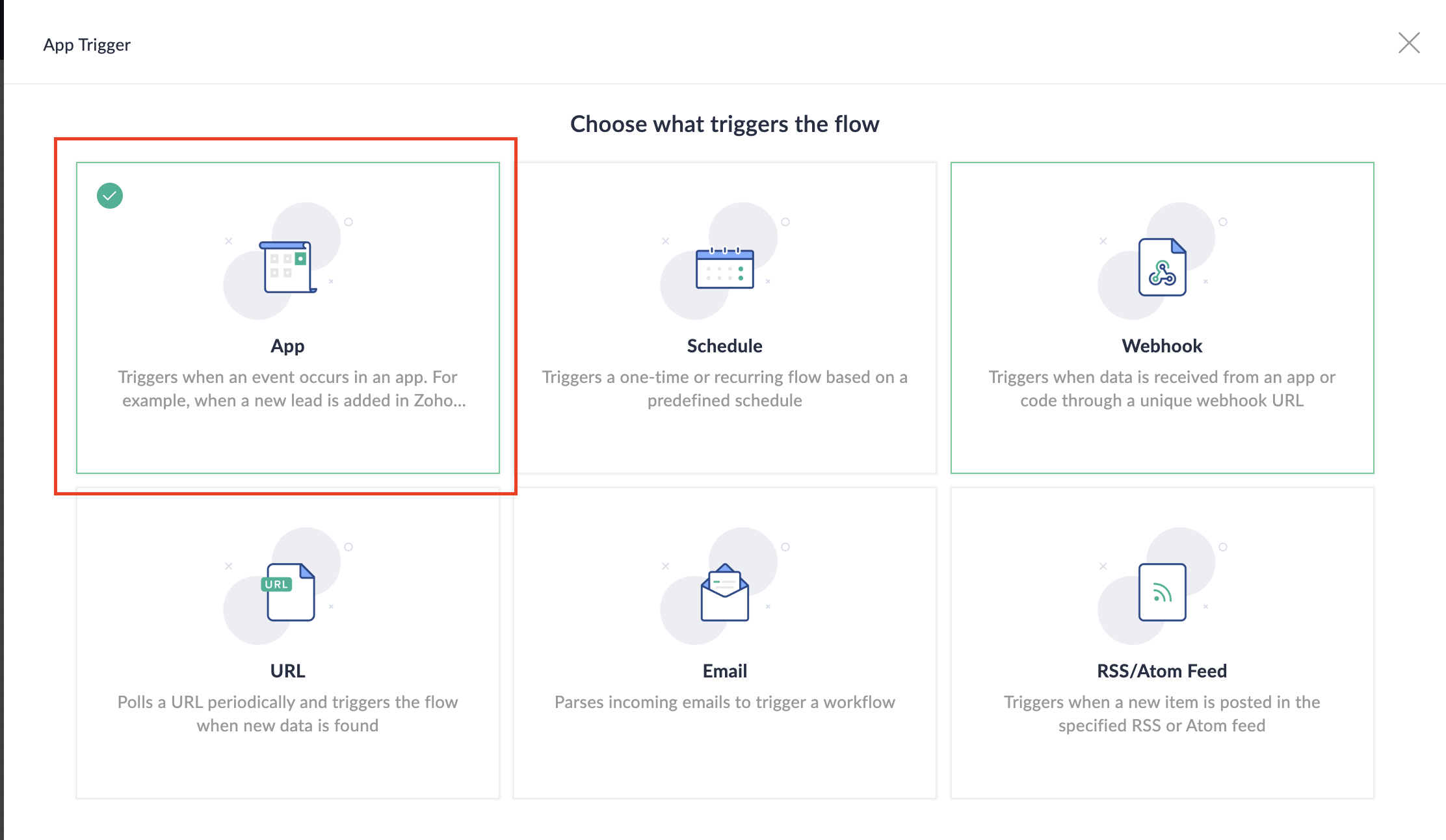


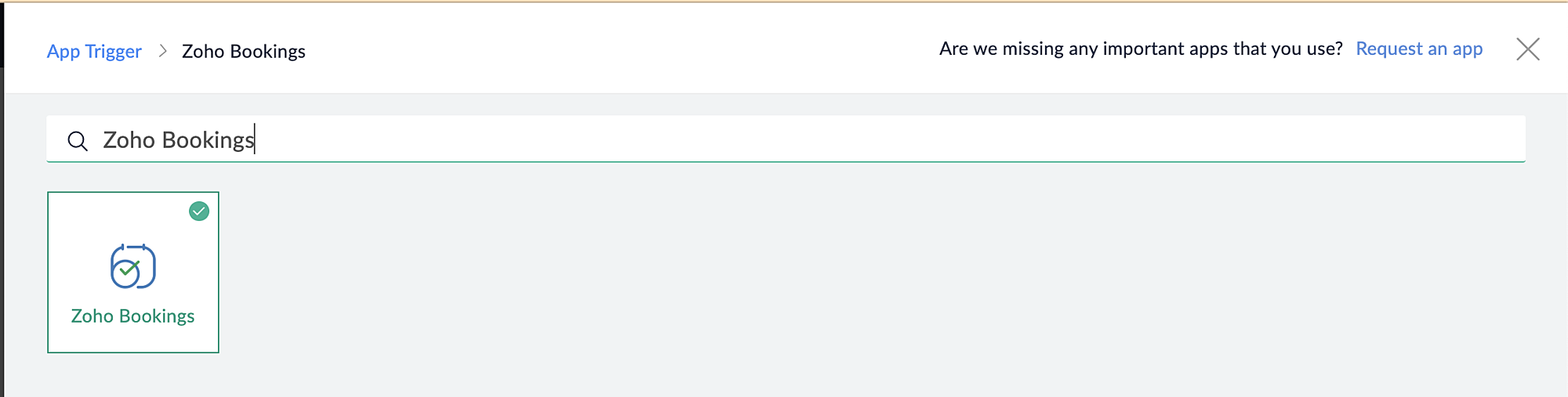
3. Select App and search for Zoho Bookings in the search bar.


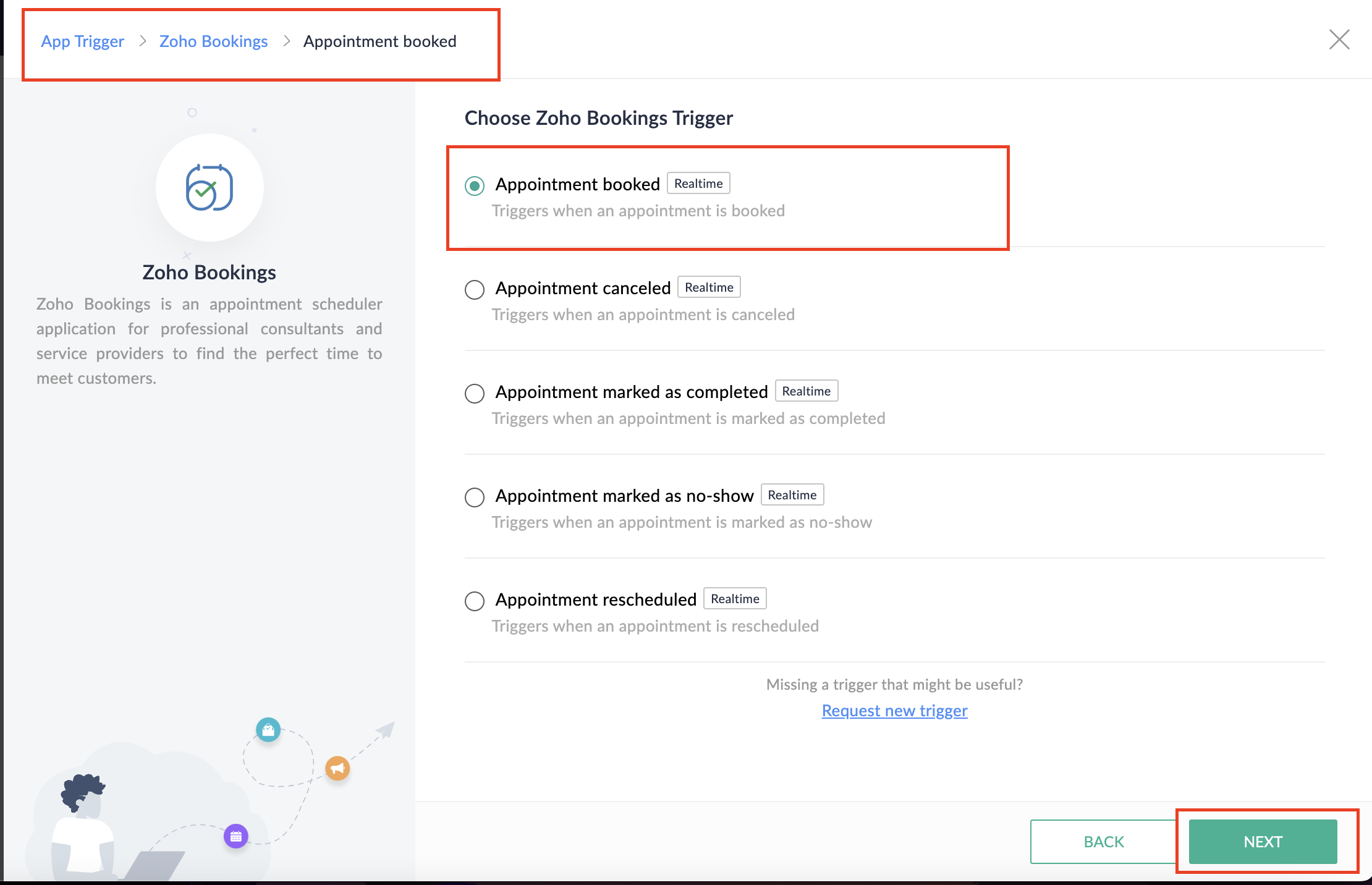
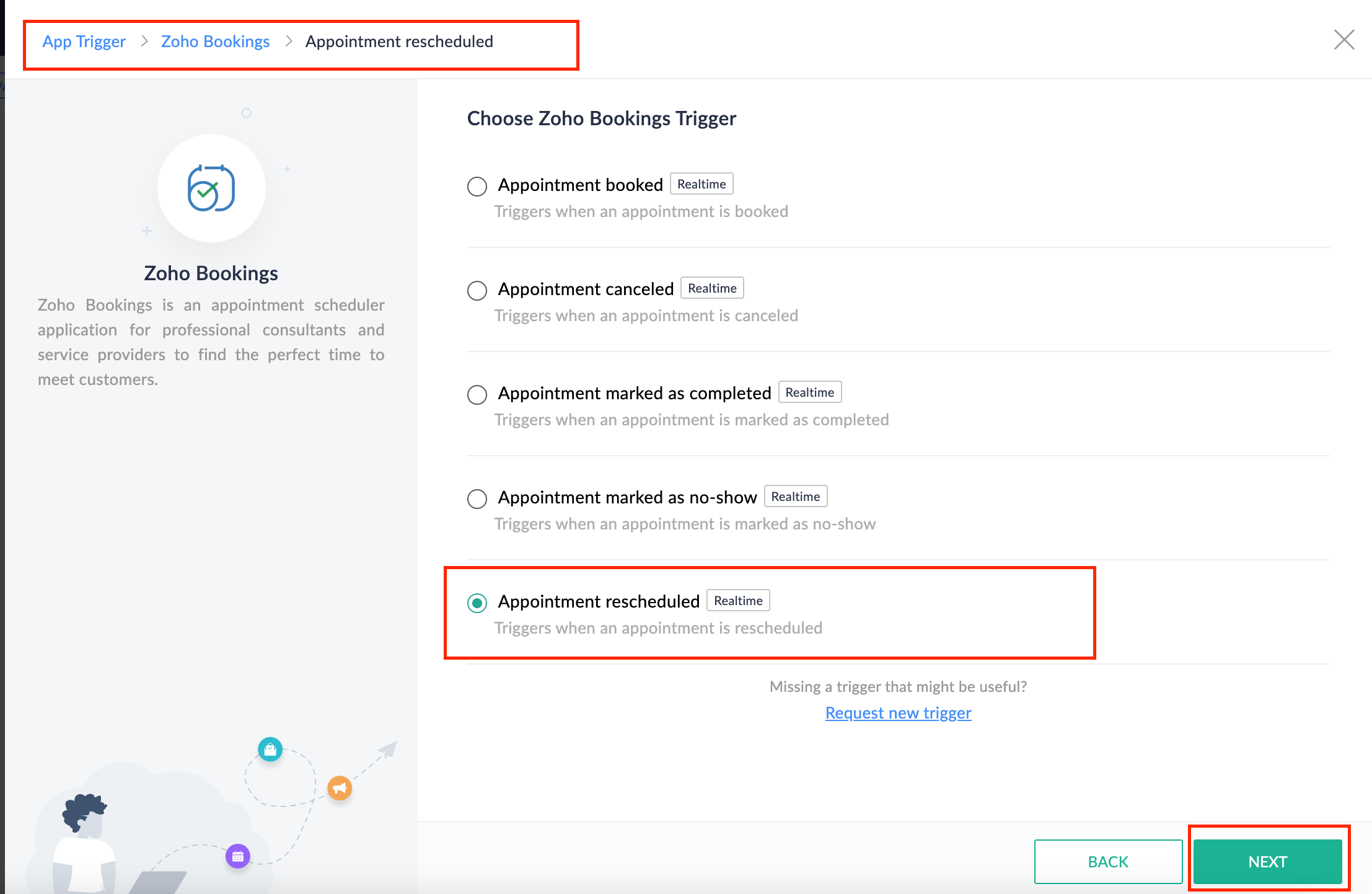
4. Select the Appointment booked trigger.


5. Select the Connection and Variable Name.
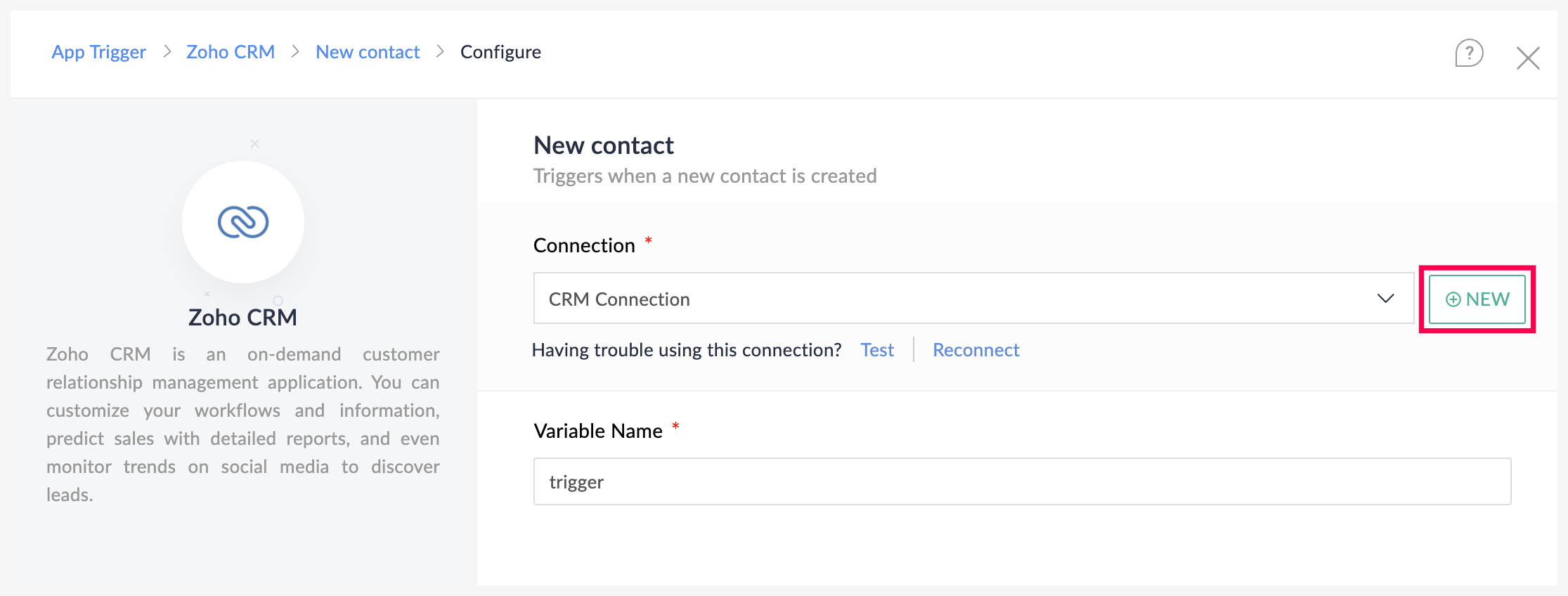


6. Click Done. 

You have now created a new flow for Zoho Bookings.

Other helpful links for this process:
B. Next, let's configure the logic: 

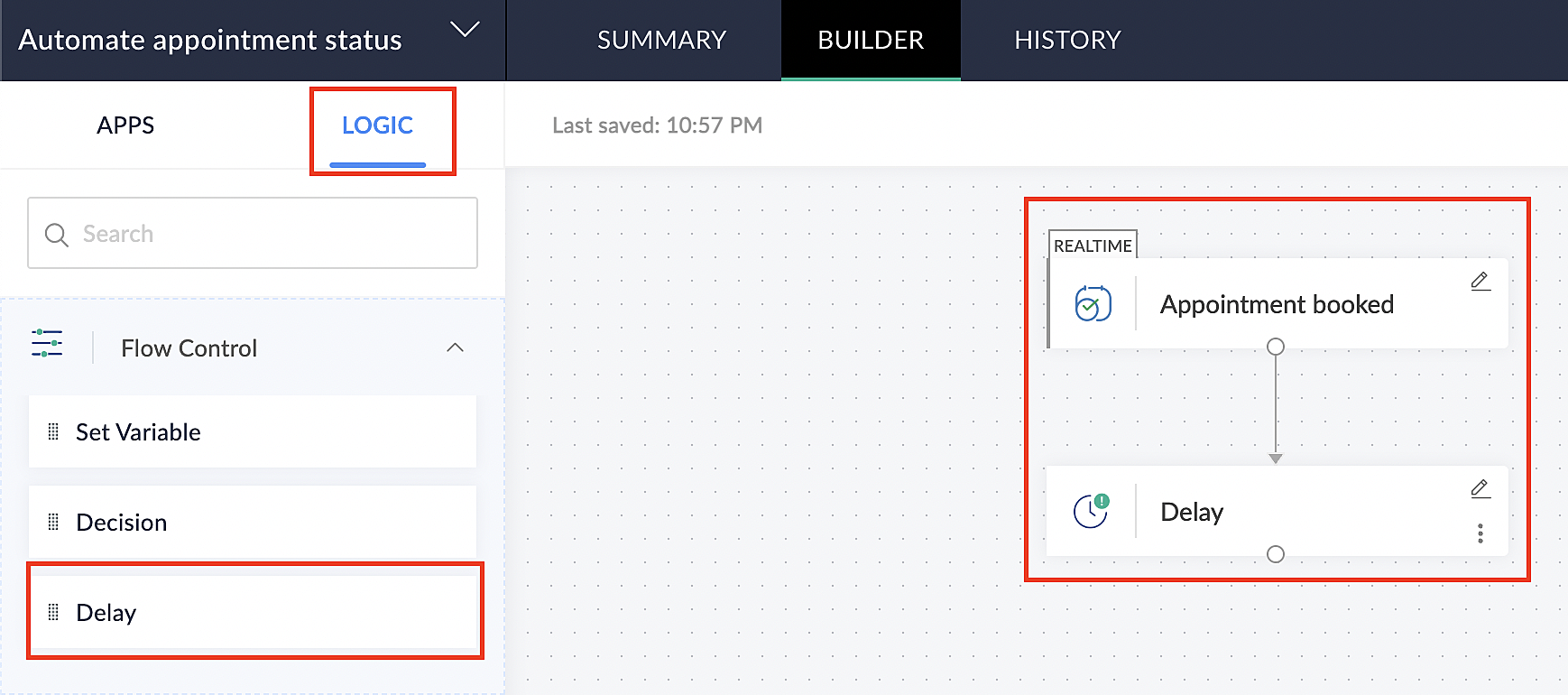
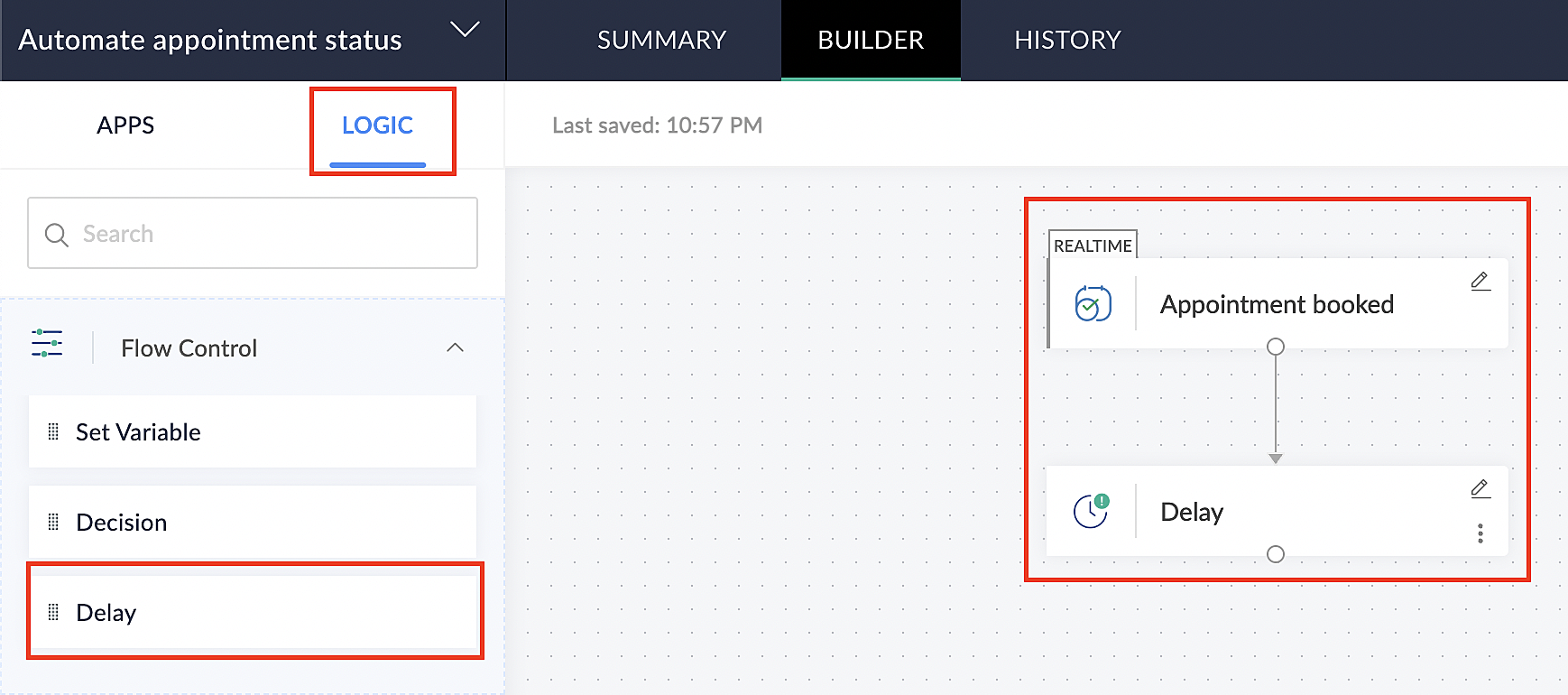
1. Navigate to the Logic tab in Zoho Flow.

2. Click the Flow Control dropdown and select Delay.

3. Drag and drop the Delay function to the bottom of the Appointment booked trigger.


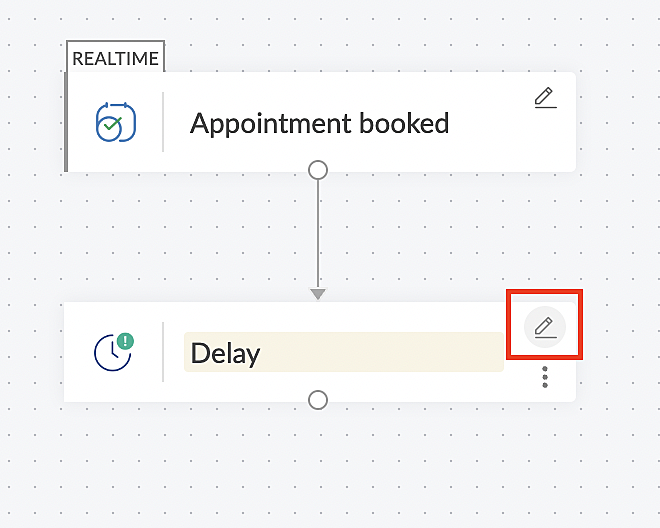
4. Click on the edit icon next to the Delay function.


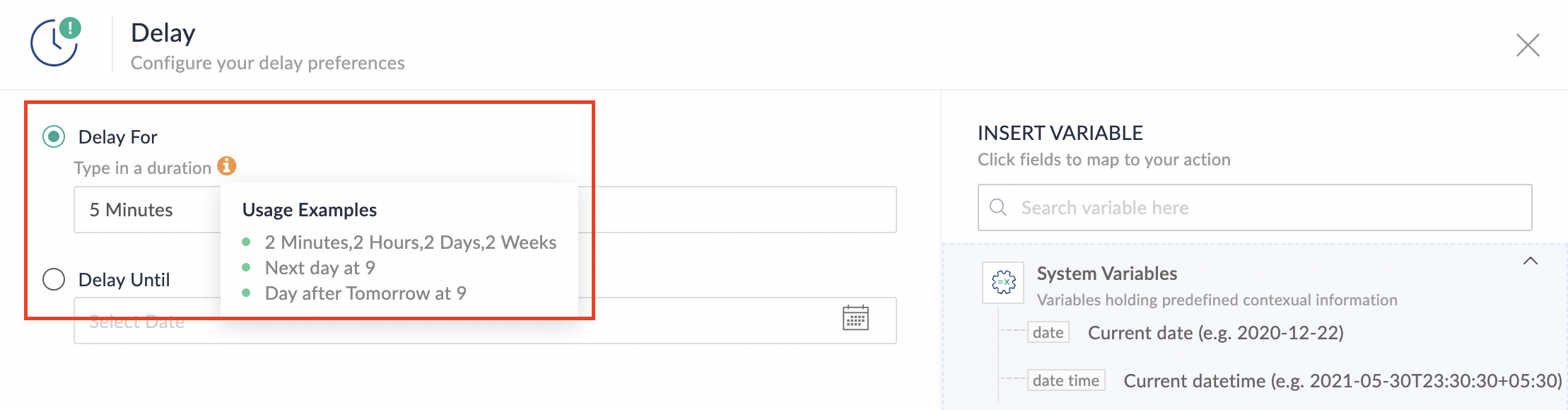
5. In the Delay For the column, select the appointment end time variable from the available Zoho Bookings variables.
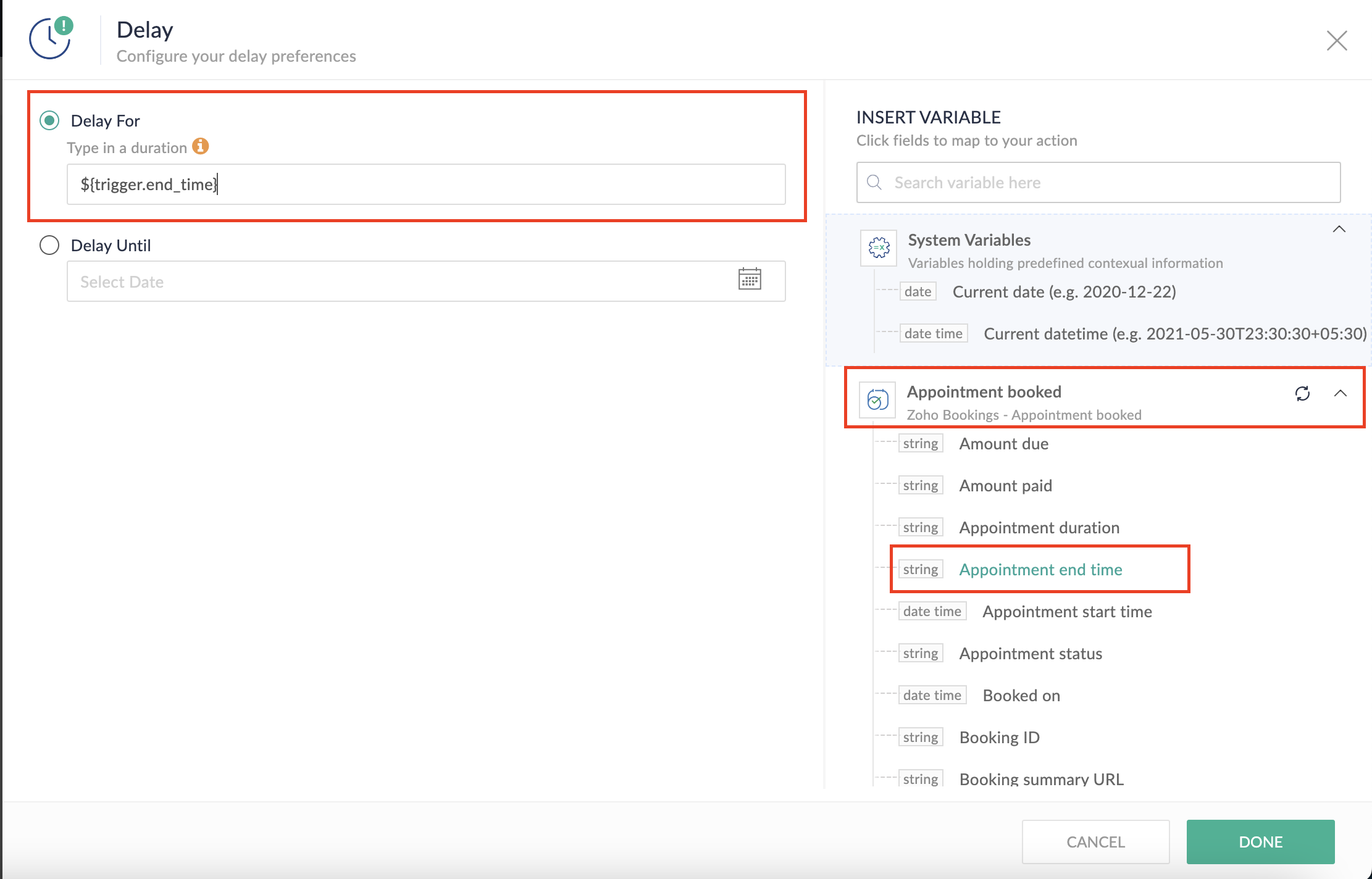


Completing this steps helps us ensure that this workflow executes exclusively at the end of each appointment.

C. We can now allocate additional time for any necessary actions:

For example, let's consider extending the remaining actions by an extra 5 minutes. This extension grants you additional time to update the appointment status. 

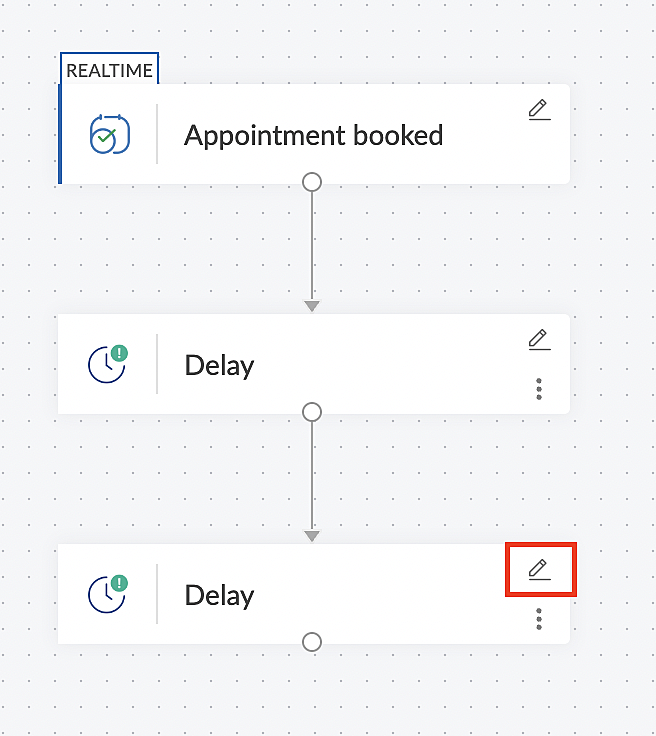
1. From the Logic tab, drag and drop another Delay action to the bottom of the first Delay action.


2. Click on the edit icon next to the Delay function.


3. In the Delay For column, set the desired extra time based on your preference. If going by our proposed example, we'd configure an additional 5 minutes.

For more details: Delay

Note: If you decide not to include extra time and prefer to execute the flow precisely at the end of the appointment duration, you do not need to complete this section of steps.

D. Finally, let's configure a custom function

Through this step, we'll ensure our ended appointment's status updates to Completed (as long as no other status has been selected).

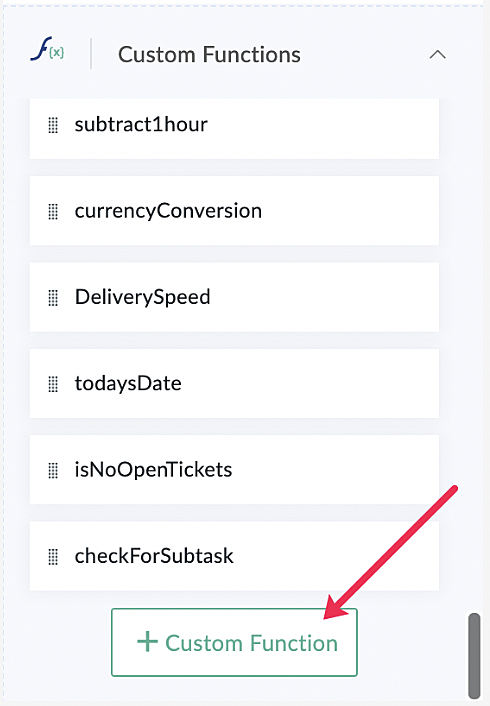
1. From the Logic tab, click the Custom Functions dropdown.
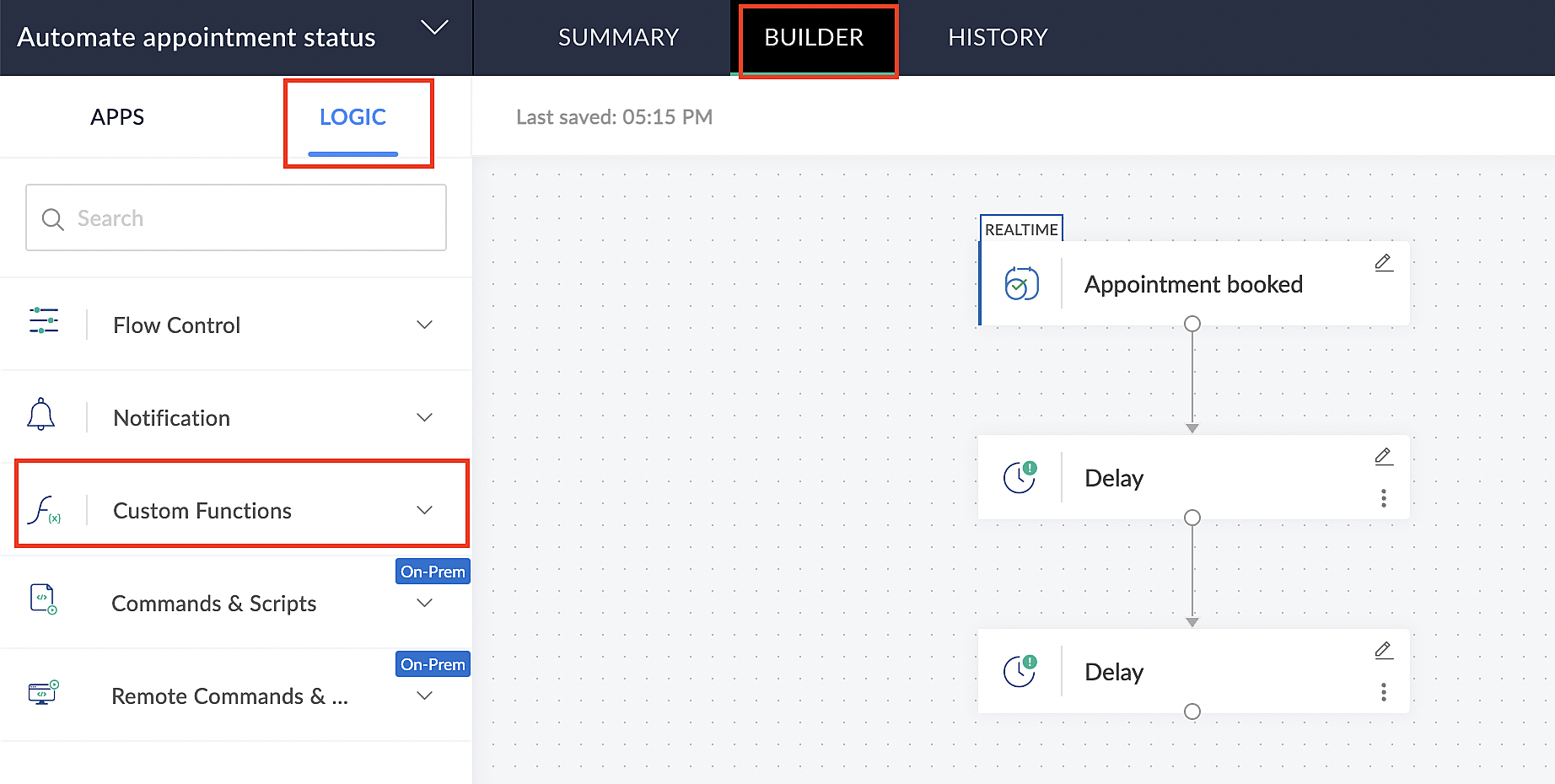


For more details: Custom Functions

2. Click +Custom Function.


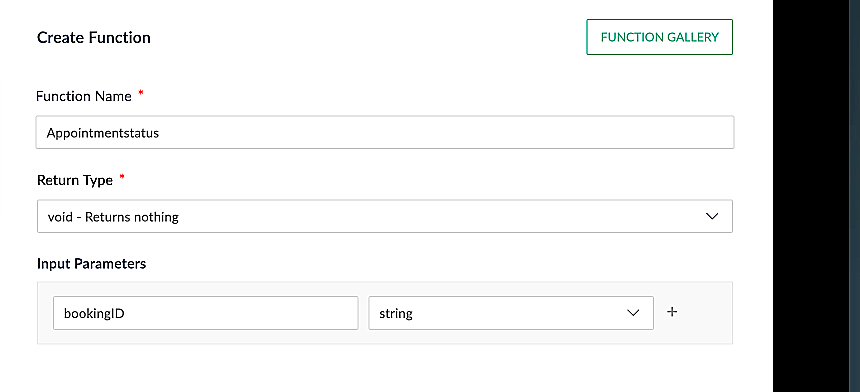
3. Add a relevant name for the function under Function Name, and set the Return Type as void - Returns nothing from the dropdown.

4. Under Input parameters, type bookingID and select string from the dropdown as shown in the screenshot below.


5. Click Create to open the Deluge script page, where we will enter our code for execution.
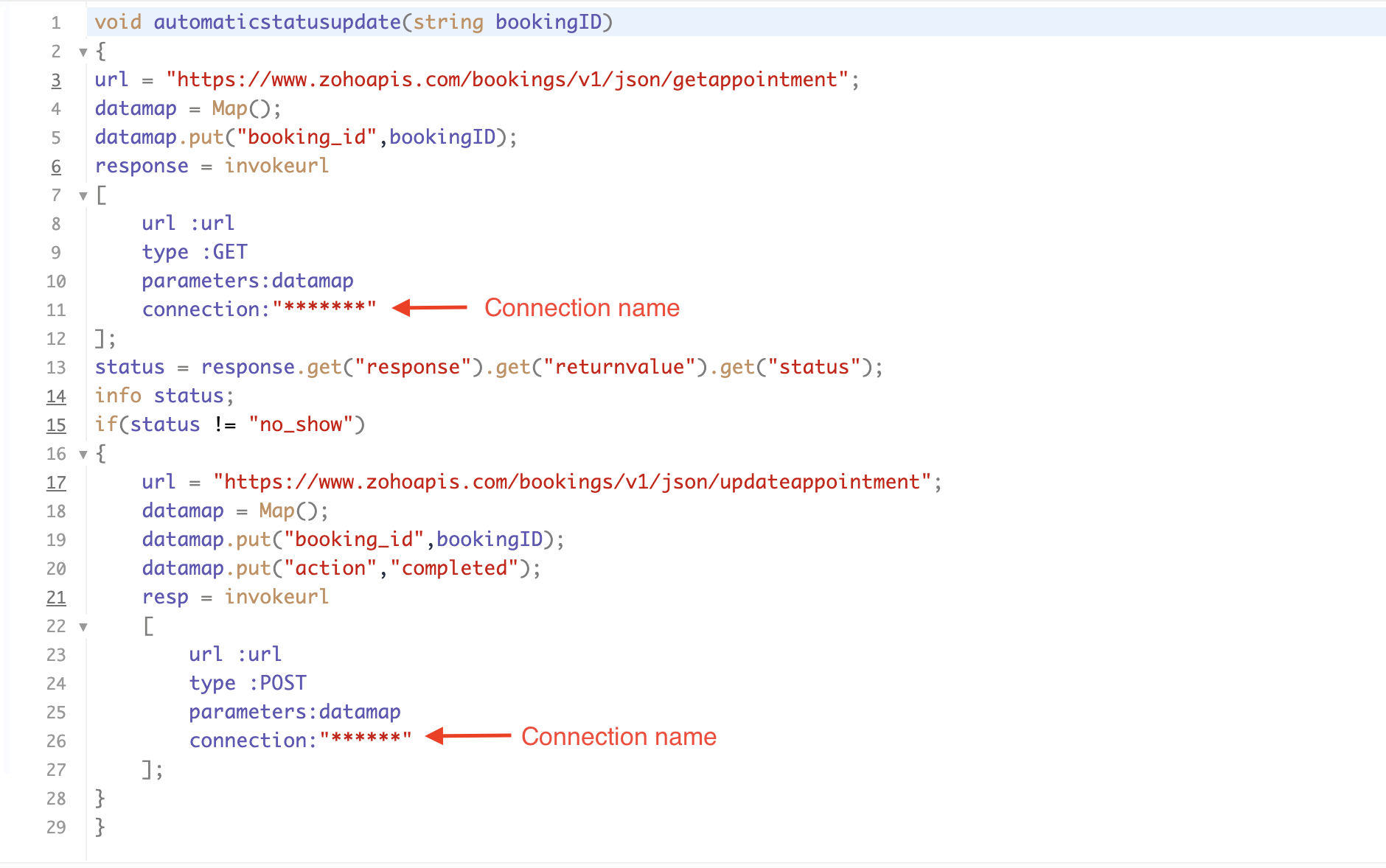
Please configure the below code in the Deluge script page.  

Code Link


If you're interested, here is a brief explanation of the code:

Line 1: To pass the input data below to the code.
  • Booking ID: Identifies the specific booking for fetching details and checking the status.
Line 3: Set up the API endpoint URL based on the Zoho Bookings account's data center.
Line 3–12: We utilize the Get Appointment API' to retrieve the appointment details. For more details: Get Appointment API

Line 13: Here, we're fetching the status of the respective appointment from the response of the Get Appointment API.

Line 15: Implement an 'if' condition to execute the code only if the appointment status is not No show.

Line 16–27: In this step, we utilize the 'Update Appointment API to mark the appointment status as Completed' when the condition specified in line 15 of the code is met.

This is how the final flow will look:
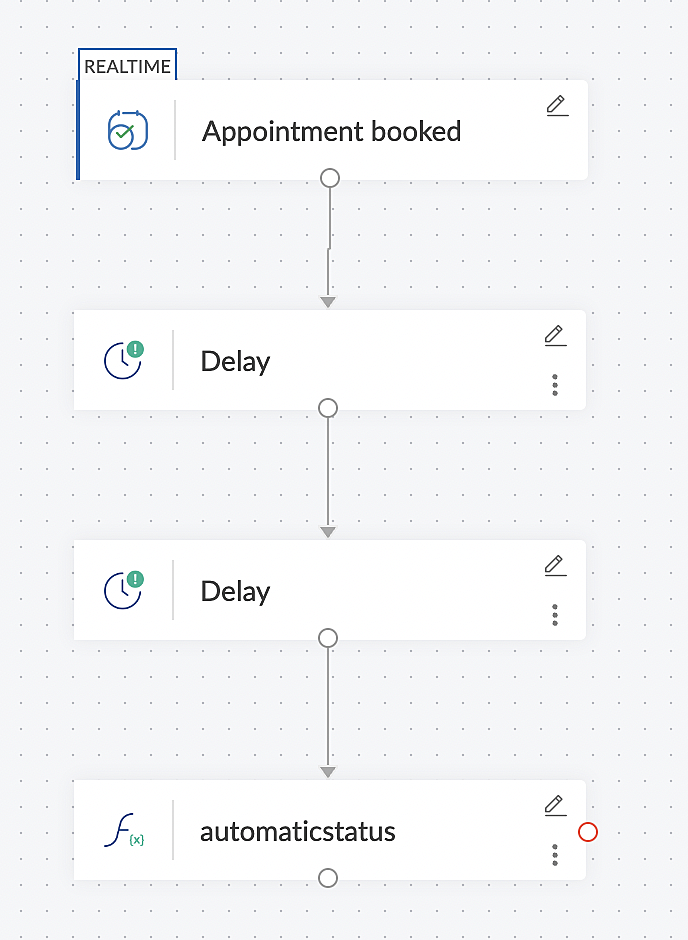


Note: The described flow is tailored for newly scheduled appointments. For cases where appointments are initially scheduled and later rescheduled, a separate flow must be created. The flow for rescheduled appointments follows the same steps outlined above, with the only modification being the initial trigger. Instead of the 'Appointment booked' trigger, please substitute it with the 'Appointment rescheduled' trigger in step A (steps B, C, and D remain the same).


Collecting feedback with surveys

Ensuring a seamless and positive customer experience is a top priority for every appointment. An integral part of this process involves gathering feedback from customers after the appointment's completion. This valuable feedback not only helps understand their sentiments but also provides insights for continuous improvement. 

Let's explore how to leverage Zoho Survey to collect valuable feedback from customers. Additionally, we'll delve into the process of pre populating survey fields with the customer's name extracted from the appointment.

How to create a survey in Zoho survey:

You have the option to create a new survey from scratch or choose from templates or existing surveys.

For more details, refer to: Create a Survey.

As an example, let's use the Customer Feedback Survey from the templates.
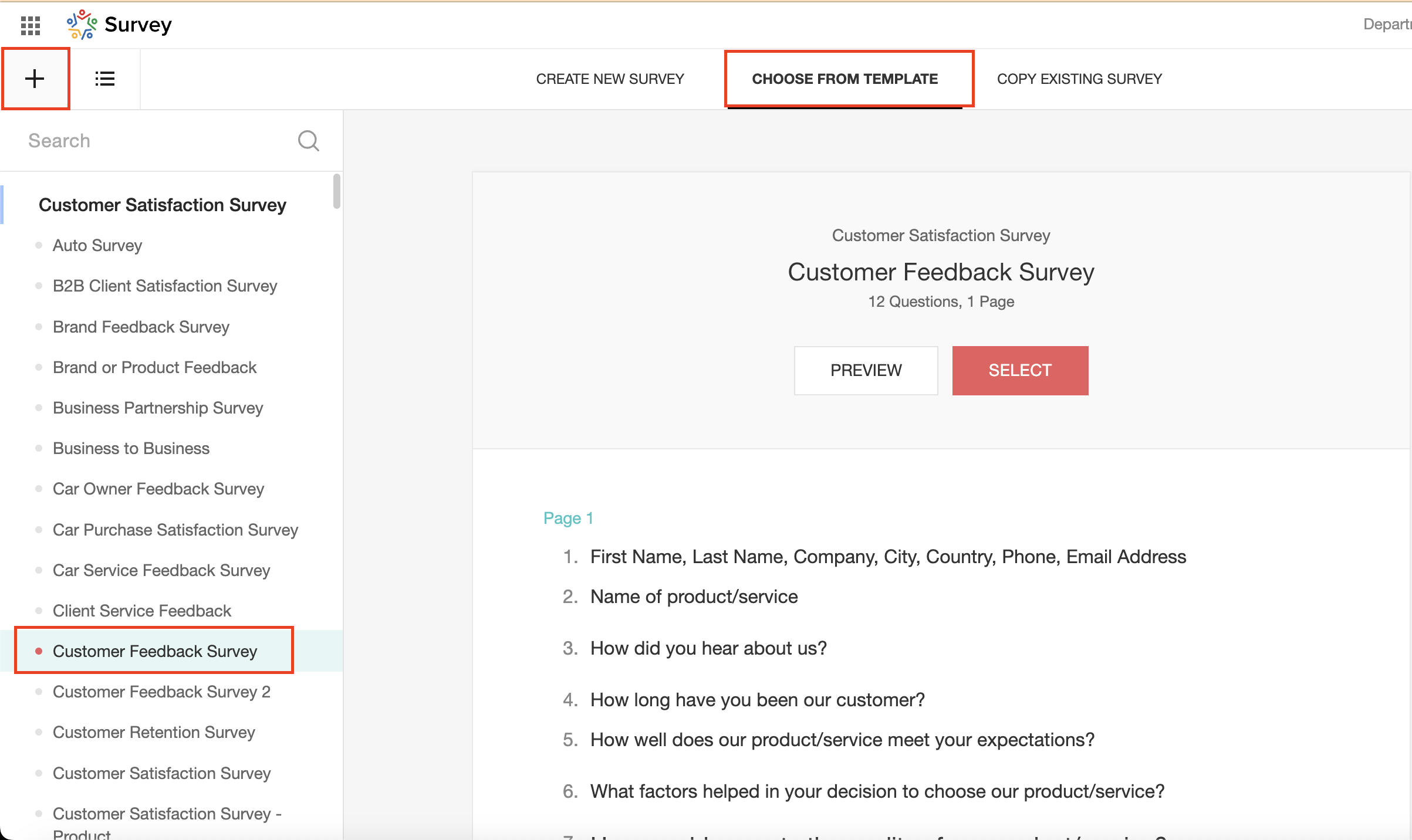


To enhance your survey experience, you have the flexibility to edit the survey form and select specific fields for inclusion.

Now, let's take a closer look at streamlining the customer experience by auto-populating the field inputs in Zoho survey with customer details. This additional step eliminates the need for customers to add their information manually, contributing to an enhanced overall experience.

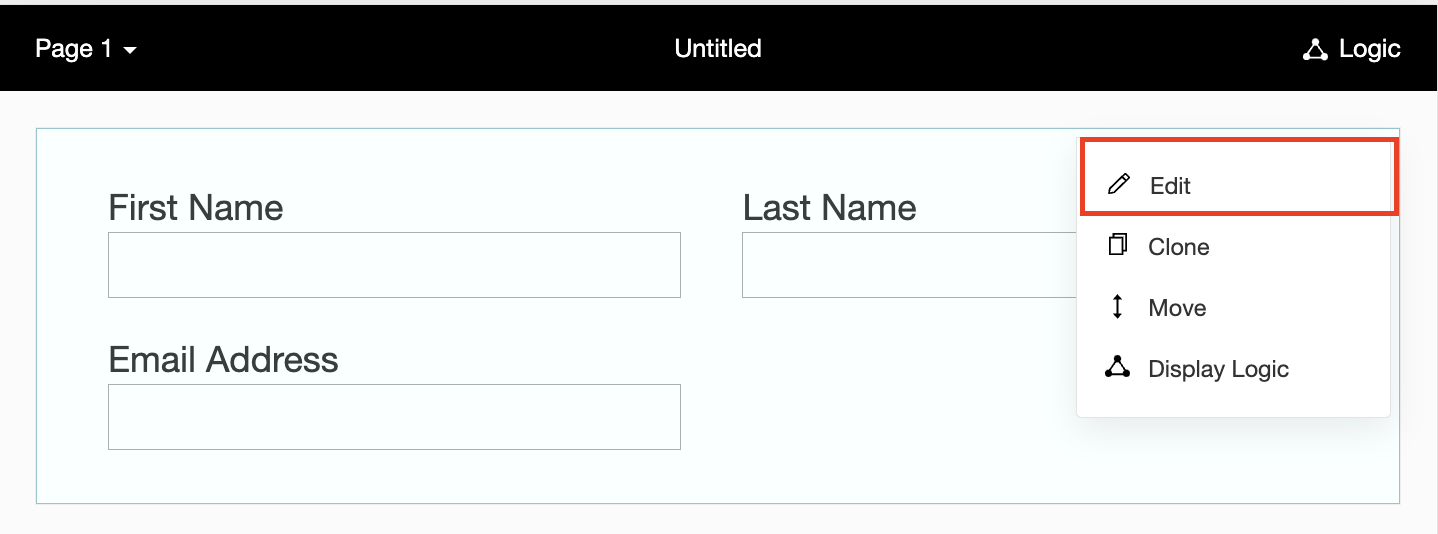
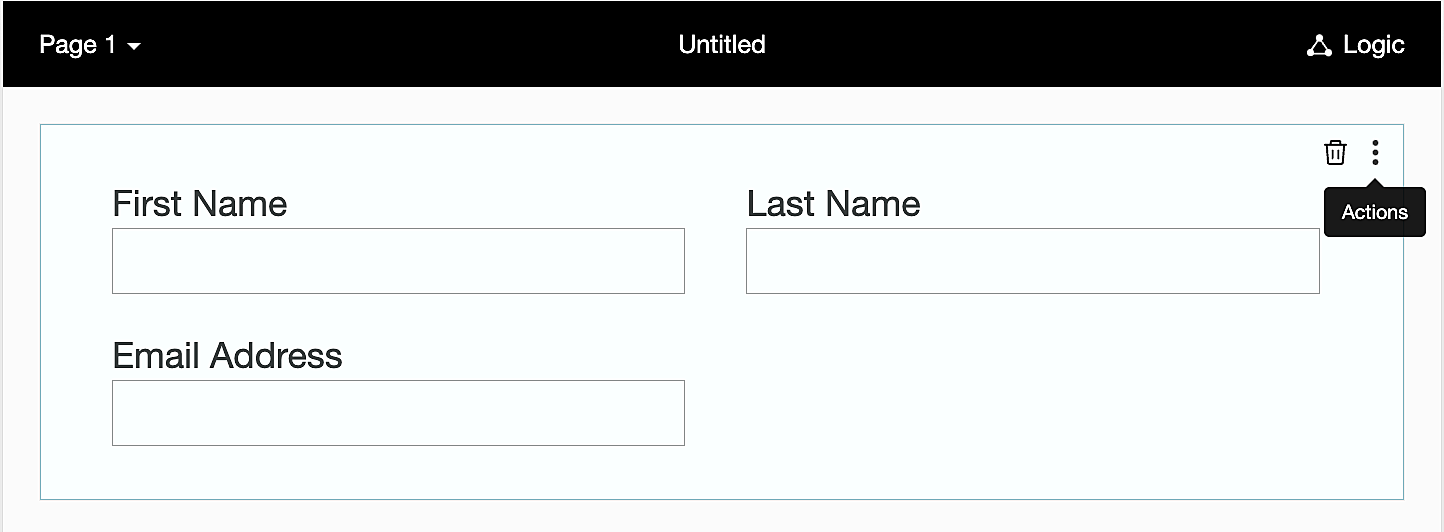
1. Click on the Actions button (three dots) next to the Last Name field, and choose Edit.


2. Click on Advanced options and check the box next to Prepopulate answer.
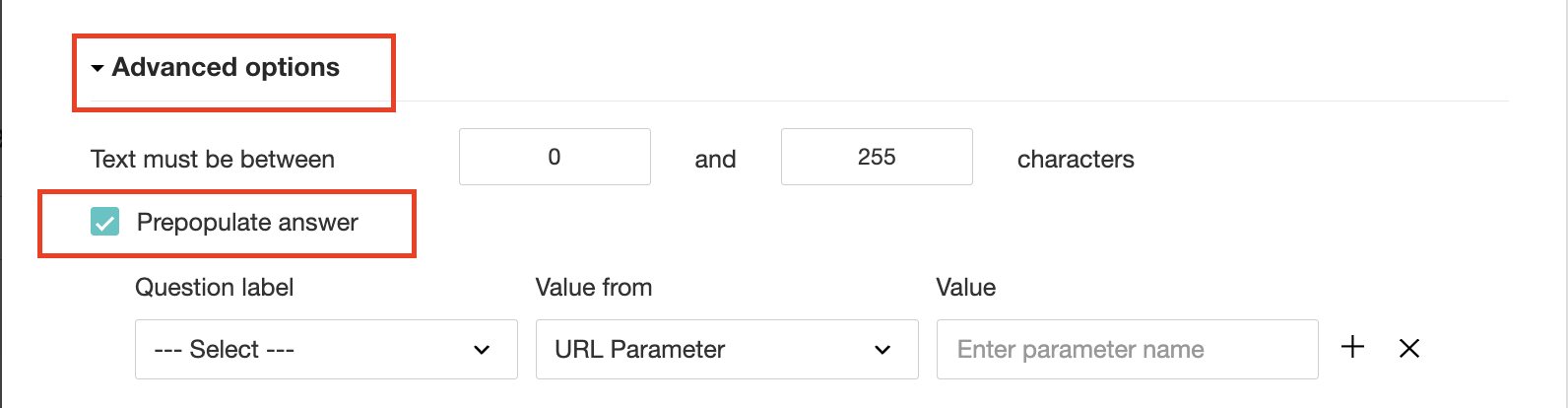


3. Select First Name, Last Name, and Email Address under Question label and URL parameter in each corresponding Value from field.
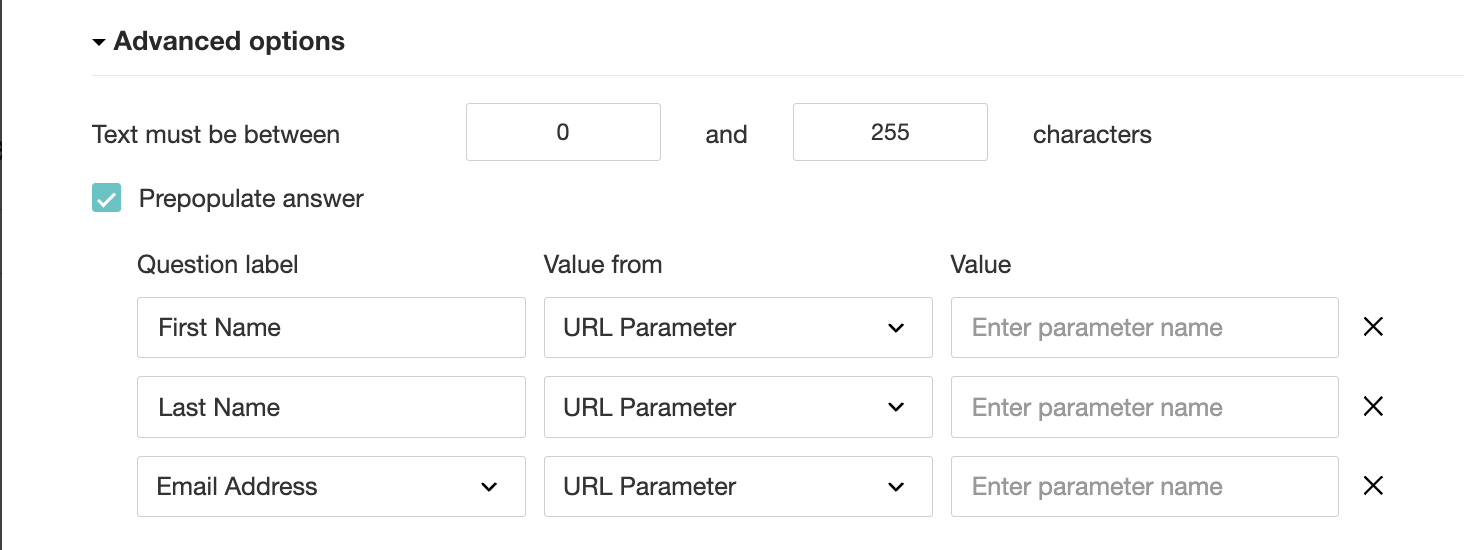


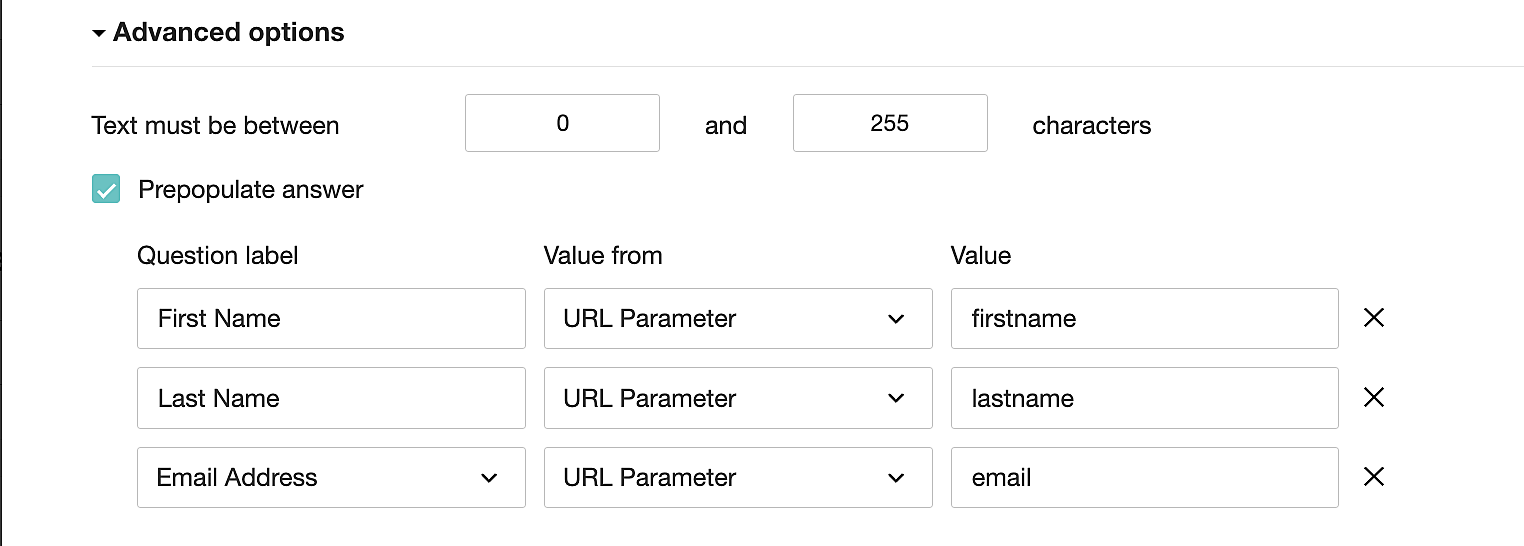
4. In the Value field, configure the parameter name (e.g., firstname, lastname, email). Once configured, this parameter name will be used in the survey link to prefill the fields in the survey form. Customize it as per your requirements, ensuring consistency with the term used in the survey URL.


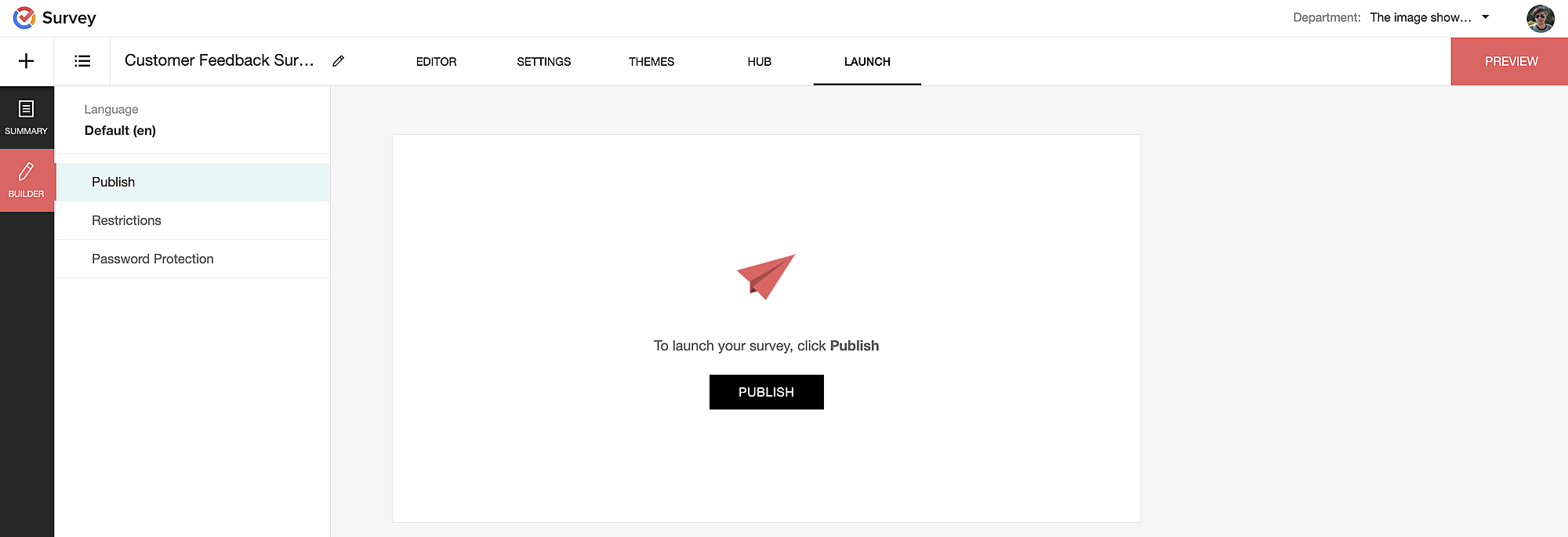
To publish the survey, go to the Launch tab and click on the Publish button to obtain the Zoho Survey URL.


Pre-populating fields in the Zoho Survey form

Once we have the Zoho Survey URL, we'll need to match the configured parameter name and variables from the Zoho Bookings email notifications. These variables play a crucial role in dynamically fetching customer information and populating it in the Zoho Survey form.

For details about variables in Zoho Bookings email notifications, refer to this link: Pre-defined variables

We'll now edit the survey URL to align the variables with the configured Value, or parameter name, from our prepopulated answer settings.

Let's say this is our survey URL: 

https://survey.zohopublic.com/zs/E****h

We'll want to use a question mark ("?") at the end of the survey URL and an ampersand ("&") to separate different parameter names.

Here's what that would look like using our example Value names from earlier:
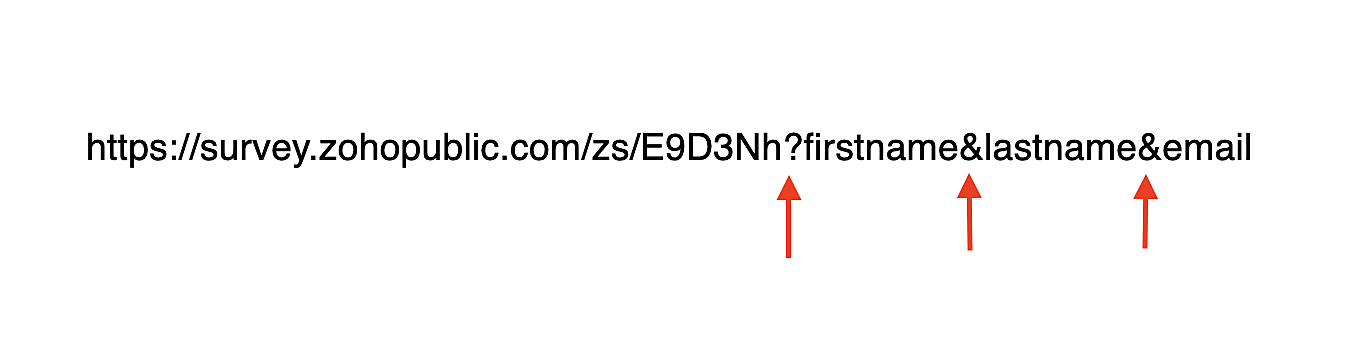

Now, let's map the parameter names to the Zoho Bookings variables.

It would look like this:


For more details: Autofill 

Where to use the Zoho Survey URL

To enable the automatic sending of the Zoho Survey URL to customers upon updating the appointment status to Completed, follow these steps in the Zoho Bookings application:

For one-on-one services:

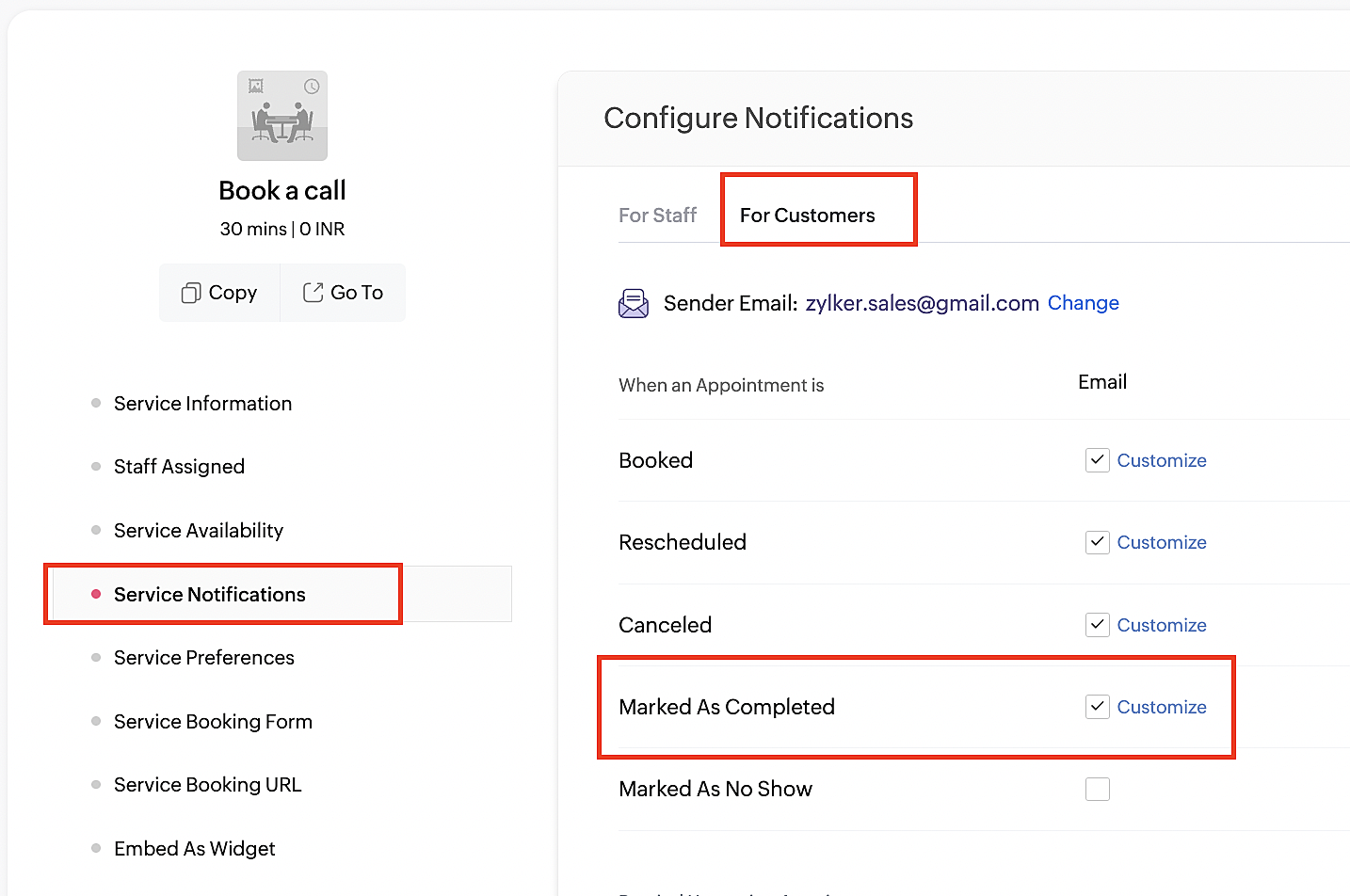
1. Click on Service in the top left corner.
2. Select the desired one-on-one service.
4. Navigate to the For Customers tab.
5. Click Customize next to the Mark As Completed' trigger to access the email content.


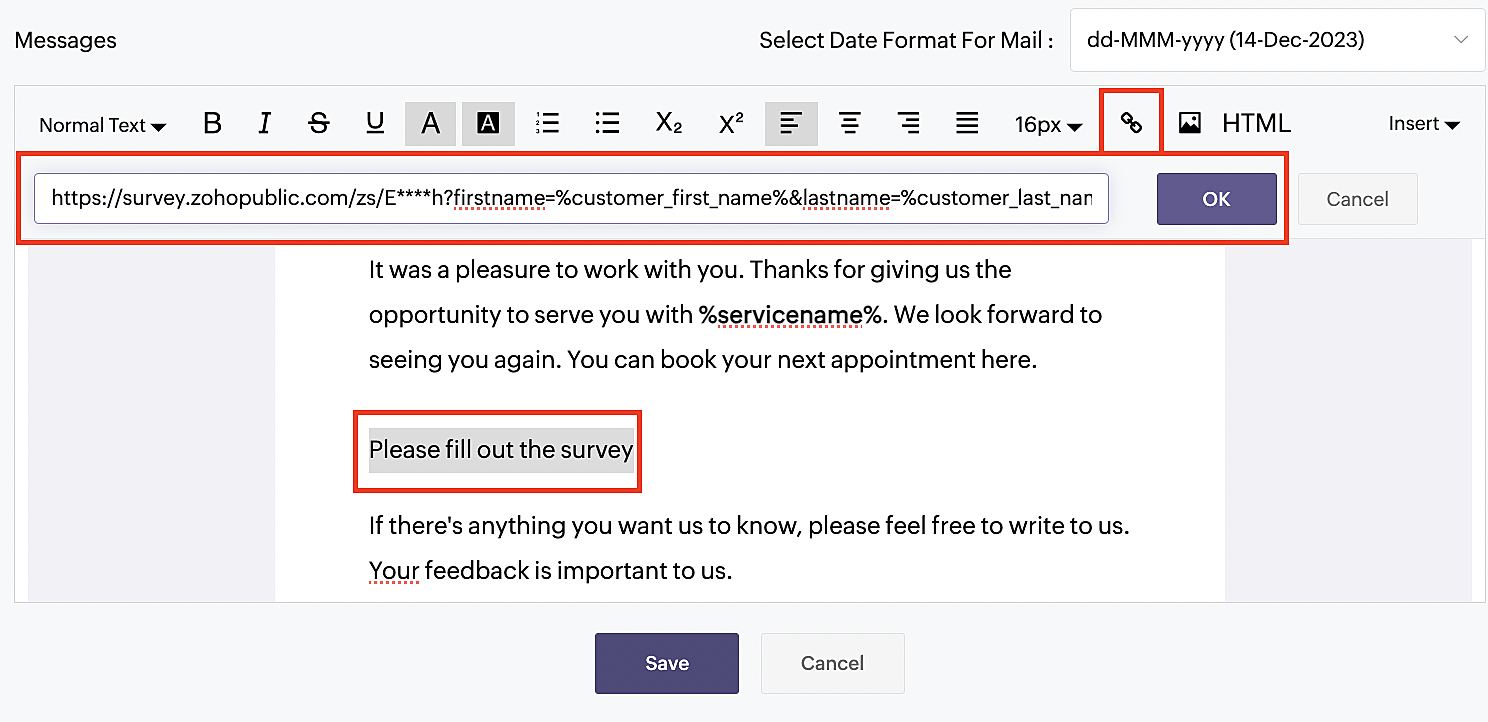
6. Enter your desired name for the button. For example, you might use something like 'Please fill out the survey'. 

7. Select the entered text and click on the Add Link icon. Paste the configured Zoho Survey URL in the URL box. This will convert your text into a hyperlink that leads to the survey.


For group and resource booking services, please follow the same steps under Workspaces > Notifications.

For more details: Workspace Notifications

With the completion of this step, we have incorporated the Zoho Survey URL with dynamic variables, facilitating the dynamic autofill of customer data.

To wrap it up

With the successful implementation of the configuration described above, the entire process of automating status updates and collecting feedback is now seamlessly integrated, promising an elevated and enhanced product experience for all users.

If you have any questions or need assistance with your configuration, please email us at hello@zohobookings.com or support@zohobookings.com.


    • Sticky Posts

    • Approve or deny appointments based on criteria

      Hey, community members! Have you ever wondered how to automatically approve or deny appointments? While we're still working on building that feature, we've got an alternative method to cancel appointments if they don't meet your specific criteria. Let

    Nederlandse Hulpbronnen


      • Recent Topics

      • Add specific field value to URL

        Hi Everyone. I have the following code which is set to run from a subform when the user selects a value from a lookup field "Plant_Key" the URL opens a report but i want the report to be filtered on the matching field/value. so in the report there is
      • CRM gets location smart with the all new Map View: visualize records, locate records within any radius, and more

        Hello all, We've introduced a new way to work with location data in Zoho CRM: the Map View. Instead of scrolling through endless lists, your records now appear as pins on a map. Built on top of the all-new address field and powered by Mappls (MapMyIndia),
      • Zoho Inventory - Composite Items - Assembly - Single Line Item Quantity of One

        Hi Zoho Inventory Team, Please consider relaxing the system rules which prevent an assembly items from consisting of a single line item and outputting a quantity of 1. A client I'm currently working with sells cosmetics and offers testers of their products
      • Editing the Ticket Properties column

        This is going to sound like a dumb question, but I cannot figure out how to configure/edit the sections (and their fields) in this column: For example, we have a custom "Resolution" field, which parked itself in the "Ticket Information" section of this
      • Cliq iOS can't see shared screen

        Hello, I had this morning a video call with a colleague. She is using Cliq Desktop MacOS and wanted to share her screen with me. I'm on iPad. I noticed, while she shared her screen, I could only see her video, but not the shared screen... Does Cliq iOS is able to display shared screen, or is it somewhere else to be found ? Regards
      • What's New in Zoho Inventory | Q2 2025

        Hello Customers, The second quarter have been exciting months for Zoho Inventory! We’ve introduced impactful new features and enhancements to help you manage inventory operations with even greater precision and control. While we have many more exciting
      • Zoho POS App Hanging Issue – Sales Becoming Difficult

        The Zoho POS app frequently hangs and becomes unresponsive during billing, making it very difficult to complete sales smoothly. This commonly happens while adding items, during checkout, or at payment time, especially during peak hours. These issues cause
      • Please, make writer into a content creation tool

        I'm tired of relying on Google Docs. I'm actually considering moving to ClickUp, but if Writer were a good content creation tool instead of just a word processor, I would finally be able to move all my development within the Zoho ecosystem, rather than
      • Make Camera Overlay & Recording Controls Visible in All Screen-Sharing Options

        Hi Zoho WorkDrive Team, Hope you are doing well. We would like to request an improvement to the screen-recording experience in Zoho WorkDrive. Current Limitation: At the moment the recording controls are visible only inside the Zoho WorkDrive tab. When
      • Allow Attaching Quartz Recordings to Existing Zoho Support Tickets

        Hi Zoho Team, We would like to request an enhancement to how Zoho Quartz recordings integrate with Zoho Support tickets. Current Behavior: At the moment, each Quartz recording automatically creates a new support ticket. However, in many real-world scenarios:
      • Add Israel & Jewish Holidays to Zoho People Holidays Gallery

        Greetings, We hope you are doing well. This feature request is related to Zoho People - please don't move it to zoho one! We are writing to request an enhancement to the Holidays Gallery in Zoho People. Currently, there are several holidays available,
      • Add Israel & Jewish Holidays to Zoho People Holidays Gallery

        Greetings, We hope you are doing well. We are writing to request an enhancement to the Holidays Gallery in Zoho People. Currently, there are several holidays available, but none for Israel and none for Jewish holidays (which are not necessarily the same
      • Sync Issue

        My Current plan only allows me with 10,000 rows and it is getting sync failure how to control it without upgrading my plan
      • Notification to customers when I use a Zoho function

        Hi all, I tried searching the community but couldn't find anything about it. I noticed that the customer receives the notification of reopening the old ticket but does not receive the notification of opening a new ticket when I use the function: "separate
      • Desk DMARC forwarding failure for some senders

        I am not receiving important emails into Desk, because of DMARC errors. Here's what's happening: 1. email is sent from customer e.g. john@doe.com, to my email address, e.g info@acme.com 2. email is delivered successfully to info@acme.com (a shared inbox
      • "Spreadsheet Mode" for Fast Bulk Edits

        One of the challenges with using Zoho Inventory is when bulk edits need to be done via the UI, and each value that needs to be changed is different. A very common use case here is price changes. Often, a price increase will need to be implemented, and
      • Email Notifications not pushing through

        Hi, Notifications from CRM are not reaching my users as they trigger.  We have several workflow triggers set up that send emails to staff as well as the notifications users get when a task is created for them or a user is tagged in the notes.  For the past 6 days these haven't been coming through in real time, instead users are receiving 30-40 notifications in one push several hours later.  This is beginning to impact our daily usage of CRM and is having a negative effect on our productivity because
      • Ticket layout based on field or contact

        Hi! I want to support the following use-case: we are delivering custom IT solutions to different accounts we have, thus our ticket layouts, fields and languages (priority, status field values should be Hungarian) will be different. How should I setup
      • Syncing Bills in Zoho Books to Zoho CRM

        Is there any way to sync the Bills in Zoho Books in Zoho CRM
      • SAML in Zoho One vs Zoho Accounts

        What is the difference between setting up SAML in Zoho Accounts: https://help.zoho.com/portal/en/kb/accounts/manage-your-organization/saml/articles/configure-saml-in-zoho-accounts ... vs SAML in Zoho One?: https://help.zoho.com/portal/en/kb/one/admin-guide/custom-authentication/setting-up-custom-authentication-with-popular-idps/articles/zohoone-customauthentication-azure
      • How do I change the order of fields in the new Task screen?

        I have gone into the Task module layout, and moving the fields around does not seem to move them in the Create Task screen. Screenshot below. I have a field (Description) that we want to use frequently, but it is inconveniently placed within the More
      • Zoho Inventory. Preventing Negative Stock in Sales Orders – Best Practices?

        Dear Zoho Inventory Community, We’re a small business using Zoho Inventory with a team of sales managers. Unfortunately, some employees occasionally overlook stock levels during order processing, leading to negative inventory issues. Is there a way to
      • Deactivated Zoho One account can sign in

        I am concerned by the fact that deactivated users in Zoho One have the ability to sign in even after their account has been deactivated (not deleted). these inactive identities have no access to individual Zoho apps or data. based on my experience they
      • How can I reset the password for a user in Zoho Projects

        We need to reset the password for a user in Zoho Projects. I am the admin portal owner and there was nothing to be found to do this. very confusing.
      • No funcionan correctamente el calculo de las horas laborales para informe de tickets

        Hola, estoy intentando sacar estadísticas de tiempo de primera respuesta y resolución en horario laboral de mis tickets, pero el calculo de horas en horario laboral no funciona correctamente cree los horarios con los feriados : Ajusté los acuerdos de
      • How can I add a comment to an existing ticket via API?

        I need to add comments/notes to the history of an existing ticket using the API without overwriting the original ticket description. Thanks!
      • Internal Error When Accessing Team Inbox.

        All our users are seeing this error in teaminbox. Because its a critical tool kindly resolve this issue ASAP.
      • Marketer's Space: Proven tips to improve open rates – Part III

        Hello Marketers! Welcome back to another post in Marketer's Space! This is the final post in the "open rate series". In the first and second parts, we discussed topics ranging from sender domains to pre-headers—but we're not done yet. A few more important
      • MCP no longer works with Claude

        Anyone else notice Zoho MCP no longer works with Claude? I'm unable to turn this on in the claude chat. When I try to toggle it on, it just does nothing at all. I've tried in incognito, new browsers, etc. - nothing seems to work.
      • Change Number Field to Decimal Field

        Hi, It would be nice to be able to change the field type without having to delete it and create a new one, messing up the database and history. Thanks Dan
      • Allow Text within a Formula

        Hi, I would like to be able to use this for others things like taking an existing Date Field and copying its value, so by entering getDay(Date)&"-"&getMonth(Date)&"-"&getYear(Date) it results in 01-02-2026. And then when the Date is changed so is this
      • Zoho Social - Feature Request - Reviewer Role

        Hi Social Team, I've come across this with a couple of clients, where they need a role which can review and comment on posts but who has no access to create content. This is a kind of reviewer role. They just need to be able to see what content is scheduled
      • Zoho Books/Inventory - Update Marketplace Sales Order via API

        Hi everyone, Does anyone know if there is a way to update Sales Orders created from a marketplace intigration (Shopify in this case) via API? I'm trying to cover a scenario where an order is changed on the Shopify end and the changes must be reflected
      • Zoho Inventory / Finance Suite - Add feature to prevent duplicate values in Item Unit field

        I've noticed that a client has 2 values the same in the Unit field on edit/create Items. This surprised me as why would you have 2 units with the same name. Please consider adding a feature which prevents this as it seems to serve no purpose.
      • Zoho CRM for Everyone's NextGen UI Gets an Upgrade

        Hello Everyone We've made improvements to Zoho CRM for Everyone's Nextgen UI. These changes are the result of valuable feedback from you where we’ve focused on improving usability, providing wider screen space, and making navigation smoother so everything
      • Kaizen #224 - Quote-driven Deal Reconciliation Using Zoho CRM Functions and Automation

        Hello everyone! Welcome back to another instalment in the Kaizen series. This post covers quote-driven deal reconciliation, emphasizing Functions and Automation to address practical sales challenges. Business Challenge Sales organizations often mark deals
      • Dependent / Dynamic DropDown in ZohoSheets

        Has anyone figured out a way to create a Dropdown, the values of which is dependent on Values entered in the other cell ?
      • Directly Edit, Filter, and Sort Subforms on the Details Page

        Hello everyone, As you know, subforms allow you to associate multiple line items with a single record, greatly enhancing your data organization. For example, a sales order subform neatly lists all products, their quantities, amounts, and other relevant
      • BARCODE PICKLIST

        Hello! Does anyone know how the Picklist module works? I tried scanning the barcode using the UPC and EAN codes I added to the item, but it doesn’t work. Which barcode format does this module use for scanning?
      • Zoho Inventory - Allow Update of Marketplace Generated Sales Orders via API

        Hi Inventory Team, I was recently asked by a client to create an automation which updated a Zoho Inventory Sales Order if a Shopify Order was updated. I have created the script but I found that the request is blocked as the Sales Order was generated by
      • Next Page