Zoho Developer Community Monthly Digest - February 2024
Hello everyone!
We're thrilled to share the highlights from February, including our recent in-person Bootcamp and exciting news about our growing extension library. Don't miss out on upcoming events, insightful resources and community discussions. Let's get started!
February Highlights
Zoho Developer Community Bootcamp (In-Person)
We had a blast hosting our very first in-person Developer Community Bootcamp at Zoho Campus in Chennai! It was exciting to see everyone dive into hands-on learning sessions, building extensions for Zoho products. Our goal was to empower developers of any skill level, help them learn the ropes, and potentially earn by listing their extensions on the Zoho Marketplace.
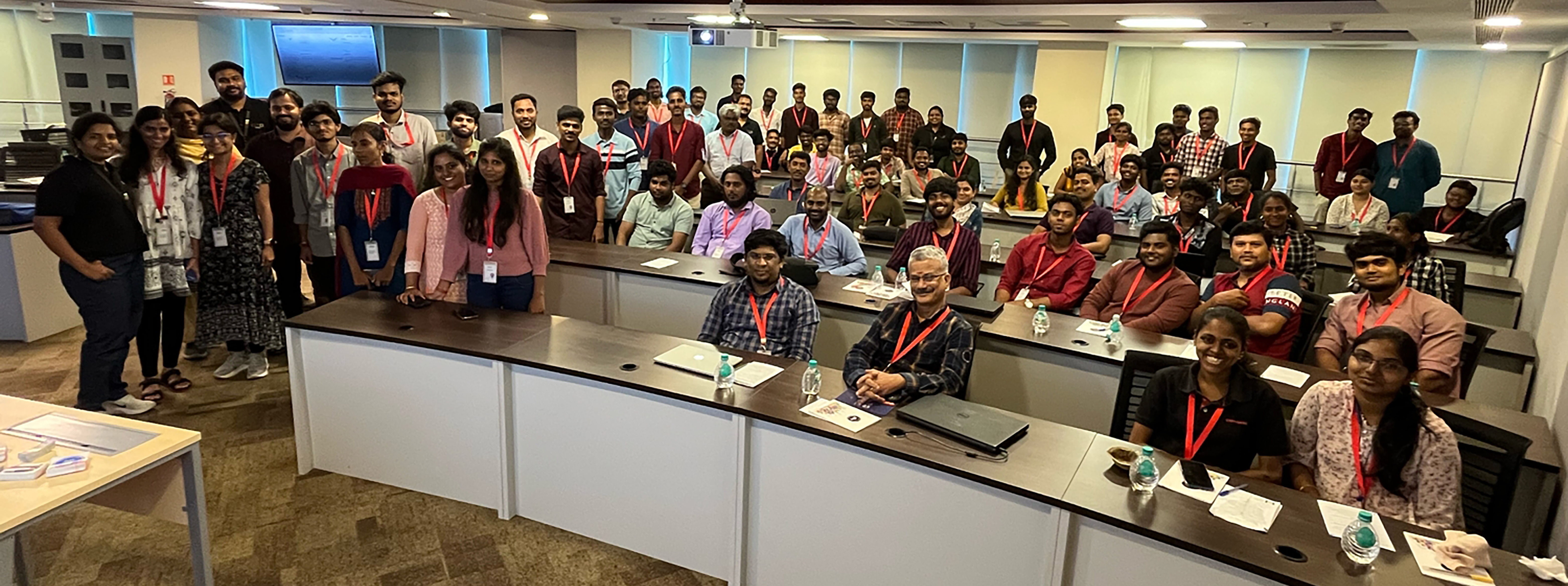 Zoho Extensions Chennai Bootcamp: A snapshot of radiant facesZoho Extensions
Zoho Extensions Chennai Bootcamp: A snapshot of radiant facesBig news! We're celebrating reaching 2000+ extensions in 40+ categories on Zoho Marketplace! 800,000+ Zoho users are using extensions to improve customer experiences, boost collaboration, break data silos, improve ROI, and much more. Learn more about this milestone here. If you're new to extensions and eager to explore, check out our Extensions 101 series.
Upcoming Events
- Zoho Developer Hangout 14: By serving as gateways for accessing and sharing functionalities and data across applications, APIs empower developers to tap into external resources and services that enrich their applications with enhanced features and solutions. Eric, a consistent top contributor in the Zoho Developer Community, says, "Zoho APIs can be fun to use. For core applications like CRM, Desk, and Books, there is an abundance of API endpoints to use and play with. Whether you are developing in or out of Zoho, there is a lot of commonality."In this episode, he will discuss the API documentation, limitations, and gotchas, using the API in Deluge, and then a demonstration of a use case outside of Zoho with a Ruby application. Registration and more details here.
- Zoho QEngine 101: We are happy to announce Zoho QEngine 101 series for the developer community consisting of five webinars in total. This webinar series aims to enable attendees to create test cases from scratch, manage them under modules, and execute them for three different platforms—web, mobile, and API—using Zoho QEngine. Registration and more details here.
- Zoho CRM APIs: In this series, you will learn about OAuth2.0 authorization used by Zoho CRM APIs, CRUD operations for retrieving, creating, updating, and deleting records, efficient search/query methods, data synchronization techniques for consistency across platforms, and working with SDKs for seamless integration of Zoho CRM functionality into applications. Registration and more details here.
- Creator Tech Connect: Creator's tech connect series would comprise of technical sessions that provide immersive training on the key essentials and technical nuances of building a solution in Zoho Creator. This is a great opportunity for our developer community to stay informed about Creator's new feature releases, product roadmap, best practices to follow while scripting in deluge, new deluge concepts, and cloud functions. We are conducting a three-month series on Custom widgets: Extension in Zoho Creator and its development process. The recent session of the series focused on widgets from Marketplace as Extensions in Zoho Creator, while the upcoming session will be about using Widget extension development for Zoho Creator.
Title: Widget extension development for Zoho Creator
Date: March 14, 2024
APAC & ANZ: 11 AM to 12 PM IST - Registration Link
EMEA: 4 PM to 5 PM IST - Registration Link
Americas: 9 PM to 10 PM IST - Registration Link - Application Development Bootcamp: Application Development Bootcamp is a three-day webinar on Zoho Creator features and the application-building process. During these sessions, users get to learn, how to turn their ideas into fully functional applications through live sessions and exercises. The webinars, each lasting an hour, cover sessions on ideating, structuring, developing, and managing solutions in Zoho Creator.
Title: Application Development Bootcamp 1.0
Date: March 19, 20 and 21, 2024
APAC & ANZ: 11 AM to 12 PM IST - Registration Link
EMEA: 4 PM to 5 PM IST - Registration Link
Americas: 9 PM to 10 PM IST - Registration Link - Streamline workflows with Zoho CRM Event Listeners in Catalyst: Join us for an exclusive deep dive into the revolutionary Zoho CRM Event Listener in Zoho Catalyst! As a tech enthusiast, you know the power of seamless integrations and real-time data updates. With Catalyst's Event Listeners, streamlining workflows and amplifying efficiency of your Zoho CRM events is a breeze. Uncover how Zoho Catalyst's Event Listeners empower your applications to scale effortlessly. Whether it's handling a surge in activity or adapting to changing business needs, Catalyst has you covered. Registration and more details here.
- Creator Learning Table Series: We designed this series to provide users with valuable insights and knowledge about Creator's capabilities in various business use cases and applications. This year, we have adopted the 12 Months 12 Industries concept. Every month, we will focus on a specific industry, illustrating its unique processes with real-time business scenarios and how to make best use of Creator for that industry. Our recent webinar on Creator for the Real Estate Industry was a success, and in the upcoming session we'll be exploring Creator for the Logistics Industry.
Title: Creator for the Logistics Industry
Date: Apr 4, 2024
APAC & ANZ: 11 AM to 12 PM IST - Registration Link
EMEA: 4 PM to 5 PM IST - Registration Link
Americas: 9 PM to 10 PM IST - Registration Link
Resource Spotlight
We've consolidated all the resources from the developer community learning series into a centralized hub for your convenient access. Consider bookmarking the Zoho Developer Community website to stay informed about the latest updates in the developer community.
- Zoho CRM Q1 2024 Update: We bring you a host of powerful features and interesting enhancements to help you get a head start in closing deals and offering great customer experiences. Here's the Q1 2024 update from Zoho CRM.
- Zoho Desk: We are thrilled to present Zoho Desk '24, with new and updated features that empower you to deliver customer service that never stops. Let's make 2024 the year you resolve faster, retain customers better, and make them happier. Here's everything that's new!
- Zoho Extensions: This post discusses the scope of Widgets in Zoho Projects extension development.
- Zoho Books: Zoho Books, as a platform, comes packed with powerful capabilities to help customize, automate, extend, and scale business processes for amazing efficiency. These powerful multi-functional platform features simplify complex financial processes, amplify productivity, and foster a more agile approach to financial management. This blog post and the next one will delve into Zoho Books's platform feature capabilities, starting with customizable functions.
- Zoho Catalyst: Check out our latest solution article on App Modernization that delves into why modernizing your legacy applications is important and how Catalyst can help with the same.
- Zoho Finance Applications: Until now, both the Zoho Finance apps and their APIs shared a common domain. We've recently introduced separate domains for APIs. You can now start using the new domains for API calls. The old domains will not work for API users starting April 1, 2024. More details here.
- Zoho Creator Webinar: Get access to the previous Zoho Creator Session Recordings below
- Previous Session Links (Youtube):
- Playlist Links (Youtube):
- Previous Session Links (Zoho Creator Studio):
- Playlist Links (Zoho Creator Studio):
- Zoho CRM Developer:
- Fetch the total number of users in your organization with the Users Count API, now available for versions 3 and above.
- You can now retrieve the count of purchased, active, and available user licenses in your organization using our User Licenses Count API, now available for v6.
- Upgraded CSharp SDK supporting v6 APIs to version 3.0.0.
- Upgraded JavaScript SDK to support v6 APIs and introduced support for the following new APIs: Unsubscribe Links, Find and Merge, Get Related, Records of Deleted Record, Features, Global Picklist, Unblock Email.
- Learn how to request specific resources, fields of the resources and relationships of the resources in a single query using GraphQL.
- Learn how to synchronize data from a third-party application to Zoho CRM using Bulk Write API and Insert/Upsert Records API through our Kaizen post.
- Check out our Kaizen post to learn how a subform works in Zoho CRM and how to manipulate it using Zoho CRM APIs.
Community Discussions
Zoho Developer Forum
- Here's a conversation that shows how to retrieve the contents of an uploaded file within a custom module in Zoho CRM. Check out the suggestion and code snippet shared by @Hugh Marshall.
- The hurdles encountered by developers often drive platform evolution. In this case, when one user sought a method to remove a relationship between a Contact and a Product in Zoho CRM via API, sparked a conversation that ultimately led to a solution. Here's another one with Client Script on the same premise. It's these interactions that keep us moving forward, shaping CRM to meet the evolving needs.
- Have you ever hit a snag while trying to add an item to a related list in Contacts module? Read through this discussion, where @Andres lays out the process in detail, offering valuable insights to navigate through the challenge.
- In this exchange, @Ken sought a Client Script code snippet with updating Picklist Field values during an onbeforeupdate event. @Haiku Technical Support lends a hand by providing concise code snippets along with clear explanations.
- Imagine the frustration of trying to join two names in Contacts module, only to hit a wall of bracket errors. Thankfully, @Sunderjan Siddharth swooped in with a fix using the Len function. Although successful, check out this discussion to find out the alternative and a much simpler solution shared by @Amanda.
Developers ZUG Cliq Channel
Note: These conversations are confined to the Developers ZUG Cliq channel members. If you're keen on becoming a part of this space, please fill in this onboarding form to receive your invitation to join the channel.
- Imagine you have set up a user portal with auto-populate using Client Script. However, it is taking time to load the data, and the end-user has already started to work around the application. That actually confuses the system, and the data is messed up. How do you address this? There may be many methods, but here is the suggestion by Jordan, a simple yet effective one. Read and share your approach too.
- This is the longest discussion and the highest community involvement yet! We had a great exchange of codes. Of course, we've taken in all the feedback and passed it along to our Zoho Books API documentation team. This thread is definitely worth checking out.
- There's no clear-cut solution to this situation, but it's definitely worth checking out the suggestions from the community's power users. Dealing with API limitations can be a nightmare for every developer. Take a peek at the suggestions, and if you've got an alternative solution in mind, feel free to jump in and continue the conversation or start a new discussion.
- Community is not just for exchanging code snippets but also for sharing the work opportunity.
- Here's a prime example of working smart with community support. There are a hundred ways to crack a problem, but bouncing your ideas off the community is a brilliant move. Zoho Developer Community has amazing developers who have been there and done that. In this case, Adam posted his query, and Mike promptly came through with a solution.
- Michel shared a use case about ways to hide a related list from certain users Zoho CRM without axing it entirely (since it's still needed for the RelatedRecords API). Dive into this discussion where our power users are brainstorming various options. If you have a better solution, post it in the Zoho Developer Forum along with your solution; we would love to feature it in our upcoming digest.
- Read through the detailed flow on writing a custom function to fetch details from CRM to Books. Our MVP @Bhoomi Joshi explained it very well by asking the right questions.
Community Spotlight
ZDH Speakers
The contributions of our ZDH presenters have been instrumental in the success of the this segment. We extend our heartfelt appreciation for their efforts.
As a continuation of featuring a ZDH presenter each month, this time, we would like to introduce our eighth presenter Jayesh Sonawane. Explore this post to discover the knowledge and insights he shared with the community.
Cliq Contributors
The Developers ZUG Cliq channel has consistently served as the primary hub for community members seeking technical assistance and engaging in savvy discussions. Here are our top contributors who have gone the extra mile to support and assist the Zoho Developer Community:

We want to express our sincere appreciation to all our community contributors. Your commitment, expertise, and the time you invest are invaluable to the community.
For those who are new to the Zoho Developer Community, check out this post to get started.
We appreciate you dedicating your time to peruse this month's digest. Make sure to follow the digest each month for the most recent updates and conversations. Stay connected and participate in the forums to be featured in the upcoming month's digest. Wishing you an amazing month ahead!
SEE ALSO
Topic Participants
Divya Krishnan
Sticky Posts
Zoho Developer Community Hackathon 2025 is LIVE!
Hey developers! It’s that time of the year again — the Zoho Developer Community Hackathon 2025 is officially open for registrations! If you’ve been waiting for a chance to stretch your skills, try something new, or finally bring that idea to life, thisExtensions 101 webinar series: Build, integrate, and monetize with extensions
Attention developers! Are you ready to take your extension development skills to the next level? We're excited to bring back the Extensions 101 webinar series with an expanded lineup of Zoho products and an introduction to more platform features. LastZoho Developer Community Monthly Digest – May 2025
Hello everyone, Welcome to this month’s Zoho Developer Community Digest! From fresh product insights to hands-on tech sessions and standout community threads, there's plenty here to keep your ideas flowing and your skills sharp. Be sure to explore ourZoho Developer Community Monthly Digest – April 2025
Hello everyone, Welcome to this month’s Zoho Developer Community Digest! We’ve lined up an exciting series of technical sessions, product deep-dives, and community conversations to keep you informed and inspired. Don’t forget to check out our resourceZoho Developer Hangout (ZDH) – Episode 18 | Zoho CRM Client Script for Efficient Sales Process
Hello everyone, A streamlined sales process isn’t just a nice-to-have—it’s the engine that powers lead generation, builds stronger customer relationships, and closes deals faster. But what if you could take your CRM beyond the basics to actually help
Recent Topics
Projects custom colors replaced by default orange
Since yesterday, projects uploaded to Zoho, to which I had assigned a custom color, have lost the customization and reverted to the default color (orange). Has anyone else had the same problem? If so, how did you resolve it?Restrict Users access to login into CRM?
I’m wanting my employees to be able to utilize the Zoho CRM Lookup field within Zoho Forms. For them to use lookup field in Zoho Forms it is my understanding that they need to be licensed for Forms and the CRM. However, I don’t want them to be able toIntroducing Connected Records to bring business context to every aspect of your work in Zoho CRM for Everyone
Hello Everyone, We are excited to unveil phase one of a powerful enhancement to CRM for Everyone - Connected Records, available only in CRM's Nextgen UI. With CRM for Everyone, businesses can onboard all customer-facing teams onto the CRM platform toUnknown table or alias 'A1'
I would like to create a subquery but i am getting the following error: Unknown table or alias 'A1' used in select query. This is the sql statement: SELECT A1.active_paying_customers, A1.active_trial_customers, A1.new_paying_signup, date(A1.date_active_customers),in the Zoho creator i have address field based the customer lookup im selecting the addresss , some times the customer address getting as null i want to show as blank
in the Zoho creator i have address field based the customer lookup im selecting the addresss , some times the customer address getting as null ,i want to show as blank instead of showing null. input.Billing_Address.address_line_1 = ifNUll(input.Customers_Name.Address.address_line_1,"");Question about upgrade and storage space Zoho Notebook
After upgarding my Zoho Notebook plan, I am running into the following issue. I just upgraded from a free Zoho Notebook subscription to Pro Lite after I got a notification in my Window Zoho Notebook desktop app saying that I had run out of space. However,how to add email to existing organization i w
I am already registered my organization and i have an email id. I need one more email id but i can't find anywhere .i want the cheapest email id . how to add ?add zoho account
How to add a zoho mail to previous zoho account? I have twoName changed in settings for mailbox but still not changed when typed in To field
In the email account secretary@ i have updaetd the new staff members details but the old members name still appears when I type secretary@ in the To field. I cant work out where Zoho is finding the old name from. I have deleted the browser cache. If IPrinting to a brother label maker
I see allot of really old unanswered posts asking how to print to a label maker from a zoho creator app. Has their been any progress on providing the capability to create a customized height & width page or print template or whatever to print labels?Sync desktop folders instantly with WorkDrive TrueSync (Beta)
Keeping your important files backed up and accessible has never been easier! With WorkDrive desktop app (TrueSync), you can now automatically sync specific desktop folders to WorkDrive Web, ensuring seamless, real-time updates across devices. Important:Track online, in-office, and client location meetings separately with the new meeting venue option
Hello everyone! We’re excited to announce meeting enhancements in Zoho CRM that bring more clarity and structure to how meetings are categorized. You can now specify the meeting venue to clearly indicate whether a meeting is being held online, at theCalling the new 'Custom API' feature from within a Custom Widget
From what I've learned it is not possible to call an endpoint from the new "Custom API" feature within a Creator Widget. The SDK's doesn't support it yet, when calling it natively you end up with CORS issues or at least I couldn't get it working evenAnnouncing new features in Trident for Mac (1.32.0)
Hello everyone! We’re excited to introduce the latest updates to Trident, which are designed to reinforce email security and protect your inbox from evolving threats. Let’s take a quick look at what’s new. Deliver quarantined emails. Organization adminsMarketing Tip #5: Improve store speed with optimized images
Slow-loading websites can turn visitors away. One of the biggest culprits? Large, uncompressed images. By optimizing your images, your store loads faster and creates a smoother shopping experience leading to higher sales. It also indirectly improves SEO.PDF Attachment Option for Service Reports
Hello Team, I would like to check with you all if there is an option to attach PDF documents to the service reports. When I try to attach a file, the system only allows the following formats: JPEG, JPG, and PNG. Could you please confirm whether PDF attachmentsZoho Browser??
hai guys, this sounds awkward but can v get a ZOHO BROWSER same as zoho writer, etc. where i can browse websites @ home and continue browsing the same websites @ my office, as v have the option in Firefox, once i save and close the browser and again when i open it i will be getting the same sites. If u people r not clear with my explanation, plz let me know. Thanks, SandeepSMS to customers from within Bigin
Hi All, Is there anyone else crying out for Bigin SMS capability to send an SMS to customers directly from the Bigin interface? We have inbuilt telephony already with call recordings which works well. What's lacking is the ability to send and receiveAdmins cannot see each others' Scheduled Reports?!
Very frustrating that as an admin I cannot see what my reports my fellow admins have created and scheduled. After asking about this on the help chat, I was told the issue is trust and security. By giving someone Admin status, it means we trust them with those responsibilities. Please change this, it is not a good process to have to bother other users to change a report or change users within a report.Automatically CC an address using Zoho CRM Email Templates
Hi all - have searched but can't see a definitive answer. We have built multiple email templates in CRM. Every time we send this we want it to CC a particular address (the same address for every email sent) so that it populates the reply back into ourWriter update results in BitDefender blocking it as malware
After updating Writer to latest update, Bitdefender blocked the app and writer no longer runs.Is there a way to invoke deluge function from within a widget?
Hi! I have custom functions in deluge and I was wondering whether there is any way to call this function through a widget? Something like on click of a button inside a widget, run the deluge custom function. Would this be possible?Missing Import Options
Hello, do I miss something or is there no space import option inside of this application? In ClickUp, you can import from every common application. We don't want to go through every page and export them one by one. That wastes time. We want to centralizeZoho CRM Portal Field Level Permission Issue
Hi Support Team, I am using the Zoho CRM Portal and configuring field-level editing permissions. However, we are unable to restrict portal users from editing certain fields. We have created a portal and provided View and Edit (Shared Only) access forWhy am I seeing deleted records in Zoho Analytics syncing with Zoho CRM?
I have done a data sync between Zoho CRM and Zoho Analytics, and the recycle bin is empty. Why do I see deleted leads/deals/contacts in Zoho Analytics if it doesn't exist in Zoho CRM? How can I solve this problem? ThanksCustom Fonts in Zoho CRM Template Builder
Hi, I am currently creating a new template for our quotes using the Zoho CRM template builder. However, I noticed that there is no option to add custom fonts to the template builder. It would greatly enhance the flexibility and branding capabilities ifIntroducing the Zoho Projects Learning Space
Every product has its learning curve, and sometimes having a guided path makes the learning experience smoother. With that goal, we introduce a dedicated learning space for Zoho Projects, a platform where you can explore lessons, learn at your own pace,All new Address Field in Zoho CRM: maintain structured and accurate address inputs
The address field will be available exclusively for IN DC users. We'll keep you updated on the DC-specific rollout soon. It's currently available for all new sign-ups and for existing Zoho CRM orgs which are in the Professional edition. Latest updateCollaboration with customers made easy with Zoom Meeting and Zoho Desk integration
Hello everyone! We are happy to announce that you can now integrate your Zoho Desk account with Zoom Meeting. The integration bridges the gap between digital communication and human connection, empowering teams to deliver timely support when it mattersCRM Canvas - Upload Attachments
I am in the process of changing my screens to Canvas. On one screen, I have tabs with related lists, one of which is attachments. There doesn't appear to be a way to upload documents though. Am I missing something really obvious? Does anyone haveTrueSync regularly filling up my local disk
Seems that WorkDrive's TrueSync randomly starts filling up my local hard drive space. None of the folders have been set as "Make Offline" but still it seems to randomly start making file offline. The settings of the app is so minimal and is of no realKaizen #194 : Trigger Client Script via Custom buttons
Hello everyone! Welcome back to another interesting and useful Kaizen post. We know that Client Scripts can be triggered with Canvas buttons and we discussed this with a use case in Kaizen#180. Today, let us discuss how to trigger Client Script when a[Webinar] A recap of Zoho Writer in 2025
Hi Zoho Writer users, We're excited to announce Zoho Writer's webinar for January 2026: A recap of Zoho Writer in 2025. This webinar will provide a recap of the features and enhancements we added in 2025 to enhance your productivity. Choose your preferredPicklist field shows "none" as default
Hello, Is there an option to avoid showing "none" as the default value in a picklist field? I also don't want to see any option displayed. My expectation is to have a blank bar, and then when I display the drop-down list, I can choose whichever I waStage-probability mapping feature in custom module
Hi, I'm building a custom module for manage projects. I would like to implement the stage-probability feature that Potentials has. Is this possible?Create static subforms in Zoho CRM: streamline data entry with pre-defined values
Last modified on (9 July, 2025): This feature was available in early access and is currently being rolled out to customers in phases. Currently available for users in the the AU, CA, and SA DCs. It will be enabled for the remaining DCs in the next coupleField Description is very small
Hello, The field Description in the activity is very small. Why don't try open a new window, or a bigger popup, or increase the width of the "popup". Example:StatusIQ
Please add StatusIQ to data sources. We using site24x7 and StatusIQ together and site24x7 integration is already there. Thanks and regards, TorstenIn Zoho People, the Operations buttons are frequently not visible or do not appear consistently.
In Zoho People, the Operations buttons are frequently not visible or do not appear consistently. We request you to please investigate and address this issue, as it is affecting daily HR operations and user access.Marketing Tip #14: Increase cart value with product bundles
Bundling products is a great way to increase average order value while giving customers more convenience. Think “camera + tripod + memory card” or “soap + lotion + bath salts.” Bundles make shopping easier and feel like a better deal. It’s a win-win forNext Page