Kaizen #194 : Trigger Client Script via Custom buttons

Hello everyone!
Welcome back to another interesting and useful Kaizen post.
We know that Client Scripts can be triggered with Canvas buttons and we discussed this with a use case in Kaizen#180. Today, let us discuss how to trigger Client Script when a Custom Button is clicked. Using this, you can execute Client Script when a custom button is clicked.
In this post,
1. Event Details2. Supported Pages3. Use Case - Export Subform Rows to Zoho Sheet in a Single Click!4. Solution5. Summary6. Related Links
Client Script support for Custom Buttons opens up possibilities for automation, personalization, and enhanced user interactions in Zoho CRM when a custom button is clicked.
Here is a detailed walkthrough to help you understand it better.
1. Event Details
The Button event triggers the Client Script when a custom button is clicked. Each time this event is invoked, the context argument is passed to the Client Script. The context contains information about the page from which the button was clicked.
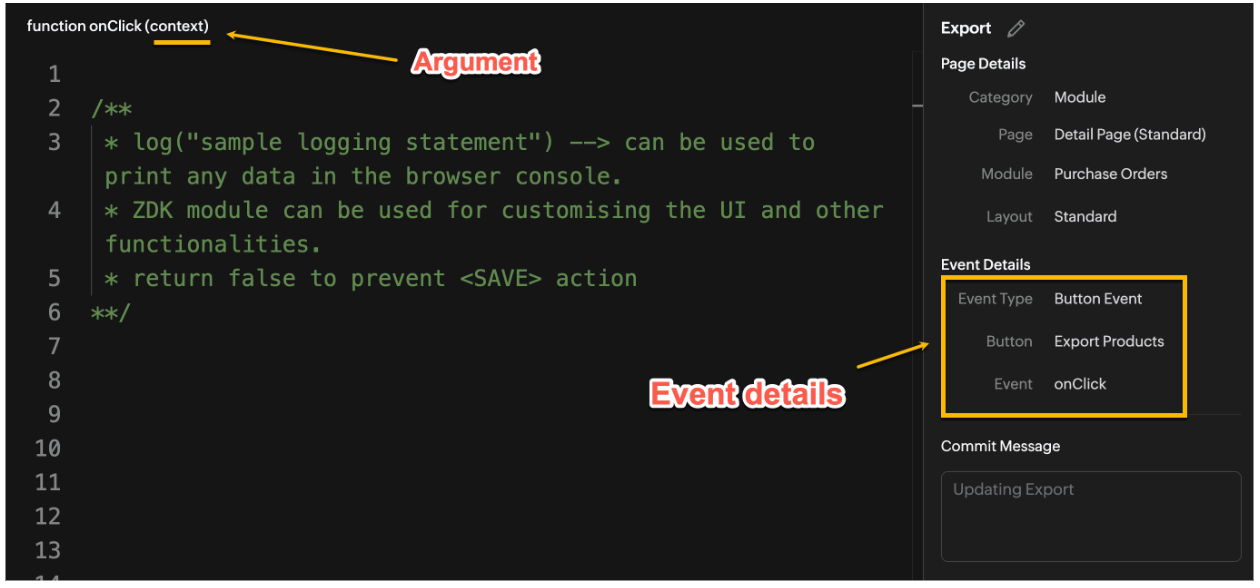
Click here to know more about Client Script Events.
2. Supported Pages
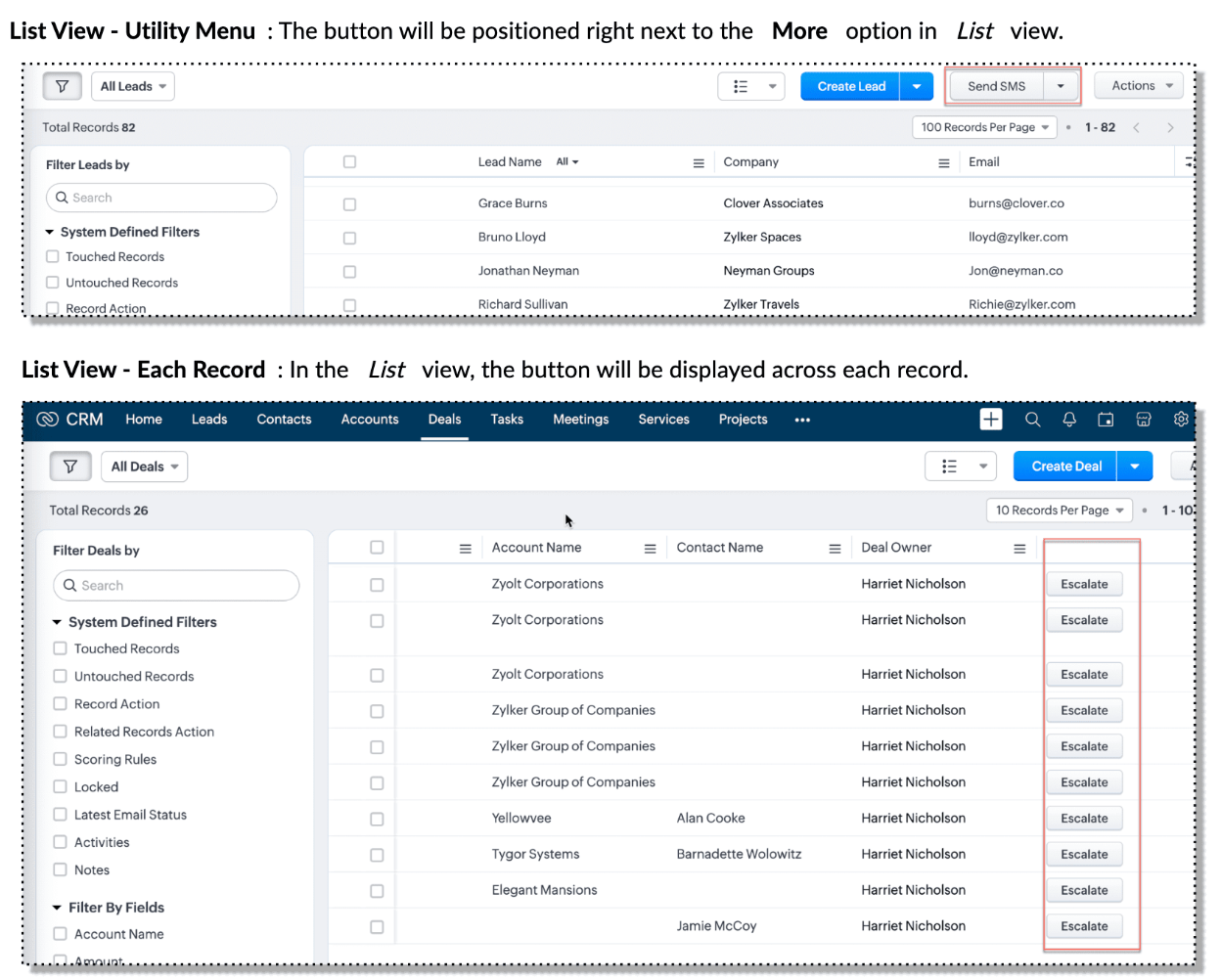
A Custom Button can be placed in different positions based on the Page.
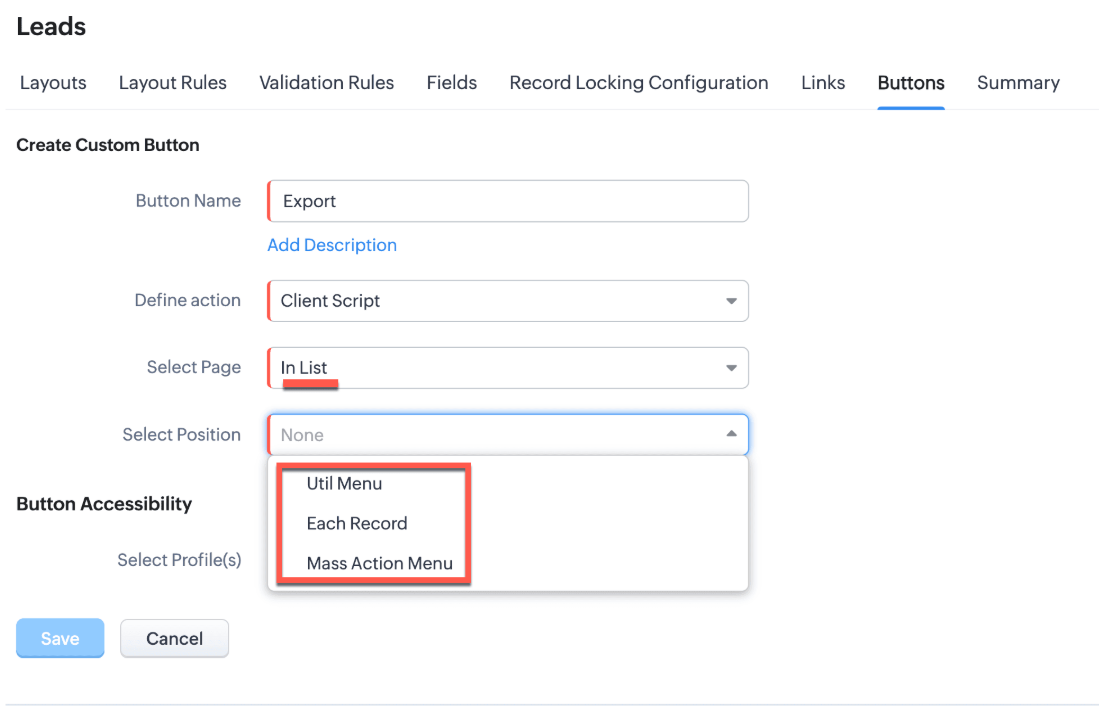
You can add a custom button in the Util Menu, in Each Record or in the Mass Action Menu of the List Page.

Also, a Detail Page can have a custom button either In Record or in the Related List. Click here for more details about the different possible positions of a custom button.
The following table lists the supported pages and the corresponding context argument, which provides different details based on the page type.

To create a Client Script and make it trigger when a custom button is clicked, first create a Custom button and associate it with a Client Script as shown in the following image.

Click here to view the steps to create a custom button and configure a Client Script.
Note:
You can configure the Client Script only from the Buttons page to trigger it when a user clicks a custom button, and not the usual way of Creating Client Script via setup page. Once a script is created, it can be edited and updated from the Client Script setup page
3. Use Case - Export Subform Rows to Zoho Sheet in a Single Click!
Zylker manufactures medical instruments, and its sales representatives frequently need to share bulk order details with distributors and hospital partners using Zoho Sheets. These details such as product names, quantities, and prices are captured in a Subform on the Purchase Order Detail(Standard) Page.
To simplify this, the admin wants to add a custom button called "Export Products" on the Purchase Order Detail Page. When clicked, it should export the Purchase Items from the Subform and move the content to the specified sheet.
4. Solution
To export subform rows to Zoho Sheet with a single click, you can add a custom button to the Detail Page of the record. When clicked, a Client Script will be triggered to fetch the subform data from the Detail Page and pass it to a Function that uses zoho.sheet.createRecords() to insert data into Zoho Sheet.
Here’s how to implement this:
- Add “Export Products” custom button on the Detail Page.
- Add the script to collect subform rows which invokes the Function.
- Write a Function to create entry in Zoho Sheets
A. Add “Export Products” custom button on the Detail Page.
- Go to Setup → Modules and Fields under Customization.
- Select a Module as Purchase Order.
- Click on Buttons → Then click + New Button.
- Enter Button Name and select Action Type as "Client Script"
- Choose Button Position and Layout details as shown in the following image.
- Click Create in Configured Client Script, enter the script, and click Add.
- Select the profiles for which these buttons should be visible.
- Click Save.

B. Add the Script to collect subform rows and invoke the Function
Use the following Client Script when you configure the custom button.
- var casesheetid = ZDK.Client.getInput([{ type: 'text', label: 'Enter the Sheet ID' }], 'Sheet details', 'OK', 'Cancel');
- if (casesheetid == null) {
- ZDK.Client.showAlert("Enter the *Case Sheet ID - Import* to import data");
- }
- var purchase_items = ZDK.Page.getField('Purchase_items).getValue();
- ZDK.Client.showLoader({type: 'page', template:'spinner', message: 'Export in progress, please wait'});
- var c=1;
- if (sheetid == null) {
- ZDK.Client.hideLoader();
- ZDK.Client.showAlert("Enter the *Case Sheet - Export* ID to export data");
- }
- purchase_items.forEach((r,i) => {
- try {
- resp = ZDK.Apps.CRM.Functions.execute("csvWrite", { "Product_Name": r.Product_Name.name, "List_Price": r.List_Price, "Discount": r.Discount, "Total": r.Total,"Sheetid":casesheetid }); }
- catch (error) {
- c = 0;
- ZDK.Client.hideLoader();
- ZDK.Client.showAlert("Unexpected issue occured while adding data in row number "); }
- });
- ZDK.Client.hideLoader();
- if (c) {
- ZDK.Client.showMessage("Export completed. Please check the Sheet");
- }
- else
- {
- ZDK.Client.showMessage("Unexpected error "); }}
In this code, several ZDKs are used for various purposes. Click on the ZDK hyperlinks to learn more.
- User Input: The code uses ZDK.Client.getInput() to fetch a "Sheet ID" from the user. This input is crucial for further operations.
- Input Validation: If the user cancels or doesn't enter a sheet ID, the code checks for null and prompts the user to enter the ID using ZDK.Client.showAlert().
- Function Invocation: The entries of Purchase Order subform are fetched using ZDK.Page.getField('Purchase_items).getValue() and written to Zoho Sheet using the Function csvWrite(), which internally calls zoho.sheet.createRecords().
- Loader Display: To indicate that a process is running, a loader is displayed using ZDK.Client.showLoader().
- Show Message: ZDK.Client.showMessage() displays that the Export is completed.
Note
The Client Script you intend to link with the button will be saved only after the custom button is saved.
C. Write a Function to create entry in Zoho Sheets
- Go to Setup > Developer Hub > Functions.
- In the Functions page, click + Create New Function.
- Choose the category as Button.
- Click Create.
- In the Create Function page, enter a name as csvWrite and description for your function.
- Enter the following function code and click Save.
- string standalone.csvWrite(String product,String qty,String up,String amt, String Sheetid){
- queryData = Map();
- writeData = Map();
- header = Map();
- writeData.put("Product",product);
- writeData.put("Quantity",qty);
- writeData.put("Unit_Price",up);
- writeData.put("Amount",amt);
- SheetData = zoho.sheet.createRecords("Sheetid","Sheet1",writeData,queryData,"sheetconnection");
- return SheetData;
- }
In the code above:
- sheetconnection refers to the name of the Zoho Sheet connection, which must have the scopes: ZohoSheet.dataAPI.UPDATE and ZohoSheet.dataAPI.READ.
- Click here to know how to create a Connection with the required scopes.
- sheetid is the unique identifier of the Zoho Sheet, available in the sheet’s URL.
- Sheet1 represents the name of the worksheet (i.e., the tab name shown at the bottom of the Zoho Sheet).
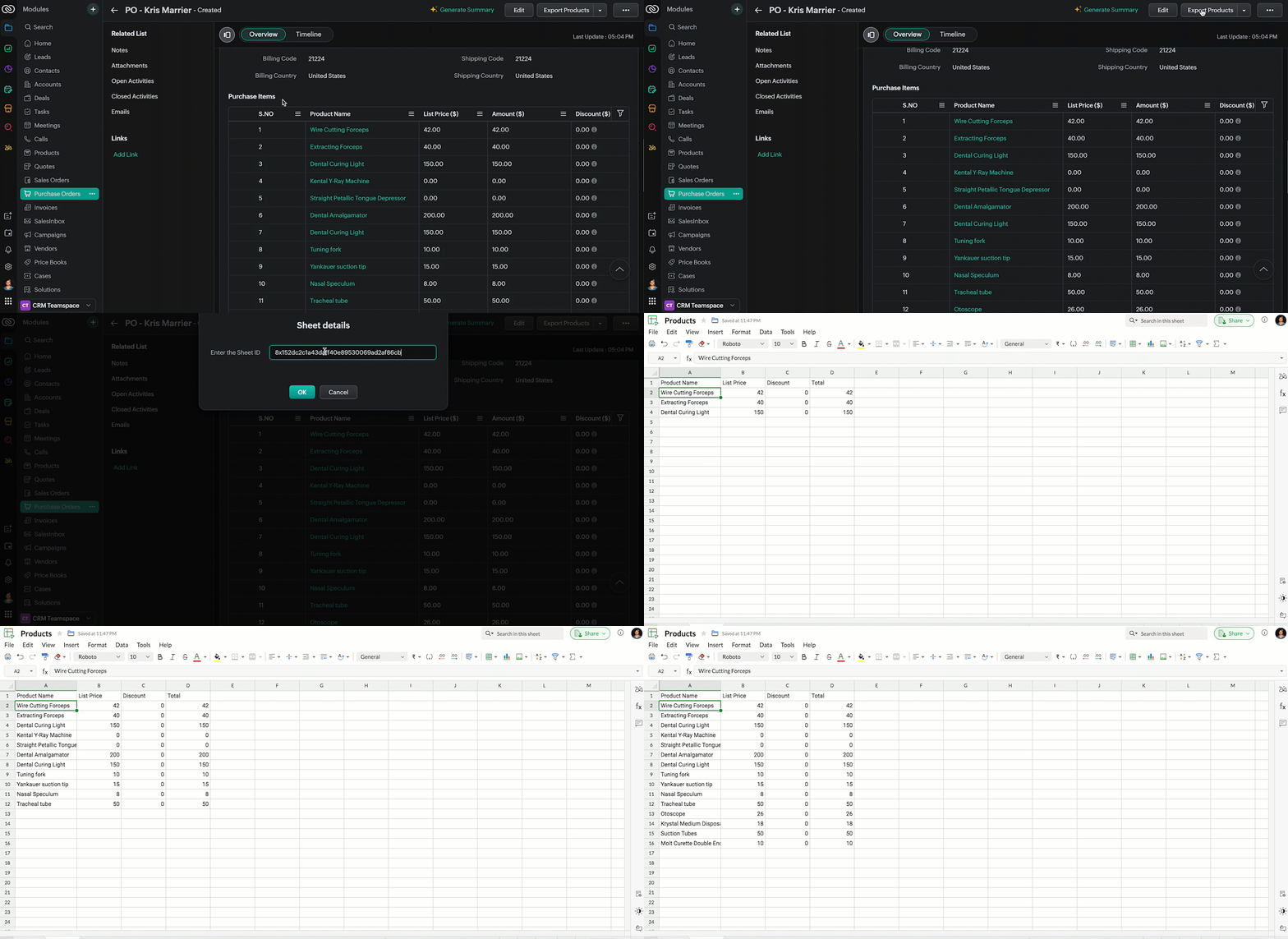
- Now, when the custom button is clicked, the Client Script is triggered. It prompts for the Sheet ID, fetches the contents of the Purchase Order subform, and invokes a function that writes the content to the Sheet.
Here's how the Client Script works.
5. Summary
In this post we have seen,
- What is a Button event?
- How to configure Client Script for a custom button
- How to write data into Zoho Sheets from Client Script
- How to create a Function and call it from Client Script
6. Related Links
- Customize Buttons using Client Script
- Automating Data Transfer from Zoho Sheets to Zoho CRM Subforms
- Update - Client Script Support For Custom Buttons
We are thrilled to be nearing the 200th post in our Kaizen series. As we approach this exciting milestone, we would love to hear from you. Do you have any questions, suggestions, or topics you would like us to cover in future posts? Your input helps us improve and shape the series to serve you better.
Previous Kaizen Post : Kaizen #193: Creating different fields in Zoho CRM through API | Kaizen Directory
We hope you found this post useful!
Happy Client Scripting! 😊
Topic Participants
Maadhari M
Rakesh Kumar
Gray
Ishwarya SG
Sticky Posts
Kaizen #222 - Client Script Support for Notes Related List
Hello everyone! Welcome to another week of Kaizen. The final Kaizen post of the year 2025 is here! With the new Client Script support for the Notes Related List, you can validate, enrich, and manage notes across modules. In this post, we’ll explore howKaizen #217 - Actions APIs : Tasks
Welcome to another week of Kaizen! In last week's post we discussed Email Notifications APIs which act as the link between your Workflow automations and you. We have discussed how Zylker Cloud Services uses Email Notifications API in their custom dashboard.Kaizen #216 - Actions APIs : Email Notifications
Welcome to another week of Kaizen! For the last three weeks, we have been discussing Zylker's workflows. We successfully updated a dormant workflow, built a new one from the ground up and more. But our work is not finished—these automated processes areKaizen #152 - Client Script Support for the new Canvas Record Forms
Hello everyone! Have you ever wanted to trigger actions on click of a canvas button, icon, or text mandatory forms in Create/Edit and Clone Pages? Have you ever wanted to control how elements behave on the new Canvas Record Forms? This can be achievedKaizen #142: How to Navigate to Another Page in Zoho CRM using Client Script
Hello everyone! Welcome back to another exciting Kaizen post. In this post, let us see how you can you navigate to different Pages using Client Script. In this Kaizen post, Need to Navigate to different Pages Client Script ZDKs related to navigation A.
Recent Topics
Are there default/pre-built dashboards in Zoho Desk?
Hi, I am looking for some pre-built dashboard templates in Zoho Desk, similar to what we can find in CRM/Projects, etc Thank youSAP S/4 HANA to CRM Integration - change the SAP Client ID
Hi I am trying to push the business partners from SAP S/4 HANA to ZOHO CRM module. The SAP Client ID is 421 in my case....kindly let me know how do I specify the sap client because it's a dropdown with specific values as of now. Thanks Ravi AswaniAdding branded signature to tickets reply
Hi, i am unable to figure out how to add signatures with logo to tickets reply. please advice .How to share ticket numbers across different ticket types
I'm running an event and have three different ticket types. Add on Event + Main Event - Early bird Main Event only - Early bird Add on Event only - Early bird And Standard class - shown but not available until early bird finishes Add on Event + Main EventAdding Social Media Buttons to Basic Campaigns
Hi, I'm quote new to using Zoho Campaigns and I can't work out how to add Social Media Buttons into my basic campaign? In MailChimp there's a button that brings the icons into your campaign for you. I've tried adding the social media icons as 'buttons' in Zoho but it's not looking great. Can anyone help? Thanks!Hide Inactive Social Sign-In Providers from Login Screen
Hello Zoho Team, We hope you are doing well. Currently, Zoho One allows admins to configure security policies and enable or disable Social Sign-In options for third-party providers such as Apple, Google, Microsoft, LinkedIn, Yahoo, Twitter, Facebook,[Free Webinar] AI Agents in Zoho Creator - Creator Tech Connect
Hello Everyone! We welcome you all to the upcoming free webinar on the Creator Tech Connect Series. The Creator Tech Connect series is a free monthly webinar that runs for around 45 minutes. It comprises technical sessions in which we delve deep intoDownload All Attached Files
It would be extremely useful to have "download-all" functionality for downloading files attached to a task, subtask, comment, forum post or hosted in the "Documents" section etc. We've instructed our users to zip multiple files prior to uploading, but of course they forget all the time. Having to download lots of files one-at-a-time off a comment or task wastes a lot of time.Ship via Carrier Not Working Since Commerce Update
Since the recent update to the Commerce platform, I can no longer use the ship via carrier function. It will take me to the address screen and let me verify them but when I go to save and move tot he next screen it will not do anything. This is happeningautomations: Can I execute a step on a specific date?
I have created a form in Zoho forms, and created a contacts list. I have also begun setting up an automation with the intention of sending the form to the contact list on a specific date every month (via email) for the entire year (essentially sendingZoho Expense - The ability to add detail to a Trip during booking
As an admin, I would like the ability to add more detail to the approved Trips. At present a requestor can add flights, accommodation details and suggest their preferences. It would be great if the exact details of the trip could be added either by theAdding Folders in Android App
Is it possible to create a new email folder within the Zoho Mail Android app? Or can this only be done from the desktop version of Zoho Mail? Cheers!Schedule Exports for Regular Project Updates
Tracking project data often means exporting data at regular intervals. Instead of manually exporting data every time, users can schedule exports for Phases, Tasks, and Tasks in Zoho Projects. These exports can be set to run once, daily, weekly, or monthlyQuestion about custom fields using Pivot Tables.
I have created a pivot table showing annual revenue of a client and how much payment that client is paying my company. Is there a way using pivot table to add an additional field that subtracts those to fields / shows me a percentage of that difference?Request for Light/Dark Mode
Would love the ability to switch between Light and Dark mode similar to Zoho CRM. https://help.zoho.com/portal/en/community/topic/introducing-dark-mode-light-mode-a-new-look-for-your-crmJourney Email - Ignored Contacts
I have a journey setup which simply sends a string of emails over time. For some reason I am getting large amounts of the contacts who enter the first email being ignored and I can't find anywhere in reports or audit logs why these contacts are notInvolved account types are not applicable when create journals
{ "journal_date": "2016-01-31", "reference_number": "20160131", "notes": "SimplePay Payroll", "line_items": [{ "account_id": "538624000000035003", "description": "Net Pay", "amount": 26690.09, "debit_or_credit": "credit" }, { "account_id": "538624000000000403", "description": "Gross", "amount": 32000, "debit_or_credit": "debit" }, { "account_id": "538624000000000427", "description": "CPP", "amount": 1295.64, "debit_or_credit": "debit" }, { "account_id": "538624000000000376", "description":Zoho Books - Include Payment Terms as a Custom View filter
It would be great if you could created a custom view based on Payment Terms. This would be really handy for seeing a list of customers who have credit terms. A workaround is not required. I could do something with a creditor checkbox, but it would beHow to update changed purchase account of item in invoice
I have selected the wrong purchase account for various articles and created invoices. I had to adjust the purchase account in the article afterwards, but the old purchase account is still posted in the transaction-journal of the invoice. To adjust theHelp - Zoho CRM notification on mobile (IOS/Android)
Hello Community! Can I get the IOS/Andoid CRM app to notify me of events, calls, etc. due as I can with MANY other apps? I am running the free Zoho I would like this to be native to the Zoho CRM app. I do not want to write a sep. mobile appZoho Books Idea - Include another field in Bank Details for Address
Hi Books team, Currently use the Description field in the Bank Details to store the bank's address. This works fine but it would be great if you could add another field for Bank Address, so that other notes about the bank account could be stored in thea question about the COQL API v8
When I specify eight or more values in a WHERE IN clause and execute it, an error occurs. Is there a limit to the number of values that can be specified in a WHERE IN clause? ↓Error select * FROM Vendors WHERE (id in (1, 2, 3, 4, 5, 6, 7, 8, 9)) ↓SuccessZoho Books Idea - Bank Details Button on Banking
Hi Books team, Sometimes I'm asked to share bank details with a customer or a colleague. So I go to the Banking Module, find the correct bank account, click Setting > Edit, then copy and paste the bank details. Wouldn't it be great if there was a buttonJS SDK 8.0 – TypeError: Cannot read properties of undefined (reading 'getCacheStore') with sample code
Hello Zoho Support Team, I’m integrating the Zoho CRM JavaScript SDK v8.0 and I’m getting the error below when running your official sample. I tested directly from: https://github.com/zoho/zohocrm-javascript-sdk-8.0/blob/main/samples/create_records_sample/create_records.jsFunction #55: Convert multiple quotes to single SO using Custom Button
Hello everyone, and welcome back to our series! In Zoho Books, after a quote is accepted by your customer, it can be converted into a sales order or an invoice. Often, a customer might have multiple quotes, and for easier billing or upon the customer'sTime based workflow without edit/action
Hello I need help solving this problem if possible. We have Deals come into the CRM via Live Transfer which have the field properties: Stage = New Channel = Inbound Some of them don't get answered so we want these to automatically go into our OutboundWhat's New - August 2025 | Zoho Backstage
Every month, Zoho Backstage grows with you. These updates aren't just features and fixes, they're about making your workday smoother, your events more impactful, and your attendees happier. We’ve listened, learned, and shaped this release to keep thingsprevent selling expired items
Hello. I need to make a constraint on expired batch items not to be sold. Is it possible in Zoho Inventory? if so, then how? Thanks for further help.Product details removed during update from other system
We maintain our product details in an other system. These details are synchronized with Zoho at the end of each day, through an API. This has worked perfectly sofar. But last Monday, all product codes and some other product data have been wiped duringClient Customer
I purchased a customer user license, but we cannot see the project I added in the customer account. I would like to ask for support on what we should do.Add Ability to Use Zoho Finance Tags
For Zoho Finance (Books and Inventory), the current actions do not allow us to affect the tags associated with the entities in question (customers, vendors, items, etc.). Please consider adding this functionality into the actions.Embeded Signing doesn't work on Safari Browser
We have implemented Zoho Sign in our website by using embeded signing, It works perfectly on Chrome. But it fails on Safari, We get stuck on Zoho Sign Page during redirection from Zoho Sign to our website after signing the document, Please let us knowDataprep Webhook Limits and Cannot update column with Dataprep
I have two problems : 1 - I am using Airflow to trigger my pipeline, and when I tested it, it worked fine a couple of times. However, after that, I received an error: {"code":429,"message":"Request rate limited"}. I didn’t send too many requests — maybeNew in Zoho Forms: Google reCAPTCHA v3 for smarter spam protection
Hello form builders, Spam submissions are one of the biggest challenges when you share your forms online. They not only clutter your data but can also waste valuable time. To help you combat this without making life harder for genuine respondents, we’reProject Management Bulletin: August, 2025
We’ve touched a grand 19 years since we started pioneering project management solutions with Zoho Projects. What started as a simple one-page interface is now a suite of products with Zoho BugTracker, Zoho Sprints, and our new debut Zoho Projects Plus,Zoho Sign and Zoho Workdrive Integration
Hello, there. I want to know if it's possible to save a signed document from Zoho Sign in an specific folder for each signer in Zoho Workdrive. For example: If John Doe signs the document in Zoho Sign I want to save it automatically in a folder namedHow do you list multiple contacts for a lead?
My sales team wants to be able to add additional contacts for leads, how do we do that? Is there a different way we should be using the lead / contact functionality? Moderation update (9th September 2025): Our developers have built an extension to achieveModifying Three Dot Menu Options
Is there a way to modify the three dot menu options that display in a Report header? They currently display: Show As (List, Calendar, Timeline), Print, Import, Export. I'd like to remove the Show As and Print options, since they aren't applicable forField Not Updating in FSM Script - Service and Parts module.
Dear Team, I am reaching out regarding a script I have implemented in Zoho FSM to automate the calculation of the End of Service date based on the End of Sale date in the Service and Parts module. Overview of the script: Fetches the End_of_Sale__C andZadarma + Zoho CRM Integration – Missed Calls Saved as Contacts Instead of Leads
Hello everyone, I’m looking for input from anyone with experience using the Zadarma + Zoho CRM integration. Currently, I’m seeing that missed calls are automatically being created as Contacts instead of Leads. From a CRM perspective, this doesn’t makeNext Page