Exploring SalesIQ's Top Features of 2024: An Insider's Look 🔍
As we wrap up another year at Zoho SalesIQ, it's time to reflect on how far we've come. This year has been incredible for us in our journey to build a more powerful, flexible, and customer-centric engagement platform. We've introduced several features that have elevated how businesses connect with their customers across the globe. Let’s take a quick look at the highlights and top releases of the year, shall we?

We saw a wide variety of feature releases on SalesIQ focused mainly on the following areas, contributing to the overall evolution of the product.
- Enhancements for advanced customer connectivity 🌐 💬
- Expanding to a global audience 🌏
- Optimizing user experience ⚙️🎨
Enhancements for Advanced Customer Connectivity 🌐 💬
1. WeChat + SalesIQ Integration: Converse with WeChat users directly from SalesIQ! 🤝
Our integration with WeChat allowed businesses to communicate directly with WeChat users from within the SalesIQ dashboard.
- Operators could easily use SalesIQ's support tools like canned replies, articles, FAQs, tags, widgets, etc., enhancing their ability to provide contextual assistance.
- Not just that, operators can also easily nurture the leads from WeChat by easily pushing their details to CRM and also converting the chats from WeChat to helpdesk tickets, pushing them to Desk with a single click. Learn more

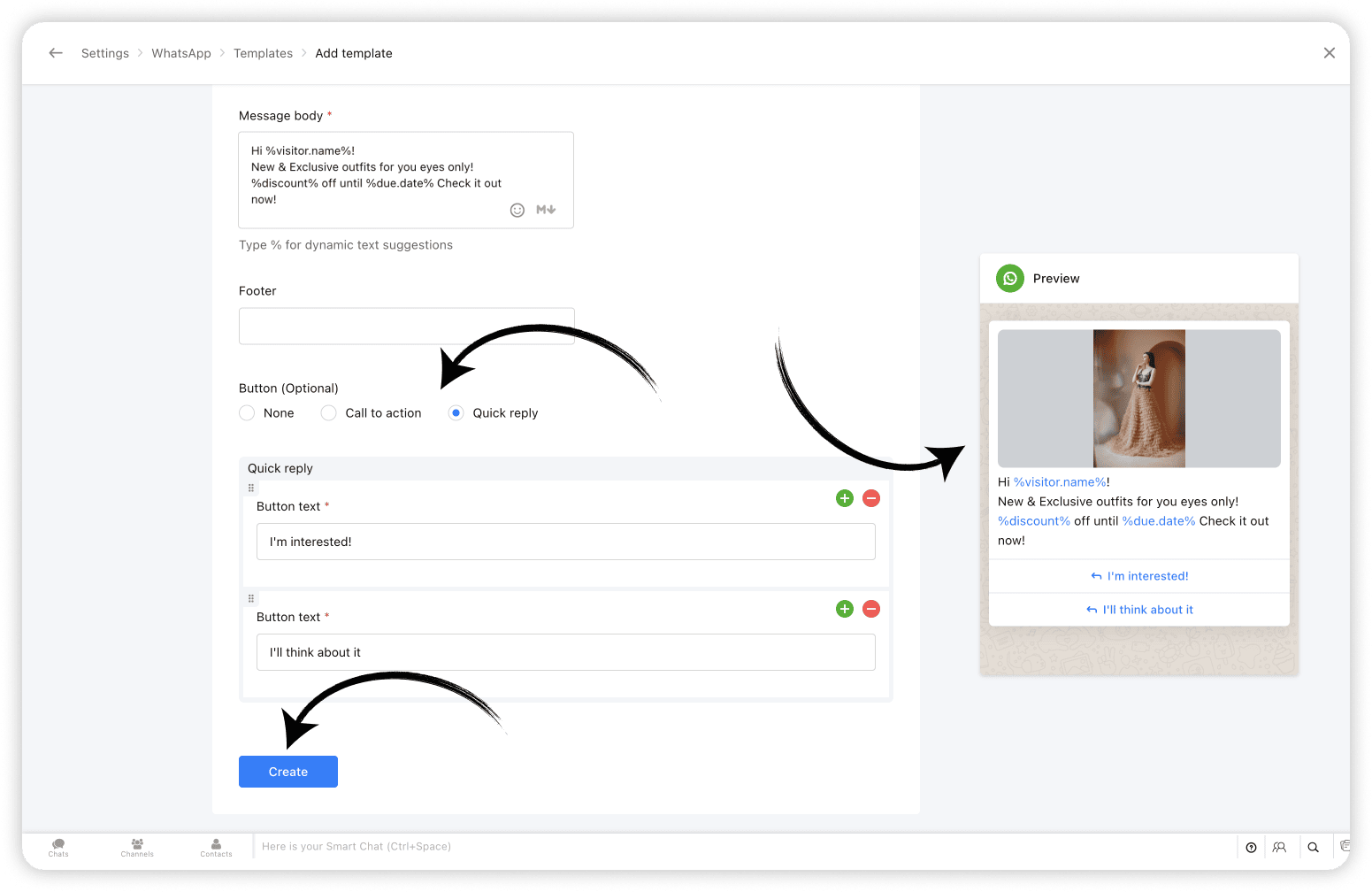
2. WhatsApp Templates: Create and share WhatsApp Templates from SalesIQ 💬
With WhatsApp templates on SalesIQ, one of the most awaited features, businesses can now create and save templates/message layouts that can be easily inserted into your WhatsApp conversations, from within your SalesIQ operator chat window.
And, Bonus? Closed WhatsApp conversations need not remain closed any more! Now you can start conversations with WhatsApp users using WhatsApp Templates. Learn more
3. Chatbots for Telegram & LINE: Expanding Automated Messaging 🤖
Already being supported on Facebook, WhatsApp and Instagram, we have now added our chatbots support for Telegram and LINE as well. This means that you can now sit back and let your bots take over chats from your Telegram and LINE audience, streamlining customer support, reducing response time and most importantly, freeing up your operators time to focus on complex queries and issues. Learn more

Expanding to a Global Audience 🌏 🤝
4. 30+ Language Support for Chatbots 🌐
To enhance and simplify global customer service further, we've expanded our chatbot's language support to over 30 languages. This ensures that your business chatbots (Zobot & Answer bot) can interact with customers in their preferred language, increasing engagement, improving customer satisfaction, and breaking down language barriers to provide seamless support. Learn more

5. Azure AI Translator: Breaking Language Barriers 🚀
With the Azure AI Translator integration, SalesIQ is now further equipped to translate chat conversations in real-time, eliminates language barriers, enabling businesses to engage effectively with customers from worldwide. While SalesIQ already supports the Google Translate integration, we have now added Azure AI Translator to its translation arsenal to cater to a wider user base to facilitate real-time visitor message translation. Learn more

6. Hebrew Right-to-Left (RTL) Support: User-friendly Chat Experience 💬
Recognizing the importance of regional customization, we introduced Right-to-Left (RTL) support for Hebrew, providing a more natural and accessible interface for our Hebrew users. SalesIQ already features RTL support in Arabic. Hebrew has now been added to the 'Right to left' bandwagon, ensuring a user-friendly experience for our Hebrew-speaking community. Learn more

Optimizing User Experience ⚙️🎨
7. SalesIQ Desktop Apps: Seamless Access Across Devices 🖥️
Another big highlight of this year was the launch of SalesIQ Desktop Apps to the App Store on Mac as well as the Microsoft store on Windows. The desktop app features exclusive options like auto-launch on device startup, Actionable notifications, access options on the Dock/Tray, Hide when Close etc, for enhanced user experience. Learn more

8. Articles support on Instant Messaging Channels 📝
SalesIQ articles support has now been extended to all Instant messaging channels, such as Facebook, Instagram, WhatsApp, Telegram, LINE, and WeChat. Operators can now share the articles to assist IM channel users. The shared articles will be displayed to the visitors in the form of URL links. Learn more

9. The All SalesIQ New Live Chat Widget: Faster and More Engaging ⚡💬
To wrap up the year, we launched a completely revamped live chat widget. Now twice as fast and fully optimized for engagement, the new widget is designed to help boost your site's SEO and reduce bounce rates. With minimized data usage it delivers consistent performance even on slower mobile networks and is also WCAG Compliant ensuring accessibility, offering an inclusive experience for all users. Learn more

Other Interesting Launches⚡
Along with the above listed top releases, we did have a few other launches that catered to user demands and expectations while adding to SalesIQ's wealth of features.
- SalesIQ-Desk Integration: Managing Tickets Within Chat 🤝 - Seamlessly edit and manage help desk tickets directly from the operator chat window, streamlining sales and support collaboration.
- Starting a Cliq Internal Chat from SalesIQ 👩💻 - Start a Cliq internal group chat right from SalesIQ for an ongoing, closed or missed conversation to discuss chat/customer-related queries with your fellow operators and Cliq users.
- Extended Chat Time: 24 Hours for IM Channels 💬 - Keep customer conversations active for up to 24 hours across Instant messaging channels, ensuring no interaction is left unresolved.
- Multi-WhatsApp Business Account (WABA) Support ⚙️ - For businesses managing multiple WhatsApp accounts, each SalesIQ brand can now be connected to its unique WABA within SalesIQ, enabling them to manage them as separate entities.
- SalesIQ TV App for Real-Time Insights 📺 - Get live updates on business performance and visitor metrics with the new SalesIQ TV App, now available on Android and Apple TV.
- Card Wait Time for Bot End Messages 💬 - Set a delay/wait time for the bot’s end card to ensure visitors have enough time to view important information before the chat closes.
- Live insights (Reports) 📊 - Get a real-time overview of incoming and outgoing chat/call volume, operator availability, and more, helping you better plan support split across teams with the live insights section on the reports dashboard.
Looking Ahead: What’s Next? 🚀
This year’s updates reflect our commitment to providing businesses with the tools they need to create meaningful, personalized connections with customers. Whether through enhanced communication options, multilingual support, or seamless integrations, every new feature has been designed with your needs in mind.
But we’re just getting started. The journey of Zoho SalesIQ is one of continuous innovation, and we’re excited to keep building and improving to help you connect with customers better, faster, and more effectively than ever before.
Thank you for being part of the Zoho SalesIQ journey. Here’s to another year of growth and innovation!
Warm regards,
Hameetha | Zoho SalesIQ
Topic Participants
Hameetha Nasreen
Damilola Olaleye
Sticky Posts
Speak Your Customers' Language: SalesIQ's chatbots now support 30 languages 🤖
We're unveiling some major upgrades to our chatbot that are set to revolutionize your experience! Now SalesIQ support 30 languages for both Zobot and Answer bot. By speaking your customers' language, you can enhance engagement, improve customer satisfaction,Attention Deluge Developers: Important Update Regarding "Send Email Deluge Task"
Hi Deluge Users, We hope this message finds you well. We would like to inform you about a recent update on the Send emails deluge task. If you are using this deluge task (SalesIQ Scripts) for your Zobot, widgets, or form controllers to send emails, pleasePlug Samples #12: Verify Customer Mobile Numbers with OTP to Avoid Spam Entries
Hi Everyone! Verifying customer information is critical in business to filter out junk data and spammers. Whether it’s lead generation, appointment booking, or any other operation, ensuring quality data is essential for driving meaningful outcomes. ABig Things Just Dropped in the SalesIQ Universe: Top Upgrades You’ll Love in Nova’25
Nova'25 has landed, and it’s packed with meaningful upgrades to help you engage smarter, work faster, and scale with ease. Whether you're into proactive messaging, smarter automation, or better admin control, there's something here for everyone. Here'sYour bot just got smarter: AI-Powered routing that reads between the lines
What if your bot could tell the difference? Between a visitor who just needs a quick answer, someone actively comparing options, and a frustrated customer one click away from leaving? Most bots can't. They deliver the same response to everyone, missing
Recent Topics
Partial refunds
I am trying to process refund for a one item invoice, however the refund is partial: i am getting this error while creating credit note, can anyone share some wisdom about thisBest practice importing items and matching assemblies
Hi, I was wondering what would be the best practice to import items and composite items (assemblies) From my backup, what should I import first? The items or the composite items? I am on Zoho one, using inventory and books. Kind regards, SabineBulk Fill In & Edit PO/Bill/SO/Invoice
Hello, I am adding stock in bulk on a PO, the system is automatically populating the Rate (price) and Tax from the item data. Problem is that the bill rate is different from the rate on the item data, so I have to manually erase each and enter the price.Separate Items & Services
Hi, please separate items and services into different categories. Thank youItems Below Reorder Point Report?
Is there a way to run a report of Items that are below the Reorder Point? I don't see this as a specific report, nor can I figure out how to customize any of the other stock reports to give me this information. Please tell me I'm missing something sAllocating inventory to specific SO's
Is there a way that allocate inventory to a specific sales order? For example, let's say we have 90 items in stock. Customer 1 orders 100 items. This allocates all 90 items to their order, and they have a back order for the remaining 10 items which couldCancelled Transfer order problem
Hello, We've canceled a transfer order, and we can't add the related items to a new Transfer Order. The system tells us that the bin doesn't have the required quantity, but when we check the item, it indicates that there are 2 units in the bin. It alsoCreating a Chart from a Report
In Zoho Analytics, is it possible to create a chart from a Pivot View report? We are looking to use Zoho Analytics to replace Excel for Sales reports and would like to be able to show both the table and the chart together.Client Portal ZOHO ONE
Dear Zoho one is fantastic option for companies but it seems to me that it is still an aggregation of aps let me explain I have zoho books with client portal so client access their invoice then I have zoho project with client portal so they can access their project but not their invoice without another URL another LOGIN Are you planning in creating a beautiful UI portal for client so we can control access to client in one location to multiple aps at least unify project and invoice aps that wouldEmail Insights included in Bigin emals are marked as SPAM everywhere
Today I noticed that email recipients who use Office 365 never receive emails sent from Bigin. Further examination showed that all Email Insights links in email headers are marked as spam/phishing by Office 365. Example screen included. The problem isData Import | Zoho Analytics Custom Query Window Size
Please increase the window size for the Custom Query Data Import. It's impossible to work with such a small query window.Name changed in settings for mailbox but still not changed when typed in To field
In the email account secretary@ i have updaetd the new staff members details but the old members name still appears when I type secretary@ in the To field. I cant work out where Zoho is finding the old name from. I have deleted the browser cache. If ICannot add my name to my domain name
I want to have My name@mydomain.com and it says my name is linked to another account already. Please fix it since I do not have another account.Invoice status on write-off is "Paid" - how do I change this to "Written off"
HI guys, I want to write off a couple of outstanding invoices, but when I do this, the status of the invoices shows as "Paid". Clearly this is not the case and I need to be able to see that they are written off in the customer's history. Is there a wayEstablishing new Zoho email account on laptop
Good Morning: I am very long time Outlook business user and decided to try your email service last night and had established an account. I am trying to verify my account; how do I establish my Zoho email account on my laptop? I opened the account withunable to send message reason 550 5.4.6 unusual sending activity
My email account can't send message. It shows unable to send message reason 550 5.4.6 unusual sending activity detectedhow to add email to existing organization i w
I am already registered my organization and i have an email id. I need one more email id but i can't find anywhere .i want the cheapest email id . how to add ?e-mail bloqueado
Estou com meu e-mail lucas@peplus.me bloqueado, preciso desbloquear para retorno de usos em minhas atividades.zoho labels api not working
We're using n8n to automte email reply using zoho api. I'm facing issue with label api. I added the required scopes but its not working. i followed zoho api documentation but didn't work. also, where do i find/how do i create zoho oauth token mentioneeedDesk DMARC forwarding failure for some senders
I am not receiving important emails into Desk, because of DMARC errors. Here's what's happening: 1. email is sent from customer e.g. john@doe.com, to my email address, e.g info@acme.com 2. email is delivered successfully to info@acme.com (a shared inboxStreams/Shared email doesn't show up in windows trident app. It works fine on MAC. Is there any difference between 2 install ?
I can see streams/share email boxs on my MAC version of trident app but i can't see them in windows version of trident app. Is there any difference between 2 install? I try to find setting but not able to see any setting to add stream/share email boxes.add zoho account
How to add a zoho mail to previous zoho account? I have twoZoho Desk Mobile App Year-End Roundup - 2025
Dear Zoho Desk users, Greetings! As you gear up for the festive season, we are excited to share a quick journey into all that is released in 2025! Zia's generative AI capabilities Zia insights can be highly beneficial in helping agents manage daily supportNarrative 17: The role of Zia AI in customer support
Behind the scenes of a successful ticketing system: BTS Series Narrative 17: The role of Zia AI in customer support Overview Zia in Zoho Desk is a layered AI assistant that combines generative AI, prediction, and automation to support agents, automateDomain Transaction
I have purchased a domain name called trainedworkforce.co.in I made the payment got the receipt but the domain is still not purchased after successful transaction .Ability to Set a Unified Tab Order/View for All Users in Zoho Projects
Hello Zoho Projects Team, We hope you are doing well. We would like to submit a feature request regarding tab/menu organization in Zoho Projects. Current Behavior: The tab (module) order in Zoho Projects is user-specific. Each user (internal or external)Zohomail - The "All Messages" vs "In Box"
Why do some new email message appear under the all messages view but not in my inbox? That's really annoying but to be fair I've experienced the same with gmail.error while listing mails
I can't access email in any of my folders: Oops, an error occurred - retry produces the second error response: error while listing mails (cannot parse null string). I've signed in and out of Zoho, restarted my iMac.Introducing the Zoho Projects Learning Space
Every product has its learning curve, and sometimes having a guided path makes the learning experience smoother. With that goal, we introduce a dedicated learning space for Zoho Projects, a platform where you can explore lessons, learn at your own pace,Where to show Customization Field ?
Dear Sir, I have made some New Field in Item Field Customisation. Now I don't require that field in Estimate, Sales Orders etc. I just wants that field in Sales Invoice to Show/Hide... Is that possible ?Zoho Desk 2025 round-up: Key highlights on feature releases
Hello everyone, As we gear up for 2026, here is a detailed round-up of all feature releases in Zoho Desk web throughout the year. For consolidated information on releases check out the What’s New page You can also watch these webinars. Zia in web ZiaPrint Sales Orders, Purchase Orders or Invoices from API
Hello, Is it possible to use the print option that is available in Sales Orders Purchase Orders and Invoices with the API?. I don't see any information in the docs about this. ThanksHow to show a hided report??
in CRM Report , I clicked Hide incidently , how to show the floder again? Nowhere I can find the hided report floder...Converting Customer Invoice to Purchase Bill
Hi, In my service-based business, I sometimes create the customer invoice first, and later I receive the purchase bill from the vendor for the same job. Is there any option in Zoho Books to: Convert a customer invoice into a purchase bill, or Link/associateEmail tracking inquiry
I am trying to track when my emails are opened and clicked like I previously did in HubSpot. HubSpot pretty much did the entire process automatically. After digging through, I finally found in settings --> emails --> BCC Dropbox there is an email I canMass Update of Lookup Fields not possible
Hello List I've created a custom field for Leads and Contacts 'Current Campaign'. This is very Handy as I can filter leads and then related them to a campaign. Everything ready, but then I realized that mass update doesn't work for lookup fields... aCollapsible Sections & Section Navigation Needed
The flexibility of Zoho CRM has expanded greatly in the last few years, to the point that a leads module is now permissible to contain up to 350 fields. We don't use that many, but we are using 168 fields which are broken apart into 18 different sections.Quick Create needs Client Script support
As per the title. We need client scripts to apply at a Quick Create level. We enforce logic on the form to ensure data quality, automate field values, etc. However, all this is lost when a user attempts a "Quick Create". It is disappointing because, fromDownload Attached Files
Hi everyone, Brand new to Zoho Creator. I have a form with a subform. The subform has a field for "File Upload" I have this in a subform to allow multiple files to be uploaded to the parent form. Once the files are uploaded, how can i download or view them? Is this a setting I am just not seeing? If there isn't a way to download them, could i create another form field that dynamically creates the file's URL? That way a user can click the URL to get to the file? Any help with this would be greatlyTicket layout based on field or contact
Hi! I want to support the following use-case: we are delivering custom IT solutions to different accounts we have, thus our ticket layouts, fields and languages (priority, status field values should be Hungarian) will be different. How should I setupNext Page