Plug Sample #10 - Simplify Ticket Management (Zoho Desk) with Chatbots

Plug Sample #10 - Simplify Ticket Management (Zoho Desk) with Chatbots

Hi everyone! 

We're here with another simple yet effective plug for your chatbot to integrate with Zoho Desk. 

When a customer reports an issue/request during chat, it's logged as a ticket on Desk. When they return for updates, you end up searching through past tickets, reading conversations, and updating them manually. Imagine if your bot could automate this, retrieving ticket details and providing updates effortlessly.


Are you new to SalesIQ? Wondering what plugs and bots are?

SalesIQ offers chatbots to automate customer interactions. Using the Codeless bot builder, you can build chatbots by using cards in the bot-builder gallery. However, at times, businesses would require unique actions from the bot and for those instances, we have plugs. With plugs, you can create any specific action and bring it as a card inside the codeless bot builder, like the rest of the cards. 

In this post, we will learn how to create a plug and list the customer's recent support tickets from Zoho desk.

How does this Plug work?
  • The bot will get the email address of the visitor (Email card)
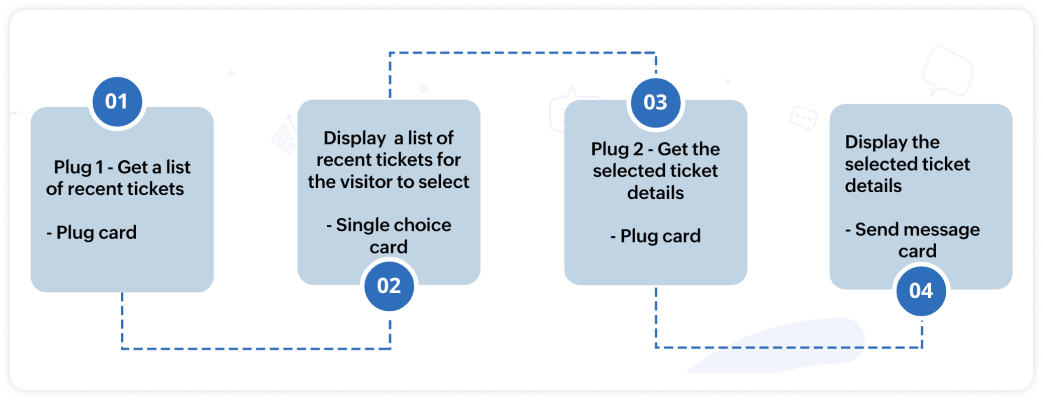
  • Next, the bot will search and get a list of tickets associated with the respective email from Desk (Plug 1). 
  • Then, this ticket list will be displayed to the visitor (Single choice card). 
  • When the visitor selects one of the displayed tickets, the bot will fetch the neccessary ticket details. (Plug 2)
  • And these details will be displayed to the visitor (Any response/input card).
Note:
  • There are two plugs involved in this process, one is to display the ticket list and another is to display the ticket details. 
  • In this post, we will look at the plug to display the ticket list. 
  • The plug sample to display the ticket details is already available, click here to know more. 

Plug output
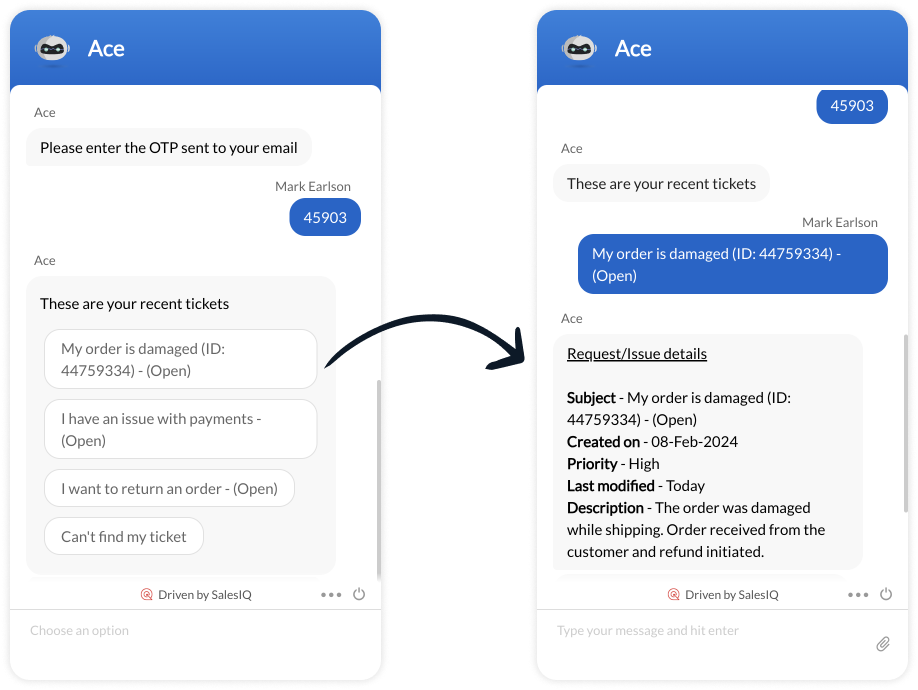


How to build this Plug?

Step 1 - Create connection with Zoho Desk
  • On your SalesIQ dashboard, navigate to Settings > Developers > Plugs > click on Add.
  • Provide your plug a name, and description, select the Platform as SalesIQ Scripts, and finally, click on Connection to your left bottom. You will be redirected to the connection interface.
  • Click on Create connection at the top right corner. 
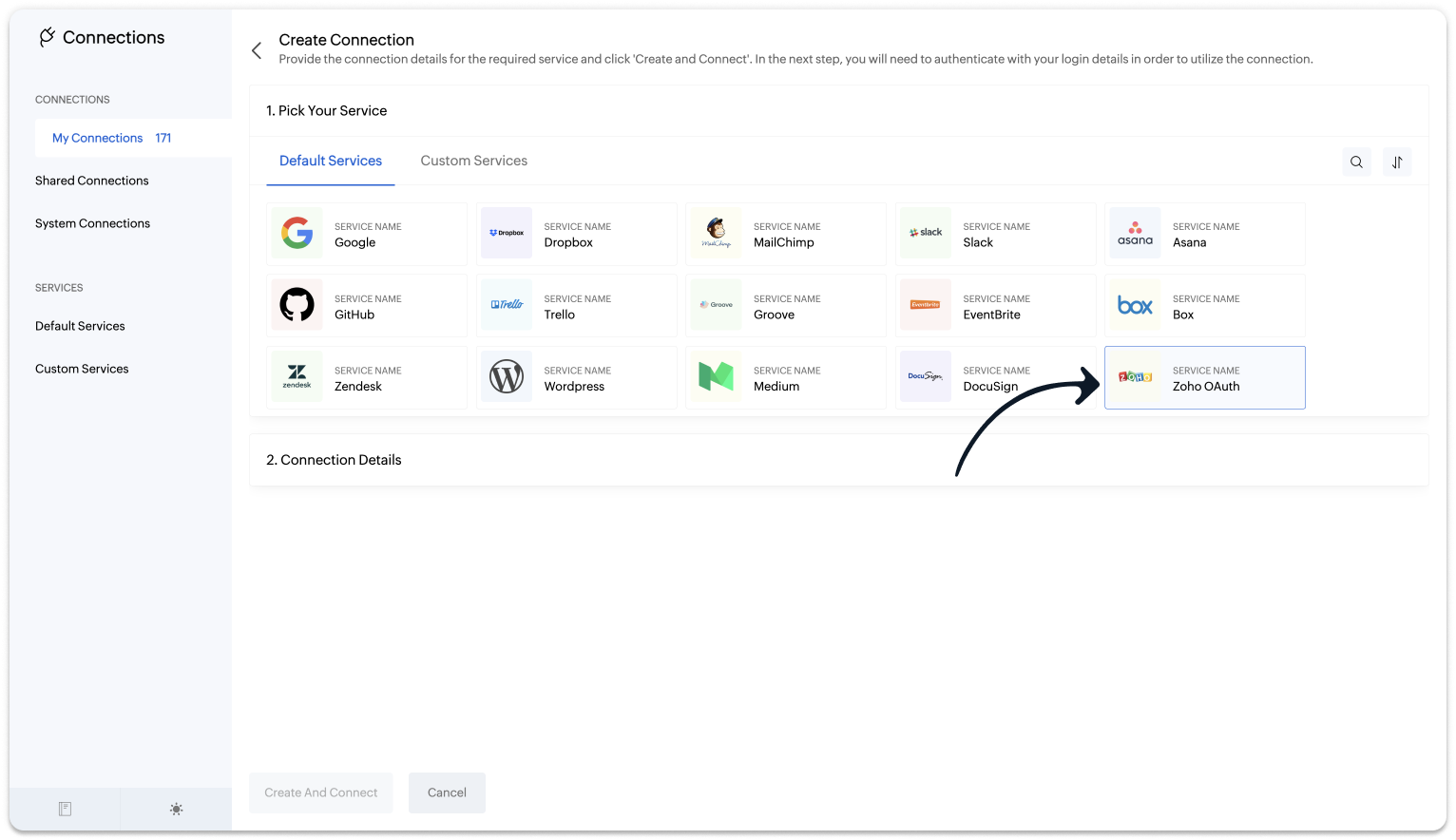
  • Under Default connection, select Zoho OAuth service

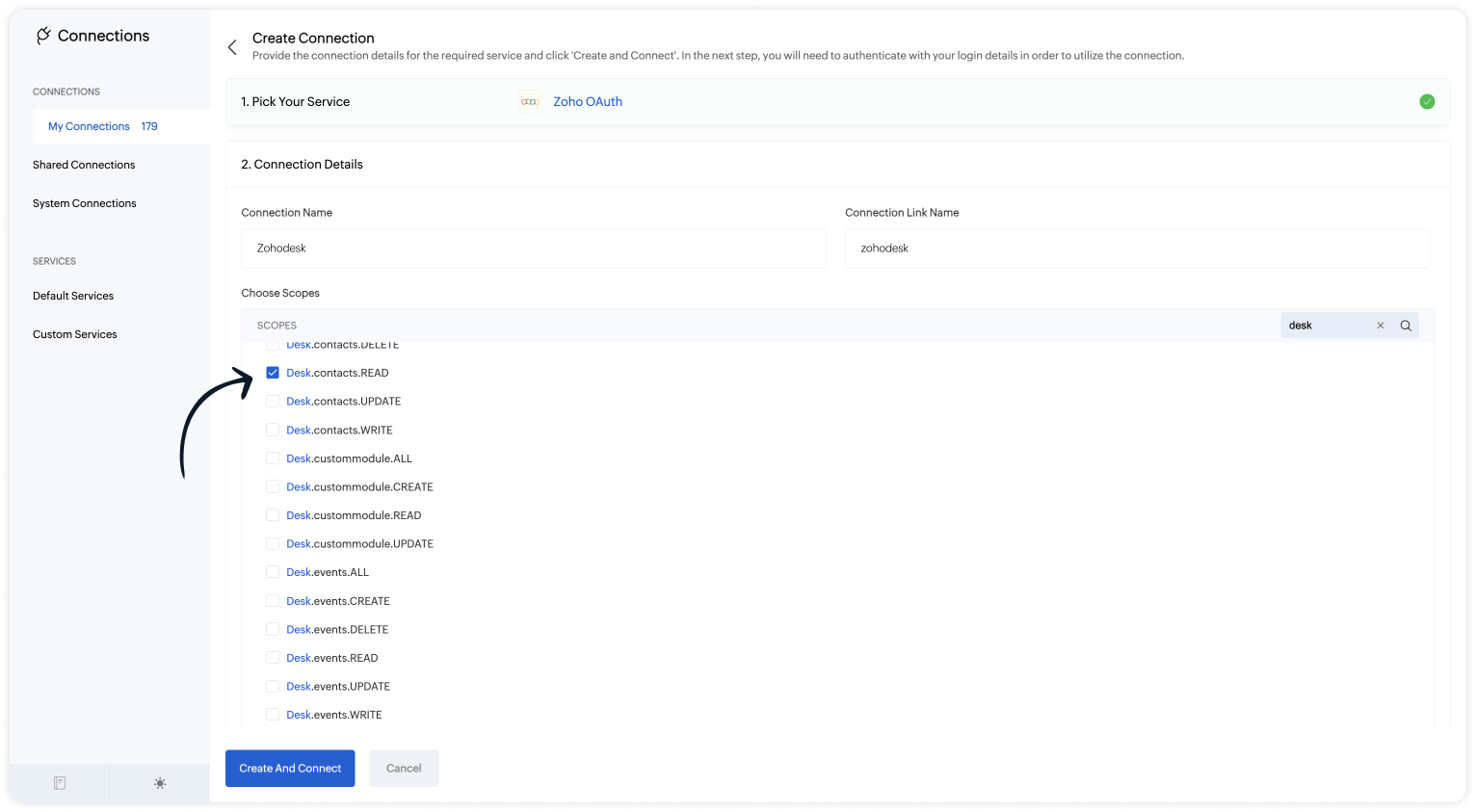
  • Provide your connection name, connection link name, and choose the scopes below.
    • Desk.search.READ
    • Desk.contacts.READ
    • Desk.tickets.READ

Note: The Connection Link Name will be used in the scripts to invoke URL tasks.
  • Click on Create And Connect to connect Zoho SalesIQ and Zoho Desk.
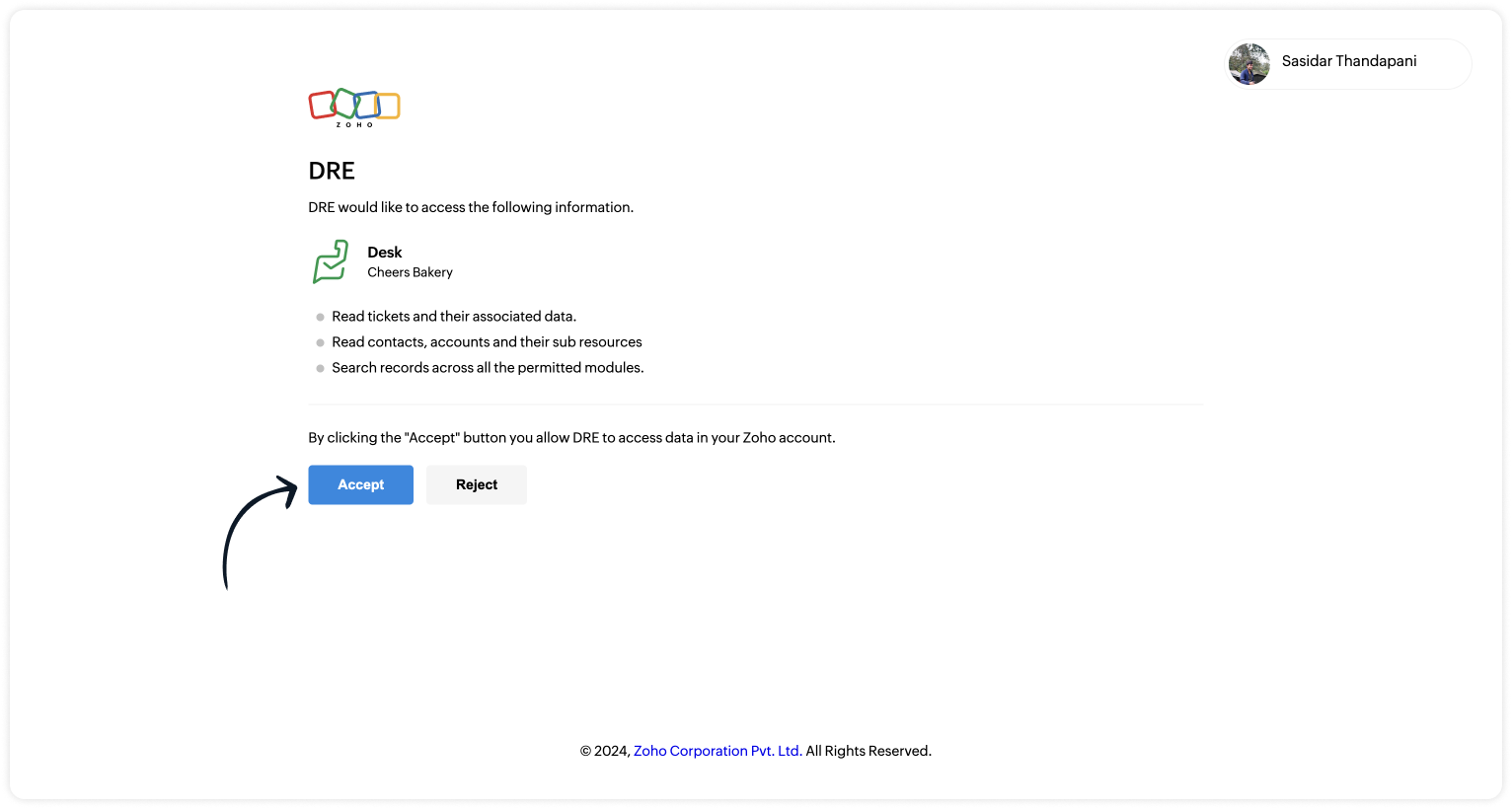
  • Upon successful authentication,  Zoho SalesIQ will be connected with Zoho Desk.
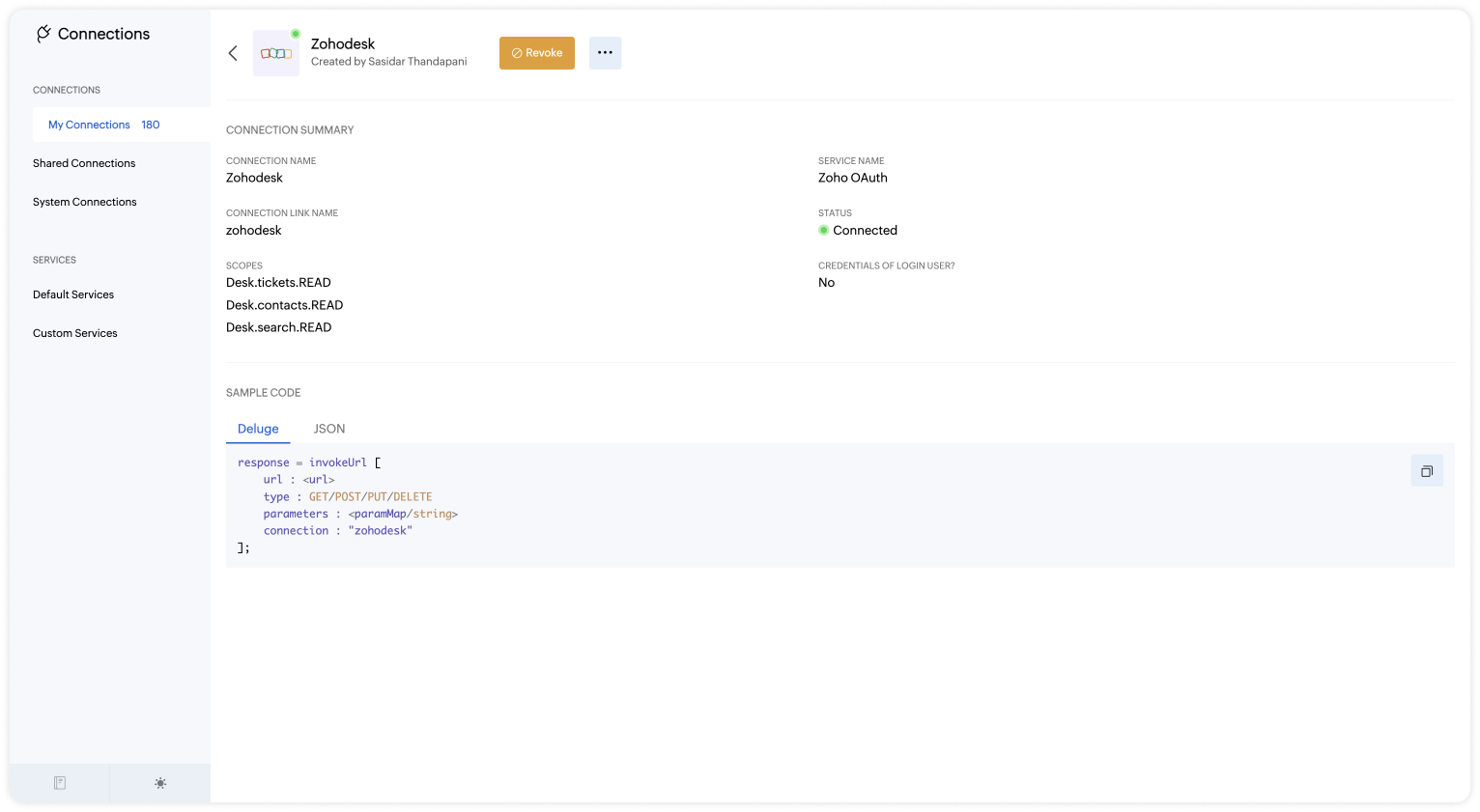
  • The connection is successfully established. 

Step 2 - Build the Plug

As we have created a connection between SalesIQ and Desk successfully, it's time to build the plug. The first step in building the plug is defining the parameters. 

Input Parameters
  • Name : email | Type : Email
Output Parameters
  • Name : ticketList | Type : Option List
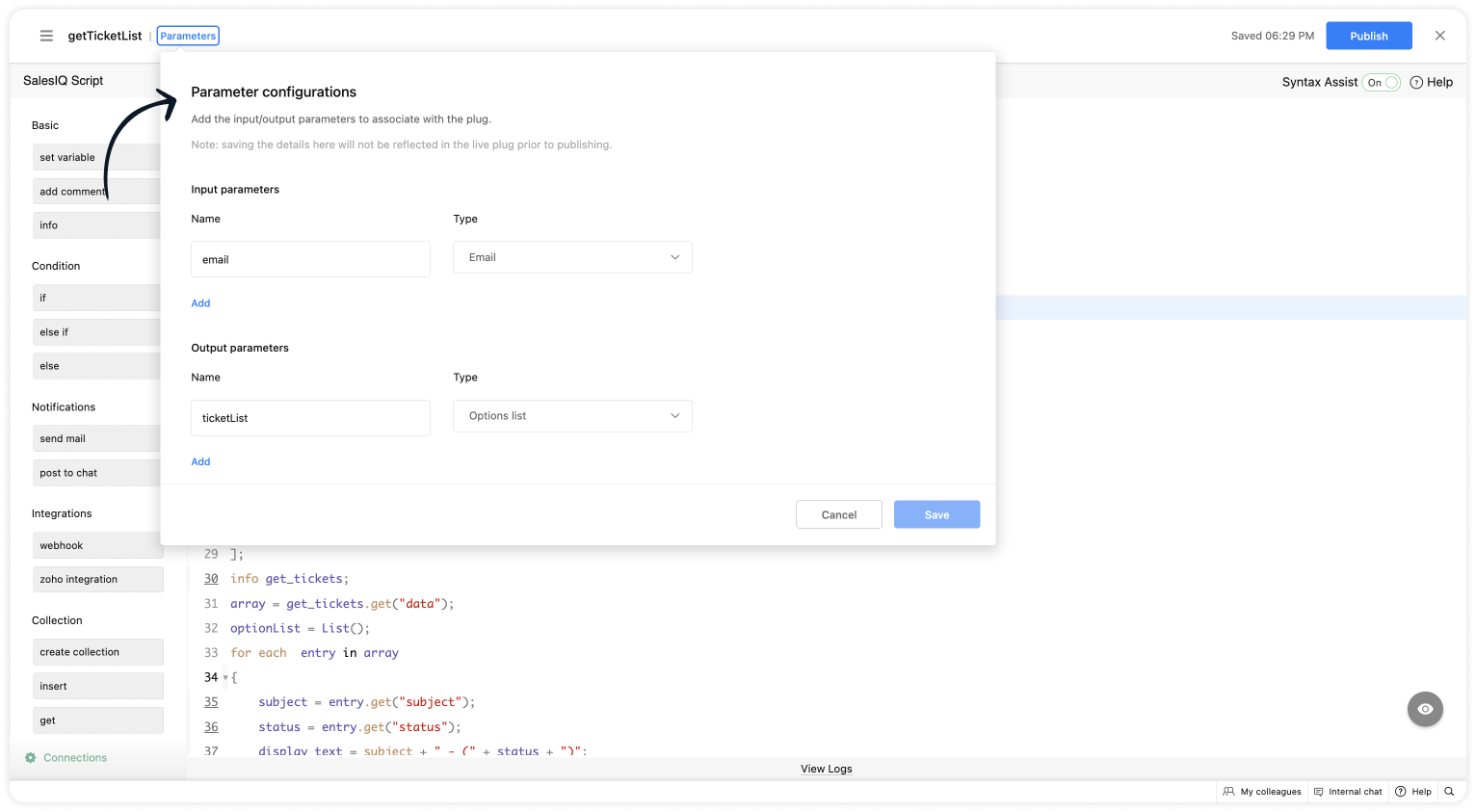

Script to get the list of tickets
  • Copy the code below and paste it into your plug builder. Then, make the following changes. 
  • In line #8, get your Desk org ID (Settings > Developer Space > API > Scroll down to find the "OrgId").
  1. if(session.containsKey("email"))
  2. {
  3. email = session.get("email").get("value");
  4. }
  5. // Getting the contact ID from the email - https://desk.zoho.com/DeskAPIDocument#Search#Search_SearchContacts
  6. url = "https://desk.zoho.com/api/v1/contacts/search?email=" + email;
  7. header = Map();
  8. header.put("orgId","012345");
  9. //Change your org ID (Settings > Developer Space > API > Scroll down > "OrgId")
  10. getcontact = invokeurl
  11. [
  12. url :url
  13. type :GET
  14. headers:header
  15. connection:"zohodesk3"
  16. ];
  17. info getcontact;
  18. contact_id = getcontact.get("data").getJSON("id");
  19. info contact_id;
  20. url_ticket = "https://desk.zoho.com/api/v1/contacts/" + contact_id + "/tickets?sortBy=-createdTime&limit=3";
  21. // Get associate ticket of a contact - https://desk.zoho.com/DeskAPIDocument#Contacts#Contacts_ListContactsByIds
  22. get_tickets = invokeurl
  23. [
  24. url :url_ticket
  25. type :GET
  26. headers:header
  27. connection:"zohodesk3"
  28. ];
  29. info get_tickets;
  30. array = get_tickets.get("data");
  31. optionList = List();
  32. for each  entry in array
  33. {
  34. subject = entry.get("subject");
  35. status = entry.get("status");
  36. display_text = subject + " - (" + status + ")";
  37. ticketNumber = entry.get("ticketNumber");
  38. optionList.add({"id":ticketNumber,"text":display_text});
  39. }
  40. response = Map();
  41. response.put("ticketList",optionList);
  42. return response;
  • Then, click Save, preview the plug and Publish it. 
 
Step 3 - Adding the plug to the Codeless bot builder
  • Navigate to Settings > Bot > Add, provide the necessary information, and select Codeless Bot as the bot platform. You can also open an existing bot.
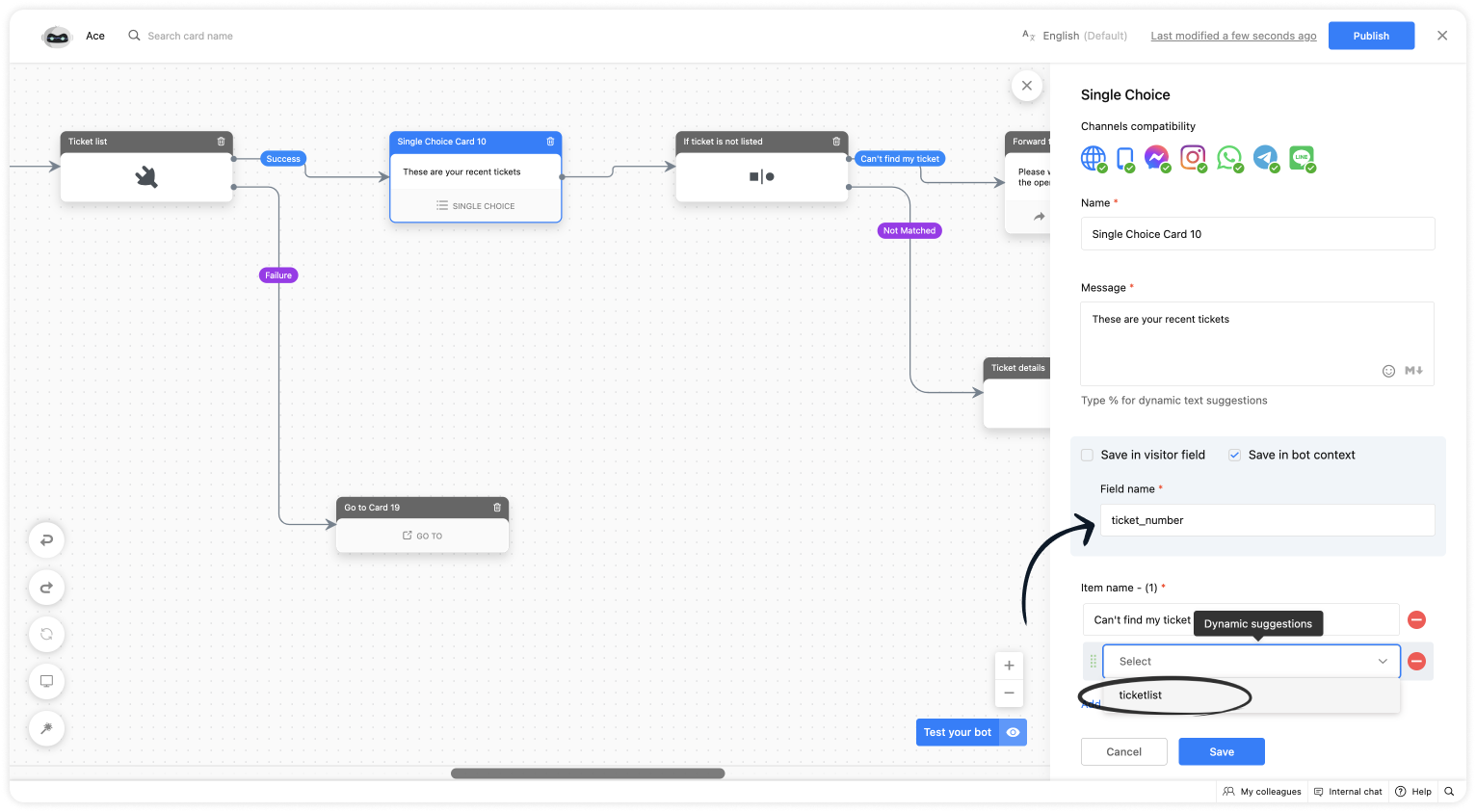
  • Click on Plugs under Action cards, select the plug you have created and provide the input values for the parameters defined in the plug builder.
  • Choose the %visitor.email% variable for the name.
  • Provide a variable name for the ticket list.
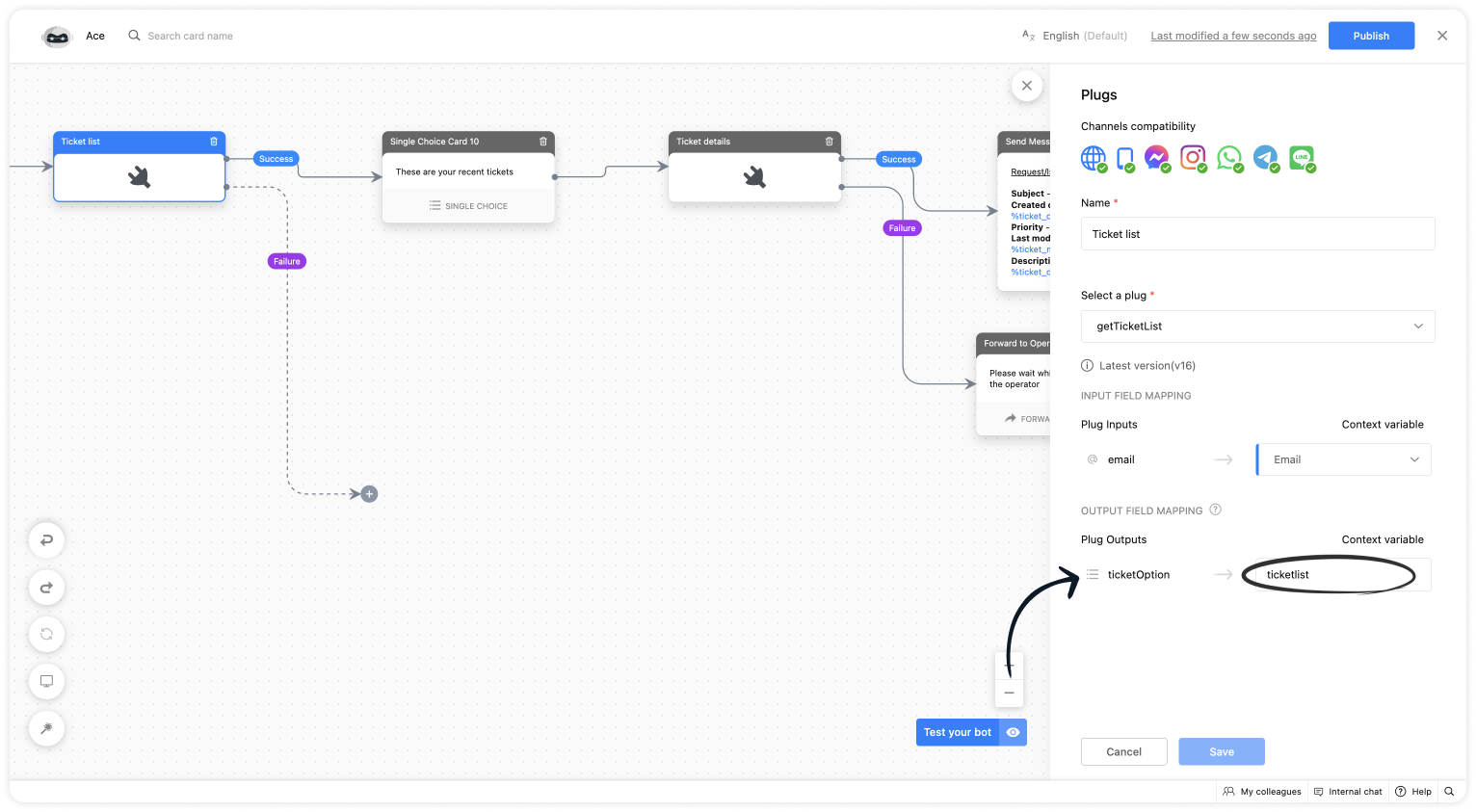
  • Use a single choice card, click on Save in bot context, give a variable name and select the context variable under dynamic suggestion

  • Then, use this plug to show the ticket details.
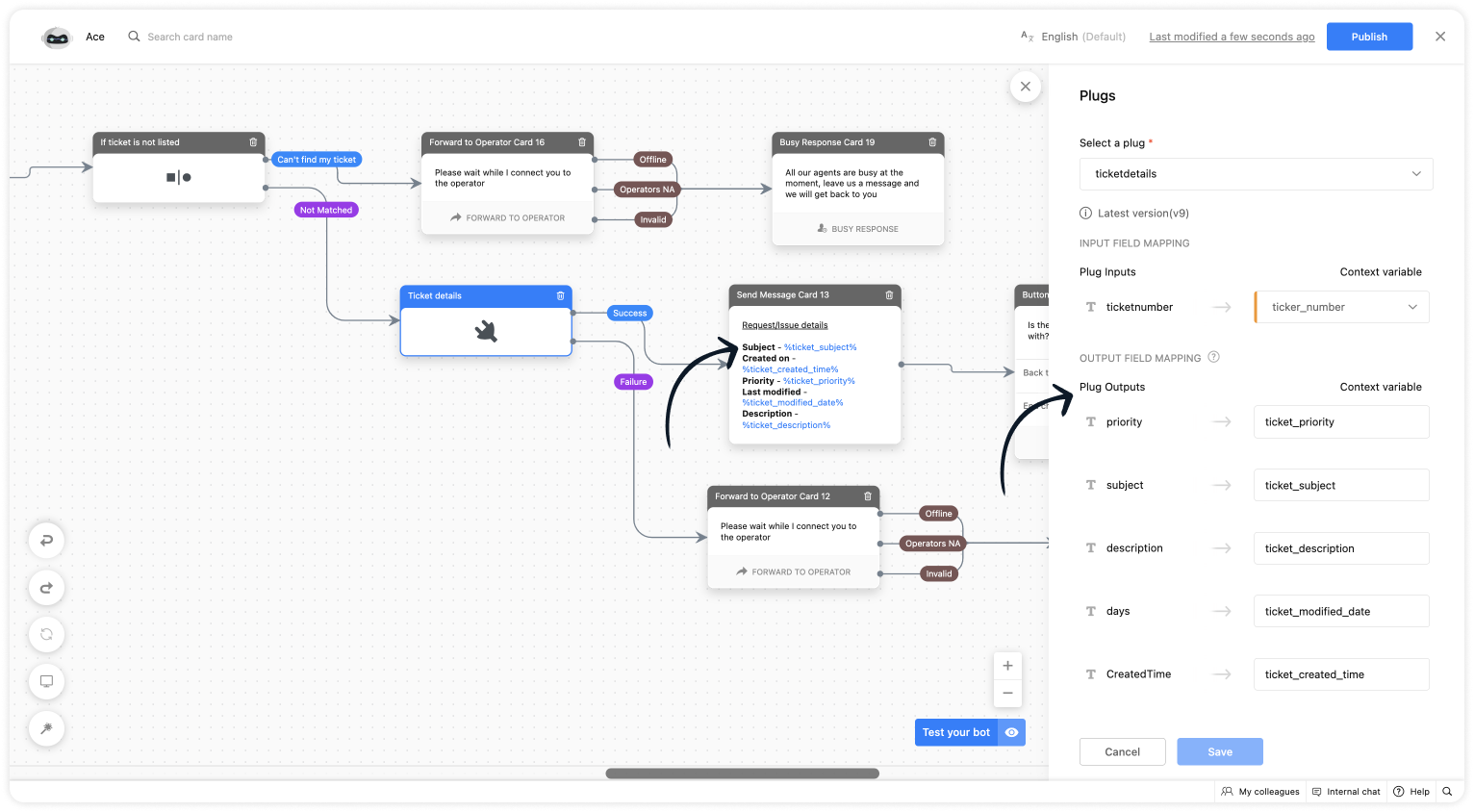

I hope this was helpful. Please feel free to comment if you have any questions. I'll be happy to help you. 


Best regards
Sasidar Thandapani

    • Recent Topics

    • Custom Related List Inside Zoho Books

      Hello, We can create the Related list inside the zoho books by the deluge code, I am sharing the reference code Please have a look may be it will help you. //..........Get Org Details organizationID = organization.get("organization_id"); Recordid = cm_g_a_data.get("module_record_id");
    • Marketer’s Space - Multi-Channel Campaigns for the Biggest Shopping Week with Zoho Marketing Automation

      Hello marketers, Welcome back to another post in Marketers Space! The biggest shopping week of the year is almost here, and it’s your moment to shine without the stress. With Black Friday and Cyber Monday just around the corner, being present across email,
    • Is there a problem with sharing workdrive files with links since last night?

      As per title, we can't access folders/files through share links since last night. I created ticket but we need quick solution and didn't hear back from the support yet. The files are still accessible by the main account but all zoho files that we are
    • Managing functions

      Can someone let me know if there are any plans to improve the features for managing functions in CRM? I have lots of functions and finding them is hard. The search only works on the function name and the filter only works on function type. I have created a naming convention based on tags to filter the list which helps a bit and for some projects I keep lists in a spreadsheet.  I'd like a spreadsheet-style list in CRM with a few custom fields and a way to construct views (like in modules). Maybe even
    • Enable Screen Recording in Zoho WorkDrive Mobile Apps (Android & iOS)

      Hi Zoho WorkDrive Team, How are you? We are enthusiastic Zoho One users and rely heavily on Zoho WorkDrive for internal collaboration and content sharing. The screen-recording feature in the WorkDrive web app (similar to Loom) is extremely useful- however,
    • Issue in Annual Leave

      We created a policy to credit 21 days at the Start of the Year An employee has taken 16 days of leaves thought the year, so we expect to see 5 Leaves remaining right? But Zoho People is Showing 12 Days of Leave Balance Available If we check the Leave
    • Regarding not having Bots section in the sidebar of the cliq.zoho.com

      I have registered and participated Cliqtrix for developing Bots or extension, when i refer the bots & tools section in my profile , i can't see the Bots option in the sidebar to create , edit and configure, is there something i have to enable?? and how
    • Trigger Zapier on Deluge Insert Into Function?

      Hello, To get around the limitation of not being able to trigger a Zapier Zap on Record Update(this would be extremely useful to be able to do btw), I have created a Deluge script to copy the data from Form A to a Trigger Form B using the Insert Into expression from a Custom Action button on a Report from Form A.  This action does not trigger the Zapier Zap whereas manually adding a record or duplicating an existing record does trigger the Zap. Is Insert Into not the same as a manual Add in the context
    • Flow - Fetch info from drop down in another module

      I am running into a road block which I thought would be a simple task. My goal - The account is assigned to a "route" which can be selected from a drop down menu and adds a tag to the account accordingly (easy enough). Now when I create a task for this
    • Tags get removed from notes on mobile

      I don't know why this keeps happening even after all these app updates but if you log out and log back into the app or you reinstall it, all the tags you assigned to your notes get taken off, but if you go on the desktop version the tags are still there.
    • Production Management Tool (MRP / BOM)

      Hi Guys, is there any recommended App available that works with zoho and covers the needed applications for a production? What we need is a system that covers the BOM (bill of materials), MRP (material ressources planning), MRP II (manufacturing ressources
    • Function #53: Transaction Level Profitability for Invoices

      Hello everyone, and welcome back to our series! We have previously provided custom functions for calculating the profitability of a quote and a sales order. There may be instances where the invoice may differ from its corresponding quote or sales order.
    • Prevent Unapproved Quotes from Exporting to Zoho CRM Finance Module

      Is it possible to prevent unapproved quotes in Zoho Books from being exported from Zoho Finance module inside Zoho CRM?
    • Kanban view on Zoho CRM mobile app!

      What is Kanban? The name doesn't sound English, right? Yes, Kanban is a Japanese word which means 'Card you can see'. As per the meaning, Kanban in CRM is a type of list view in which the records will be displayed in cards and categorized under the given
    • Bug in Zoho Cliq Signup Flow – "%s" Placeholder Visible Instead of Product Name

      Hi Zoho Team, I would like to report a UI bug in the Zoho Cliq signup/enable flow. During the step where Cliq asks to enable the product for the company, the following text appears: Great! Your company is already available in Zoho, so you just have to
    • Account name not populating when importing contacts

      When importing a csv file to add contacts the account name is blank? Every other filed gets mapped and imported correctly, i.e contact name, phone number. However not the account name which I have mapped to "company" field in my csv file
    • Zoho Invoice Customer Login Portal

      Are there any plans for a customer portal to Zoho Invoice, ala Freshbooks?  I would like customers that I invoice to be able to login to review invoices and invoice history.  I have not switched from Freshbooks for this very reason.
    • Exporting tickets

      I went to Setup -> Organization -> Import/Export in order to export tickets but found 2 issues: 1. The email body never gets exported. 2. There are some large numbers (like 5.57E+16) under certain columns of the exported CSV file. I could not find any export options. Please can you help with this?
    • Editing the Ticket Properties column

      This is going to sound like a dumb question, but I cannot figure out how to configure/edit the sections (and their fields) in this column: For example, we have a custom "Resolution" field, which parked itself in the "Ticket Information" section of this
    • Copy field information to clipboard

      I need to be able to transfer some field information in to the clipboard, so that I can then paste it in to our helpdesk system. Is there a way I could add a button to a detail report that does this?
    • Issuing reconciling a bank statement

      HELP! I'm trying to reconcile a bank statement. The prior month reconciled perfectly. Beginning balance is correct yet I'm off by the same amount each time. Both myself and my office manager, separately and together, have tried to complete this reconciliation
    • Can you inject JS in an HML+CSS+Deluge Page?

      I have an HTML + CSS + Deluge page and need just a little vanilla JS functionality. However, it seems like Zoho Creator does not allow that. I'm required to create a JS widget. Is this correct? If so: 1. Won't this quickly consume my API limit if there
    • Use the searchBy parameter to find user by email address

      I'm trying to find a user is Zoho Desk via the Api. In the documentation I see that there is the possibility to add a searchBy parameter in the request. But I can't find how the search values should be formatted. I've tried multiple things and get either
    • Correlated subqueries not supported in Zoho Analytics. This creates huge limitations

      Running into a major limitation in Zoho Analytics: correlated subqueries simply don’t work, even in completely standard SQL patterns inside a JOIN. Example: LEFT JOIN "Bills" b ON d."Id" = b."Deal ID" AND EXISTS ( SELECT 1 FROM "Bill
    • Unknown table or alias 'A1'

      I would like to create a subquery but i am getting the following error: Unknown table or alias 'A1' used in select query. This is the sql statement:  SELECT A1.active_paying_customers, A1.active_trial_customers, A1.new_paying_signup, date(A1.date_active_customers), 
    • Detect and ignore bots in visitors

      The SalesIQ visitor numbers are basically useless to us because there is no bot detection. We get the same bots coming in from the same countries looking at the same pages every day. It can't be that difficult to tell the difference between an actual
    • Zoho CRM - Rename "Estimates" in CRM Finance Suite Integration to "Quotes"

      I'm not sure if it's been 2 or 3 years now since Zoho Books renamed Estimates to Quotes. I still see "Estimates" in the Zoho CRM integration. Could this be added to Translation settings so that some customisation could be made on an account by account
    • Add Real-Time Microphone Audio-Level Indicator During Screen Recording

      Hi Zoho WorkDrive Team, Hope you are doing well. We would like to request an important enhancement to the Zoho WorkDrive screen-recording experience. Current Limitation: During a recording session, there is no visual indication that the microphone is
    • Properly Capture Dropdowns & Hover Elements When Recording a Window/Tab

      Hi Zoho WorkDrive Team, Hope you are doing great. We encountered a limitation when recording a selected window or browser tab: Certain UI elements, such as dropdown lists, hover menus, and overlays, are not captured unless we record the entire screen.
    • Allow Recording Only a Selected Portion of the Screen

      Hi Zoho WorkDrive Team, Hope you are doing well. We would like to request a more flexible recording option in Zoho WorkDrive. At the moment, we can record either the entire screen or a specific window/tab — but not a custom selected portion of the screen
    • Add Camera Background Blur During Recording

      Hi Zoho WorkDrive Team, Hope everything is well. We would like to request an enhancement to the video recording feature in Zoho WorkDrive. Currently, the camera preview displayed during a recording does not support background blur. This is an essential
    • Make Camera Overlay & Recording Controls Visible in All Screen-Sharing Options

      Hi Zoho WorkDrive Team, Hope you are doing well. We would like to request an improvement to the screen-recording experience in Zoho WorkDrive. Current Limitation: At the moment the recording controls are visible only inside the Zoho WorkDrive tab. When
    • Display Client Name in Zoho Creator Client Portal Dashboard

      Hello Zoho Creator Team, We hope you are doing well. Zoho Creator recently introduced the option to set a client’s display name in the Client Portal settings, which is very helpful for providing a personalized portal experience. However, there is currently
    • Introducing Dark Mode / Light Mode : A New Look For Your CRM

      Hello Users, We are excited to announce a highly anticipated feature - the launch of Day, Night and Auto Mode implementation in Zoho CRM's NextGen user interface! This feature is designed to provide a visually appealing and comfortable experience for
    • Allow Admins to Transfer Ownership of Their Own Files & Folders

      Hi Zoho WorkDrive Team, Hope you are doing well. We would like to request an important enhancement to the ownership-transfer functionality in Zoho WorkDrive, specifically regarding administrator capabilities. As administrators, we have the ability to
    • Allow Regular Users to Directly Transfer Ownership of Files & Folders

      Hi Zoho WorkDrive Team, Hope you are doing well. We would like to request an important enhancement related to file and folder ownership management in Zoho WorkDrive. At the moment, a regular user cannot directly transfer ownership of their files or folders
    • How to update custom multi-user field in Zoho Projects?

      I'm trying to update custom multi-user fields in Zoho Projects via a Deluge function in CRM. The code I have so far is below. It works for updating standard project fields and single-line custom fields, but it does not work to update multi-user fields.
    • Has Anyone successfully integrated Zoho and Sage Intact?

      Hey all, We’re evaluating Zoho One + Sage Intacct and I’m trying to connect with anyone who has actually implemented the two together.Specifically, I’d love to know: -- Which functions you kept in Zoho vs. Intacct (e.g., Product Catalog, AR/AP, invoicing,
    • Finding missing records

      I have a challenge and I am not really sure where to start with it. I can't find any similar threads on here, can anyone help: I have two forms, FormA and FormB. Both forms have records that contain a field called Job_Number. What I am trying to achieve
    • Kaizen #57 - Mass Update API in Zoho CRM

      Hello everyone! Welcome back to yet another post in the Kaizen series. This week, we will discuss the Mass Update API in Zoho CRM. In this post, we will cover the following: 1. Introduction 2. Mass Update Records API  3. Schedule Update and Get Status
    • Next Page