Create Your Own Issue Management System
Effective issue management is a cornerstone of project success. Every bug or issue, no matter how small, needs to be tracked and resolved in time to maintain project momentum. In this post, we’ll explore how an issue management system in Zoho Projects is used to manage issues in our own product management process.
Real-time Example:
During the software testing process, when the tester identifies an issue impacting the Global Web Tab feature task where the alignment breaks in certain browsers, it follows a predefined process for resolution. Here’s how the issue management system handles this end-to-end.
Submit Issues using Custom Fields
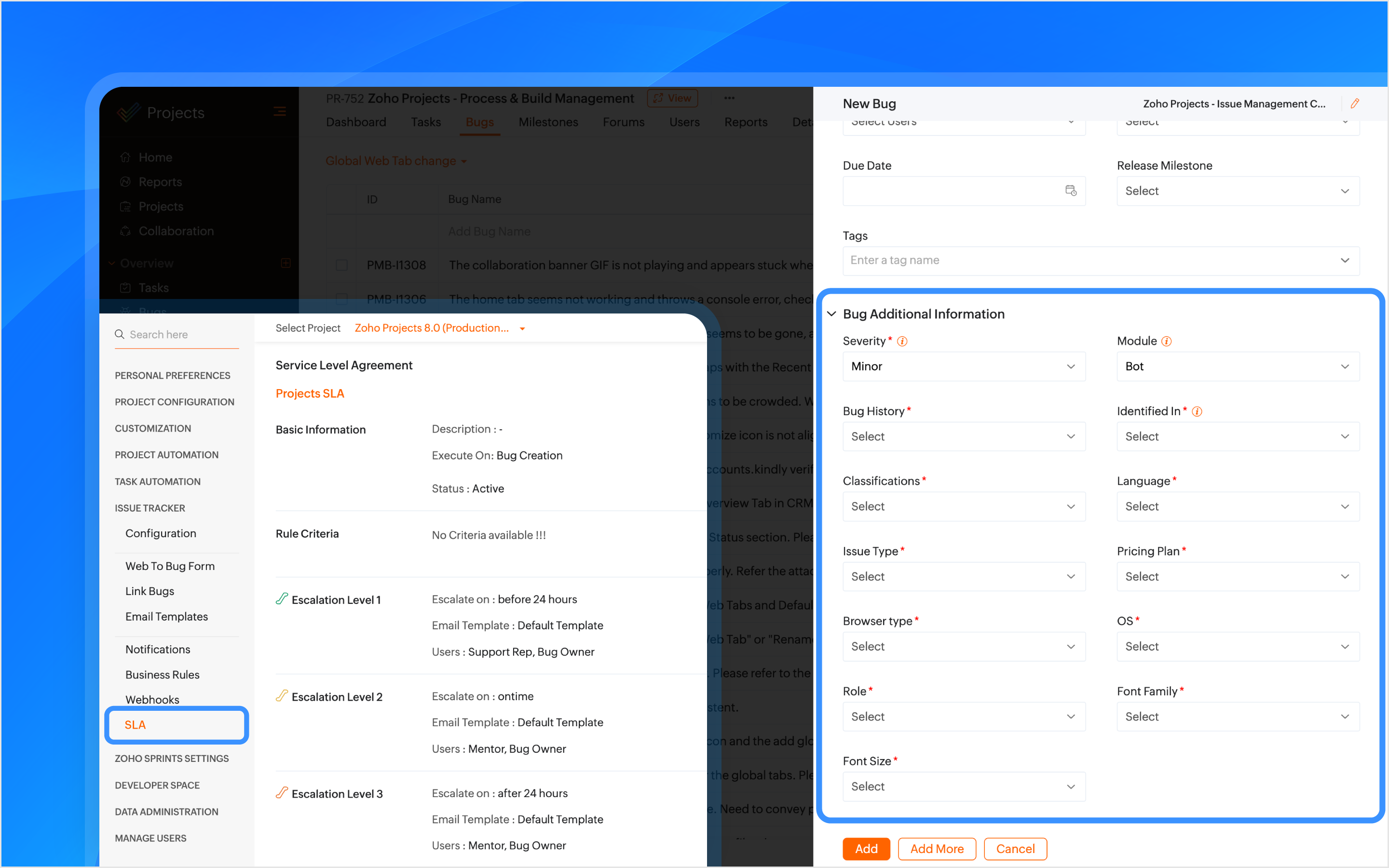
Custom fields are created within the Issue Layout, allowing testers to submit issues with key details like severity, module, browser type, and font family. In the case of the Global Web Tab alignment issue, the browser type field helps pinpoint which environment is affected.

How Other Industries Can Use Issue Layouts In This Process:
Construction: Track issues like material defects or design flaws using custom fields such as location, material type, grade, etc.
Manufacturing: Track production line breakdowns or machine malfunctions issues with custom fields like product phase, machine type, location, etc.
SLAs Based on Issue Type
SLAs are configured based on the issue type, such as Support, Security, Privacy, or Performance, to set resolution deadlines. If the issue is categorized as one of these types, the SLA triggers a resolution within 24 hours. If the issue remains unresolved, it escalates through Levels 1–4.
How Other Industries Can Use SLAs In This Process:
Construction: Set SLAs to resolve critical issues like safety violations or structural failures quickly.
Manufacturing: Set SLAs for issues like production line stoppages to minimize downtime.
Automate Assigning Issues
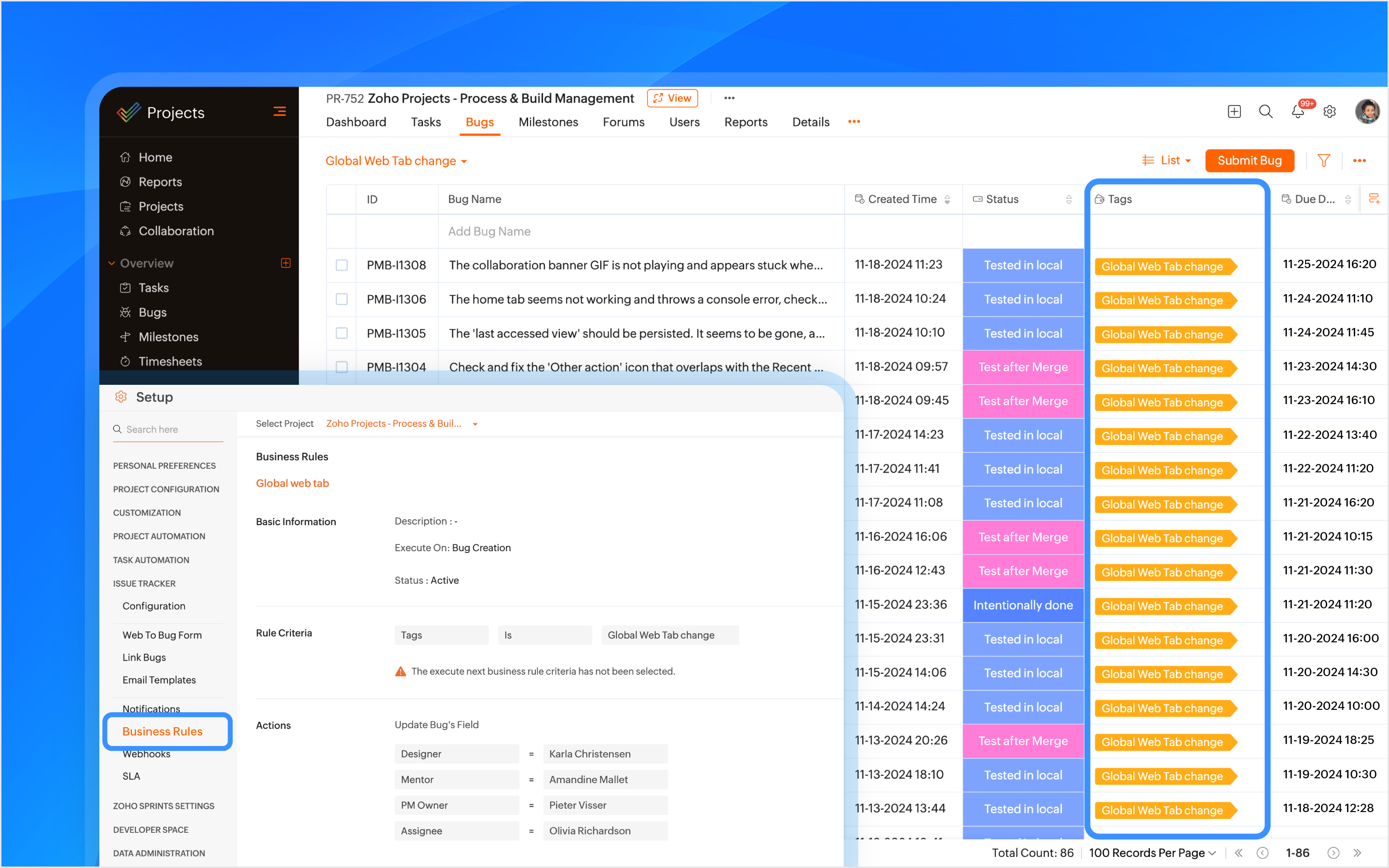
A tag is created using the feature name and is associated with the issue when it is submitted. Business rules are created using the tags as criteria to automatically assign the issue to the relevant developers, designers, managers, and project managers (PMs).
How Other Industries Can Use Tags In This Process:
Construction: Automatically assign issues using the issue type as tags, such as plumbing or electrical, to the appropriate contractors or subcontractors.
Manufacturing: Use tags like machinery or production to assign issues to maintenance teams or shift managers automatically.
Bulk Update Issues
A custom view is created to track and bulk update all issues related to the feature using the tag as a criteria.
How Other Industries Can Use Custom Views In This Process:
Construction: Create custom views to track and update issues related to electrical work.
Manufacturing: Create custom views to track and update production-related issues.

Manage Duplicate Issues
If a duplicate issue is submitted, the developer can link it to the original issue using the is duplicate of link type for identification. A custom function is created to ensure that duplicate issues are closed only when the original issue is closed ensuring no redundancy in the issue tracking process.
How Other Industries Can Use Link Issues In This Process:
Construction: Link duplicate issues like multiple reports of the same electrical fault.
Manufacturing: Link duplicate maintenance issues to the original issue to ensure a single resolution.

Associate Tasks to Issues
The Global Web Tab task is associated with the issue, allowing both the development and QA teams to monitor the progress of the work item from a single place. When a tester opens the task, they can view all associated issues, and when opening an issue, they can easily track the associated task.
How Other Industries Can Use Task Association In This Process:
Construction: Associate tasks like Foundation to issues like Cracked Foundation for easy tracking.
Manufacturing: Associate maintenance tasks to machinery issues to track progress.
Automating Status Updates
A custom function is created to automate the update of issue statuses. when the tester updates the task status to Started Testing, the associated issue status is automatically updated to In QA Process. Similarly, when a developer resolves the issue and updates the task status to Resubmit for QA, the associated issue status is updated to To be tested. Issue Tracker Notifications are used to send notifications to all team members to keep everyone informed about such status updates.
How Other Industries Can Use Custom Functions In This Process:
Construction: When the Electrical Safety Check issue status is updated to Passed, the associated task, such as Wiring Installation, will automatically update its status to Inspection Complete.
Manufacturing: When the Material Shortage issue is updated to Resolved, the task status for Electrical Installation will automatically update to Work Completed.
Automate Adding Followers
Sometimes issues need further validation before they are resolved. Developers can update the issue status, such as Intentionally Done or Discuss with the PM. Business rules are created to automatically add relevant product managers (PMs) and other team members as followers with such statuses as criteria. This ensures that decisions are validated and any necessary inputs are added through comments before moving forward.
How Other Industries Can Use Business Rules In This Process:
Construction: Automate adding followers to validate electrical safety checks or structural issues before moving forward.
Manufacturing: Automate adding followers to validate machine repair statuses before completing maintenance tasks.
Checklist for Testers
Once the feature is reviewed and tested, the Checklist Extension is used for the associated task. The tester is required to complete a predefined checklist within the task to verify that all relevant testing scenarios have been covered. This checklist ensures that no critical testing aspects are missed.
How Other Industries Can Use Checklist Extension In This Process:
Construction: Use checklist to create a punch list to ensure all inspections, tests, and final verifications are completed before a task issue is marked as completed.
Manufacturing: Create a compliance checklist to ensure product assembly and quality control steps are completed before a task issue is marked as completed.
Note: Checklist extension can be used for both tasks and issues.

Resolve Issues
Upon resolving the issue, the developer can resolve the issue from the issue details page with the context.
Custom Notifications
Custom email templates in Issue Tracker Notifications are used to automate communication. Developers and the relevant team members are automatically notified about reopened issues. This helps prevent delays in the project.
How Other Industries Can Use Email Templates In This Process:
Construction: Create customized email template and use it in issue tracker notifications for critical issues like safety violation when reopened.
Manufacturing: Create customized email template and use it in issue tracker notifications for maintenance issues when reopened.
Features used in the process: Issue Layouts, SLAs, Tags, Business Rules, Issue Tracker Notifications, Link Issues, Custom Function, Checklist Extension, and Email Templates.
Topic Participants
Navya Nune
frankn66
François
Monica P
Sticky Posts
Introducing Version-3 APIs - Explore New APIs & Enhancements
New Update - The end of life timeline for V2 APIs has now been extended to 30th June, 2026 Happy to announce the release of Version 3 (V3) APIs with an easy to use interface, new APIs, and more examples to help you understand and access the APIs better.CodeX Scripts for Enforcing Custom Project Logic
Every organization has a defined way of executing projects. There are clear expectations around how tasks should move, when projects should progress, and which actions require validation. When these rules are consistently followed, projects remain structuredAutomation Series: Auto-create Dependent Task on Status Change
In Zoho Projects, you can automatically create and assign a dependent task when a task’s status is updated. This helps teams stay aligned, ensures reviews happen on time, and reduces manual effort. In this post, we’ll walk through an easy setup usingTime Log Reminder
Tracking the time spent on tasks and issues is one of the most important functions of a timesheet. However, users may forget to update the time logs because they have their own goals to achieve. But, time logs must be updated at regular intervals to keepIntroducing the Zoho Projects Learning Space
Every product has its learning curve, and sometimes having a guided path makes the learning experience smoother. With that goal, we introduce a dedicated learning space for Zoho Projects, a platform where you can explore lessons, learn at your own pace,
Recent Topics
Introducing Version-3 APIs - Explore New APIs & Enhancements
New Update - The end of life timeline for V2 APIs has now been extended to 30th June, 2026 Happy to announce the release of Version 3 (V3) APIs with an easy to use interface, new APIs, and more examples to help you understand and access the APIs better.Correlated subqueries not supported in Zoho Analytics. This creates huge limitations
Running into a major limitation in Zoho Analytics: correlated subqueries simply don’t work, even in completely standard SQL patterns inside a JOIN. Example: LEFT JOIN "Bills" b ON d."Id" = b."Deal ID" AND EXISTS ( SELECT 1 FROM "BillUnknown table or alias 'A1'
I would like to create a subquery but i am getting the following error: Unknown table or alias 'A1' used in select query. This is the sql statement: SELECT A1.active_paying_customers, A1.active_trial_customers, A1.new_paying_signup, date(A1.date_active_customers),Feature announcement - Introducing recipient authentication via Didit in Zoho Sign
Hi everyone! Zoho Sign already integrates with trusted providers like IDology (US), eID Easy (EU), and Stripe Identity. Today, we're excited to add another powerful option: Didit. Some benefits of using Didit: Unified ID verification Streamlined eKYCCRM x WorkDrive: File storage for new CRM signups is now powered by WorkDrive
Availability Editions: All DCs: All Release plan: Released for new signups in all DCs. It will be enabled for existing users in a phased manner in the upcoming months. Help documentation: Documents in Zoho CRM Manage folders in Documents tab Manage filesSuper Admin Logging in as another User
How can a Super Admin login as another user. For example, I have a sales rep that is having issues with their Accounts and I want to view their Zoho Account with out having to do a GTM and sharing screens. Moderation Update (8th Aug 2025): We are workingRegarding the integration of Apollo.io with Zoho crm.
I have been seeing for the last 3 months that your Apollo.io beta version is available in Zoho Flow, and this application has not gone live yet. We requested this 2 months ago, but you guys said that 'we are working on it,' and when we search on GoogleMessage as bot
I would like to be able to send a Cliq message truly as a bot. the current implementation of this function, while it sends the message as a bot it sends that message inside a chat from the user how authenticated the flow cliq connection instead of directlyUsing a custom single line External ID form as merge fields in templates
Hey everyone, We're looking to integrate a few external systems better with our Zoho CRM, and we had hoped to use external fields for this purpose. In this case, it would mean being able to use our own inoice system's invoice numbers are a direct id compatibleBuild an approval management system with Custom Modules
Dear users, Task management is at the heart of project management. But not all tasks are created equal. You can have your tasks reviewed before any work begins, to improve transparency or stay within budget or as part of your process. Zoho Projects allowsCRM's sandbox now supports the Zoho Desk integration
Hello everyone, Sales and customer support teams often collaborate to solve tickets and identify pain points. In Zoho's suite of products, sales teams primarily use Zoho CRM while customer support teams work in Zoho Desk. These two tools are often integratedCountries List Global Set- Complete with Phone Country Code and Continent.
Dear Zoho Team I saw your recent addition to the Global Sets regarding the Countries list and states. While working on it, why didn't you also add things like Continent and Phone Country Code? Also, some ISO codes from some Countries/regions are mismask Customer phone number and agents cant see customer phone number
Is there any way we can integrate Zoom Phone with Zoho CRM while ensuring that customer phone numbers remain masked? We need a solution where agents can make outbound calls but cannot see customer phone numbers. Please let us know if there is any solutionCan not send or reply to mails
Hello, I can not send mails or reply. If I try to send a mail i get "Unable to send message;Reason:553 Replaying disallowed. Invalid Domain - invata-programare.ro" Can you help me, please? Thank you!Zoho Community Digest — Marzo 2026
¡Hola, comunidad! Un mes más os traemos las novedades más interesantes de Zoho para marzo de 2026, incluyendo actualizaciones de producto publicadas oficialmente, cambios de políticas y noticias del ecosistema. ¡Gracias por venir a los Workshops de Madrid!Files Uploaded to Zoho WorkDrive Not Being Indexed by Search Engines
Hello, I have noticed that the files I upload to Zoho WorkDrive are not being indexed by search engines, including Google. I’d like to understand why this might be happening and what steps I can take to resolve it. Here are the details of my issue: FileHow can we get payment status updates for payment links in Zoho Books using webhooks?
When we create and share a payment link in Zoho Books, is there a way to know when the payment is updated? Can we use webhooks to get real-time updates for payment link status instead of checking manually?Uplifted homepage experience
Editions: All editions. Availability update: 17th February 2026: All editions in the CA and SA DC | JP DC (Free, Standard and Professional editions) 23 February 2026: JP (All Editions) | AU, CN (Free, Standard, Professional editions) 27 February 2026:【Zoho CRM】住所項目のアップデート:構造化された正確な住所入力を実現
ユーザーの皆さん、こんにちは。Zoho コミュニティグループの中野です。 今回は「Zoho CRM アップデート情報」の中から、住所項目に関するアップデートをご紹介します。 アップデートの概要 これまでの住所項目は、自由入力形式のテキスト欄が中心でした。 そのため、入力者によって書き方がバラバラになりやすく、データの検索やレポート集計が難しいという課題がありました。 今回追加された新しい住所項目では、住所を構造化されたフォーマットで管理できるようになりました。 以下の要素をそれぞれ個別の項目として分割して管理します。Edit a previous reconciliation
I realized that during my March bank reconciliation, I chose the wrong check to reconcile (they were for the same amount on the same date, I just chose the wrong check to reconcile). So now, the incorrect check is showing as un-reconciled. Is there any way I can edit a previous reconciliation (this is 7 months ago) so I can adjust the check that was reconciled? The amounts are exactly the same and it won't change my ending balance.Zoho Desk - Event Calendar View
Hi Desk team, Are there any plans to introduce a calendar or timeline view for Events in Zoho Desk? It would be very helpful if we could see Events visually in a calendar and/or timeline. This is very helpful when desk side support activities need toRe-Apply SLA When Ticket Reopened from Closed Status?
If you have an SLA applied, timers are deactivated when going to "On Hold" status type and reactivated when going back to an Open status type. What we discovered is when a customer replies to a closed case and it reopens, the SLA is not applied and timersOption to Delete Chats in IM
Currently, there is no option to delete any chats in IM, regardless of their source.Time Zones for Users
I've searched for this topic, but the only answers I see are from years back. We have users all over the country. is there a way for them to set their own time zone? This is important and should be a standard setting, but I do not see how to do it.Online Payment Fees
We don't take many online credit card payments so the merchant service provider (PayPal) charges us the 2.9% fee for processing the amount. I would like the ability for the fee to be automatically added to the total amount for "ease of payment". We'dShowing the map along with mileage expense
When you use the GPS to track mileage, it shows you the map of the actual path travelled. It would be very useful and practical to save that map with the mileage expense, so that when the report is created, it provides a map of each mileage expense associatedE-Invoicing Automation
Do you have an API endpoint for pushing the invoice through the e-tims for KenyaTransaction Rule Matching
Q1. Is there a method to have the Transaction Rules applied across multiple Bank Accounts? Q2. To match "contains" text in Transaction Rules, is a wildcard or regular expression required? Is it case sensitive? Would searching for "issue" in the followingNotebook on Mac: Fuzzy fonts in list view
Hi, I am running Notebook on Mac OS 26. Generally it works fine, and the font display in the notes themselves is crisp. However, in the notes list (left of the open note) the font of the note titles as well as first lines is noticeable fuzzy. AttachedZoho CRM Email Templates 100% Width No Background How?
Hi, On the Zoho CRM Email Templates in setup > customization > templates > new templates > I choose blank template, but still it puts in a gray background and a max width for the email. I just want to make an email that looks like an email I would send from gmail that has no background or max width. How do you do this?ZOHO CRM Quote Export / Quote Report
How can I either Export my quote list, or create a Report that shows all quotes AND includes the NOTES field in a column. I attempted to Run a Report which includes ALL FIELDS, however it does not include the Notes Field (but oddly does include the fieldsIntroducing Radio Buttons and Numeric Range Sliders in Zoho CRM
Release update: 1. 2 March 2026: Currently out for CN, JP, AU and CA DCs (Free and standard editions). For other DCs, this will be released by mid-March. 2. 26 March 2026: CA, SA, AU, JP, CN DCs - Free, Standard, Professional, Enterprise, Ultimate, CRMAdding a Mark Up
Can you use the discount column to be a mar up column on estimates and invoices?Subscription Statuses - Dunning
How are other companies handling the scenario when customers don't pay and dunning takes over? Our issue is that in my situations, we want our customers to be able to catch up their late payments and continue their subscription after the dunning processLogo Doesnt appear on email
Hi, 1. PROBLEM: mails sent to customer from zoho invoice ( Estimates and incoices etc.) Logo doesnt appaer on email. 2. SUGGESTION: there must be an option to select from google fonts if we want specific font to the pdf templates. thanksHow to see Statement Details Shown in Unclassified Transactions in All Transactions?
All, The list of Unclassified Transactions show the Statement Details and Descriptions. What is the method to see that column in the All Transactions list? -Thanks!Non-Avalara Tax Automation wtih Zoho Books
We are paying a ridiculous amount for Avalara. Our team wants to make a change, but they're the only software fully integrated with Zoho. We also don't have the bandwidth to do this manually, so we do need some sort of automated software solution. WeMigrating to the new outgoing webhook model in Zoho Connect
Dear User, Outgoing webhooks configured in the Zoho Connect Integrations page, and used as triggers in Zoho Flow and Zapier will stop working after May 31, 2026. This is due to an upcoming upgrade to our outgoing webhook flow. This update is intendedCreate formula calculations in Assemblies for scaling quantities
Something we have been encountering with our composite items is dealing with scaling of quantity of one or more items within the composite assembly relative to the number of complete units being sold. I.e. running the equation 2(n-1) on one of the assemblyLastest update
The latest update to notepad has completely trashed all my notes. If I go to view it it just opens up a screen with a box with dotted lines around it for me to add something I can import saved nodes but you can't view them at all. Anybody else havingNext Page