Understand your CRM Account | Online Help - Zoho CRM

Understand your CRM Account

This document will introduce some basic concepts that will help you understand Zoho CRM better. This will be followed by a quick tour of the CRM's user interface.
Customer relationships drive profits when you manage them well. Whether you're winning fast-paced transactions or managing complex deals that stretch over months, your CRM stores key data about the people and organizations you are doing business with.

Let's look at how Zoho CRM organizes this data.

Modules

Modules are the main categories by which data is organized in Zoho CRM. Each module refers to a particular entity or relationship that you want to track and manage in the CRM.

For example, Leads is a module where you track all your prospects, Deals is a module where you track all your opportunities, Quotes is where you manage your quotes, and so on.

Zoho CRM comes with a set of standard modules like the ones mentioned above. In addition, businesses can create custom modules to track data that does not fit into any of the standard modules.

Team modules are a special kind of modules that empower your teams to bring their data and processes into Zoho CRM without the hand-holding of CRM admins. You can learn more about how to use team modules here.

Fields

Fields capture structured information in a module. They refer to a property/attribute/any other detail of an entity. For example, the Deals module would include fields like deal amount, closing date, deal stage, and so on.

A special kind of field is a lookup field. This field points to another module. For example, every deal is related to an account, so the Deals module will have a lookup field called Account (which will point to the Accounts module).

Records

Records are the individual entries in a module. Each entry is an instance of the module.

An analogy would be that a module, with its fields, is like an unfilled form — the structure is there, but there are no values yet. A record, then, is like a filled-out form: it contains actual values for those fields.

Let's look at some examples of records in the CRM:
  1. Tressa Sweely is a lead. There is a record for her in the Leads module. 
  2. Benton is an account that you do business with, so it has a record in the Accounts module. 
  3. You are working on a $100,000 deal with Benton. This will have its own record in the Deals module.
Whenever someone in your team needs information about these entities, they can access the respective records in the CRM.
Notes
Note
You can add notes to store unstructured information within a record. You can also add tags to help you categorize your records flexibly.

Standard modules

When you open your CRM account for the first time, you'll notice that you have a set of standard modules for entities that are usually tracked in a sales process. They also have relevant fields to help you get started quickly. You can use the modules that you need, modify the ones that need some changes, and hide or delete the rest.

Module
Description
Availability
Enabled by default?
Campaigns are marketing efforts planned, executed, and monitored from within your CRM.
All editions
Yes
Leads are unqualified prospects who've shown an initial interest.
All editions
Yes
Contacts are individuals (people) your company communicates with during business interactions.
All editions
Yes
Accounts represent companies or departments you do business with.
All editions
Yes
Deals are potential sales opportunities, connected to contacts and accounts.
All editions
Yes
Products can be either goods or services, which are sold or procured by your organization. If you need a specialized module for services, you can enable the standard Services module and check if it meets your needs.
All editions
Yes
Price Books are used for selling products at different prices, based on the agreement terms with a particular type of customer.
Professional, Enterprise, and Ultimate
Yes
Vendors are companies from which your company gets products and services.
Professional, Enterprise, and Ultimate
Yes
Quotes are formal price offers for customers based on selected products.
Professional, Enterprise, and Ultimate
Yes
Sales orders are confirmed customer orders that list what's being delivered.
Professional, Enterprise, and Ultimate
Yes
Purchase orders are orders placed for procuring products or services from your vendors.
Professional, Enterprise, and Ultimate
Yes
Invoices are requests for payment from customers for products or services delivered.
Professional, Enterprise, and Ultimate
Yes
Cases are customer support issues that are tracked within the CRM.
Professional, Enterprise, and Ultimate
Yes
Solutions are answers to frequently asked support questions.
Professional, Enterprise, and Ultimate
Yes
Tasks are to-dos or follow-up actions that are assigned to users or created by users for themselves.
All editions
Yes
Calls list the scheduled and completed calls made to customers.
All editions
Yes
Meetings are the one-off or recurring events where you meet your customers online or offline.
All editions
Yes
Services is a catalog of the services you offer to customers. This is not enabled by default.
Professional, Enterprise, and Ultimate
Yes
Appointments track the appointments made for your services. This is not enabled by default.
Professional, Enterprise, and Ultimate
Yes

How to use the standard modules?

Let's look at how the standard modules can be used during the sales process:
  1. Leads are added to the CRM. You can add them to Campaigns for marketing to them. You can follow up with individual leads and qualify them within the leads module.
  2. Once the lead is qualified, you can convert the lead into a Contact, Account, and Deal.
  3. You can start working on the deal and move it through the different stages in the pipeline.
  4. Send a Quote at the right stage. This will include a list of Products whose price can be chosen using Price Books. Track the quote as it moves through its stages.
  5. Once the customer has accepted the quote, convert it into a Sales Order and start working on delivery.
  6. You can raise a Purchase Order to your Vendor if needed. This can be tracked within the purchase orders module. If the purchase order is successful, it will increase the quantity of Products.
  7. Once you've fulfilled your order, you can send an Invoice.
  8. If there are any issues post-sale, you can log them in the Cases module. To make it easier for your users to answer customer queries, you can use the Solutions module.
  9. Throughout this process, you can add Tasks, Meetings, and Calls to track your work.
Notes
Note
Team modules are a special kind of modules that empower your teams to bring their data and processes into Zoho CRM without the hand-holding of CRM admins. You can learn more about team modules here.

Quick screen tour

Here's a quick screen tour to help you know your CRM's interface better. For a more thorough explanation of navigating the CRM interface, see: Navigating the Zoho CRM interface.

The UI consists of a sidebar that contains links to Home, Reports, Analytics, My Requests, Teamspaces, and Modules.
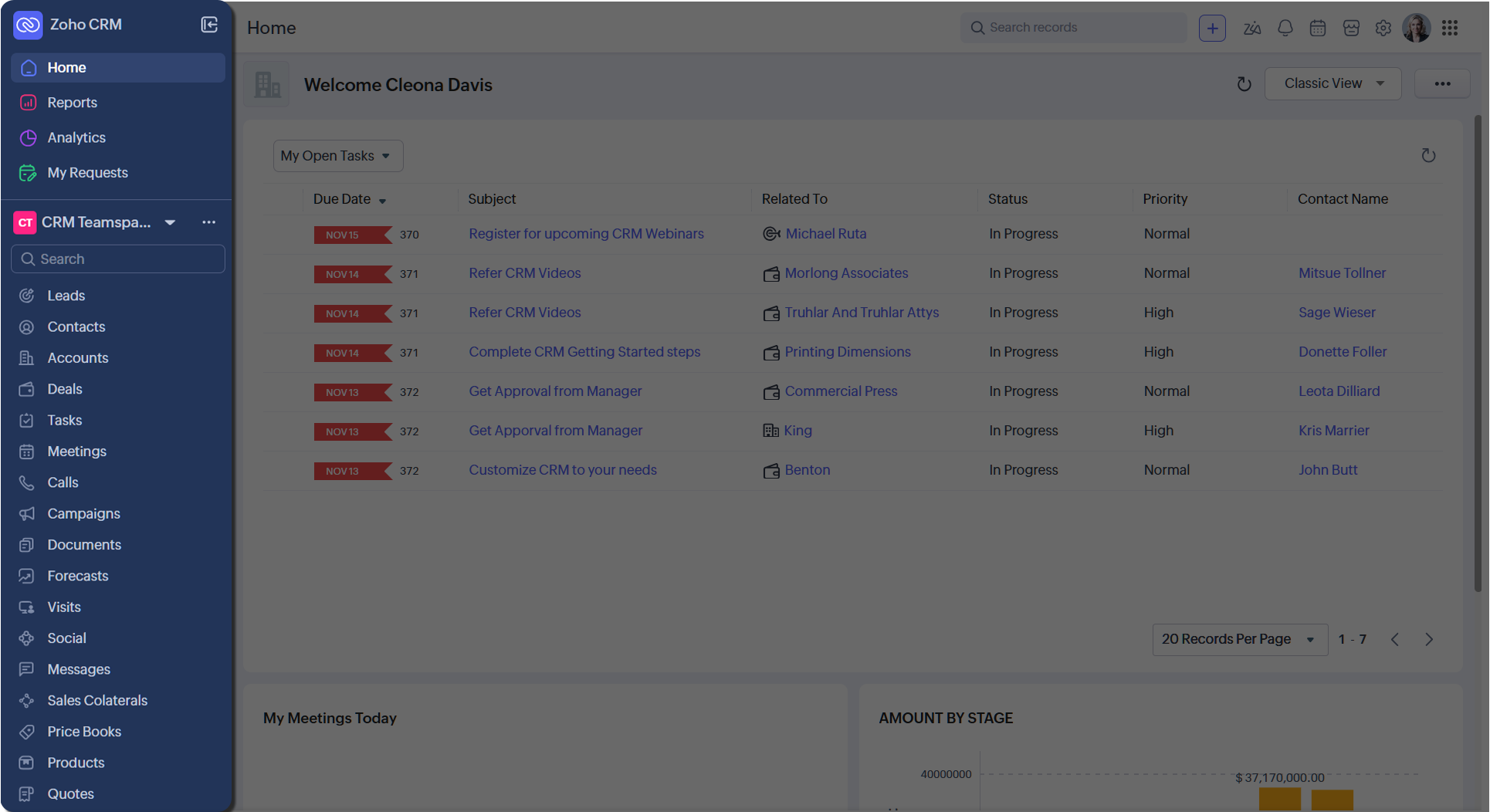
Your selection in the sidebar will dictate what you see in the main pane.
For example, when you log in for the first time, you are likely to see the home tab selected in the sidebar, and hence, it will be displayed in the main pane.


You have global search, quick create, Ask Zia, Signals, Calendar, Marketplace, Setup, and Profile on the top.

Teamspace

A Teamspace is a dedicated workspace for your team, which contains the modules and other tabs needed to help you do your work. For example, this user is in the default CRM Teamspace. A single user can belong to multiple teamspaces and can switch between them.

Home tab

The Home tab provides a quick, at-a-glance overview of your work or your team's work. This can include your open activities if you are a sales rep, dashboard components if you are a sales manager, and so on. You can have multiple home tabs and switch between them.

Module views

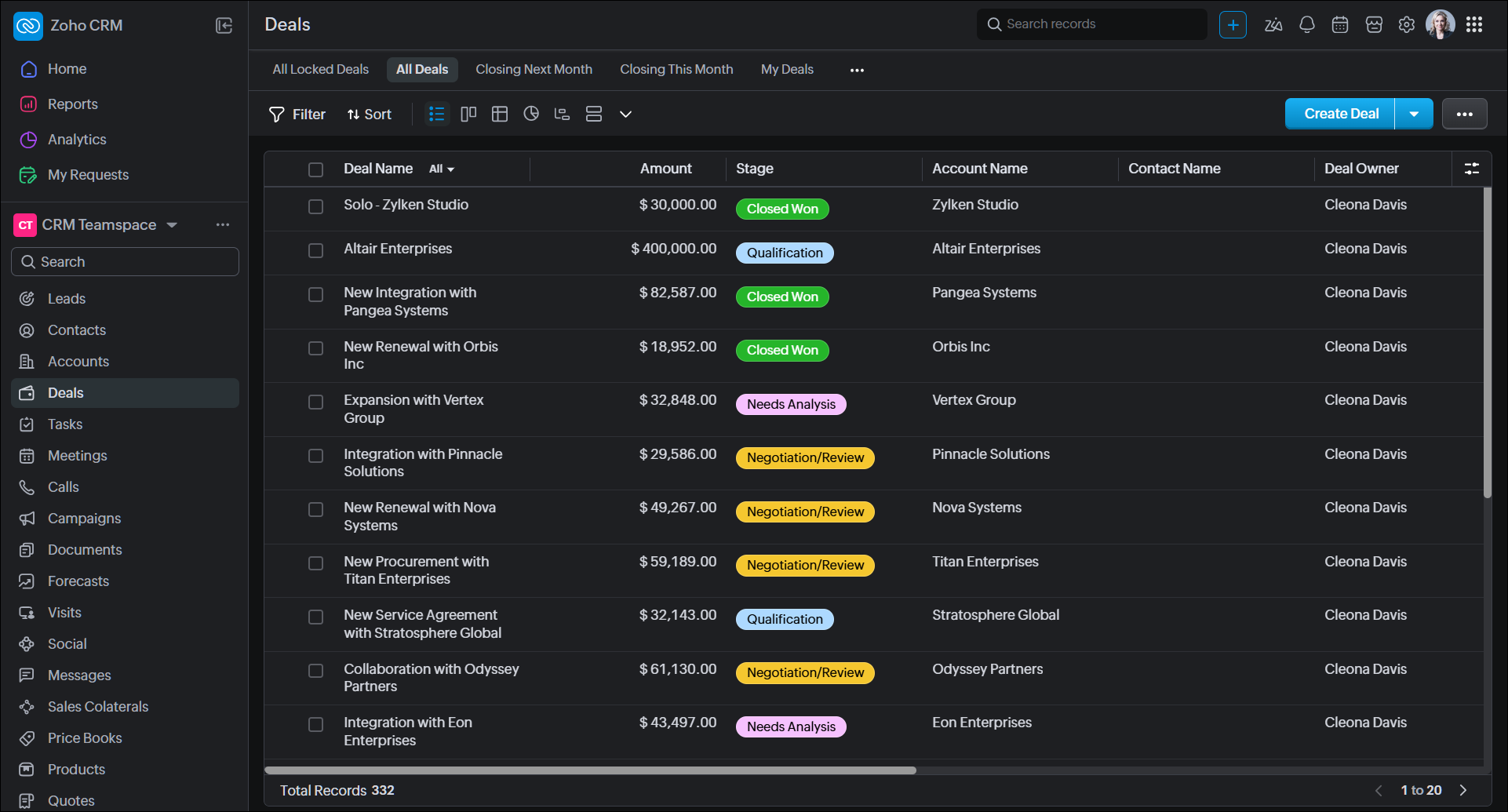
Once you select a module, you will see its records. Zoho CRM is packed with a set of powerful and flexible module views. Based on your needs, you can pick a module view that fits your workflow.


The different module views are:
  1. List view

  2. Kanban view

  3. Grid view

  4. Chart view

  5. Timeline view

  6. Split view

  7. Canvas views like
  1. Custom list view

  2. Tile view

  3. Table view

In each view, you can use advanced filters, perform select records, and perform mass actions like updating records, sending emails, and so on. When you click on an individual record, you will see the record detail page.

Record detail page

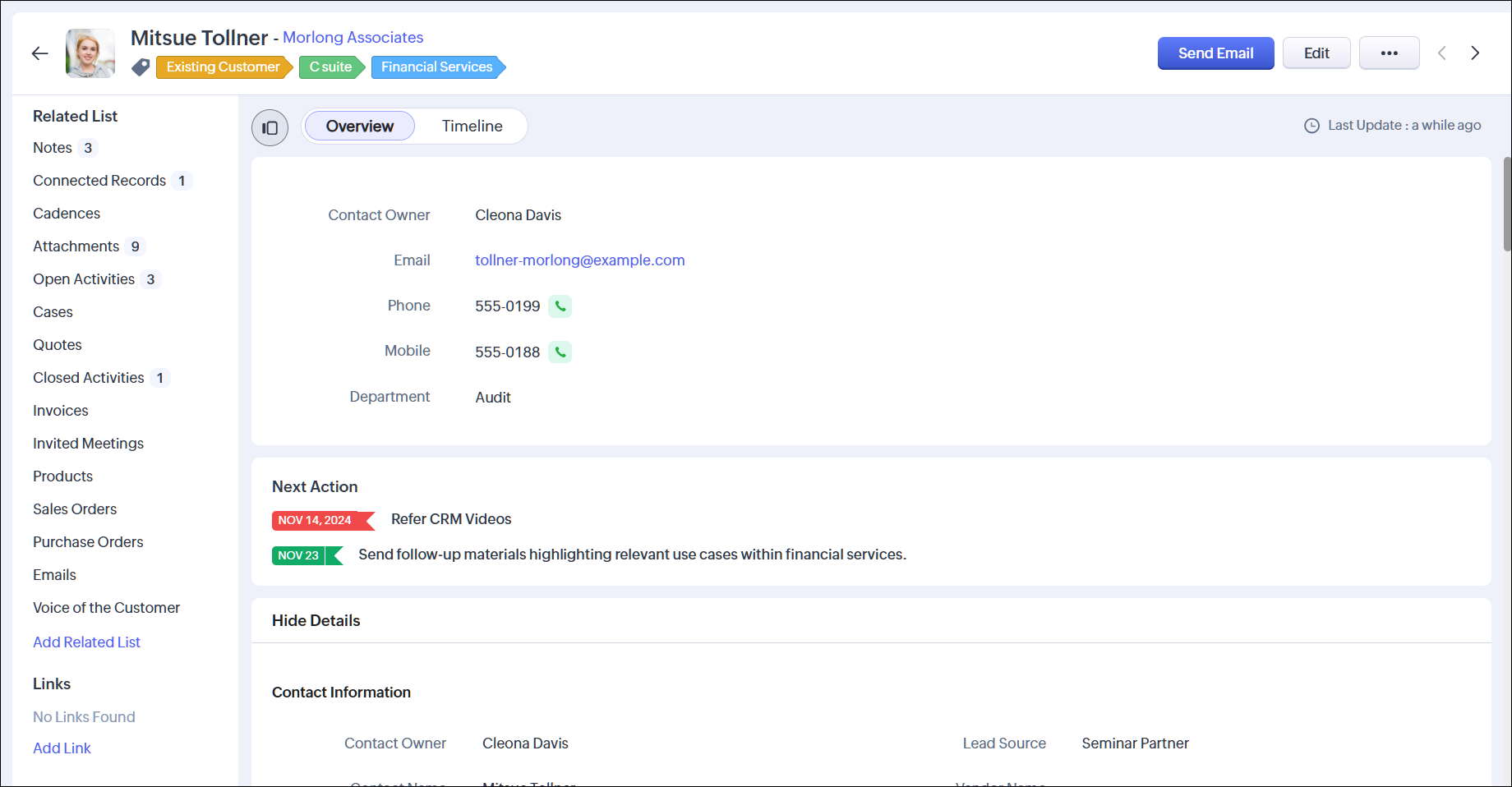
When you open a record, you will see the record detail page. This contains all the information related to that record. You will be able to see all the fields and their values, the records related to this record, access to buttons and actions to perform on this record, and so on. You can also see the record's timeline, which shows all the changes made to the record.
Notes
You can customize the record detail page using Canvas.

Setup page

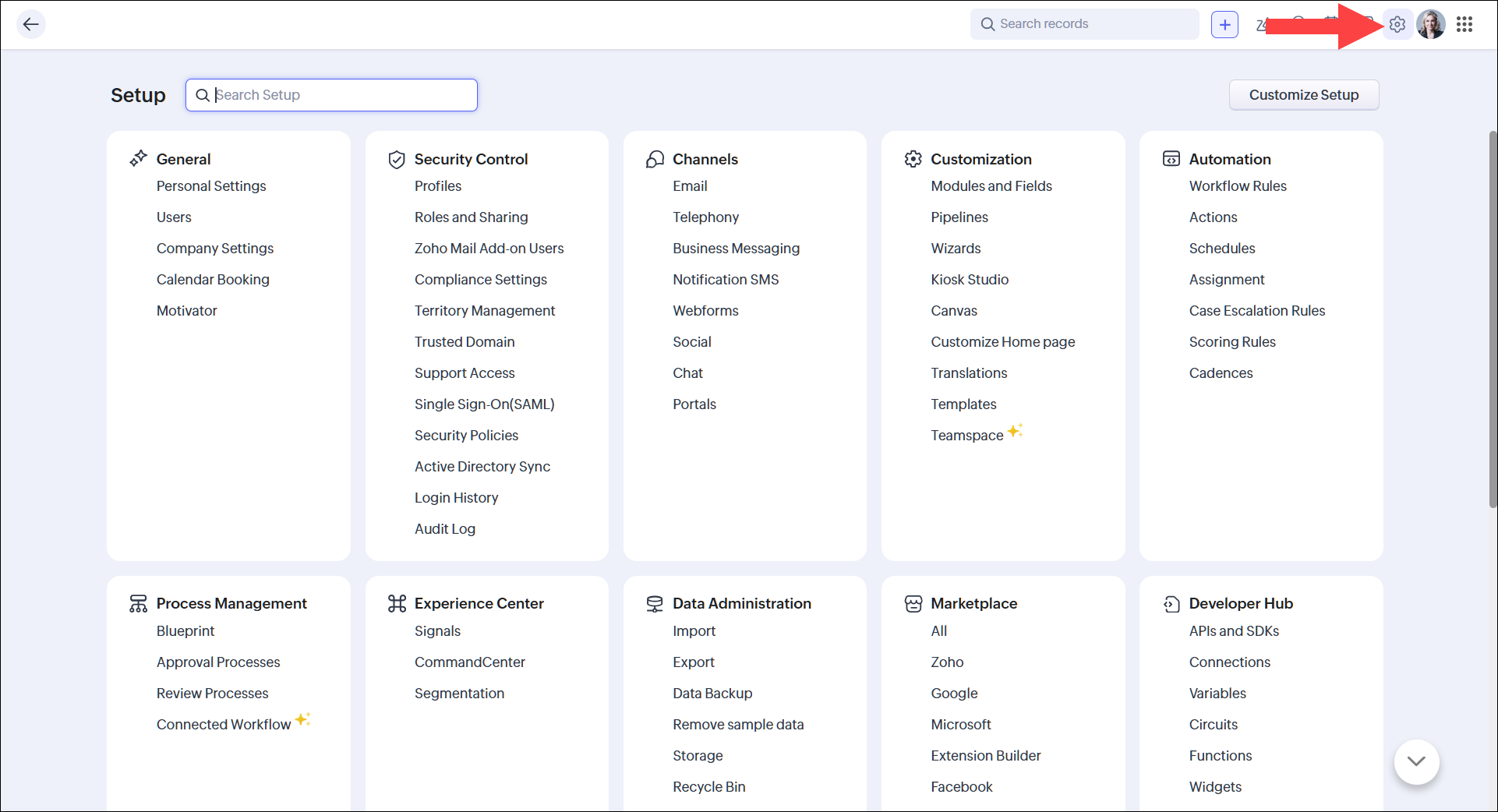
You can configure the settings of your CRM account by clicking on the Setup icon [] in the top right of your screen.

To begin with, you can configure the General settings initially, which will allow you to fill in your personal details and your company's details. Navigate to Setup > General to access the general settings.

Personalize your CRM's look and feel

You can select the theme for your CRM account and decide whether you'd like to work in the night mode or day mode. Click the profile icon in the top right of your screen to do this. In addition, you can make use of accessibility controls to further tweak the CRM to meet your needs.

Next steps
  1. Access our guide to navigating the CRM's UI.
  2. Check out specifications related to Zoho CRM
  3. Begin your admin journey to set up the CRM for your users.
  4. Use our developer docs to extend the CRM.

        Create. Review. Publish.

        Write, edit, collaborate on, and publish documents to different content management platforms.

        Get Started Now


          Access your files securely from anywhere

            Zoho CRM Training Programs

            Learn how to use the best tools for sales force automation and better customer engagement from Zoho's implementation specialists.

            Zoho CRM Training
              Redefine the way you work
              with Zoho Workplace

                Zoho DataPrep Personalized Demo

                If you'd like a personalized walk-through of our data preparation tool, please request a demo and we'll be happy to show you how to get the best out of Zoho DataPrep.

                Zoho CRM Training

                  Create, share, and deliver

                  beautiful slides from anywhere.

                  Get Started Now


                    Zoho Sign now offers specialized one-on-one training for both administrators and developers.

                    BOOK A SESSION


                                Quick LinksWorkflow AutomationData Collection
                                Web FormsEnterpriseOnline Data Collection Tool
                                Embeddable FormsBankingBegin Data Collection
                                Interactive FormsWorkplaceData Collection App
                                CRM FormsCustomer ServiceAccessible Forms
                                Digital FormsMarketingForms for Small Business
                                HTML FormsEducationForms for Enterprise
                                Contact FormsE-commerceForms for any business
                                Lead Generation FormsHealthcareForms for Startups
                                Wordpress FormsCustomer onboardingForms for Small Business
                                No Code FormsConstructionRSVP tool for holidays
                                Free FormsTravelFeatures for Order Forms
                                Prefill FormsNon-Profit

                                Intake FormsLegal
                                Mobile App
                                Form DesignerHR
                                Mobile Forms
                                Card FormsFoodOffline Forms
                                Assign FormsPhotographyMobile Forms Features
                                Translate FormsReal EstateKiosk in Mobile Forms
                                Electronic Forms
                                Drag & drop form builder

                                Notification Emails for FormsAlternativesSecurity & Compliance
                                Holiday FormsGoogle Forms alternative GDPR
                                Form to PDFJotform alternativeHIPAA Forms
                                Email FormsFormstack alternativeEncrypted Forms

                                Wufoo alternativeSecure Forms

                                TypeformWCAG


                                    All-in-one knowledge management and training platform for your employees and customers.

                                              Create. Review. Publish.

                                              Write, edit, collaborate on, and publish documents to different content management platforms.

                                              Get Started Now


                                                                You are currently viewing the help pages of Qntrl’s earlier version. Click here to view our latest version—Qntrl 3.0's help articles.


                                                                    Manage your brands on social media


                                                                      • Desk Community Learning Series


                                                                      • Digest


                                                                      • Functions


                                                                      • Meetups


                                                                      • Kbase


                                                                      • Resources


                                                                      • Glossary


                                                                      • Desk Marketplace


                                                                      • MVP Corner


                                                                      • Word of the Day


                                                                      • Ask the Experts


                                                                        Zoho Sheet Resources


                                                                            Zoho Forms Resources


                                                                              Secure your business
                                                                              communication with Zoho Mail


                                                                              Mail on the move with
                                                                              Zoho Mail mobile application

                                                                                Stay on top of your schedule
                                                                                at all times


                                                                                Carry your calendar with you
                                                                                Anytime, anywhere


                                                                                      Zoho Sign Resources

                                                                                        Sign, Paperless!

                                                                                        Sign and send business documents on the go!

                                                                                        Get Started Now


                                                                                                Zoho TeamInbox Resources


                                                                                                          Zoho DataPrep Demo

                                                                                                          Get a personalized demo or POC

                                                                                                          REGISTER NOW


                                                                                                            Design. Discuss. Deliver.

                                                                                                            Create visually engaging stories with Zoho Show.

                                                                                                            Get Started Now


                                                                                                                                • Related Articles

                                                                                                                                • Deleting the Zoho CRM organization

                                                                                                                                  Any circumstance that prompts you to discontinue Zoho CRM service or delete an unused account you can delete the CRM organization. Similarly, if an employee is no longer using the org CRM account you can either deactivate or delete it. Points to note ...
                                                                                                                                • Migrating from Bigin to Zoho CRM

                                                                                                                                  You can migrate your data from Bigin to Zoho CRM by uploading a data backup of your Bigin account into your Zoho CRM account. This involves only a few steps, as mentioned below. Pre-requisites: To initiate the migration of your data from Bigin, you ...
                                                                                                                                • Managing Multiple CRM Organizations

                                                                                                                                  Access multiple CRM accounts using one sign-in Zoho CRM allows users to access multiple organizational (CRM) accounts using the same email address. This is especially useful for organizations that maintain different CRM accounts to manage their ...
                                                                                                                                • Zoho CRM's Core Data Model and How You Extend It Safely

                                                                                                                                  Zoho CRM ships with a complete set of standard modules covering every stage of the sales cycle, and gives your team structured, governed ways to extend that model as your business grows. Here is how the core data model is built, what it covers, and ...
                                                                                                                                • Managing Calendar in Zoho CRM

                                                                                                                                  Planning and scheduling is important when it comes to business meetings. A well conceived plan goes a long way in bringing positive results whereas, properly scheduled meeting can complement your planning.Businesses attend meetings for various ...
                                                                                                                                  Wherever you are is as good as
                                                                                                                                  your workplace

                                                                                                                                    Resources

                                                                                                                                    Videos

                                                                                                                                    Watch comprehensive videos on features and other important topics that will help you master Zoho CRM.


                                                                                                                                    eBooks

                                                                                                                                    Download free eBooks and access a range of topics to get deeper insight on successfully using Zoho CRM.


                                                                                                                                    Webinars

                                                                                                                                    Sign up for our webinars and learn the Zoho CRM basics, from customization to sales force automation and more.


                                                                                                                                    CRM Tips

                                                                                                                                    Make the most of Zoho CRM with these useful tips.


                                                                                                                                      Zoho Show Resources