Introducing WorkDrive 4.0: Enhanced productivity. Advanced data administration. (Phase 1)
Hello All,
We're excited to share the release of WorkDrive 4.0, which includes important new features and enhancements focused primarily on productivity, secure collaboration, data administration, integrations, and user experience.
Productivity
WorkDrive Snap: Record and share files quickly
Couldn't schedule meetings across time zones?
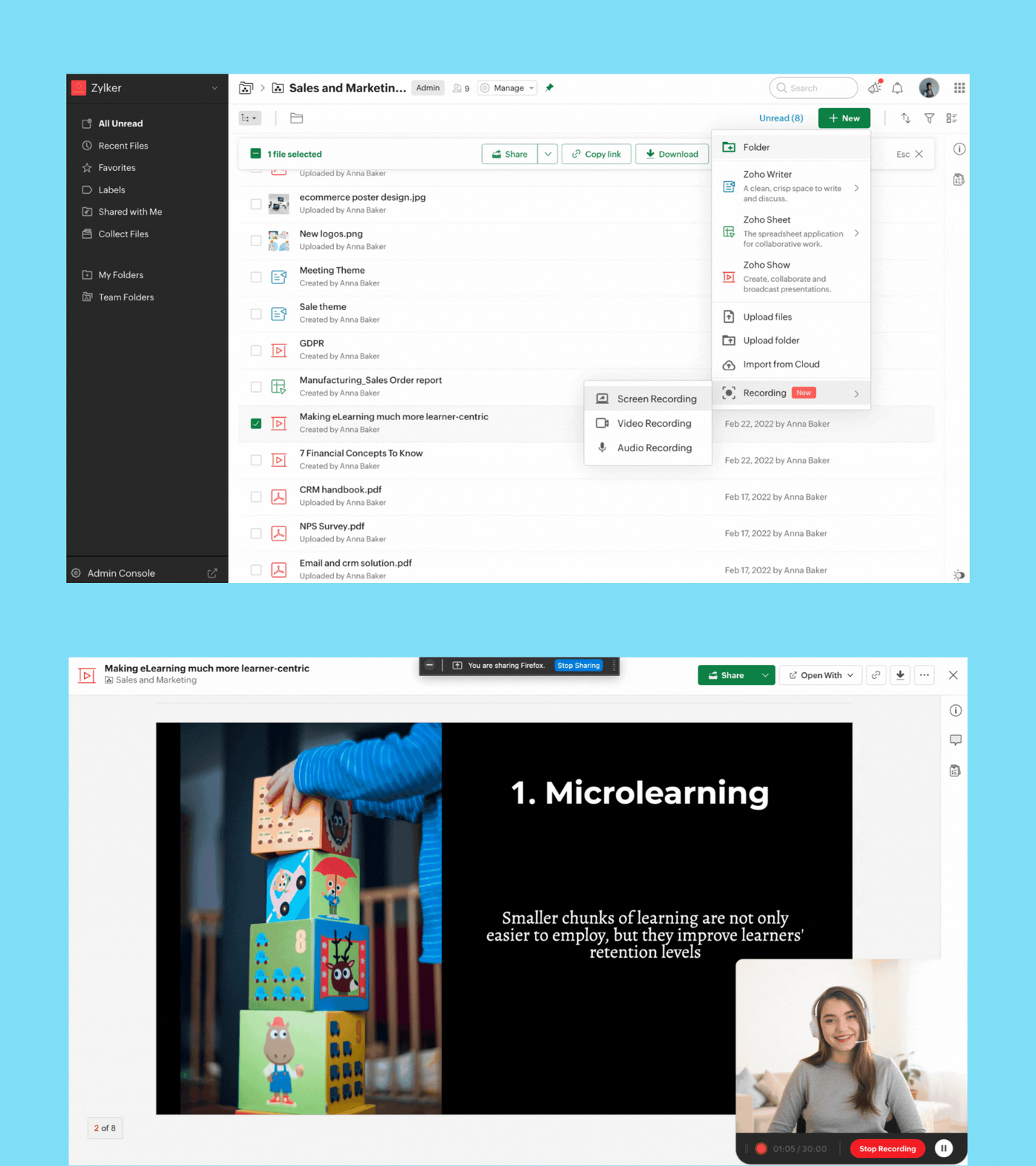
Now, you can quickly record video, audio, or your screen from right within the WorkDrive app and share it with your team.
Screen recording: Whether you're sending a proposal, or reviewing a document, you can now record your screen along with your video for better clarity and impact.
Video recording: If you want to share a message or announcement with your team, simply record your video and share it with your entire organization.
Audio recording: Take audio notes or record meeting audio so you never miss key points discussed in your team or project meetings.
You can record while offline, but to upload the file, you must be connected to the internet.
Note: You can currently record for a maximum of 30 minutes.
Security and collaboration
External sharing just got better—and more secure!
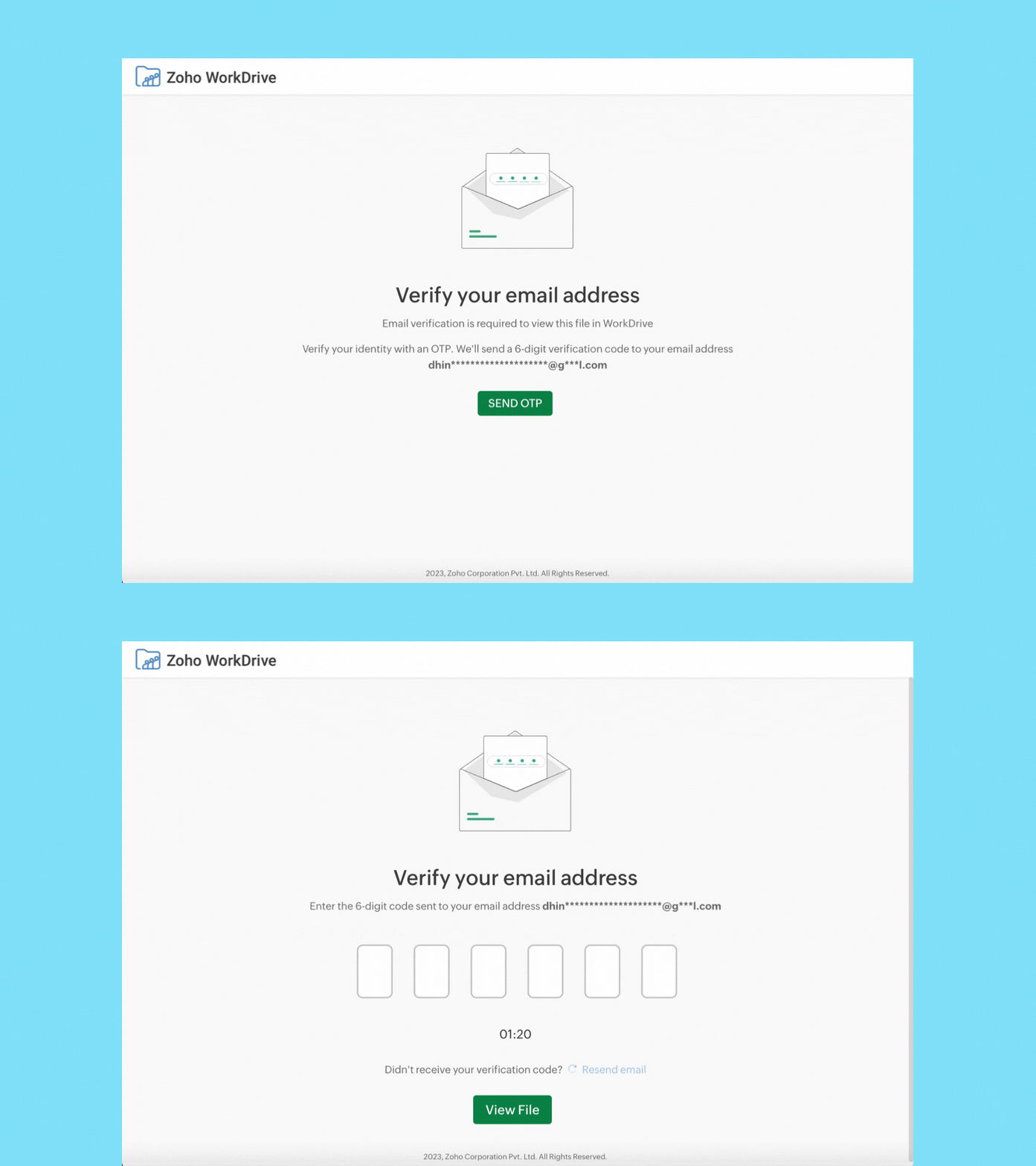
When you share a file or folder with external users (who don't have a Zoho account) using email addresses, they must now verify their email addresses via OTP authentication to access it.
External users can now upload files, and add or reply to comments. WorkDrive signup is not required. We'll soon enable the Edit option for external users as well.
Data administration
Manage all your team's shared items in one place
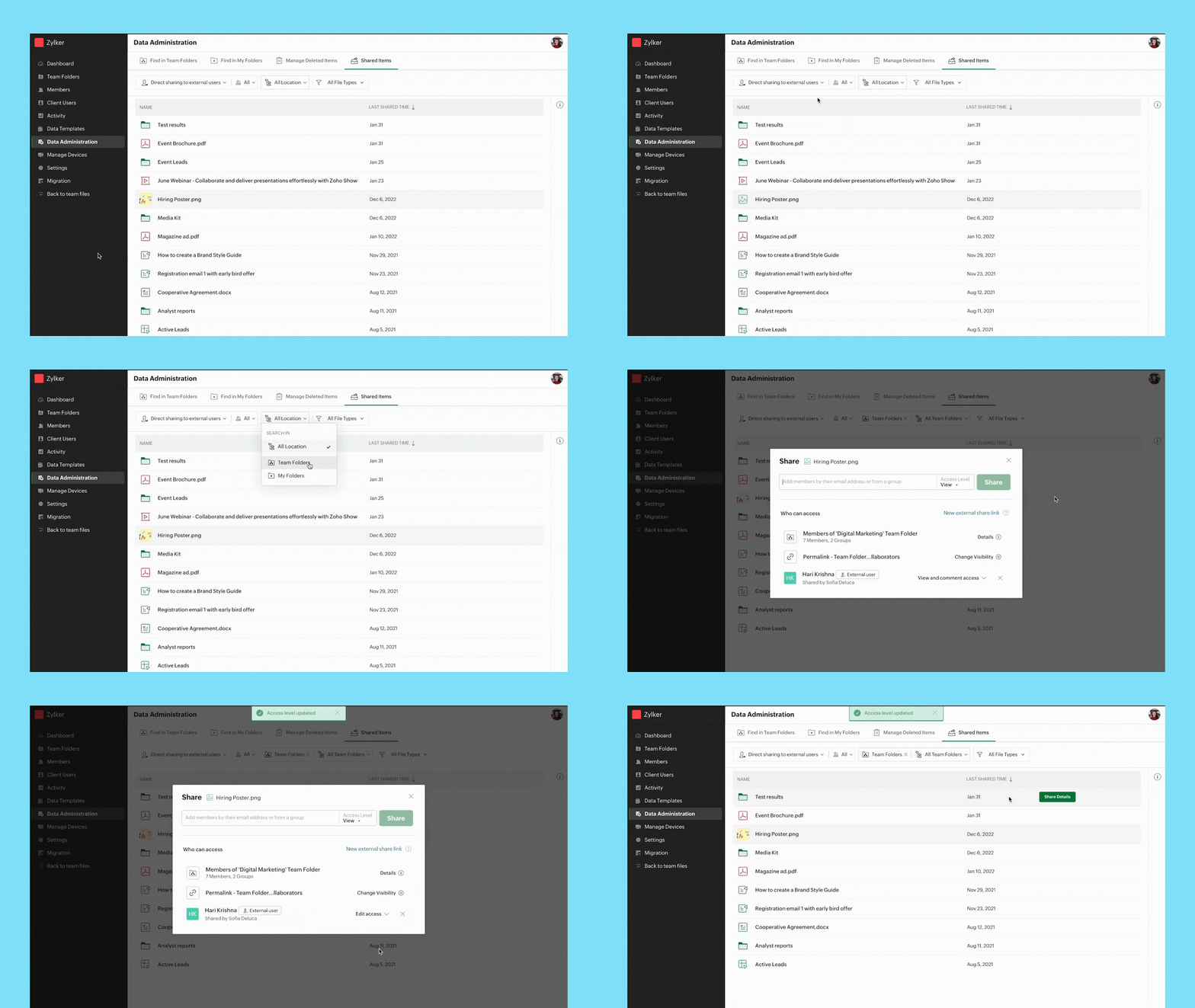
Admins can view a list of all shared items and track who they're shared with, whether they're shared externally or within a team, and more.
You can easily search for shared files and folders by applying the following filters
- Share type
- User
- Location
- File type
Path: Data Administration > Shared Items
Manage all shared items in a Team Folder
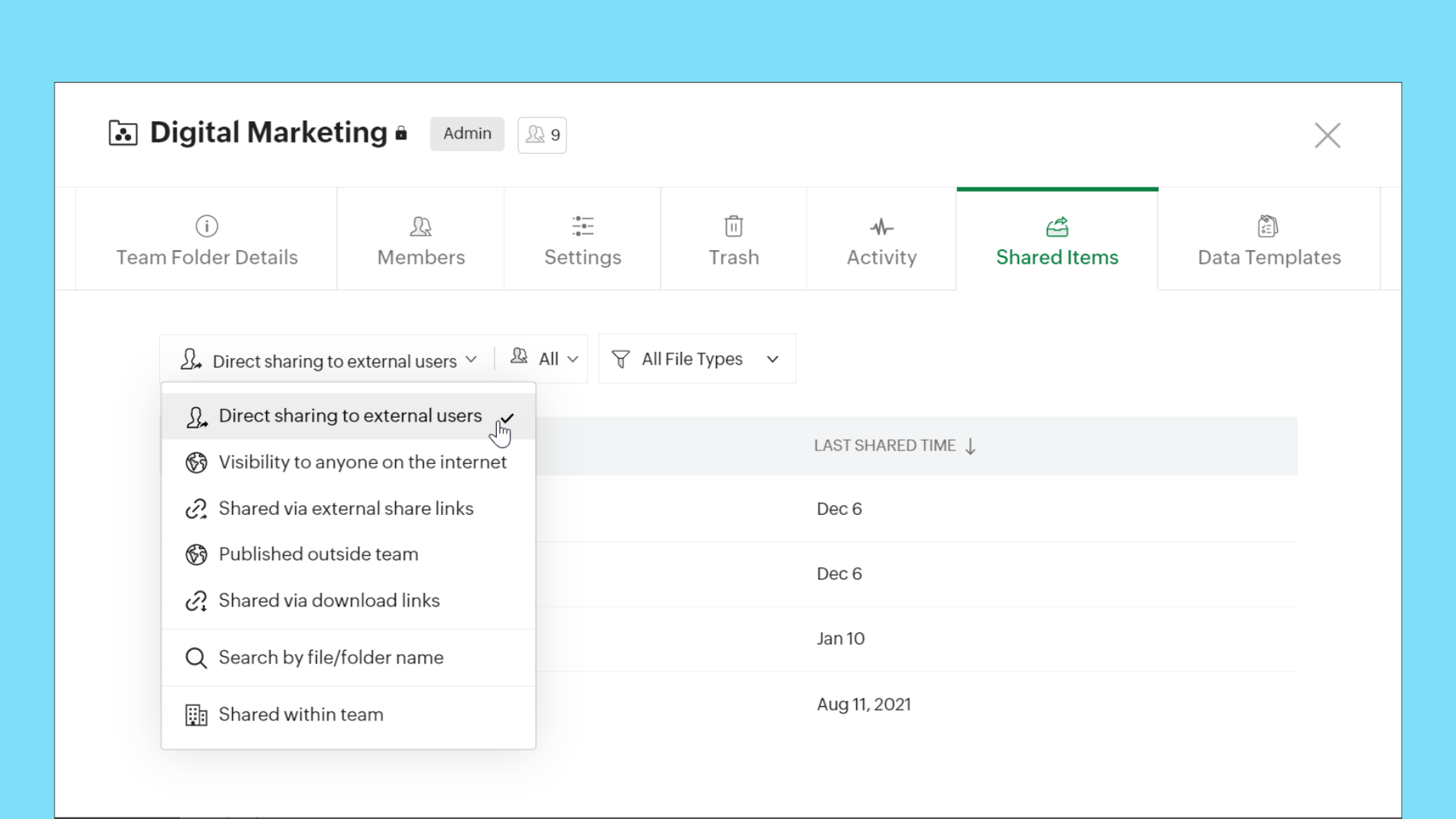
When you're working with multiple stakeholders, such as external users and organization members, it is important to keep your team's data safe and maintain full control over it. Now, Team Folder Admins and Organizers can easily view and manage all items shared internally and externally, make sure data is secure, and update or remove permissions whenever required.
Path: Team Folders > Manage > Shared Items
This feature is available for all WorkDrive team plans.
Manage all shared items in My Folders
We are making it easier to manage shared items in My Folders too! You can now view and manage all your shared items from My Folders. Quickly check which items are shared with external users, team members, and more.
Path: My Folders > Manage > Shared Items
This feature is available for all WorkDrive plans.
Find all files in members' My Folders
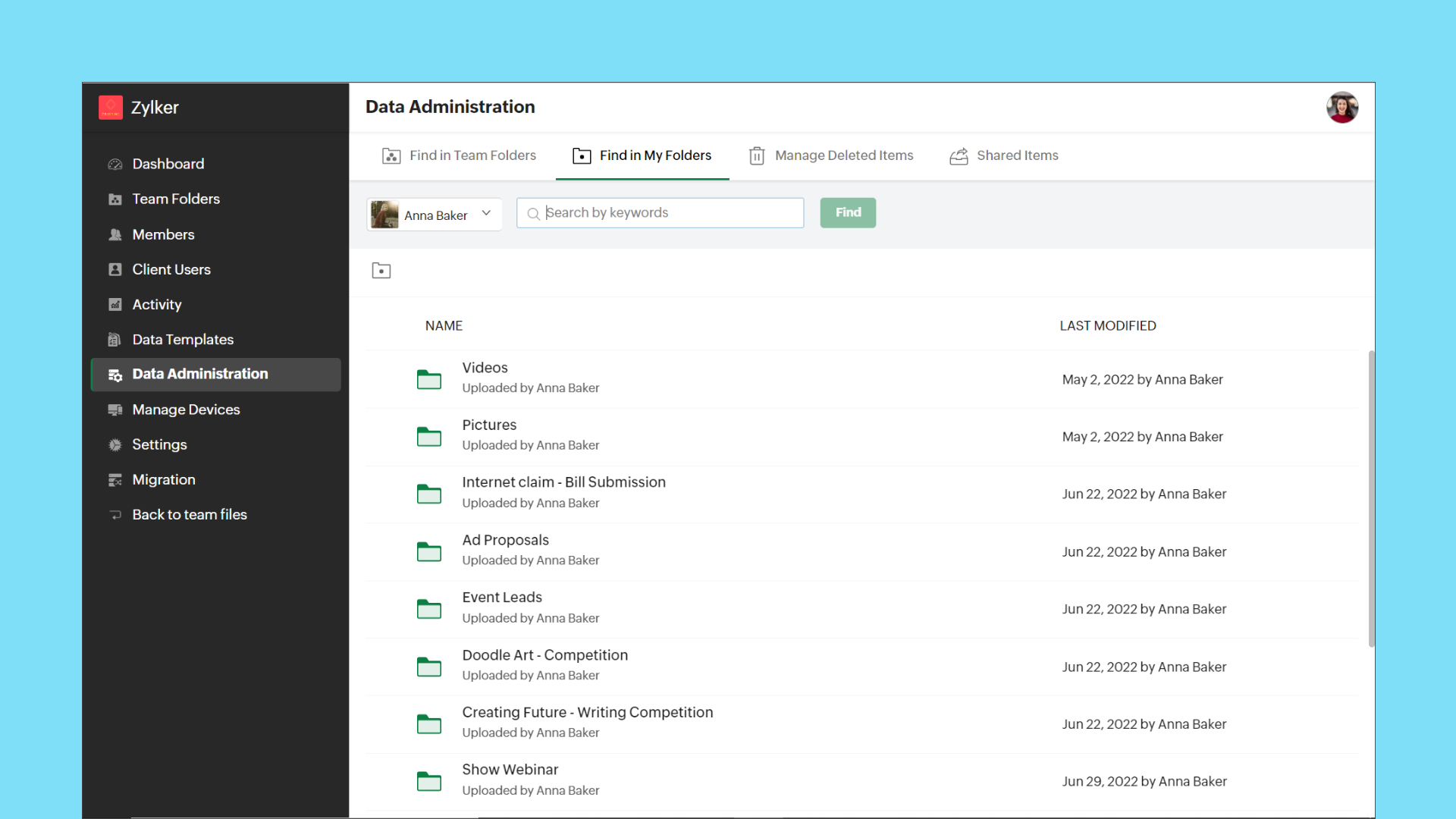
Admins can now view the entire list of files and folders in a team member's My Folders from the Admin Console. This gives Admins full control over each team member's data. They can share the files with other team members, or transfer ownership to themselves or another team member, if required.
Path: Data Administration > Find in My Folders > (Select User)
Transfer ownership of files and folders
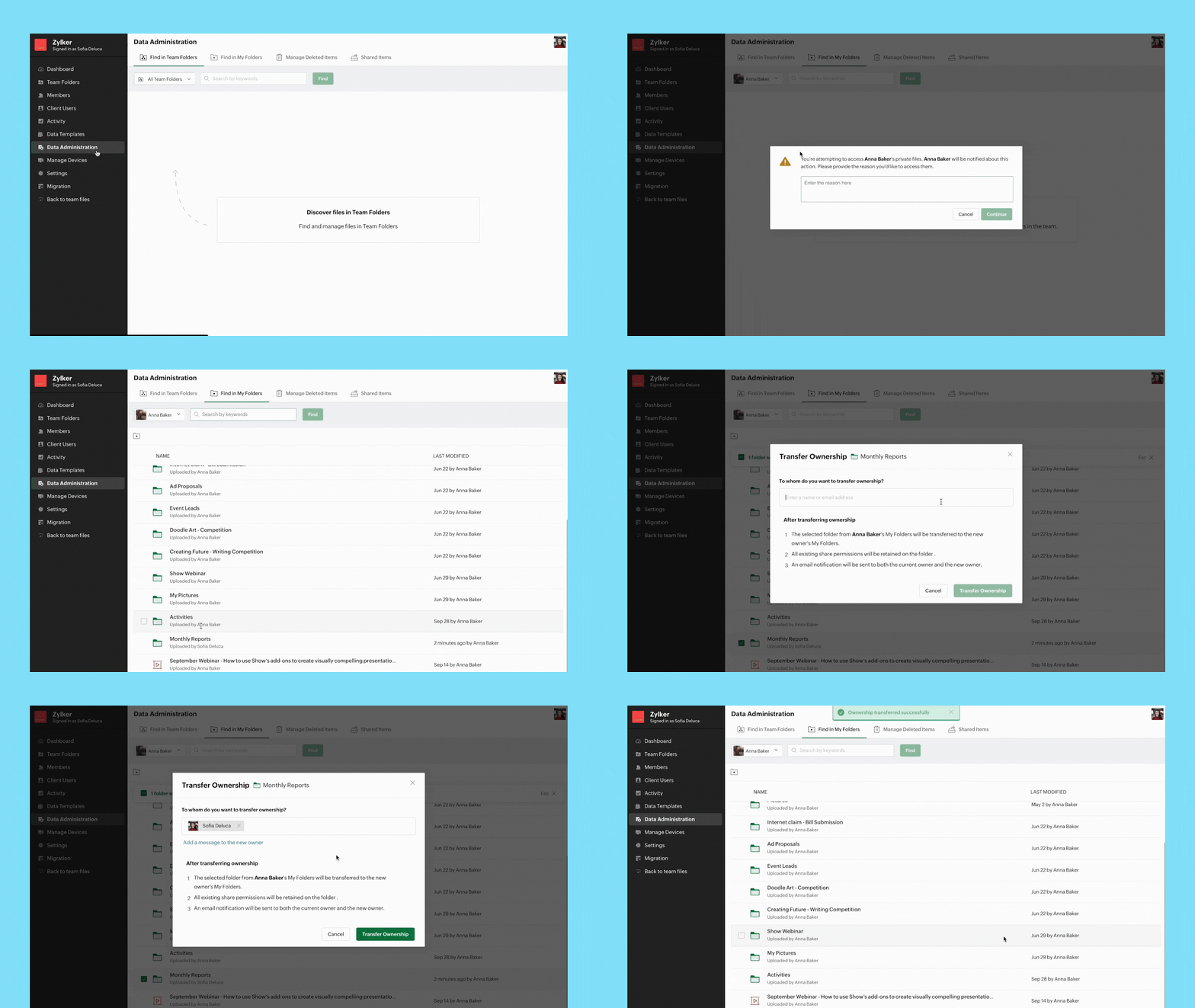
When an employee is not available temporarily or leaves an organization permanently, it's important to transfer their data to another employee securely. Admins can now transfer ownership of files and folders from one user's My Folders to another.
Path: Data Administration > Find in My Folders > (Select User) > (Select Files/Folders) > Transfer Ownership
Note:
- Data Administration features are only available with WorkDrive's Business plan.
- When you delete a member, there is already an option available to transfer all their My Folders data to another member.
Integrations
Bigin's integration with Zoho WorkDrive simplifies file management
Bigin's integration with Zoho WorkDrive helps you exchange files with your customers or leads in a secure and organized way. You can now create a File Cabinet for each customer and efficiently send, receive, and store related files.
With this integration, you can:
- Generate unique links to collect customer files
- Get notified whenever customers upload files
- Configure workflows to automate file management
Cliq/WorkDrive integration: Share files from WorkDrive
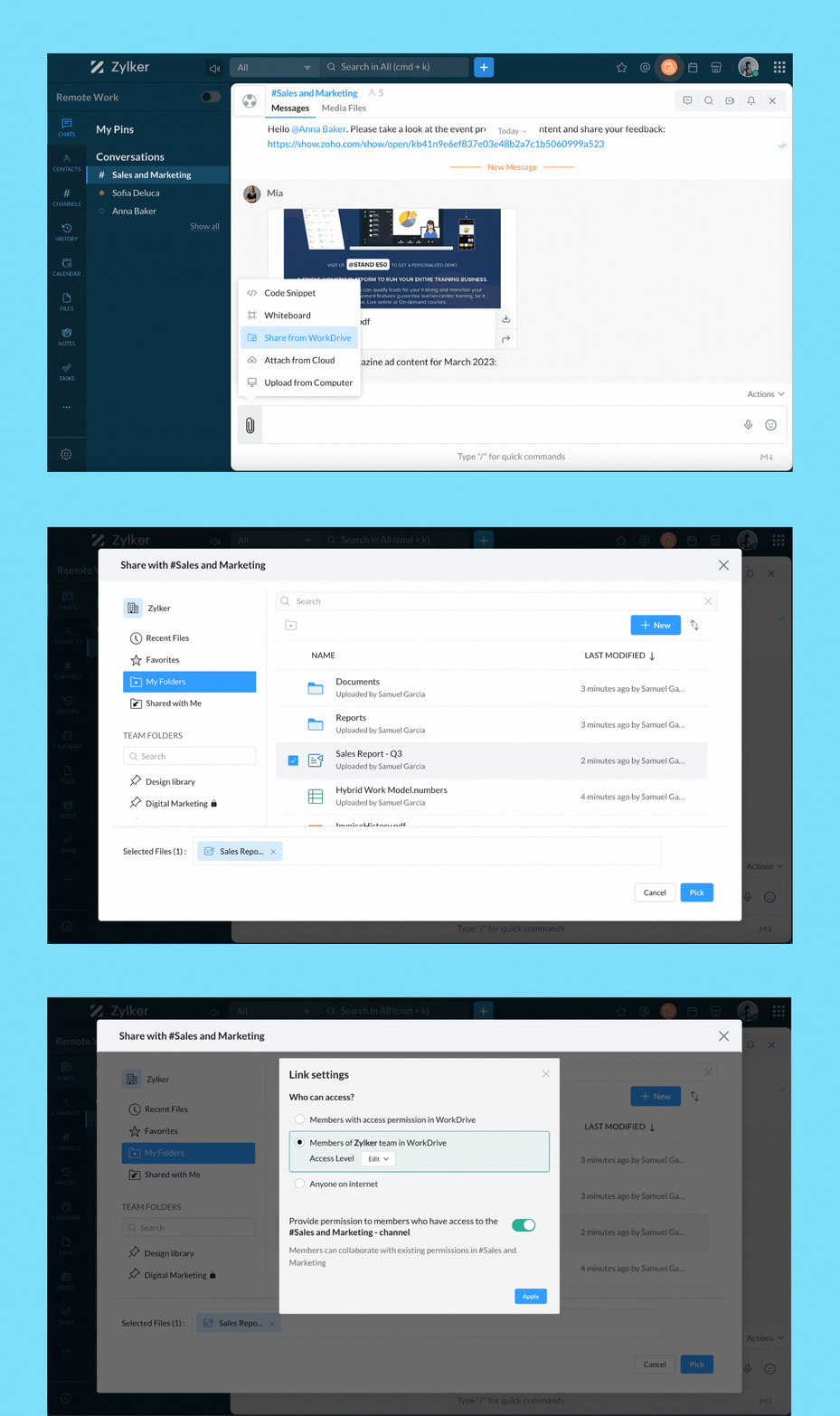
You can now share files directly from WorkDrive to your Cliq chats and channels. When you share files from WorkDrive, you have the option to choose the share type and set permissions.
When sharing to channels, you have the option to share the selected file(s) with channel members, org members, or anyone on the internet.
Group Team Folders for easy access
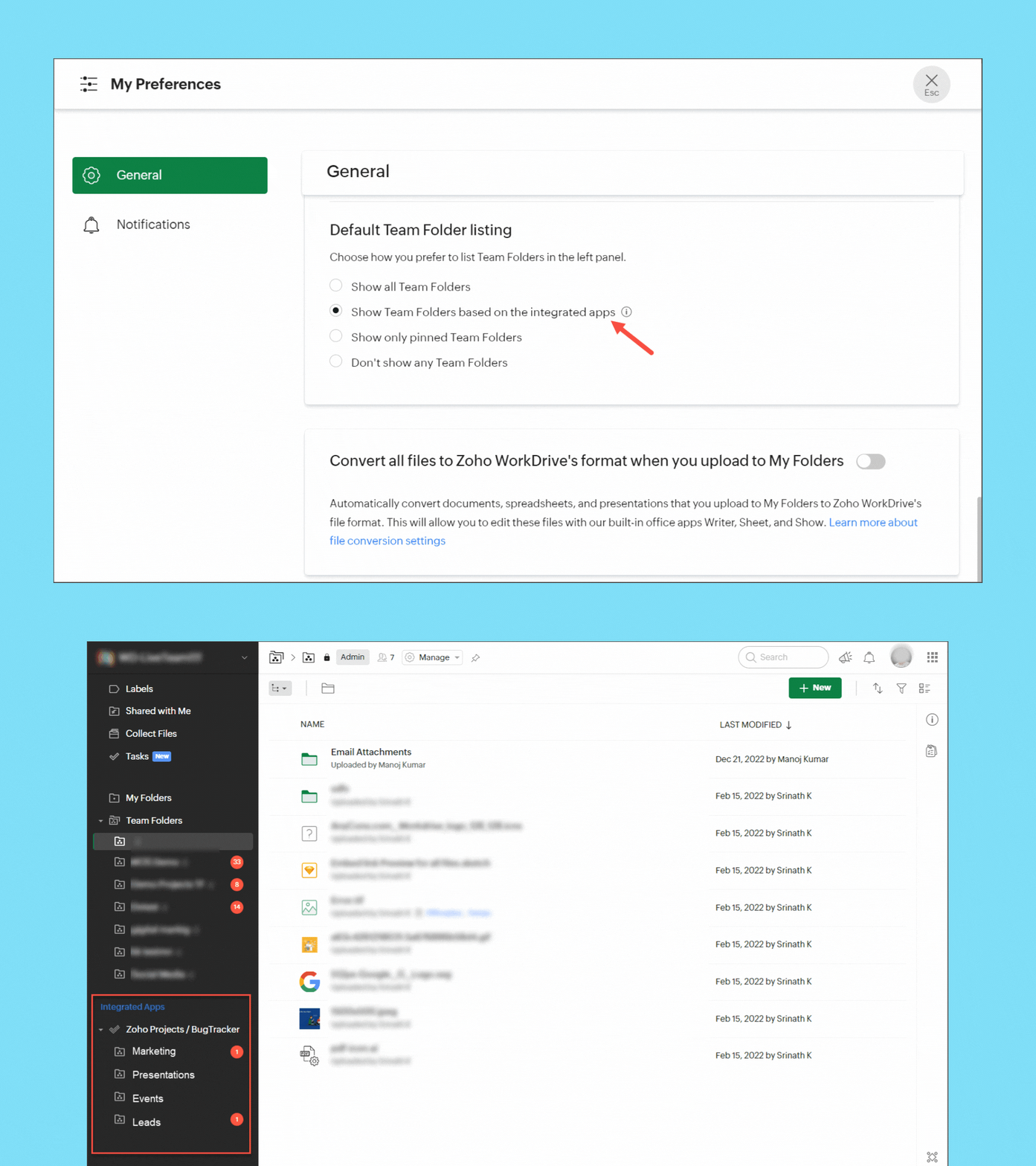
If you have integrated Zoho Projects or Zoho Marketing Plus with WorkDrive, you can now group the Team Folders created in Projects and Marketing Plus in the left panel of your WorkDrive account for easy access and management. Team Folders created directly in WorkDrive will be listed separately.
Save emails from Zoho Mail as EML files in WorkDrive
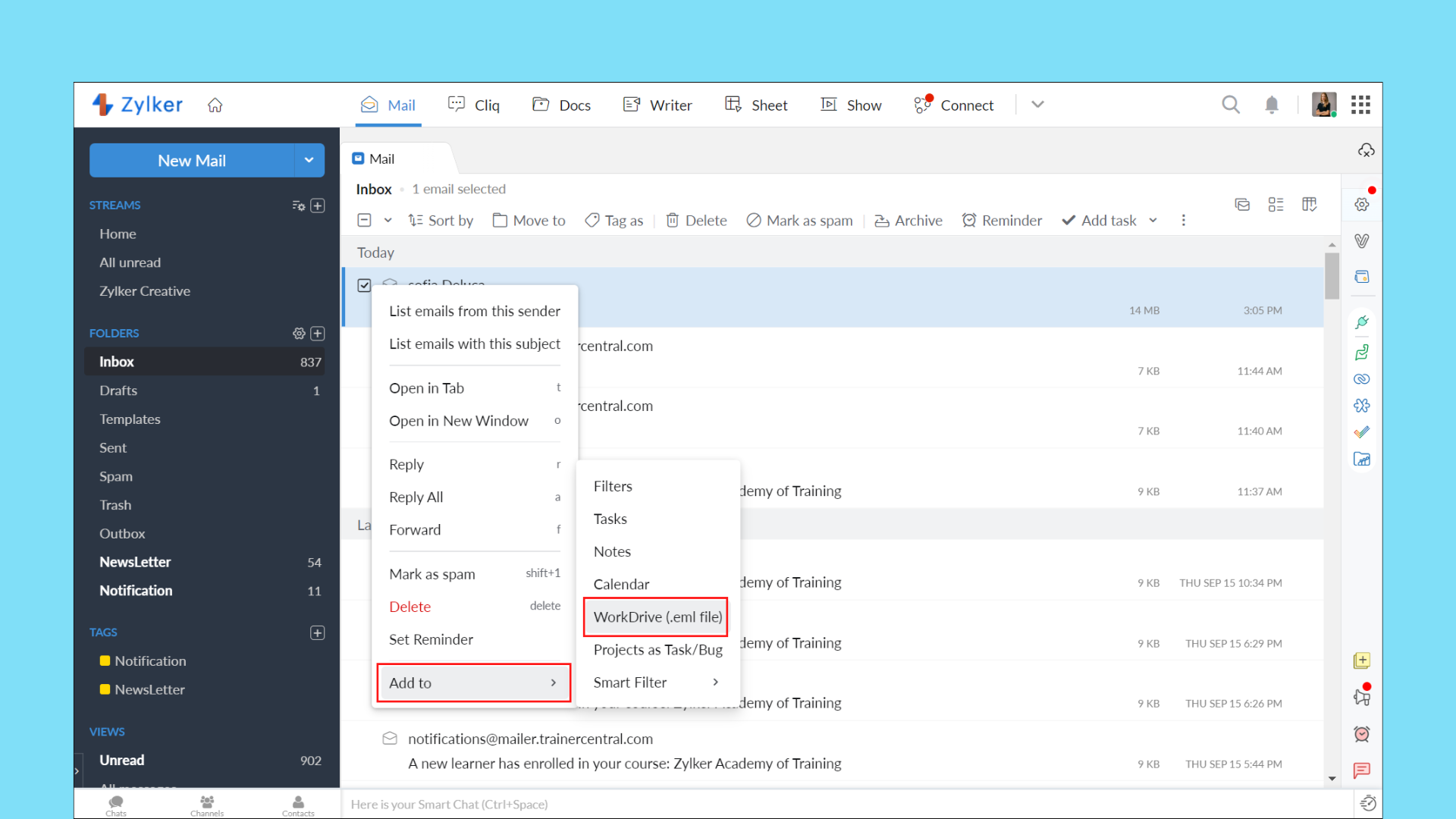
With the Zoho Mail/WorkDrive integration, you can now save an entire email as an EML (Electronic Mail Format) file in WorkDrive. This way, you can keep a backup of important emails and preview them right from WorkDrive.
Your EML file will contain the email content along with details, such as the subject, sender email address, recipient email address, date and time of the email, and attachment details (if any).
User experience
Tree view for efficient navigation
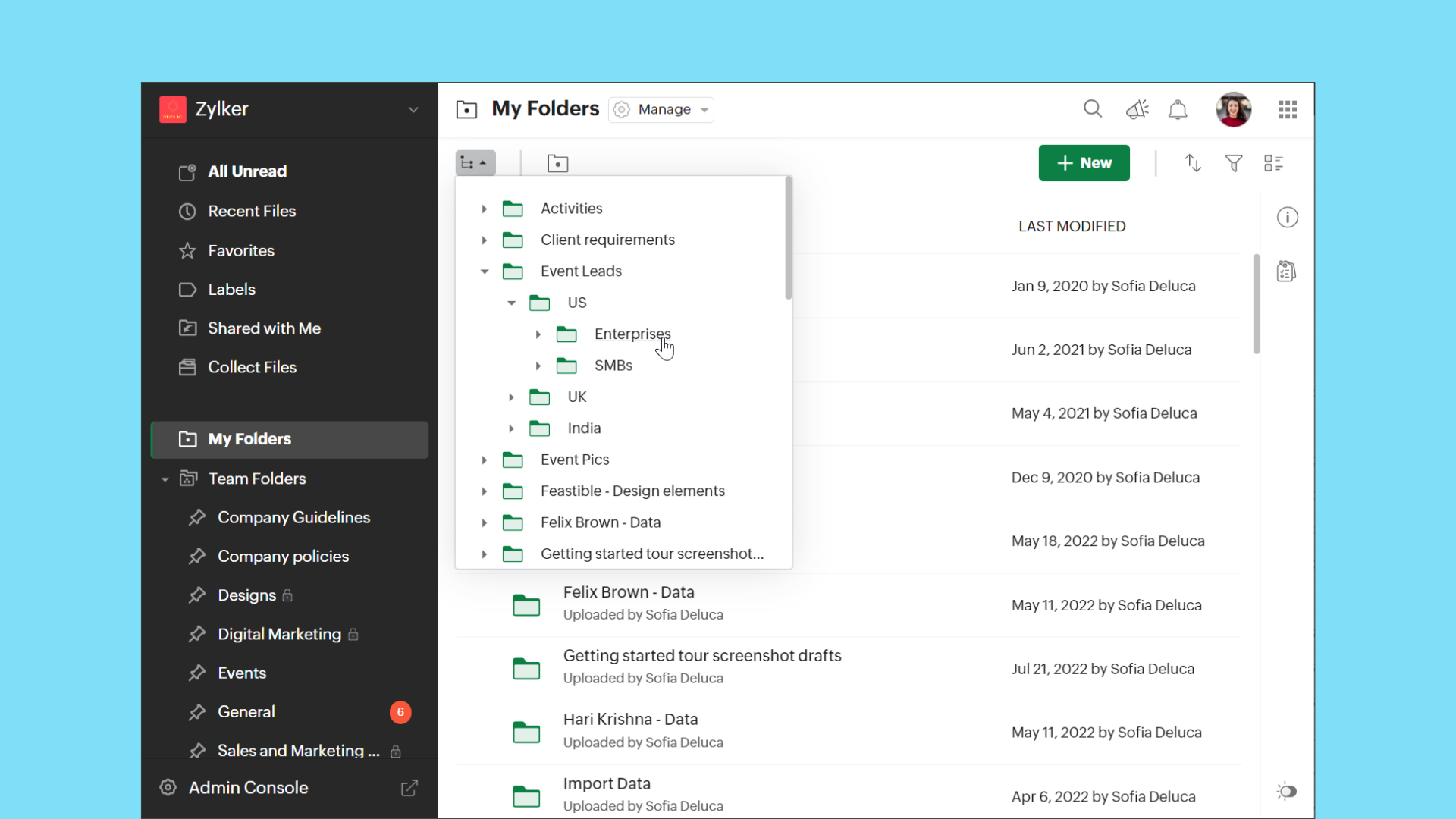
The new tree view in WorkDrive makes it easier to access folders from any location in Team Folders or My Folders based on hierarchy.
Support for editing comments
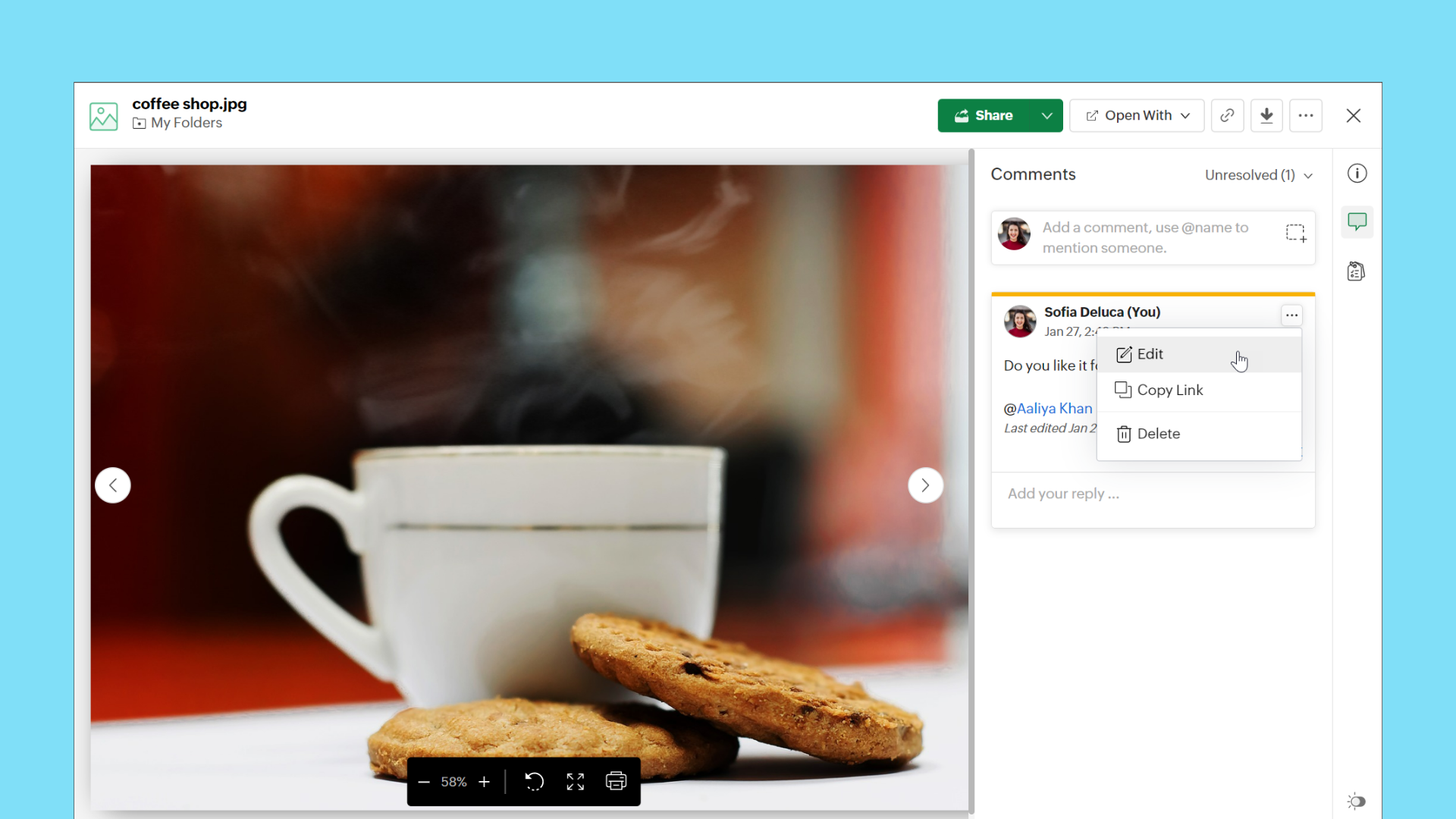
WorkDrive now supports the Edit option for comments. This allows users to modify their existing comments at any time without deleting them.
Copy or move enhancements
Copy or move files using keyboard shortcuts
Keyboard shortcuts are now supported in WorkDrive for copy and move actions.
Copy files and folders
Copy: Ctrl+C (Cmd+C on MacOS)
Paste: Ctrl+V (Cmd+V on MacOS)
Move files and folders
Cut: Ctrl+X (Cmd+X on MacOS)
Paste: Ctrl+V (Cmd+V on MacOS)
Note: Ensure you have permissions in both the source and destination folders for copy and move actions.
View progress of copy and move actions
We have added a progress bar to show clear details of ongoing copy and move actions for your convenience.
Watch this space, as we will share the WorkDrive 4.0 Phase 2 updates in the next few months.
As always, you can contact our support with any questions, or simply add your comments below.
Topic Participants
Karthick Kaliyamoorthy
Ashish Bhatnagar
Chris Kiadii
Narendra Eswar G
Cameron
Sticky Posts
Ask the Experts: Five-hour live Q&A session with Zoho WorkDrive product experts
Have questions about WorkDrive 5.0? Let’s talk! We recently launched Zoho WorkDrive 5.0, packed with powerful updates to help your team work smarter, stay secure, and get more value from your business content. From content-centric workflows and AI-poweredSupport for auto-upgrade in TrueSync (for Windows)
WorkDrive TrueSync app now supports auto-upgrading to the latest version for Windows OS. You must manually download and install the TrueSync app version 3.4.0 to avail this feature. Download the latest TrueSync app for Windows (version 3.4.0) SupportedWorkDrive API Documentation
WorkDrive provides users and developers an extensive set of APIs to help integrate functionalities of Zoho WorkDrive with other Zoho applications and third-party tools. We have published the official WorkDrive API Documentation page for all external users.March 15, 2023: Zoho Docs is discontinued
As of today (March 15, 2023) Zoho Docs is discontinued for all users. We would like to thank our customers for trusting us for so many years! Going forward, we're confident you'll enjoy using Zoho WorkDrive for all your advanced file management and collaborationIntroducing WorkDrive 4.0: Enhanced productivity. Advanced data administration. (Phase 1)
Hello All, We're excited to share the release of WorkDrive 4.0, which includes important new features and enhancements focused primarily on productivity, secure collaboration, data administration, integrations, and user experience. Read the official announcement
Recent Topics
Zoho Cliq not working on airplanes
Hi, My team and I have been having this constant issue of cliq not working when connected to an airplane's wifi. Is there a reason for this? We have tried on different Airlines and it doesn't work on any of them. We need assistance here since we are constantlyRequest to Recover Deleted Task List – Project ID: RIV-MOD-10722
Hi Zoho Team, I hope this message finds you well. My Zoho task list associated with Project ID: RIV-MOD-10722 appears to have been deleted. When I clicked on the task link from the email notification, I received the following message: "Task has been deletedEmail Insights included in Bigin emals are marked as SPAM everywhere
Today I noticed that email recipients who use Office 365 never receive emails sent from Bigin. Further examination showed that all Email Insights links in email headers are marked as spam/phishing by Office 365. Example screen included. The problem isHow do I import Connected Records for a Deal?
Can you point me to an example of the CSV file that would add related records to an existing CRM Deal? I imported a Deal, then tried importing a connected record using a unique ID that references the Deal ID, but it doesn't attach it to the Deal recFile Upload Field in Zoho Forms Not Updating Existing File in Zoho CRM
Hi everyone, I’m trying to understand the behavior of a file upload field mapped from Zoho Forms to Zoho CRM. Scenario There is a File Upload field in a Zoho CRM module. A Zoho Form also has a File Upload field, which is mapped to that CRM field. WhenZoho Training
Greetings! I am trainer. My focus area is Project Management and MS Project. I have used Zoho CRM to a good extent. Though, I was interested in using ZOHO projects, as there were no live projects, I could not take it up for studies. Recently a clientDetailed list of scoring rules in Zoho CRM
Good morning Zoho community, warm greetings The reason for my message today is that I have a problem with my CRM, which I will explain below: Our organization has scoring rules designed to rate our potential customers or leads in the application basedHow to create a summary document from Projects details
Hi, Our team is creating many projects inside Zoho Project. When closing a project, they write a summary document containing data from the projects it-self (understand project budget, customers, etc...), and editable (ie the document is either a WriterHost in US Data Centre
I humble apply to be registered on US Data centreconvert the project to templet
i have some deployment ME product for different customer , i need to create a fixed template for use it rather then keeping creating this template every timeBest practices for managing Project Charters, Business Case and RAID logs within Zoho?
Hello everyone, I’m currently refining our PMO setup within Zoho Projects and I’m curious how others are handling high-level governance documentation. We’ve been using the standardized Project Charter, Business Case and RAID frameworks from projectmanagertemplate.comWork Orders / Bundle Requests
Zoho Inventory needs a work order / bundle request system. This record would be analogous to a purchase order in the purchasing workflow or a sales order in the sales cycle. It would be non-journaling, but it would reserve the appropriate inventory ofIzettle or Sumup Integration for Zoho Books.
The Stripe & Square clearing works great in Zoho Books. Any further integrations planned in the future for Izettle or Sumup? These card processors are very common for taking payments with a card reader.Trying to access records in a custom module in Zoho Desk and not having luck
I've built a custom module in Zoho Desk and am using a custom function to query the records in the module and I'm not having any luck. The only way I have found to retreive a record is by getting it by its recordID (the long zoho assigned one). The functionZOHO Books Smart Accounting Software for Travel Agency
Dear Travel partner, Contact for Travel Agency Accounting Setup & Training Vansh Travel (ZOHO Books Authorised partner) Email: info@vanshtravel.com Mo: +91 98984 95155 Please find PDF452 Mailbox delivery restricted by policy error
We have been testing Zoho desk for about a week now and have been forwarding emails in via an Exchange Online Mail flow rule without issue until yesterday. Suddenly yesterday morning we started getting the vast majority of the emails stuck in PendingSend Email reply on behalf of Agent
Hi, When using the send email reply via the API I can set the reply on behalf of the customer by using impersonatedUserId in the header of the API call. Is there a way to do this for Agents too? I need to be able to send an email reply on behalf of anSharing Tickets to a team within a department
Hi there, We have a need for one department to be able to share tickets to a specific team within a department, I'm wondering if this is possible? All the shared tickets are going into the 'Shared Tickets' view for the whole department but is there aDo not use isnull()
Does not always return booleans. Can also return null. Never use this function. Just use var==null instead.FSM integration with Books
Hi, I have spent a few months working with FSM and have come across a critical gap in the functionality, which I find almost shocking....either that, or I am an idiot. The lack of bi-directional sync between Books and FSM on Sales Orders/ Work OrdersUnable to load a specific image
Hi I am trying to upload an svg file, which reports that there is "a problem with the file", but does not say what sort of problem. I can't find anything which says which files are supported, so it may be it does not support svg. (which would be a real shame) The file itself will open in either Firefox or Chrome without problem. For the moment I am using a png file, which does not zoom well of course. DavidWhy does the Address field show the wrong map location even with a correct Pincode?
I am noticing an issue with the Address field map in Zoho Creator. When I enter a city name that exists in multiple locations within the same state, the map sometimes points to the wrong area even if I have entered the correct Pincode. Currently, it seemsArchive Option in Conversation View
Hello, I have a suggestion\request to add an "Archive Thread" button in conversation view of Zoho Mail. The best suggestion I have is to put an "Archive Thread" button next to the "Label Entire Thread" button in conversation view. Most users don't justOutlook/Hotmail Blocking Zoho SMTP IPs (S3150)
We are currently facing a serious deliverability issue with Zoho SMTP while sending transactional OTP emails for our production application. Emails sent to Outlook / Hotmail addresses are being rejected with the following error: 550 - 5.7.1 Unfortunately,Outlook is blocking incoming mail
Outlook is blocking all emails sent from the Zoho server. ERROR CODE :550 - 5.7.1 Unfortunately, messages from [136.143.169.51] weren't sent. Please contact your Internet service provider since part of their network is on our block list (S3150). It looksZoho Social API for generating draft posts from a third-party app ?
Hello everyone, I hope you are all well. I have a question regarding Zoho Social. I am developing an application that generates social media posts, and I would like to be able to incorporate a feature that allows saving these posts as drafts in Zoho Social.Temporarily rate limited due to IP reputation.
We have suddenly started receiving the following Mail Delivery Status Notification: Diagnostic-Code: 4.7.650 The mail server [136.143.184.12] has been temporarily rate limited due to IP reputation. For e-mail delivery information, see https://aka.ms/postmasterIMPORTANT: It doesn´t search for letters with portuguese characters.
Some of my articles have for example the word "vídeo". But if I search for "vídeo" it doesn´t find them. If I search for "video" it does find them. Idealy, it should find the articles either way. But if I have to choose, it would be better to find theIMPORTANT: It doens´t show full article name on search - Should add line break
When we search for articles, it doesn´t show the full name. There should be a line break so the user can see the full article name, otherwise the user can´t know if that´s the article he/she is looking for. This is very important, otherwise the user hasZoho Books - Payment Gateway - Revolut
Hi Books Team, My feature request if to include the popular platform Revolut as a payment collection option on invoices in Zoho Books. Please upvote if you are also looking for this option.Zoho Books | Product updates | January 2026
Hello users, We’ve rolled out new features and enhancements in Zoho Books. From e-filing Form 1099 directly with the IRS to corporation tax support, explore the updates designed to enhance your bookkeeping experience. E-File Form 1099 Directly With theKaizen #233 - Generating AI-powered Follow-up Emails Using CRM Functions and Widgets
Hey everyone! Welcome back to another interesting post in the Kaizen series! Sales teams regularly capture interaction notes in CRM after speaking with prospects. However, drafting a follow-up email that reflects the conversation context can be repetitiveConnect Bank in Zoho Books
Can I connect UOB or Ariwallex in Zoho Books?Using MPN across multiple SKUs and inventory tracking
I have several different SKU's that share a common MPN and would like to track inventory by MPN. SKU1 has MPN1 assigned SKU2 has MPN1 assigned Here is an example If I start with 5 of MPN 1 in stock I want each SKU1 and SKU2 to show as 5 in stock, If IMarketing Tip #1: Optimize item titles for SEO
Your item title is the first thing both Google and shoppers notice. Instead of a generic “Leather Bag,” go for something detailed like “Handcrafted Leather Laptop Bag – Durable & Stylish.” This helps your items rank better in search results and instantlyFeature Enhancement Request – Text Formatting Options in Item Description (Zoho Books/Quotes Module)
Dear Zoho Development Team, Greetings from Radiant360 Integrated Technical Services LLC. We would like to bring to your attention a functional limitation we've encountered within the Item Table / Quote Description section of Zoho Books (and Zoho CRM Quotes).ZOHO Books Query
Good day, Can someone please advise. I recently migrated from ZOHO Invoice to ZOHO Books. No that I want to use the inventory on Books I cant as all my items have transaction history. The person I spoke to at ZOHO said I need to create a new Company profileBest way to schedule bill payments to vendors
I've integrated Forte so that I can convert POs to bills and make payments to my vendors all through Books. Is there a way to schedule the bill payments as some of my vendors are net 30, net 60 and even net 90 days. If I can't get this to work, I'll haveinventory removal at packing list or shipment.
currently our system is set to remove inventory at invoice. This is creating an inventory nightmare? Is it possible to change the settings to remove the item from inventory at either the packing slip stage or shipping the item.How to add employee and not invite them to log in?
I want to add 50 employees, but invite them only when everything will be configured and ready. Is it possible? Should we create employee profiles and then convert them later? Thank you,Next Page