Announcing a significant enhancement for Zia Presentation: Personalize the data and distribution of your sales deck
Dear Customers,
We hope you're well!
There are two aspects to being a salesperson: Selling and reporting. While the former is the job itself, the latter helps salespeople evaluate their performance from time to time. This evaluation doesn't just help them measure their contribution to the company, but also helps their managers correlate it to the business's resultant growth. Accordingly, a task this important has to be carried out frequently—but, truth be told, getting the right numbers computed and compiled is time-consuming.
With this in mind, we developed Zia's Presentation feature a couple of years ago. Today, we've fine-tuned it even more and are happy to "present" you with some new enhancements!
Introducing user-based personalization and presentation distribution

Here's a quick recap:
Zia's Presentation is an AI-generated slide deck that gets published to all users as a notification. Using its generative intelligence, Zia computes and compiles usage-based personal and business insights for each rep that has enabled this feature. All a rep has to do is look at the numbers, come up with a workaround, and present them to their managers. This saves a lot of time with respect to computation and compilation. Learn more about the current setup.
In this update:
We've changed the location of the Presentation feature in the setup to be directly under the Zia features in Zoho CRM. Previously, it was a tab under Zia > Notifications.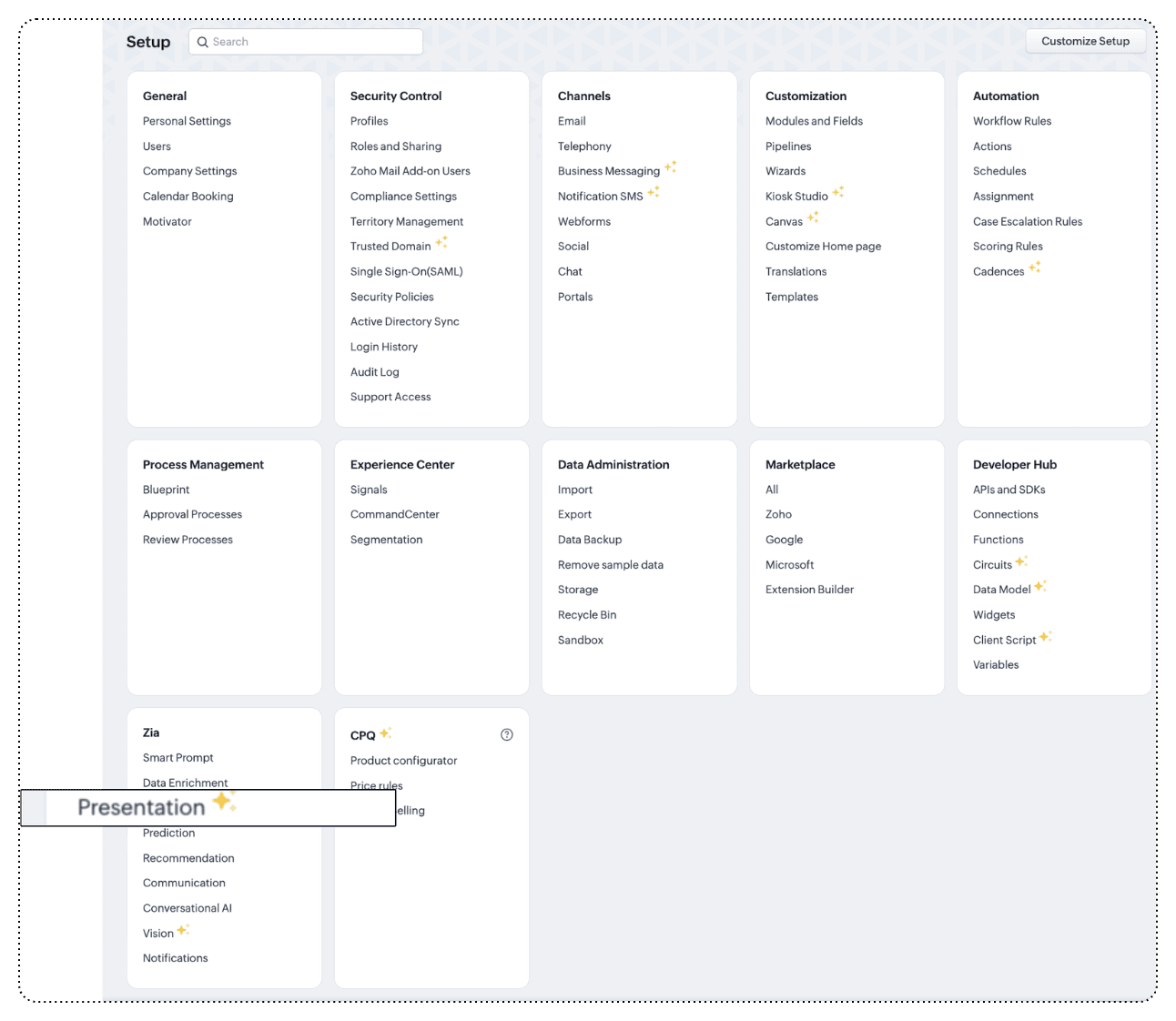
To achieve presentation personalization, we've re-worked the previously user-enabling feature to be an admin-operated feature. If you're an admin, you can do the following:
Choose user, data, and distribution parameters
Select whom a presentation is intended for—either all users in the organization or selected users.
All users: If you prefer all users, then all users will receive the configured presentation with data built on all users' usage and contributions.
Selected users: If you prefer this presentation for selected users only, then the computed insights will relate to those users and will be shared with those users only. However, you can also view the KPIs of those below each selected user in the organizational hierarchy.
For example:
If you want to prepare a presentation only for reps in level L4, you can configure a presentation only for them. In this case, you can see Kevin Glassman is an L4 rep. A presentation personalized for him will have insights based on his usage and contributions, and will be sent to him alone. If Kevin is the sales lead, and for him to validate his reportees' data cumulatively, he can choose his name and select the "Individuals' data and their respective subordinates' option.

Choose the data: You can choose the modules that are essential for computation. This enables you to focus on what metrics you want to evaluate. You can also let Zia choose that for you based on the popular usage observed in your organization—or you can opt for both.
Choose the carbon copy: Another method of generating sales metrics is to evaluate sales commission, in which case these insights can be shared with the sales operations team to distribute commission and incentives. For this, you can copy other users from the organization.
Choose the medium: You can choose to receive the presentation as a notification via Zia's default notification panel. If you've integrated Zoho Cliq into your organization, you can receive notifications there via a bot as well.
Choose the frequency: You can also set the frequency of computation and distribution as weekly, monthly, or quarterly. You can also tweak more settings, like when each week, month, or quarter you want to generate the presentation.

Here are a few important notes:
- As an administrator, you can generate up to 10 presentation configurations, and each configuration can be created for 10 individual users.
- A presentation created for a user will have insights based on their usage and will be shared with them only. Even if you include subordinates' data, the slide will be sent only to the users specified.
- If you'd like to share the deck with subordinates, you should add them separately.
These enhancements to Zia's presentation are built to optimize sales performance reporting. Below are the key benefits you can enjoy with this feature update:
- Get turnkey analyses with Zia's generative capabilities.
- Zia analyzes the usage of each user, and therefore includes all observed metrics in the computation.
- Behavioral analyses like cohorts and quadrants based on a user's performance substantiate the user's objectives and actions.
- The ability to configure and customize data and distribution helps you monitor the productivity of each sales rep or entire team quickly.
- Because these entries are triggered by the admin (sales managers) themselves, the findings are accurate.
That's all folks! We're constantly working to enrich the sales experience in Zoho CRM. If you have any feedback, please drop it in the comments section. Let's connect!
Availability: Zia's Presentation is available for organizations with Enterprise or Ultimate editions with 10+ user licenses.
DC information: US, EU, IN, CN, JP, and AU
Resources:
Help document: Zia Presentation
Help document: Zia Presentation
Thanks and kind regards,
Saranya Balasubramanian
Saranya Balasubramanian
Zoho CRM - Marketing
New to Zoho Recruit?
Zoho Campaigns Resources





Topic Participants
Saranya Balasubramanian
Inspiring Business
Pheranda Nongpiur
Sticky Posts
Presenting ABM for Zoho CRM: Expand and retain your customers with precision
Picture this scenario: You're a growing SaaS company ready to launch a powerful business suite, and are looking to gain traction and momentum. But as a business with a tight budget, you know acquiring new customers is slow, expensive, and often deliversGood news! Calendar in Zoho CRM gets a face lift
Dear Customers, We are delighted to unveil the revamped calendar UI in Zoho CRM. With a complete visual overhaul aligned with CRM for Everyone, the calendar now offers a more intuitive and flexible scheduling experience. What’s new? Distinguish activitiesCreate and populate a record in an instant: Introducing zero-shot field prompting to Zia's ICR
A couple of months ago, we upgraded our in-house AI image detection and validation tool, Zia Vision, with intelligent character recognition (ICR). By training Zia with sample images, you could create and enrich CRM records with data extracted from standardIn-person ZUG Meetups for Real Estate Professionals - US Q1 2026
The Real Estate Zoho User Group is going on a multi-city, in-person meetup tour across the US, and we’d love to see you there! These meetups are a great opportunity to: Connect with fellow real estate professionals using Zoho Share challenges and discoverNimble enhancements to WhatsApp for Business integration in Zoho CRM: Enjoy context and clarity in business messaging
Dear Customers, We hope you're well! WhatsApp for business is a renowned business messaging platform that takes your business closer to your customers; it gives your business the power of personalized outreach. Using the WhatsApp for Business integration
Zoho CRM Plus Resources
Zoho Books Resources
Zoho Subscriptions Resources
Zoho Projects Resources
Zoho Sprints Resources
Zoho Orchestly Resources
Zoho Creator Resources
Zoho WorkDrive Resources


Zoho CRM Resources
Get Started. Write Away!
Writer is a powerful online word processor, designed for collaborative work.
Zoho CRM コンテンツ
-
オンラインヘルプ
-
Webセミナー
-
機能活用動画
-
よくある質問
-
Ebook
-
-
Zoho Campaigns
- Zoho サービスのWebセミナー
その他のサービス コンテンツ
ご検討中の方
Recent Topics
CRM Related list table in Zoho analytics
In Zoho Analytics, where can I view the tables created from zoho crm related lists? For example, in my Zoho CRM setup, I have added the Product module as a related list in the Lead module, and also the Lead module as a related list in the Product module.Zoho learn Custom portal - networkurl & CustomPortalId
I want to get my individual account’s networkurl and customportalId to use in this API: https://learn.zoho.com/learn/api/v1/portal/<networkurl>/customportal/<customportalId>/manual How can I retrieve the networkurl and customportalId using the API? IConnecting zoho creator to zoho writer to send prefilled documents
i will paste the worflow below // Get user's submitted data from the form userSalary = input.Current_Salary; userCIBIL = input.CIBIL_Score; userEmail = input.Email; userName = input.Name; // You need to get the Document ID from the URL of your Zoho WriterZoho Creator to Zoho Writer for prefilled documents...
In response to the question about connecting Zoho Creator to Zoho Writer for prefilled documents, I wanted to share a working implementation that demonstrates how to use the record_id parameter with the Zoho Writer Merge API. This allows Writer to automaticallyManaging functions
Can someone let me know if there are any plans to improve the features for managing functions in CRM? I have lots of functions and finding them is hard. The search only works on the function name and the filter only works on function type. I have createdIntroducing our latest privacy enhancement - Hiding email IDs in Zoho Cliq Networks
Hello everyone, Zoho Cliq Networks offers a powerful collaboration platform that allows businesses to create dedicated digital workspaces for external vendors, partners, or individuals you want to communicate with professionally without adding them tozoho performance
OVERALL CONFIGURATION OF ZOHO PERFORMANCE Quarterly performance review Self rating and scoring Manager rating and scoringZoho Social API for generating draft posts from a third-party app ?
Hello everyone, I hope you are all well. I have a question regarding Zoho Social. I am developing an application that generates social media posts, and I would like to be able to incorporate a feature that allows saving these posts as drafts in Zoho Social.When will it be possible to edit Subform records via either views or tabular reports?
Hey there, data maintenance often requires mass update of quite a lot of records. While this is a piece of cake via either List view or Zoho sheet view, the same cannot be carried out for subform records yet. When one of the two options will be made available?Onboarding
Hello Team, Im yuktha working as HR at Ossisto Technologies. We are currently utilizing zoho for onboarding candidate. right now facing issue with onboarding Attaching the screenshots for your referenceArchiving Contacts
How do I archive a list of contacts, or individual contacts?How do I change a form's name? Why isn't this more intuitive?
Can someone please let me know how to change a form's name?Control Over Zia Generative AI Reply Assistance Behavior
Hello, I would like to request an enhancement to the Zia Generative AI feature, specifically concerning the Reply Assistance within Zoho Desk. Current Issue: When replying to a ticket, the Ticket Properties section is automatically replaced by the ZiaZia now integrated with Open AI in Zoho Desk
The powerful integration of Zia with OpenAI, has empowered Zoho Desk reach a new level of efficiency and performance. With contextual self-service capabilities, Zia enables agents to boost their productivity and delivers superior customer experiences.Zoho Desk Partners with Microsoft's M365 Copilot for seamless customer service experiences
Hello Zoho Desk users, We are happy to announce that Zoho Desk has partnered with Microsoft's M365 to empower customer service teams with enhanced capabilities and seamless experiences for agents. Microsoft announced their partnership during their keynoteEmployee self-service portal: Onboarding and continuous learning platform for support reps
Hello everyone, In any organization, employees must go through multiple courses to learn about the product, their organization's standards, and how to respond to customer queries using the knowledge base articles available. This typically requires completing2024 Email Authentication Standards: Elevating Security with Google and Yahoo
In contemporary email communication, email authentication plays a pivotal role in mitigating email fraud, spam, and phishing attacks. Brace yourself for a new level of security. Starting February 2024, Gmail and Yahoo will be implementing robust emailContact custom field in layout
Good day, all, I have an "Extension" custom field in contacts, and would like to display the contact extension in the ticket layout, but I don't seem to be able to. What am I missing? Thanks RudyExact match in name when searching workdrive
Hello, I am wondering how to search workdrive files/folders with an exact match in the name. For example, when I search across folder with the url param search[name]=someName, I get multiple results such as "someName", "someNameAndMore", or "someNameaccount in a diferent bas currency
Is it possible to have an account in currency diferente from base currency?, lets say, the bas currency in japase yen but asset accut called cash dollars in dollars?Meeting impossible to use when sharing screen
he Meeting tool in Brazil is practically unusable when sharing anything, whether it’s a presentation or simple navigation. When accessed via Cliq, the situation gets even worse: even basic calls fail to work properly, constantly freezing. And as you areChanging the Default Search Criteria for Finding Duplicates
Hey everyone, is it possible to adjust the default search criteria for finding and merging duplicate records? Right now, CRM uses some (in my opinion nonsensical) fields as search criteria for duplicate records which do nothing except dilute the results.Is there a way to create a desktop shortcut for a website course portal?
Hello everyone, I recently got a laptop and bought an online course from a website, Skillwint.com, which I visit regularly. I open that site many times a day and want to create a desktop shortcut so I can open it directly instead of searching in the browserSalesIQ Tip for Admins: Your Safety Net for Data Recovery
Ever clicked 'Delete' in your SalesIQ and then realized it was the wrong item? Maybe it was a prospect's chat that held important context you needed to refer to later on. Or, maybe you deleted an elaborate Zobot that you were still testing or planningDepreciated mergeAndStore Function Help!
Hello, I have a function designed to create a PDF containing information from the fields in a Deals record. There is a Writer Mail Merge template in WorkDrive that is populated via Deluge code, and a copy of the resulting PDF is then attached to the record.Can I execute two 'functions' when completing a mail merge from CRM?
Hi, I have set up a mail merge from CRM Deals to a template. I want a copy of this to be saved in Workdrive, and then a copy also saved back into the deal record from which the merge occurred. I can do both independent of each other, and managed to getExternal Share > Edit: Cannot Create Zoho Files
Hi Zoho, When we create an external share link with Edit permission, our external users are unable to create a Zoho file (Zoho Writer, Zoho Sheet and Zoho Show). They can only upload files. They can edit the Zoho files if we create them internally andZoho Mail iOS app update - RTL languages support and access emails using permalink and universal link, image upload resolution
Hello everyone! In the most recent version of the Zoho Mail iOS app update, we have brought in support for RTL languages(Arabic and Urudu), providing a seamless reading experience with proper text alignment and layout throughout the app. We have alsoWhy are emails sending with @viazohocrm.com ?
I just sent out mass emails from CRM. They are sending from the email below and people cannot reply, and they are getting this message: Address not found Your message wasn't delivered to sales.XXXXXXXX.com.au@viazohocrm.com because the address couldn'tDuplicating and referencing datasets
I am moving from PowerBI to Zoho Analytics and while I find Zoho easier to use in many ways, there is one function that I use in PowerBI that I have not been able to find in Zoho. I have several data sets that I need to modify in different ways to getZoho Inventory Now Supports VeriFactu for Businesses in Spain
Starting from January 1, 2026, Spain requires real-time invoice reporting for all B2B transactions. From July 2026, this requirement will extend to B2C transactions as well. All reporting must be carried out through the VeriFactu to AEAT (Agencia EstatalWhy am I seeing deleted records in Zoho Analytics syncing with Zoho CRM?
I have done a data sync between Zoho CRM and Zoho Analytics, and the recycle bin is empty. Why do I see deleted leads/deals/contacts in Zoho Analytics if it doesn't exist in Zoho CRM? How can I solve this problem? ThanksEnhancements to Zoho Map integration tasks
Hello everyone, We're excited to announce enhancements to the Zoho Map integration tasks in Deluge, which will boost its performance. This post will walk you through the upcoming changes, explain why we're making them, and detail the steps you need toLet’s Talk Recruit: Meet Zia, your all-in-one AI assistant (Part-3)
Welcome back to the Let’s Talk Recruit series. In the part 2 post, we explored how Zia has evolved with smarter summaries and seamless AI-assisted content creation. This time, we’re diving into the latest upgrades that take productivity even further —Announcing Early Access to "Zoho CRM for Everyone" — A new and exciting update to Zoho CRM
Update : Zoho CRM For Everyone's Nextgen Interface gets an upgrade! Hello everyone, We’ve updated the Zoho CRM for Everyone Nextgen interface based on your feedback. The UI is now simpler with a unified sidebar, a more visible global search and featuresUnable to verify domain for Zoho People
I have added TXT records in my DNS (GoDaddy) [screenshot attached], but unable to verify even after 12 hours after adding. On checking the console, it shows some errors [screenshot attached]. It appears that the verification flow is broken - please provideZoho Invoice Now Supports VeriFactu for Businesses in Spain
Starting from January 1, 2026, Spain requires real-time invoice reporting for all B2B transactions. From July 2026, this requirement will extend to B2C transactions as well. All reporting must be carried out through the VeriFactu to AEAT (Agencia EstatalZoho Billing Now Supports VeriFactu for Businesses in Spain
Starting from January 1, 2026, Spain requires real-time invoice reporting for all B2B transactions. From July 2026, this requirement will extend to B2C transactions as well. All reporting must be carried out through the VeriFactu to AEAT (Agencia EstatalWeekly Tips : Make your email content error free with Spell check in Zoho Mail
As someone who writes multiple emails a day, we are bound to make both grammatical and spelling errors. Most of them we may not even notice, and even if we do, we may not have the time to correct each one individually when we are in a hurry. So how doIntroducing Enhanced Storage Management
We’re excited to roll out two new enhancements in Zoho Recruit, Subscription Information and Storage Management — designed to give admins complete visibility into subscription details, feature limits, and storage consumption — all from one place insideNext Page