Beyond months: Zoho CRM now supports custom fiscal year formats
Hello (again) folks !
You can now set your CRM's fiscal year to follow the 4-5-4 calendar and other widely used 52-week fiscal year formats.
Why this change?
As you know, the fiscal year of an organization may not coincide with the Gregorian calendar (spanning from January 1 to December 31). There could be multiple reasons for this: legal regulations in a region, seasonal patterns in sales, lower cost of auditing services, and so on. In Zoho CRM, you already have the option of choosing the starting month of the fiscal year. This lets businesses shift their fiscal year based on their specific needs.
In many industries, there is an additional need to divvy up the fiscal year into periods that are more uniform than calendar months. So, they look at a fiscal year as 52 weeks instead of 12 months.
For example, in the retail industry, the contribution of weekend sales usually outstrips weekday sales. In such cases, retail businesses would like to split the fiscal year into periods that include the same number of weekends. This enhances the comparability of sales data (across weeks, periods, and quarters), improves forecasting, eases payroll calculation, and simplifies accounting work. So, many retail businesses have adopted the 4-5-4 fiscal year format.
To address the needs of businesses that follow such calendars, we've now added custom fiscal year formats in Zoho CRM. These include:
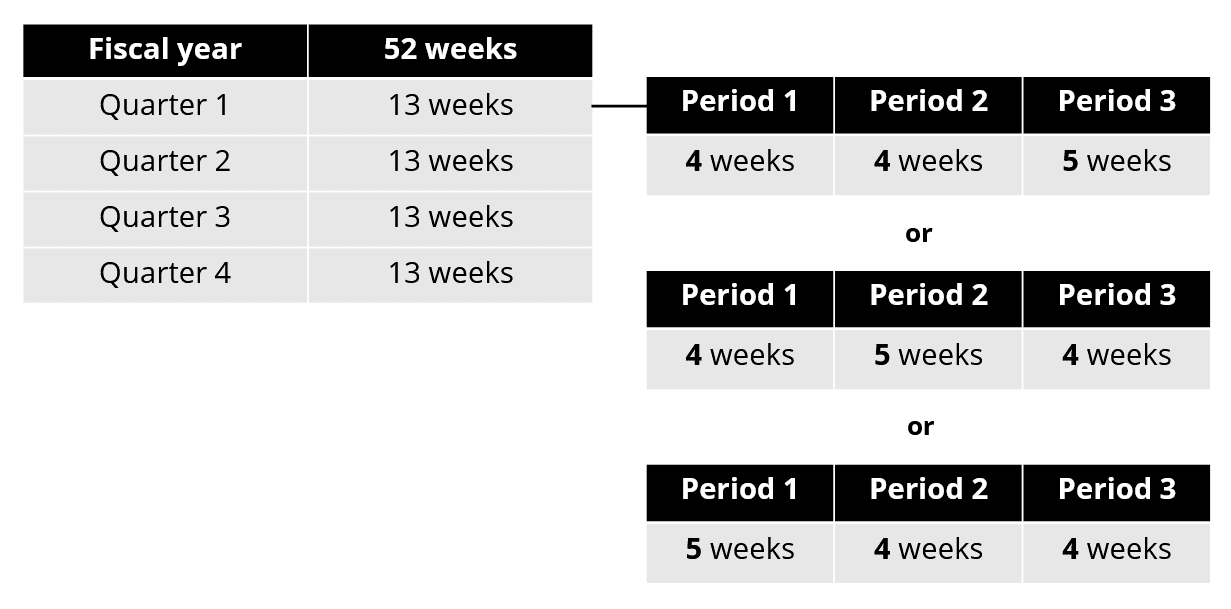
4-4-5, 4-5-4, or 5-4-4: In these quarter-based formats, each quarter has 13 weeks. Within a quarter, these 13 weeks are spread across 3 periods. The number of weeks in these three periods gives the names of these formats: 4-4-5, 4-5-4, and 5-4-4.
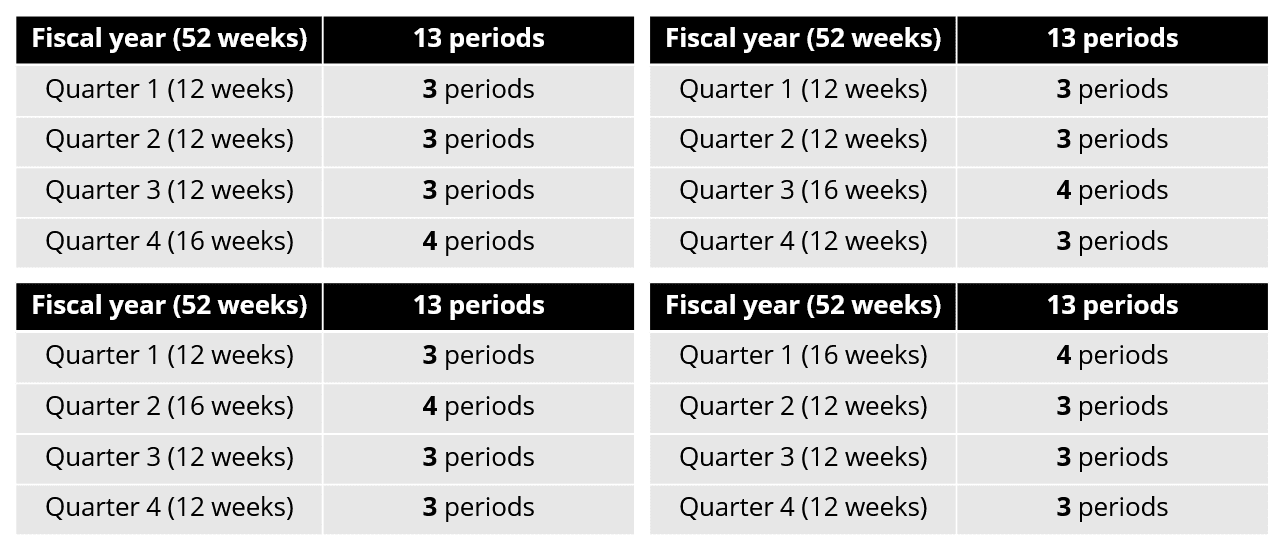
3-3-3-4, 3-3-4-3, 3-4-3-3, or 4-3-3-3: In these year-based formats, each period consists of 4 weeks. A fiscal year consists of 13 such periods. These periods are distributed across 4 quarters in 3-3-3-4, 3-3-4-3, 3-4-3-3, and 4-3-3-3 formats. The names indicate the number of periods in each of those four quarters.
What's changed?
Choose your fiscal year type
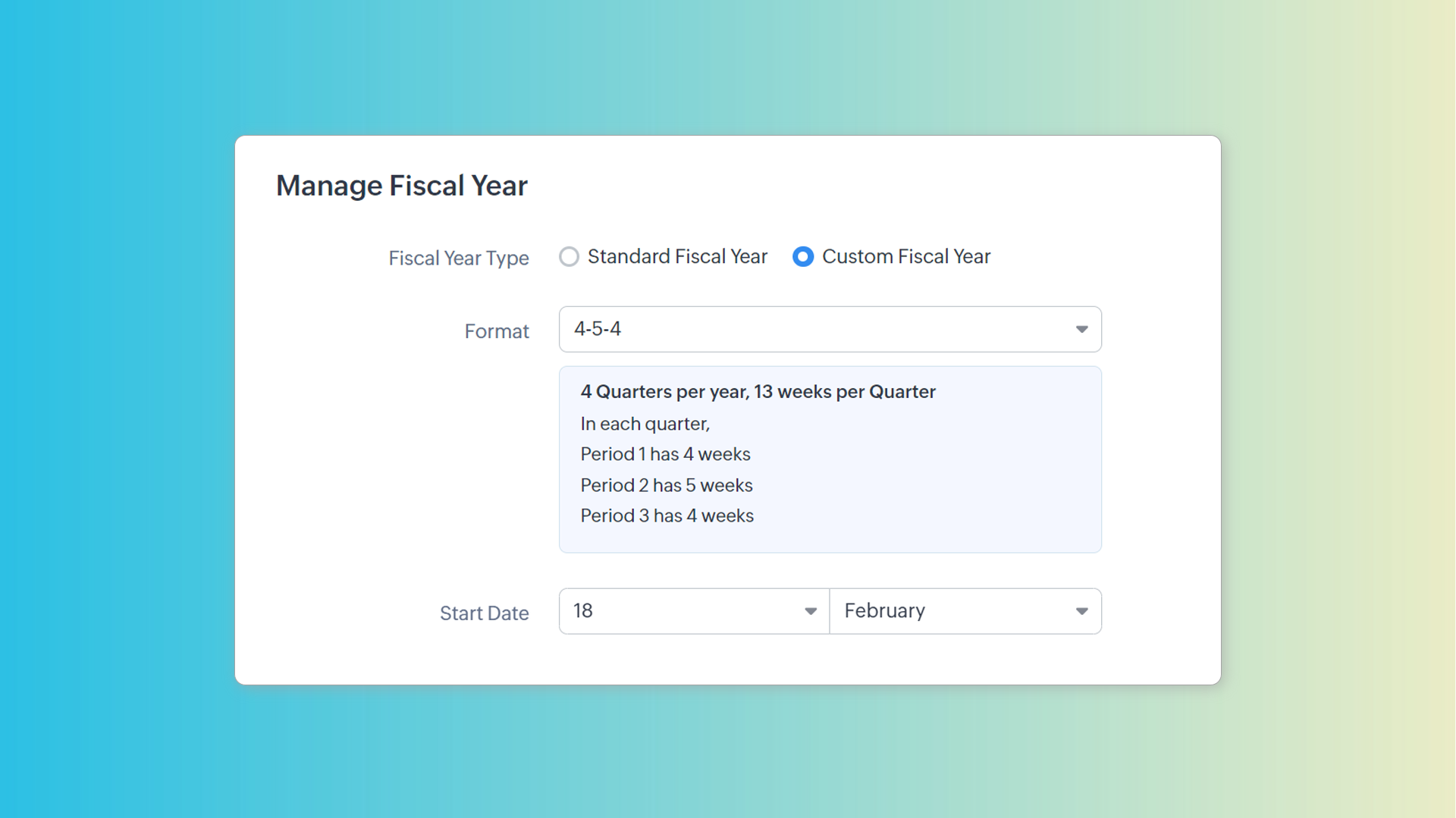
A new option called Custom Fiscal Year will be available on the Fiscal Year tab. The previous option of choosing the starting month and following the Gregorian calendar will be available under the Standard Fiscal Year option.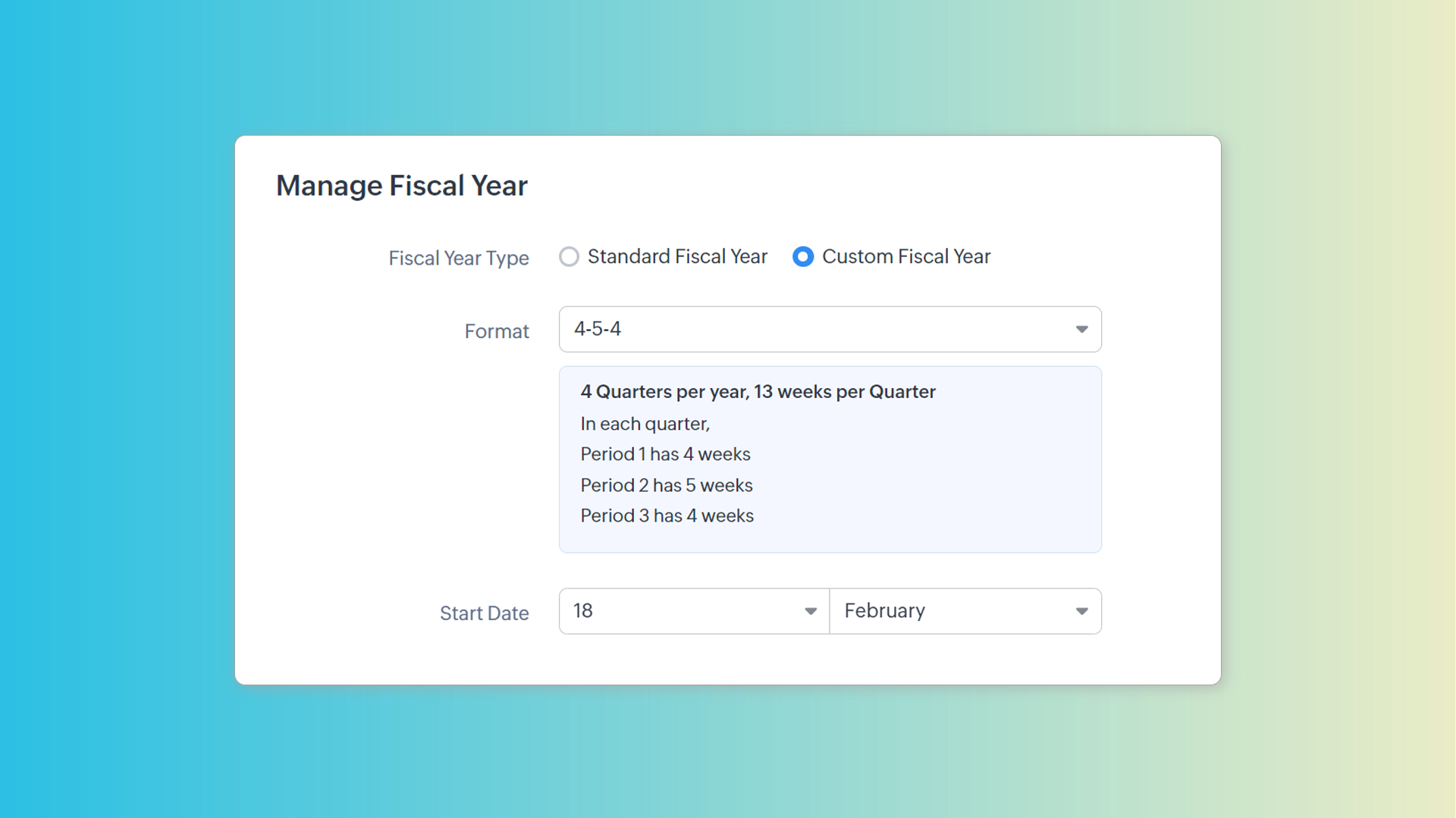
Pick a format and start date that works for you
You can choose one of the seven formats we'd described before. The preview section tells you what each format means in terms of quarters, periods, and weeks.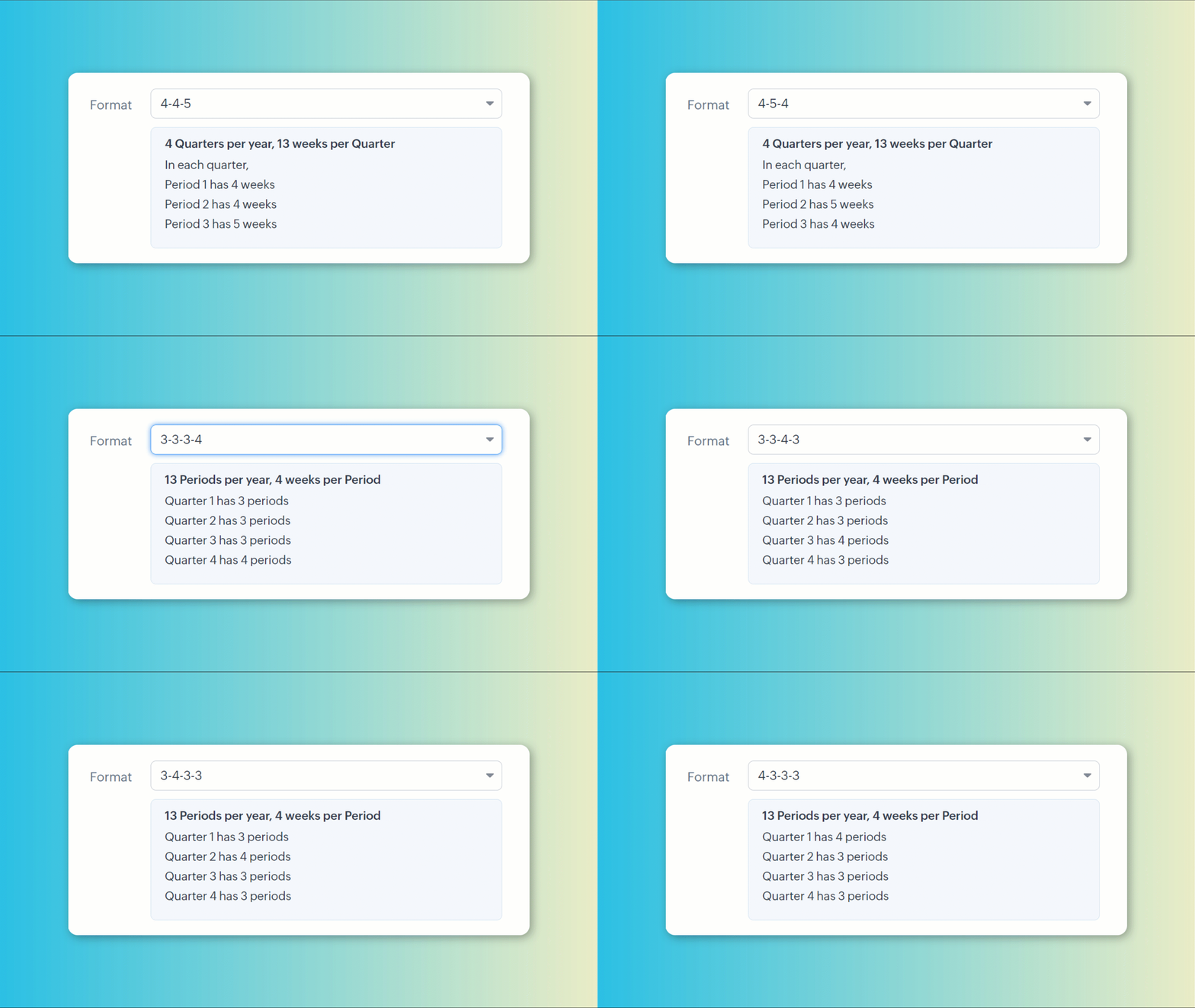
A start date can be set to precisely align your CRM's fiscal year to your organization's calendar.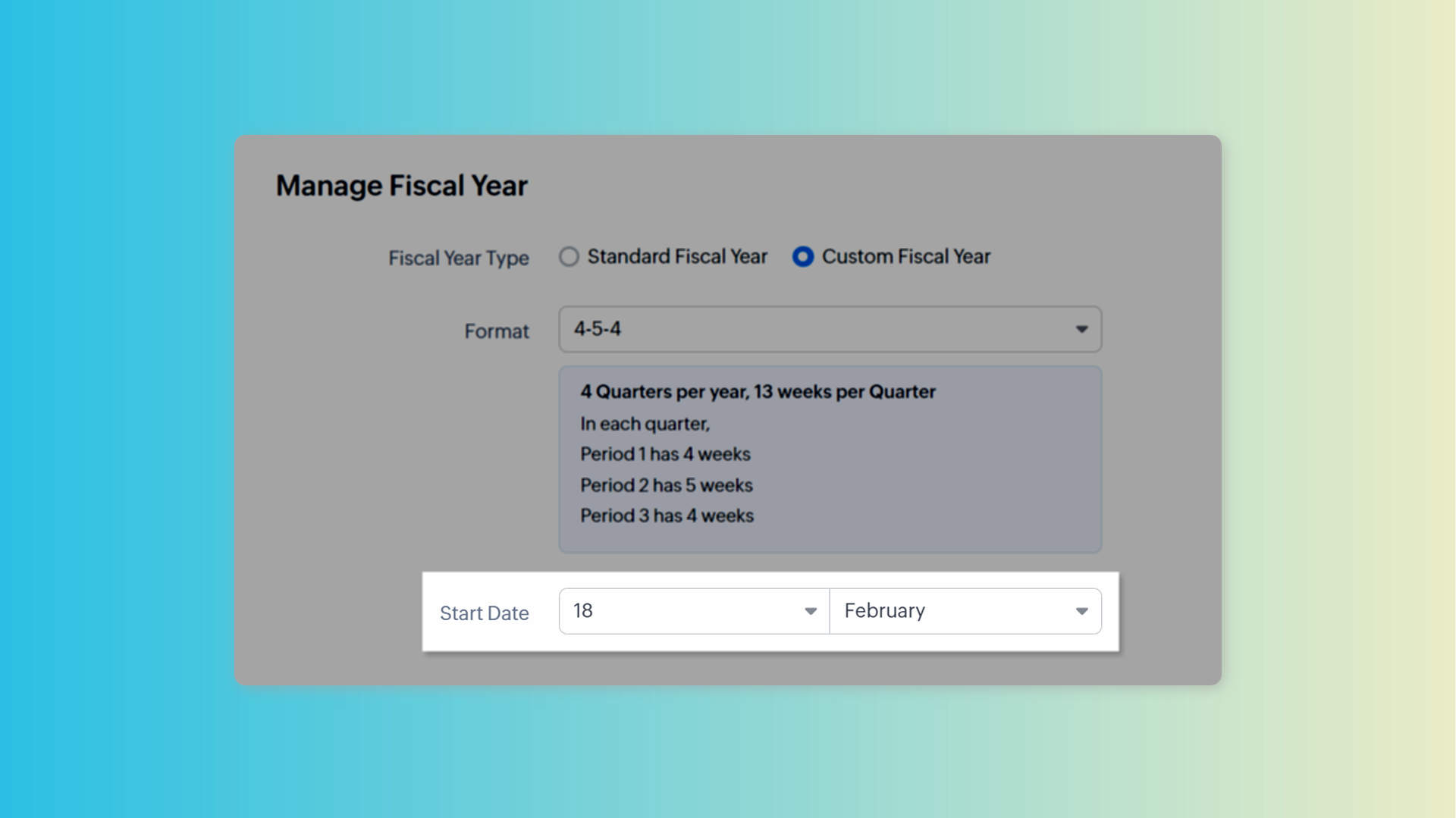
Check your fiscal year visually
You can preview in calendar to know which dates fall in which period and to get a visual representation of your fiscal year. If you're not satisfied, you can change the pattern and check the preview again.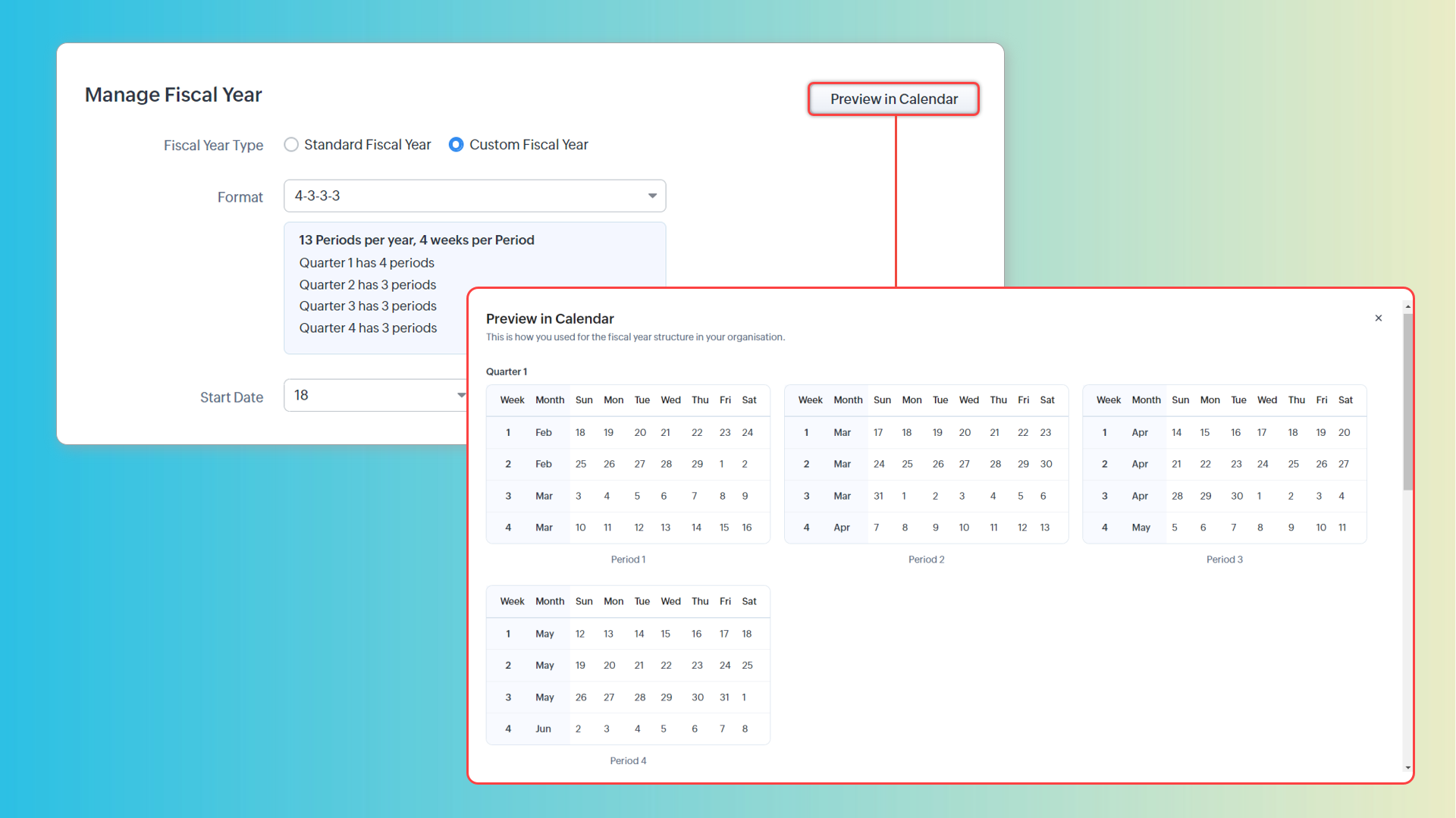
Configure display options
You can also choose how you want the fiscal periods to be displayed in CRM.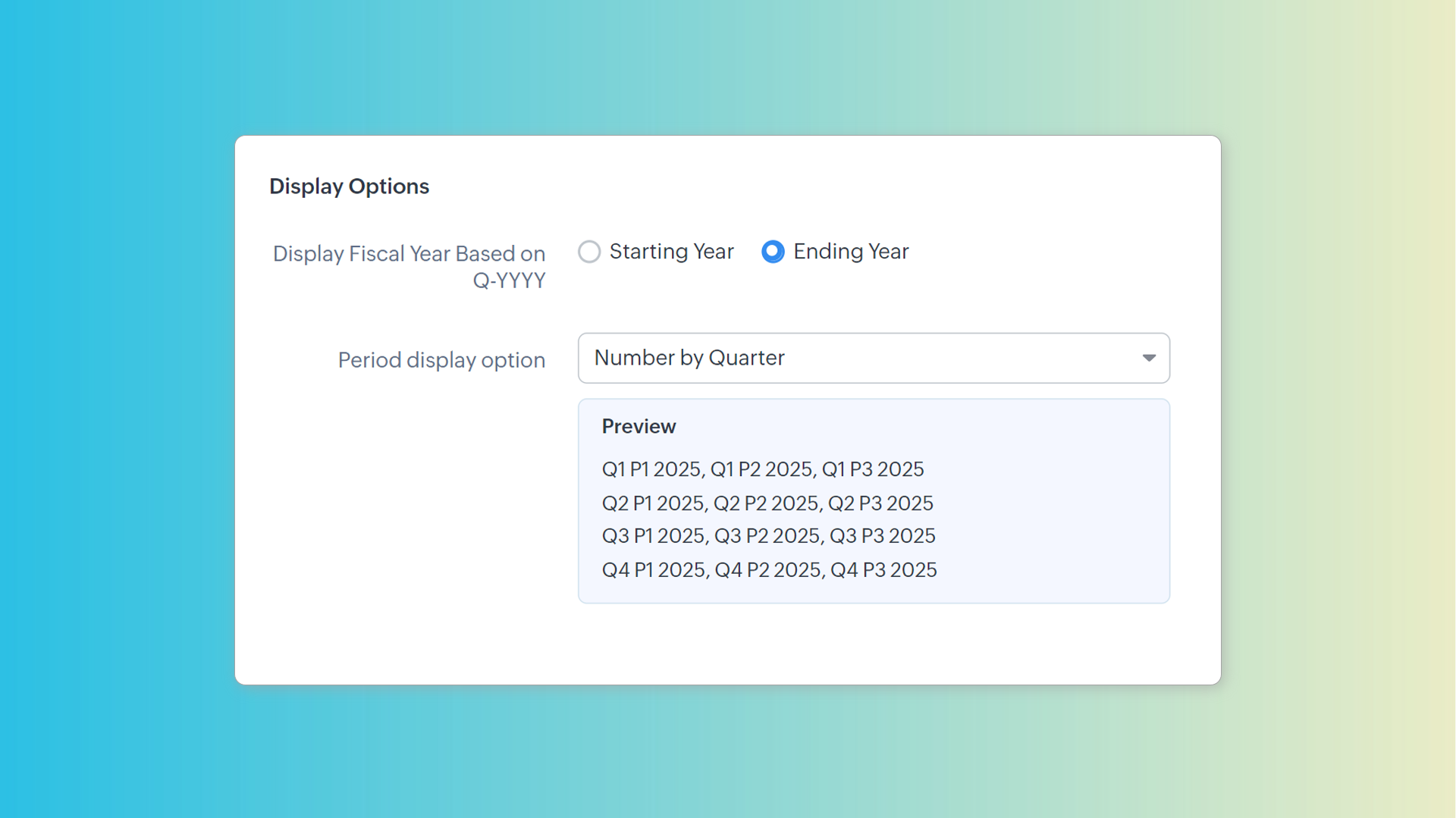
Manage the surplus week
Since these formats split the year into 52 weeks (364 days), there is always a slip of a day each year. Depending on your needs, you may need to add an extra week to a financial period. For example, you may need to do this if you want your fiscal year to begin on the first Monday of April always. You can add an extra week to any of the upcoming fiscal periods to correct for this.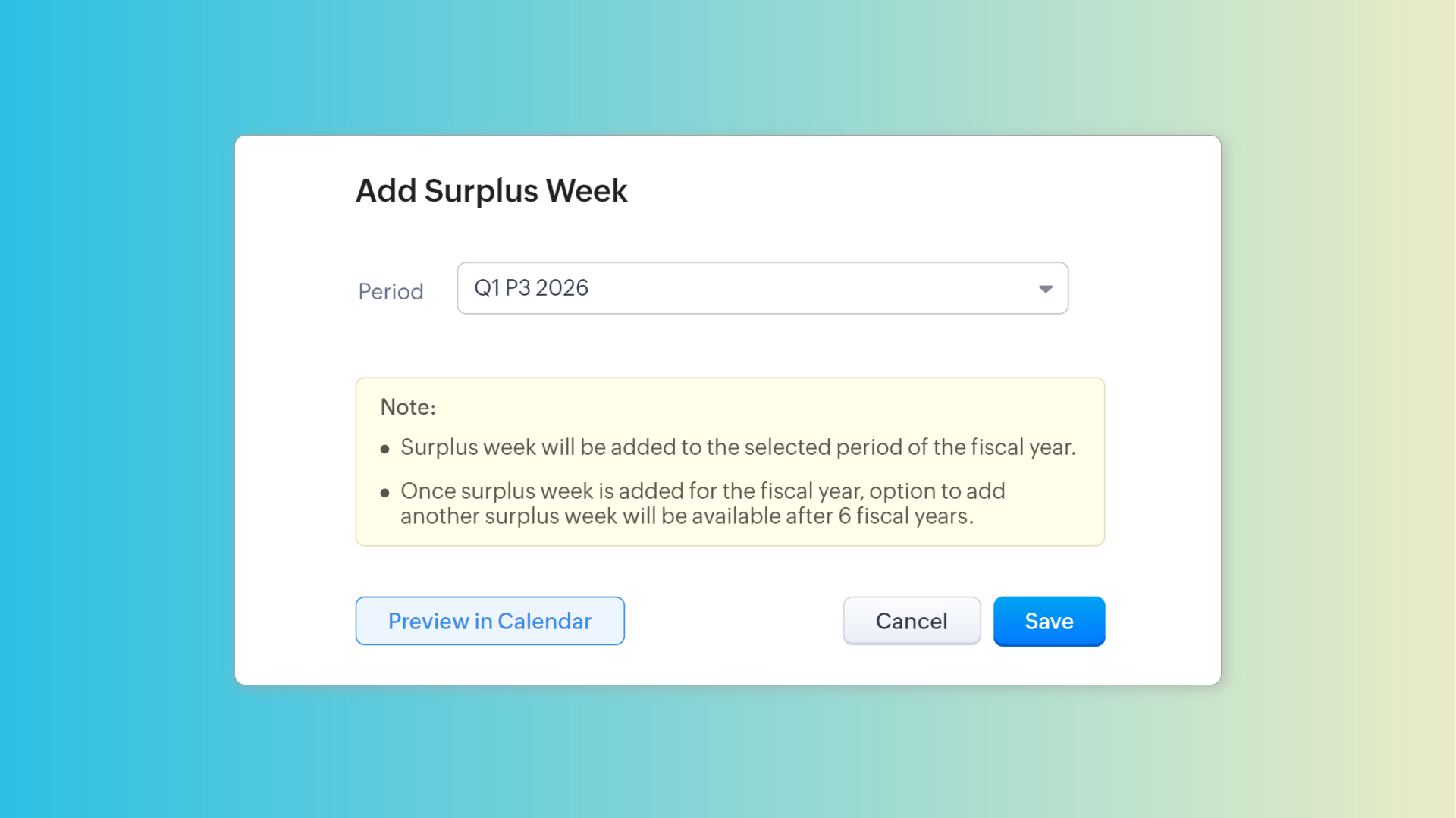
Track fiscal year changes
You can also view the history of fiscal year changes in the Fiscal Year tab. For entries with custom fiscal year formats, you can preview them in calendar.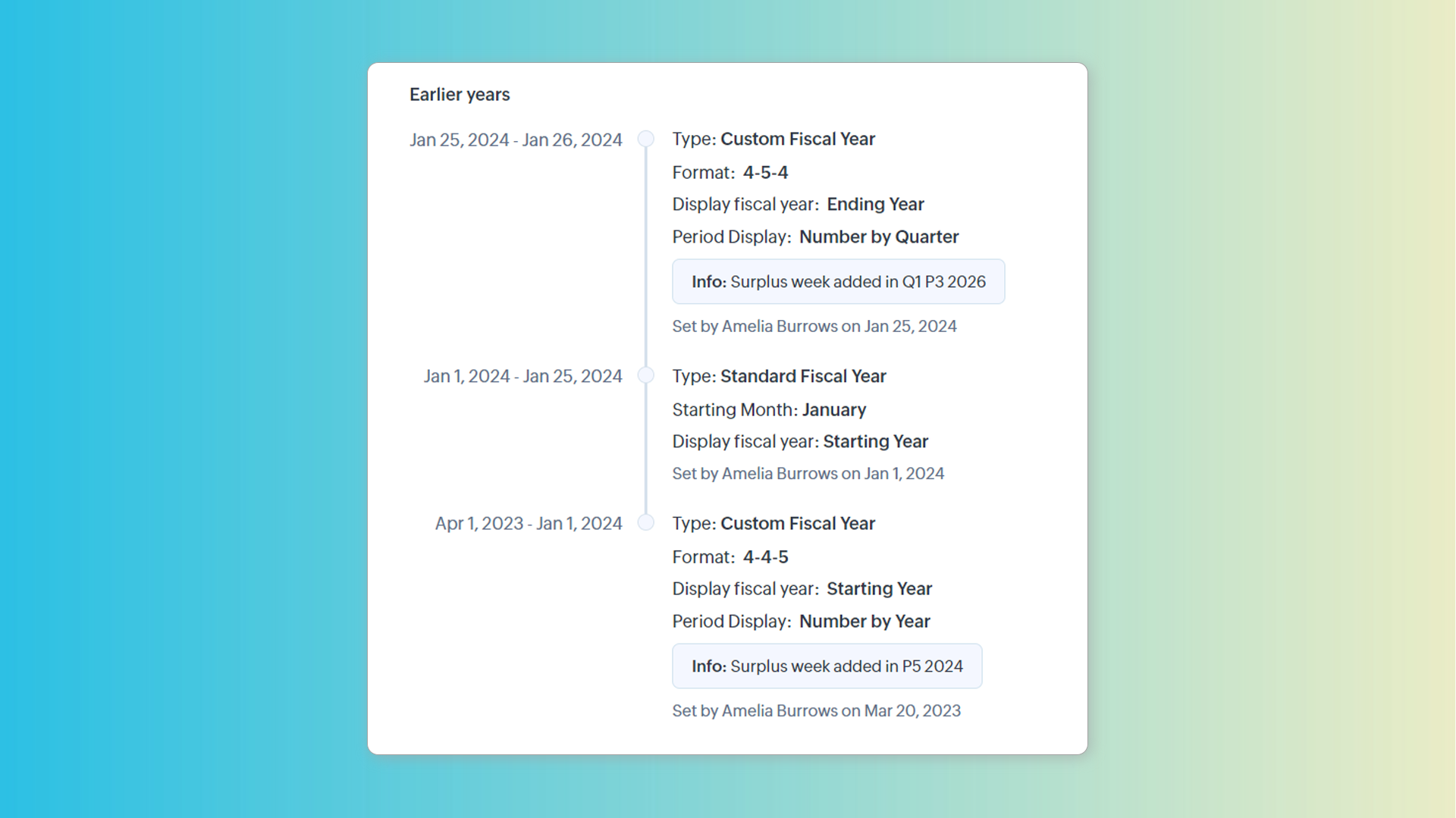
Custom fiscal year and forecasts
Once set, fiscal years can be managed only from the Fiscal Year page. Previously, it was managed in the Forecast Configuration page. Once a custom fiscal year is chosen, we can create forecasts based on quarters or periods. The Monthly option will be replaced by the Periodly option.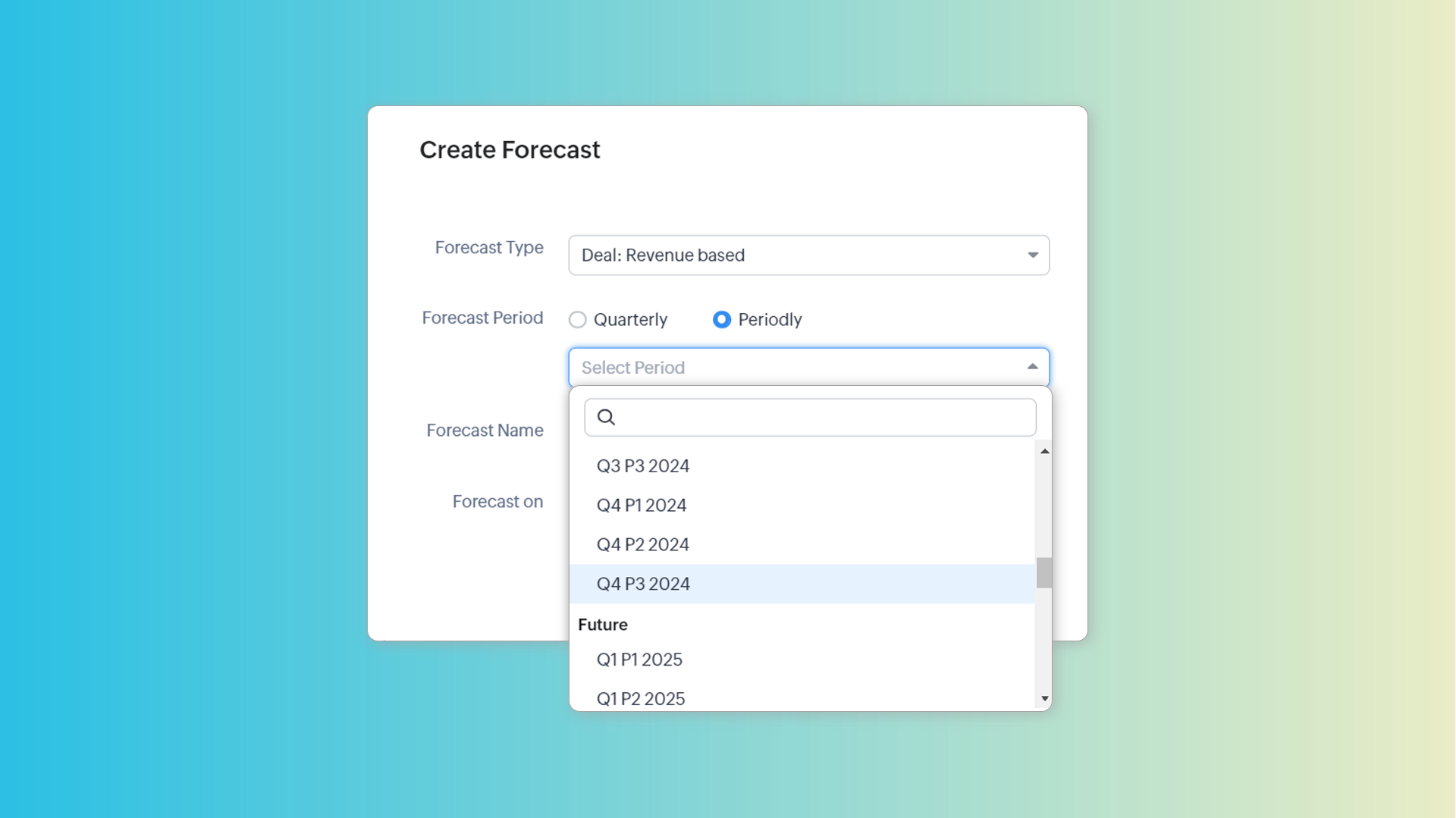
Note: Changing the fiscal year type will delete all existing forecasts.
To learn more about custom fiscal year, see: Set up fiscal year in Zoho CRM.
Zoho Campaigns Resources





Topic Participants
Kiran Karthik P
Donna Waterman
Pheranda Nongpiur
Sticky Posts
Good news! Calendar in Zoho CRM gets a face lift
Dear Customers, We are delighted to unveil the revamped calendar UI in Zoho CRM. With a complete visual overhaul aligned with CRM for Everyone, the calendar now offers a more intuitive and flexible scheduling experience. What’s new? Distinguish activitiesVoC in Zoho CRM is now data savvy: Explore response drilldown, summary components and participation in CRM criteria
VoC has all the goods when it comes to customer intelligence—which is why we're constantly enhancing it. We recently added the following: A customer drilldown component that shows you the list of prospects and customers behind a chart's attribute ExpandedWrapping up 2025 on a high note: CRM Release Highlights of the year
Dear Customers, 2025 was an eventful year for us at Zoho CRM. We’ve had releases of all sizes and impact, and we are excited to look back, break it down, and rediscover them with you! Before we rewind—we’d like to take a minute and sincerely thank youPresenting ABM for Zoho CRM: Expand and retain your customers with precision
Picture this scenario: You're a growing SaaS company ready to launch a powerful business suite, and are looking to gain traction and momentum. But as a business with a tight budget, you know acquiring new customers is slow, expensive, and often deliversCreate and populate a record in an instant: Introducing zero-shot field prompting to Zia's ICR
A couple of months ago, we upgraded our in-house AI image detection and validation tool, Zia Vision, with intelligent character recognition (ICR). By training Zia with sample images, you could create and enrich CRM records with data extracted from standard
Zoho CRM Plus Resources
Zoho Books Resources
Zoho Subscriptions Resources
Zoho Projects Resources
Zoho Sprints Resources
Zoho Orchestly Resources
Zoho Creator Resources
Zoho WorkDrive Resources


Zoho CRM Resources
Get Started. Write Away!
Writer is a powerful online word processor, designed for collaborative work.
-
オンラインヘルプ
-
Webセミナー
-
機能活用動画
-
よくある質問
-
Ebook
-
-
Zoho Campaigns
- Zoho サービスのWebセミナー
その他のサービス コンテンツ
ご検討中の方
Recent Topics
What’s New in Zoho Inventory | April 2025
Hello users, April has been a big month in Zoho Inventory! We’ve rolled out powerful new features to help you streamline production, optimise stock management, and tailor your workflows. While several updates bring helpful enhancements, three major additionsPass current date to a field using Zoho Flow
I am trying to generate an invoice automatically once somebody submits a record in Zoho CRM. I get an error in the invoice date. I have entered {{zoho.currentdate}} in the Date field. When I test the flow, I get "Zoho Books says "Invalid value passedAPI: Mark Sales Order as Open + Custom Status
Hi, it's possible to create Custom Status (sub-status actually) states for the Sales Order. So you have Open, Void. Then under Open you can have Open, and create one called Order Paid, Order Shipped, etc etc...which is grouped under Open. I can use theTip 26: How to hide the "Submit" button from a form
Hi everyone, Hope you're staying safe and working from home. We are, too. By now, we at Zoho are all very much accustomed to the new normal—working remotely. Today, we're back with yet another simple but interesting tip--how to hide the Submit button from your forms. In certain scenarios, you may want to hide the submit button from a form until all the fields are filled in. Use case In this tip, we'll show you how to hide the Submit button while the user is entering data into the form, and thenHow do I move Notes around within a Group?
It says here: " You can now sort notes by title (alphabetically), or by date modified and date created. You can even organize your notes by dragging and dropping them into a particular order. To sort your notes, simply go to Settings and tap “Sort By.” Please note: all sort settings will be saved and synced across devices, except for custom sorting. Custom sorting will be device specific."However, I am unable to 'custom sort' in either Notebook for Mac or on the Web. In addition, I can't find theZoho Sign: need to leave document pending for up to a year, or maybe there's a better way?
I have zoho one, maybe there's a better way to do this with another service than sending a zoho sign template from zoho crm. At the end of the day this requirement is due to regulations, no matter how dumb it may seem. I'm just looking for a way of gettingUnable to edit or delete email address
I signed up for free Zoho today. I usually am pretty good at understanding and configuring things like this, but your interface baffles me, and your online help is cryptic to say the least. I have spent hours just trying to set up a couple of email accounts in Zoho before pointing my domain MX records to Zoho. I solved some other issues on my own, but I can't figure out this latest problem: I have created two email addresses in Zoho. Let's call the first one myname@mydomain.com and the second oneMastering Zia Match Scores | Let's Talk Recruit
Feeling overwhelmed by hundreds of resumes for every job? You’re not alone! Welcome back to Let’s Talk Recruit, where we break down Zoho Recruit’s features and hiring best practices into simple, actionable insights for recruiters. Imagine having an assistantWe are unable to process your request now. Please try again after sometime or contact support@zohoaccounts.com
I cannot sign up and return the error of we are unable to process your request now. Please try again after sometime or contact support@zohoaccounts.comMulti-currency - What's cooking ?
Hi, We have been doing this feature for sometime and we would like to give you some glimpses of it. Working with Multi Currency : Multicurrency support gives you the ability to handle business transactions in multiple currencies. You can define a base currency for your organization and add more currencies with exchange rates based on the base currency. Setup : From the setup page, you can manage all the currencies supported by your organization. Currencies pageHow to reduce programmatically the image uploaded by user?
I need a function that will automatically reduce the pixel dimension to 800 x 600 pixels / 180 resolution or (approx. 1.37MB) of image uploaded by user from digital camera, for example, 2271 x 1704 pixels /180 resolution or approx. 11.1MB. After the user selected the image, the function will able to detect if pixels is above 800x600, process the photo (crop/ reduce) and resume upload. Need help...Dark mode for Zoho Creator / Zoho CRM Code editor
Hi Team, Is there any plans for Dark mode in Zoho creator / Zoho Crm code editor and development pages in pipeline?ZOHO Android Client
Hi, I installed the Android app, but it had an issue, so I reinstalled it. I was able to add multiple accounts, but now when I add the next account, it just duplicates the one I already have and will not even allow me to enter the info for another account.I'd like to suggest a feature enhancement for SalesIQ that would greatly improve the user experience across different channels.
Hello Zoho Team, Current Limitation: When I enable the pre-chat form under Brands > Flow Controls to collect the visitor’s name and email, it gets applied globally across all channels, including WhatsApp, Messenger, and Instagram. This doesn't quite alignEnhance Barcode/QR Code scanner with bulk scanning or continuously scanning
Dear Zoho Creator, As we all know, after each scan, the scanning frame closes. Imagine having 100 items; we would need to tap 100 times and wait roughly 1 second each time for the scanning frame to reopen on mobile web. It's not just about wasting time;Managing Rental Sales in Zoho Inventory
I am aware that Zoho Inventory is not yet set up to handle rental sales and invoicing. Is anyone using it for rentals anyway? I'd like to hear about how others have found work arounds to manage inventory of rental equipment, rental payments, etc. ThZoho Flow to Creator 3001 Respoonse
I have updated my Flows with the new V2 connection to Zoho Creator, but now some Flows do not work. They take in data from a Webhook and are supposed to create a record in Creator, however creator returns a 3001 message along with a failure, but I cannotFile Upload to Work Drive While Adding Records in Zoho Creator Application
Hi I am trying to set a file attachment field in zoho creator form, to enable the user to upload a scanned document from their local pc. The file should be uploaded to zoho workdrive and not to the default zoho creator storage. The file link should beWhy not possible to generate?
Using this https://desk.zoho.com/DeskAPIDocument#TicketCount#TicketCount_Getticketcountbyfield on my ZML script url :"https://desk.zoho.com/api/v1/ticketsCountByFieldValues?departmentId=XXXXXXXXXXX&accountId!=XXXXXXXXX&customField1=cf_country_1:XXXXXX&field=overDue"email
Hi My crm email is not working, can you check, I have zoho one account.Need option to see Mass Emails & Cadences in Gmail Outbox OR a dedicated Zoho Outbox
Hi everyone, Right now, when we send 1:1 emails from gmail (with gmail API connected to Zoho CRM), those emails appear both in gmail's sent folder and in Zoho CRM. That works well. But when we send Mass Emails or Cadence emails form Zoho CRM, they areI can't found API for Sales Receipts
Hello May you please help me to find an API document for Sales Receipts to get data and retrive a custom fields like Invoice and credit notes RegardsKaizen #205 - Answering Your Questions | Managing Picklists and Enabling History Tracking via Zoho CRM APIs
Hello everyone! Welcome back to another post in our Kaizen series. In this post, we will look at how you can manage picklist fields in Zoho CRM using APIs. This topic was raised as feedback to Kaizen #200, so we are taking it up here with more details.Internally created tickets
Hi there When tickets are created internally on-behalf of customers - there is nothing to show that the ticket was created by an internal agent. This means, that it's easy for our agents to confuse tickets which were created by internal team members andAutomatically change website passwords
Hi everyone, We just switched to a Professional package to also use the "Automatically change website passwords" function. But I cannot find anything about it, how to use it, anywhere. Does anyone know how I can use this function? Best, CasparChange Invoice Prices for an Effective Date
Hi, It would be a really good feature to be able to change the prices on invoices/recurring invoices from an effective date in the event of price increases. For instance, I am in the process of increasing prices that will be effective from a specific"Other Current Asset" accounts as "Paid Through" accounts in Expense
It would be incredibly useful to be able to assign accounts of type Other Current Asset as Paid Through accounts in Expense. Currently, Other Current Liability are permitted as Paid Through Accounts. This makes sense, as Credit Cards are current liabilities.Multi column open text questions that allows respondents to add rows for additional information
I need to create a question that has 2 columns with open text, but I also need to allow respondents to click a "+" button, or something similar, so that they can add additional information if they choose to. I've tried using the Multiple Textboxes typeBot Filtering & Apple Mail Privacy Protection Compliance in Zoho Campaigns
Dear Campaigns Users, The wait is over! We’re excited to announce that the enhanced bot filtering feature is now live in Zoho Campaigns. This update brings greater accuracy to your email campaign reports by distinguishing real user engagement from automatedDécouvrons les détails qui simplifient vos journées de travail avec Trident
Nous nous installons dans des routines efficaces et rodées avec le temps. Chaque matin, nous ouvrons nos e-mails, passons aux messages, consultons notre agenda, puis attaquons nos tâches. Ce processus nous semble maîtrisé, mais est-il réellement optimiséIssue with Purchase Rate Showing as “0” After Importing Items List
Dear Zoho Books Support Team, Good day. I’m reaching out regarding an issue I’m facing while importing my items list into Zoho Books. Despite mapping all fields correctly and including the purchase price for each product in my Excel file, the PurchaseAPI for Task Entity in Zoho Books
I’m working on automating task creation in Zoho Books via a custom button in the Bills Module. The goal is to create a task in the Tasks Module and assign it to the Finance Team, so they can track progress efficiently. While reviewing Zoho Books documentation,create invoice in zoho books from the zoho forms
Is there a native way to have create invoice in zoho books, when zoho form is completed?Email undelivered
GOod Day I am always receiving an uncategorized-bounce to my email. I am not sure why this is happening.Add inventory_valuation_method to items endpooints
To ensure consistent item creation it would be helpful to have the inventory_valuation_method (FIFO vs WAC) be able to be set at item creation or as an update (consistent with current behavior where it is not allowed for items with existing transactions)Use Zoho to send sales receipts for Gocardless transactions
I've been using gocardless for years and have d/d mandates set up on there. Each week we get bulk payments from customer d/d's. However, we need to send sales receipts to these customers. So I know I can sync mandates into Zoho, and then I can set upZoho - Gocardless sales receipts
I've been using gocardless for years and have d/d mandates set up on there. Each week we get bulk payments from customer d/d's. However, we need to send sales receipts to these customers. So I know I can sync mandates into Zoho, and then I can set upIntroducing Rollup summary in Zoho CRM
------------------------------------------Moderated on 5th July'23---------------------------------------------- Rollup summary is now available for all organizations in all the DCs. Hello All, We hope you're well! We're here with an exciting update thatIntroducing Connected Workflows in Zoho CRM for Everyone : Free Your Teams to Focus on What Matters
Hello Everyone, We’re thrilled to introduce the next big evolution in Zoho CRM for Everyone -- Connected Workflows. This new feature builds on our commitment to deliver a CRM that’s truly inclusive, adaptable, and designed for consistent collaborationCooling-off Period Just Got Better: More Coverage, More Control
We’ve enhanced the Cooling-off Period feature in Zoho Recruit to give you more control over repeat applications and referrals. This helps you maintain a cleaner, more efficient recruitment pipeline. With this enhancement, you can: Prevent duplicate candidateNext Page