Building extensions #1: Creating, testing, and editing Zoho Projects extensions using the cloud editor
Hello!! We're happy to announce the beginning of a new series called "Building Extensions," which aims to help guide developers in creating and developing extensions for Zoho Projects. The goal of this series is to assist developers with the extension creation process, as well as to explore the features and functionalities that are available in the developer platform to build extensions for Zoho Projects.
Extensions are essentially plugins or add-ons that extend a Zoho product's existing functionality by either enhancing itsexisting features or integrating with other applications and performing third-party actions from within the Zoho product itself. Zoho offers a developer platform named Sigma, which is intended exclusively for building extensions for various Zoho products.
In our first post of this new series, we'll look at how to create, test, and edit a Zoho Projects extension. Let's take a look at each of these topics individually.
Creating an extension using the Sigma cloud editor
- Log in or sign up into developer.zoho.com.
- Go to Sigma and access your workspace.
- Once you enter your workspace in Sigma, you will be taken to the Extensions section in Sigma.
- You may either build a new extension entirely from scratch, or use one of Sigma's current templates to begin your extension development process.
- To begin creating an extension using a template, simply select the Extensions Gallery option in your workspace.
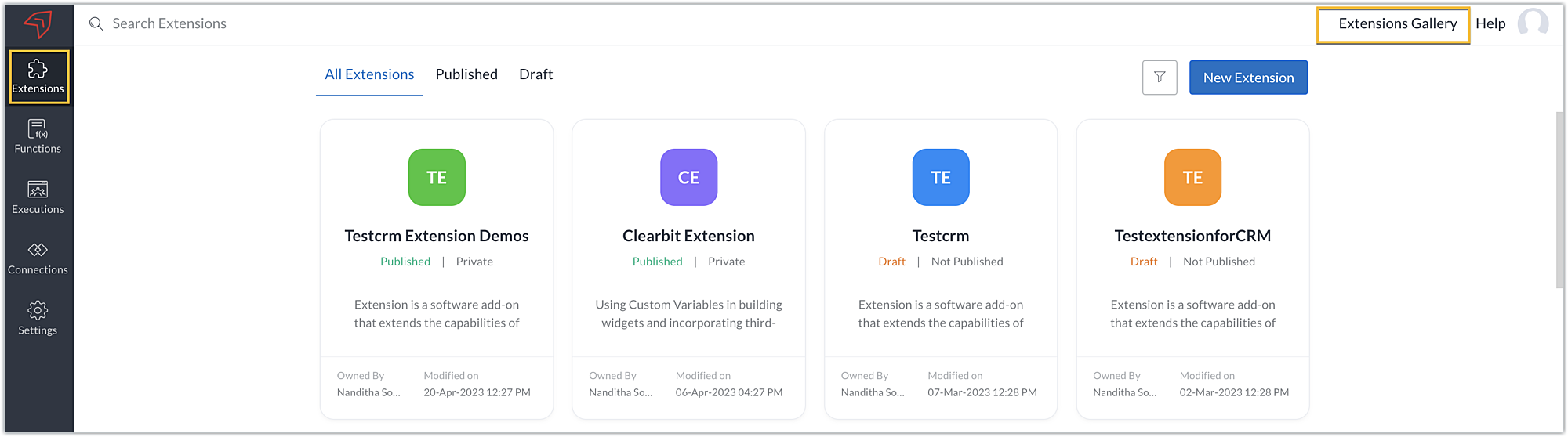
- Choose an extension from the options available in Zoho Projects to begin creating one with a template. When you select an extension, you will be taken to the Sigma cloud editor, where you will find a template for that extension.
- Alternatively, you can also start building an extension entirely on your own. To do this, click the New Extension button to start creating and building an extension.
- Enter a Name and Description for the extension. Choose the service as Zoho Projects.
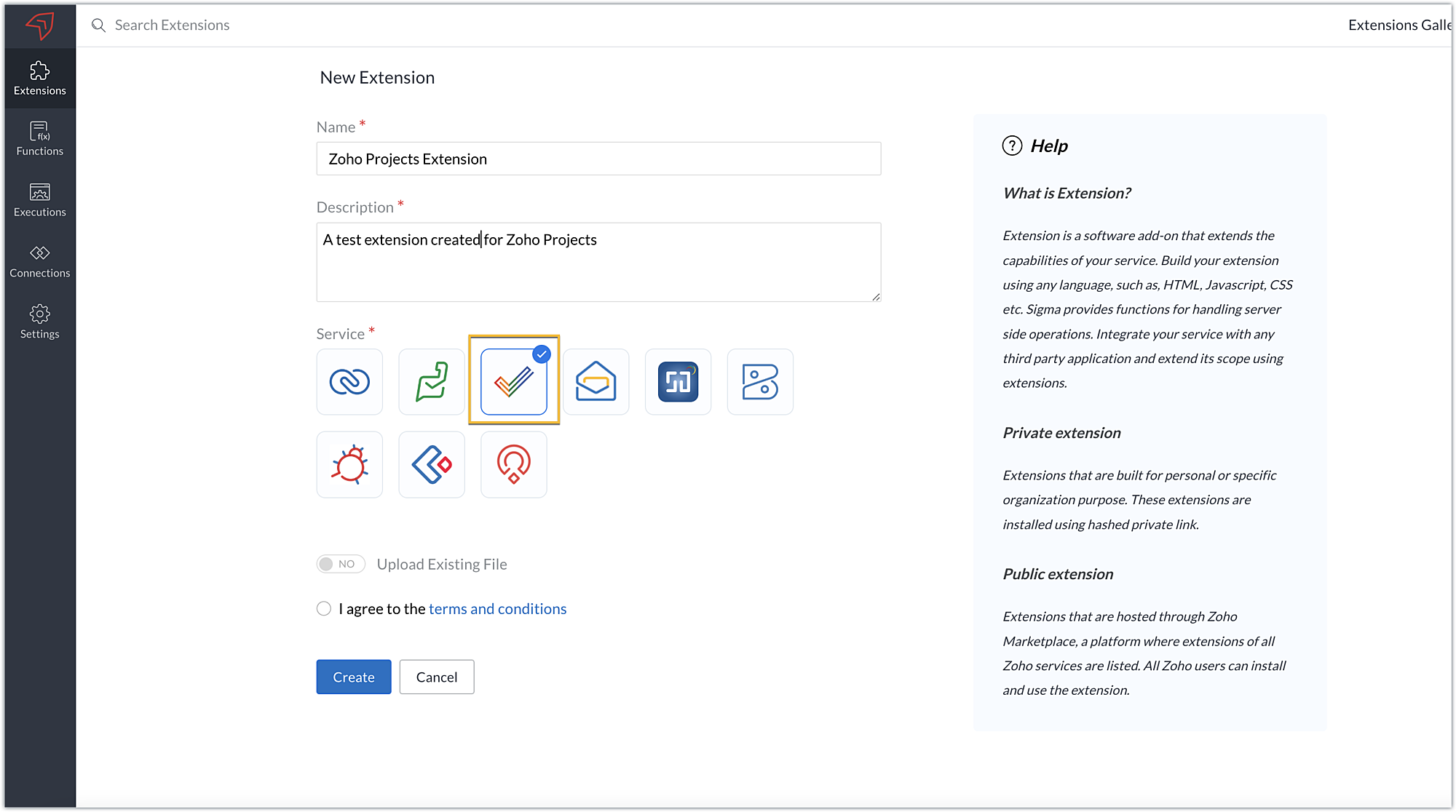
- There are two ways you can create an extension for Zoho Projects:
➤ Using the cloud editor➤ Using the command line interface (CLI)
- Toggle Upload Existing File to YES to build your extension using CLI, and NO to develop it using the cloud editor.
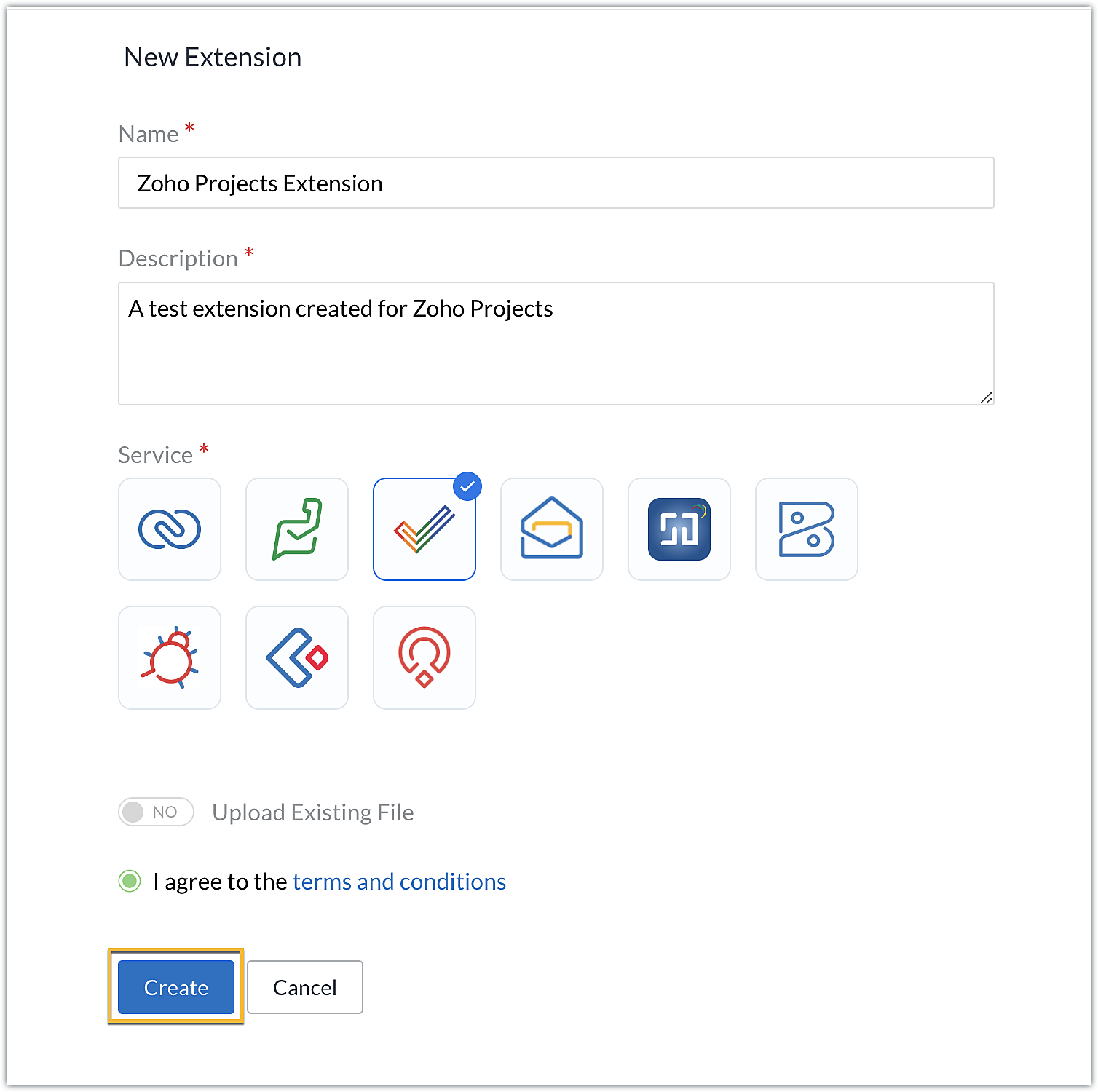
- In this post, we'll look at how to create an extension with the cloud editor. So toggle to NO, accept the terms and conditions, then click Create.
Note: We'll be exploring building extensions using CLI in our next post.
- You'll be redirected to the cloud editor for the extension you've created, where an app folder and a plugin-manifest.json file will be available by default.
- The app folder will have a defined directory structure populated automatically for the sample Zoho Projects extension. This app folder can be used to manage all of the important resources that are required for your extension.
- The plugin-manifest.json will help with the configuration of your extension. It contains a set of keys and values that determine your extension's settings.
Note: We'll go over most of these keys in detail when we get into the related feature and functionality in upcoming posts.
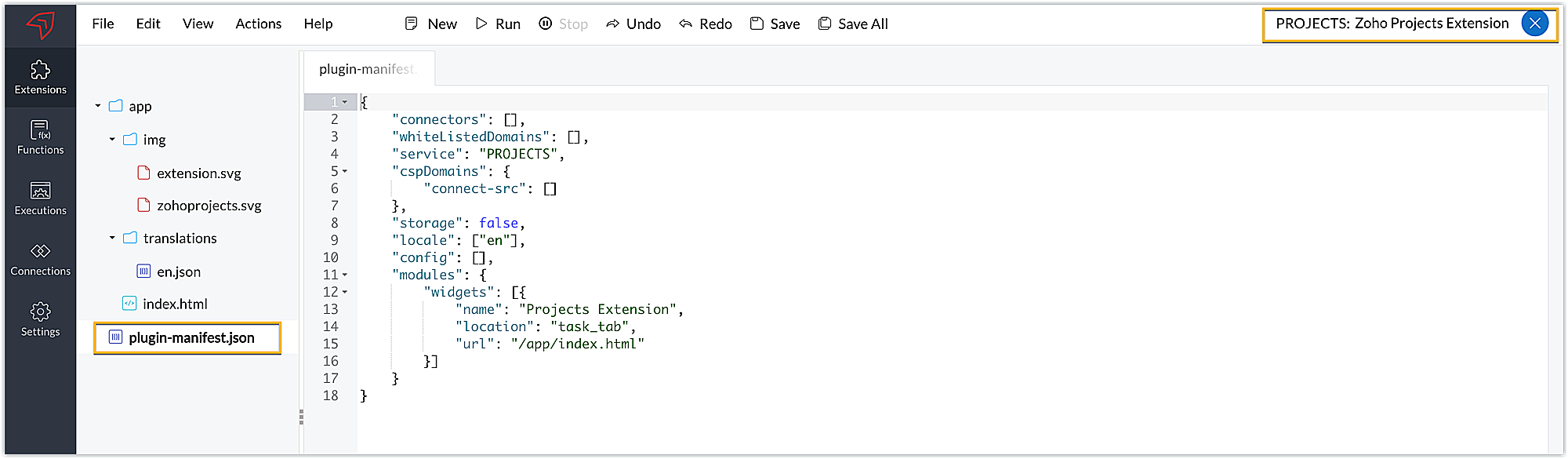
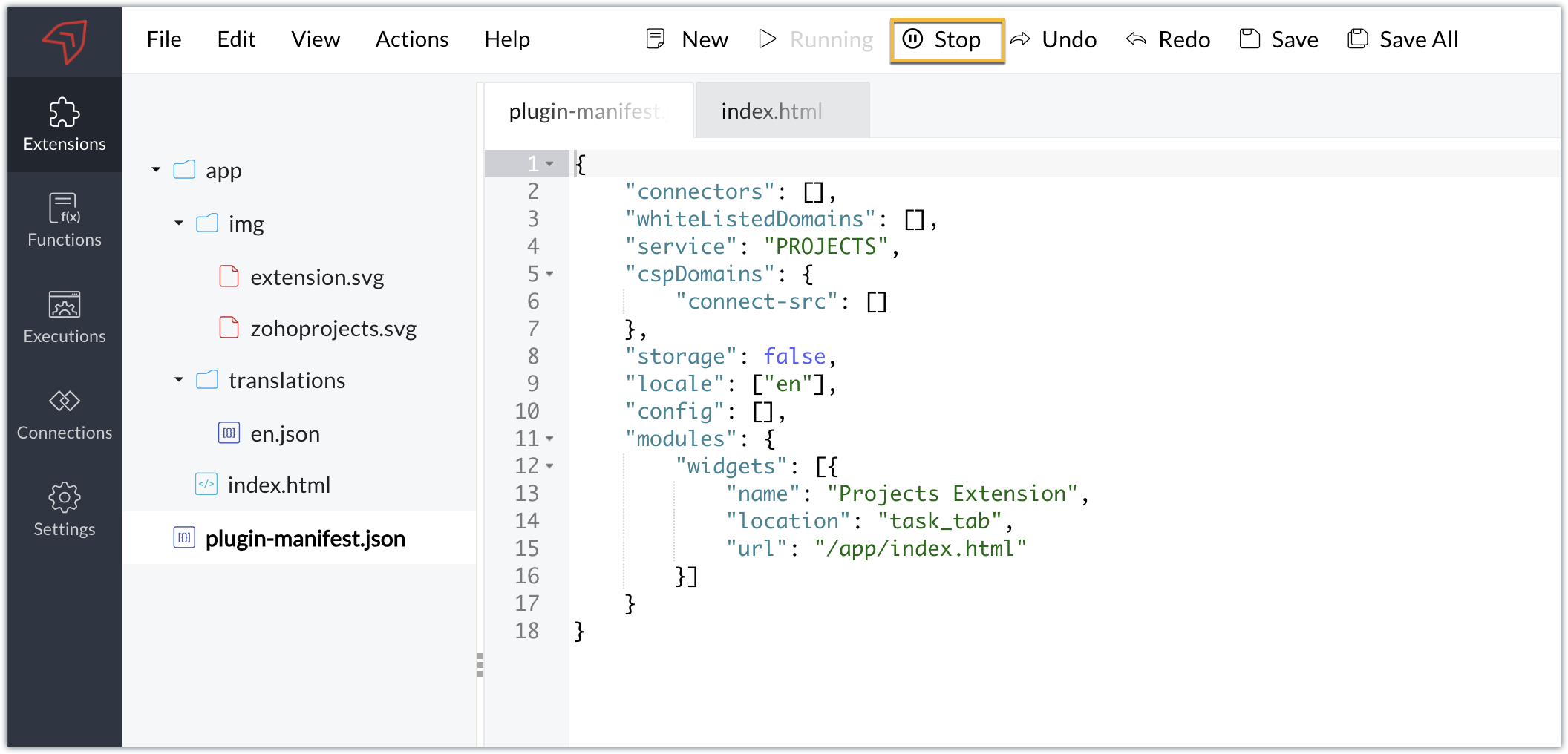
- When you examine the default plugin-manifest json file populated in the cloud editor, you'll find the widgets key being configured with these details for a default sample widget:
➤ A name key mapped with the sample widget name as "Projects Extension."➤ A location key mapped with the default location as "task_tab." This key determines the location to load thewidget. Zoho Projects supports multiple locations where you can load widgets. You can select the location based on your requirements; however, the default location is the task details tab.➤ An URL key that holds the path or location of the HTML file that will be loaded as the widget UI. By default, the path is defined as: /app/index.html.
- The cloud editor also includes a pre-populated index.html file in the app folder that will be loaded as the widget UI in the task details tab.
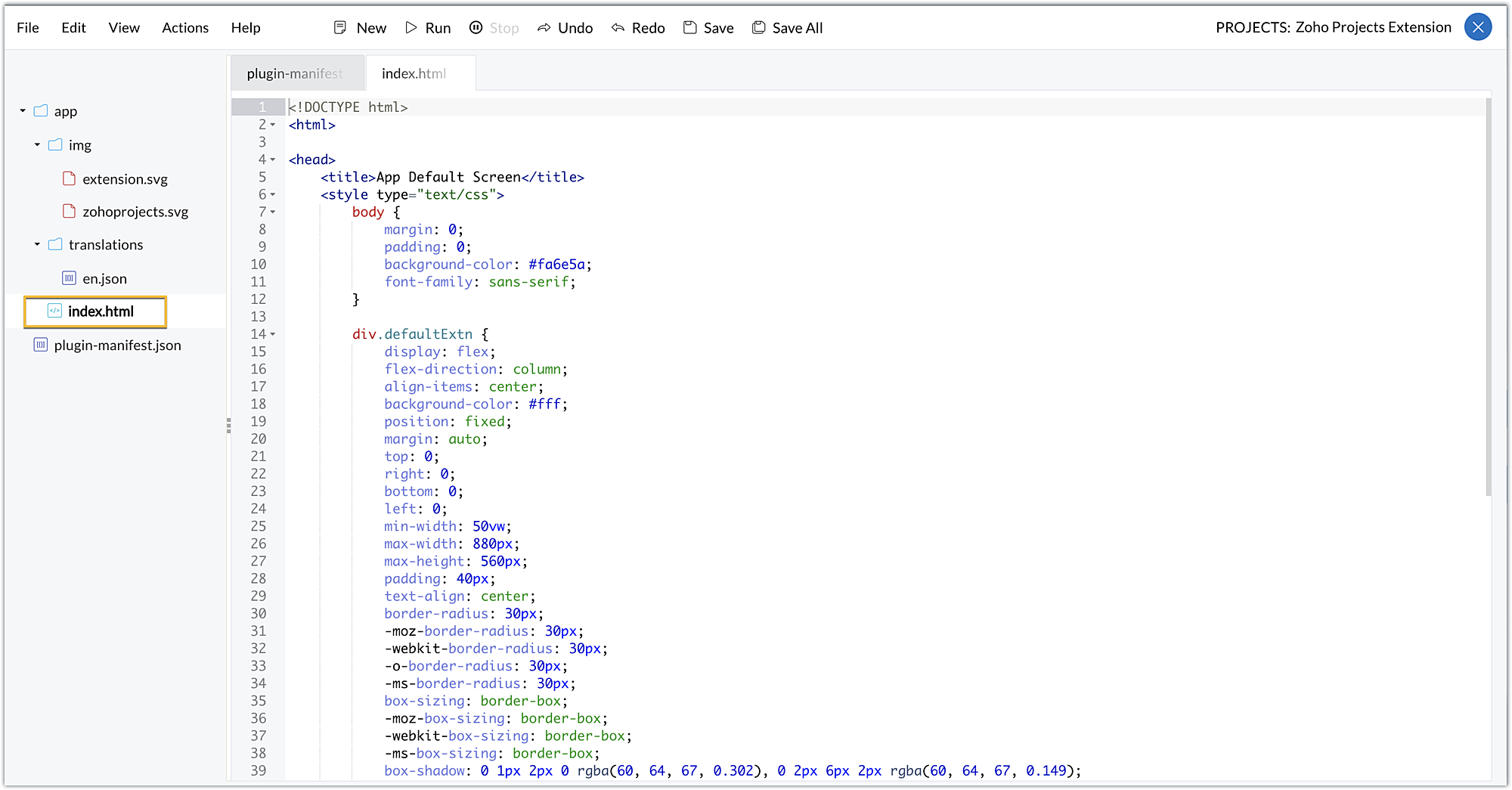
Now that we've looked at the folders and files that are created by default when an extension is created, let's now explore how you can test this extension in a testing environment.
Testing an extension using the cloud editor
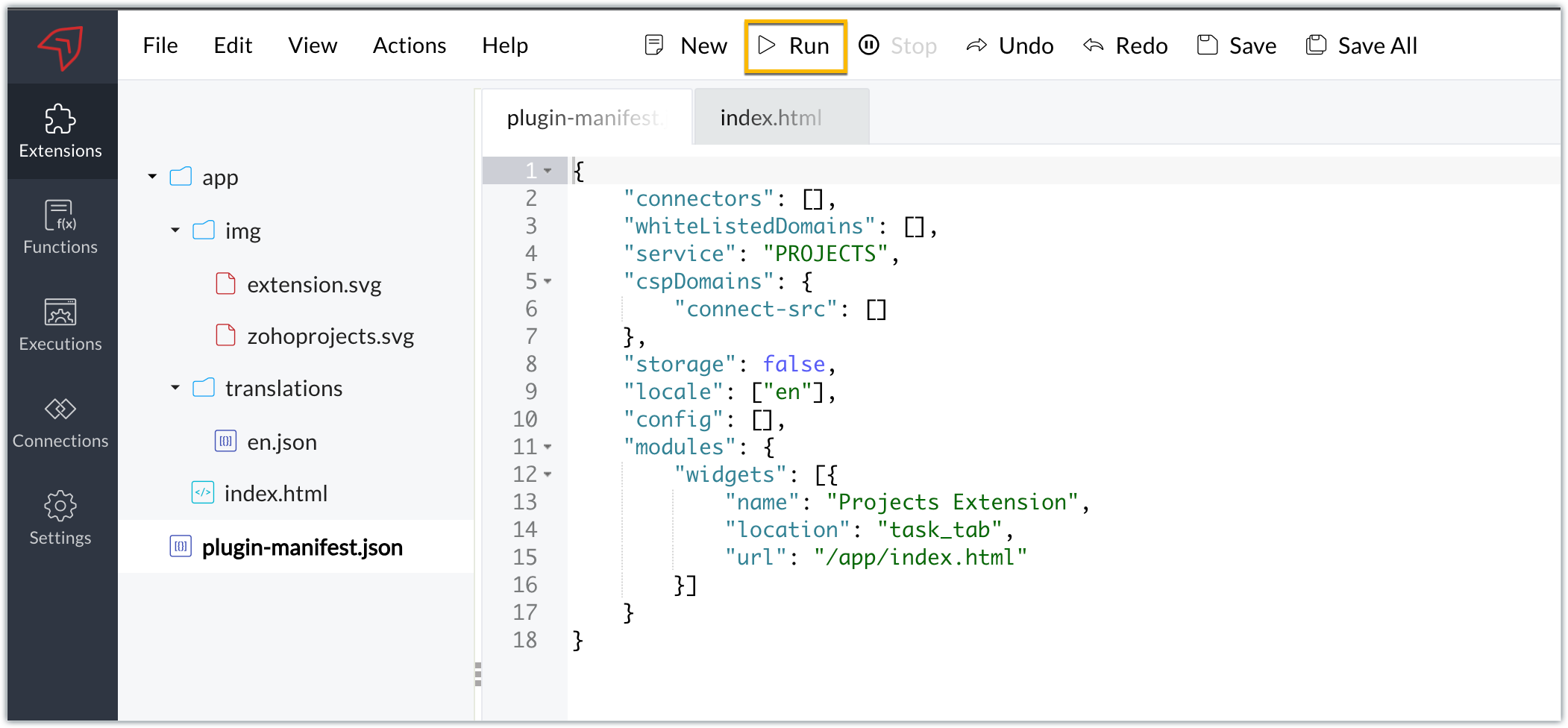
- The Sigma cloud editor allows you to test your extension functionalities in a testing environment before publishing the extensions and installing them in a Zoho Projects portal.
- To test the extension, click Run in the cloud editor.
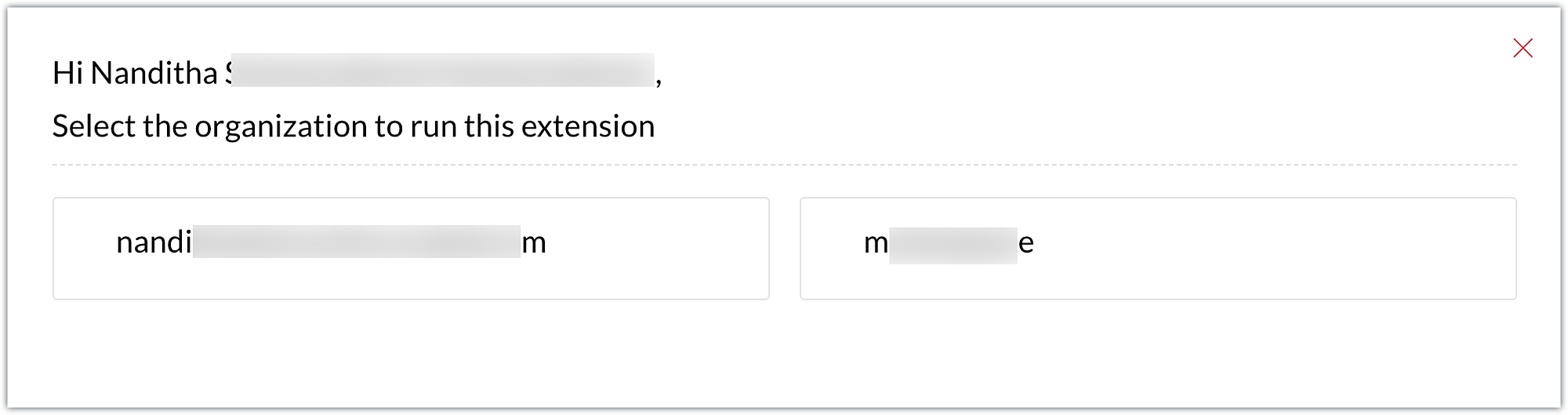
- You'll be taken directly to a specific portal in your Zoho Projects account. If you only have one portal, you'll be landing directly in that portal. If you have multiple portals, you'll be prompted to select the portal where you wish to test your extension.
Note: The extension's components (for example, widgets) can be tested in the portal by selecting the Run option; however, no instance of the component will be reflected on the portal until the extension is published and installed in that portal.
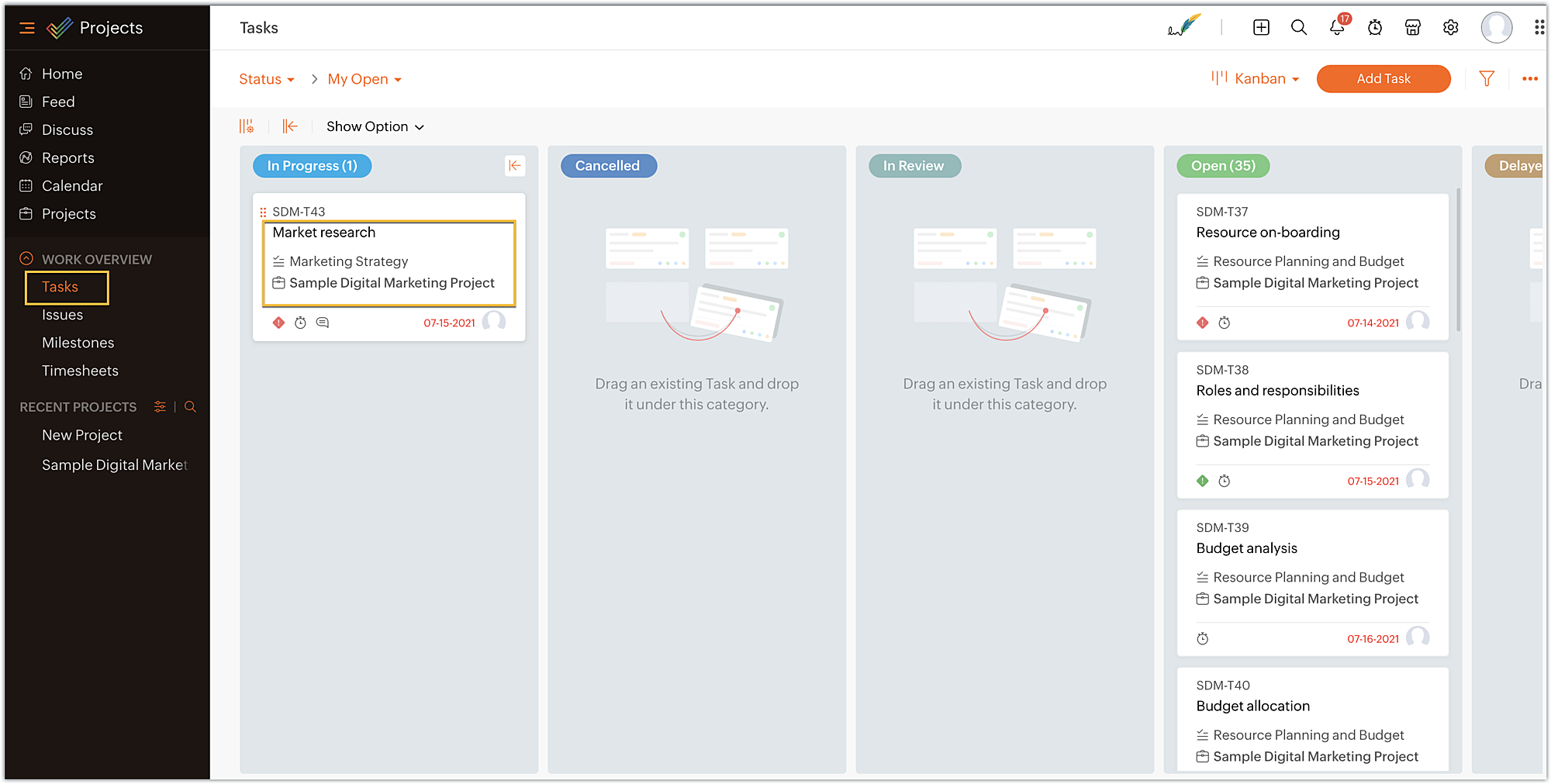
- Once you've entered the testing environment, click on a task to enter the task details page, because the extension you've created has a sample widget named Projects Extension in the task details tab.
- On the task details page, you can view the widget named Projects Extensions as an individual task tab. Click on the Projects Extensions tab.
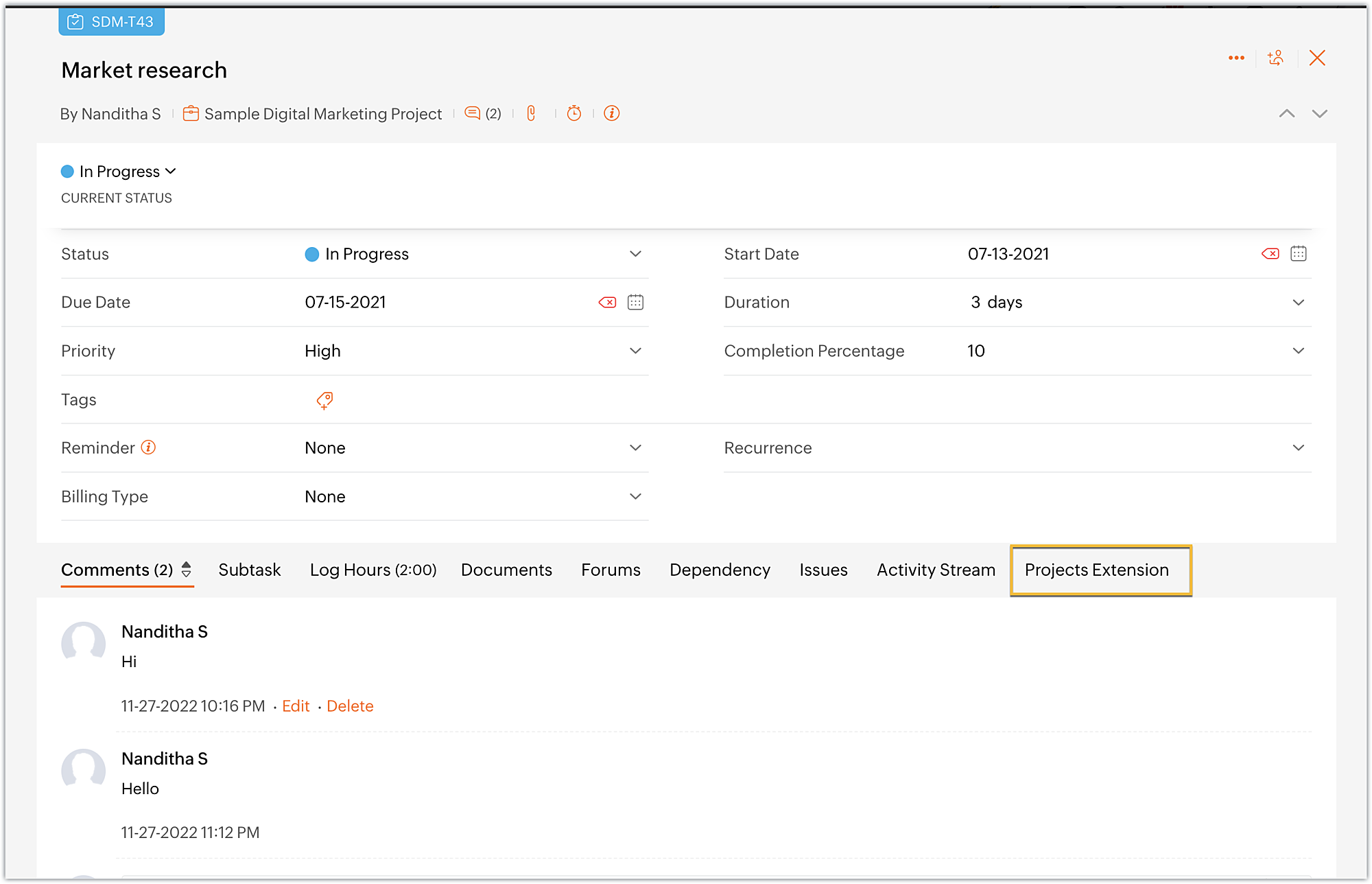
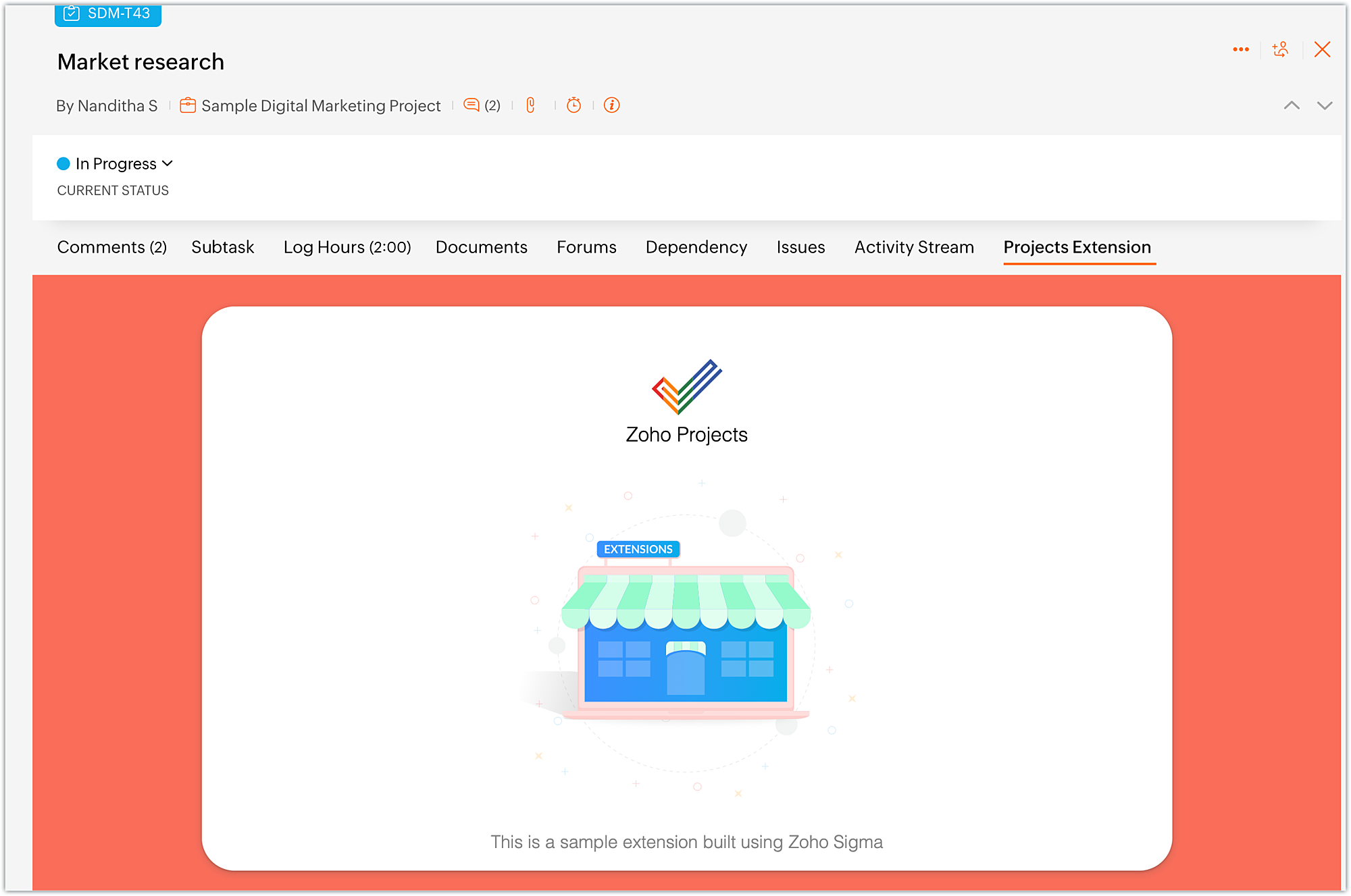
- The widget will be loaded with the UI as available in the index.html file.
- Once you are done with testing your extension functionalities, switch to the cloud editor tab and click Stop.
- In what situations can we use the Run option?
➤ To run the extension for the first time in the testing environment.➤ Whenever the plugin-manifest.json file is modified, you have to use the Run option again.Note: If you make modifications to any other files, simply refresh the extension to see the changes; there's no need to use Stop and Run again.➤ When you use the Stop option to end a test and then want to retest the extension, the Run option has to be used.
Editing an extension using cloud editor
- Whenever you want to make changes to your extension code, choose the Extensions section in the left panel of your Sigma workspace.
- Hover over the extension to which you want to make changes. Click on Edit Builder icon.
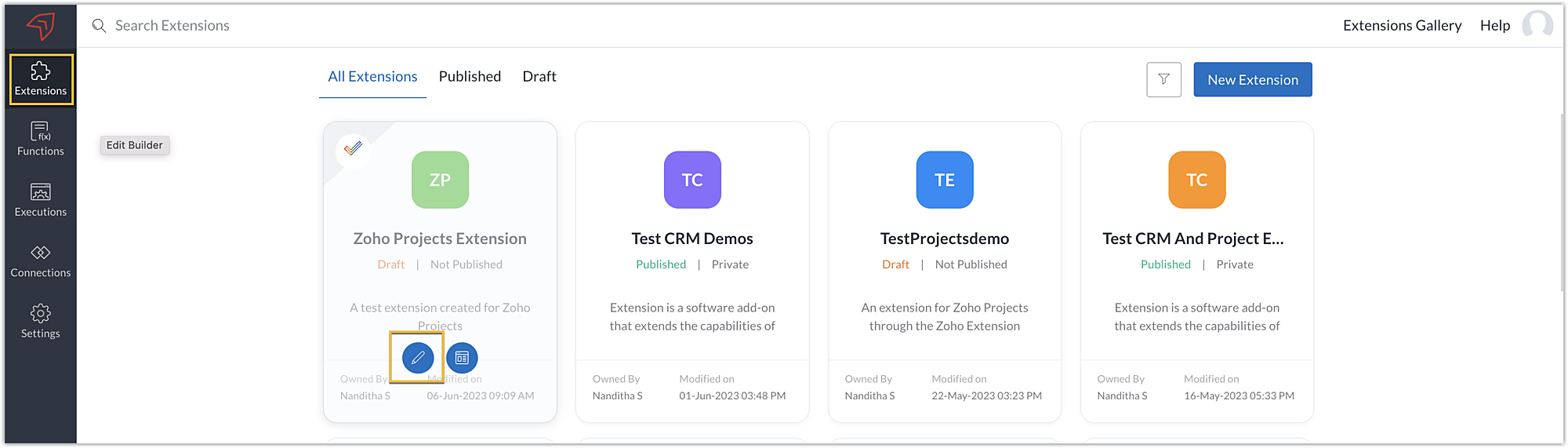
- You'll be taken to the cloud editor of that particular extension, then you can go ahead and make your edits.
- Alternatively, you can also click on the Extension Details icon.
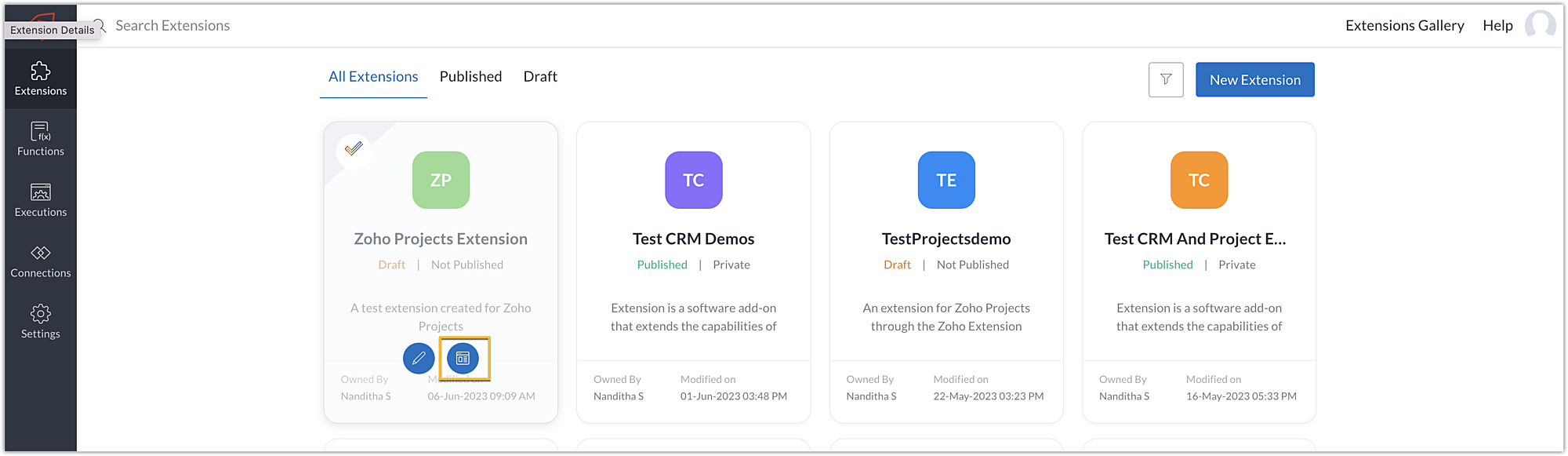
- Then, click Edit Extension.
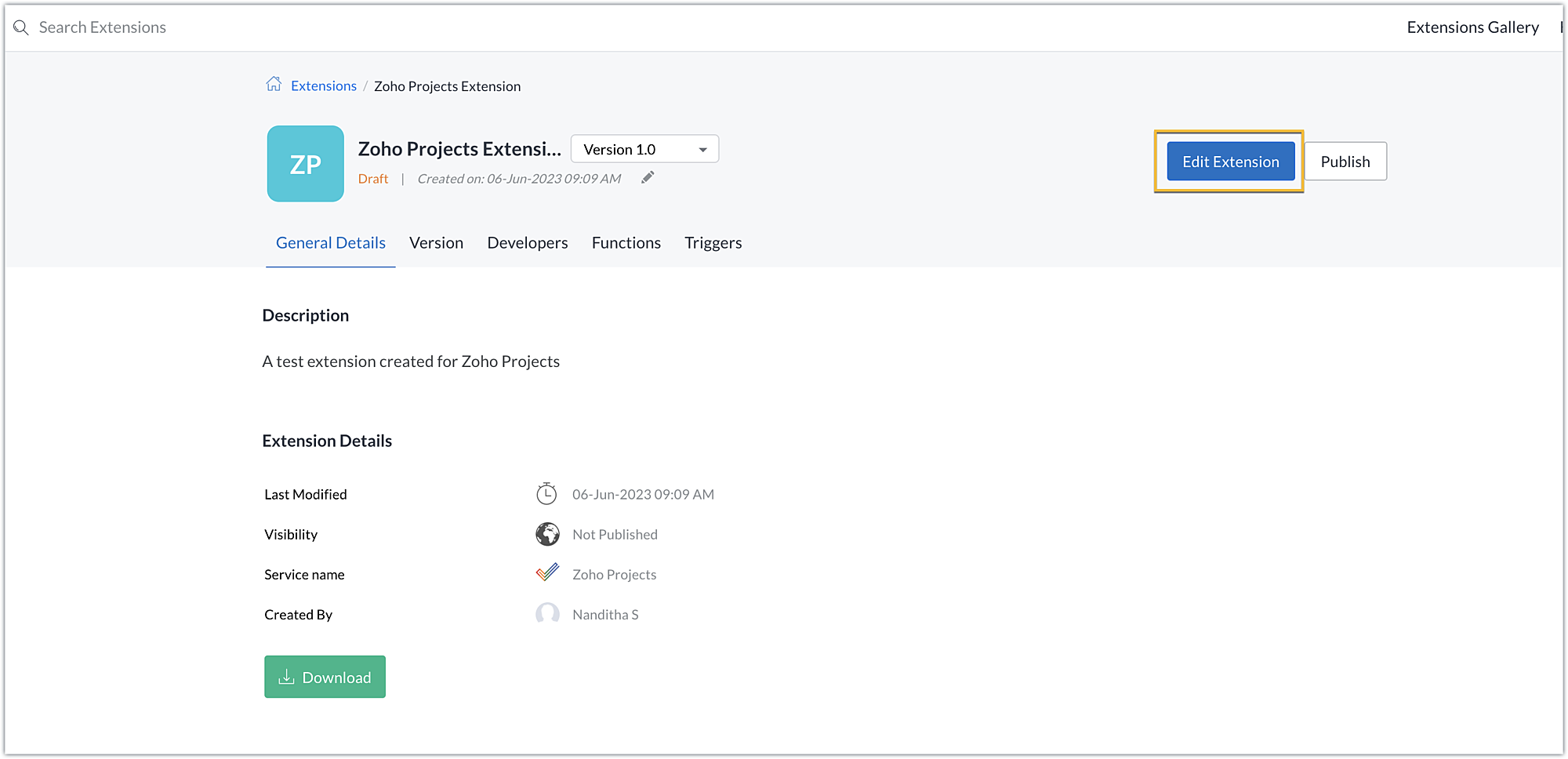
- This method will also take you to the cloud editor of the extension where you can make necessary changes.
In this post, we've covered creating an extension, testing it, and making changes to it. We hope you found this information useful. Keep following us for more information!

Sign up for a Zoho Developer account ans start developing extensions for Zoho products using Sigma.
New to Zoho Recruit?
Zoho Campaigns Resources





Topic Participants
Nanditha Somasundaram Somasundaram
Sticky Posts
Building extensions #10: Fetch customized user inputs, store them globally at the app level, and access them across entities
This data storage concept enables you to store data related to your extension for both entity properties and extension properties. In our previous piece, we looked at how to store data for entities using entity properties. In this post, we'll look atBuilding extensions #9: Store, retrieve, and access entity-specific data in widgets using data storage
Data storage - Overview Storing data related to the extension you are working on is essential. It can be saved as key-value pairs for an entity or extension, known as entity and extension properties, respectively. Data can be saved for the following entitiesBuilding extensions #7: Create custom widgets for a simplified end-user experience
Discover the benefits of using widgets! We explored the significance of widgets, prerequisites, and the availability of JS SDK methods as part of our previous post. In this post, let's go over a detailed example of using widgets along with certain ZohoBuilding extensions #6: Custom user interfaces with Widgets
Welcome to our post on Widgets for Zoho Projects! In our last post, we explored the significance of the connections feature, showed how to use it, and provided an example use case. In this article, we'll look at the importance of widgets, another featureBuilding extensions #5: Integrating applications with Zoho Projects through Connections
In our last post, we discussed the essential features that a Zoho Projects extension can provide. Starting with this post andin every subsequent post going forward, we'll go through each of those features in depth, one by one, with an example use case.
Zoho CRM Plus Resources
Zoho Books Resources
Zoho Subscriptions Resources
Zoho Projects Resources
Zoho Sprints Resources
Zoho Orchestly Resources
Zoho Creator Resources
Zoho WorkDrive Resources


Zoho CRM Resources
Get Started. Write Away!
Writer is a powerful online word processor, designed for collaborative work.
Zoho CRM コンテンツ
-
オンラインヘルプ
-
Webセミナー
-
機能活用動画
-
よくある質問
-
Ebook
-
-
Zoho Campaigns
- Zoho サービスのWebセミナー
その他のサービス コンテンツ
ご検討中の方
Recent Topics
Closing Accounting Periods - Invoice/Posting dates
Hi, I have seen in another thread but I'm unsure on how the 'transaction locking' works with regards to new and old transactions. When producing monthly accounts if I close December 24 accounts on 8th Jan 25 will transaction locking prevent me from postingZoho CRM Portal Error
Hi, We’re experiencing an issue with the Zoho CRM Portal. When we try to access it, we receive an HTTPS connection error: net::ERR_CERT_COMMON_NAME_INVALID. If we proceed past that, we then get a 400 Bad Request error. Could you please help us resolveCan we do Image swatches for color variants?
We want to do something like the attached screenshot on our new zoho store. We need image swatches instead of normal text selection. We want to user to select an image as color option. Is this doable? I don't see any option on zoho backend. Please hIntegrating Zoho CRM EmbeddedApp SDK with Next.js — Initialization and Data Fetching Issues
You can get an idea from my code I have given in end: First, I worked on a React project and tried the same thing — it worked. My goal was to import the Zoho script and then load contacts using the Zoho Widget SDK, which was successful in React. Now,Feature enhancement: Highlight rows based on a cell value
Hello Sheet users, We're excited to announce a new feature enhacement, shaped directly by your valuable feedback! As you might know, conditional formatting is a great tool for anyone dealing with large data sets. Previously, if you’ve ever wanted to drawScript Editor not an option
I am trying to apply a script to a sheet and Script Editor is not an option. I don't want to go outside Sheets to do this (like Creator) if it can be done inside Sheets.monetizing the courses
Can I add a price for course enrollment ?Can we add zoho books features like invoices estemates etc on our zohocommerce website. When our customer login with their account they can able to see all books features in one place on zohocommerce?
Can we add zoho books features like invoices estemates etc on our zohocommerce website. When our customer login with their account they can able to see all books features in one place on zohocommerce?Copy paste from word document deletes random spaces
Hello Dear Zoho Team, When copying from a word document into Notebook, often I face a problem of the program deleting random spaces between words, the document become terribly faulty, eventhough it is perfect in its original source document (and withoutCreate custom rollup summary fields in Zoho CRM
Hello everyone, In Zoho CRM, rollup summary fields have been essential tools for summarizing data across related records and enabling users to gain quick insights without having to jump across modules. Previously, only predefined summary functions wereDownload a file from within a zoho creator widget
I have a widget running in Zoho Creator , it displays uploaded documents in a table file, and I have added a download link in the view. ( The widget is created with html, css and javascript). I do not succeed in getting the download working. Do I haveTaxes for EU B2B Transactions
Currently, ZC doesn't seem to have a procedure for validating VAT numbers of businesses purchasing in another EU state, and removing local VAT is valid. This is essential for all inter EU B2B trade.Unable to Receive Emails on Zoho Mail After Office 365 Coexistence Setup – Error: 553 Relaying Disallowed
Hello, My domain name is bigniter.com, and I’ve been using Zoho Mail as my email service provider without any issues. Recently, I followed the steps outlined in the Zoho documentation to enable Coexistence with Office 365: 🔗 https://www.zoho.com/mail/help/adminconsole/coexistence-with-office365.html#multi-serverEnhance Sign CRM integration
Hello all, I'm working on a custom Deluge script to enhance the integration between Zoho CRM and Sign by using a writer merge template for additional flexibility. I want to replicate the post-sign document integration that exists between CRM and SignCRM Related list table in Zoho analytics
In Zoho Analytics, where can I view the tables created from zoho crm related lists? For example, in my Zoho CRM setup, I have added the Product module as a related list in the Lead module, and also the Lead module as a related list in the Product module.Candidate Registration/Invitation
It would be great to include the 'invite' candidate functionality into some of the automation functions - ether through a custom function trigger or webhook or accessible through an email template. Currently there is no way to add this functionality into any workflows or blueprint steps which, I find limits the ability to invite candidates to engage with us directly through our candidate portal.[Free Webinar] Learning Table Series - Creator for Infrastructure Management | A Partner-driven collaborative session
Hello Everyone! We’re excited to invite you to another edition of Learning Table Series, where we showcase how Zoho Creator empowers industries with innovative and automated solutions. About the Learning Table Series The Learning Table Series is a free,Where we can change the icon in social preview
Hi, we changed our logo, and the image that appear in preview (ex : when we post a appointment link somewhere) is still our old logo. I did change our logo in the org setting. https://bookings.zoho.com/app/#/home/dashboard/settings/basic-info?clview=falseCadences
I have just started using Cadences for follow-up up email pipeline. Is it just me or do you find the functionality very basic? For example, it will tell me (if I go looking for it) if someone has replied to a follow-up and been unenrolled; but it won'tI have error AS101 when I try to add paypal@mydomain.com to Zoho
Please help me with this. I tried to call the help line 4 times but don't get any response.VAT on Multiple Expenses
Firstly, might I say I am based in Ireland, and I'm not an accountant, and therefore my understanding of procedures could be somewhat limited. Scenario. An employee pays for items throughout a month, and therefore their claim for expenses includes multiple items - some of the items are VAT deductible (eg, an IT product) and some are not (eg, a client lunch). Discovery The odd thing in ZBooks, is that whilst it seems possible to add a VAT rate to a one-off item of expense, it is not possible to addDetect and ignore bots in visitors
The SalesIQ visitor numbers are basically useless to us because there is no bot detection. We get the same bots coming in from the same countries looking at the same pages every day. It can't be that difficult to tell the difference between an actualAgent assignment filter?
Godo day, We are starting to play with FSM to see if it's going to work for our needs. Now so far we have found that it's very restrcitve in the field department you you have layout rules or can't even hide fields depending on the users roles. We can'tDefault tax type for mileage?
Where we are, mileage includes a government tax. Is there any way to set a default tax for the Personal Car Mileage category of expense? (Or any other way?)DKIM Now Mandatory - Changes to Zoho Forms Email Policies
Hello Zoho Forms Users, This post is to inform you about an important update regarding the authentication of all email domains in your Zoho Forms account. This year, we are doubling down on our commitment to deliver a secure, seamless, and empoweringIn arattai received message can't be deleted
The issue has been noticed in following: arattai app (Android) arattai app (Window) arattai web While the message posted by me may be deleted, the ones received from others can't be. The item <Delete> change to <Report> when the message is a receivedis it possible to add more than one Whatsapp Phone Number to be integrated to Zoho CRM?
so I have successfully added one Whatsapp number like this from this User Interface it seems I can't add a new Whatsapp Number. I need to add a new Whatsapp Number so I can control the lead assignment if a chat sent to Whatsapp Phone Number 1 then assignKiosk Page Refresh
We have a Kiosk running from a button in contacts to update values and also add related lists, which works great, but when the kiosk is finished the page does not refresh to show the changes. Is there a way to force the contact to refresh/update whenTips & tricks: Make SalesIQ automations work for you
Every day, thousands of visitors land on your website. Some browse, some buy, and some leave without a word. But, wouldn’t it be great if you could automatically know who’s interested, engage them at the right moment, and never miss a lead, and all thisAdd Custom Reports To Dashboard or Home Tab
Hi there, I think it would be great to be able to add our custom reports to the Home Tab or Dashboards. Thanks! ChadFinding missing records
I have a challenge and I am not really sure where to start with it. I can't find any similar threads on here, can anyone help: I have two forms, FormA and FormB. Both forms have records that contain a field called Job_Number. What I am trying to achieveDigest Octobre - Un résumé de ce qui s'est passé le mois dernier sur Community
Chers utilisateurs, Faisons le point sur les temps forts du mois d'octobre au sein de notre Community Zoho France. Partager des informations sensibles, comme des mots de passe, peut vite devenir compliqué et risqué. Les données circulent par email ouHow do I fully delete a user account
Hi, I have two old accounts on my CRM which are inactive and show as 'Closed' in the list of users. BUT they are basically still there. How do I fully delete these accounts? They appear in some parts of CRM still such as the on the contact record emailsAutomatically Add Recurring Zoho Meeting Events to Zoho Calendar / Zoho Meeting Calendar
Hello Zoho Meeting Team, Hope you are doing well. We would like to request an enhancement regarding recurring meetings created inside Zoho Meeting. At the moment, when we schedule a recurring meeting in Zoho Meeting, it does not appear in Zoho CalendarCredit Management: #6 Tackling Common Mistakes in Credit Based Billing
Businesses extend credit to build relationships, make buying easy, and drive more sales. But somewhere between extending and collecting, things begin to slip. A few late payments here and there, an overlooked invoice, and a backlog make cash flow feelTasks Statuses
Hi, The task status "Completed" is a final status which closes the task. We need to have a status "Cancelled". However, when the status is set to "Cancelled", the task prompt still has a blue button to Close Task. When the customer clicks that and closesUpdating Blueprint stage from my Deluge function
Hi all, I need to update the blueprint stage. Its almost working, but ONLY if the current Deal stage is 'Closed Lost'. On any of my custom stages that Ive specified in the pipeline it doesnt work! My code: dealmap = Map(); deal_stage = deal.get("Stage");Canvas: is it possible to have a fixed header?
Hello. Does Canvas provide the option to have a fixed header, similar to the standard view? It would also be interesting for other parts of the interface, like the header or sidebar of the tab section. Thanks!Replacing email ID,
In zoho sheets If I am sending it as an email attachments can I replace sender email ID from notifications to my email ID.Limited layout rules in a module
There is a limit of 10 layout rules per module. Is there a way to get that functionality through different customization or workflow + custom function (easily accessible), etc. Having just 10 is limiting especially if module contains a lot of data. AreNext Page