Bulk user onboarding for Cliq Channels in a jiffy

Bulk user onboarding for Cliq Channels in a jiffy

As developers, we frequently switch between coding, debugging, and optimizing tasks. The last thing we want is to be burdened by manual user management. Adding users one by one to a channel is tedious and prone to errors, taking up more time than we could devote to actual development. 


Let's explore how to create a custom workflow using Cliq's platform components to streamline the process of bulk-adding users to a channel via a Zoho Sheet or CSV file. This approach facilitates a smooth onboarding experience without the need for manual effort.

Pre-requisite :

Before beginning to script the code below, we must create a connection with Zoho Cliq. Once a connection is created and connected, you can use it in Deluge integration tasks and invoke URL scripts to access data from the required service.

Create a Zoho Oauth default connection with any unique name and the scopes -  ZohoCliq.Channels.All and ZohoSheet.dataApi.ALL

Refer to the below links to learn more :

Step 1  : Creation of slash command

  • After a successful login in Cliq, hover to the top right corner and click your profile. Post clicking, navigate to Bots & Tools > Commands.
  • At your right, click the button - Create Command.
  • To know more about slash commands and their purposes, refer to Introduction to slash commands.
  • Create a slash command using your preferred name. Specify the following details: the command name, a hint (to give users an idea of what the command is for), and the access level.
  • Finally, click "Save & edit code".

  1. inputs = List();
  2. inputs.add({"name":"channels","label":"Pick a channel","placeholder":"Choose a channel where you need to add members","max_selections":"1","multiple":false,"mandatory":true,"type":"native_select","data_source":"channels"});
  3. inputs.add({"name":"headername","label":"Header name","placeholder":"Email ID","hint":"In which the Email ID is present","min_length":"0","max_length":"25","mandatory":true,"type":"text"});
  4. inputs.add({"type":"radio","label":"Import type","name":"import_Type","hint":"Choose a type that you need to import users","options":[{"label":"CSV","value":"csv"},{"label":"Zoho sheet","value":"zohosheet"}],"trigger_on_change":"true"});
  5. return {"name":"addbulkuser","type":"form","title":"Add bulk users","hint":"To add maximum of upto 1000 users in a channel.","button_label":"Add Users","inputs":inputs,"action":{"type":"invoke.function","name":"addbulkusers"};

Step 2  : Scripting form function

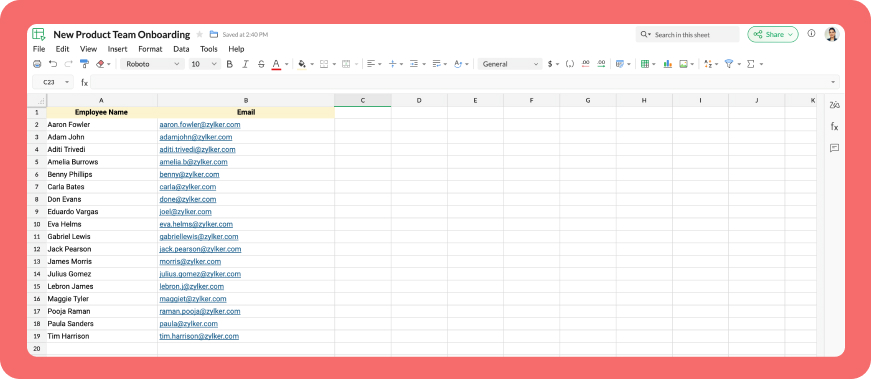
  • We need to create a function for the form that manages submission responses, including the Zoho Sheet link or CSV file, the name of the column containing the email addresses, and the channel details where users should be added in bulk.
  • Hover to the top right corner and click your profile. After clicking, navigate to Bots & Tools > Functions.
  • To your right, click the Create Function button.
  • Name the function "addbulkusers," provide a description as desired, and select "form" as the function type. Then, click "Save and edit code," and paste the following code.
  1. emailIdList = list();
  2. successlist = list();
  3. failedlist = list();
  4. try 
  5. {
  6. info form;
  7. formValues = form.get("values");
  8. columnName = formValues.get("headername");
  9. headerName = formValues.get("headername");
  10. if(formValues.get("import_Type").get("value") == "zohosheet")
  11. {
  12. url = formValues.get("url");
  13. spreadSheetId = url.getPrefix("?").getSuffix("open/");
  14. sheetName = url.getSuffix("?").getPrefix("&").getSuffix("=");
  15. worksheetname = sheetName.replaceAll(" ","%20");
  16. columnName = columnName.replaceAll(" ","%20");
  17. allDatas = list();
  18. params = Map();
  19. params.put("column_names",columnName);
  20. params.put("method","worksheet.records.fetch");
  21. params.put("worksheet_id",sheetName + "#");
  22. sheetDetails = invokeurl
  23. [
  24. url :"https://sheet.zoho"+environment.get("tld")+"/api/v2/" + spreadSheetId
  25. type :GET
  26. parameters:params
  27. connection:"addbulkusers"
  28. ];
  29. info sheetDetails;
  30. if(sheetDetails.get("status") == "success" && sheetDetails.get("records").size() <= 1000)
  31. {
  32. allDatas.addAll(sheetDetails.get("records"));
  33. }
  34. else if(sheetDetails.get("status") == "success" && sheetDetails.get("records").size() > 1000)
  35. {
  36. return {"type":"form_error","text":"I can only able to add 1000 user. Kindly try passing with 1000 records in the sheet!!!"};
  37. }
  38. else
  39. {
  40. return {"type":"form_error","text":"I can't find any email ids. Kindly re-check the column name and header row!!!"};
  41. }
  42. info "allData: " + allDatas.size();
  43. if(allDatas.size() > 1000)
  44. {
  45. return {"type":"form_error","text":"I can only able to add 1000 user. Kindly try passing with 1000 records in the sheet!!!"};
  46. }
  47. for each  data in allDatas
  48. {
  49. if(data.get(formValues.get("headername")) == null)
  50. {
  51. return {"type":"form_error","text":"I can't find any email ids. Kindly re-check the column name and header row!!!"};
  52. }
  53. emailIdList.add(data.get(formValues.get("headername")));
  54. if(emailIdList.size() == 100)
  55. {
  56. channelID = formValues.get("channels").get("id");
  57. params = {"email_ids":emailIdList};
  58. info "Params: " + params;
  59. addUsers = invokeurl
  60. [
  61. url :environment.get("base_url") + "/api/v2/channels/" + channelID + "/members"
  62. type :POST
  63. parameters:params.toString()
  64. detailed:true
  65. connection:"addbulkusers"
  66. ];
  67. info "Adduser: " + addUsers;
  68. if(addUsers.get("responseCode") == "204")
  69. {
  70. successlist.addAll(emailIdList);
  71. }
  72. else
  73. {
  74. failedlist.addAll(emailIdList);
  75. }
  76. info "100: " + emailIdList.size();
  77. emailIdList = list();
  78. }
  79. }
  80. if(emailIdList.size() > 0)
  81. {
  82. channelID = formValues.get("channels").get("id");
  83. params = {"email_ids":emailIdList};
  84. info "Params: " + params;
  85. addUsers = invokeurl
  86. [
  87. url :environment.get("base_url") + "/api/v2/channels/" + channelID + "/members"
  88. type :POST
  89. parameters:params.toString()
  90. detailed:true
  91. connection:"addbulkusers"
  92. ];
  93. info "Adduser: " + addUsers;
  94. if(addUsers.get("responseCode") == "204")
  95. {
  96. successlist.addAll(emailIdList);
  97. }
  98. else
  99. {
  100. failedlist.addAll(emailIdList);
  101. }
  102. info "Email id: " + emailIdList;
  103. }
  104. info "Successlist: " + successlist;
  105. info "Failedlist: " + failedlist;
  106. if(successlist.size() > 0 && failedlist.size() > 0)
  107. {
  108. postMessage = {"text":"Successfully added " + successlist.size() + " member(s) and failed for " + failedlist.size() + " Member(s)"};
  109. }
  110. else if(successlist.size() > 0 && !failedlist.size() > 0)
  111. {
  112. postMessage = {"text":"Successfully added " + successlist.size() + " member(s)"};
  113. }
  114. else if(!successlist.size() > 0 && failedlist.size() > 0)
  115. {
  116. postMessage = {"text":"Adding members in channel failed for " + failedlist.size() + " member(s)"};
  117. }
  118. info zoho.cliq.postToChat(chat.get("id"),postMessage);
  119. }
  120. else
  121. {
  122. csvFile = formValues.get("csvFile");
  123. csvFile = csvFile.getfilecontent();
  124. allDatas = csvFile.toList("\n");
  125. i = 0;
  126. indexValue = 0;
  127. indexBoolean = false;
  128. for each  data in allDatas
  129. {
  130. if(i == 0)
  131. {
  132. headers = data.toList(",");
  133. for each  header in headers
  134. {
  135. info header;
  136. if(headerName == header)
  137. {
  138. indexBoolean = true;
  139. indexValue = headers.indexOf(headerName);
  140. }
  141. }
  142. if(indexBoolean == false)
  143. {
  144. return {"type":"form_error","text":"I can't find any email ids. Kindly re-check the column name and header row!!!"};
  145. }
  146. }
  147. else 
  148.             {
  149. emailIdList.add(data.get(indexValue));
  150.             }
  151. i = i + 1;
  152. if(emailIdList.size() == 100)
  153. {
  154. channelID = formValues.get("channels").get("id");
  155. params = {"email_ids":emailIdList};
  156. info "Params: " + params;
  157. addUsers = invokeurl
  158. [
  159. url :environment.get("base_url") + "/api/v2/channels/" + channelID + "/members"
  160. type :POST
  161. parameters:params.toString()
  162. detailed:true
  163. connection:"addbulkusers"
  164. ];
  165. info "Adduser: " + addUsers;
  166. if(addUsers.get("responseCode") == "204")
  167. {
  168. successlist.addAll(emailIdList);
  169. }
  170. else
  171. {
  172. failedlist.addAll(emailIdList);
  173. }
  174. info "100: " + emailIdList.size();
  175. emailIdList = list();
  176. }
  177. }
  178. if(emailIdList.size() > 0)
  179. {
  180. channelID = formValues.get("channels").get("id");
  181. params = {"email_ids":emailIdList};
  182. info "Params: " + params;
  183. addUsers = invokeurl
  184. [
  185. url :environment.get("base_url") + "/api/v2/channels/" + channelID + "/members"
  186. type :POST
  187. parameters:params.toString()
  188. detailed:true
  189. connection:"addbulkusers"
  190. ];
  191. info "Adduser: " + addUsers;
  192. if(addUsers.get("responseCode") == "204")
  193. {
  194. successlist.addAll(emailIdList);
  195. }
  196. else
  197. {
  198. failedlist.addAll(emailIdList);
  199. }
  200. }
  201. info "Successlist: " + successlist;
  202. info "Failedlist: " + failedlist;
  203. if(successlist.size() > 0 && failedlist.size() > 0)
  204. {
  205. postMessage = {"text":"Successfully added " + successlist.size() + " member(s) and failed for " + failedlist.size() + " Member(s)"};
  206. }
  207. else if(successlist.size() > 0 && !failedlist.size() > 0)
  208. {
  209. postMessage = {"text":"Successfully added " + successlist.size() + " member(s)"};
  210. }
  211. else if(!successlist.size() > 0 && failedlist.size() > 0)
  212. {
  213. postMessage = {"text":"Adding members in channel failed for " + failedlist.size() + " member(s)"};
  214. }
  215. info zoho.cliq.postToChat(chat.get("id"),postMessage);
  216. }
  217. }
  218. catch (e)
  219. {
  220. info e;
  221. return {"type":"form_error","text":"I can't find any email ids. Kindly re-check the column name and header row!!!"};
  222. }
  223. return Map();

Step 3  : Configuring form change handler

  • After copying and pasting the code into the form submission handler, navigate to the form change handler for the created form function.
  • You can find this in the top left corner of the editor, where you will see an arrow next to the form submission handler. Clicking on this arrow will display the form change handler in a dropdown menu.
  • Click it to edit the code in the form change handler, which is necessary for real-time modifications to a form's structure or behaviour based on user input in a specific field. 
  1. targetName = target.get("name");
  2. info targetName;
  3. inputValues = form.get("values");
  4. info inputValues;
  5. actions = list();
  6. if(targetName.containsIgnoreCase("import_Type"))
  7. {
  8. fieldValue = inputValues.get("import_Type").get("value");
  9. info fieldValue;
  10. if(fieldValue == "csv")
  11. {
  12. actions.add({"type":"add_after","name":"import_Type","input":{"label":"CSV File","name":"csvFile","placeholder":"Please upload a zCSV File","mandatory":true,"type":"file"}});
  13. actions.add({"type":"remove","name":"url"});
  14. }
  15. else if(fieldValue == "zohosheet")
  16. {
  17. actions.add({"type":"add_after","name":"import_Type","input":{"name":"url","label":"Enter the sheet url","placeholder":"https://sheet.zoho.com/sheet/open/6xhgb324f142e91d845e5b4b472f7422379c9","min_length":"0","max_length":"400","mandatory":true,"type":"text","format":"url"}});
  18. actions.add({"type":"remove","name":"csvFile"});
  19. }
  20. }
  21. return {"type":"form_modification","actions":actions};
Business use cases:

  • HR onboarding: Seamlessly add new employees to internal communication channels.
  • Event management: Quickly invite attendees to event-specific channels.
  • Education platforms: Enroll students in course groups in one go.
  • Community building: Grow large communities by importing member lists effortlessly.

Bottom line

Bulk user addition in Cliq channels through Zoho Sheet or CSV files allows us to eliminate tedious tasks, reduce errors, and manage large-scale data effortlessly. Is onboarding consuming too much of your valuable development time? If so, it might be time to shake things up with a customized workflow!

We're here to help, so don't hesitate to reach out to support@zohocliq.com with any questions or if you need assistance in crafting even more tailored workflows.


      Zoho Campaigns Resources


        • Desk Community Learning Series


        • Digest


        • Functions


        • Meetups


        • Kbase


        • Resources


        • Glossary


        • Desk Marketplace


        • MVP Corner


        • Word of the Day


        • Ask the Experts


          • Sticky Posts

          • Customer payment alerts in Zoho Cliq

            For businesses that depend on cash flow, payment updates are essential for operational decision-making and go beyond simple accounting entries. The sales team needs to be notified when invoices are cleared so that upcoming orders can be released. In contrast,
          • Automating Employee Birthday Notifications in Zoho Cliq

            Have you ever missed a birthday and felt like the office Grinch? Fear not, the Cliq Developer Platform has got your back! With Zoho Cliq's Schedulers, you can be the office party-cipant who never forgets a single cake, balloon, or awkward rendition of
          • Accelerate Github code reviews with Zoho Cliq Platform's link handlers

            Code reviews are critical, and they can get buried in conversations or lost when using multiple tools. With the Cliq Platform's link handlers, let's transform shared Github pull request links into interactive, real-time code reviews on channels. Share
          • App Spotlight : PagerDuty for Zoho Cliq

            App Spotlight brings you hand-picked apps to enhance the power of your Zoho apps and tools. Visit the Zoho Marketplace to explore all of our apps, integrations, and extensions. In today's fast-paced world, seizing every moment is essential for operational
          • Automate your status with Cliq Schedulers

            Imagine enjoying your favorite homemade meal during a peaceful lunch break, when suddenly there's a PING! A notification pops up and ruins your moment of zen. Even worse, you might be in a vital product development sprint, only to be derailed by a "quick

          Zoho CRM Plus Resources

            Zoho Books Resources


              Zoho Subscriptions Resources

                Zoho Projects Resources


                  Zoho Sprints Resources


                    Zoho Orchestly Resources


                      Zoho Creator Resources


                        Zoho WorkDrive Resources


                          Zoho CRM Resources

                          • CRM Community Learning Series

                            CRM Community Learning Series


                          • Tips

                            Tips

                          • Functions

                            Functions

                          • Meetups

                            Meetups

                          • Kbase

                            Kbase

                          • Resources

                            Resources

                          • Digest

                            Digest

                          • CRM Marketplace

                            CRM Marketplace

                          • MVP Corner

                            MVP Corner


                            Zoho Writer Writer

                            Get Started. Write Away!

                            Writer is a powerful online word processor, designed for collaborative work.

                              Zoho CRM コンテンツ


                                ご検討中の方

                                  • Recent Topics

                                  • Zoho / Outlook Calendar sync

                                    The current Marketplace -> Microsoft -> Meetings integration needs 2 changes. 1. The current language for the Two-Way sync option should be changed. It currently states, "Sync both your Zoho CRM Calendar and Office 365 Calendar meetings with each other."
                                  • Email content just contain 'OK' ,not what we expect

                                    create campaign API URL: https://campaigns.zoho.com/api/v1.1/createCampaign req params: {'campaignname': 'General_Outreach_d0cfc415-43aa-4b96-bb09-558e76a3dda3_50_20251117_214806_660', 'from_email': 'admin@allinmedia.ai', 'subject': 'ALL IN MEDIA', 'list_details':
                                  • Introducing the all-new email parser!

                                    Greetings, We are pleased to introduce to you, a brand-new, upgraded version of the Zoho CRM Email Parser, which is packed with fresh features and has been completely redesigned to meet latest customers needs and their business requirements. On that note,
                                  • Possible to connect Zoho CRM's Sandbox with Zoho Creator's Sandbox?

                                    We are making some big changes on our CRM so we are testing it out in CRM's Sandbox. We also have a Zoho Creator app that we need to test. Is it possible to connect Zoho CRM's Sandbox to Zoho Creator's Sandbox so that I can perform those tests?
                                  • Send Zoho Forms Link using Zoho CRM Email Templates

                                    I have set up Zoho Forms and CRM integration to pre-populate data from Zoho CRM to Zoho Forms. The setup is working fine. I have also created an email template in the Zoho CRM deals module to send Zoho forms links. So when I send an email using that template
                                  • Reopen ticket

                                    Hello! Can I reopen a ticket just using the API ticket/sendReply ? What's the rules to do it? I'm trying but it doesn't reopen the ticket, it just send the reply
                                  • 60 Days Into Zoho - Tiktok Branding Startup -7 Questions?!

                                    Wsp Everybody I co-own a TikTok Branding / Consulting Startup & have been using Zoho for the past 60 days - Am now looking to make our overall operations & processes more Efficient & Effective! Curious to know how others are using the platform & what's
                                  • Creator HTML page refresh

                                    Hi, I have added around 5 different html snippets in single creator page. I understand, I can refresh the entire page from page script using Navigational URLs https://help.zoho.com/portal/en/kb/creator/developer-guide/others/url-patterns/articles/navigational-urls
                                  • Allow Admins to Transfer Ownership of Their Own Files & Folders

                                    Hi Zoho WorkDrive Team, Hope you are doing well. We would like to request an important enhancement to the ownership-transfer functionality in Zoho WorkDrive, specifically regarding administrator capabilities. As administrators, we have the ability to
                                  • Tip#46: Capture accurate log hours

                                    Hello everyone, Use the newly introduced timer settings that will streamline the usage of timers and help admins or workspace owners to manage the time entries of the workspace users better. Check out the below mentioned timer settings added to the Timesheet
                                  • Moving to app-specific authentication for Google integrations

                                    Hello everyone, We’re making an important change to how Google integrations work in our platform. Until now, we used a common Google project across Zoho to enable integrations like Google Drive, Calendar, and more. Going forward, we’ll be moving to an
                                  • Double opt-in notifications and customizable confirmation messages for your webforms

                                    Dear CRM Community, We are excited to announce a major upgrade to our Webforms feature. You can now customize the confirmation message shown to your users who double opt-in from your webform and also customize your confirmation emails when they submit
                                  • Lost the ability to sort by ticket owner

                                    Hi all, in the last week or so, we have lost the ability to sort tickets by Ticket Owner. Unlike the other columns which we can hover over and click on to sort, Ticket Owner is no longer clickable. Is it just us, or are other customers seeing this too?
                                  • Using a CRM Client Script Button to create a Books Invoice

                                    Hello, I need help handling error messages returned to my client script from a function. The scenario I have setup a client script button which is available from each Deal. This CS executes a crm function, which in turn creates an invoice based on the
                                  • Zoho Desk - Custom Module Related List Columns on Tickets

                                    I have a custom module in Zoho Desk called Asana Tasks, each task has a lookup to a Ticket. On the Ticket I want to see the columns of the Asana Tasks in the related list . Is there a way to do this? Right now it just has the name of the record and I
                                  • How to unlink a SAML user from the existing Zoho Desk user (domain change case)

                                    Hi everyone, I’m trying to understand how to handle a situation where a customer changes their company domain. In our setup, users authenticate via SAML, so when the domain changes, the SAML system treats them as a new user. However, in Zoho Desk, I’d
                                  • Standalone custom function not generating logs

                                    Why dont't standalone custom functions generate logs when the're called from another function? I have some functions (workflow, buttons and blueprint) that have common parts, so I put that part in a standalone function which is called from the others.
                                  • How Can i put a form in Zobot

                                    Hi,how can i integrate a form which has a multiple options to choose from.the form should be opened or displayed by zobot after it meets a requirement in the conversation. Thanks in advance !
                                  • Has Anyone successfully integrated Zoho and Sage Intact?

                                    Hey all, We’re evaluating Zoho One + Sage Intacct and I’m trying to connect with anyone who has actually implemented the two together.Specifically, I’d love to know: -- Which functions you kept in Zoho vs. Intacct (e.g., Product Catalog, AR/AP, invoicing,
                                  • Admin asked me for Backend Details when I wanted to verify my ZeptoMail Account

                                    Please provide the backend details where you will be adding the SMTP/API information of ZeptoMail Who knows what this means?
                                  • Playback and Management Enhancements for Zoho Quartz Recordings

                                    Hello Zoho Team, We hope you're all doing well. We would like to submit a feature request related to Zoho Quartz, the tool used to record and share browser sessions with Zoho Support. 🎯 Current Functionality As of now, Zoho Quartz allows users to record
                                  • Zoho Analytics - Feature Request For Time Based Data Source Fetch

                                    Hi Analytics Team, I have a client using Zoho CRM and they want a weekly report at 4:30pm every Friday, emailed to the sales team showing a pie chart of Closed Won Deals for that week. This is easy to achieve in Analytics but not so easy to ensure the
                                  • Which user's capacity is used for Shared Mailbox storage?

                                    We use shared mailboxes at our company, and their size is increasing daily. Which user(s)'s total mailbox limit is being used up by this space?
                                  • Migrate data from old to new account

                                    Hy, Have one Old Zoho Notebook Account with Data , want to migrate that whole Data to New Zoho Notebook Account which is in Zoho One . Is that possible ? If Yes then how?
                                  • Campaign editor overrides href value

                                    I've been trying to insert a deep link in an email campaign so recipients can directly open a native app on their device. My deep link looks something like "myapp://". The options to insert links in the campaign editor are limited to strict urls, emails,
                                  • Can't login IMAP suddenly

                                    Since this evening I'm getting the error: You are yet to enable IMAP for your account. Please contact your administrator... IMAP always been enabled in my account and was workign fine for the past 7 years. Already tried turning IMAP off and on again.
                                  • Sending email notifications based on language

                                    Hello. I would like to know how we can bypass the default notifications (which are just in English) for when a ticket is created/replied to/closed, to be in other languages, based on the language field in the ticket? I can create other email templates,
                                  • how to add subform over sigma in the CRM

                                    my new module don't have any subform available any way to add this from sigma or from the crm
                                  • Zoho CRM - Option to create Follow-Up Task

                                    When completing a Zoho CRM Task, it would be very helpful if there was an option to "Complete and Create Follow-Up Task" in the pop-up which appears. It could clone the task you are closing and then show it on the screen in edit mode, all the user would
                                  • Bug Report and Suggestions for Improvement in Zoho Applications

                                    Hi Zoho Team, I’d like to report a few bugs and improvement suggestions I’ve noticed while using Zoho products: Zoho Cliq Video Call: The camera sometimes turns off automatically during video calls. This seems to be a bug — please check and fix it. Zoho
                                  • Super Admin Logging in as another User

                                    How can a Super Admin login as another user. For example, I have a sales rep that is having issues with their Accounts and I want to view their Zoho Account with out having to do a GTM and sharing screens. Moderation Update (8th Aug 2025): We are working
                                  • Canvas Flex Box containers should not require a width/height.

                                    Flexbox containers are often used as organizational concepts, to ease re-flow on mobile etc. - I cannot use % for flexbox W or H - I cannot omit W or H This means that the content cannot dictate, and a Flexbox container cannot be used merely as an organizational
                                  • Zoho Desk Android app update: Filter enhancement, Save Filters

                                    Hello everyone! We have now enhanced the filter section on the ticket listing screen of Zoho Desk Android app as it is on the web(desk.zoho.com). Also, we have introduced an option to save filters for tickets on the mobile app. You can easily apply, rename,
                                  • Very long loading times | bad performance [ZOHO DC: EU]

                                    Hello there, we have recently noticed that the loading times have become extremely long when retrieving tickets and ticket details. For example, I open any ticket and get the following view. The subject and standard information (ticket owner, status etc.)
                                  • How to add to Subforms via Zapier with Zoho Writer?

                                    I have the following layout for a Zoho Writer Document. As you can see there is a repeating subform taking in "Items". I am trying to make a Zapier integration with it, and I can see there is 1 field saying: "Items", but it does not specify how I'm supposed
                                  • Zia Profile Summary now supports six languages and responds faster

                                    After numerous customer requests, we’ve expanded Zia Profile Summary to do more than just summarize resumes quickly. It can now summarize them in six different languages and deliver results even faster. What’s New 1. Extended language support Zia can
                                  • Introducing Zoho Show Android 3.0

                                    Good ideas need the right space to grow. They deserve tools that move as fast as your thoughts and make creating feel effortless. And that is why we are bringing you Zoho Show Android 3.0! From a brand-new look and smoother navigation to improved collaboration
                                  • Properly Capture Dropdowns & Hover Elements When Recording a Window/Tab

                                    Hi Zoho WorkDrive Team, Hope you are doing great. We encountered a limitation when recording a selected window or browser tab: Certain UI elements, such as dropdown lists, hover menus, and overlays, are not captured unless we record the entire screen.
                                  • Peppol integration zoho invoicefu

                                    Hi, Belgium will require Peppol invoicing as of 2026. I found that this is being prepared for Zoho books, to be released in Sep 2025. Will Zoho Invoice get this functionality too? I like the Invoice app for my part-time side business as bike mechanic
                                  • CRM x WorkDrive: File storage for new CRM signups is now powered by WorkDrive

                                    Availability Editions: All DCs: All Release plan: Released for new signups in all DCs. It will be enabled for existing users in a phased manner in the upcoming months. Help documentation: Documents in Zoho CRM Manage folders in Documents tab Manage files
                                  • Next Page
