Commandes client
La commande client est un document commercial qui précise la vente de biens ou de services et détaille les spécificités de la vente, notamment le prix, la qualité des biens ou des services fournis ainsi que l'adresse, la date de livraison prévue, les conditions de paiement, de vente et de livraison. Elle vous permet de savoir si vos produits sont en stock ou en rupture , afin d'aider votre service achats à faire des prévisions.
Voici quelques-unes des façons dont votre entreprise peut bénéficier de l'optimisation du processus de commande client:
- Réduire le risque d'erreur humaine
- Gardez vos commandes en ordre
- Améliorer le suivi des stocks
Gestion de commandes client dans Zoho Inventory
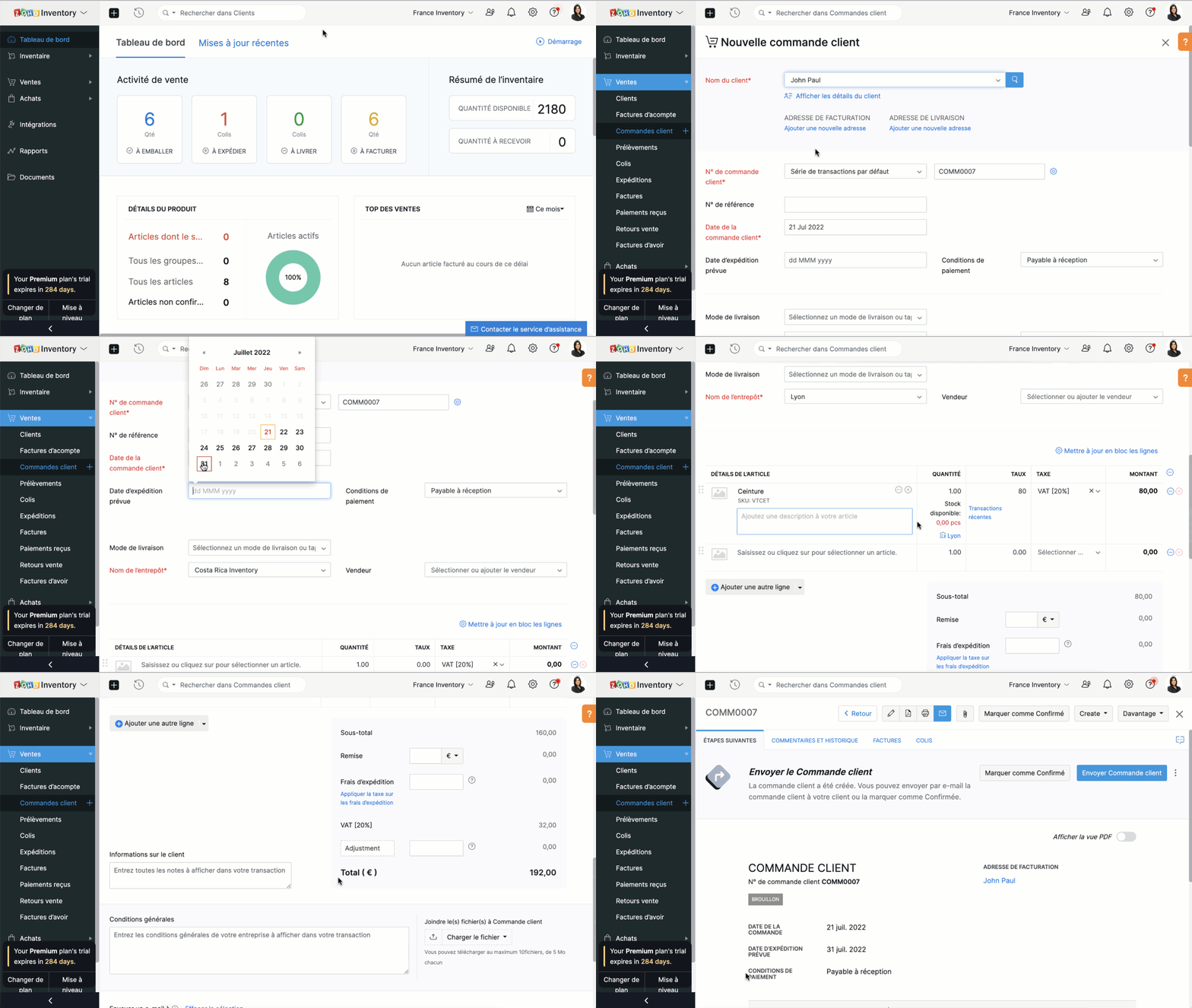
Créer une commande client
- Sélectionnez l'onglet "Commandes client" sous "ventes"
- Cliquez sur "+nouveau" et saisissez les détails du client. Dans le champs "Nom du client", vous pouvez soit sélectionner un client dans la liste déroulante, soit ajouter un nouveau client.
- Le N° de commande est généré par défaut. Si vous souhaitez le saisir manuellement , cliquez sur l'icône "Paramètres" à côté de l'onglet et une fenêtre s'affichera pour vous permettre de choisir entre la génération automatique et la saisie manuelle.
- Saisissez les autres informations comme la date d'expédition, le mode de livraison, les conditions de paiement, le nom de l’entrepôt. Ajoutez un produit ou un service à partir de votre inventaire. Vous pouvez également cliquer sur l'option "Ajouter des articles en vrac" pour ajouter plusieurs articles à la fois à votre commande client.
- Saisissez la quantité, le taux et la taxe applicable à partir de la liste déroulante. La liste déroulante des taxes affiche uniquement celles que vous avez créées dans l'onglet "Paramètres", sous la section "Taxes".
- Saisissez le taux de remise, les frais d'expédition et les modifications, si applicable.
- Vous pouvez ensuite choisir d' sur "Enregistrer comme brouillon" ou "Enregistrer et envoyer"
Créer une commande à partir du module "Clients"
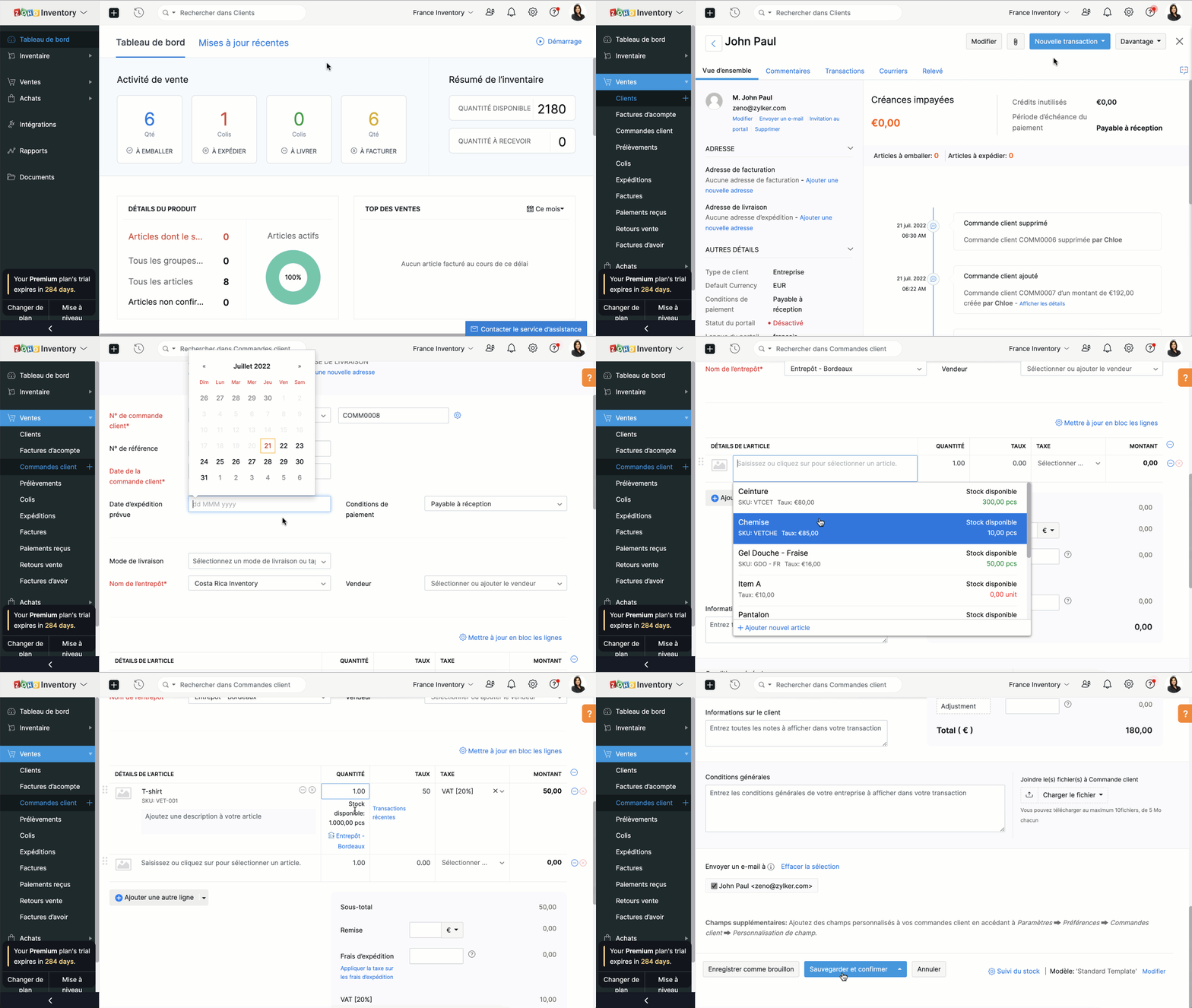
- Passez à l'onglet "Clients" et sélectionnez un client pour lequel vous souhaitez créer une commande.
- Cliquez sur le bouton "Nouvelle transaction" et sélectionnez "Commande client", une nouvelle fenêtre apparaît pour créer une nouvelle commande client.
- Vous pouvez maintenant suivre le parcours ci-dessus.
Fermer une commande client
En fonction de vos préférences, vous pouvez choisir que le statut de votre commande client soit automatiquement défini comme clôturé. Les critères sont les suivants:
- Lorsqu'une facture est créée
- Lorsqu’une expédition est effectuée
- Lorsque l’expédition est traitée et que la facture est créée
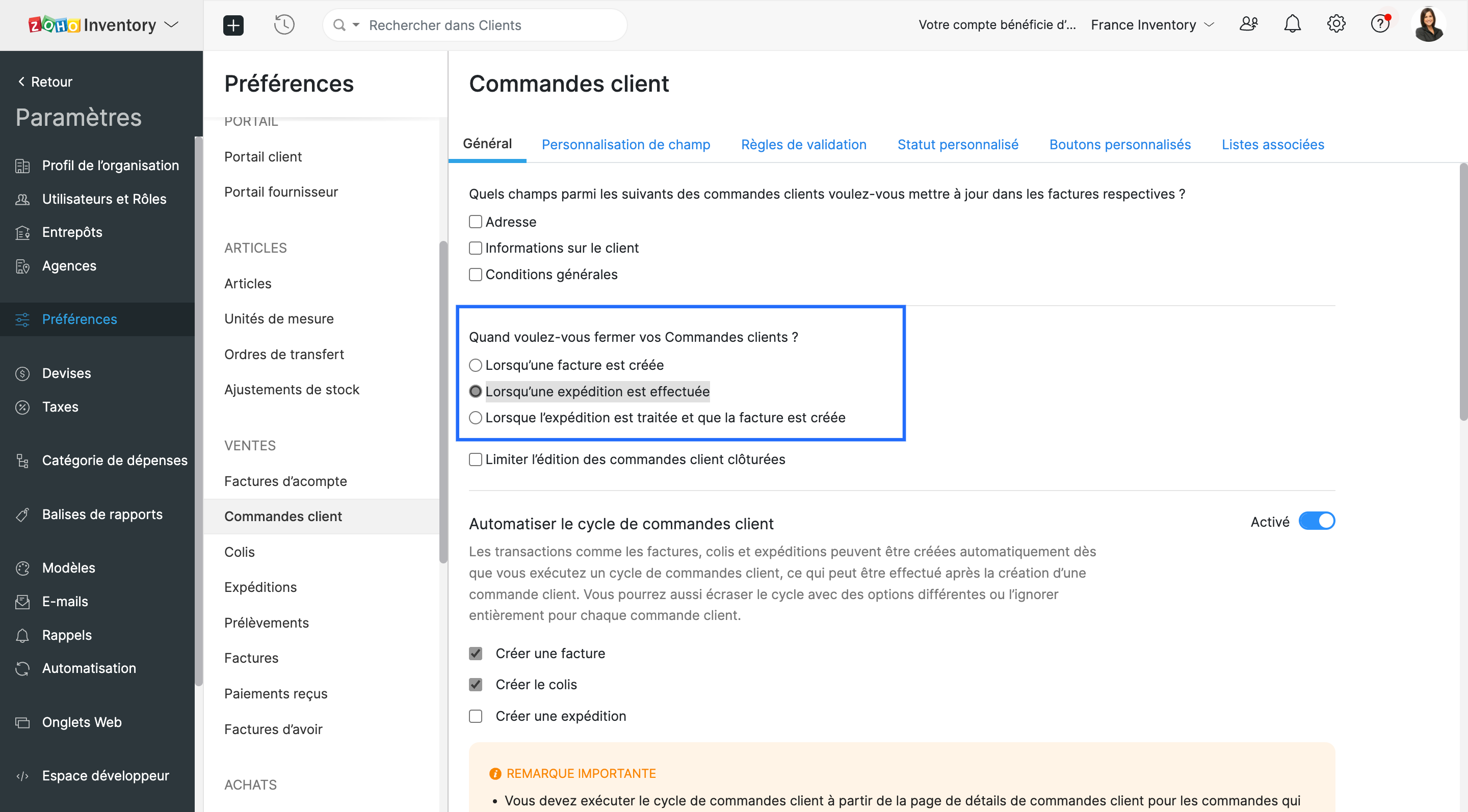
- Vous pouvez choisir l'un ou l'autre. Lorsque les critères sont satisfaits, le statut de la commande client est défini comme fermé.
Envoyer une commande à votre client
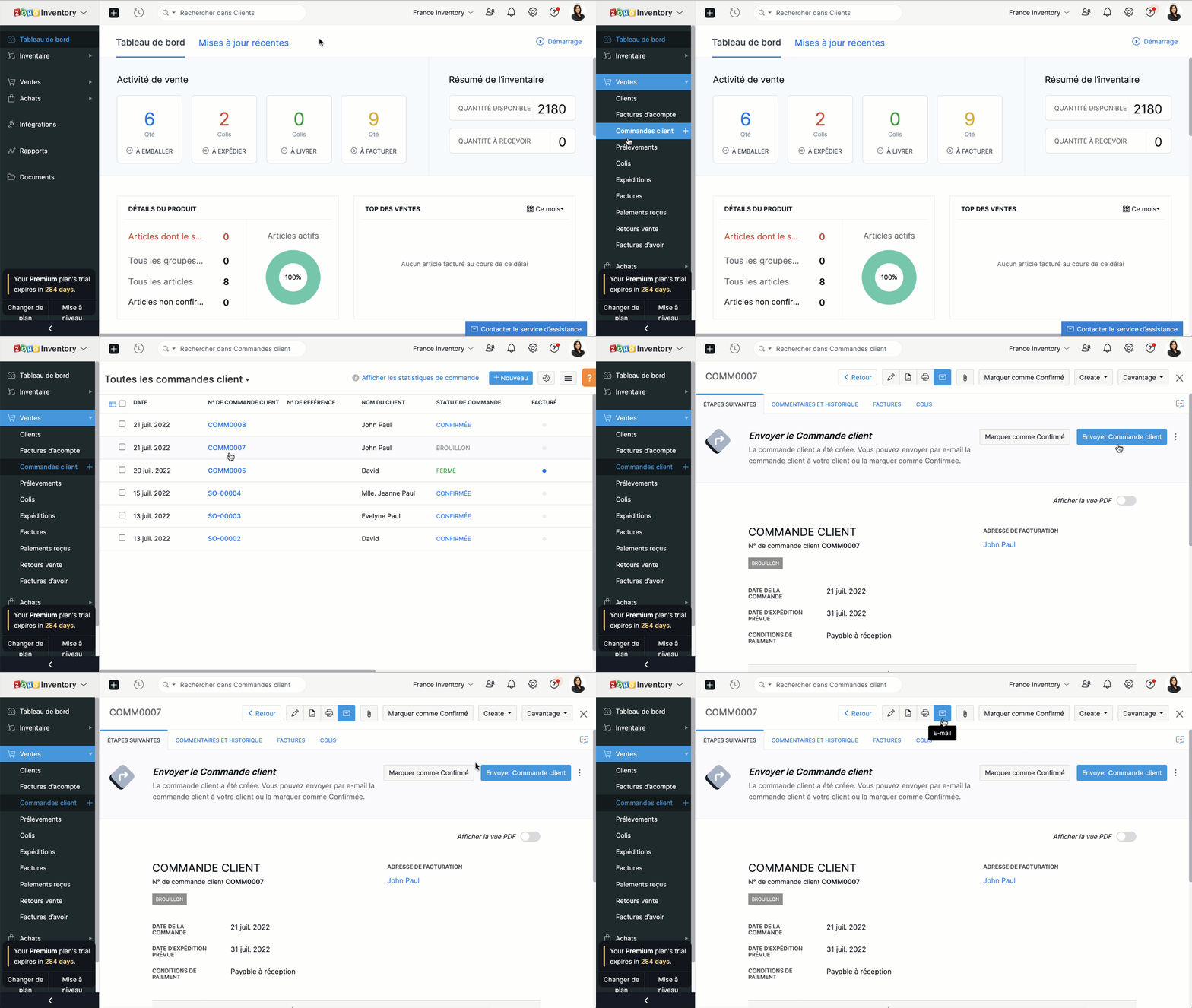
Vous pouvez soit envoyer la commande client au moment où vous la créez en cliquant sur "Enregistrer et envoyer", soit l'envoyer plus tard depuis le bouton "E-mail" situé en haut de la fenêtre.
Fusionner les commandes client.
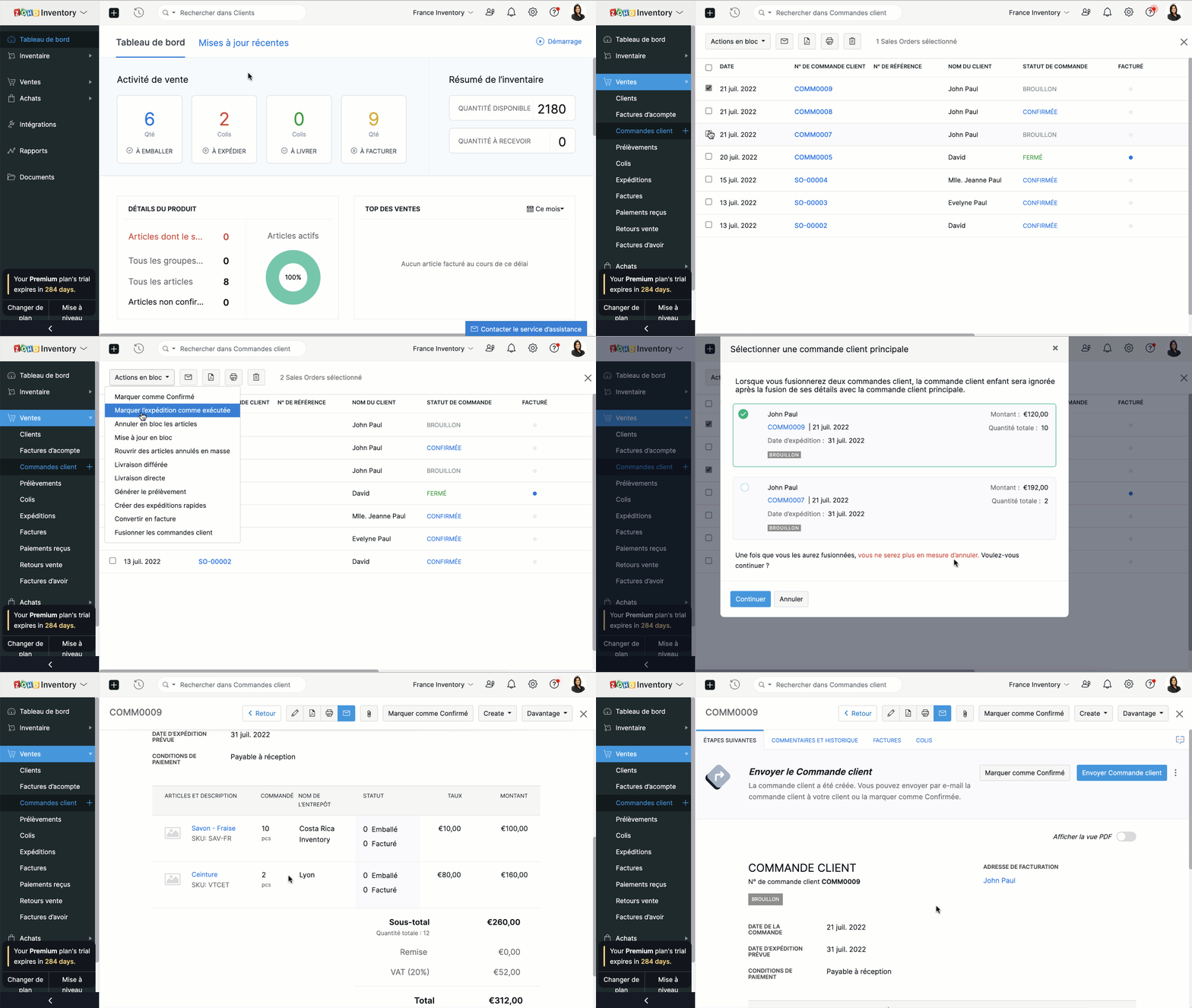
Si vous recevez deux commandes d'un même client, vous pouvez en regrouper les détails dans un seul document. Ainsi, vous pourrez préparer, expédier et facturer une seule commande au lieu de deux.
- Accédez au module "Commandes clients" depuis le panneau à gauche.
- Sélectionnez deux commandes clients à fusionner.
- Cliquez sur "Actions en bloc" et sélectionnez "Fusionner les commandes client".
Conditions préalables :
- Vous ne pouvez fusionner que deux commandes clients à la fois.
- Les deux commandes clients doivent être adressées au même client avec la même adresse de facturation et de livraison.
- Les deux commandes clients doivent avoir le même statut (statut Brouillon ou Confirmé uniquement) sans forfaits ou factures associés.
- Vous ne pouvez pas fusionner de commandes client de marketplace.
Créer des factures à partir de commandes clients
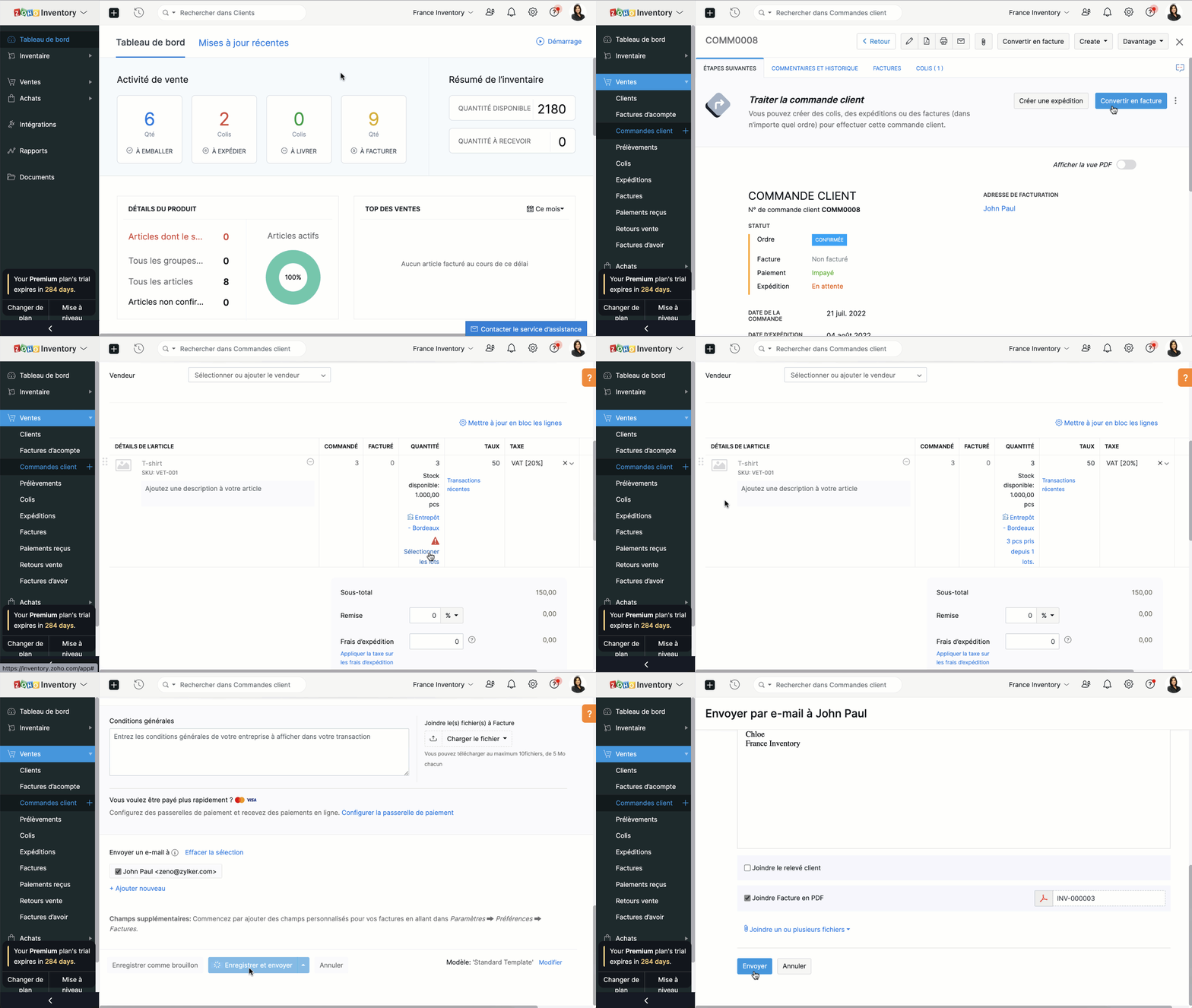
- Depuis le panneau à gauche, sélectionnez une commande client que vous voulez convertir en facture.
- Vous pouvez directement convertir en facture depuis l'onglet "Convertir en facture" soit depuis l'onglet "Facture".
- Vous serez dirigé vers la page de création de la facture. Par défaut, tous les détails fournis dans la commande client seront remplis automatiquement.
- En fonction des besoins, vous pouvez soit choisir de facturer partiellement la commande client et cliquer sur "Enregistrer", soit envoyer la facture immédiatement à vos clients en cliquant sur "Enregistrer et envoyer".
Merci
L'équipe Zoho France
New to Zoho Recruit?
Zoho Campaigns Resources





Topic Participants
Kinjal Lodaya
renaud.laurent
Sticky Posts
Collaboration sans faille avec Zoho One
Bonjour à tous, Dans cet article nous allons voir comment Zoho One permet une collaboration à différents niveaux . La façon dont nous travaillons évolue. À mesure que les entreprises se mondialisent, la plupart des activités sont menées en équipe.
Zoho CRM Plus Resources
Zoho Books Resources
Zoho Subscriptions Resources
Zoho Projects Resources
Zoho Sprints Resources
Zoho Orchestly Resources
Zoho Creator Resources
Zoho WorkDrive Resources


Zoho CRM Resources
Get Started. Write Away!
Writer is a powerful online word processor, designed for collaborative work.
Zoho CRM コンテンツ
-
オンラインヘルプ
-
Webセミナー
-
機能活用動画
-
よくある質問
-
Ebook
-
-
Zoho Campaigns
- Zoho サービスのWebセミナー
その他のサービス コンテンツ
ご検討中の方
Recent Topics
Zoho Vault: A look at what's new for iOS, iPadOS, and macOS
Hi everyone, At Zoho Vault, we constantly aim to improve your security experience. Based on both internal and external feedback, we have recently rolled out updates across our iOS, iPadOS, and support for macOS platforms. Introducing the desktop app forBiometric Access Support on Zoho Vault Desktop App
Is there any plans to add biometric authentication (fingerprint, face recognition) for Vault desktop apps (Windows/macOS) to enhance security and ease of access. I would love to hear other members view on thisFree webinar: Learn the benefits of migrating to Zoho Vault's new interface
With remote work becoming more and more common across the globe, productivity and time management are now pivotal concerns for every organization. With the number of business applications employed by companies constantly increasing, a password manager like Zoho Vault saves a lot of productive hours for your team. Vault's new interface has been carefully designed to address these pressing needs, helping users increase their productivity while improving their overall online experience. This July,Free Webinar: An exclusive live Q&A session with the Zoho Vault team
As 2020 draws to an end, we're closing out a year that has seen drastic changes all around the world. Many businesses have adopted cloud solutions and a remote work culture for the first time, and this has given rise to newer cyber risks and threats thatWhy passwordless authentication should be your top security project for 2021
Hello users! We know that nobody likes to remember passwords, yet they form an indispensable part of our lives. Many of us working with any kind of technology today manage numerous passwords for personal and business accounts. With the widespread adoptionFree Webinar: See why Zoho Vault is the best alternative to LastPass
When LastPass was acquired by LogMeIn in Oct 2015, we expressed our genuine concern about how this would change the LastPass business model and how customer trust would transfer from one company to another. As we suspected, LastPass doubled their pricingManaging cyber threats when working remotely | A Customer Survey Report
The nearly universal adoption of remote work has changed the way businesses function. Globally, enterprises continue to work to find new ways to make life easier for employees working remotely. However, a commonly cited concern has been the lack of cybersecurityWorld Password Day: 5 interesting facts about passwords
It's World Password Day: that time of the year when we talk about password hygiene and the importance of safe password management. World Password Day is observed on the first Thursday of every May, and this year, we'd like to talk about some of the mostFree Webinar: Go passwordless in 2022 with Zoho Vault
Passwords have long been the preferred authentication method, largely due to their universal appeal. While they're easy for people to use and implement, they're also convenient for hackers to exploit. Reports from 2021 state that weak and stolen passwordsMyki has announced EOL for its services | Learn why Zoho Vault password manager is the best alternative
Hello Myki users, Myki has announced end-of-life for its Teams, MSP, and GUARD services, after being acquired by JumpCloud. In their recent announcement, Myki stated that they will be removing their apps and extensions from the respective stores, turningJoin our exclusive meetup with Zoho's Real Estate community
Hey there, The Zoho Vault team is conducting a meetup for all real-estate users from Zoho. During this session, we will be discussing the need for secure password management and how Vault can help you and your clients safely protect passwords and otherFree webinar: A quick walkthrough of Zoho Vault and major updates in 2023
Managing passwords is crucial for all businesses. You can securely store, share, and manage passwords effectively from anywhere with Zoho Vault. We have introduced several new features in 2023 to offer the best online experience for our users. Join ourFree webinar: Why a password manager is a “must-have” for everyone in 2024
In the past decade, we've witnessed numerous cybersecurity breaches globally, with a significant portion resulting from the "it won't happen to me" mindset. Shockingly, in 2023, 86% of breaches involved weak and stolen passwords. Password hygiene is crucialZoho Vault - Webinars 2023 - Video Recordings and Slide Decks
Hello, We wanted to offer a consolidated list of Zoho Vault webinar resources from 2023. Therefore, we're putting together a list that includes links to our webinar recordings and slide decks for easy access. Webinar Video recording Slide deck GettingFree webinar: Focal point: Building a financial ecosystem with Zoho Vault and Zoho Workplace
Hi everyone! Cyber threats against the financial sector are escalating. In the last two decades, nearly one-fifth of reported incidents targeted financial institutions, causing $12 billion in direct losses. Cybercriminals are becoming more sophisticated,New features in Zoho Vault
We’re thrilled to introduce a wave of powerful updates in Zoho Vault, designed to enhance security, streamline workflows, and improve your overall experience. Let’s dive into what’s new! Folder creation restrictions Limit who can create folders in yourJoin our World Password and Passkey Day expert Q&A 2025
Hey everyone! World Password and Passkey Day is almost here, and there's no better time to talk about something we all rely on daily—secure authentication. Did you know that a staggering 60% of hacking-related breaches are tied to weak or stolen passwords?Dashlane discontinued its free plan: Here's why Zoho Vault's free plan is worth the switch
Hey everyone, Dashlane password manager has officially announced that its free plan will be discontinued starting September 16, 2025. This change means that current free users will need to either upgrade to a paid subscription or export their data andIntroducing SecureForms in Zoho Vault
Hey everyone, Let’s face it—asking someone to send over a password or other sensitive data is rarely straightforward. You wait. You nudge. You follow up once, twice—maybe more. And when the information finally arrives, it shows up in the worst possibleClickjacking: Zoho Vault's Response
Issue: Password manager browser extensions are found to be vulnerable to clickjacking security vulnerabilities that could allow attackers to steal account credentials, TFA codes, and card details under certain conditions. Reported by: Marek Toth, IndependentFree webinar: Security that works: Building resilience for the AI-powered workforce
Hello there, Did you know that more than 51% of organizations worldwide have experienced one or more security breaches, each costing over $1 million in losses or incident response? In today’s threat landscape, simply playing defense is no longer enough.Free webinar—Redefining workforce security with Zoho Vault: Passwords, passkeys, and multi-factor authentication
Hi everyone! Did you know that in Q2 alone, 94 million data records were leaked globally? Behind every breach is a combination of poor password habits, phishing attacks, privilege misuse, and simple human error. The fallout—including reputational damage,Fill Colors
Hello, Just curious, is it possible to manage the Used and standard colors in the fill drop down menu ? I would like to change/edit them is possible to colors I frequently use. Thanks for you reply, BruceClient scripts for Zoho Books ?
Good day everyone, I am looking for a way to be able to interact with the Quotes and Invoices as they are being created. Think of it like Zoho client script in Zoho CRM. But for the life of me I dont see a way to do this. The issue with having functionFillable template with dynamic tables?
Is there a way to build a fillable template so that users can add rows to a table? To describe what I'm trying to accomplish the table has 3 sections; a header row, some number of rows with custom information, and a summary row with totals. I can't figureInvoicing multiple expense items as a single line item
My client would like me to invoice them for multiple expense items on a single line item on an invoice. Can this be done? I know I can import billable expenses to an invoice, but I don't know how to show them as a single line item or have themTables improvement ideas / features
Heya, I've been using Zoho Tables for a few months now and wanted to post some features that I think will be greatly beneficial for the tool: 1. Ability to delete a record in automation or move a record in automation. - Usecase: I move a record from oneAnnouncing offline payment modes for event tickets
Hello everyone, Collecting ticket payments from prospective attendees can be a tricky part of event planning. While Zoho Backstage has always allowed you to collect payments online as people buy tickets from your event microsite, we have now enabledGmail is ramping up its email sender policy from November 2025
Hello marketers, As you may be aware, Gmail introduced a guideline for bulk senders starting February 2024. If not, here's a quick refresher straight from Google: After this policy was announced first in 2023 and soft-implemented in February 2024, weIs there a list of Zoho Icons?
Is there a list of Zoho Icons you can reference: i.e. business-gold is <image marginRight='7px' color='#2A70E7' bgColor='#FFFFFF' width='52px' height='52px' type='icon' value='business-gold' size='24px' cornerRadius='26px' iconType='solid' /> Thanks!Item images
Can we get an "On hover" expanded image for items please ?Ability to Create and Manage YouTube Video Chapters in Zoho Social
Hi Zoho Social Team, How are you? We would like to request an enhancement to Zoho Social that would allow users to create and manage YouTube video chapters directly within the platform. Currently, Zoho Social does not support manually adding chaptersWhat happens to my current site SEO if i opt for zoho creator?
I have an existing website and I need to use Zoho creators for the rapid creation of my webpage creation. Currently, my IT team is creating the web pages, but I am concerned about the SEO of my current website if I shift to zoho will i loose it all?Preview Emails with Merge Fields before sending
Hello, Are there plans to preview an email with merge fields before sending out? Currently, all you see in the preview are the merge field values, but before I send out the email I want to make sure the merge is working. Also, the saved emails only showUser Filter not selecting All Items
We are encountering 2 issues when using the user filter. When users are trying to search using the filter option, the OK button is grayed out. Users have to unselect or make a change before it filters properly. 2. When filtering and the OK button works,Support Nested JavaScript Variables in PageSense Pop-up Targeting
Hello Zoho PageSense Team, I hope you're doing well. I’d like to request a feature enhancement for the PageSense pop-up targeting functionality. Current Limitation: Currently, PageSense pop-ups can be triggered using simple JavaScript variables. However,Cannot Invert Axis for Rankings
Hi there I want to be able to create a ranking graph in Analytics/BI, with 1 at the top of the Y axis, but I am unable to invert the axis. Super simple example in Excel below. Higher rankings need to be higher up on the graph to give the correct visualHow to copy value from a single line field into a picklist field within a module's subform?
Hello there, I have a single line field in a module's subform. I would like the value in the field to automatically update a picklist field within the same subform (both have items with the same names). Is this possible via function? Unfortunately, workflowsCommitted Stock and To Be Received Stock via API?
Is it possible to retrieve Committed Stock and/or To Be Received Stock for an Item via the API? I want to use this information for calculating the amount of inventory needed to be purchased.Creating Email template that attaches file uploaded in specific field.
If there's a way to do this using Zoho CRM's built-in features, then this has eluded me! I'm looking to create a workflow that automatically sends an email upon execution, and that email includes an attachment uploaded in a specific field. Email templatesNext Page