Create Your Own Issue Management System

Create Your Own Issue Management System

Effective issue management is a cornerstone of project success. Every bug or issue, no matter how small, needs to be tracked and resolved in time to maintain project momentum. In this post, we’ll explore how an issue management system in Zoho Projects is used to manage issues in our own product management process.

Real-time Example:

During the software testing process, when the tester identifies an issue impacting the Global Web Tab feature task where the alignment breaks in certain browsers, it follows a predefined process for resolution. Here’s how the issue management system handles this end-to-end.

Submit Issues using Custom Fields

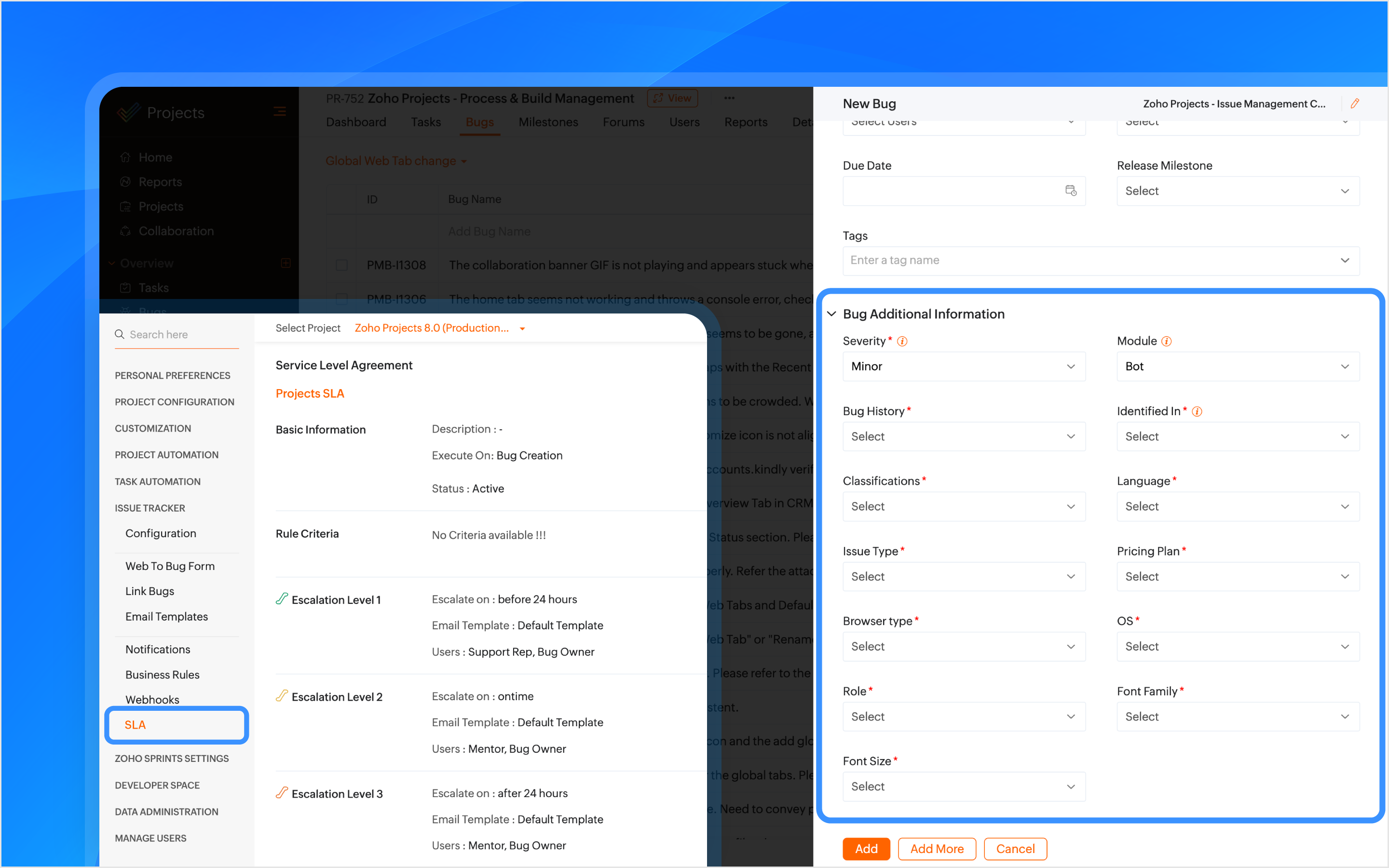
Custom fields are created within the Issue Layout, allowing testers to submit issues with key details like severity, module, browser type, and font family. In the case of the Global Web Tab alignment issue, the browser type field helps pinpoint which environment is affected.
Info
How Other Industries Can Use Issue Layouts In This Process:  
Construction: Track issues like material defects or design flaws using custom fields such as location, material type, grade, etc.
Manufacturing: Track production line breakdowns or machine malfunctions issues with custom fields like product phase, machine type, location, etc.

SLAs Based on Issue Type

SLAs are configured based on the issue type, such as Support, Security, Privacy, or Performance, to set resolution deadlines. If the issue is categorized as one of these types, the SLA triggers a resolution within 24 hours. If the issue remains unresolved, it escalates through Levels 1–4.
Info
How Other Industries Can Use SLAs In This Process:
Construction: Set SLAs to resolve critical issues like safety violations or structural failures quickly.
Manufacturing: Set SLAs for issues like production line stoppages to minimize downtime.

Automate Assigning Issues

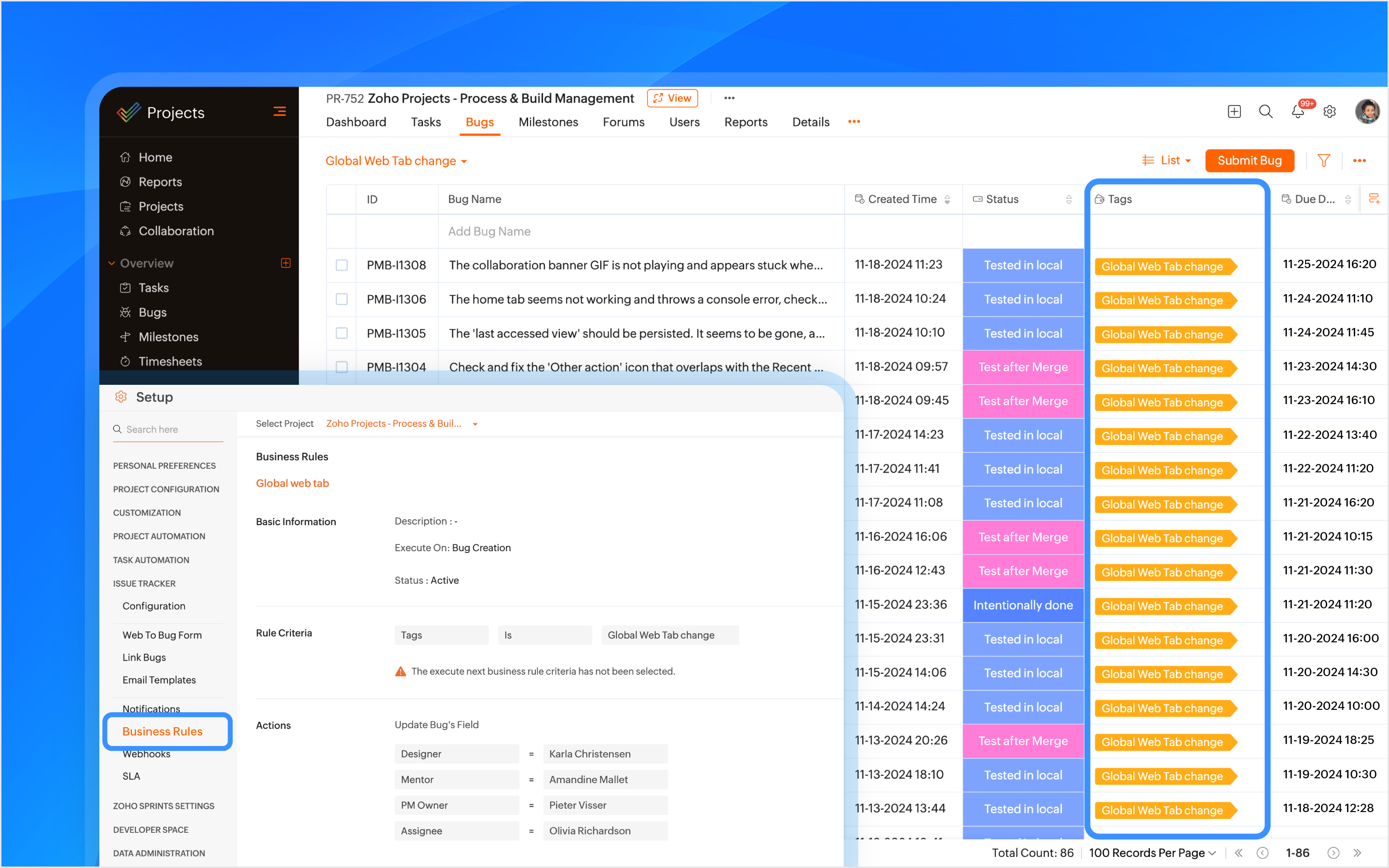
A tag is created using the feature name and is associated with the issue when it is submitted. Business rules are created using the tags as criteria to automatically assign the issue to the relevant developers, designers, managers, and project managers (PMs).
Info
How Other Industries Can Use Tags In This Process:
Construction: Automatically assign issues using the issue type as tags, such as plumbing or electrical, to the appropriate contractors or subcontractors.
Manufacturing: Use tags like machinery or production to assign issues to maintenance teams or shift managers automatically.

Bulk Update Issues

A custom view is created to track and bulk update all issues related to the feature using the tag as a criteria.
Info
How Other Industries Can Use Custom Views In This Process:
Construction: Create custom views to track and update issues related to electrical work.
Manufacturing: Create custom views to track and update production-related issues.


Manage Duplicate Issues

If a duplicate issue is submitted, the developer can link it to the original issue using the is duplicate of link type for identification. A custom function is created to ensure that duplicate issues are closed only when the original issue is closed ensuring no redundancy in the issue tracking process.
Info
How Other Industries Can Use Link Issues In This Process:
Construction: Link duplicate issues like multiple reports of the same electrical fault.
Manufacturing: Link duplicate maintenance issues to the original issue to ensure a single resolution.

Associate Tasks to Issues

The Global Web Tab task is associated with the issue, allowing both the development and QA teams to monitor the progress of the work item from a single place. When a tester opens the task, they can view all associated issues, and when opening an issue, they can easily track the associated task.
Info
How Other Industries Can Use Task Association In This Process:
Construction: Associate tasks like Foundation to issues like Cracked Foundation for easy tracking.
Manufacturing: Associate maintenance tasks to machinery issues to track progress.

Automating Status Updates

A custom function is created to automate the update of issue statuses. when the tester updates the task status to Started Testing, the associated issue status is automatically updated to In QA Process. Similarly, when a developer resolves the issue and updates the task status to Resubmit for QA, the associated issue status is updated to To be tested. Issue Tracker Notifications are used to send notifications to all team members to keep everyone informed about such status updates.
Info
How Other Industries Can Use Custom Functions In This Process:
Construction: When the Electrical Safety Check issue status is updated to Passed, the associated task, such as Wiring Installation, will automatically update its status to Inspection Complete.
Manufacturing: When the Material Shortage issue is updated to Resolved, the task status for Electrical Installation will automatically update to Work Completed.

Automate Adding Followers

Sometimes issues need further validation before they are resolved. Developers can update the issue status, such as Intentionally Done or Discuss with the PM. Business rules are created to automatically add relevant product managers (PMs) and other team members as followers with such statuses as criteria. This ensures that decisions are validated and any necessary inputs are added through comments before moving forward.
Info
How Other Industries Can Use Business Rules In This Process:
Construction: Automate adding followers to validate electrical safety checks or structural issues before moving forward.
Manufacturing: Automate adding followers to validate machine repair statuses before completing maintenance tasks.

Checklist for Testers

Once the feature is reviewed and tested, the Checklist Extension is used for the associated task. The tester is required to complete a predefined checklist within the task to verify that all relevant testing scenarios have been covered. This checklist ensures that no critical testing aspects are missed.
Info
How Other Industries Can Use Checklist Extension In This Process:
Construction: Use checklist to create a punch list to ensure all inspections, tests, and final verifications are completed before a task  issue is marked as completed.
Manufacturing: Create a compliance checklist to ensure product assembly and quality control steps are completed before a task  issue is marked as completed.
Note: Checklist extension can be used for both tasks and issues.


Resolve Issues

Upon resolving the issue, the developer can resolve the issue from the issue details page with the context.

Custom Notifications

Custom email templates in Issue Tracker Notifications are used to automate communication. Developers and the relevant team members are automatically notified about reopened issues. This helps prevent delays in the project.
Info
How Other Industries Can Use Email Templates In This Process:
Construction: Create customized email template and use it in issue tracker notifications for critical issues like safety violation when reopened.
Manufacturing: Create customized email template and use it in issue tracker notifications for maintenance issues when reopened.

If you have any questions, do leave a comment below or mail to us at: support@zohoprojects.com.


      Zoho Campaigns Resources


        • Desk Community Learning Series


        • Digest


        • Functions


        • Meetups


        • Kbase


        • Resources


        • Glossary


        • Desk Marketplace


        • MVP Corner


        • Word of the Day


        • Ask the Experts


          • Sticky Posts

          • Introducing the Zoho Projects Learning Space

            Every product has its learning curve, and sometimes having a guided path makes the learning experience smoother. With that goal, we introduce a dedicated learning space for Zoho Projects, a platform where you can explore lessons, learn at your own pace,
          • Update on V2 API End-of-Life Timeline

            Dear Users, Earlier this year, we shared the launch of the V3 APIs and requested users to migrate from the older V2 APIs by December 2025. We have received valuable feedback from our users and partners regarding their migration timelines. We are happy
          • Automation Series: Auto-update Phase Status

            Hello Folks! You can auto-update your phase's status based on status of underlying tasks using custom functions. In this series, we will showcase how to create and run custom functions, using Deluge, with ease. Follow the steps below and automate your
          • Automate Timesheet Approvals with Multi-level Approval Rules

            Introducing Approval Rules for Timesheets in Zoho Projects. With this automation, teams can manage how timesheets are reviewed and approved by setting up rules with criteria and assigning approvers to handle submissions. Timesheet, when associated to
          • Accessibility Spotlight Series - 1

            Every user interacts with products differently, what feels intuitive to one may be challenging for another. Addressing this, accessibility is built into Zoho Project's design philosophy. This helps users navigate and perform actions with ease irrespective

          Zoho CRM Plus Resources

            Zoho Books Resources


              Zoho Subscriptions Resources

                Zoho Projects Resources


                  Zoho Sprints Resources


                    Zoho Orchestly Resources


                      Zoho Creator Resources


                        Zoho WorkDrive Resources


                          Zoho CRM Resources

                          • CRM Community Learning Series

                            CRM Community Learning Series


                          • Tips

                            Tips

                          • Functions

                            Functions

                          • Meetups

                            Meetups

                          • Kbase

                            Kbase

                          • Resources

                            Resources

                          • Digest

                            Digest

                          • CRM Marketplace

                            CRM Marketplace

                          • MVP Corner

                            MVP Corner


                            Zoho Writer Writer

                            Get Started. Write Away!

                            Writer is a powerful online word processor, designed for collaborative work.

                              Zoho CRM コンテンツ


                                ご検討中の方

                                  • Recent Topics

                                  • Change User Role in a Form

                                    Hi, When in a form, it would be good (And consistent) to be able to change the user role/permission like you can with Shared Reports, All Entries or the actual User itself, rather than having to delete the users permission and then add it back again with
                                  • Assistance needed: Activation of a domain

                                    Hello Zoho Support, I purchased the .com domain "primesolva.com" via Zoho 6 days ago. The domain is still pending, and I cannot access the DNS panel to add the TXT verification for domain ownership. Please confirm the registration status and help me activate
                                  • Operation not permitted

                                    I am trying to add an email address to the list of user but I am getting error Operation not permitted
                                  • Cannot connect to imap.zoho.eu on iOS26

                                    Hey, I recently migrated to another iPhone and since then use iOS26. Every since then, I was not able to connect to "imap.zoho.eu" from Apple Mail. I tried deleting the account and adding it again, did not work. I tried creating an app password, didn't
                                  • Request to Permanently Delete Email User (info@mehbobgulf.com ) from Old Organization

                                    Please permanently delete the user email info@mehbobgulf.com It is still associated with my old Zoho organization. I cannot delete it because it shows ‘You cannot delete email. Zoho host’. I need to use this email in a new Zoho account.”
                                  • Client host [89.36.170.5] blocked using Spamhaus

                                    Hello please make make actions for delist ..... "Client host [89.36.170.5] blocked using Spamhaus"
                                  • Suggestion: Option to Re-run a migration

                                    As I'm going through a migration process, I like the IMAP migration tool, but it would be better if there were an option to re-run the same migration as configured. There's not even an option to copy/edit one that's already there. Just run if it hasn't
                                  • Issue with "Add Your Mobile Number"

                                    Hello, I am trying to sign up for email service for a domain name, and I cannot finish the authentication. When I enter my mobile number, I receive the message "We’re unable to send OTP to this mobile number. Please contact support-as@zohocorp.com". I
                                  • zoho mail non vérifié

                                    Bonjour, Il y'a un jour que j'ai acheté un domaine et toute les tentatives pour l'associé a mon compte shopify son vaine. j'ai essayé TXT sans suite après, j'ai essayer avec CNAME sans suite. j'aurais besoin de votre assistance pour associé mon mail.
                                  • Unable to send message;Reason:553 Relaying disallowed. Invalid Domain

                                    i have facing the issue "Unable to send message;Reason:553 Relaying disallowed. Invalid Domain" if i verify domain evertthing i did but still face the same error.
                                  • ZohoMail is so close to being Perfect BUT

                                    Why don’t you have HILIGHTING???!! I've been trying to find a substitute for Edison Mail but I want & need hilighting (preferably in more than just yellow)! Is this even on your To Do list? I’m so disappointed. 🙄
                                  • Override Auto Number field?

                                    We are preparing to migrate from Salesforce. In Salesforce, we auto-generate a unique number on our Opportunities (Potentials). If the Opportunity results in a contract, we use that unique number as the Contract number. There are some situations where
                                  • Using a third party service provider want to move directly with Zoho

                                    Hi good day I’m currently using Zoho but I’m using a third party service provider I want to move directly with you guys I’m using Zoho email and invoices and my domain please let me know if it’s possible to move away from the third party provider my email
                                  • Request for Assistance Regarding Email Sending Issue (554 5.1.8 - Email Outgoing Blocked)

                                    Dear Zoho Support Team, I hope this message finds you well. I am writing to request assistance with an issue we are currently facing regarding our Zoho Mail account. Our email account, admin@tuyensinhcanuoc.com, is encountering the following error when
                                  • Zoho Mail API returns empty inbox (0 messages) but webmail shows 37 unread emails

                                    Hello, I'm experiencing a discrepancy between Zoho Webmail and the Mail API (EU region). **Setup:** - Account: EU datacenter (mail.zoho.eu) - API: Self Client OAuth2 via api-console.zoho.eu - Scopes: ZohoMail.messages.READ, ZohoMail.messages.UPDATE, ZohoMail.folders.READ,
                                  • Zoho Mail not working

                                    Zoho Mail not working
                                  • ShipStation and Zoho Inventory

                                    Hello, I am looking to sync zoho inventory with shipstation ZOHO INVENTORY           SHIP STATION Sales Order  ==>  create ORDERS INVOICE  <==    Shipments What exactly does BETA mean on the Shipstation connector?  This is required for me to sign-on in the next month. Thanks in advance for your efforts
                                  • Are there settings for hyperlinks?

                                    Clicking a hyperlinked cell in Sheet creates this little pop-up with the actual hyperlink inside. Is it possible to have a 1-click link where if you click the cell it opens the link directly with no pop-up?
                                  • 550 5.4.6 Unusual sending activity detected. Please try after sometime

                                    Hi, I am receiving this error message when trying to send my emails. The only reason I can think why this is happening is my previous two emails were bounced back to me due to a non working mailbox error. I have followed the online links for unblocking but it says there are no blocks on my account. How and when can I get my email working again to send emails? Thanks,
                                  • E

                                    We are trying to add our Zoho Form embed in our Elementor Page Builder. After adding Zoho Forms widget in elementor page builder it’s displaying in backend page builder but it’s giving 403 error while trying to save, as it’s not reflecting in front end.
                                  • Kaizen #225 - Making Query-based Custom Related Lists Actionable with Lookups and Links

                                    Hello everyone! Welcome back to another post in the Kaizen series! This week, we will discuss an exciting enhancement in Queries in Zoho CRM. In Kaizen #190, we discussed how Queries bridge gaps where native related lists fall short and power custom related
                                  • Ability to Edit YouTube Video Title, Description & Thumbnail After Publishing

                                    Hi Zoho Social Team, How are you? We would like to request an enhancement to Zoho Social that enables users to edit YouTube video details after the video has already been published. Your team confirmed that while Zoho Social currently allows editing the
                                  • Formatting Problem | Export to Zoho Sheet View

                                    When I export data to Zoho Sheet View, ID columns are automatically formatted as scientific notation. Reformatting them to text changes the actual ID values. For example, 6557000335603071 becomes 6557000335603070. I have attached screenshots showing this
                                  • Add Attachment Support to Zoho Flow Mailhook / Email Trigger Module

                                    Dear Zoho Support Team, We hope you are well. We would like to kindly request a feature enhancement for the Mailhook module in Zoho Flow. Currently, the email trigger in Zoho Flow provides access to the message body, subject, from address, and to address,
                                  • Connecting Zoho Inventory to ShipStation

                                    we are looking for someone to help connect via API shipStation with Zoho inventory. Any ideas? Thanks. Uri
                                  • Clone / Export Popup Design Across PageSense Projects

                                    Hello Zoho PageSense Team, We hope you’re doing well. We would like to request an enhancement that allows popup designs to be reused across different PageSense projects. Problem Statement: Currently, Zoho PageSense allows popups to be duplicated only
                                  • custom module import.

                                    Is there a way to import data into a custom module? Thanks Rudy
                                  • IF Statement in Zoho CRM Formula Field

                                    Hi, I am attempting to write a formula field that will give me one result if one statement AND another statement are true, then a different value if the first statement AND a different statement are true, else 0. Stated differently: if account = destination
                                  • HEIC File Type Viewer

                                    Hi, It would be nice to be able to click on the images in the All Entries/Reports Tables which are HEIC the same as JPG, PNG, etc. so they open in a viewer from Zoho or the Attachment Service, today HEIC requires you to download each image and open it
                                  • Building Toppings #4 - Setting up and using connections in Bigin toppings

                                    When building a topping to extend Bigin's functionality and connect it with third-party applications, creating and handling connections is an important step. Connections provide a secure way for your topping to authenticate and communicate with other
                                  • Free Webinar: Zoho Sign for Zoho Projects: Automate tasks and approvals with e-signatures

                                    Hi there! Handling multiple projects at once? Zoho Projects is your solution for automated and streamlined project management, and with the Zoho Sign extension, you can sign, send, and manage digital paperwork directly from your project workspace. Join
                                  • Need code format to specify default values

                                    Can someone please direct me to the code syntax or the proper translation per the instructions circled below. These instructions don't seem correct.
                                  • AI Interview Insights: Turn Recorded Interviews into Quick Transcripts & Summaries

                                    Evaluating interviews shouldn’t require replaying long recordings or taking manual notes. With AI Interview Insights, you can now review complete transcripts and AI-generated summaries of your One-way (Recorded) interviews right inside Zoho Recruit. This
                                  • OAuth integration issues

                                    I'm experiencing persistent OAuth errors when trying to connect Make with Zoho API. I've tried multiple approaches but keep encountering the following issues: First error: 'Invalid Redirect Uri - Redirect URI passed does not match with the one configured'
                                  • Facing email delivery issues? Verify your domain's DNS records

                                    Have you ever wondered why your legitimate emails are landing in the recipient’s spam folder? Or been surprised to see emails sent from your registered domain getting rejected by recipient email servers? Why does this happen? In most cases, this happens
                                  • Adding Markdown text using Zoho Desk API into the Knowledge Base

                                    Hi Zoho Community members, We currently maintain the documentation of out company in its website. This documentation is written in markdown text format and we would like to add it in Zoho Knowledge Base. Do you know if there is REST API functionality
                                  • Order of Departments in Help Desk

                                    In the end user portal, , the departments are sorted by the date of creation of the department (or perhaps their id). Is there a way to choose the display order of the departments or at least to be able to sort them alphabetically?
                                  • COGS - Account showing negetive

                                    I have multiple COGS account and in these all there is one account is negetive so suggest why it is showing negetive value.?
                                  • Create CRM Deal from Books Quote and Auto Update Deal Stage

                                    I want to set up an automation where, whenever a Quote is created in Zoho Books, a Deal is automatically created in Zoho CRM with the Quote amount, customer details, and some custom fields from Zoho Books. Additionally, when the Sales Order is converted
                                  • %PaymentLink%

                                    Does not work. Software creates a BAD link. ....and yes payment options are turned on. Link on the invoice pdf once opened will work but this template is a joke.
                                  • Next Page