Creating a Gmail integration using custom connectors
Hello everyone!
Greetings from Deluge. Following up on our series aimed at exploring the capabilities of Deluge, today we'll take an in-depth look into the Deluge custom connections that can be created across Zoho services.
Deluge boasts an extensive range of over 260 built-in integrations spanning more than 35 Zoho services. These integrations streamline data access and modification with these services, from a single point in Zoho, without having to toggle between services. However, we understand that the needs of our users vary widely, and sometimes existing integrations may not cover every scenario.
That's where custom connections come in. Think of them as the Swiss Army Knife of integrations, enabling connections with hundreds of services—such as Gmail and Outlook—and seamlessly integrating them with your favorite Zoho services. With custom connections, you have the power to build your own integrations with virtually any third-party service and tailor them to meet your requirements. Moreover, since the custom connections use the OAuth 2.0 authentication mechanism, you're getting best-in-class security while integrating with third-party services.
What are connections?
Before we dive into the details of custom connectors, let's take a glimpse at what connections are in Deluge. Connections are a means to connect your Zoho account and any third-party accounts you wish to integrate with. Once a connection is created and connected, you can use it in Deluge integration tasks or invokeURL scripts to perform REST operations on the target service from the required Zoho service. For more information, visit our Connections help doc.
Use case
Assume the sales team of an organization uses Zoho CRM for managing leads, customer retention, and customer acquisition, and uses Gmail for communication purposes, like following up with potential clients via email. While the system works as is, it's time-consuming and prone to error, so an integration between Gmail and Zoho CRM is necessary to improve efficiency.
A custom connection to your Google account will enable you to sync your Zoho CRM and Google accounts, allowing you to perform actions related to your Google account from Zoho CRM. For example, you can invoke the connection using the invokeURL task in Zoho CRM and send an email to your leads from your Gmail address.
Steps to configure the Google custom connection
Configuration video
Configuration steps
Creating Google OAuth credentials
- Visit https://console.cloud.google.com/.
- Click the dropdown and choose the required project.

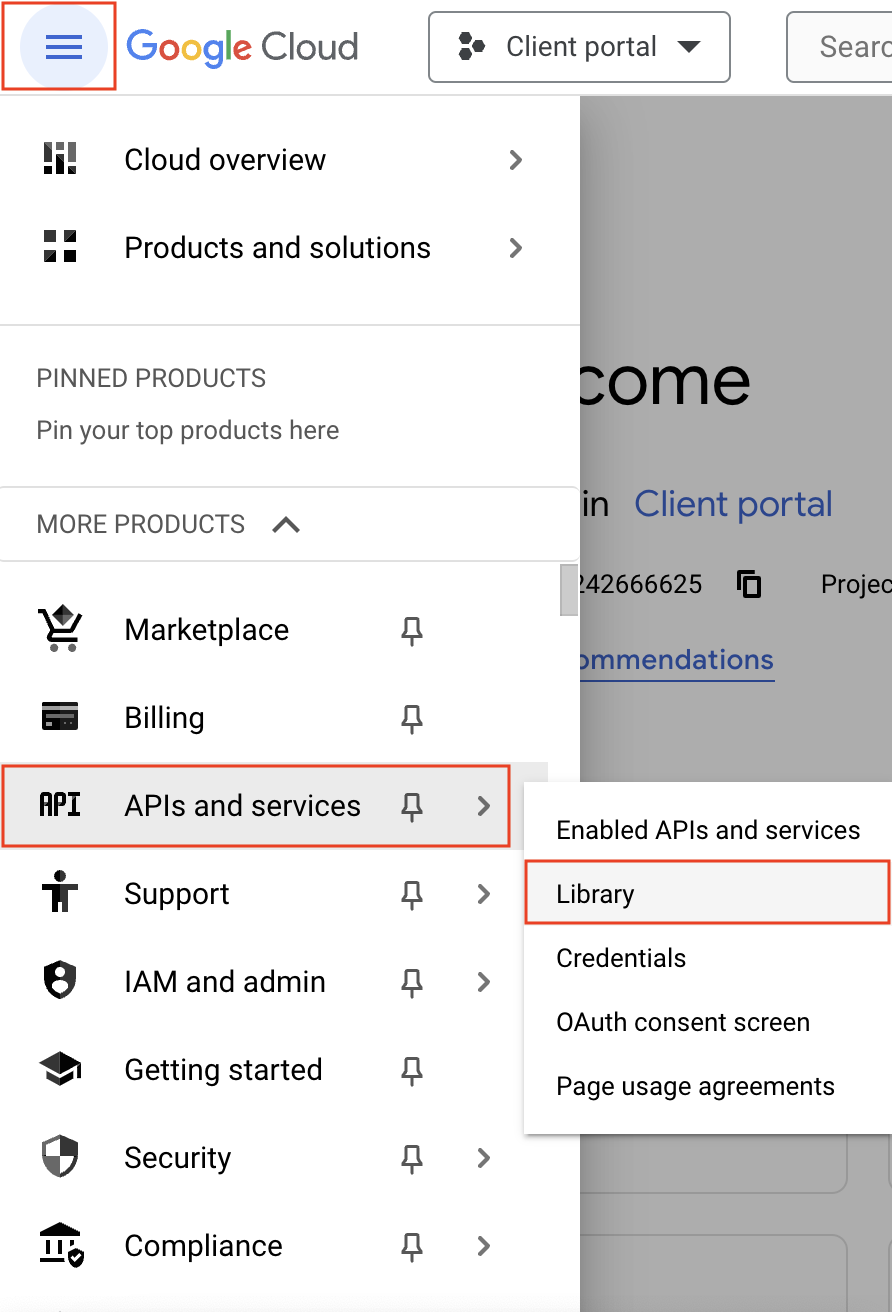
- Navigate to the hamburger menu on the left and click APIs and services -> Library.
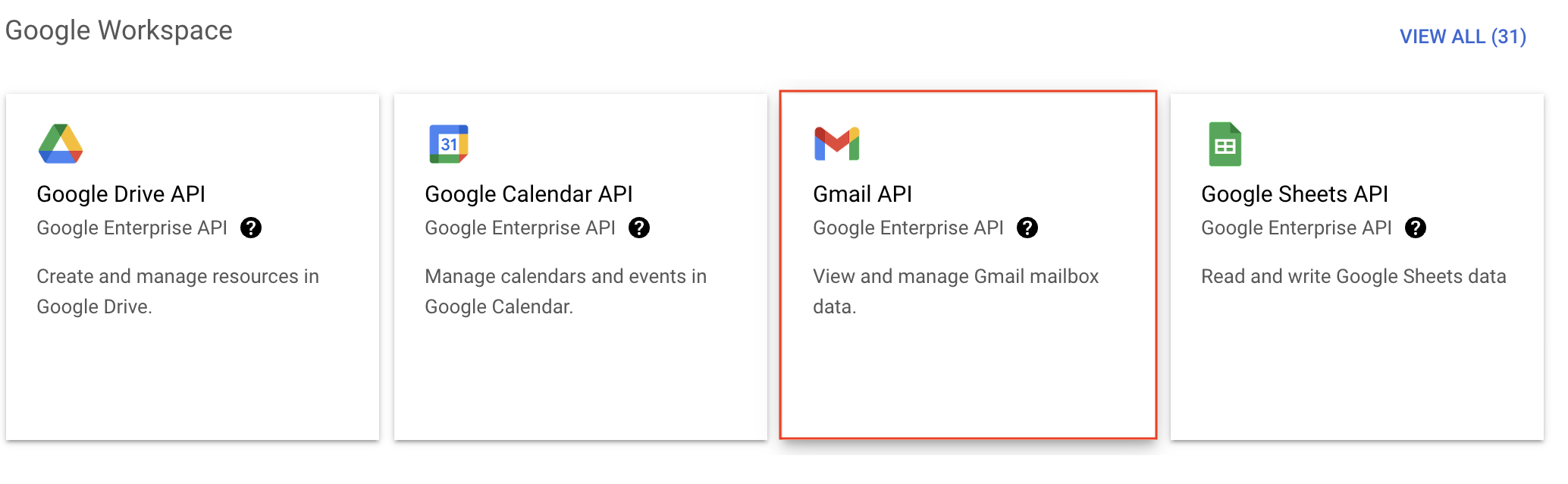
- You'll be taken to the API library page. Navigate to the Google Workspace section and click Gmail API.
- Next, click Enable on the Gmail API product details page.
- In order to use this API, you'll need to create credentials. Click CREATE CREDENTIALS.

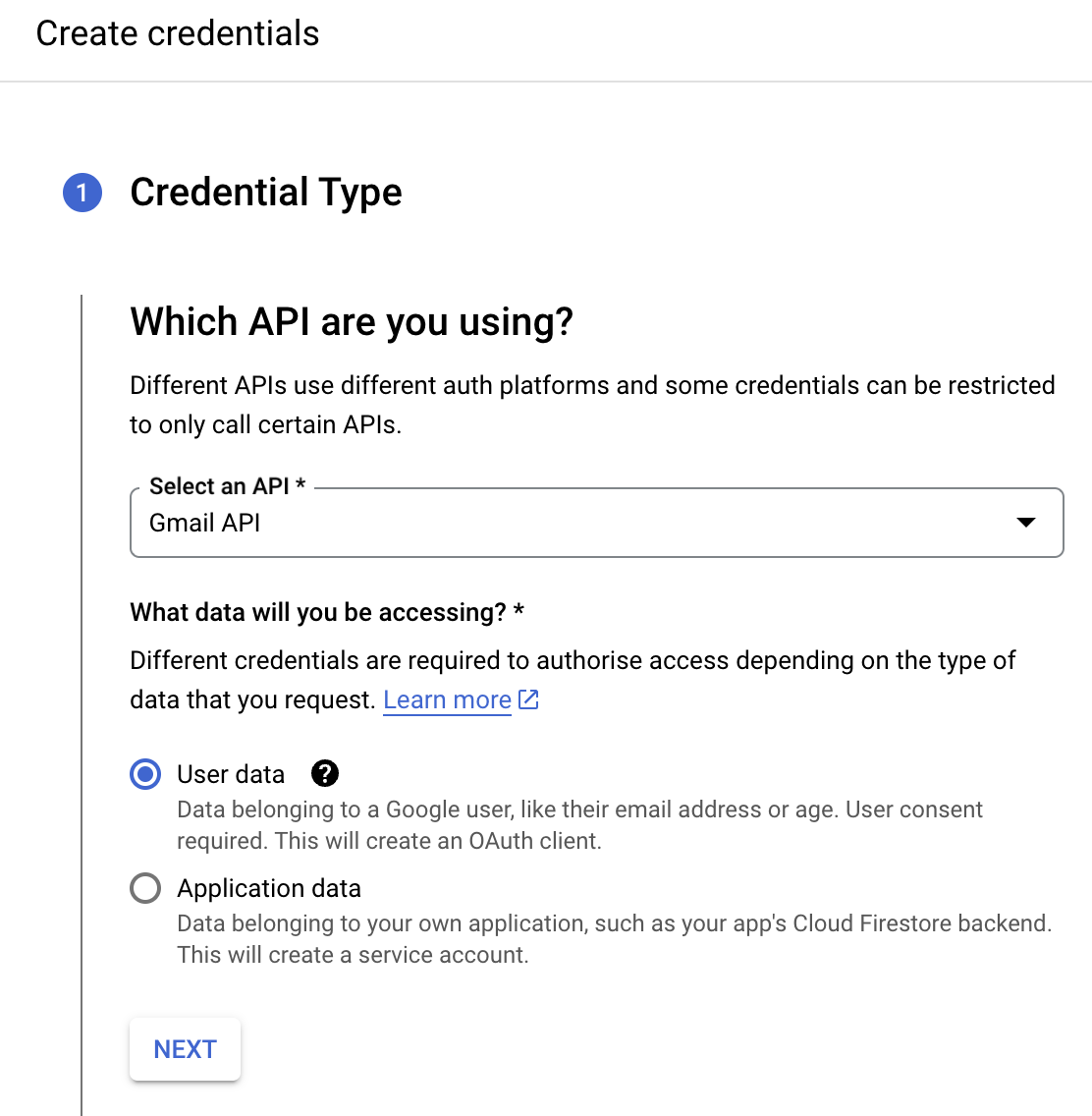
- On the Create credentials page, choose Gmail API in the Select an API dropdown and User Data under the What data will you be accessing? section. Click Next.
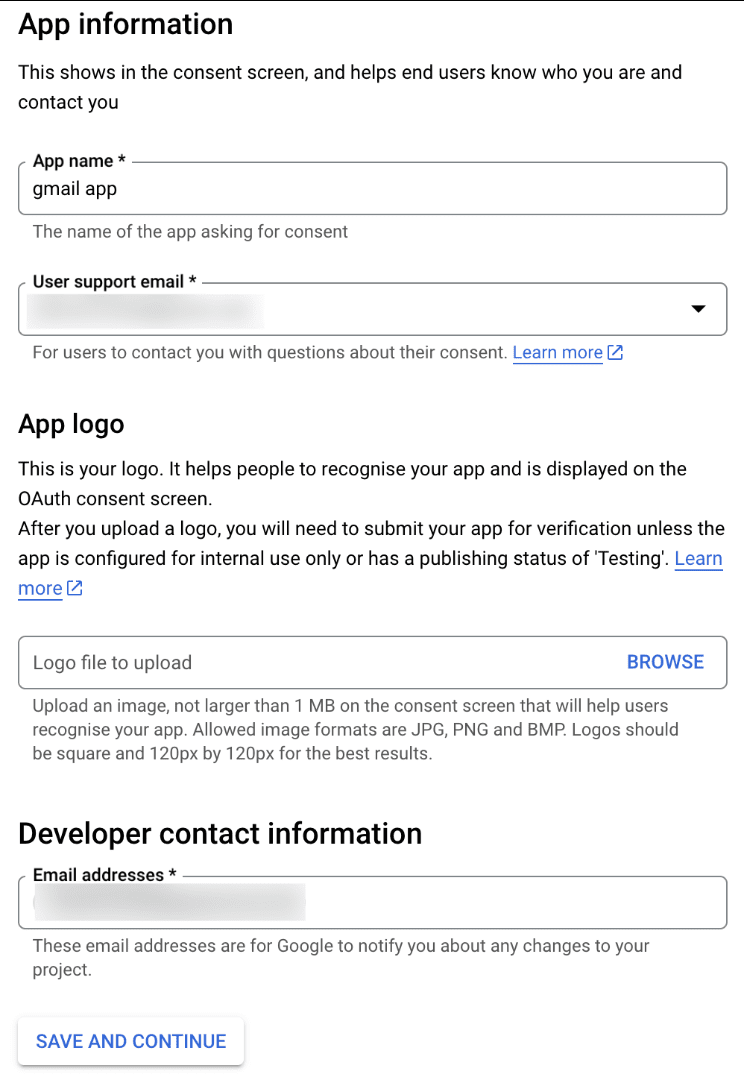
- Next, on the OAuth consent screen, enter the App name, User support email, and Developer contact email address. Then click Save and Continue.
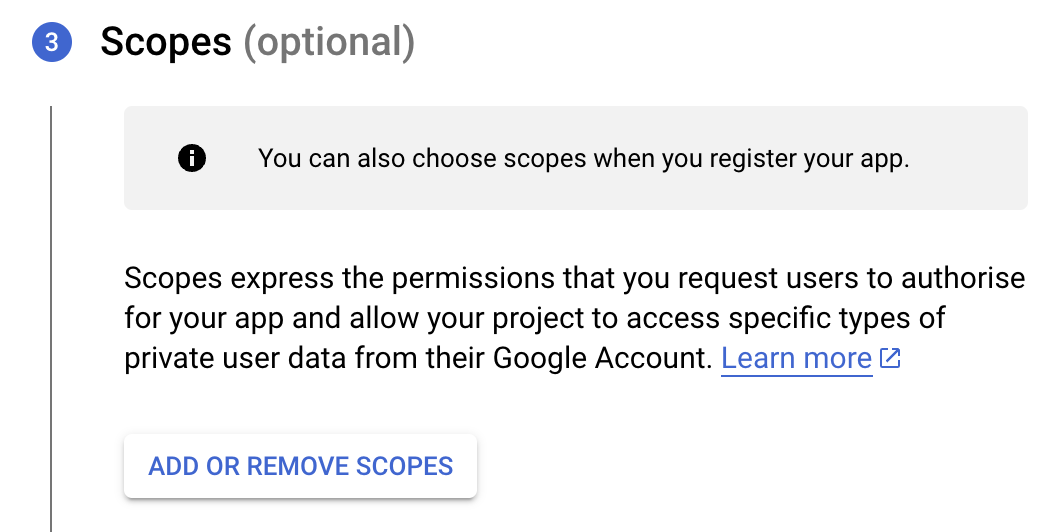
- Next, under the Scopes section, click the ADD OR REMOVE SCOPES button.
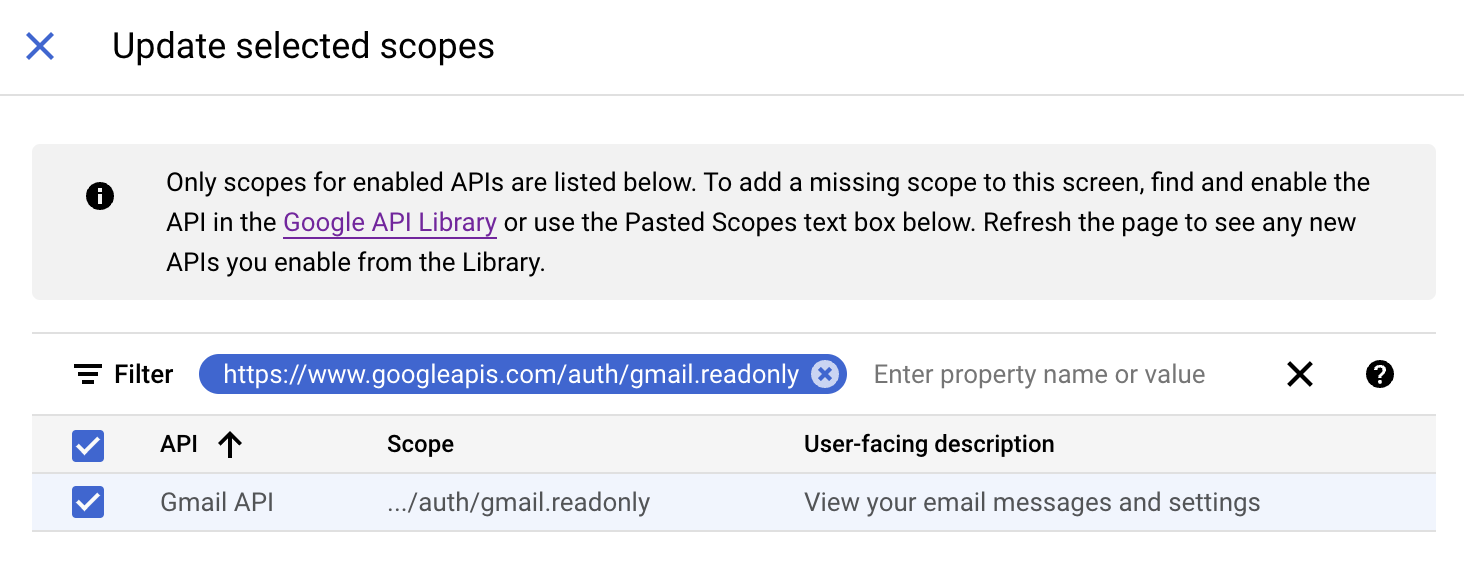
- In the Update selected scopes pane, search and select the gmail.readonly scope. Click Update, and then click Save and continue.
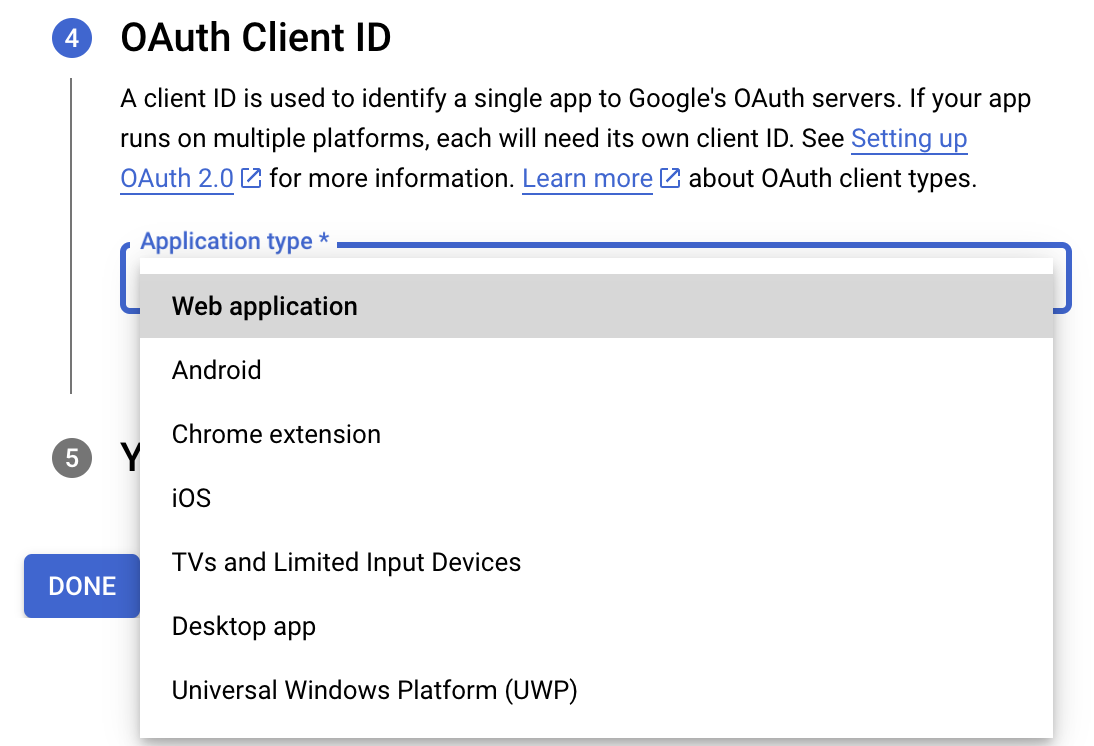
- Now, under the OAuth Client ID section, choose Web application in the Application type dropdown. Then name your app.
- Enter https://deluge.zoho.com/delugeauth/callback as the Authorized redirect URI.
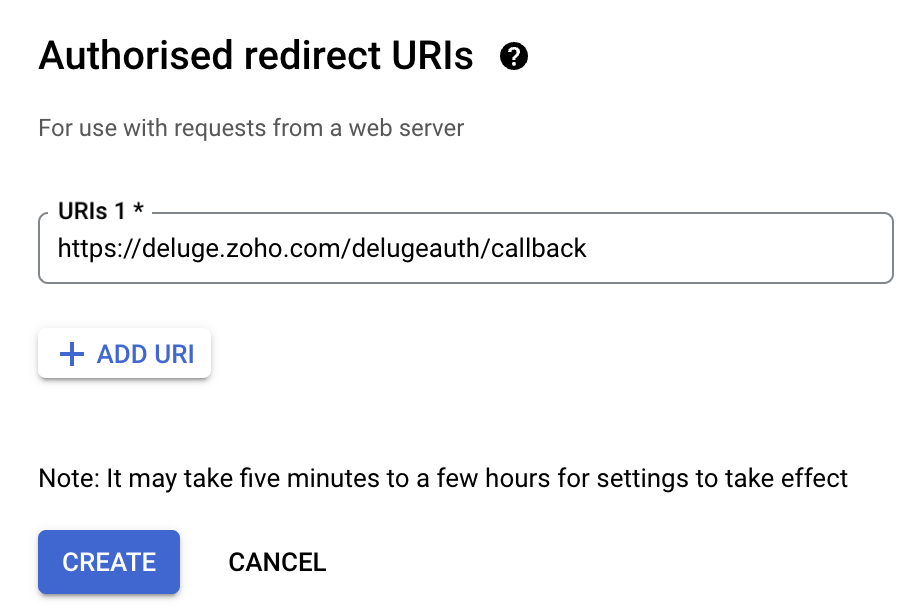
- Click Create and download your credentials. This Client ID and others will be required later, while creating a connection in Zoho CRM.
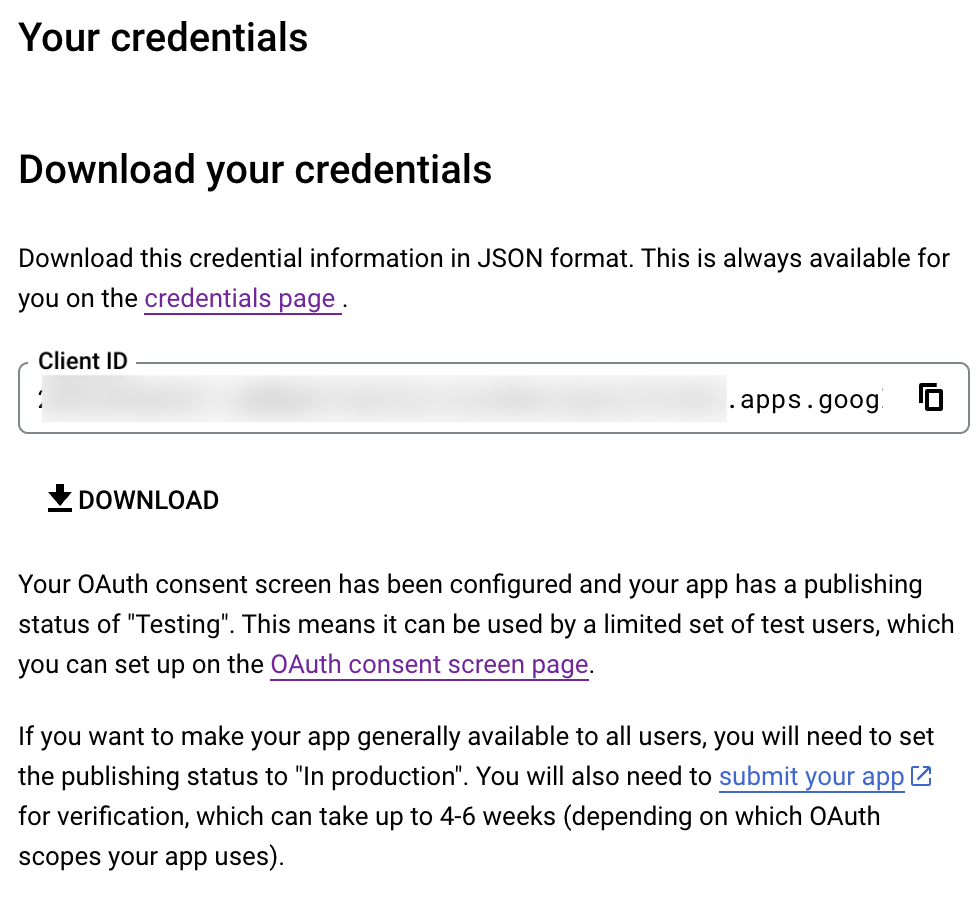
- Navigate to the OAuth consent screen and click Add users under Test users. Enter the user's email address and click Save.
Creating a custom connector for Gmail
- Now the action shifts to Zoho CRM. Navigate to crm.zoho.com -> Settings -> Connections.
- Choose Custom Services and click Create Service.
- On the Create Service screen, choose OAuth 2.0 as the Authentication type and Header as the Parameter.
- Enter the Client ID, Client Secret, and Authorize URL generated from Google as shown in step 12 above.
Tip: Having the Offline access type will allow your application to refresh tokens even when the user is not actively using the application. - Then enter https://oauth2.googleapis.com/token as the Access token URL and Refresh token URL.
- Specify the necessary scopes like read and create, etc. and then click Create Service.
- On the next page, click Create Connection. Give the connection name and choose the scopes. Then click Create and Connect.
- Finally, authenticate the connection on the Google accounts page. Your custom connection will be created, and the two services can be integrated!
Now that the connection between Zoho CRM and Gmail has been established, you can use the invokeURL task to access and modify data in Gmail using the different APIs.
Sample
You can use the below code in invokeURL task to get the latest emails from Gmail.

userId = "emailaddress@gmail.com";
get_gmail = invokeurl
[
url: "https://gmail.googleapis.com/gmail/v1/users/"+userId+"/messages"
type: GET
connection : "connectionname"
];
messageID = get_gmail.get("messages").get(0).get("id");
get_gmail_withID = invokeurl
[
url: "https://gmail.googleapis.com/gmail/v1/users/"+userId+"/messages/"+messageID
type: GET
connection : "connectionname"
];
Content_of_the_mail = get_gmail_withID.get("snippet");
info "Mail Content : " + Content_of_the_mail;
gmail_values = get_gmail_withID.get("payload").get("headers");
for each headers in gmail_values
{
if ( headers.get("name") == "Subject" )
{
info "Subject of the Mail : " + headers.get("value");
}
if ( headers.get("name") == "From" )
{
info "From Address : " + headers.get("value");
}
}
get_gmail = invokeurl
[
url: "https://gmail.googleapis.com/gmail/v1/users/"+userId+"/messages"
type: GET
connection : "connectionname"
];
messageID = get_gmail.get("messages").get(0).get("id");
get_gmail_withID = invokeurl
[
url: "https://gmail.googleapis.com/gmail/v1/users/"+userId+"/messages/"+messageID
type: GET
connection : "connectionname"
];
Content_of_the_mail = get_gmail_withID.get("snippet");
info "Mail Content : " + Content_of_the_mail;
gmail_values = get_gmail_withID.get("payload").get("headers");
for each headers in gmail_values
{
if ( headers.get("name") == "Subject" )
{
info "Subject of the Mail : " + headers.get("value");
}
if ( headers.get("name") == "From" )
{
info "From Address : " + headers.get("value");
}
}
References
----
And that's a wrap for today! We hope you found this post informative and start using custom connections to experience the full capabilities of Deluge and Zoho.
Kindly let us know if you have any questions, feedback, or suggestions in the comments, or write to us at support@zohodeluge.com!
Regards,
The Deluge Team
New to Zoho Recruit?
Zoho Campaigns Resources





Topic Participants
Ashwin Vishal R
Kaushal
Anand M B
Zoho CRM Plus Resources
Zoho Books Resources
Zoho Subscriptions Resources
Zoho Projects Resources
Zoho Sprints Resources
Zoho Orchestly Resources
Zoho Creator Resources
Zoho WorkDrive Resources


Zoho CRM Resources
Get Started. Write Away!
Writer is a powerful online word processor, designed for collaborative work.
Zoho CRM コンテンツ
-
オンラインヘルプ
-
Webセミナー
-
機能活用動画
-
よくある質問
-
Ebook
-
-
Zoho Campaigns
- Zoho サービスのWebセミナー
その他のサービス コンテンツ
ご検討中の方
Recent Topics
【Zoho CRM】キャンバス機能のアップデート
ユーザーの皆さま、こんにちは。コミュニティチームの藤澤です。 今回は「Zoho CRM アップデート情報」の中から、キャンバス機能のアップデートをご紹介します。 目次 グリッドについて フォーム表示のタブについて 1. グリッドについて ビジュアルデザインは細部の調整に手間がかかりますが、キャンバスのグリッドを使えば要素を整理し、バランスよく配置できます。 画像やデータなどの要素をグループ化せずに簡単に配置できます。 余白を調整することで、要素間の視覚的なバランスを保つのに役立ちます。 「表示切り替え基準の幅」を設定すると、デザインをレスポンシブに調整できます。スマホでキャンペンメールを見ると正しく表示されない
キャンペーンのメール(HTML)を作成しましたが、スマホ表示に切り替えると正しく表示されません(添付参照)過去に作成したキャンペーンでは特に意識してませんでしたが、問題なく表示されていたようです。うまく表示される場合とされない場合の違いは何でしょうか?Zoho Calendar Integrated Into CRM?
I've searched around the forums but couldn't find anything addressing this . . . Is there a plan to integrate Zoho's stand alone calendar solution into Zoho CRM? The CRM calendar does an OK job but is very basic and the Zoho calendar is great, but I've only figured out to subscribe to my CRM calendar within ZCalendar - there is no 2-way sync. My preferred solution would be for ZCal to become the default calendar/event solution within Z CRM. Is this on the roadmap? ThanksCan I Create Different Page Layouts Based on a Specified Module Pick List Field
I am trying to work out how to create different page layouts based on a specified module pick list field value, like the Salesforce feature where you can define multiple record types and then create custom page layouts for each record type. This is a super important feature as for almost all the modules we are using (Leads, Potentials, Accounts) we need to be able only show fields relevant to the record type. E.g. We need a very different page layout for a consumer lead Vs a commercial lead, sameScheduling Tasks in Relation to Project End Date
I use Zoho project to help manage tasks that relate to a number of specific business events that take place. I would like to be able to have my project end date be the date of the event and then work "back" from that date to say... Add a task 2 weeks before the project end date to remind me to XYZ. Does anyone know if there is a way to base task timings back from a project due date rather than a project start date?Notes of Tasks in Zoho CRM
Hello, Is there a way to filter the Notes that appear on a Task to only show the notes related to that specific Task and not display all the Notes of the objects related to that Task (Accounts, Contacts, Deal, etc). In essence, our team struggles to understandHow to next stage blueprint in Zoho Creator
Hello, I have question, its possible to next stage blueprint? in case, Start - (first stage) Leader 1 (with condition 1) - (second stage) Leader 2 (with condition 2) - (third stage) Leader 3 (with condition 3) - (fourth stage) After first stage, i wantFeature Request: Email Follow-Up Sequences Similar to Zoho CRM
I’m wondering if Zoho Recruit is planning to introduce a feature similar to the Email Automation – Follow-Up Sequences that is available in Zoho CRM. In CRM, this allows users to send a series of timed follow-up emails triggered by specific actions (forMulti-select Lookup does not have Advanced filter options in CRM
With much fanfare Zoho announced the advanced filter options for CRM lookup fields which was a nice addition. This feature is not available for Multi-Select lookup fields. Will it be rolled out in the next 3-6 months, considering the standard lookup filterExperience effortless record management in CRM For Everyone with the all-new Grid View!
Hello Everyone, Hope you are well! As part of our ongoing series of feature announcements for Zoho CRM For Everyone, we’re excited to bring you another type of module view : Grid View. In addition to Kanban view, List view, Canvas view, Chart view andKaizen #157: Flyouts in Client Script
Hello everyone! Welcome back to another exciting edition of our Kaizen series, where we explore fresh insights and innovative ideas to help you discover more and expand your knowledge!In this post, we'll walk through how to display Flyouts in Client ScriptAdmin Control Over Profile Picture Visibility in Zoho One
Hello Zoho Team, We hope you are doing well. Currently, as per Zoho’s design, each user can manage the visibility of their profile picture from their own Zoho Accounts page: accounts.zoho.com → Personal Information → Profile Picture → Profile PicturePublished Course Not Reflecting In Hub
Hi! I am trying to create micro-learning courses for our team to be available for self-guided learning. I have published the courses with enrollment settings open to all users of the hub, but they don't appear to be available for enrollment. Am I missingUnlock Locked Users via Zoho One Mobile App
Hello Zoho One Team, We have noticed that in the Zoho One web admin panel, we can unlock a locked user when needed. However, when using the Zoho One mobile app, there is no indication that a user is locked, nor is there an unlock button similar to whatTip #47- Stay Ahead with Automated Scheduled Reports in Zoho Assist- 'Insider Insights'
We’ve made it easier for you to stay informed, even when you’re busy managing remote sessions! With Scheduled Reports in Zoho Assist, you can now automatically receive detailed insights about your remote support and unattended access activities directlyColour Coded Flags in Tasks Module List View
I really like the colour coded flags indicating the status of the tasks assigned to a Contact/Deal in the module list view. It would be a great addition to have this feature available in the list view of activities/tasks. I understand you have the DueUploading data to S3
Has anyone successfully uploaded data from Creator to S3 using the InvokeURL command or any other method in Deluge? (keywords: S3, AWS, Amazon, bucket)UPS Label size when generated via Zoho
We've integrated UPS with Zoho inventory. When creating and downloading the shipping labels they are created in a larger paper size. I'd like them to be generated to print on a 4x6 printer. Zoho have told me I need to do this within our UPS portal. UPSCredit Management: #4 Credits on Unused Period
Recall a familiar situation. You sign up for a monthly gym membership. You pay the subscription fee upfront, get motivated, and show up consistently for the first week. Then, suddenly, you get caught up in work deadlines, travel plans, or a dip in motivation.Zoho Analytics Automatically Deletes Queries and Reports When a Synced CRM Field Is Removed
We’ve encountered a serious and recurring issue that poses a massive data integrity risk for any Zoho Analytics customer using Zoho CRM integration. When a field is deleted in Zoho CRM — even an unused one — Zoho Analytics automatically deletes everyPrevent new Record Association
Hello all, We have a small sales organization therefore, it's helpful for everyone on the sales team to be able to view the full list of accounts to assist in preventing duplicate accounts from being created. However we want to prevent people from creatingTip of the Week #73– Automate workflow with Make integration.
Make is a no-code workflow automation platform designed to connect your favorite apps and automate repetitive tasks across services. By integrating Make with Zoho TeamInbox, you can streamline everyday inbox management and save valuable time. With thisViewing attachments
I'm using a Web Form integrated in my web site to collect Leads several info, including a image upload. In order to to approve each lead, we have to view the image uploaded. Unfortunately, in the Leads view, the Attachments can only be downloaded, notKaizen #89 - Color Coding using Client Script
Hello everyone! Welcome back to another exciting Kaizen post. Today let us see how you can apply color codes to the List and Detail Pages of Zoho CRM using Client Script. Need for color code in Zoho CRM When you mark things with different colors as aInstant Sync of Zoho CRM Data?
With how valuable Zoho Analytics is to actually creating data driven dashboards/reports, we are surprised that there is no instant or near instant sync between Zoho CRM and Zoho Analytics. Waiting 3 hours is okay for most of our reports, but there areIs it possibly to directly set the tax amount on order instead of indirectly via tax rates?
We own an eCommerce application and want to funnel submitted orders from that system into Zoho. We're already calculating tax in our application and just need a way to set it in Zoho. We tried to use Zoho's tax objects for tax by setting the rates toZoho account sign in with passkey
Hello, I am trying to sign in using passkey, but the option doesn't show up in the web and is disabled in Oneauth on mobile, saying the admin has restricted the use. On the Admin page in Security MFA I can find no option for passkey. Help would be greatlyRescheduled US meetups: Zoho Desk user meetups are coming to seven U.S. cities in October and November, 2025
Hello to our Zoho Desk users in the United States, We're excited to share the revised dates for the upcoming Zoho User Groups happening across the US this summer. Our product experts are heading to seven cities throughout the country, and for the firstChecklists as templates
Is it possible to save checklists as templates to reuse them in other tasks? Example: I have a web project. I maintain individual web URLs as tasks. Within the tasks the same checklist should be used again and again: - Page created in CMS - PropertiesSend mass email using my secondary email
Hello, When I send an email to just one person from Zoho CRM, a complete email editor appears, where I can choose which of my email addresses I want to use in the From field. When I send a mass email, there is not such option. I can only select the emailZOHO TEAM INBOX Calendar Integration
The Problem: Clients send meeting invitations to our TeamInbox address. TeamInbox receives these invites, but we cannot accept them. We do not use individual inboxes for transparency purposes. Ideal Solution: A way to accept calendar invites sent to ourWhy Can't I add unicode emoji's to my signature?
Why would Zoho Mail prevent me from adding unicode emojis to my email signature? Every time I try to save the signature, Zoho Mail erases the emoji and any nearby content. Every time I setup something with Zoho, I know I'm going to run into some incrediblyUnearned / Deferred Revenue Automatic Calculation for Subscriptions
As a SaaS business, we have multiple active subscriptions with varying dates and amounts. Is there a way to have a monthly automatic calculation for all of them that debits or credits the unearned revenue and revenue accounts accordingly? Alternatively,Zoho Desk Limit for Comma Separated Queries
Hi, I have just discovered a limit that I believed is not mentioned in any of Zoho's documentations. My search query looks like so: "query: {"accountId":"786050000091629966,786050000163589273,786050000163589427,786050000162753705,786050000162112971,786050000161987643,786050000160752868,786050000167089504,786050000167089378,786050000167089024,786050000167070005,786050000166295256,786050000128153693,786050000110560021,786050000046594575,786050000039106461,786050000002225356,786050000076889093,786050000047895103,786050000043365354,786050000044765191,786050000041790249,786050000040359116,786050000037945198,786050000024605077,786050000000525015,786050000155333895,786050000157741437,786050000000718125,786050000011574353,","departmentId":"786050000042648070","status":"Finished","sortBy":"createdTime","customField2":"cf_completion_date:2025-01-28T03:00:00.000Z,2025-10-28T03:00:00.000Z","customField3":"cf_billed:false"}"Module Name doesn't exist
I am trying to create a module named Activity, with plural Activities, but I have an error that module name already exists. This module is doesn't exist, and I don't have a single field called Activity or Activities.Zoho Desk iOS and Android app update: AI powered: Reply Assistance and Refine Messages on IM module.
Hello everyone! We are excited to introduce new AI powered features on the IM module of the Zoho Desk app. Reply Assistance: Reply Assistance generates suggested responses for incoming chat messages, which you can directly insert into the conversationIs it possible to embed Youtube shorts?
Hi Zoho desk support, This is Ryan from Accuver America. While I'm trying to create a knowledge base article with embed video, I ran into this issue. "www.youtube.com refuse to connect" A little bit background is that because this video is recorded onSplit functionality - Admins need ability to do this
Admins should be able to split an expense at any point of the process prior to approval. The split is very helpful for our account coding, but to have to go back to a user and ask them to split an invoice that they simply want paid is a bit of an inDelegates - Access to approved reports
We realized that delegates do not have access to reports after they are approved. Many users ask questions of their delegates about past expense reports and the delegates can't see this information. Please allow delegates see all expense report activity,How to include total km for multiple trips in expense report.
Whenever I create a mileage report it only shows the total dollar amount to be reimbursed. The mileage for each individual trip is included but I also need to see the total distance for all trips in a report? How do I do this?Next Page