[Early Access] Circuits in Zoho CRM- Orchestrate Functions in Zoho CRM
Early Access | |
Resources | |
Feature availability | Currently supported for CRM accounts in US Data Centers |
Editions | CRM Enterprise & Ultimate, CRMPlus, Zoho One |
Default credits added | 15,000/Month - Enterprise | 20,000/Month - Ultimate |
Usability | For Workflows, Blueprints, and Custom Buttons |
Customers often need a way to extend their CRM functionality through various means. Functions, a simple way to write code, can define business logic on top of the CRM offerings.
Often, functions become bloated as the business needs grow. Invariably, they become big monolithic blocks of code. Their maintenance, re-use, debugging, etc., become a challenge.
Moreover, when you want to offload the series of operations to be orchestrated by functions, based on various business scenarios, customer touch points, or any third party application’s status, etc., it becomes even more cumbersome to make the functions work.
This is where Circuits in Zoho CRM come in very handy. Through Circuits, you can orchestrate the business flow through functions asynchronously offloaded from the CRM layer, still meaningfully hooked into the salesforce automation. It offers a great platform to write a typical step-function with easy using drag-and-drop(DIY builder) interface, adding great value to the business users.
Circuits offer a cascading structure to different states in a business process, allowing you to write functions that each individually feed their output into the next one, or any other one you pre-define. Not just that, it allows you to reroute, park for a certain period, or feed it in batches to enable just about any sort of action.
Circuits offer the following benefits that allow developers to focus more on business logic:
- Low-code - Create a circuit effortlessly with the visual drag-and-drop interface, which makes it easier for the users with minimum coding knowledge.
- Developer-friendly - Circuits help you manage parallel processes, service integrations, spot failures, retry, and view logs, within minutes. Developers can focus on the business logic and not worry about these factors.
- Orchestrate CRM Functions - Use various CRM functions on your circuit to integrate multiple third-party apps and Zoho CRM, seamlessly. Write functions once, and orchestrate them in circuits to solve different business needs.
- Automate IT and business processes within CRM - Create a circuit, associate it to a workflow, blueprint, or button, and automate your entire business process. With high availability, scalability, and fault tolerance, circuits ensure the performance of your workflow remains consistent even with changing states and an increase in frequency.
Sample business scenario
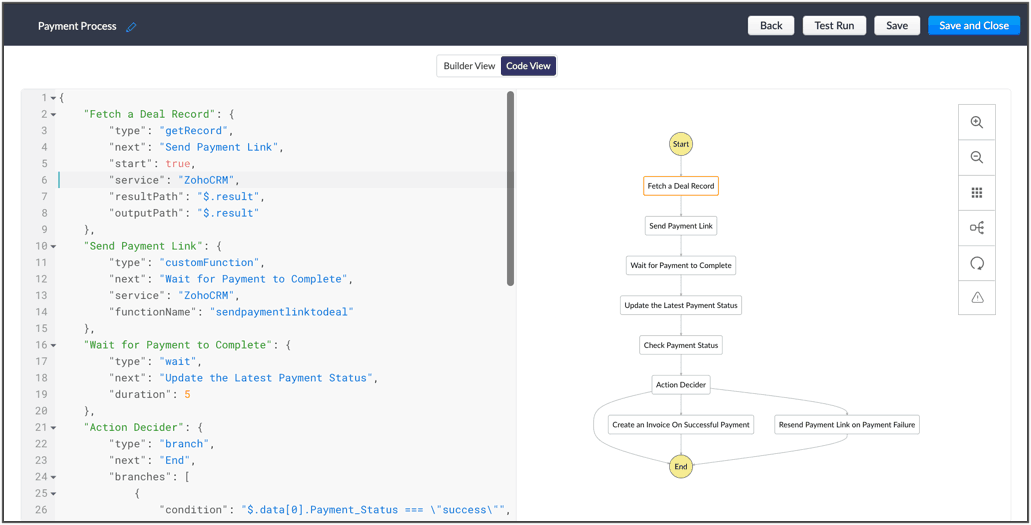
To put it in action, let's talk about payment processes, that are a part of most business processes. Say for your business process, once a deal is won, you'd like to send a payment link to said deal, and then generate an invoice on successful payment. If the payment is unsuccessful, the link is re-sent.
Here, we're building a circuit with two functions, in the order as mentioned below, and with the output of the former feeding into the consecutive function
A function that parses the details of the deal record, fetches the email ID, fetches the right payment URL and sends it to the deal.
A function that checks the payment status and updates the corresponding fields in CRM and generates an invoice on successful payment or resends the payment link to the deal upon payment failure.
So, let's understand why circuits are necessary in this business scenario.
- The order of orchestration - While CRM offers the option to write individual functions, as and when necessary for custom actions and workflows let you automatically execute them, Circuits goes one step further and streamlines the flow of your functions' logic, and simultaneously performs error handling. This ability to pick the order and states of your functions lets you pull in different third-party or external services to address minute use-cases.
- A single, editable space - A flow diagram that uses states and flows that include everything from functions to trigger record movement, using wait or parallel actions as others simultaneously occur, to record states that give you the record details. This not only gives you a bird's eye view of all that's configured in your circuit, but also, allows you to pinpoint issues, modify or reorganize it.
- Diagnose errors and view audit logs - A detailed log of each execution provides the status of each state's task execution, the payload and parameters passed, and the responses and exceptions generated.
- Use Existing Functions - From picking functions you've already tried, tested, and are up and running in your CRM account, to using a circuit within another circuit, this flexibility opens up possibilities of handling so much of your out-of-the box requirements in a single space.
The flow of action here:
Other examples of actions that can be performed with Circuits:
- Generate reports automatically, track inventory, fulfil orders and track them, and generate receipts.
- Trigger a circuit when a deal is won, update the deal's details in a sheet, calculate the commission based on the revenue, and update the details back in CRM.
- Manage users, send custom push notifications based on specific conditions, and manage user-generated files in applications, automatically.
Once enabled for your account, Circuits will be available under:
Setup > Developer Space > Circuits
Learn more about the components of Circuits and how you can make the most of it in the help documentation. Once we enable early-access to Circuits for your account, we'll send out an email confirming the same.
Cheers!
Shylaja
Shylaja
New to Zoho Recruit?
Zoho Campaigns Resources





Topic Participants
Shylaja S
Ryan N.
Sunderjan Siddharth
Greg Robson
Praveen Sankar
Sticky Posts
Announcing Early Access to "Zoho CRM for Everyone" — A new and exciting update to Zoho CRM
Update : Zoho CRM For Everyone's Nextgen Interface gets an upgrade! Hello everyone, We’ve updated the Zoho CRM for Everyone Nextgen interface based on your feedback. The UI is now simpler with a unified sidebar, a more visible global search and features[Early Access] Voice of the Customer (VoC) for Zoho CRM
Happy new year, everyone! We have an exciting addition to our suite of features and would like to introduce you to VoC (Voice of the Customer) for Zoho CRM, powered by Zia. 2023 is definitely the best time to be a customer with rapid innovations and advancementsAdding calls as a channel in Voice of the Customer
Dear All, We hope you're well! It's been almost a year since we opened Zoho CRM's Voice of the Customer solution up for early access. We are grateful for the reception and support you have been showing us with regards to its adoption and feedback. Since
Zoho CRM Plus Resources
Zoho Books Resources
Zoho Subscriptions Resources
Zoho Projects Resources
Zoho Sprints Resources
Zoho Orchestly Resources
Zoho Creator Resources
Zoho WorkDrive Resources


Zoho CRM Resources
Get Started. Write Away!
Writer is a powerful online word processor, designed for collaborative work.
Zoho CRM コンテンツ
-
オンラインヘルプ
-
Webセミナー
-
機能活用動画
-
よくある質問
-
Ebook
-
-
Zoho Campaigns
- Zoho サービスのWebセミナー
その他のサービス コンテンツ
ご検討中の方
Recent Topics
Self Client Authorization Code Flow for Mail returns 404
Hello, I'm having trouble getting the Zoho mail api setup and want a sanity check. I am trying to follow this guide to get an access token for the mail api: https://www.zoho.com/accounts/protocol/oauth/self-client/authorization-code-flow.html UnfortunatelyZoho Knowledgebase Help Center Categories linkages are wrong
Greetings, I am build a help center in zoho desk, based on the additional custom brand I have paid for. My knowledge base has 4 main categories. I have this setup this way in my knowledgebase customization theme area. The page layout is like this: HereCan Answer Bot read private articles if I have ChatGPT activated?
I've uploaded an article that is basically a data dump of our website. I want Answer Bot to be able to look through that article and find answers via OpenAI. I've connected with OpenAI API and all seems well, however it doesn't seem to find anything.Zoho Social integration with Zoho Flow
Is there any plans for Zoho Social integration with Zoho Flow?Connecting Learn to a Custom GPT
Hi all! I am attempting to connect a Learn Space and all it's articles into a custom GPT. Has anyone successfully done this? I have worked on it with no success so far.Tip 12: How can you customize the display name while sending emails from Zoho Creator.
Hi folks, Usually when you send emails to your users, the display name defaults as your From email address. Most often, you would like to set a custom display name to represent your organization or the context of the email. You can mask or customize the display name (From Address) using Deluge script as long as the From email address has been verified. This would be very useful to you if you want to send bulk emails to a large audience. Let's say you have a Student Registration form for your danceImporting Data to update and not add
I'm very new to Zoho created and tried searching the forums for the answer. Nothing I found has helped me make sense of how to do this. I created a app based on an excel spreadsheet but no matter what I do, whenever I import data it duplicates the record. I have a field I would like to use as a unique identifier, but I'm not sure how to tell my app that. Any assistance, even a link to a tutorial on creating functions in the workflow of the app, would be very helpful. Unfortunately I can't shareAllow me to duplicate a field
Hi, Many times I need to create new field with slightly change compare to an existing one. So when I click an existing field, can you add one more option "duplicate"? That'd be very helpful. You mayc heck wufoo.com to see this feature. Thanks, Li lhong1Community Digest Noviembre 2024 - Todas las novedades en Español Zoho Community
¡Hola, Español Zoho Community! Wow, ya termina el año, ¡gracias a vuestra participación se nos ha pasado volando! Por eso mismo estamos preparando sorpresas para todos los que participáis en la Español Zoho Community para el próximo año, ¡estad atentosZoho Mail iOS app - Complete revamp of the UI including insert image option, toolbar customization, calendar widgets and more!
Hello everyone! The new Zoho Mail iOS app introduces a fresh look, blending native iOS features with a refined UI and UX to make email management more intuitive. The updated design focuses on simplicity, ensuring smoother navigation throughout the app.Adding a work order for Assets vs. changing the contact person
When adding a work order for an existing Assets (e.g. service), the assigned contact cannot be changed (deleting the contact deletes the selected Assets). This results in such an illogical operation that if you want to change the person to be contacted,DOMIN NME
How many email account do zoho supportsAssign admins to the application
I want to know who to assign admins to UAE Payroll application. I tried from inside the application, and from one.zoho.com >> directory and nothing is happening, knowing that I have enabled zoho people integration with payroll. Can someone help me?Zoho Marketing Campaign
I want a details report of marketing API . which API i can use to get a full flexed detail of email campaign , sms , social media ,and all other campaigns ?¿Puedo migrar mi sitio desde WordPress a Zoho? ¿Zoho admite herramientas con código personalizado?
¡Hola comunidad! Estoy evaluando la posibilidad de migrar mi sitio web https://calculadoradenotas.cl/ desde WordPress a una solución Zoho, y tengo algunas dudas técnicas que espero puedan aclararme. Mi sitio no es solo informativo: es una herramientaAutomating SharePoint Folder Creation based on Equipment Module
Dear Team, I would like to seek your valuable advice on one of my requirements. My objective is to automatically create a SharePoint folder whenever a record is created in the Equipment module. The folder should be named based on the equipment name. OnceCan I view a gallery of attachments related to an Account, Contact, or Subscription
It is often useful to review photos related to an account or contact by service type. It would be nice to be able to see the photos collected through workorders or appointments all associated.Language Field on Contact Person-level
Dear at Zoho Books, would it be possible for you to have a Field for 'Language' for the Contact Persons under a Company. In CRM and Bigin we could create a Custom Field (Dropdown) for this effect but without any present in Zoho Books we could never syncCustomise Zoho FSM Work Order Name
Hi there, is there a way for us to customise the work order number? For example - I want to add auto look up for company name or dates at the end of the work order number. WO4 - Company ABCIntroducing Dynamic Display in Zoho CRM mobile apps
Hello everyone, We're happy to announce that Dynamic Display is now available in the Zoho CRM mobile app for both iOS and Android devices. Mobile apps have become synonymous with convenience and flexibility. As more and more businesses rely on mobileHow we can integrate pdf attachments in zoho crm with xero
when i tried to integrate the data and attchment from zoho crm to to xero only the data get integrated with xero how we can integrate the pdf attachment as well nb zoho apis are not working via functionsDelete user profile
Hello, How can I delete a User Profile?Send emails directly via Cases module
Greetings all, The ability to send emails from the Cases module, which users have been eagerly anticipating, is now available, just like in the other modules. In Zoho CRM, Cases is a module specifically designed for managing support tickets. If your organizationIntroducing delegate signing in Zoho Sign
Hi everyone! We are happy to announce a new feature in Zoho Sign — Delegate Signing! Whether you're tied up in meetings, away on vacation, or managing multiple responsibilities, you can now assign a delegate to sign documents on your behalf. This ensuresZoho Voice VS in Zoho CRM for logging calls
I don't understand the differences between logging calls in Zoho Voice VS in Zoho CRM. Why the 2 separate platforms? Seems confusingUpdates to Auto-Upgrade in Zoho Campaigns
Hello everyone, We've rolled out a new update that slightly modifies how the auto-upgrade option in Zoho Campaigns works. Even if you hit the contact limit, this update ensures that your account is upgraded and that contacts are imported smoothly—withoutAdding Sub-Forms to Merge Documents
I am setting up a Mail Merge, which includes sub-form table data. I've done it before but now I am having issues: 1. The headings don't show. I had to enter these manually 2. The table lines are separated. I want them together. Anyone know how to fixZoho Bookings Online Training | July 31, 2025
Hi everyone! We’re back with the second session of our Zoho Bookings training series! This time, we’ll show you how to automate your scheduling, manage appointments more efficiently, and explore advanced features for your industry. Join our free, two-hourCREATE button is grayed
On Android adding new notes to notebooks with collections is impossible because the CREATE button is grayed. What can be done?Can Zoho Creator Apps have multiple actors and steps? Example
Mortgage Application App- Outside party fills out form via published website form, Inside party approves for additional documentation, outside party recieved requests for x, y, and z documents. Outside party submits x, y and z but z is wrong. InsideRe-Apply SLA When Ticket Reopened from Closed Status?
If you have an SLA applied, timers are deactivated when going to "On Hold" status type and reactivated when going back to an Open status type. What we discovered is when a customer replies to a closed case and it reopens, the SLA is not applied and timersZoho Expense Reimbursement
I am using Zoho Expense for employee expenses. At year end I accounted for reimbursement for the founders' expenses by doing a manual entry between employee reimbursements and shareholder loan. All is correct in the balance sheet, but in Zoho expense the expense report totals are showing as owing still. It doesn't impact the books, but I don't want to see amounts owing. How can I zero these out? The only way I can see it is by creating a transaction in Books that pays the employee via a bankRequest to Delete Mistakenly Created Zoho Desk Account – Access Blocked to Company Directory
Dear Zoho Support Team, I hope this message finds you well. I am writing to request assistance regarding a Zoho Desk account I mistakenly created using my company email address. I created the account before being officially onboarded by my company, andIntroducing an AI-driven CAPTCHA for Help Center that offers improved accessibility and enhanced security | Zoho Desk | Product Update
Captcha protects your help center from fraud and abuse without creating friction. What is a CAPTCHA? CAPTCHA is a test used in computing to verify that a user is human by requiring them to complete a challenge. It helps prevent bot attacks and reduceAnnouncing new features in Trident for Windows (v.1.29.4.0)
Hello Community! Trident for Windows just got better! It’s packed with new features designed to enhance communication, manage important information securely, and give you a smoother, more productive experience. Let’s dive into what’s new! Access ZohoExporting Ticket Threads/Comments and Attachments in Reports
Hi, I would like to know is it possible for Ticket Comments and/or Attachments to be displayed in Reports?Product management across integrated apps
Hi everyone, I’m setting up my business for selling products and integrating CRM, Inventory/Books, Ecommerce, and other apps. Where should I load products for the first time so they reflect across all apps? And for updating prices or adding new products—whereCalculate Number of Days Between Two Dates
Can someone help me with how to create a field using the formula function to calculate the number of dates between a campaign start date and end date? The closest I have gotten is using the "Datecomp" function but it gives you the dates in minutes, ratherZoho Writer Docx files not able to be converted into Google Docs
Since July 23rd, I've encountered an issue where DOCX files exported from Zoho Writer no longer convert properly into Google Docs when uploaded to Google Drive. My workflow relies on generating merged DOCX documents from Zoho Forms using Zoho Writer templates,Schedule Campaign - Recipients Time Zone
Something seems to be wrong with the scheduling feature for scheduling campaigns to be deployed at a specific time to the recipients time zone. I scheduled campaigns twice to be sent at the recipients time zone and the campaigns are deploying at the wrong time. When communicating with Zoho support they said to make sure it was scheduled at least 24 hours in advance so we did this with our last campaign and it was still deployed at the wrong time. Anyone else having this issue?Next Page