Introducing an AI-driven CAPTCHA for Help Center that offers improved accessibility and enhanced security | Zoho Desk | Product Update
Introducing an AI-driven CAPTCHA for Help Center that offers improved accessibility and enhanced security | Zoho Desk | Product Update

Captcha protects your help center from fraud and abuse without creating friction.


What is a CAPTCHA?

CAPTCHA is a test used in computing to verify that a user is human by requiring them to complete a challenge. It helps prevent bot attacks and reduce spam.


In a help center, this is implemented as a security feature. It is usually a distorted image with text or a brief audio sample that users are required to decipher and type in to prove they are human and not an automated bot. This feature is often used on forms like logins or ticket submissions within the help center to prevent spam or malicious activity.

Why does your Help Center need CAPTCHA?

If users are being prompted for CAPTCHA while using your help center, it could be due to any of the following reasons:


Bot prevention: CAPTCHA is often implemented to prevent automated bots from spamming or misusing the platform. If unusual traffic from a particular IP or user actions seems automated, the system might trigger a CAPTCHA challenge.
Info

            C - Completely                              

           A - Automated 

           P - Public 

           T - Turing test (to tell) 

           C - Computers (and) 

           H - Humans

           A - Apart

Types of CAPTCHA in the Help Center

1. Audio CAPTCHA 
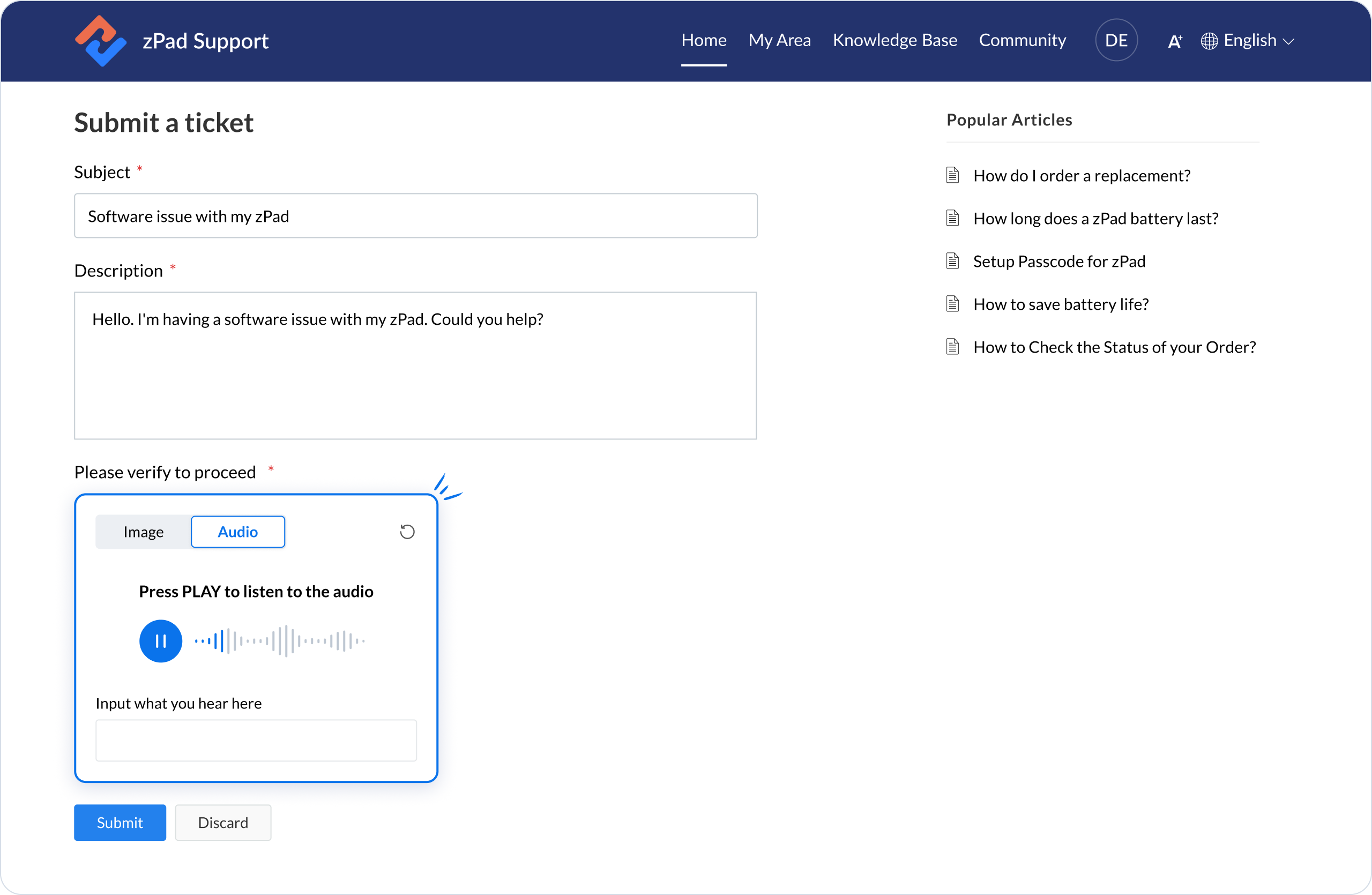
An audio CAPTCHA in a help center is an accessibility-focused verification tool designed to assist users with difficulty reading visual CAPTCHAs. 

This type of CAPTCHA can be beneficial for visually impaired users or those with reading difficulties to help ensure that the help center remains accessible to all. Requiring users to listen to the audio and type what they hear helps prevent automated bots from submitting forms while providing a more inclusive experience for real users.

For example, the audio will ask a simple math problem, "What is 2+3?" the user must type the answer.


2. Image CAPTCHA

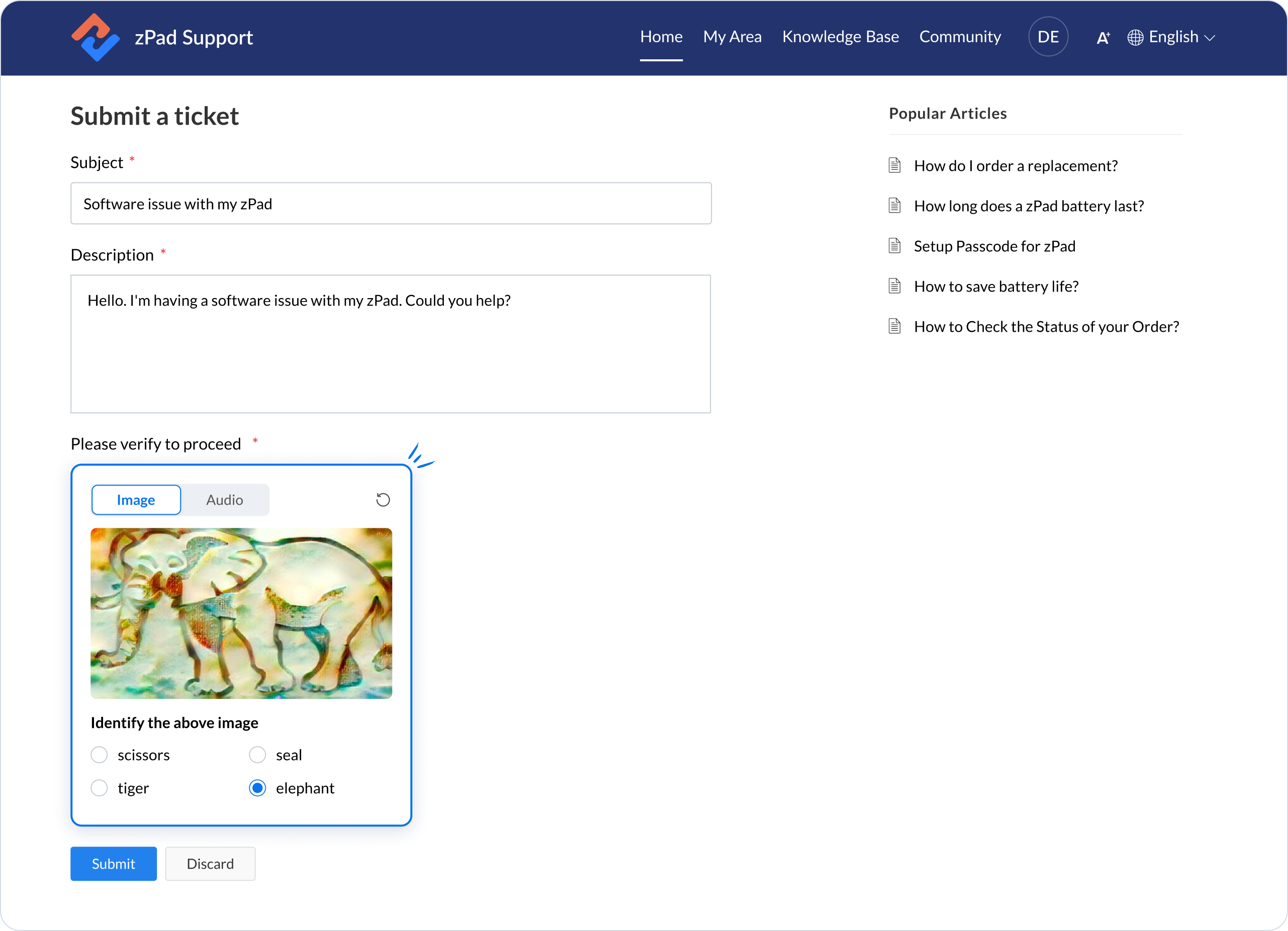
An image CAPTCHA in a help center is a visual verification tool designed to determine whether a user is a human or an automated bot. Typically, it presents users with an image containing distorted objects they need to identify or transcribe as part of a challenge-response test. This method effectively prevents spam and automated submissions, as bots often struggle to interpret images in the same way humans can.

Help Center CAPTCHA Enhancements 

To reduce the frequency of CAPTCHA prompts, consider reviewing your security settings, monitoring user activity, and ensuring that your help center is user-friendly and accessible.


Administrators can allow unregistered users to submit tickets by disabling the preference setting Customers must sign in to your Help Center to submit Tickets in the Help Center Access Settings.

Enabling this preference is highly recommended as it will help prevent bots from creating spam tickets.

We noticed that unregistered users created spam tickets via the Help Center's Add Ticket form. To stop the spamming, we have facilitated the preference Show captcha for unregistered users in the add Tickets form in your portal.

We will enable this setting with the latest enhancements for all your portals. You can still turn off the preference in the Help Center Access Settings. We recommend enabling it to avoid ticket spamming.
NotesYou can still disable these preferences in the Help Center Access Settings

To set the CAPTCHA permissions

  1. Go to Setup > Channels > Help Center.
  2. Select the Help Center for which you want to set access permissions.
  3. Click Access Settings under the Help Center sub-menu.
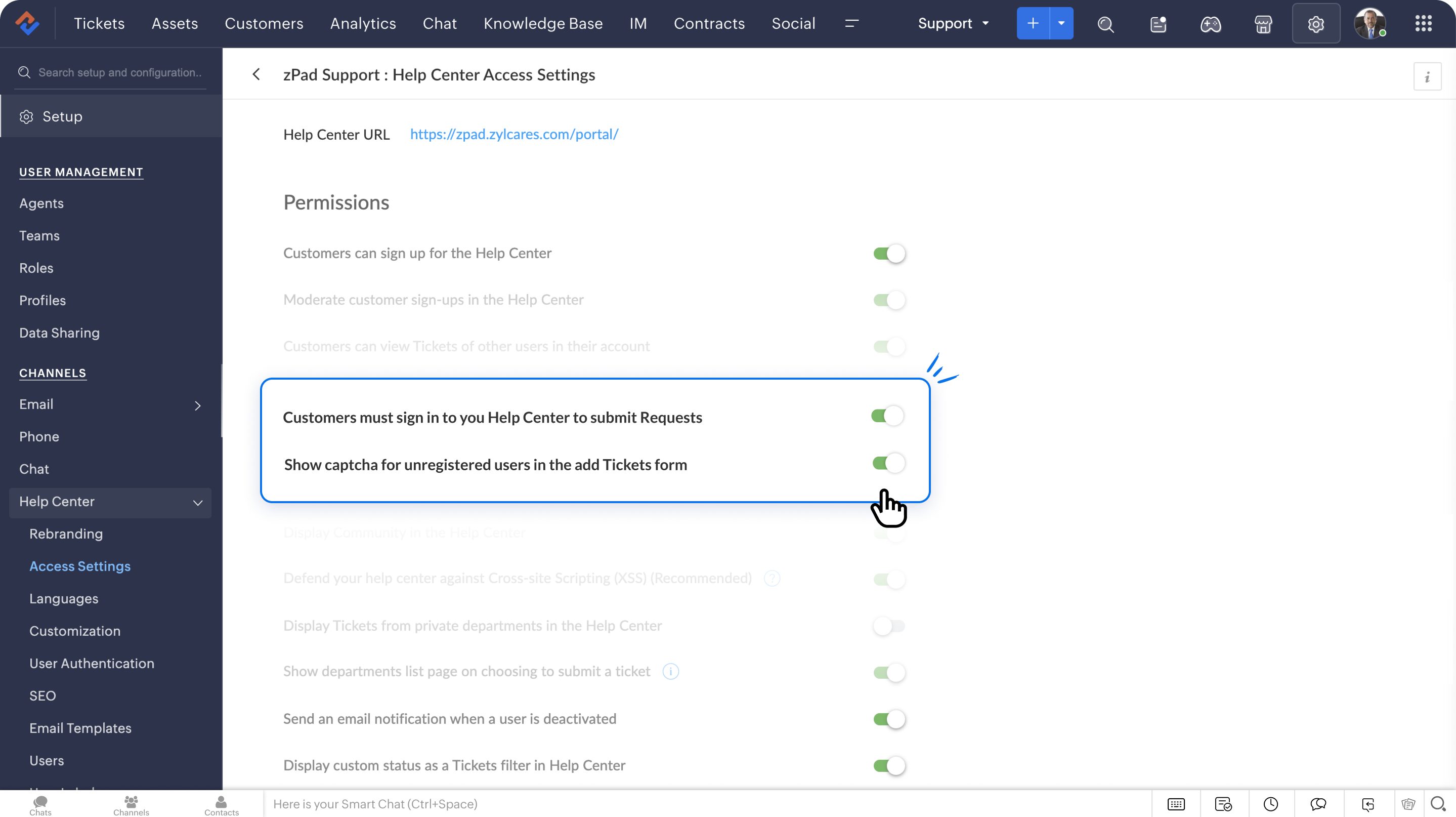


     4. On the Access Settings page, enable Show captcha for unregistered users in the add Tickets form option under Permissions.
     5. Alternatively, you can enable Customers to sign in to your Help Center to submit the Tickets option.
Notes
Enabling this option will direct your customers to the login page, where they must sign in or register to access your Help Center.
NotesEnabling this option provides an open Help Center; however, customers must sign in to submit their tickets.
      6. The changes will be saved instantly.

Takeaway

Implementing image and audio CAPTCHAs helps maintain the integrity of the help center by reducing the likelihood of spam tickets and ensuring that your agents can prioritize genuine user inquiries.


For more information on CAPTCHA and how to configure them, please refer to the detailed help documentation on Working with My Area in Help Center

Please stay tuned for new updates in Help Center.


Cheers,


Kavya Rao

The Zoho Desk Team


      Zoho Campaigns Resources


        • Desk Community Learning Series


        • Digest


        • Functions


        • Meetups


        • Kbase


        • Resources


        • Glossary


        • Desk Marketplace


        • MVP Corner


        • Word of the Day


        • Ask the Experts


          • Sticky Posts

          • Zoho Desk Partners with Microsoft's M365 Copilot for seamless customer service experiences

            Hello Zoho Desk users, We are happy to announce that Zoho Desk has partnered with Microsoft's M365 to empower customer service teams with enhanced capabilities and seamless experiences for agents. Microsoft announced their partnership during their keynote
          • WhatsApp pricing changes: Pay per message starting July 1, 2025

            Starting July 1, 2025, WhatsApp is shifting from conversation-based pricing to per-message billing. That means every business-initiated message you send will count. Not just the first one in a 24-hour window. Pricing updates on the WhatsApp Business Platform
          • Live Webinar - Work smarter with Zoho Desk and Zoho Workplace integration

            Hello customers! Zoho Desk and Zoho Workplace are coming together for a webinar on 14th May, 2024. Zoho Workplace is a suite of productivity apps for email, chat, docs, calls, and more at one single place. Zoho Desk is closely integrated with a few tools
          • Apple iOS 17 and iPadOS 17 updates for Zoho Desk users

            Hello Zoho Desk users! Apple recently announced the release of iOS 17 and iPad OS 17. These latest OS updates will help you stay productive and efficient, through interactive and seamless user experiences. Zoho Desk has incorporated the updates to help
          • Zoho Desk Cheat Sheet For The Year-End

            Check out these Zoho Desk best practices to end this year on a high and have a great one ahead! #1 Set Business (Holiday) Hours - If you have limited working hours, please make sure you restrict your business hours or set them as holidays for the coming days. Let your customers know when you will, and won't, be available. #2 Update the Annual Holiday List - Check the holidays for the new year and update the holiday schedule. Usually, holidays from the current year will be carried over for the next

          Zoho CRM Plus Resources

            Zoho Books Resources


              Zoho Subscriptions Resources

                Zoho Projects Resources


                  Zoho Sprints Resources


                    Zoho Orchestly Resources


                      Zoho Creator Resources


                        Zoho WorkDrive Resources


                          Zoho CRM Resources

                          • CRM Community Learning Series

                            CRM Community Learning Series


                          • Tips

                            Tips

                          • Functions

                            Functions

                          • Meetups

                            Meetups

                          • Kbase

                            Kbase

                          • Resources

                            Resources

                          • Digest

                            Digest

                          • CRM Marketplace

                            CRM Marketplace

                          • MVP Corner

                            MVP Corner


                            Zoho Writer Writer

                            Get Started. Write Away!

                            Writer is a powerful online word processor, designed for collaborative work.

                              Zoho CRM コンテンツ


                                ご検討中の方

                                  • Recent Topics

                                  • "Temporary" Field Value?

                                    I have a custom action in Form A report Detail View that passes the Rec ID and updates a Temp Record ID lookup field in the Form B record via openURL (and opens the Form B report in popup) . The updated Temp Record ID field value in Form B is then used
                                  • A note-taking app right inside your project management space

                                    How do you feel when you check off the last task from your to-do list after a long day at work? Euphoric, blissful, satisfied? Now, imagine completing the same checklist from your PM platform, without juggling tools. Sounds simple and handy? That’s exactly
                                  • Email Forwarding: Maintain business continuity

                                    As an administrator, ensuring uninterrupted email communication is critical when a role-based employee is unavailable due to extended leave or a temporary role change. Emails from customers, partners, and internal teams must continue to be received and
                                  • Tip #61- Collaborate live with Invite Technician- 'Insider Insights'

                                    We’ve all been there: you’re deep into a complex remote session, and you realize you need a second pair of eyes. Instead of ending the call or rescheduling, why not just bring the expert to you? With Zoho Assist, you can invite internal colleagues or
                                  • How to integrate Zoho CRM, Zoho Forms and a WIX Web Site

                                    Attached video demonstrates how to use Zoho Forms included in Zoho One, to design a Contact Us form to be embedded into a WIX web site and integrated into Zoho CRM.
                                  • Bug Causing Major Sync & SO Access Failures in Zoho POS

                                    We are experiencing critical and recurring issues in Zoho POS that all trace back to role-permission handling defects in the latest POS app version. These issues directly affect syncing, login ability, and Sales Order access for role-restricted users
                                  • Change Last Name to not required in Leads

                                    I would like to upload 500 target companies as leads but I don't yet have contact people for them. Can you enable the option for me to turn this requirement off to need a Second Name? Moderation update (10-Jun-23): As we explore potential solutions for
                                  • Zoho CRM for Everyone's NextGen UI Gets an Upgrade

                                    Hello Everyone We've made improvements to Zoho CRM for Everyone's Nextgen UI. These changes are the result of valuable feedback from you where we’ve focused on improving usability, providing wider screen space, and making navigation smoother so everything
                                  • Timesheet invalid data error

                                    Getting the "Invalid Date" error when trying to add a time sheet to an appointment in a work order. I initially though the work order was corrupt or something so I deleted the work order and recreated it. I added the first time sheet to the AP and saved
                                  • OAuth2 Scope Error - Incorrectly defaulting to CRM instead of Analytics.

                                    Hello Zoho Team, I am trying to connect n8n to Zoho Analytics API V2 for a simple automation project. Despite using the correct Analytics-specific scopes, my OAuth handshake is failing with a CRM-related error. The Problem: The authorization screen shows:
                                  • Add Custom Reports To Dashboard or Home Tab

                                    Hi there, I think it would be great to be able to add our custom reports to the Home Tab or Dashboards. Thanks! Chad Announcement: The feature is being rolled out across DC's and Edition in phases. To know more refer to the announcement post here.
                                  • Hiding Pre-defined Views

                                    You can enhance Zoho with custom views - but you cannot hide the pre-defined views. Most users focus on 4 or 5 views. Right now for EVERY user EVERY time they want to move to one of their 4 or 5 views - they have to scroll down past a long list of pre-defined
                                  • why can't agent see accounts & contacts

                                    My new user, with 'Agent' privileges, cannot see records that don't belong to them. How can I give them access? Why isn't this the default configuration in Zoho?
                                  • Sender Email Configuration Error.

                                    Hello Team, Hope you are all doing well. We are in the process of creating the Zoho FSM environment in the UAE. When we try to add the sender email address “techsupportuae@stryker.com”, we receive the error message: “Error occurred while sending mail
                                  • 【Zoho CRM】フィルター機能のアップデート:ルックアップ項目を使ったデータフィルタリング

                                    ユーザーの皆さま、こんにちは。コミュニティチームの藤澤です。 今回は「Zoho CRM アップデート情報」の中からフィルター機能のアップデートをご紹介します。 ルックアップ項目を使ったデータフィルタリングがより詳細に行えるようになりました。 この機能は詳細フィルターとカスタムビューで利用でき、必要な情報を正確に取得できます。 これにより、タブ間を移動することなく、より深く正確な方法でデータを絞り込むことが可能になります。 ◉できること 詳細フィルターとカスタムビューで、ルックアップ先タブの項目が選択可能
                                  • This will be long, Please bear with me - Next Gen Layout - Search

                                    In general, I think that Zoho are going in the right direction with the Next Gen UI. The latest update brings some nice improvements and all-in-all from a user's perspective I think the improvements are generally very good. However, there are some areas
                                  • Zoho Books | Product updates | July 2025

                                    Hello users, We’ve rolled out new features and enhancements in Zoho Books. From plan-based trials to the option to mark PDF templates as inactive, explore the updates designed to enhance your bookkeeping experience. Introducing Plan Based Trials in Zoho
                                  • Zoho Books | Product updates | August 2025

                                    Hello users, We’ve rolled out new features and enhancements in Zoho Books. From the right sidebar where you can manage all your widgets, to integrating Zoho Payments feeds in Zoho Books, explore the updates designed to enhance your bookkeeping experience.
                                  • Quotes Approval

                                    Hey all, Could you please help in the following: When creating quotes, how to configure it in a way, that its approval would work according to the quoted items description, not according to quote information. In my case, the quote should be sent to approval
                                  • Important Update: Facebook Pages API Deprecation

                                    Dear Zoho Analytics users, As of January 26, 2026, Facebook has officially deprecated Facebook Pages API version 18. This update involves the removal of several metrics that were previously supported by the API. As a result, these changes will affect
                                  • Adding a Deal to and Existing Contact

                                    I want to easily add a Deal to an existing Contact. If I click on New Deal on the Contact page this currently this is what happens: All of the mandatory field (and other field) information exists within the Contact. Is there a simple way for it to automatically
                                  • Email was sent out without our permission

                                    Hi there, One customer just reached out to us about this email that we were not aware was being sent to our customers. Can you please check on your end?
                                  • Flexible Partial-Use Coupons (Stored Value Credits)

                                    Subject: Feature Request: Ability for users to apply partial coupon balances per transaction Problem Statement Currently, our coupons are "one-and-done." If a user has a $50 coupon but only spends $30, they either lose the remaining $20 or are forced
                                  • Prevent accidental duplicate entry of Customer Ordersome

                                    Zoho Support has confirmed that Zoho currently does not have any method (using Deluge, flow or any other method) to alert a user when a sales order has been entered twice using the same customer reference number (i.e. a duplicate). Most ERP platforms
                                  • Customizing Helpcenter texts

                                    I’m customizing the Zoho Desk Help Center and I’d like to change the wording of the standard widgets – for example, the text in the “Submit Ticket” banner that appears in the footer, or other built-in widget labels and messages. So far, I haven’t found
                                  • Migrating Brevo Automation Logic to Zoho Campaigns

                                    Hello Zoho Campaigns Support Team, I am in the process of migrating my email marketing from Brevo to Zoho Campaigns. I have around 10,000 contacts, which I have already successfully exported from Brevo and imported into Zoho Campaigns. I now need guidance
                                  • Is there a way to delete workspaces?

                                    I want to remove one of the workspaces in my Campaigns account. I don't see any obvious way to do this. Am I missing something?
                                  • Boost your Zoho Desk's performance by archiving tickets!

                                    The longer your help desk operations are, the more likely it is to accumulate tickets that are no longer relevant. For example, ticket records from a year ago are typically less relevant than currently open tickets. Such old tickets may eventually lead
                                  • Collapsing and expanding of lists and paragraphs

                                    hello Would you ever implement Collapsing and expanding of lists and paragraphs in zoho writer ? Best regards
                                  • New Custom View -Sorting the Custom fields

                                    While creating a New Custom View in invoice , Customers, Bills ,expense etc , the sorting of custom fields are not available , a query function "order by / sort by  " may also be included in  Define new criteria module  which will be more beneficial to
                                  • Make CAMPAIGNS email look as simple as possible

                                    Hi there I'm trying to make my Campaigns email look as much like a normal email as possible. I'm a bit stuck with the "justification" of the email email block. Can I LEFT JUSTIFY the "whole email" to make it look "normal"? (Please see screenshot attached)
                                  • [Webinar] Top 10 Most Used Zoho Analytics Features in 2025

                                    Zoho Analytics has evolved significantly over the past year. Discover the most widely adopted features in Zoho Analytics in 2025, based on real customer usage patterns, best practices, and high-impact use cases. Learn how leading teams are turning data
                                  • Sorry! we encountered some problems while sending your campaign. It will be sent automatically once we are ready. We apologize for the delay caused.

                                    Hello. Lately we are having problems with some campaigns, which show us this error message. Sorry! we encountered some problems while sending your campaign. It will be sent automatically once we are ready. We apologize for the delay caused. We can't find
                                  • Can I remove or divert certain contacts from an active Campaigns workflow?

                                    I have created a workflow in Zoho Campaigns, which sends different emails, once contacts have been added to a mailing list. To choose which email to send to the contacts, there are conditions, which divert contacts based on their company type and their company size. There was a subsection of this workflow, where company size wasn't selected correctly, and some contacts have been sent down the wrong path and received the wrong email. The workflow contains a reminder loop and a further series of emails.
                                  • File Upload field automatically replaces spaces with underscores – support experience

                                    Hi everyone, I want to share my recent experience regarding the File Upload field behavior in Zoho Creator and my interaction with the Zoho support team. When a user uploads a file, the system automatically renames the document by replacing spaces in
                                  • How to map fields from Zoho Recruit to Zoho People

                                    I've got these fields from my Job Offer that I'm trying to map to the Work information fields in Zoho People, but they arent showing up. For example, how do I get the department name field (in the job post) to map to the work information field in Zoho
                                  • UTM in zoho campaigns

                                    Helloo everybody!!! Someone know how IF ZOHO CAMPAIGNS has UTM for tracking the url of any campaigns. thank u
                                  • Full Context of Zoho CRM Records for Zia in Zoho Desk for efficient AI Usage

                                    Hello everyone, I have a question regarding the use of Zia in Zoho Desk in combination with CRM data. Is it possible to automatically feed the complete context of a CRM record into Zia, so that it can generate automated and highly accurate responses for
                                  • Knowledge base printing

                                    I saw a posting about printing the knowledge base as I was looking for the answer, but we would like the ability to print out the entire knowledge base with a click, keeping the same organization format.   Bonus would include an index of keywords and
                                  • Search not working!

                                    I have items in my notebook tagged but when I search for a tag nothing comes up! Any fix for this?
                                  • Next Page