Featurecast Story 12 - Auto response
IM'ing (Instant Messaging) Feature Story Series
Featurecast Story 12 - Auto response
Provide prompt, clear communication
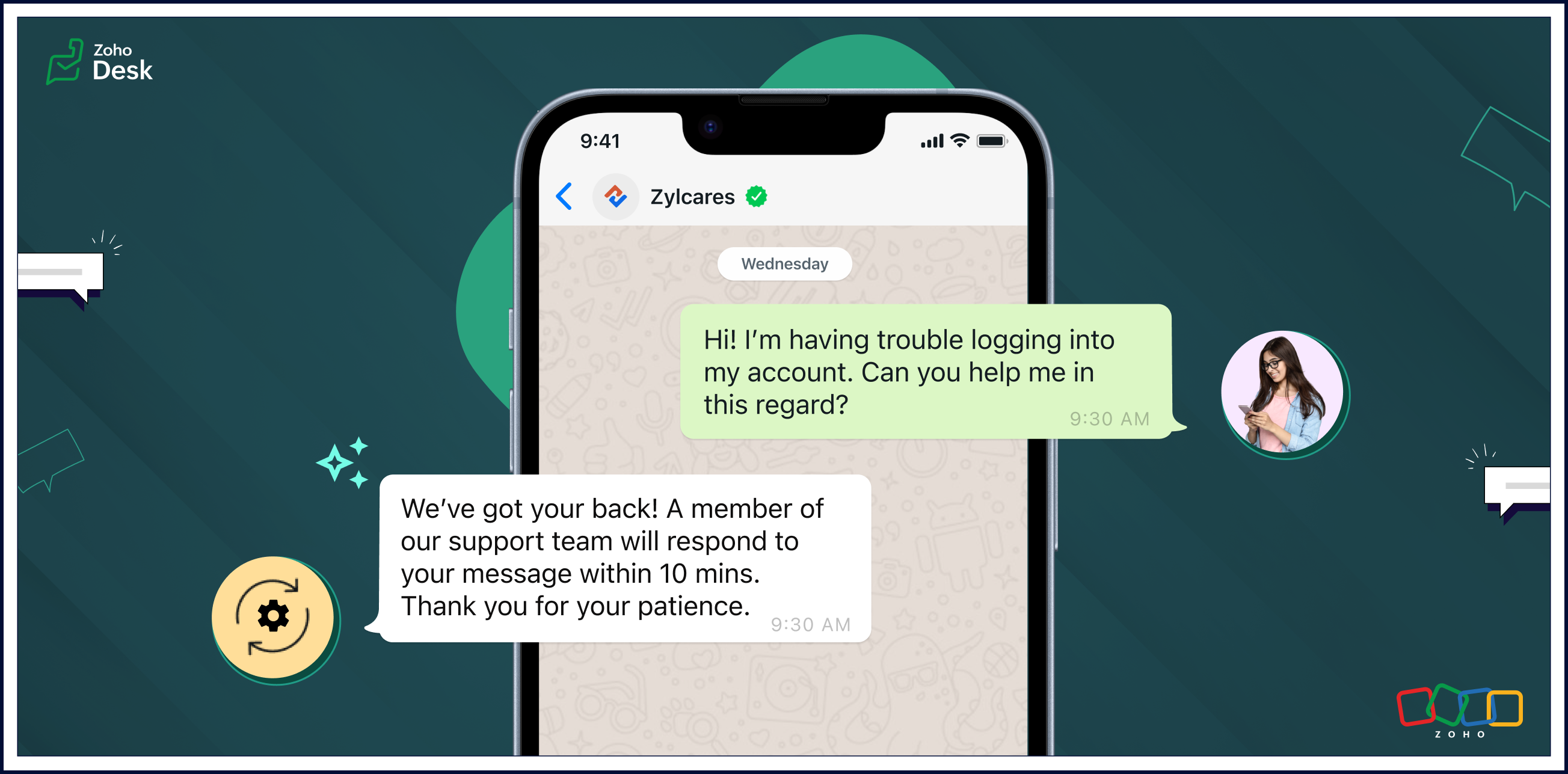
Auto response ensures that users receive an immediate confirmation of their message, setting a positive tone for their interactions with your organization.
Automatic replies enable businesses to streamline routine interactions, freeing up agents to focus on more complex issues and requests. The strategic use of auto-response messages enhances customer satisfaction, optimizes workflow efficiency, and contributes to cost savings.
Pros of auto-response messages
Prompt, clear communication
Automatic responses help maintain clear and uniform communication. These messages can include essential information, such as expected response times, alternative contact details, or links to relevant resources.
Fast response times
Auto-response messages excel in expediting response times. Customers appreciate swift acknowledgements of their questions or concerns and will be more willing to wait patiently if they know help is coming soon.
Reduced burdens on support reps
One of the primary advantages of auto-response messages is the time-saving benefit for agents. Routine inquiries or frequently asked questions can be addressed automatically, allowing agents to focus on more complex issues. This efficiency contributes to improved overall customer service.
Cons of auto-response messages
Limited capabilities compared to a human agent
Given a choice, customers often prefer to interact with human agents despite the convenience of automated replies. Even though auto replies are efficient, they lack the personal touch and empathy that human communication can provide. Also, auto responses may struggle to meet customer expectations in situations requiring emotional understanding.
Potential customer frustration
Auto replies can lead to customers becoming frustrated in some scenarios. They may need help with urgent or sensitive issues and be upset about not being able to reach an agent immediately. Standardized messages might not be able to address unique concerns adequately, leaving customers feeling unheard. Striking the right balance between automation and personalization is essential to mitigate frustration and provide a positive experience.
Uses of auto-response messages
• Sending out-of-office notifications
• Managing high volumes of incoming messages
• Providing information outside of business hours
• Handling customer interactions during events
• Saving time and making support teams more cost-efficient
• Managing high volumes of incoming messages
• Providing information outside of business hours
• Handling customer interactions during events
• Saving time and making support teams more cost-efficient
Auto-reply messages are quickly becoming an essential tool for providing effective customer support. Here are a few examples of auto-reply messages that you can use in different situations.

• Hi there! Thank you for contacting us. A support agent has already received your request and will reply soon.
• Hi there! You've reached [company name], and one of our support reps will get back to you shortly.
• Thank you for your message. We are currently unavailable, but a service agent will contact you as soon as possible.
• Welcome aboard! We can't wait to start working with you. Our team is always here for you if you have any questions or need support. Thank you for joining us!
• Thank you for reaching out to us. We're aware of the issue, and we're working on it. We'll update you as soon as we have more information.
• We're closed, but our support team will be available at [time] to get back to you and address your concerns. Thanks for your patience.
• Hi there! Thank you for opting into our newsletter. You'll start receiving exclusive content and updates from us soon.
• Sorry for the late delivery. We're on it and doing our best to get your order to you as quickly as possible. We appreciate your patience.
• Thank you for your message. We are currently unavailable, but a service agent will contact you as soon as possible.
• Welcome aboard! We can't wait to start working with you. Our team is always here for you if you have any questions or need support. Thank you for joining us!
• Thank you for reaching out to us. We're aware of the issue, and we're working on it. We'll update you as soon as we have more information.
• We're closed, but our support team will be available at [time] to get back to you and address your concerns. Thanks for your patience.
• Hi there! Thank you for opting into our newsletter. You'll start receiving exclusive content and updates from us soon.
• Sorry for the late delivery. We're on it and doing our best to get your order to you as quickly as possible. We appreciate your patience.
Closing thoughts
Automated replies save time, ensure prompt acknowledgement of customer requests, and help manage expectations when agents are unavailable or busy due to high communication volumes.
They enhance the transparency of business communication by providing immediate responses, even outside regular business hours. This helps foster a positive support experience and nurture long-term relationships with customers.
Clarity in communication improves customer satisfaction by setting appropriate expectations and reducing uncertainty in the support process. It's a win-win for customers and businesses.
I hope you found this article helpful and start using auto responses to help deliver great service to your customers. There's more to come, so please watch this space for more IM feature stories.
Until next time,
Kavya Rao
The Zoho Desk Team
New to Zoho Recruit?
Zoho Campaigns Resources





Topic Participants
Kavya Rao Addepalli
Antonio
Shivani | Zoho Desk
Sticky Posts
Register for Zoho Desk Beta Community
With the start of the year, we have decided to take a small step in making the life of our customers a little easier. We now have easy access to all our upcoming features and a faster way to request for beta access. We open betas for some of our featuresShare your Zoho Desk story with us!
Tell us how you use Zoho Desk for your business and inspire others with your story. Be it a simple workflow rule that helps you navigate complex processes or a macro that saves your team a lot of time; share it here and help the community learn and grow with shared knowledge.Tip #1: Learn to pick the right channels
Mail, live chat, telephony, social media, web forms—there are so many support channels out there. Trying to pick the right channels to offer your customers can get pretty confusing. Emails are most useful when the customer wants to put things on record. However, escalated or complicated issues should not be resolved over email because it's slow and impersonal. When you need immediate responses, live chat is more suitable. It's also quick and convenient, so it's the go-to channel for small issues.Welcome to Zoho Desk Community - Say hello here!
Hello everyone! Though we have been here for a while, it’s time to formally establish the Zoho Desk Community; we’re really happy to have you all here! This can be the place where you take a moment to introduce yourself to the rest of the community. We’d love to hear all about you, what you do, what company or industry you work for, how you use Zoho Desk and anything else that you will like to share! Here’s a little about me. I am Chinmayee. I have been associated with Zoho since 2014. I joined hereWebinar 1: Blueprint for Customer Service
With the launch of a host of new features in Zoho Desk, we thought it’ll be great to have a few webinars to help our customers make the most of them. We’re starting off with our most talked about feature, Blueprint in Zoho Desk. You can register for the Blueprint webinar here: The webinar will be delivered by our in-house product experts. This is a good opportunity to ask questions to our experts and understand how Blueprint can help you automate your service processes. We look forward to seeing
Zoho CRM Plus Resources
Zoho Books Resources
Zoho Subscriptions Resources
Zoho Projects Resources
Zoho Sprints Resources
Zoho Orchestly Resources
Zoho Creator Resources
Zoho WorkDrive Resources


Zoho CRM Resources
Get Started. Write Away!
Writer is a powerful online word processor, designed for collaborative work.
Zoho CRM コンテンツ
-
オンラインヘルプ
-
Webセミナー
-
機能活用動画
-
よくある質問
-
Ebook
-
-
Zoho Campaigns
- Zoho サービスのWebセミナー
その他のサービス コンテンツ
ご検討中の方
Recent Topics
Automation #4 - Auto Delete Tickets based on Rules
This is a monthly series in which we pick some common use cases that have been either discussed or most asked about in our community and explain how they can be achieved using one of the automation capabilities in Zoho Desk. Unwanted tickets spammingZoho Community Digest — Enero 2026
¡Hola, comunidad! 🌟 Aquí os traemos las novedades más interesantes de Zoho durante este mes de enero, incluyendo actualizaciones de productos, integraciones y un recordatorio sobre los workshops certificados que vuelven a España. 🎓 Eventos y ComunidadAutomation #3 - Auto-sync email attachments to tickets
This is a monthly series where we pick some common use cases that have been either discussed or most asked about in our community and explain how they can be achieved using one of the automation capabilities in Zoho Desk. Most of our customers use emailAutomation #11 - Auto Update Custom Fields with Values from Emails
This is a monthly series designed to help you get the best out of Desk. We take our cue from what's being discussed or asked about the most in our community. Then we find the right use cases that specifically highlight solutions, ideas and tips to optimizeAutomation #13 - Auto assign tickets based on agent shift time
This is a monthly series designed to help you get the best out of Desk. We take our cue from what's being discussed or asked about the most in our community. Then we find the right use cases that specifically highlight solutions, ideas and tips to optimizeAutomation #14: Capture Jira Issue Key/ID in a Ticket Custom Field
Hello Everyone! This month's edition brings you a custom function to consolidate your records associated with Jira integration. Jira integration enables support engineers and R&D units to collaborate seamlessly on feature development, product improvement,Automation #16: Automate Ticket Reopening on Scheduled Timestamp
Hello Everyone! This edition uncovers the option to schedule reopening a ticket automatically. Zylker Finance tracks insurance policyholder activities through Zoho Desk. For policyholders who pay monthly premiums, tickets are closed upon payment completion.Automation#19:Auto-Close Tickets Upon Task Completion
Hello Everyone! We’re excited to bring you another custom function this week. In this edition, we’ll show you how to automatically close tickets when all associated tasks are marked as completed. Let’s see how ZylkaPure, a leading water filter company,Automation #15: Automatically Adding Static Secondary Contacts
Rockel is a top-tier client of Zylker traders. Marcus handles communications with Rockel and would like to add Terence, the CTO of Zylker traders to the email conversations. In this case, the emails coming from user address rockel.com should have TerenceImproved UX design for Projects CRM integration
The current integration embeds the entier projects inteface into the CRM this is confusing and allows users to get lost. For example as a user i navigate to an account and go down to the related projects list and want to get information about a specificTransformer vos stocks en décisions intelligentes avec Zoho Inventory et Zoho Analytics
Zoho Inventory permet de suivre facilement les niveaux de stock et d’anticiper les restockages. Pour de nombreuses entreprises, cela suffit à gérer les opérations au quotidien. Mais à mesure que l’activité se développe, cette clarté peut commencer à montrerSecurity Enhancements | Migrate to the Updated Policies
Hello everyone, Zoho Directory's security policies have been updated and reorganized into three new policies with features that enhance the overall organization security. These policies provide a stronger and more secure sign-in methods and improve theBring Zoho Shifts Capabilities into Zoho People Shift Module
Hello Zoho People Product Team, After a deep review of the Zoho People Shift module and a direct comparison with Zoho Shifts, we would like to raise a feature request and serious concern regarding the current state of shift management in Zoho People.How to block a WhatsApp user for sending spam
Is there a way to block those whatsapp users that just come to play and annoy our service, they also spam us. We have a waba service with sales iqInquiry regarding auto-save behavior for Zoho Sign Embedded Sending
Dear Zoho Support Team, I am currently integrating Zoho Sign's Embedded Sending functionality using iframes on my website. I would like to know if there is a way to ensure that the document state (including any added fields) is automatically saved asIntroducing Connected Records to bring business context to every aspect of your work in Zoho CRM for Everyone
Hello Everyone, We are excited to unveil phase one of a powerful enhancement to CRM for Everyone - Connected Records, available only in CRM's Nextgen UI. With CRM for Everyone, businesses can onboard all customer-facing teams onto the CRM platform toAutomation#17: Auto-Create Tasks in Zoho Projects Upon Ticket Creation in Zoho Desk
Hello Everyone, This edition delivers the solution to automatically create a task in Zoho Projects when a ticket is created in Zoho Desk. Zylker Resorts uses Zoho Desk for bookings and handling guest requests. Zylker resorts outsources cab bookings toAutomation#20 : Auto-Add Ticket Tags based on Keywords
Hello Everyone! Welcome to unveiling custom functions on our Community series. This week's post lets you add tags to your tickets automatically based on the keywords in the ticket subject and the ticket thread. Discover how this custom function helpsAutomation#21: Track Ticket Transfers Across Departments
Hello Everyone! With Halloween just around the corner, we'd like to let you know the Zoho Desk team is always there to sweep away your customer service troubles! This week, we’re excited to introduce a custom function that tracks tickets moved betweenEmail Integration - Zoho CRM - OAuth and IMAP
Hello, We are attempting to integrate our Microsoft 365 email with Zoho CRM. We are using the documentation at Email Configuration for IMAP and POP3 (zoho.com) We use Microsoft 365 and per their recommendations (and requirements) for secure email we haveHomepage not assignable to group
MS Teams for daily call operations
Hello all, Our most anticipated and crucial update is finally here! Organizations using Microsoft Teams phone system can now integrate it effectively with Zoho CRM for tasks like dialling numbers and logging calls. We are enhancing our MS Teams functionalityAutomation#22 Track Ticket Duration at Specific Status
Hello Everyone! Welcome back to the Community Learning Series! Today, we explore how Zylker Techfix, a gadget servicing firm, boosted productivity by tracking the time spent at a particular ticket status in Zoho Desk. Zylker Techfix customized Zoho Desk’sAutomation#23: Automate Guided Conversations in Zoho Desk with Business Hours
Hello Everyone, This week's edition introduces a custom function designed to automate Guided Conversations in Zoho Desk, based on your business hours. With this feature, you can align the bot's behavior with your business schedule, ensuring a smooth andAddress changes in quote form
When entering a quote, the first piece of information required is the Account, which properly populates the billing and shipping address fields. Then I use the lookup function to select a contact, and when I do, the billing and shipping addresses areAutomation#24: Auto-Update custom field from Accounts to Tickets
Hello Everyone! Welcome back to the Community Learning Series! This episode dives into how Zylker Techfix streamlines account-related ticket references. Previously, employees had to manually check account details to retrieve specific customer information,Kaizen #227 : Client Script Support for List Page (Canvas)
Hello everyone! Welcome to another week of Kaizen. In today's post lets see how Client Script can be used in Canvas List Page to mask sensitive information from specific roles and add colors to Canvas List Page records based on custom criteria.This useAutomation#25: Move Tickets to Unassigned When the Owner Is Offline
Hello Everyone, Welcome to this week's Community Series! 'Tis the holiday season—a time when work often takes a brief pause. The holiday spirit is in full swing at Zylker Techfix too, with employees taking some well-deserved time off. During this period,Automation#27: Retain Ticket Owner on Moved Tickets
Hello Everyone! This week, we present to you a custom function that retains the ticket owner when a ticket is moved from one department to another. Here’s more to help you understand the custom function: At Zylker Techfix, Alex, the Support Engineer managesAutomation#28 Notify Agents on Article Expiry
Hello Everyone! This week, we’re bringing you a feature that notifies your team when articles in the Knowledge Base are set to expire to keep your content relevant and helpful for customers. The Zoho Desk's Knowledge Base is an asset for customers toAutomation#29 Retain ticket status on moved tickets
Hello Everyone, Hear out Zylker Techfix’s Success Story on Smoother Ticket Transitions! Zylker Techfix, a gadget servicing firm committed to quick repairs and timely deliveries, faced a challenge when ticket statuses changed automatically while movingAutomation#32:Auto Add New Portal Users to the Help Center User Groups
Hello Everyone, Introducing a custom function that automates the process of adding new portal users to Help Center user groups, making user management effortless! By default, Zoho Desk allows you to assign new portal users to groups manually. But withAutomation#34 : Automate Email threading for Ticket notification
Hello Everyone, It's been a while since we've presented an automation. However, our community has been buzzing with ideas, use cases, and discussions with our community experts and Ask the Experts session. So, here we are again, presenting an automationAutomation#35 : Auto-Add Comments under the Owner's Name in Tickets via Macros
Hello Everyone, This week's custom function provides simple steps to configure a Macro for adding comments to tickets with the name of the Comment owner. When managing tickets, you can use the Comment feature to communicate internally with your team andAutomation#36: Auto-create time-entry after performing the Blueprint transition
Hello Everyone, This week’s edition focuses on configuring a custom function within Zoho Desk to streamline time tracking within the Blueprint. In this case, we create a custom field, and request the agent to enter the spending time within the singleAutomation#33: Automate Splitting Names for Existing Contact Records
An organized directory – who doesn't love one? Previously, we explored how to split contact names into First Name and Last Name for new contacts in Zoho Desk. But what about existing contacts already in your database? This week, we bring you a customWorkqueue
I really like the idea of the Workqueue generally - it will be really useful. What it seems to lack however, is the ability to customise it properly. I want to be able to show a custom view rather than just "My Leads" and "Leads Assigned in Last 3 hours".Webform & spam
Hi, We set up 2 webform on our website, fowarding the content to Zoho CRM. Since it has been opened up, we are getting lot of spam message (for now about 20 a day). To lower the amount of false new leads we added the captcha field and new enquieries areZoho CRM Web form page URL
Hi there, I am getting quite a bit of spam through my Zoho CRM Web form and want to restrict the URLs it is submittable from. I can see that I can add Location URLs but I need to be able to just add a domain so can I enter mydomain.com/* to cover allReceiving too many Spam Leads. Why?
I am receiving so many junk leads from web forms created by zoho's platform. The junk queries are increasing day by day and are affecting our business. I am continuously following up with zoho team from the past one year but not getting any satisfactoryNext Page