Kaizen #157: Flyouts in Client Script

Hello everyone!
Welcome back to another exciting edition of our Kaizen series, where we explore fresh insights and innovative ideas to help you discover more and expand your knowledge!In this post, we'll walk through how to display Flyouts in Client Script and break down the key differences between Flyouts and pop-ups in Client Script, including when to use each one.
In this Kaizen post,
1. What are Flyouts in Client Script?2. Flyout- ZDKs and functions in Client Script3. Use Case4. Solution4.a. Create a Widget for EMI Calculator.4.b. Create a Client Script to render the Widget as Flyout.5. Difference between flyout and popup in Client Script6. Summary7. Related links
1. What are Flyouts in Client Script?
Flyouts are floating User Interface that can be moved around and controlled using Client Script. Widgets can be used to render a flyout. The flyout can run independently, and any Client Script can communicate with it.
2. Flyout- ZDKs and functions in Client Script :
- createFlyout(name, config) - Creates a flyout. You can specify the heading, dimensions, and animation type using the config parameter.
- getFlyout(name) - To Fetch the details of a flyout.
- open(config, data) - Opens the created flyout.
- notify(data, options) - Notifies and waits for data in a flyout. The options can be wait: true (Client Script execution will wait for a response from the widget) or wait: false - (Client Script execution will not wait for a response from the widget)
- close() - Closes the active flyout.
Click here for more details about the ZDKs and functions related to flyouts.
3. Use Case :
Sales Advisors in a Finance Consulting Company regularly rely on an EMI calculator to help customers with loan queries. To improve their efficiency and eliminate the need to switch between different windows, the admin manager intends to integrate the calculator directly into CRM. The EMI calculator should appear on the Create Page of the Loans module and remain active until the user closes it.
4. Solution:
To achieve this in Zoho CRM, we can use Widgets to create an EMI calculator and render them using flyouts in client script whenever the create Page of Loan page loads.
4.a. Create a Widget for EMI Calculator
Install Zoho CLI, and follow the steps given in this document to create the Widget app folder. Then update the html, javascript, and css code as per your requirement.
index.html
- <!DOCTYPE html>
- <html lang="en">
- <head>
- <meta charset="UTF-8" />
- <meta http-equiv="X-UA-Compatible" content="IE=edge" />
- <meta name="viewport" content="width=device-width, initial-scale=1.0" />
- <title>Document</title>
- <link rel="stylesheet" href="style.css" />
- </head>
- <body>
- <div class="loan-calculator">
- <div class="top">
- <h2>EMI Calculator</h2>
- <form action="#">
- <div class="group">
- <div class="title">Amount</div>
- <input type="range" min="1000" value="30000" max="50000" step="500" class="loan-amount" id="loanAmount" />
- <div class="slider-label">$<span id="loanAmountValue"></span></div>
- </div>
- <div class="group">
- <div class="title">Interest Rate</div>
- <input type="range" min="5" value="6" max="100" step="1" class="interest-rate" id="interesRate" />
- <div class="slider-label"><span id="interesRateValue"></span></div>
- </div>
- <div class="group">
- <div class="title">Tenure (in months)</div>
- <input type="range" min="6" max="100" step="1" value="12" class="loan-tenure" id="tenureMonth" />
- <div class="slider-label"><span id="tenureMonthValue"></span></div>
- </div>
- </form>
- </div>
- <div class="result">
- <div class="left">
- <div class="loan-emi">
- <h3>Loan EMI</h3>
- <div class="value">123</div>
- </div>
- <div class="total-interest">
- <h3>Total Interest Payable</h3>
- <div class="value">1234</div>
- </div>
- <div class="total-amount">
- <h3>Total Amount</h3>
- <div class="value">12345</div>
- <div class="right">
- <canvas id="myChart" width="400" height="400"></canvas>
- </div>
- </div>
- </div>
- <script src="https://cdn.jsdelivr.net/npm/chart.js@3.6.2/dist/chart.min.js"></script>
- <script src="https://live.zwidgets.com/js-sdk/1.2/ZohoEmbededAppSDK.min.js"></script>
- <script src="main.js"></script>
- </body>
- </html>
- Click here to view the complete code.
- Once you have added the code, upload the zip file by following the below steps.
- Go to Setup > Developer Space > Widgets.
- Click Create New Widget and Fill in the details.
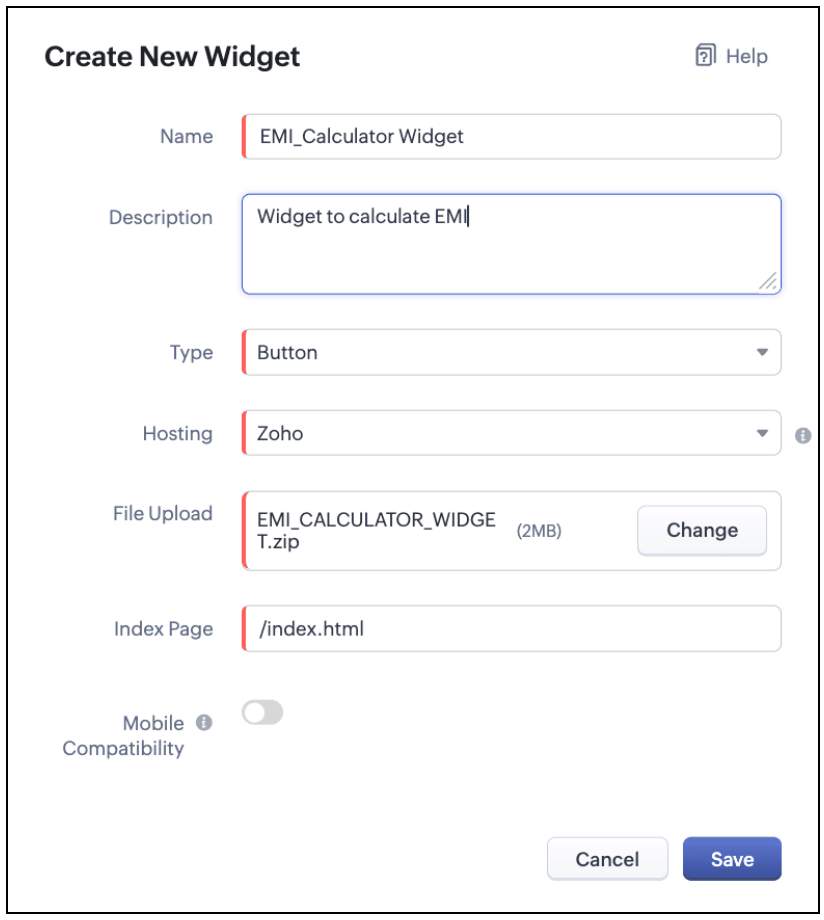
The Hosting should be "Zoho" and mention the html page of the app folder that you uploaded.

Note:
The widget should be of "button" type in order to render through a Client Script.
4.b. Create a Client Script to render the Widget as Flyout
Configure a Client Script for Create Page(Standard) Loans module, that triggers during onLoad event as shown below. Click Next. Click here to know how to configure a Client Script.

Enter the following script and click Save.
- ZDK.Client.createFlyout('EMIFlyout', {
- header: 'EMI Calculator',
- animation_type: 1,
- height: '400px',
- width: '450px',
- close_on_exit: false
- });
- ZDK.Client.getFlyout('EMIlyout').open(
- { api_name: 'EMI_CALCULATOR_WIDGET', type: 'widget' },
- { data: loanDetails }
- );
In the above script, createFlyout() will create a new flyout with header.
Below is the syntax and parameter detail.

Now Open the flyout and render the Widget in the flyout using open() method and specify the api_name of the widget.

Here is how the Client Script renders the flyout.
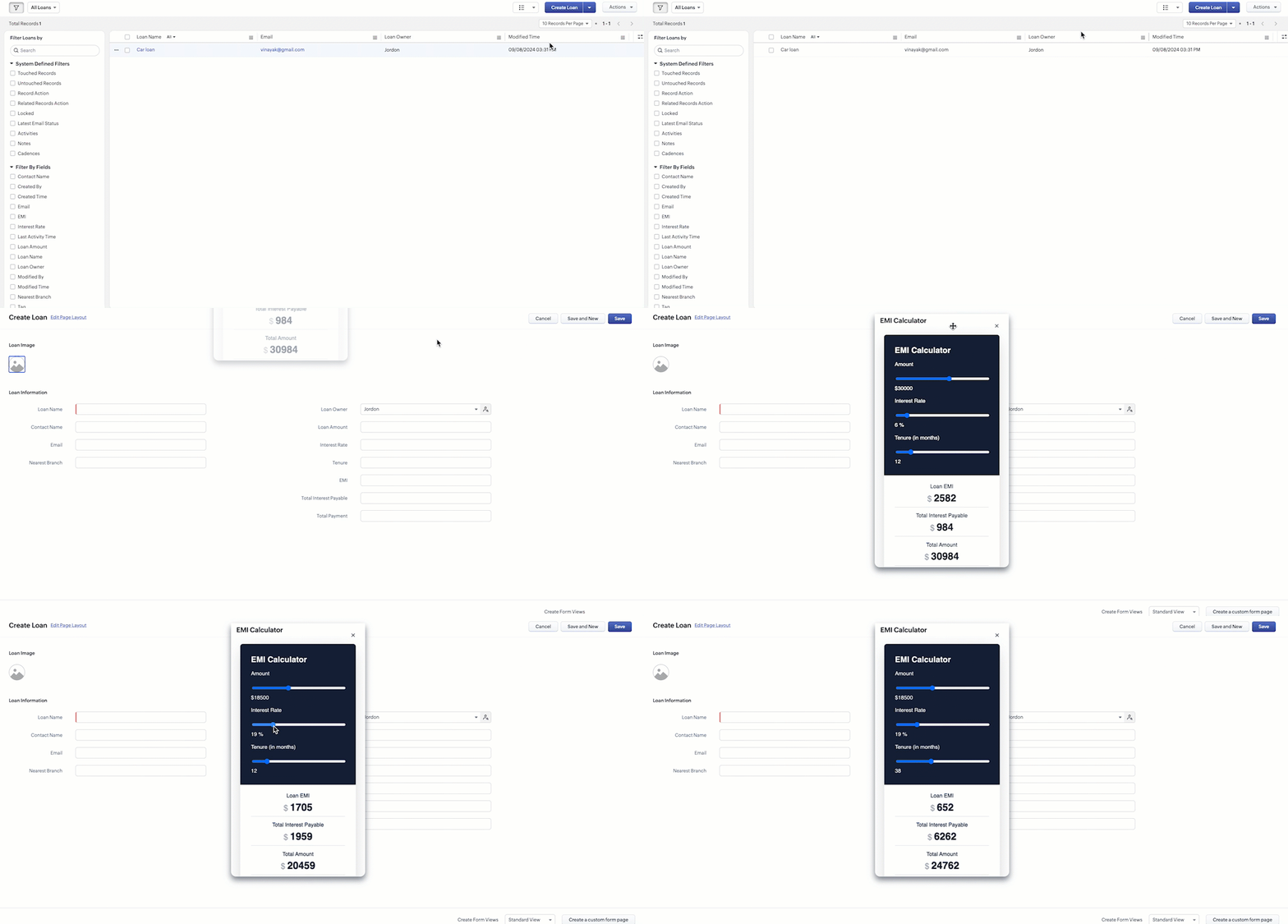
5. Difference between flyout and popup in Client Script
Flyout | Pop up |
A flyout can be moved around the page. | A pop-up cannot be moved anywhere on the page. |
It can run independently in a separate thread. The user can interact with the background interface without closing the flyout. | The user cannot interact with the background without closing the pop up. |
Use flyouts, when you need to exchange data to and fro between a Widget and Client Script. You can use ZDK.Client.sendResponse() to pass data from a widget rendered as a flyout to the Client Script. | Use popup, when you need to interrupt the screen to gather input from the user or display a message before proceeding. Use $Client.close() to pass data to the Client Script, which will also close the popup. |
In the scenario discussed in this post, if you want to make it mandatory for the user to read or interact with the EMI Calculator before entering any value in the create Page(Standard), then you can use pop-up instead of Flyout. Both pop up and flyout can be used to display widgets, and their dimensions can be altered.
Refer to this post to know how to render widgets as pop up using Client Script.
6. Summary
- In this post, we have seen,
- Flyouts in Zoho CRM.
- ZDKs and methods to render a Flyout(Widget) using Client Script.
- When to use a Flyout and when to use a pop up.
7. Related Links
 Previous Post: Kaizen #156 -Enhancing Mass Communication in Zoho CRM with a Custom Button Widget | Kaizen Collection: Home
New to Zoho Recruit?
Zoho Campaigns Resources





Topic Participants
Maadhari M
Jeremy Nagel - www.smooth.tel
Kava Li
Jeganprabhu S
Ishwarya SG
Sticky Posts
Kaizen #226: Using ZRC in Client Script
Hello everyone! Welcome to another week of Kaizen. In today's post, lets see what is ZRC (Zoho Request Client) and how we can use ZRC methods in Client Script to get inputs from a Salesperson and update the Lead status with a single button click. In thisKaizen #222 - Client Script Support for Notes Related List
Hello everyone! Welcome to another week of Kaizen. The final Kaizen post of the year 2025 is here! With the new Client Script support for the Notes Related List, you can validate, enrich, and manage notes across modules. In this post, we’ll explore howKaizen #217 - Actions APIs : Tasks
Welcome to another week of Kaizen! In last week's post we discussed Email Notifications APIs which act as the link between your Workflow automations and you. We have discussed how Zylker Cloud Services uses Email Notifications API in their custom dashboard.Kaizen #216 - Actions APIs : Email Notifications
Welcome to another week of Kaizen! For the last three weeks, we have been discussing Zylker's workflows. We successfully updated a dormant workflow, built a new one from the ground up and more. But our work is not finished—these automated processes areKaizen #152 - Client Script Support for the new Canvas Record Forms
Hello everyone! Have you ever wanted to trigger actions on click of a canvas button, icon, or text mandatory forms in Create/Edit and Clone Pages? Have you ever wanted to control how elements behave on the new Canvas Record Forms? This can be achieved
Zoho CRM Plus Resources
Zoho Books Resources
Zoho Subscriptions Resources
Zoho Projects Resources
Zoho Sprints Resources
Zoho Orchestly Resources
Zoho Creator Resources
Zoho WorkDrive Resources


Zoho CRM Resources
Get Started. Write Away!
Writer is a powerful online word processor, designed for collaborative work.
Zoho CRM コンテンツ
-
オンラインヘルプ
-
Webセミナー
-
機能活用動画
-
よくある質問
-
Ebook
-
-
Zoho Campaigns
- Zoho サービスのWebセミナー
その他のサービス コンテンツ
ご検討中の方
Recent Topics
Ability to Edit Ticket Subject when Splitting a Ticket
Often someone will make an additional or new request within an existing ticket that requires we split the ticket. The annoying part is that the new ticket maintains the subject of the original ticket after the split so when the new ticket email notification[Free Webinar] Environments in Zoho Creator - Creator Tech Connect
Hello Everyone, We’re delighted to kick off the 2026 edition of the Zoho Creator Tech Connect Series and are excited to continue this learning journey with you. The Creator Tech Connect series is a free monthly webinar featuring deep-dive technical sessionsZoho Voice API SMS
I made a post request in Zapier to try to send an SMS. Authentication appears to be configured correctly. I followed the documentation and I'm getting a 400 Error "Internal Server Error". Not helpful at all. Anyways, I could not find any information onHow do I change (error) display messages
Hi! I would like to edit display messages like "invalid entries" and "enter a value for Nome" and so on into Italian language messages. How can I do that? Already tried on Validate on form submit. Where I am failing? Thanks in advance.Record Overseas Transactions Along with CC charges
Hi All, We receive payments via stripe in multiple currencies and stripe takes around 2.5% fees. The amount is settled in INR into our local bank. What should be the currency of the income account used for Stripe payments? Here is a sample flow that weEasier onboarding for new users with stage descriptions
Greetings, I hope all of you are doing well. We're happy to announce a recent enhancement we've made to Bigin. You can now add descriptions to the stages in your pipeline. Previously, when creating a pipeline, you could only add stages. With this update,Pieds de page personnalisé - Document Zoho Writer
Bonjour à tous, Je rencontre un souci avec l’ajout d’un pied de page personnalisé dans un document Zoho Writer. Je souhaite insérer les informations de mon entreprise (notamment un logo + adresse) dans le pied de page. Le problème, c’est que lorsque j’ajoutePermissions on Views
Having the option of any agent creating custom views is firing back and got a situation where there are a hundred different views across the team and tickets are not being dealt in the most efficient of ways. Tickets seems to be missed by some agents,Credit card transactions are backwards after importing statements
I am new to Zoho Books so I'm importing my firm's bank and credit card statements in. My credit card statements have a single column with negative numbers so that is the option I chose. But when I went to categorize the credit card transactions, I canKnowledgebase SEO
We have a custom-domain mapped help center that is not restricted via login. I have some questions: a) will a robots.txt file still allow us to control indexing? b) do we have the ability to edit the sitemap? c) do category URLs get indexed by searchVIsual maindmaps in Zoho notebook Ai
Can I create and export VIsual maindmaps in Zoho notebook Ai1stDibs Integration to Zoho Inventory
Hello is it possible to integrate my Zoho inventory and 1stDibs?Community Question: Renewal vs Invoicing
This is a question for the community. Does anyone else consider there to be a difference between a subscription renewal event and sending out a recurring invoice for a subscription? For example, let's say customer XYZ purchases a 1-year subscription tocloud console support for music websites
Hi Friends, I am not from a very technical background.. So need support from the Zoho family. I want to build a e-commerce website which is in Musical Niche. It will help people learn music & play instruments of all types. There are a few players in the market like Chordify , Guitaa, Guitar Dashboard, ChordU & few others. But I all these websites allow only a few instruments to play. So I want to build a better website than the one I mentioned. So wnated to know what UI & AI should I use so thatScheduled Reports - Do not send empty report
Hello, We are intensively using reports in the CRM, especially for sales managers. When data is empty, they still receive an email. Can you add an option to avoid sending the report when data is empty?MRP or Manufacturing Module for Zoho
We have been searching for options for a production planning or MRP that will integrate with Zoho. Zoho Creator is pushed as a platform that can have an MRP built from scratch but we would like to find more of an out of the box solution and modify it to fit our needs. Are there any recommendations? Would Zoho consider creating a custom solution in Creator to support this need?Is Zoho One Desktop more secure than Zoho One Web SaaS?
Is Zoho One Desktop more secure than using Zoho One in browser? Inherently, it seems desktop would be unless you don't do things like share your pw or leave pc on. I am concerned about data being on the cloud or someone else's server and database.Reminder Settings - Time Tracker
On the time tracker in Reminder Settings I created a reminder according to the Zoho manual. But a manager asked me to change the message that goes in the email. Is it possible to change the message? I didn't find that in the Zoho manual. Another question: I configured to receive the reminder everyone who logged in less than 40 hours. Does Zoho consider less than 40 hours of the current week or the whole month? Another situation, I put it so that I and another specific user would receive the notification,Create Item group from a composite Item
I have applied my mind for hours but cannot figure this out. Can you have a composite item in an item group?. E.g. We bundle different color and size SKU's together as composite items. Also Using composite items as Bill of Materials. We want to createMain difference of Zoho Recruit Corporte version and Staffing HR vesion
Hi Zoho, I need help to fully understand what is the main key point differences of Recruit Corporate version versus the Staffing HR version? We are currently using Corporate HR version and we are looking on having an insightful automated reporting, doesOut of Stock items showing in Commerce
I have over 6000 items and most are not in stock, but all items are showing up in Commerce whether they are inventory or not. What option or feature can you use to hide items in Commerce at zero or negative quantities? I currently am using Commerce forIs it possible to transfer data from one related list to another within the same module ?
In the Leads module, there is an existing default Product related list that already contains data. Recently, I added a custom multi-lookup field, which created a new related list in the same Leads module. Now, I need to move the existing data from theHow to implement new online payment gateway?
Hello, Can you tell me how to proceed to implement my local payment gateway? DIBS has an open avaiable API that should be easy to implement into ZOHO BOOKS. http://tech.dibspayment.com/dibs_payment_windowFormula working in MS Excel , is not working in Zoho Sheets, Filter fuction which is working in MS sheets per the attached workbook / Daily update.
Filter function , which is working in MS Excel is not working in Zoho sheets. Please help on function of filter of particular class sheets and extract students name who has more than 3.5 hours of study hours on particular day depending on date in D7 cell.New in Smart Prompt: Record Assistant for contextual assistance, and support for new AI models
Smart Prompt helps teams stay informed and move faster by providing relevant suggestions where work happens in CRM. With this update, Smart Prompt becomes more adaptable to your organization’s AI preferences. You can now choose which Large Language ModelImproved Integration Failure Information (And Notification Options)
Hi, When an attachment service for example fails, you just get "Field x - Error", I can check the field it is failing on and find nothing wrong, same file size, type, dimensions, etc. so more information as to the actual issue would be helpful. And anCreate static subforms in Zoho CRM: streamline data entry with pre-defined values
Last modified on (9 July, 2025): This feature was available in early access and is currently being rolled out to customers in phases. Currently available for users in the the AU, CA, and SA DCs. It will be enabled for the remaining DCs in the next coupleChange User Role in a Form
Hi, When in a form, it would be good (And consistent) to be able to change the user role/permission like you can with Shared Reports, All Entries or the actual User itself, rather than having to delete the users permission and then add it back again withReassign Partially Saved Entries
Hi, I would like to be able to go to Partially Saved Entries and like the option to delete them I would like the option to multi-select and be able to reassign them to another user to complete (Such as when a user has left the company). Thanks DanIncrease the "Maximum Saved Entries per User" Options Limit
Hi, You can create lots of saved entries, yet the Limit when you apply one is 25, we may often expect 32 to be in draft, and therefore want to enforce that, can we increase the limit of this field from 25 to 100 (As you can just turn it off and have moreDynamic Field Folders in OneDrive
Hi, With the 2 options today we have either a Dynamic Parent Folder and lots of attachments all in that one folder with only the ability to set the file name (Which is also not incremented so if I upload 5 photos to one field they are all named the sameProduct Updates in Zoho Workplace applications | December 2025
Hello Workplace Community, Let’s take a look at the new features and enhancements that went live across all Workplace applications this December. Zoho Mail Block emails without notifying the sender Block emails without sending a rejection notificationZoho CRM for Gmail Extension Not Working in Brave Browser?
Is anyone able to get the Zoho CRM Chrome Extension working in the Brave browser? They're both built on the Chromium platform and every other Chrome Extension works with the exception of Zoho CRM for Gmail so any ideas here?Set Frozen Cells in the Report Settings
Hi, It would be nice to be able to set the frozen cells in the report Settings, and have an option if this is fixed or can be changed after loading (On the next load it still goes back to the Settings). Thanks DanMicrosoft Teams now available as an online meeting provider
Hello everyone, We're pleased to announce that Zoho CRM now supports Microsoft Teams as an online meeting provider—alongside the other providers already available. Admins can enable Microsoft Teams directly from the Preferences tab under the MeetingsTip of the week #26: Import/ Export calendars in Zoho Calendar.
Any calendar on the web or calendars that you create in any other calendar application can be imported in to Zoho Calendar. This will help you to add the events from the calendars that you import to your Zoho Calendar. You also have the option to exportAdd Zoho Forms to Zoho CRM Plus bundle
Great Zoho apps like CRM and Desk have very limited form builders when it comes to form and field rules, design, integration and deployment options. Many of my clients who use Zoho CRM Plus often hit limitations with the built in forms in CRM or Desk and are then disappointed to hear that they have to additionally pay for Zoho Forms to get all these great forms functionalities. Please consider adding Zoho Forms in the Zoho CRM Plus bundle. Best regards, Mladen Svraka Zoho Certified Consultant andBlocklist candidates in Zoho Recruit
We’re introducing Block Candidate, which helps recruiters to permanently restrict a candidate from applying to current/future job openings. Once the candidate is blocked, they will no longer be able to participate in the recruitment process. This willZoho CRM for Everyone's NextGen UI Gets an Upgrade
Hello Everyone We've made improvements to Zoho CRM for Everyone's Nextgen UI. These changes are the result of valuable feedback from you where we’ve focused on improving usability, providing wider screen space, and making navigation smoother so everythingSocial icons, open in new tab?
Hello, I have two social icons on my footer, Facebook and Psychology Today. Clicking on the Facebook icon opens a new tab, the Psychology Today icon does not. I would like them both to open a new tab. Am I missing a setting somewhere?Next Page