Leverage layout rules to customize workflow
 Layout rules in Zoho Sprints primarily aim to customize the field layout of your creation forms to meet complex requirements. But it doesn't stop there. Its customization can push the boundaries of how your fields behave, how data is gathered, how processes are branched out, and how workflow is channeled.
Based on conditions, you can tailor field behavior, direct the life cycle of an item, mandate specific actions, restrict the field options, or auto-assign users. The possibilities are aplenty.
We've tried to provide a few sample scenarios that help you automate your data collection and progress tracking flow. If you have any specific requirements, please state them in the comments, and we'll find out if layout rules can help you.
Use case 1: Restricting item statuses based on work item types
With layout rules, each item type can have its own workflow. This means it can have its own unique set of statuses that align with its specific lifecycle.
Let's assume you have three item types: Bug, Story, and Task.
Each type follows its own lifecycle, represented by the following statuses.
- Bug goes through the To Do, In Progress, Bug Fixing, Bug Testing, and Done statuses.
- Story has To Do, Ideation, In Progress, Development, Review, and Done.
- And Task moves through a simple To Do, In Progress, and Done.
To align with these flows, certain statuses should not be available to specific item types. For instance, a story or a task should not be moved to the Bug Fixing status. Similarly, a bug or a task should not be moved to the Development status.
To enforce this, we can create layout rules that control which statuses are available based on the item type.
So, we'll create three conditions with each item type as the primary field.
- If the item type is Bug, specify the condition with the trigger action to restrict the status pick list to To Do, In Progress, Bug Fixing, Bug Testing, and Done.
- If the item type is Story, specify the condition with the trigger action to restrict the status pick list to To Do, Ideation, In Progress, Development, Review, and Done.
- If the item type is Task, specify the condition with the trigger action to restrict the status pick list to To Do, In Progress, and Done.
Together, these conditions control the status progression for each item type. So, when you create a bug, it will only progress into the statuses that belong to the Bug lifecycle.

Use Case 2: Restricting future statuses based on the item's current status
When your team requires a pre-defined strict workflow where an item can be moved from a specific status to only a few statuses, layout rules can help implement this. For example, an item in the Bug Fixing status should only move to Bug Testing, and no other status. This way, each status controls the next status in the workflow.
To ensure this, create layout rules specifying conditions for each of the item status:
- If the status is To do, specify the condition with the trigger action to restrict the status pick list to In progress and Rejected.
- If the status is In progress, specify the condition with the trigger action to restrict the status pick list to In progress and Development.
- If the status is Development, specify the condition with the trigger action to restrict the status pick list to Review Level 1.
- If the status is Review Level 1, specify the condition with the trigger action to restrict the status pick list to Reopen and Review Level 2.
- If the status is Reopen, specify the condition with the trigger action to restrict the status pick list to In progress.

Use case 3: Making a field mandatory based on item status or item type
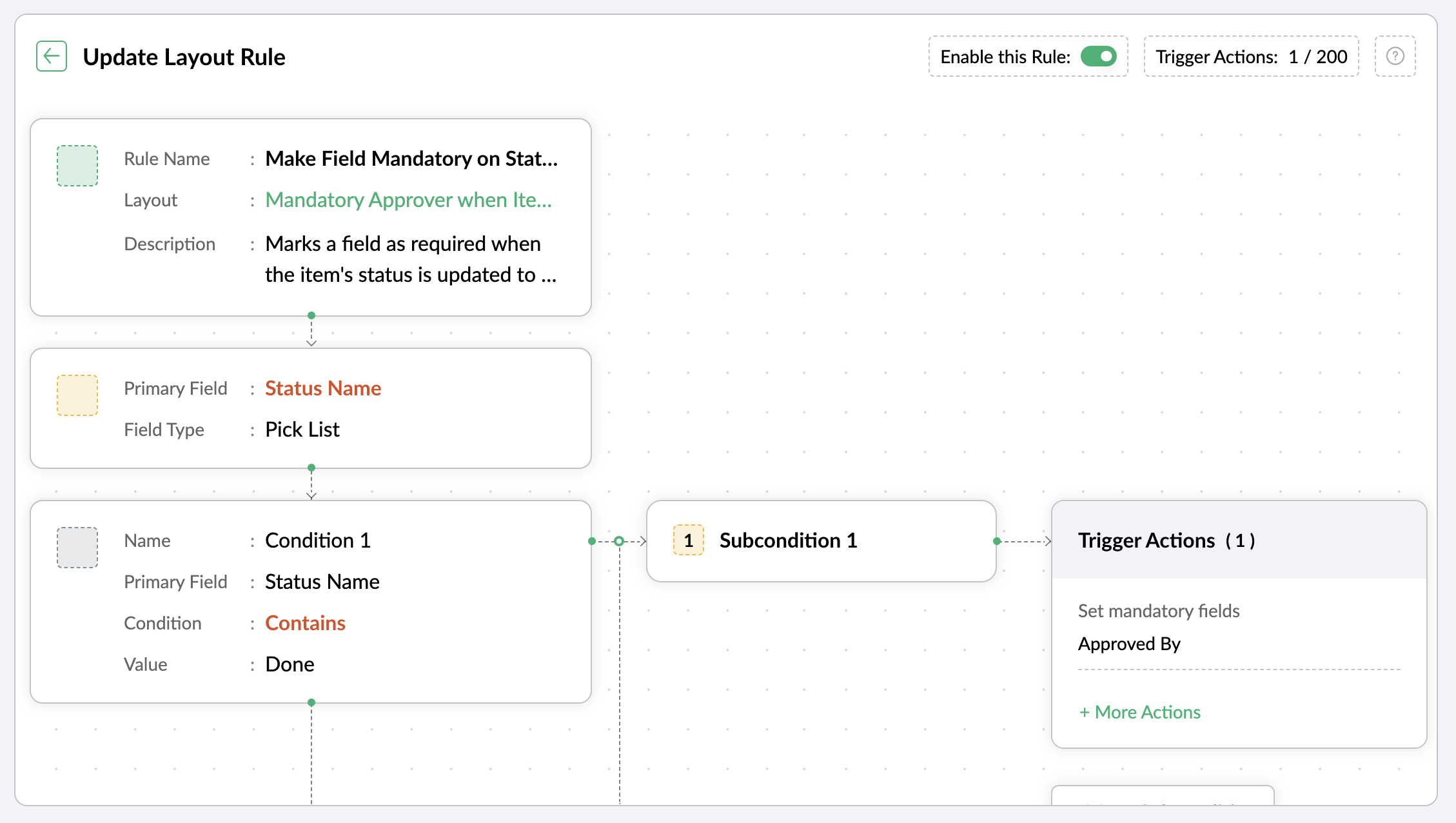
Let's assume you want a field to be made mandatory only when the item is moved to one particular status. Which implies the field will remain non-mandatory during other statuses and will be mandatory only at that particular status. So, the progress to that status must be allowed only when the mandatory field is updated.
For instance, when an item is moved to the Done status, the Approver field must become mandatory to record completion approval. To ensure that this process is executed, you can create a layout rule where the primary field is the Status Name. If the status field is updated to Done, specify the condition with the trigger action to set the Approver field as mandatory.
Use case 4: Showing or hiding a section or field based on item types
Layout rules enable you to show or hide fields or sections based on item type conditions.
Let's say a section with fields related to a new feature should only be visible when the item type is New Feature.
Similarly, when the item type is Security Issue, the section with fields related to Security issue must be visible.
To achieve this, create a layout rule with Item Type as the primary field.
- Create a condition for the New Feature item type with a trigger action to show the New Feature Details section.
- Create a condition for the Security Issue item type with a trigger action to show the Security Issue Details section.

Use case 5: Selecting specific assignees for item types and priorities
Layout rules can help you assign users based on the item type and priority. Let's say your team has a group of developers with varied levels of experience and expertise. You want to assign the high priority items to a more experienced member like John, while assigning low priority items to a novice like Peter.
If the item type is Bug and the priority level is Critical, you can assign the bug to John. If the priority level is High, it goes to Peter.
To meet this requirement, you can create a layout rule with Item Type as the primary field.
- Create a condition for the item type Bug with a subcondition where the priority level is Critical and the trigger action has the Set Field Value Assignee as John.
- For the same condition, add a subcondition where the priority level is High and the trigger action has the Set Field Value Assignee as Peter.
Similarly, say you want the Task item type with a medium priority level to go to Helen, and a low priority level should go to James.
- Create a condition for the item type Task with a subcondition where the priority level is Medium and the trigger action has the Set Field Value Assignee as Helen.
- For the same condition, add a subcondition where the priority level is Low and the trigger action has the Set Field Value Assignee as James.

These are just a few examples of how layout rules can streamline your project management. Do you have any particular scenario that needs resolution? Please share it with us.
Thanks,
Zoho Sprints Team
New to Zoho Recruit?
Zoho Campaigns Resources





Topic Participants
Neethinila R
Sticky Posts
Tip #28 - Plan less and deliver more using WIP limit in Zoho Sprints
Hello, It's been a while since we met with a quick, interesting tip. As the saying goes, "Too much of anything is good for nothing", today the focus is on delivering your outcomes with the right amount of planning. Your plan should be practical, calculative, and achievable for driving a qualitative success. Laura's plan Laura has a habit of planning her project deliverables before assigning work to her team-mates. Once the plan is finalized, she schedules a general meeting with her team andTip # 3- Working on the Scrum board
Continuing from our Tip #2 on leading to a sprint, let's see how to manage the work items on the Scrum board. Once you start the sprint your work items are automatically displayed on the Scrum board where you will actually manage the work items. It is a snapshot of the backlog items identified for the current sprint. The layout of the Scrum board Simply put, the scrum board is just like a physical board with sticky notes on which the work items of the active sprint are displayed. The scrum boardTip#2- Leading you to a Sprint
Product Backlog After the user stories are written and finalized, they are sorted to create the Product Backlog for the project during the Backlog Grooming meeting. This is a master list of all the work items that have been identified for the project and sorted by priority. Requirements are not constant during this period.The Product Backlog is dynamic and is an ongoing process. Every user story in the Product Backlog is customer centric. The Product Backlog includes: User centric stories based onTip #1- Why swimlanes?
Lanes define a clear path to reach your destination. In Agile, swimlane is one such concept that sets a simple and clear process of the work that you do. The concept of swimlane can be related to the pool, where the swimmers gather in their respective lanes to start off. Similar to the pool, work items are grouped in different categories. Each category is referred as a lane and is displayed in horizontal format. Swimlanes are effective in categorizing the work items with respective to specific
Zoho CRM Plus Resources
Zoho Books Resources
Zoho Subscriptions Resources
Zoho Projects Resources
Zoho Sprints Resources
Zoho Orchestly Resources
Zoho Creator Resources
Zoho WorkDrive Resources


Zoho CRM Resources
Get Started. Write Away!
Writer is a powerful online word processor, designed for collaborative work.
Zoho CRM コンテンツ
-
オンラインヘルプ
-
Webセミナー
-
機能活用動画
-
よくある質問
-
Ebook
-
-
Zoho Campaigns
- Zoho サービスのWebセミナー
その他のサービス コンテンツ
ご検討中の方
Recent Topics
Allow all Company Users to view all projects, but only owner/admins can change projects
I was wondering if there was a permission setting I could adjust to allow all our company users to see all projects created. Then, only the project owners and admins with the change permission. ThanksSeeking help to be able to search on all custom functions that are defined
Hello I have a lot of custom functions defined (around 200) and i would like to search some specific strings in the content of those. Is there a way to accomplish that? If not, is there a way to download all existing custom functions in some files locallyAdd Bulk Section / Grid Layout Duplicate Feature in Zoho Forms Builder
Currently in Zoho Forms, users can only duplicate individual fields. There is no option to duplicate an entire section or two-column/grid layout with all internal fields. This becomes inefficient when building structured forms such as Family Details,Leistungsdatum in Rechnungen (Zoho Books)
Hallo, ist es irgendwie möglich den Leistungszeitraum in der Rechnung aufzuführen? Beste Grüße AleksZoho Trident Windows - Streams Not Visible
Namaste We’re having an issue with Streams not being visible in Trident (Windows), which is important for us as we share many emails internally. It appears that the feature to show Streams above the Inbox folder, as seen in the default mailbox view, isSales IQ Chat Widget is Only Displaying Last Name
Can anyone suggest why the widget is only displaying "last name"?! We have the latest version of the wordpress plugin installed. Thanks Thanks!Shopify - Item sync from Zoho Inventory
Hi team, We’ve connected Shopify with Zoho Inventory. We want that when an item is created in Zoho Inventory, it must create a product in Shopify. But currently, new items created in Zoho Inventory are not getting created in Shopify even after clickingKill zoho meeting
Saying the quiet part out loud. Can zoho please just give up on the idea that they can make a meeting platform and just make our workplace licenses cheaper when you remove it so people can switch to zoom or teams. Tired of the excuses, you guys cant makeUtilisation de Zoho en conformité avec l’article 286 du Code général des impôts (CGI)
Cher(e) client(e), Conformément à l’article 286 du Code général des impôts (CGI) impose aux entreprises assujetties à la TVA d’utiliser des systèmes de caisse ou de gestion commerciale certifiés lorsqu’elles enregistrent des ventes à des particuliers.Unable to Create Task as a Support Administrator
Hello! I want to ask for help regarding creating tasks within the tickets. I am by default the Support Admin. I should be able to create tasks or activities right? But there's a prompt that I need to contact the Administrator. See photos for reference.Introducing Forms in Zoho Sheet
We hereby bring you the power of forms in Zoho Sheet. Now, build and create your own customized forms using Zoho Sheet. Be it compiling a questionnaire or rolling out a survey, Zoho Sheet can do it all for you. Forms is an excellent feature that helps you collect information in the simplest of ways and having it in Zoho Sheet takes it a notch higher. Build Simple yet Powerful forms Building forms using Zoho Sheet is fairly simple. The exclusive 'Form' tab lets you create one quickly. Whether youLayout one survey question in a time & redirect next Page based on previous response
I have doubt while, I am scripting survey on the Zoho where I redirecting to next page based on my previous response but didn’t get success on this. Please help me on this and tell me how I layout one survey questions in a time when I submit responseZoho Bookings form pre-filled with Zoho Forms in
Hi, I've got a contact page on my website and I'd like to have the option to book an appointment (redirected to zoho bookings page) after an option is submitted on the contact form. how would I go about doing this? thanksSupport “Other” Option with Free Text in Dropdown Fields
Hello Zoho Bookings Team, Greetings, We would like to request an enhancement to the registration form fields in Zoho Bookings, specifically for dropdown fields. Current Limitation: At the moment, dropdown fields do not support an “Other” option that allowsDetailed Balance Sheet for tax preparer
I'm using the free edition of Zoho Books. My tax preparer is asking for "detailed" Profit & Loss and Balance Sheet reports which include all the activity and transactions within the various categories. The default reports do not include these details.Sending automated messages that appear in the ticket's conversation thread
Good morning, esteemed Zoho Desk community, warm greetings Today I am here to raise the following problem, seeking a solution that I can implement: I need to implement an automation that allows me to send reminder messages to customers when I am waitingPayment Card or Identity form-fill from Vault?
Hello! I'm working on replacing Bitwarden with Vault and one issue I've run into is that I can't find any option to fill address and payment forms from Payment Card or Identity info that has been saved in Vault. Is there a way to do this? Is it a plannedAbility to add VAT to Retainer Invoices
Hello, I've had a telephone conversation a month ago with Dinesh on this topic and my request to allow for the addition of VAT on Retainer Invoices. It's currently not possible to add VAT to Retainer Invoices and it was mutually agreed that there is absolutely no reason why there shouldn't be, especially as TAX LAW makes VAT mandatory on each invoice in Europe! So basically, what i'm saying is that if you don't allow us to add VAT to Retainer Invoices, than the whole Retainer Invoices becomesTime Log Reminder
Tracking the time spent on tasks and issues is one of the most important functions of a timesheet. However, users may forget to update the time logs because they have their own goals to achieve. But, time logs must be updated at regular intervals to keep[Early-access] Introducing Zoho's CommandCenter - Cross-Zoho business process automation
Resources to help Webinar recording | Documentation Feature Restrictions Currently available on early-access only for US data center accounts Features Role CommandCenter as a Service uses signals across Zoho services to propel the movement of recordsTip #58- Accessibility Controls in Zoho Assist: Learning- 'Insider Insights'
Learning should be clear and interruption-free for everyone. Timely feedback plays an important role in helping users understand actions as they happen, without breaking their focus. In this post, we’ll explore the final section of Accessibility: Learning.ZIA "Generate Content" action doesn't have contexual data from the ticket
"Generate Content" action doesn't have contexual data from the ticket. I try to get AI to help me with this ticket but it doesn't seem to have any ticket information as context. Although the ticket has a lot of information in it.Zoho Desk - Zoho FSM Integration issue on Mobile and iPad
Hello Team, I am trying to create a Work Order (WO) using the Zoho FSM integration (Add-on Service) that is integrated with Zoho Desk. The issue is that the integration is not working on mobile devices and iPads. While I am able to create the WO, Request,E-File Form 1099 Directly With the IRS From Zoho Books
The Form 1099 filing season has begun, and businesses are required to e-file certain forms with the IRS to report payments made to vendors and contractors. If your business made qualifying payments during the year, you must e-file the appropriate FormSuggestions for showing subscribed Topics in CRM (contact record)
We have several Topics set up in ZMA. We also have a sync set up between ZMA and CRM. I'd like to display the subscribed topics on the CRM Contact record. This will allow the Sales team (who uses CRM) to see at a glance what topics a Contact is subscribedReplies sometimes creating separate ticket
Sometimes when a customer responds to an email coming from Zoho Desk, instead of adding a reply to the original ticket, a separate ticket is created. This happens even though the response subject line contained the ticket number, and the person respondingRe-hide fields when option is unselected
Hi all Can anyone help me with this - when I create a 'show' field rule for when a dropdown option is selected, how to I make it so the 'show' option re-hides if that option is no longer selected?Custom Fields
There is no way to add a custom field in the "Timesheet" module. Honestly, the ability to add a custom field should be available in every module.Consultant-Only Booking Page
Zoho Bookings does not allow for Meeting Type OR Workspace-Wide booking pages to be turned off. This is detrimental to organizations that have territory-based or assigned accounts, because if prospects can go to these booking pages and either select theCustom Sorting based on other columns in table
I need the ability to apply custom sorting to a text-based dimension in the X axis where the sorting is based on another column in the table. For example, I have a chart report where the X axis is a text label. I would like to be able to sort those textFeature Request: Enable Custom PDF Layout Editor for All Modules (Including Package Slips)
Hello Zoho Community and Product Team, I am writing to share a suggestion that would significantly enhance the customization capabilities within Zoho Books. We all appreciate the power of the Custom PDF Layouts (the "New" template engine) that allowsIs there a way to invoke deluge function from within a widget?
Hi! I have custom functions in deluge and I was wondering whether there is any way to call this function through a widget? Something like on click of a button inside a widget, run the deluge custom function. Would this be possible?Can a default task Priority be set?
The "Priority" field in the Task layout does not allow a default to be set. Is there another way of doing it? Because the current default is "None" and the Zoho Kanban board design has selected this field as critical information to surface by includingAdding a threshold to a line chart based on date range
I have a line chart that is tracking a percentage over time. It also has a filter for 50 different clients. I would like to create a threshold that is based on a portion of the date range. As I understand it, this would be done by adding a column to theResize Signature field dynamically
On the tablet, it is perfect. But on smaller mobile devices and PCs, both web and application, it is too small for people to sign. Is there any plan to make the signature field size dynamically in the future update?Zoho Creator Application - New User Not able to access the application
In Zoho Creator, The newly added user not able to access the " Added Application" - User has received the Invitation Email, but while clicking "confirm Account" in the invitation Email, the following error message has appeared. "Sorry! you cannot acceptDeleting Salutation Field
We have updated our lead input screen and 'Salutation' has appeared. This is not visible in the 'Edit Pgae Layout' screen so cannot be moved to 'List of Removed Fields' Salutation is visible in the list in 'Customization - Fields' however I can only 'Edit' or 'Replace' I cannot delete and I do not need this field on my lead input screen. Please can you advise how to get rid of this. Screen shots can be provided if needed. Thank you TashaAuto-Generate & Update Asset Serial Numbers using a custom function (Assets Module)
Hello Team, I’ve been working on a script to automate one of our processes in Zoho FSM, and the core functionality has been successfully implemented. However, I’m encountering an issue related to serial number allocation, which is not working as expected.Zoho Mail iOS app update: Access Delegated Mailbox.
Hello everyone! You can now access the delegated mailbox from within the iOS version of the Zoho Mail app. To access the delegated mailbox: Open the Zoho Mail app. Go on to the 'Email' module. Tap the profile picture. Choose the delegated mailbox PleaseHow to convert Lead's country field from Text to Pick List
Hi, I would like to change the default country field in ZCRM from text to pick list. It looks like not I can't delete default country field and recreate it as pick list nor can i create an new custom field country because such a label belong to default field. So what do I have to do? Any ideas? LNext Page