Hello Everyone,
We’re thrilled to announce a powerful set of enhancements to Kiosk Studio in Zoho CRM. These new updates give you more flexibility, faster record handling, and real-time data capture, making your Kiosk flows smarter and more efficient than ever.
What's New?
- Launch Kiosks Anywhere with Client Script Support (Phase 1)
- Capture data live during Kiosk execution
- GetRecords Screen Enhancements :
- Fetch all records from a module
- View more records with pagination
- Find records faster with the new Search & Filters
- Select more records at a time with increased selection limits
- GetRecords first screen loads Instantly with no refresh needed
- Kiosk Studio now available in the Standard Edition
Let's dive into the details below:
Launch Kiosks anywhere with Client Script Support
The first phase of Client Script support for Kiosk is here.
Now users can open a Kiosk directly through scripts anywhere within Zoho CRM.
As part of this update, there’s an important change to note. We’ve introduced a Unified API Name which is a unique identifier that stays consistent across all versions of the Kiosk. While creating Kiosks, users must now also add this API name so it will be easier to manage and track Kiosks while ensuring smooth integration with scripts.
Kiosks can be opened using Client Scripts in both Modules and Commands.
To open Kiosks using client scripts in Modules : Navigate to Settings < Developer hub < Client Script < Module. Then select where the Kiosk should open from (while creation or editing or cloning, etc), the layout and choose the event.
To open Kiosks using client script in Commands: First create the command to open kiosks from anywhere in the CRM by navigating to Settings < Developer hub < Client Script < Command. Next you can open the command from the Command Palette or use keyboard shortcuts from any module in your CRM account to open Kiosks.
Kiosks can open in three ways either as Pop-up, Flyout or a Callout.
Given below are some sample codes to open Kiosk for the above ways.
openPopup() : This will open a Kiosk as a modal popup.
Learn more
Sample Code :
ZDK.Client.openPopup(
{ api_name: 'test', // Required: Unified Kiosk API name
type: 'kiosk', // Required
header: 'Kiosk Header', // Optional
height: '500px', // Optional
width: '200px', // Optional
animation_type: 4 // Optional
},
{
data: 'sample data' // Optional: Passed to PageLoad event
}
);
openFlyout() : This will open a Kiosk in a flyout panel.
Learn more var flyout;
try {
flyout = ZDK.Client.getFlyout('newFlyout');
} catch (error) {
flyout = ZDK.Client.createFlyout(
'newFlyout',
{
type: 'kiosk', // Required to execute Kiosk
animation_type: 4, // Optional
header: 'Sample Kiosk' // Optional
}
);
}
flyout.open({
api_name: 'testNew', // Required: Unified Kiosk API name
type: 'kiosk', // Required
data: 'Sample data' // Optional
});
openCallout() : This will open a Kiosk as a callout anchored to a field on the record details page. Learn more
ZDK.Client.openCallout(
{
api_name: 'test', // Required: Unified Kiosk API name
type: 'kiosk', // Required
header: 'Sample Kiosk', // Optional
height: '450px', // Optional
width: '450px' // Optional
},
{
type: 'field', // Required
api_name: fieldApiName // Required: Field API name
},
{
data: fieldApiName // Optional
}
);
This is just the beginning! Phase 1 lays the foundation for deeper client script integrations coming soon.
Some of the upcoming client script support enhancements include :
- Allow users to add clients scripts for a screen from both a screen in Kiosk or from a command in Client Script.
- Add multiple client scripts for a Kiosk screen,
- Invoke responses from a Kiosk for a call back function from Client Script.
Capture data live during Kiosk Execution with new create record actions
1 - Predefined Configuration (Existing Action)
The current create record action will be retained and renamed as 'Predefined Configuration'.
Records will be created automatically during the execution of a Kiosk. They require you to add pre-defined values either as static values or data from previous screens. This is ideal for predefined updates or recurring tasks where information is known in advance.
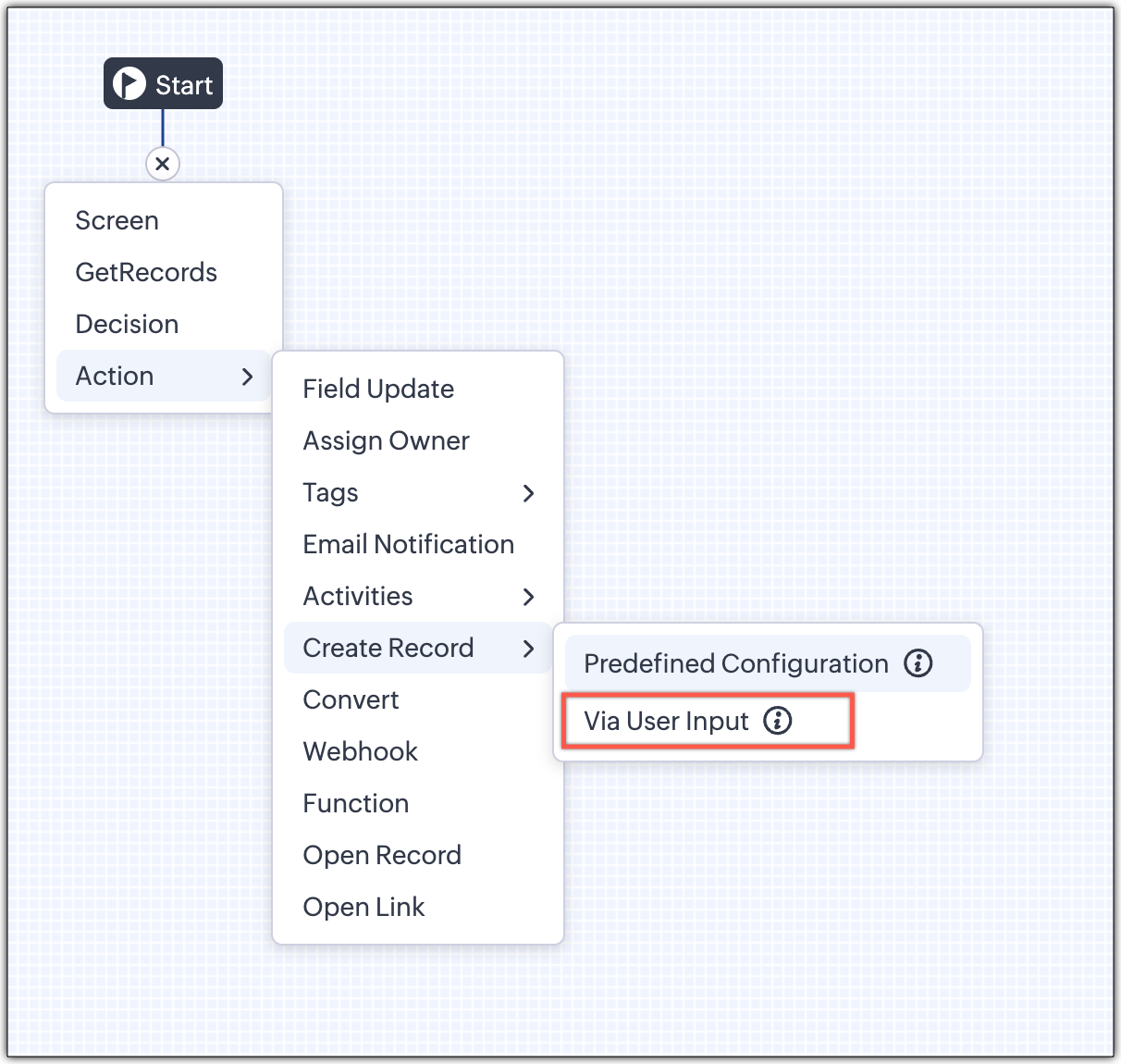
2 - Via User Input (New Action)
The key advantage of this update is that it simplifies how admins configure record creation in Kiosk Studio. Earlier, admins had to manually create a separate screen replicating all the fields of a module and then map them in the Create Record action. Moreover, if there were changes made to the fields in the module, the admin would have to edit the Kiosk and add/map the new field. All this was time-consuming and complex to setup.
Now, admins can choose to allow records to be created during the Kiosk's execution and eliminate the need to replicate, map and merge fields to save time and effort through the use of Quick Create pop-up.
Through this enhancement, real-time record creation is possible during live Kiosk execution. Users can input values in the Quick create layout that would pop-up during execution to create new records in a module. Perfect for real-world scenarios, the exact information needed to create a record only becomes available during the live execution of the Kiosk.
Real-time scenarios
Let's say you run a Kiosk for your sales team. During a call, a customer requests a product demo and shares their availability Or, your support team receives a call and has to log the customer’s issue details or updated contact info.
With this enhancement, the sales rep or support executive can create records instantly while the Kiosk is running, to input the information they get during their call to provide a smooth customer experience.
How does it work?
- While setting up the Kiosk, select Create Record > Via User Input.
- Enter Action Name, then choose the Module and Layout.
- During execution, the Quick Create layout for the selected module appears.
- There is an option to pre-fill frequently used field values during configuration.
- Now, users can enter details directly while the Kiosk is being executed.
- Note: If a user lacks Create permission for a module, this step is skipped, and related values will show as null.
Take a look at the GIF below to understand how this action can be setup and executed.
GetRecords just got smarter with these new enhancements
Fetch All Records from a module to your GetRecords Screen
You can now choose to fetch all records from a module to be displayed in your GetRecords Screen.
Previously, you could select a single record or multiple records based on the limit set for record preferences. Now, we've given you a choice to be able to select Some Records or All records. This is useful in scenarios when users need to view or act on a complete set of records in a module rather than on a limited number of them.
New pagination making easier to navigate records
We’ve added pagination to the GetRecords screen, making it easier to navigate and locate specific records quickly, even when dealing with large data sets.
Search or filter records in GetRecord screen s
Quickly find records in GetRecords screens with this new addition to Kiosk.
Increased selection limit to select more records
We have increased the GetRecord selection limit from 10 to 100.
GetRecords First-Screen Loads Instantly - No Refresh Needed
Currently, only Kiosks opened through user actions (like Blueprint or Custom Buttons) loaded records directly, while others showed a 'Refresh to load' button.
Now, every Kiosk auto-loads the first-screen of GetRecords without the need to manually refresh. When a Kiosk opens with GetRecords on the first screen, records now load instantly, regardless of whether it’s on the Home Page, Canvas, Record Detail View, Blueprint, or a Custom Button.
Kiosk Studio Added to the Standard Edition
We have extended the ability to create Kiosks to all paid editions in Zoho CRM including the Standard Edition. We aim to allow more users to create and manage Kiosks for their business processes. Take a look at the table below to know Kiosk creation limits for each Zoho CRM edition.
| Standard | Professional | Enterprise | Ultimate / CRMPlus / ZohoOne |
Number of Kiosks | 2 | 7 | 25 | 50 |
- These enhancements is available for all users in all data centers.
Start exploring these new features today and experience a faster, smarter, and easier way to capture data with Kiosk Studio.
Stay tuned for even more exciting enhancements coming your way!
Regards,
Serena Woolridge


