Tips and Tricks #56: How to create a brochure using Zoho Show
 With the right layout, style, and images, a brochure can set the tone for your business and capture your audience's attention. Unfortunately, high-quality brochures can be expensive and often require the help of a professional designer. Enter Zoho Show. Show's design elements and customization options empower you to create brochures that effectively highlight all your business's most important features.
Here are some ways you can build an eye-catching brochure in Show:
Customize your layout for a high-impact content display
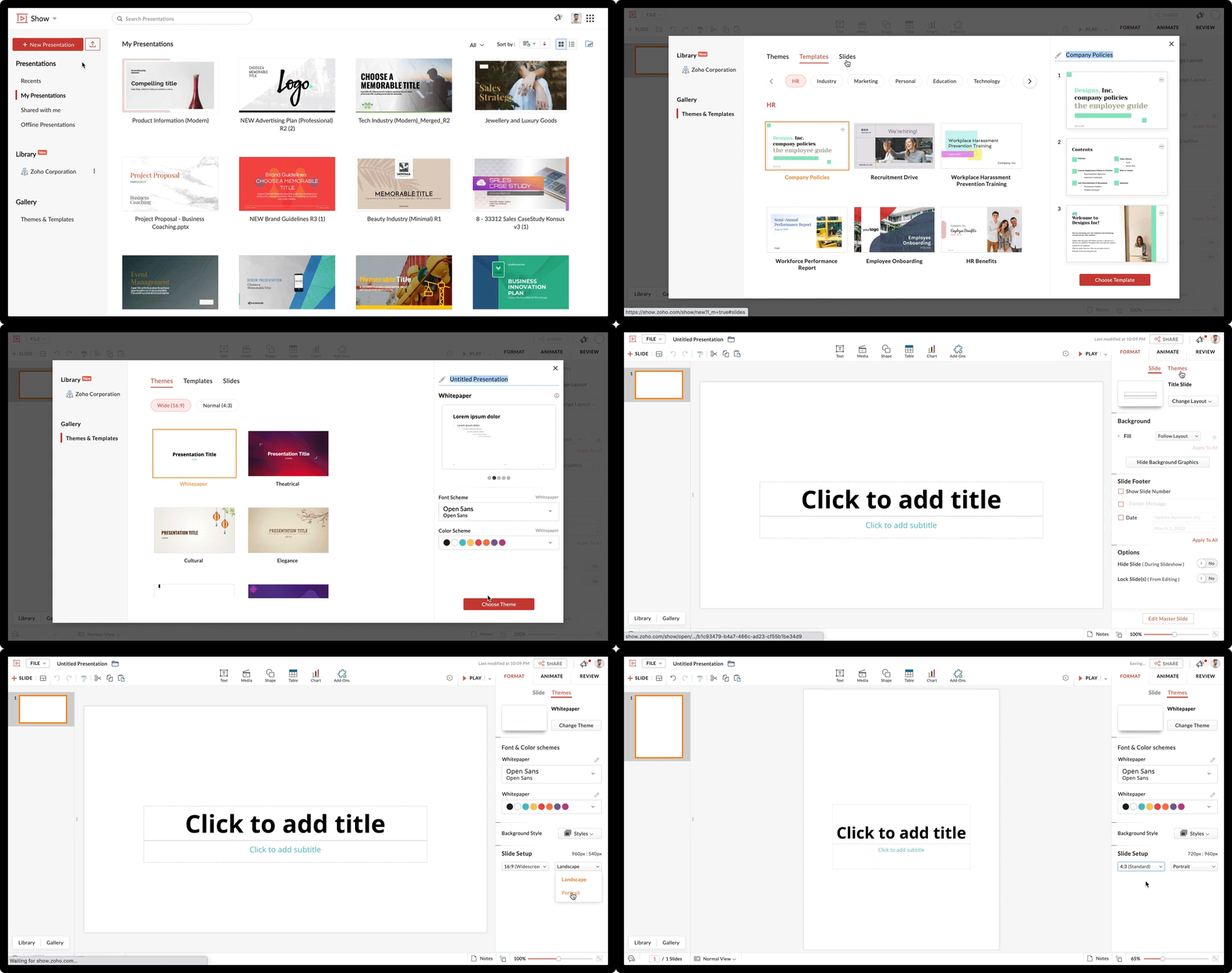
First, you'll have to choose the right layout. By default, Show's slides are set to landscape. For a brochure, you'll have to change the slide layout to portrait and adjust the width to fit your requirements.
To change your layout:
- Log in to Zoho Show, and in the left pane click New presentation.
- Choose a Theme, Template, or Slide design and finalize your choice by clicking Choose Themes, Choose Templates, or Choose Slides.
- From the main interface, select Themes from the right pane.
- From the bottom-right corner, under slide set-up, click the Landscape drop-down menu and select Portrait.
- If needed, adjust the width of the slide with the Widescreen drop-down menu.
- Adjust the pointers of the placeholders to create margins for your slide.
Tip:
For a two or three-fold brochure, you can avoid adjusting the layout and section your slide by drawing straight lines. Navigate to Shape and choose Line from Draw with pen.
Choose backgrounds that compliment your company's style
A brochure has to appeal to your audience aesthetically. You'll need to select the right background to fit your business's style. Show offers various background options like colors, images, and patterns to enrich the look of your brochure.
To choose a background:
- Go to Format on the right pane of the layout.
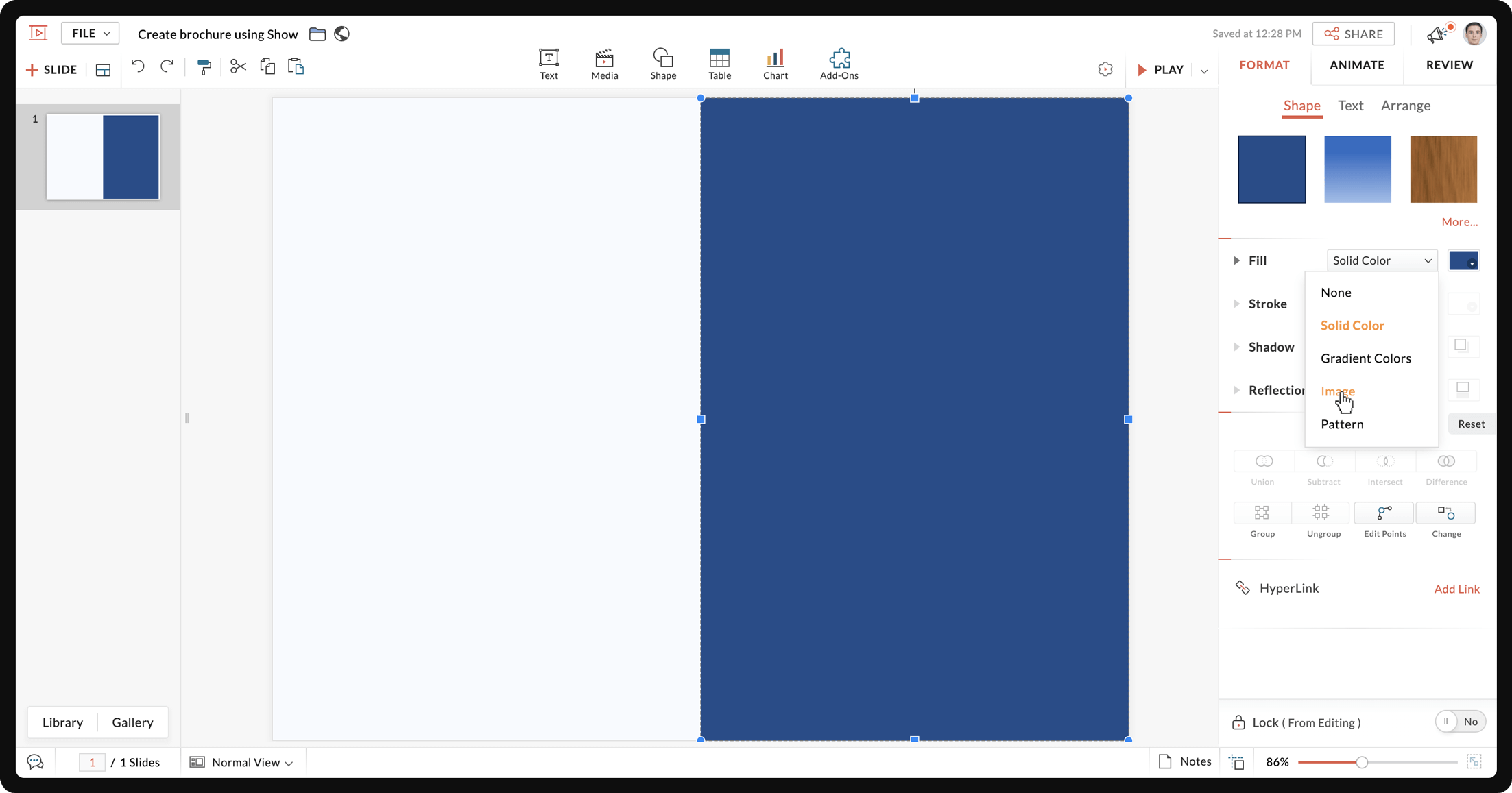
- From the Background tab, go to Fill, and use the drop-down menu to choose a Solid Color, Gradient Color, Image, or Pattern.
- For Solid Colors, you can choose from Theme Colors, Standard Colors, or Advanced Color Options.
- For Gradient Colors, you can choose from Light Colors or Dark Colors.
- For Image, you can upload from your local drive, or choose from Unsplash.
- For Pattern, you can choose a pattern for the Foreground and a color for the Background.
Tip:
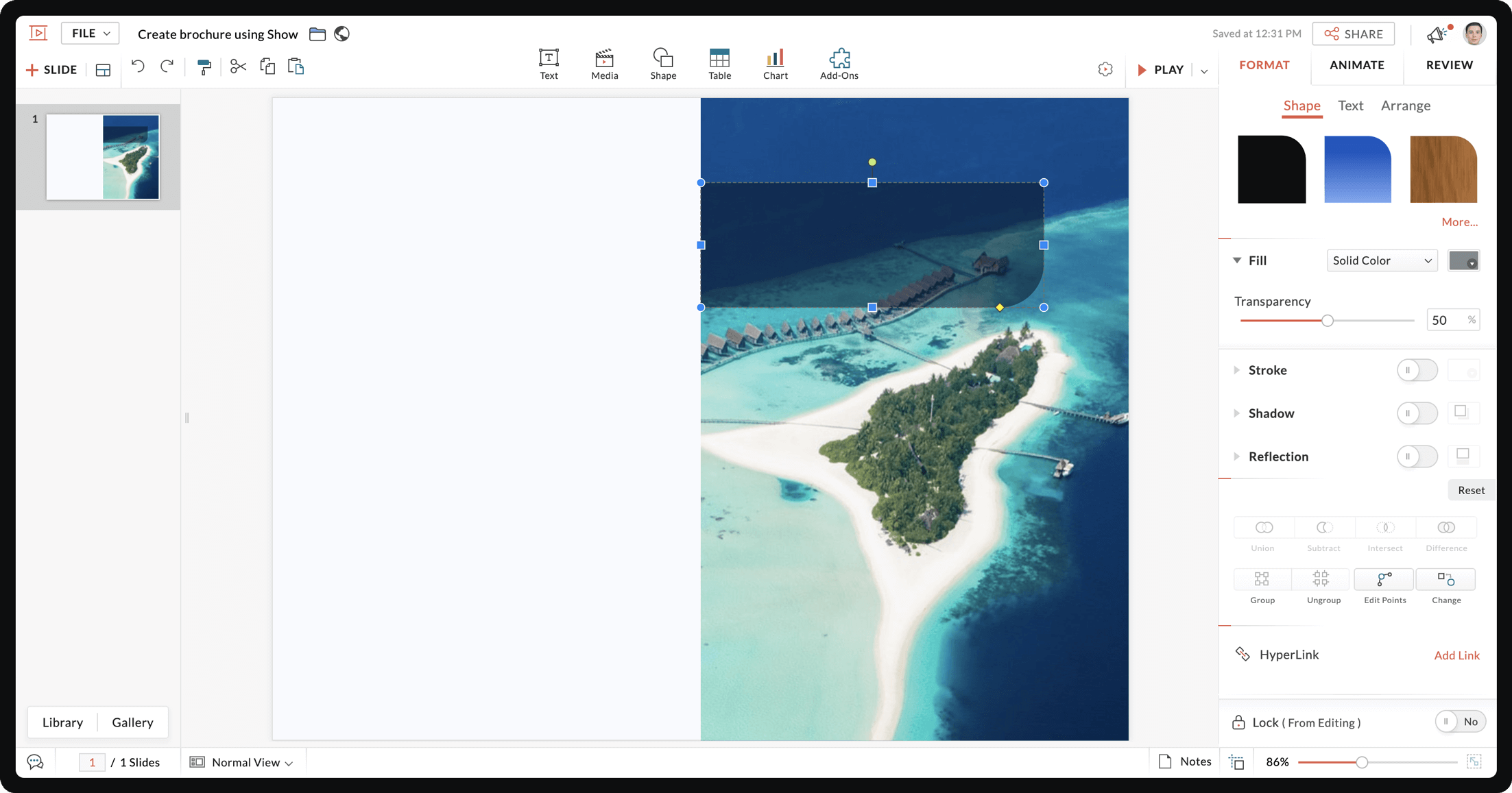
To create a watermark, select any image and adjust its transparency using the slider on the right pane.
Use shapes to highlight your content
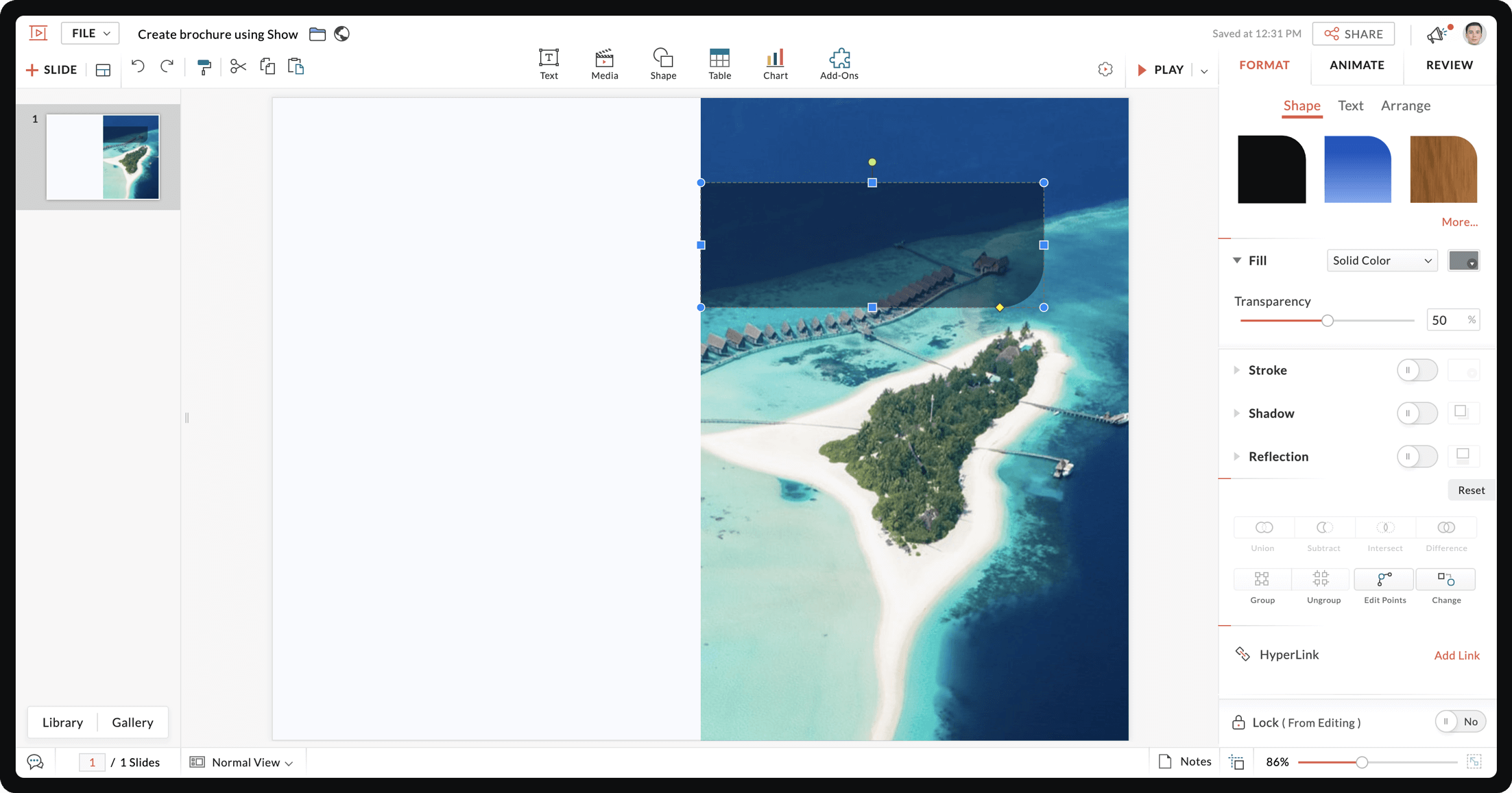
Brochures include texts as well as images. Add shapes to your brochure to highlight content and make different sections stand out.To enhance your content,Show offers various shapes to section your brochure and highlight content.
To section your brochure:
- From the top of the interface choose Shape.
- Select a shape.
- Once the shape is added to your slide, use the pointers to adjust its size.
- Drag and drop the shape to your chosen position.
- Click Format from the right pane and choose a color for your shape.
- Choose a text box style from Text and drag it to your shape to create your content.
Tips:
- Place your text inside a unique shape to highlight content like CTA, offers, and discounts.
- Change the color of your text or shapes to compliment each other.
- Use smart elements to represent data.
Style your message with fonts and texts
Fonts determine your brochure's readability, and help you differentiate between content styles such as headings and body text. Show offers a variety of font styles, and gives you the option to upload your own fonts to the gallery.
To add and customize fonts:
- To choose your font, select the text and click the Font drop-down menu from the right pane.
- To change the color of your text, select the text and navigate to the right pane. Using the drop-down menu next to Font, select from Theme colors, Standard Colors, Other Used Colors, or customize from the Advanced Color Palette.
Tips:
- Don't use too many font styles in your brochure. Stick to a maximum of three.
- Use a different font style or text color to highlight important content.
- Make sure your font size is readable.
- Use bullets to break up large blocks of text and improve readability.
Add images that resonate with your audience
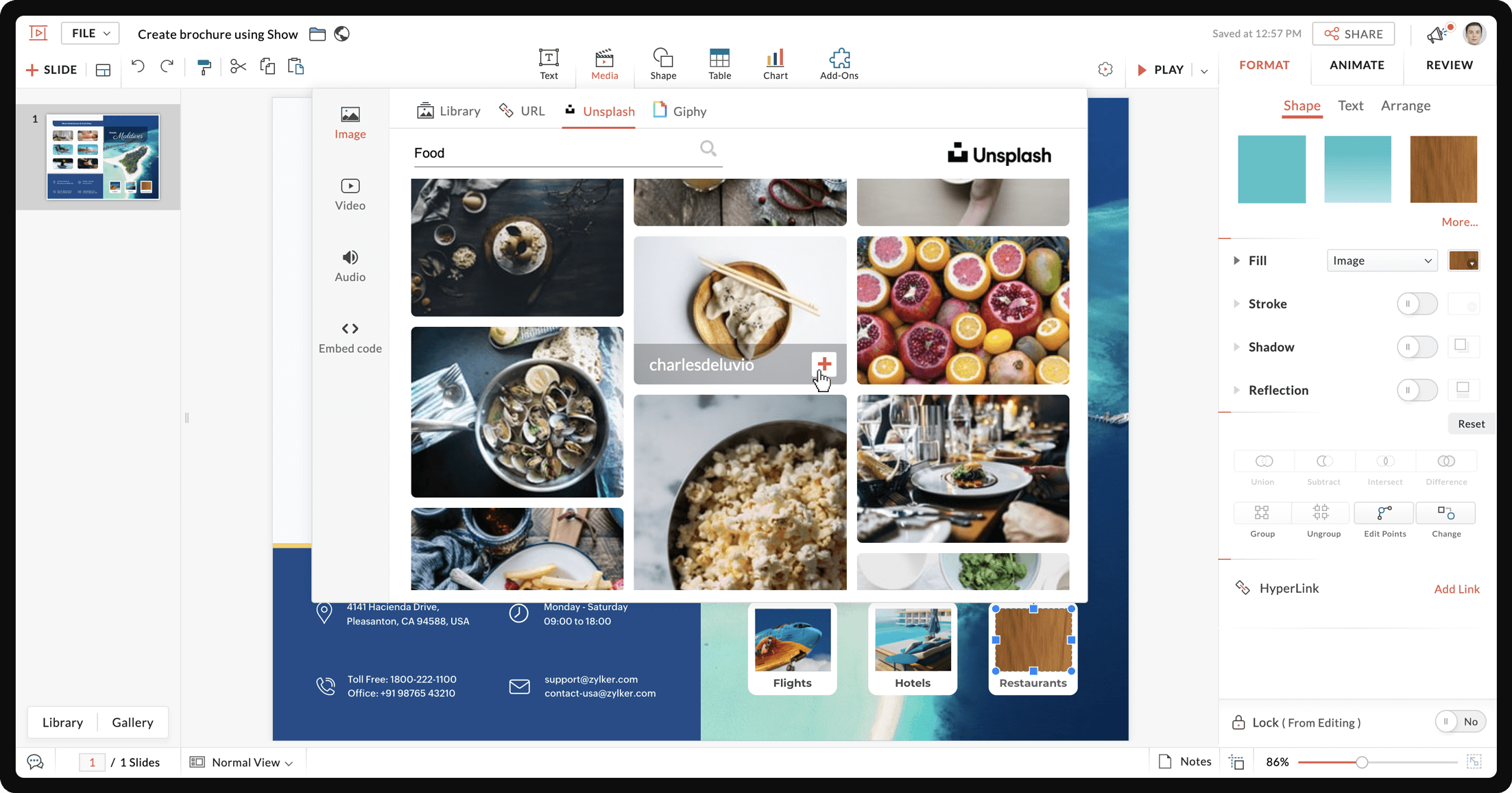
Images help your brochure stand out and connect with your audience. Select and customize images that convey your company's core message.
To add images in a brochure,
- From the top of the editor interface choose Media and then select Image.
- You can also find and add an image from your local drive, image Library or Unsplash.
Tip:
If you want all your images to have the same stroke, shadow, or reflection, select all the images and use the Group option.
Go green! Download your brochure and send it as an e-brochure to your leads.
A good brochure must be rich in content and design. To make your brochure worth reading, focus on displaying your content in unique and creative ways for your audience.
New to Zoho Recruit?
Zoho Campaigns Resources





Topic Participants
Gowthami Boominathan
Sticky Posts
Tips and Tricks #08: Lock and unlock objects in Zoho Show
Hello everyone, Here is a tip about just one of the many interesting tools in Zoho Show. Let's say the marketing and design teams are working together on a product launch. With multiple people working on this shared presentation, and rushing to get itTip and Tricks #01: Take your text for a spin
Hello folks, Zoho Show's all-new, clear, contextual interface was a great update to an already great product, so we thought you might appreciate some help putting it to good use. Following this release, the Zoho Show Community is happy to launch TipsTips and Tricks #06: Animate text at the paragraph level on Zoho Show.
Hi guys! We're back with another Show tip! Before we jump into it, let's read through a quick scenario first. Say you have a slide with a list of bullets and paragraph levels to present to your audience. The second it's on the screen, your audienceTips and Tricks #05: Add pictures as comments within a slide.
Hello everyone, We're back with a new Show tip. In today's post, we'll look at a more interesting way to comment and collaborate on a slide in Zoho Show. No matter where your colleagues are in the world, using comments to share opinions or give feedback isTips and Tricks #07: Crop a Picture to Fit a Shape
Hello everyone, Whether you're designing an adventurous photo collage, your company's brochure, or simply a team introduction for new hires, images always play a crucial role in making your presentation look interesting and interactive. To help spruce
Zoho CRM Plus Resources
Zoho Books Resources
Zoho Subscriptions Resources
Zoho Projects Resources
Zoho Sprints Resources
Zoho Orchestly Resources
Zoho Creator Resources
Zoho WorkDrive Resources


Zoho CRM Resources
Get Started. Write Away!
Writer is a powerful online word processor, designed for collaborative work.
Zoho CRM コンテンツ
-
オンラインヘルプ
-
Webセミナー
-
機能活用動画
-
よくある質問
-
Ebook
-
-
Zoho Campaigns
- Zoho サービスのWebセミナー
その他のサービス コンテンツ
ご検討中の方
Recent Topics
Access Phone Field Components (Country Code) Directly
Hello everyone, I'd like to propose an enhancement for the Phone field in Zoho Creator. The Problem: The Phone field captures the country code and local number separately, but stores them as a single string (e.g., +1234567890). To get the country code,Send mass messages through WhatsApp from the Tickets module
Hi Everyone! Effective communication is key to delivering prompt and reliable customer support. Because WhatsApp is one of the most widely used and familiar messaging platforms, it's an effective channel for agents to reach customers who have submittedLead Owner Signature Merge Field
I want to automatically insert a signature (i.e. contact info usually found at the bottom of an email) into an email template, depending on who the lead owner is. What is the merge code for the Signature from a Users profile? CRM > Settings > Customization > Templates There is a popup near the bottom of the edit screen which says: "You can insert a Signature, which is available as a merge field in the users section." It is also referenced on this page: https://help.zoho.com/portal/en/kb/crm/customize-crm-account/customizing-templates/articles/template-builder#Merge_FieldsHow do I create a time field?
I want a field that only records time. I can only see how to create a date-time field. If I do that and enter a time, without a date, nothing is recorded. If I create a number or decimal field, I cannot use it in time calculations. All I want is a fieldAlternating columns - How to reverse order on mobile - Responsive template
Can the order of alternating columns be reversed on mobile so that image comes before the text? Example: Desktop Row 1 column Left (image) , column right (text) Row 2 column Left (text) , column right (image) Mobile Currently Row 1 Image over text RowInvokeURL butchering JSON for OpenAI API calls
My organization works with mostly educational institutions. We have a custom module called "Schools", which is the user-entered school name they put when using our service (which they enter along with their state and zip code). We want to map this toCustom order for Current Stage (Blueprint field)
Hi! I suggest adding the option to set a custom order in reports for the Blueprint field ‘Current Stage’. Currently, these fields can only be sorted in ascending or descending order. Thanks!CRM E-mail Sync from Outlook
We are exploring Zoho as a possible new solution for our company. We are trying to understand further on how e-mail sync works. We use outlook. Our current CRM logs anytime we e-mail a customer so we can see in the CRM the message sent to the customer.Run your help desk on your schedule
In business, time is of the essence. This is especially true in a function like customer service, where KPIs such as response time and agent availability are the measures of success. Perhaps the most crucial consideration one needs to make about time is your hours of operation. These set expectations for your customer and for employees. To make communicating this information easier, we've revamped the way business hours and holiday lists work in Zoho Desk. In order to accommodate teams that workThe Customer Happiness REST API is broken
1. We are unable to extract the customerHappiness ( https://desk.zoho.com/DeskAPIDocument#CustomerHappiness#CustomerHappiness_ListallcustomerHappiness) object using the ticketNumber criteria. We keep getting HTTP 429 even when we limit to 60 calls perCan the Product Image on the Quote Template be enlarged
Hello, I am editing the Quote Template and added ${Products.Product Image} to the line item and the image comes up but it is very tiny. Is there anyway that you can resize this to be larger? Any help would be great! ThanksAutomatic Department and Employee Sync Between Zoho One and Zoho People
Dear Zoho Support, I'm writing to propose a valuable feature request that would streamline data management and improve user experience within the Zoho ecosystem: automatic synchronization between departments and employees in Zoho One and Zoho People.Zoho Expense and Chase Bank Visa credit cards - Direct Feed?
Our company uses JP Morgan Chase Visa credit cards. We can't be the first to try and use a combination of Zoho Expense + Chase Bank + Visa Credit Cards --- anyone successful with this combination? 1. The direct feed automation isn't working. When I goImpossibile inviare il messaggio;Motivo:554 5.1.8 Indirizzo del mittente bloccato
" Impossibile inviare il messaggio;Motivo:554 5.1.8 Indirizzo del mittente bloccato" Hi need to send email, how can fix this? Thanks, AliceImage inputed in Zoho Form were displayed to small in exported version
Good evening, my name is athallah, i am a trainee in government office Right now, i use Zoho form to digitalize an airfield monitoring form. my problem is, the image were to small to displayed in exported version. it really bad for formal presentationAPI. How do I get responses submitted to the form?
Hi, I'm trying to retrieve a list of form responses via the API. I've created a Self Client application in API Console. What scoup should I enter? What are the endpoints? Is there documentation on this anywhere? I've wasted a lot of time searching. GPTQuestion about Zoho CRM Professional plan users
Hello! I have a question about the Zoho CRM Professional plan. Is the pricing charged per user or per organization? Are there any free users included in this plan, or do I need to pay for each additional user separately? Thank you!Communicating with emojis
On July 17, we celebrate World Emoji Day! We're a bit late 😐 sharing insights about this day. But we just couldn't let it pass without a mention 😊 because emojis have a meaningful connection with customer service 💬 🤝. We do not want to miss out onChanging the Default Search Criteria for Finding Duplicates
Hey everyone, is it possible to adjust the default search criteria for finding and merging duplicate records? Right now, CRM uses some (in my opinion nonsensical) fields as search criteria for duplicate records which do nothing except dilute the results.Is it possible to create a word cloud chart in ZoHo Analystics?
Hi there, I have a volume of transaction text that I would like to analyse using word cloud (or other approcah to detect and present word frequency in a dataset). For example, I have 50,000 records describing menu items in restaurants. I want to be ableHelp integrating Aircall into Zoho CRM
Hi all, We are need to get better AirCall integration into Zoho. We have configured in the Aircall dashboard but we have not done the Zoho side. We cannot see Zoho CRM information on incoming calls. And we calls and text's are not being logged. SpecificallyShopify Extension no longer working in CRM
Zoho CRM and Extension are no longer working properly. We have used Shopify Basic for years. All of the sudden it stopped working, then started working again, and now no longer working again. There are several ways for Personal Information to sync fromHow to keep track of bags, cans, drums of inventory?
We buy and sell products that are packaged in bags 🛍️, cans🥫, drums🛢️, etc. with batch numbers. When we get a shipment of one of the products, how do we track we received (say) 10 cans each of 5L of a product and maybe we received 10 cans of anotherEasy third party collaboration: Zoho Flow Integration
Third-party integrations extend your project functionality with improved workflow, and data processing. With Zoho Flow integration you can include multiple third party actions into your project or task automation. Add Zoho Flow action in Workflow rulesZoho Inventory - How to pay a supplier up front then receive multiple deliveries
How do we manage situations where we pay a supplier up front, then the receive the products in increments? Example Workflow: Create Purchase Order > Receive Bill for full amount > Receive Items 2 or more deliveries. Currently, once a Bill is created againstIntroducing Configure, Price, Quote (CPQ) in Zoho CRM | Public early access 2023
Greetings Customers! We're excited to announce that the CPQ feature will soon be available in Zoho CRM and accessible to all accounts using the Professional, Enterprise, and Ultimate editions. We've opened this feature to select customers, and it'll behow to edit the converted lead records?
so I can fetch the converted leads records using API (COQL), using this endpoint https://www.zohoapis.com/crm/v5/coql and using COQL filter Converted__s=true for some reasons I need to change the value from a field in a converted lead record. When I tryZoho Bookings <> CRM integration
Hello Zoho community! We are enabling our Zoho Bookings <> CRM integration. What is the workflow if the integration detects that the contact already exists in the CRM? Does it create a duplicate record? Overwrite the record? Merge the record? (in thisCannot reject empty expense report
Hello, We are currently having issues with two empty expense reports where if we try to reject them, either manually or through the REST API, we get error 114016, which says some of the expenses have already been billed and must be removed. I'd appreciateUse of Zia within Forms
I have noticed that recently you have added Zia to help create forms from scratch. Would it be possible to add Zia functionality to free text fields for form submissions or if this is already on the roadmap an ETA for this please? We have a lot of fieldDefault in fields on Form B based on the user selection in Form A
Hi Everyone, I have added an action button to a form report to bring up a new form based on user selection, see it indicated in red below: Then when the ne form loads, I want to default in some of the fields based on the record the user was selected on.Auto-sync field of lookup value
This feature has been requested many times in the discussion Field of Lookup Announcement and this post aims to track it separately. At the moment the value of a 'field of lookup' is a snapshot but once the parent lookup field is updated the values diverge.Last activity time is acting like last modified time
When i edit the description or any field in the potential, account, contact and lead, the Last Activity Time is being updated like the Modified Time. This is messing all workflows and reports and we are unable to track real last time of activities likeEnhancements to the formula field in Zoho CRM: Auto-refresh formulas with the "Now" function, stop formula executions based on criteria, and include formulas within formulas
Dear Customers, We hope you're well! By their nature, modern businesses rely every day on computations, whether it's to calculate the price of a product, assess ROI, evaluate the lifetime value of a customer, or even determine the age of a record. WithHEX/RGB Color Input in Visual Editor
Hello Zoho Pagesense Team, We hope you're doing well. We’d like to submit a feature request to improve the color selection options in the Pagesense popup editor. Current Limitation: Currently, to set text colors, users must move the color slider manually.Add Comprehensive Accessibility Features to Zoho Writer
Hello Zoho Writer Team, We hope you are doing well. We would like to submit a feature request to enhance Zoho Writer with a full set of accessibility tools, similar to the accessibility options already available in the Zoho Desk agent interface. 🚧 CurrentCRM and Campaigns- tags not integrating?
Hi! I am setting up an automation in zoho campaigns and it says the crm is integrated...but when I want to use a trigger of a certain tag I created for people in the crm to denote those who purchased, it doesnt have that tag available as an option inMaximum limit of rows exceeded
I am trying to add a row to a spreadsheets that has fewer than 60 rows. I keep getting an error message that says I have exceeded the maximum limit of 65,536 rows. Any ideas out there?Can't change form's original name in URL
Hi all, I have been duplicating + editing forms for jobs regarding the same department to maintain formatting + styling. The issue I've not run into is because I've duplicated it from an existing form, the URL doesn't seem to want to update with the new【参加無料】今年最後のZoho ユーザー交流会|東京・大阪・名古屋で開催! 活用事例&ユーザー同士の情報交換
ユーザーの皆さま、こんにちは。コミュニティチームの中野です。 11月に東京、大阪、名古屋の3都市でZoho ユーザー交流会を開催します! 毎回ご好評いただいている本イベントでは、実際の Zohoユーザーによるリアルな活用事例の共有や 参加者同士でノウハウを交換し合うグループワークを予定しています。 「他社の活用を参考にしたい」「Zoho をもっと使いこなしたい」方にぴったりの場です。 初参加の方もぜひお気軽にご参加ください! ーーーーーーーーーーーーーーーーーーーーーーーーーーーーーーーーーーーーーNext Page