What's New - March 2025 | Zoho Backstage
Hello there,
We’re thrilled to introduce a much-awaited lineup of powerful features and enhancements designed to fulfill your event management needs. Here's a round-up of the latest updates that will enhance your experience with Zoho Backstage this month.
Offer Tickets
Early bird and limited-time offers are powerful tools to boost ticket sales and generate early revenue. With the new Offer Tickets feature, you can create multiple offers as tiers within a single ticket class, making the process more streamlined and automated.
Previously, you had to create separate ticket classes for each offer and manually manage their availability. Now, you can:
- Add multiple offers under a single ticket class
- Automate the offer start and stop conditions
- Reduce manual intervention
Key benefits
- Increased marketing impact: Time-sensitive discounts create a sense of urgency, encouraging faster ticket purchases.
- Early revenue and cash flow: Early sales provide immediate cash flow to cover event expenses like venue deposits, marketing, and logistics.
- Leverage Psychological Triggers:
- FOMO (Fear of Missing Out): Limited-time availability compels attendees to act quickly.
- Perceived Savings: Attendees feel they are getting a deal, making them more likely to buy.
How to use
Setting up offers

You can add offers as tiers within a ticket class and configure their availability based on:
- Time: Set specific start and end dates for the offer.
- Quantity: Define the number of tickets available at the offer price.
Flexible offer progression
From the second offer onward, you can choose to automatically start the next offer when the previous one ends. Or, set a custom start date for the new offer.
Customizing offer display
You can customize how offers are displayed on your event website using the Website Designer. The offer card can show:

- Current Offer
- Previous Offer
- Next Offer
- Both Previous and Next Offers
This flexibility helps you highlight the most relevant deals and enhance visibility.
Good to know
- During the ticket purchase process, the offer name appears alongside the ticket class name. The order summary clearly displays the applied offer.
- After attendees purchase their tickets, the "Your Orders" section displays the offer name along with the ticket class name. The invoice also reflects the offer name for transparency.
- When manually adding an order, any valid offers associated with the ticket class are applied automatically. There's no need for manual price adjustments.
- During check-in, only the original ticket class amount is displayed.
- Offer-tiered tickets cannot be selected during manual check-in.
Click here to learn more.
Tax Rules - Canada (Early access)
Accurate tax calculation is essential for ensuring compliance and transparency in event management. With the new Tax Rules feature for Canada, you can automatically apply the correct tax rates based on your event location, making tax management simpler and more efficient. Zoho Backstage now allows you to create tax rules for all 10 provinces and 3 territories, which can be selected and applied to an event automatically, ensuring the correct tax rates are applied without manual adjustments. This feature supports in-person, hybrid, and online events, offering flexibility and accuracy.
The Canadian tax rule engine covers 10 provinces, 3 territories, multiple tax agencies, and 12 sales tax rates, providing a comprehensive solution for handling event-related taxes.

How do taxes work on Canadian events?
For in-person and hybrid events, the tax rate is determined by the event’s physical location, based on the Place of Supply, in compliance with Canada Revenue Agency (CRA) regulations. This ensures attendees are charged the appropriate tax rate according to the province or territory where the event takes place.
For online events, where no physical venue exists, the tax is calculated based on the attendee’s location. This ensures the correct sales tax is applied, even when attendees purchase tickets from different provinces or countries.
How to use
To enable Canada Tax Rules, configure your organization’s location:
- Go to Portal Settings > Payments and Tax.
- Select Canada as the organization location.
Once configured, the system automatically populates:
- 12 default tax rates covering all provinces and territories.
- 13 tax rules (one for each region).
- A default rule for online events, applying the correct tax based on the attendee’s location.
- 5 tax agencies for accurate tax handling.
You can create new tax rates, groups, and authorities to meet your event’s specific needs. Additionally, you can add custom tax rules for both in-person/hybrid and online events, giving you full control over how taxes are applied.
Applying Tax Rules to In-Person and Hybrid events
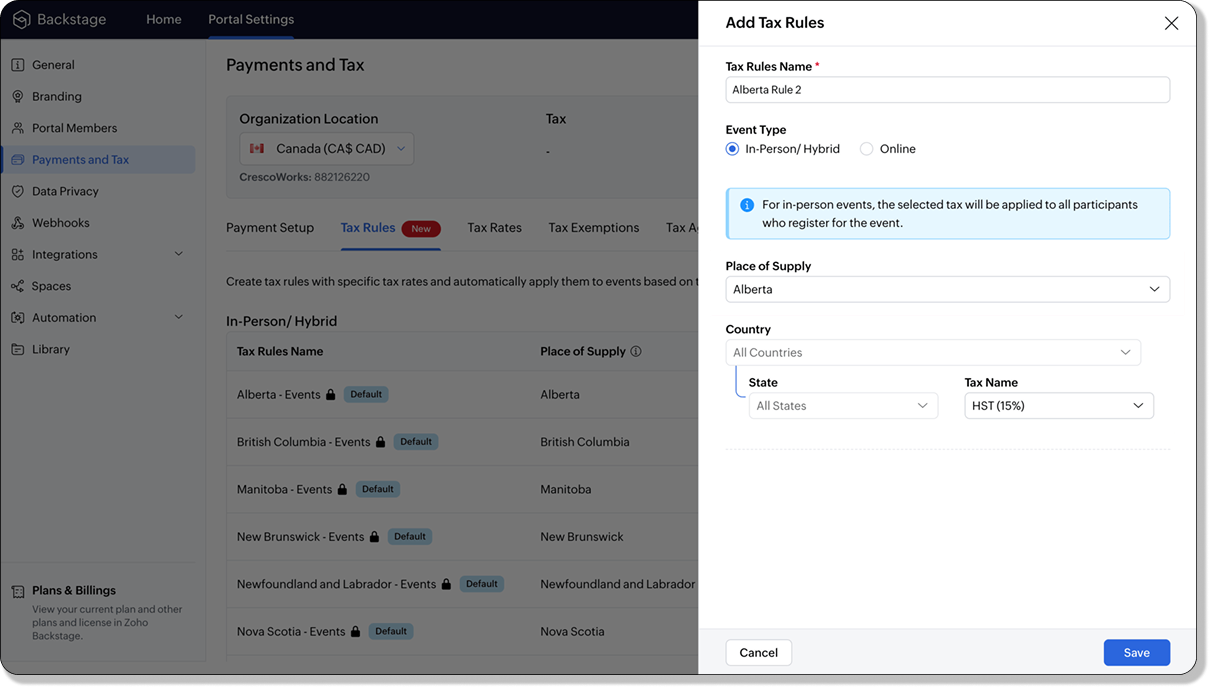
For in-person and hybrid events, Zoho Backstage automatically suggests tax rules based on the event location. The 13 default tax rules cover all Canadian provinces and territories. If the event location changes, the system automatically updates the relevant tax rules to reflect the new region’s rates.
You can also create custom tax rules by selecting a specific province or territory and applying a custom tax rate, offering greater flexibility for managing event taxes.
Applying Tax Rules to Virtual events
For online events, the system uses a default tax rule that covers all Canadian provinces and territories. Taxes are applied based on the attendee's location.
Canadian attendees are charged the applicable provincial tax rate.
International attendees are assigned a zero tax rate by default.
If you need to apply taxes to international attendees, you can create new tax rules tailored for online events, ensuring compliance with international tax regulations.

- Tax rules in Zoho Backstage are flexible and dynamic. You can modify them at any time during your event setup. However, changes will only apply to new transactions. Existing transactions will retain the original tax rule, ensuring previous purchases remain unaffected.
- If you select a non-Canadian location for your event, the Canada Tax Rule will not be applied. This ensures taxes are only charged where applicable, preventing errors in cross-border events.
Event Category

Categorize and filter events based on custom classifications for organizers and attendees to find and manage events easily. This new addition is aimed at improving event management by giving organizers the flexibility to create, manage, and filter events using custom categories. Organizers can now create up to 100 custom categories when setting up an event, giving them the freedom to define categories that suit their specific needs.
Previously, categories selected in Event Info were not utilized elsewhere, and there was no option to add new/manage categories.
Now, organizers can tailor categories to their specific needs and filter them on the Event Directory.
To access:
- While Creating an Event: On the Event Info page.
- For Category Management: Under Portal Settings > Branding > Event Category.
Permissions:
Portal Owners & Admins:
- Add, edit, and delete custom categories.
- Cannot edit or delete default categories.
Event Organizers:
- Can only add new categories.
- Cannot edit or delete existing custom or default categories.
Other Enhancements
Floor plan Focus Area

The Focus Area in the floor plan refers to designated spaces within the event venue that are visually highlighted to draw attention to specific sections, such as booths, stages, or key locations. These areas allow organizers to emphasize important spots, making navigation easier for attendees and improving the overall flow of the event. Focus areas help guide visitors to essential parts of the venue, enhancing their event experience.
Custom Dates for ticket classes (Early access)
In cases where smaller sessions or events (like welcome events, after-event parties, etc.) occur before or after the main event, this feature allows organizers to assign specific dates to separate ticket classes, ensuring tickets are only valid for the selected dates.
Custom dates can be set within 30 days before or after the main event.
New WhatsApp triggers and templates
The WhatsApp Integration, designed to enhance communication and engagement with all event stakeholders, now includes new triggers and templates to facilitate messaging and ensure timely updates for everyone.
For Purchasers:
- Send Registration Confirmation: Instantly confirm registration to enhance the attendee experience.
- Order Canceled: Notify purchasers promptly in case of any order cancellations.
For Speakers:
- Welcome Speaker: Extend a warm welcome to our speakers and set a positive tone for their participation.
- Speaker Added to a Session: Inform speakers when they’re added to a session, ensuring they are well-prepared.
- Speaker Removed from a Session: Provide timely updates should there be any changes to their session involvement.
For Sponsors:
- Thank a Sponsor Before Website is Live: Show appreciation early on, fostering positive relationships with sponsors.
- Welcome and Thank Sponsor After Website is Live: Acknowledge sponsors publicly once the event website goes live.
- Deny Sponsor Proposal: Deliver sensitive information with professionalism and clarity.
- Acknowledge Sponsor Proposal: Confirm receipt of sponsor proposals, keeping communication open and transparent.
For Participants:
- Event Canceled: Quickly inform participants in the event of cancellations, ensuring they’re kept in the loop.
We are continuously refining Zoho Backstage to make your event management experience even more powerful and intuitive. Stay tuned for more updates in the coming months!
If you have any questions, please contact support@zohobackstage.com.
New to Zoho Recruit?
Zoho Campaigns Resources





Topic Participants
Jithan Raghuraj
Zoho CRM Plus Resources
Zoho Books Resources
Zoho Subscriptions Resources
Zoho Projects Resources
Zoho Sprints Resources
Zoho Orchestly Resources
Zoho Creator Resources
Zoho WorkDrive Resources


Zoho CRM Resources
Get Started. Write Away!
Writer is a powerful online word processor, designed for collaborative work.
Zoho CRM コンテンツ
-
オンラインヘルプ
-
Webセミナー
-
機能活用動画
-
よくある質問
-
Ebook
-
-
Zoho Campaigns
- Zoho サービスのWebセミナー
その他のサービス コンテンツ
ご検討中の方
Recent Topics
Zoho Books | Product updates | January 2026
Hello users, We’ve rolled out new features and enhancements in Zoho Books. From e-filing Form 1099 directly with the IRS to corporation tax support, explore the updates designed to enhance your bookkeeping experience. E-File Form 1099 Directly With theWeekly Tips : Save Time with Saved Search
Let's assume your work requires you to regularly check emails from important clients that have attachments and were sent within a specific time period. Instead of entering the same conditions every time—like sender, date range, and attachments included—youBring real app analytics into Zoho Creator apps with Zoho Apptics
We’re kicking off the year with a release we’ve been looking forward to for a long time. After being in the works for a while, Zoho Creator and Zoho Apptics are now officially integrated, bringing in-depth product analytics directly into the Zoho CreatorDiscontinuing Zoho ShowTime service on May 30, 2026
Hello everyone, As a follow-up to our earlier announcement, we’d like to share an important update regarding Zoho ShowTime’s discontinuation timeline. Zoho ShowTime, our online training platform, reached its end of life on December 31, 2025, and its servicesemailing estimates
Shows up in the customer mail logs as sent but nobody is receiving them, even when I send them to myself I don't get them ??? Something wrong with the mail server or my end ?Ability to CC on a mass email
Ability to CC someone on a mass email.No background for video recordings, no playback speed, can't even playback longer recordings - have to download…
Hi. We utilize heavily video messages on Slack, but wanted to migrate to Cliq with Zoho One, however very basic yet very frequently used feature is missing: backgrounds for video recordings and playback speed. We were not happy with Slack's 5 minute limitsBookings duration - days
Hi team, Is there any way to setup services/bookings that span multiple days? I am using Zoho Bookings for meeting room bookings. Clients may wish to book a room for more than one day, for up to a month. If not, is there a plan to allow services to be setup with durations of Days as well as hours and minutes? Many thanks, Anna.Customer address in Zoho Bookings
Hello, Is it possible to add customer address information to the Zoho bookings appointment screen? Or have it pull that information automatically from the CRM? We are wanting to use this as a field management software but it is difficult to pull the address from multiple sources when it would be ideal to have a clickable address on the appointment screen that opens up the user's maps. It would also be advantageous for the "list view" to show appointment times instead of just duration and bookingFeature Request - Allow Customers To Pick Meeting Duration
Hi Bookings Team, It would be great if there was an option to allow customers to pick a duration based on a max and minimum amount of time defined by me and in increments defined by me. For example, I have some slots which are available for customersNew feature: Invite additional guests for your bookings
Hello everyone, Greetings from Zoho Bookings! We are happy to announce the much-awaited feature Guest Invite, which enhances your booking experience like never before. This feature allows additional participants to be invited for the bookings to makeChanging the owner of a call
Am I correct in my conclusion that I cannot change the owner of a call in Zoho? The field does not show up in the screen, nor can I make it show up as the systems does not give me that option. I cannot "mass update" it either. I tried it, but Zoho refuses to change the name of the owner. Please help out: how do I change the owner of a call.Unified Notes View For Seamless Collaboration
To facilitate better coordination among different departments and team members, the notes added to a record can now be accessed in all its associated records. With this, team members, from customer service representatives to field technicians, can easilyRemove Profiles from "Forecast" Module
How can I remove Profiles from My forecast Module? Image Below The only revenue generators are the VP's, and the Estimation Managers, and the Estimators subordinate to the Est. Managers. How can I remove the unused Profiles? Its frustrating to see themUplifted homepage experience
Editions: All editions. Availability update: 17th February 2026: All editions in the CA and SA DC | JP DC (Free, Standard and Professional editions) 23 February 2026: JP (All Editions) | AU, CN (Free, Standard, Professional editions) 27 February 2026:Restoring records from the recycle bin programatically
Background I'm working on a piece of software to automate conversion of Leads into Deals based on order status from my company's website. The process is mostly complete, right now I'm just working on handling a few edge cases to ensure data integrity.Does Zoho Learn integrate with Zoho Connect,People,Workdrive,Project,Desk?
Can we propose Zoho LEarn as a centralised Knowledge Portal tool that can get synched with the other Zoho products and serve as a central Knowledge repository?All new Address Field in Zoho CRM: maintain structured and accurate address inputs
Availability Update: 29 September 2025: It's currently available for all new sign-ups and for existing Zoho CRM orgs which are in the Professional edition exclusively for IN DC users. 2 March 2026: Available to users in all DCs except US and EU DC. LatestCreate static subforms in Zoho CRM: streamline data entry with pre-defined values
Last modified on (9 July, 2025): This feature was available in early access and is currently being rolled out to customers in phases. Currently available for users in the the AU, CA, and SA DCs. It will be enabled for the remaining DCs in the next coupleSalesIQ Identity Update for Logged In Wordpress User
Hey folks, SalesIQ does not automatically detect when a visitor logs in to WordPress and update their identity to match. For example, if a client of ours visits the site and logs in, SalesIQ will not track them correctly by default. The Solution The solutionFeature Request – Conditional Visitor Information Request in Zoho SalesIQ
We would like to request the ability to conditionally ask for visitor details based on the communication channel used in Zoho SalesIQ. Specifically: When a visitor initiates a conversation through the live chat widget on the website, we want to continueZoho Sign Not Delivering
I have sent several contracts out via Zoho Sign. They do not seem to be getting delivered. I had one person receive it, but the others have not. I had one person tell me they sent it back to me and never got it and doesn't show as signed. I've sentAdd zoho calendar to google calendar
Hi I keep seeing instructions on how to sync Zoho CRM calendar with google calendar but no instructions on how to view Zoho calendar in my google calendar.Paragraph spacings in Zoho Notebook are double-spaced only. Is there a way to keep the original spacing format?
Sorry I don't know the proper terminologies but the best way I can put it is all single-spaced paragraphs that I copy to Zoho Notebook become double-spaced paragraphs. It's very inconvenient and counterproductive when copying and pasting things from andChanging line space in Notebook
My lines are double spaced. How do i change to single space?Workdrive on Android - Gallery Photo Backups
Hello, Is there any way of backing up the photos on my android phone directly to a specific folder on Workdrive? Assuming i have the workdrive app installed on the phone in question. EmmaAuto sync Photo storage
Hello I am new to Zoho Workdrive and was wondering if the is a way of automatically syncing photos on my Android phone to my workdrive as want to move away from Google? ThanksIs anyone experience missing functions in the new UI until hard refresh?
The set of functions including search is almost always missing upon loading an app in the new UI. If you refresh, the functions return. (see second screenshot) Anyone else experiencing this?Conversion Rate – Won Deals over Assigned Prospects
Hello, I would like assistance configuring a KPI in Zoho Analytics titled: Objective of the calculation: Number of Won Deals divided by Total number of assigned prospects (not only converted prospects). Important clarification: The denominator must includeNot receiving New Ticket Emails
Hello! The company I work for uses the Zoho ticketing system, however, I've noticed I'm not receiving email notifications when new tickets are published. I have admin rights to see these tickets on Zoho Desk and respond to them, but am not receiving theCan't update a field on a parent form from a child form's On Success workflow
Title: Can't update a field on a parent form from a child form's On Success workflow Hi everyone, I'm building a simple Golf Lesson Tracker app and I'm stuck on what should be a basic operation — updating a number field on a parent form when a child formApprovals in Zoho Creator
Hi, This is Surya, in one of my creator application I have a form called job posting, and I created an approval process for that form. When a user submits that form the record directly adding to that form's report, even it is in the review for approval.Upload from Zoho Creator File Upload field to OpenAI Vector Store
I’ve struggled for quite a while to get this working properly. For a long time we relied on Azure Functions as a workaround to handle file transfers between Zoho Creator and OpenAI Vector Stores. It worked, but added unnecessary infrastructure and complexity.Calendar start time limit
Hi all, Has anyone found a magical way to filter calendar reports to start from, let's say 8:00, and not 0:00? Or at least to auto scroll there like Google Calendar for example?Enable Free External Collaboration on Notecards in Zoho Notebook
Hi Zoho Notebook Team, I would like to suggest a feature enhancement regarding external collaboration in Zoho Notebook. Currently, we can share notes with external users, and they are able to view the content without any issue. However, when these externalEU Problem
Hi all, we've been facing issues with the Europe data center for two days. It's starting to disrupt our daily workflow. Any word on when this will be resolved?How can I clone my website in order to try new templates?
I want to try a new template for my existing Zoho website without the risk of changing the current site or accidentally publishing the wrong template. Therefore I thought a 'clone website'-option should be somewhere, but I can't find it. How do I tryCustom Module Missing from Roles & Permissions List
Hi Zoho Community, I created a new Custom Module in Zoho Expense. The module is fully built and I can see it in the Module Builder (Settings > Customization > Modules). However, I am unable to deploy this to my users because the module does not appearNeed Customer Item Inward Module along with QC
Need Customer Item Inward Module along with QC 1. Using Transfer Orders hit the item balance sheet 2. Items without inventory it becomes difficult for tracking purpose. 3. Custom Modules become tedious to capture multiple items, item subforms are notZoho CRM Quotes – Subform and PDF/Writer Limitations
Hello, I am encountering the following limitations in Zoho CRM Quotes: Custom product images cannot be uploaded in the subform – the image upload field cannot be added; only the file upload field is available. File upload placeholders cannot be used inNext Page