Zoho Desk: Q1 2025 | What's New
Hello everyone,
Our first release for the year 2025 is here!

The diverse capability of AI and its avatars has been the center of attention lately, and we've made some significant strides in this area. We now have a spectrum of other features to meet business's evolving customer service landscape.
This post is categorized into the following topics to maintain brevity and clarity:
- Zia: Content generation and writing assistance services
- Computational and analytical ability
- Agent productivity and reply readiness
- User inclusivity and help center security
- Improved ticket assignment and workflow
- Data administration: Audit logs and criteria-based exports
- Instant messaging and guided conversations
- Marketplace
- Enhancements in ASAP
- Mobile apps (Android, iOS, and Radar)
Register here for the What's New Webinar on 22nd April 2025.
Zia: Content generation and writing assistance services
Zia (powered by open source language model [Llama 3.1]), can perform a variety of actions from predicting behavior to automating crucial ticket handling actions to providing 24x7 self-service to customers. Zia can now help agents craft more empathetic, personalized responses in the customer's language of choice.
Highlighting the tone and underlying sentiment gives agents crucial cues about the conversation. Insights display a collection of key points or terms that are used in the conversation, and this gives agents an idea about the topic being discussed. Using this information, the agent can draft an appropriate, empathetic reply. They can prioritize tickets with negative sentiment to contain critical issues from escalating.
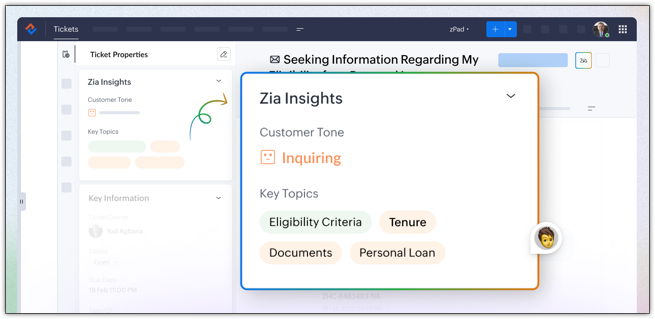
The ticket summary is repositioned within the reply interface to provide a better usability experience and provide more clarity. The thread summary will give you an overview of the conversation in a thread.Generate content: Aside from responding to ticket queries, agents sometimes need assistance drafting invitation emails, meeting reminders, follow-up mailers, and more. Zia's writing assistant abilities can help generate content based on the prompt; for example, "Generate invitation email for the upcoming sales." The content can be used as a reply or regenerated with a different prompt.

The tone of the entire response or a section of the content can be adjusted to meet the customer's conversational style. You can adjust the tone to formal, informal, diplomatic, assertive, or humorous.

Agents can check the quality of their response before sending it to their customers. Zia will highlight spelling and grammatical errors and offer suggestions. It will also provide the readability score and sentence length.

Agents need to engage with customers beyond just troubleshooting and resolving queries such as inviting them for events, follow-up meetings, onboarding follow-up etc. In these cases, Generate Content can assist agents by creating custom content on demand through prompts. Agents also have the flexibility to modify the prompt, use the generated content as a response, or regenerate it by adjusting the tone and length to fit the context better.

Computational and analytical ability
Support managers can actively monitor the ticket handling process and improve the existing strategies by defining better criteria and optimizing resource allocation for critical services. The lifecycle report will highlight the time spent at each stage; the number of tickets that are moved to another team, agent, or department; and how much time it took to resolve a ticket, which are all critical in identifying bottlenecks and improving assignment strategy.
For example, if L3 tickets are frequently reassigned and take longer to resolve as a result, it can indicate that the tickers are being classified incorrectly. By redefining the criteria and setting proper filters, these tickets can be correctly identified at the submission stage and assigned to the right department, team, or agent.

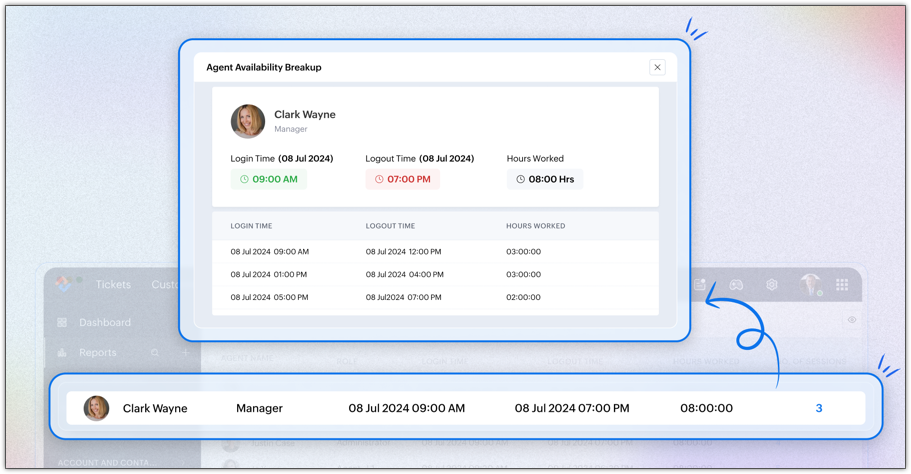
Managers can track each agent's active working hours to calculate the billable hours. They can regulate agents' availability by closely monitoring their session timings.
The report is drilled down into:
- Summary view: An overview of an agent's daily attendance, including their first login time, last logout time, total hours worked, and the number of sessions they conducted.
- Session view: A detailed breakdown of the login and logout times of each session. It provides insights into how often an agent logs in and out and the duration of each session.
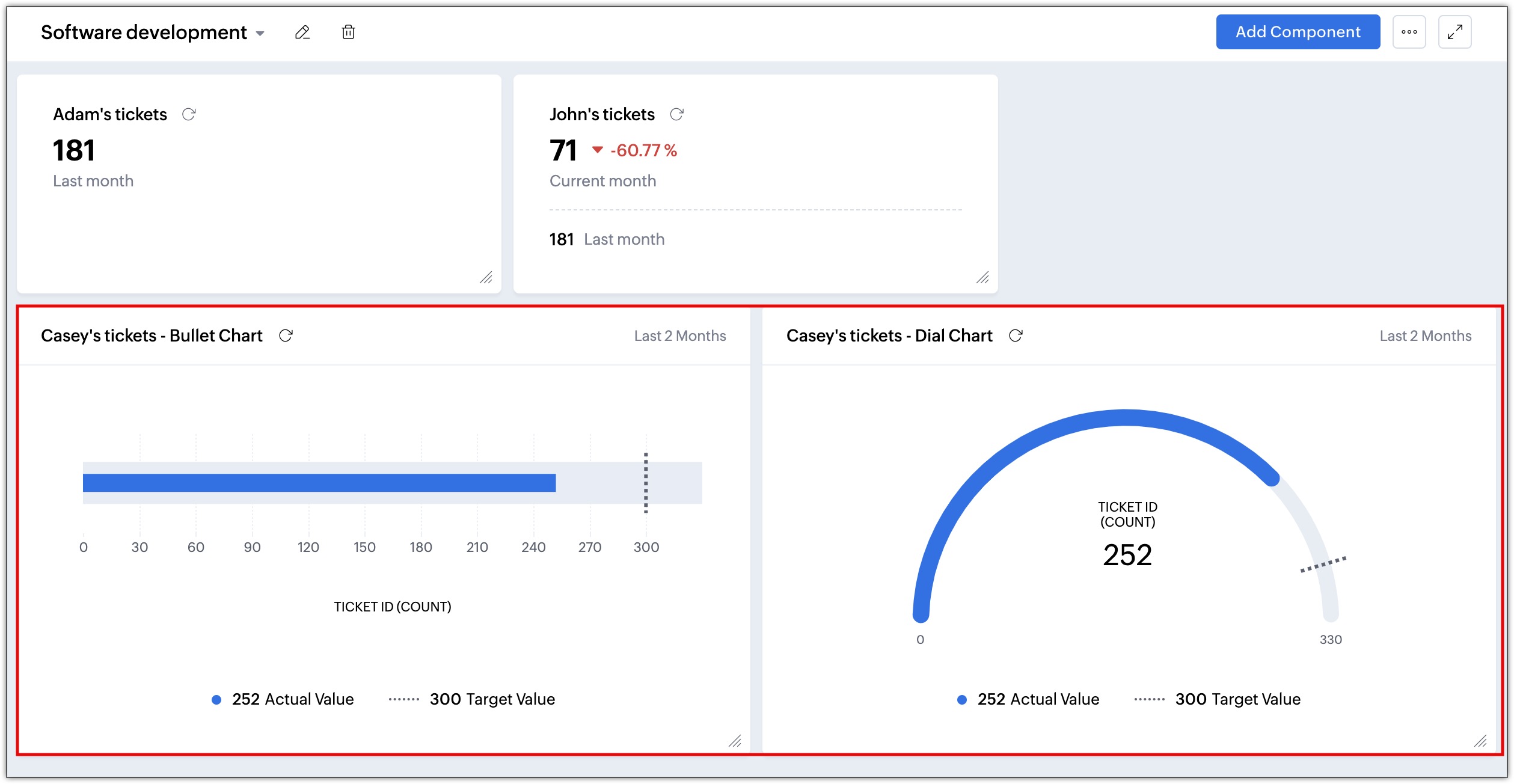
Monitoring the performance of an individual, a team, or a process identifies areas needing improvement. KPIs can also track progress or decline, and make periodic corrections. Some common performance indicators—like the number of tickets closed, task completion rates, monthly outbound calls, and pending asset requests—can all indicate whether there are any delays or if the agent requires training in handling special cases. KPI components such as metric cards, comparison indexes, bullet and dial charts provide visual representation of important business metrics that help with:
- Resource management: Monitoring agent productivity can help managers understand agents' bandwidth and allocate tickets and tasks accordingly.
- Performance tracking: Measuring First Response Time (FRT) and Time to Resolution (TTR) can help identify underlying reasons for any delays and take necessary actions to improve resolution time.
- Goal alignment: By measuring FRT or resolution time, businesses can align support activities to bigger goals, such as quicker ticket closure, improved customer satisfaction, and a decrease in tickets.
The Tickets module facilitates automatic computation of the customer's age in years, insurance policy tenure, claim amounts, service costs, and more, which would otherwise require an agent to calculate manually.

Agent productivity and reply readiness
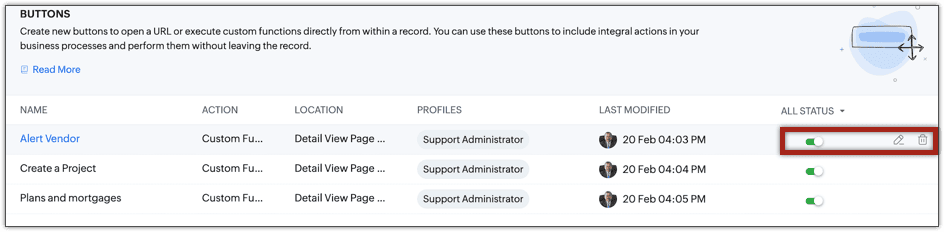
This functionality allows agents to perform actions, send information, track locations, and alert third-party vendors with the click of a button. Buttons can be accessed from the Ticket Detail view. It can invoke a URL or initiate a spectrum of actions through functions.
- Agents can refer to the company's term insurances, plans, benefits, and payout details while addressing a customer issue from the ticket.
- The customer's exact location can be found using the correct coordinates in the navigation service URL.
- Agents can create a record or initiate a process in another tool, such as creating a project in Zoho Projects or filing a bug in JIRA.
Businesses that use custom or private extensions (that aren't available in Zoho Marketplace) to manage their processes can add those extensions to the custom module. This allows them to view data generated by location trackers, forecast budgets, or even load and view images right inside the module's subtab, improving accessibility and usability.

The Community module UI has been redesigned to enhance its visual appeal and improve the user experience.
We've upgraded the filters, the community detail view, and the moderation settings page with a sleek new design, making navigation and accessibility simpler and more intuitive for users. With the new Approve All button, admins can now approve all posts that are pending approval at once.

Multiple contacts can be sent a WhatsApp message at once, saving time. Agents can also select multiple contacts and update a value or delete them.
Agents have the flexibility to respond to a ticket that was submitted through the IM channel via email.
User inclusivity and help center security
These have been introduced to provide help center users with ease of navigation.
The happiness rating feedback form can be translated in multiple languages to improve outreach and allow customers to submit feedback for the support they received in their native language.
These templates allow businesses to store multiple language versions under a single template ID, ensuring that messages are sent in the recipient’s preferred language. This eliminates the complexity of managing multiple templates and streamlines the WhatsApp approval process. These templates can also be triggered via our API, allowing businesses to automate multilingual messaging and enhance customer engagement at scale.
These bots allow customers to interact with you in their preferred language with multilingual GC bots in WhatsApp, Telegram, Line, Facebook Messenger, Instagram, and Business Messaging. It detects the user’s language, translates, and provides responses accordingly, eliminating the need for separate language-specific bots.
OTPs allow users to access the help center without their login credentials. Sometimes, when users are in a rush or have forgotten their login credentials, an alternative secure login system keeps them connected. OTP-based user authentication is currently available only for India-based customers.
Users can verify their identity using either of the options while accessing the help center.
Improved tickets assignment and workflow
Businesses that use custom modules can use workflow rules to update the field values in these records automatically. The "update record action" will update static and dynamic values in the custom module and its related modules. For example, if the employee name is updated in the Employee module, the name will be updated in the Payroll module as well.
These logs offer a detailed record of both successful and failed custom function executions triggered by automation rules. It includes execution details, passed arguments, and print statements, helping you debug issues and identify the causes of any failures.
Data administration: Audit Log enhancements
- The Audit Log is now available for both the Contacts and Accounts modules. Admins can track the changes and actions performed in these modules to gain more visibility.
- The Detail view of the Audit Log is introduced to view and analyze all of the logs. Admins can track specific actions and events all in one place to gain more clarity instead of navigating back to each record individually.
- Audit log data can be exported in CSV format file for future reference. Read more
Instant messaging and guided conversations
The AnswerBot can generate relevant answers from knowledge base articles to automate chat interactions and reduce response times. The agents can review the answers and choose whether to send them. Chat services on WhatsApp, Telegram, Line, Facebook Messenger, Instagram, and Business Messaging help manage high chat volumes, provide 24/7 support, and ensure quick resolution for common questions. When necessary, the AnswerBot will transfer conversations to human agents, ensuring a smooth customer experience while optimizing agent availability and efficiency across multiple messaging channels.
Triage chat conversations by systematically routing each new inquiry to the next available agent in a predefined sequence. This ensures an even workload distribution, eliminates manual assignment efforts, and enhances response efficiency, leading to better customer service and streamlined operations.
AI inside the CPaaS inbox offers real-time message suggestions, conversation summaries, sentiment analysis, and intelligent response recommendations. Available for WhatsApp, Telegram, Line, Facebook Messenger, Instagram, and Business Messaging, it facilitates faster resolution of customer queries while maintaining consistency in responses.
The AI-powered composer enhances the agent's productivity by offering real-time writing assistance, language translation, and tone adjustments. It ensures clear, refined, and contextually appropriate communication that resonates with the brand's messaging.
Generate AI-powered responses with context retention in Guided Conversations. The Generative AI Block understands complex queries and remembers the conversation history within a session to give personalized replies. It also provides a chat summary for agents, ensuring a smooth transition and better customer interactions.
Use industry-specific templates from the gallery to build contextual chatbot ready-made flows that are optimized for multiple languages and channels.
Connect Guided Conversations with Zoho CRM, Zoho Cliq, Zoho Connect, Zoho Projects, Zoho Mail, and Zoho Calendar. These integrations enable data exchange and automate workflows across platforms for smoother operations.
Create and deploy chatbots with unified widgets and flows. Switch between editing and viewing modes, preview blocks on hover, and customize the block listing panel. Reposition the panel for flexibility and track real-time metrics to optimize chatbot performance.
Automate user actions and personalize chats across messaging platforms like WhatsApp, Telegram, and Facebook Messenger by using the IM variable in the GC flow. IM variables enable session-specific actions, user identification, and ticket management for smoother interactions.
Personalize the logo, theme, launcher, and background. Set custom session end rules, idle timeouts, and enable multilingual support for a tailored chat experience.
The GC Mobile SDK (Android and iOS) supports multiple languages, adapting to the user’s device or preferred language. It ensures a consistent chatbot experience. App Clip and instant app Cliq support enables instant chatbot access without installing the full app.
Merge multiple variables and text into a single structured variable for better data integration. Use it to streamline workflows, improve ticket creation, and enhance AI responses. This reduces manual effort and ensures better context retention in conversations.
Marketplace
Zoho Desk can be integrated with Microsoft Azure DevOps, a suite of cloud-based tools and services developed to support the software development lifecycle (SDLC). Integration improves collaboration between support and development teams by enhancing communication and visibility of requirements, progress, and issues.
For example, a ticket raised for a feature request or feature enhancement by the customer is handled by the customer support team in Zoho Desk. The software development team handles their tasks, such as validating the request, coding, and testing in Azure DevOps.
Enhancements in ASAP
- Voice-to-Text Search: Android SDK customers can use voice-to-text search instead of typing.
- Comprehensive callback functionality: We've introduced callback events for Knowledge Base and Community interactions. These callbacks allow developers to track user engagement and integrate support usage data with their preferred analytics tools. This provides valuable insights for optimizing support content and identifying areas for improvement.
- Targeted content display: Support content can now be customized based on application screens and user contexts. For example, you can display a specific forum topic on a dedicated screen or show a particular ticket status on a ticket management page. This allows for a more tailored support experience.
Mobile apps: (Android, iOS, and Radar)
- Schedule and record calls (Android and iOS): The details of inbound and outbound calls can be recorded for transparency and tracking the agent's progress.
- Create stand-alone activities (Android and iOS): Individual tasks, events, and calls can be created without associating them with tickets, such as onboarding requests, service maintenance, and more. Activities can be sorted and viewed under system-defined list views or custom views.
- Customizing the list view in a custom module (Android): The list view in a custom module can be personalized by adding or removing the columns as needed. For example, in a custom module called Tour Packages, the users can select fields like country of travel, duration, package type, and visa requirements in the list view for easy access. The fields and layouts within a module can be rearranged, and the appearance and alignment of each card in the module can also be customized.
- Generate quick and accurate replies using Zia insights in IM chats (Android and iOS): Zia insights in IM chats will help agents understand complex queries by generating a summary of the chat session. Reply suggestions can also be generated to provide contextually accurate replies, reducing the time spent on drafting replies. The tone of the incoming message can be read using Zia insights, helping agents to align their conversation to that of the customer.
- Use Radar permissions to control who can use what in the app: Radar permissions let admins customize app access based on a user's profile. This way, users can access only the tools and data needed to discharge their duties. By removing distractions and reiterating responsibilities, Radar permissions help users collaborate while staying within the confines of their roles, enhancing overall efficiency and productivity.
- Make the Radar app follow your device's time zone: Empower agents to provide support from anywhere in the world using the Radar app. Its "Use Device Timezone" setting synchronizes the help desk application's clock with that of the agent's device. Consequently, agents can view all time-related data (e.g., created time, due time) in their local time, enabling punctual, well-timed responses.