Hello All,
We're excited to share the release of WorkDrive 4.0, which includes important new features and enhancements focused primarily on productivity, secure collaboration, data administration, integrations, and user experience.
Productivity
WorkDrive Snap: Record and share files quickly
Couldn't schedule meetings across time zones?
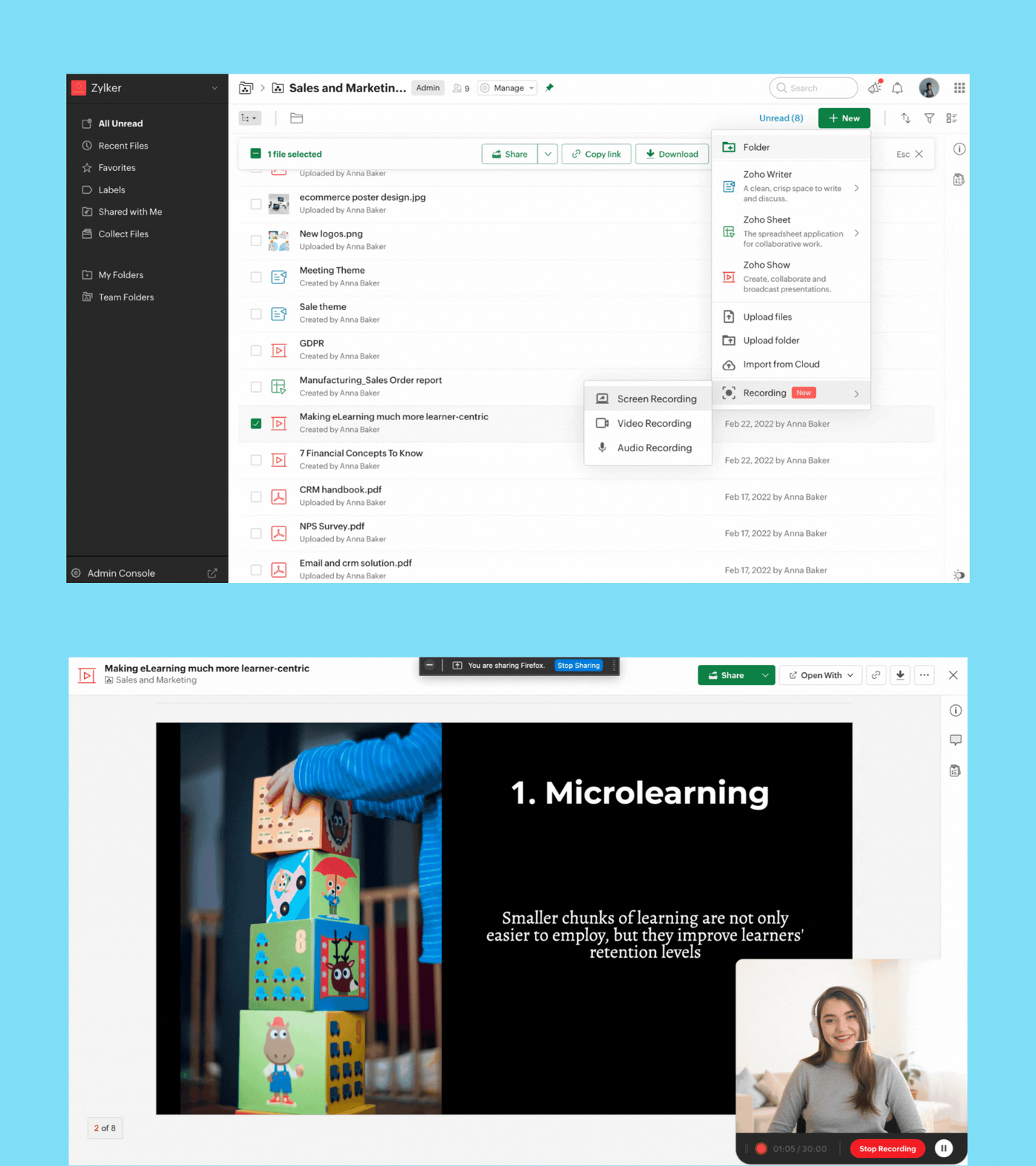
Now, you can quickly record video, audio, or your screen from right within the WorkDrive app and share it with your team.
Screen recording: Whether you're sending a proposal, or reviewing a document, you can now record your screen along with your video for better clarity and impact.
Video recording: If you want to share a message or announcement with your team, simply record your video and share it with your entire organization.
Audio recording: Take audio notes or record meeting audio so you never miss key points discussed in your team or project meetings.
You can record while offline, but to upload the file, you must be connected to the internet.
Note: You can currently record for a maximum of 30 minutes.
Security and collaboration
External sharing just got better—and more secure!
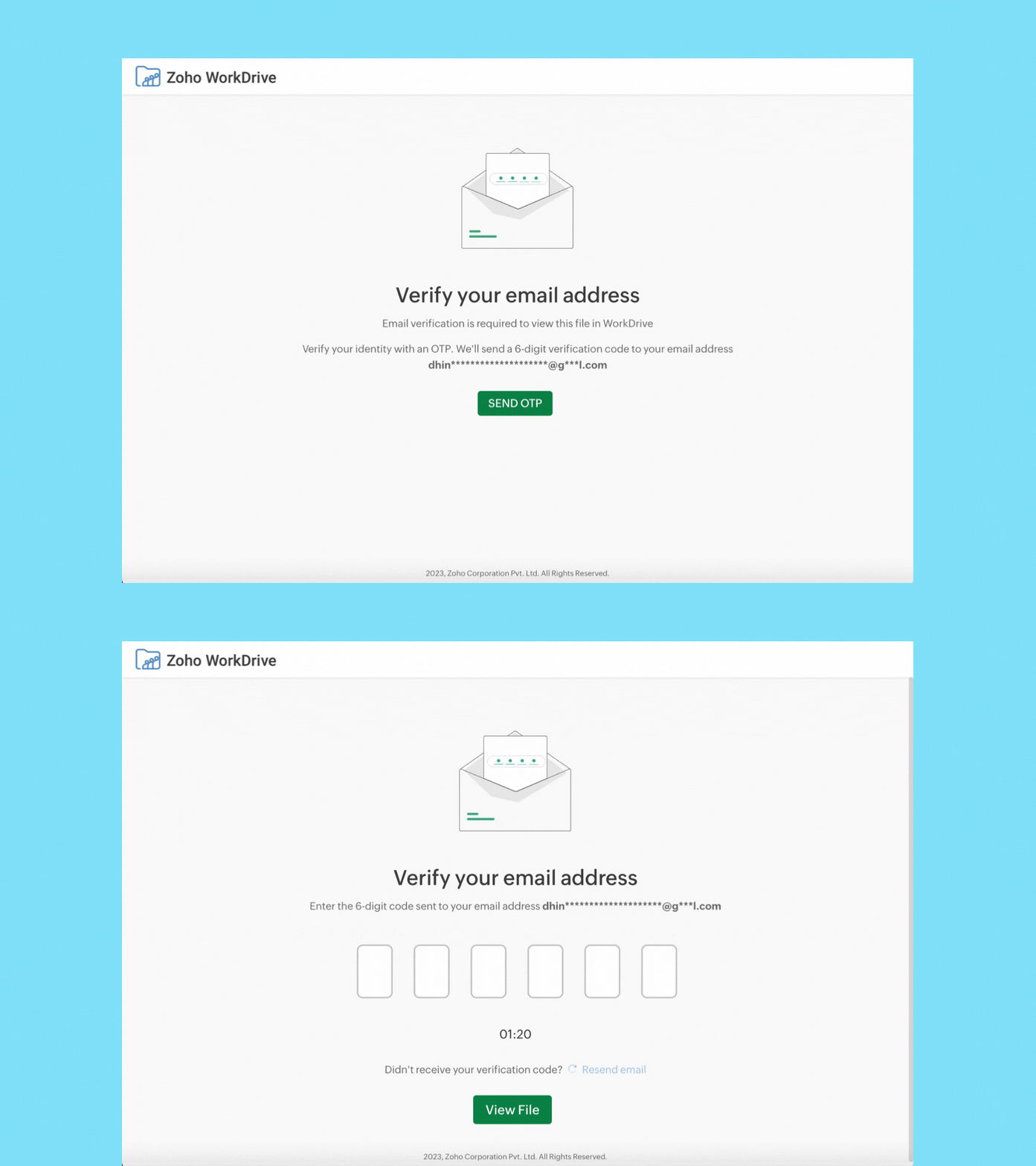
When you share a file or folder with external users (who don't have a Zoho account) using email addresses, they must now verify their email addresses via OTP authentication to access it.
External users can now upload files, and add or reply to comments. WorkDrive signup is not required. We'll soon enable the Edit option for external users as well.
Data administration
Manage all your team's shared items in one place
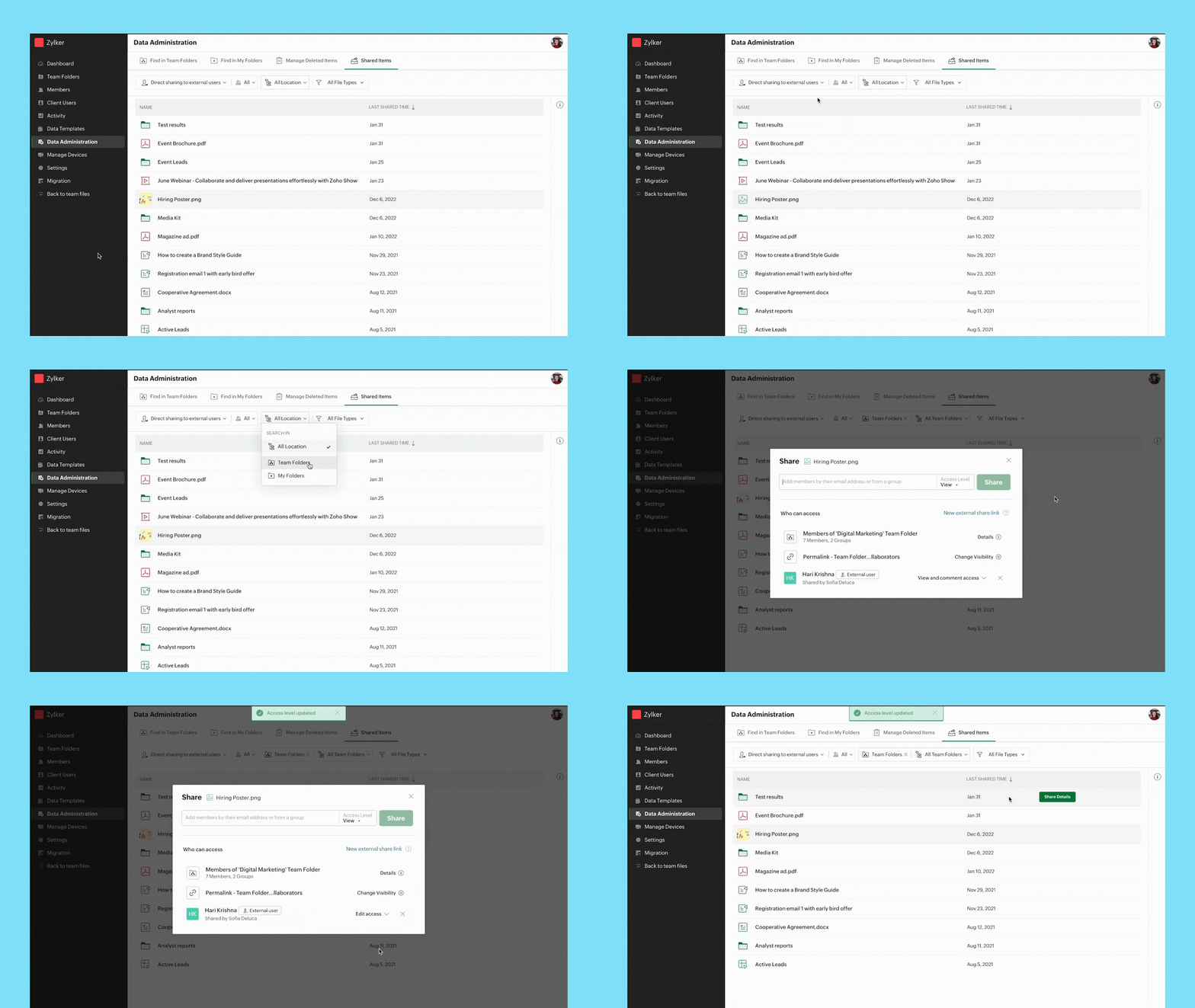
Admins can view a list of all shared items and track who they're shared with, whether they're shared externally or within a team, and more.
You can easily search for shared files and folders by applying the following filters
- Share type
- User
- Location
- File type
Path: Data Administration > Shared Items
Manage all shared items in a Team Folder
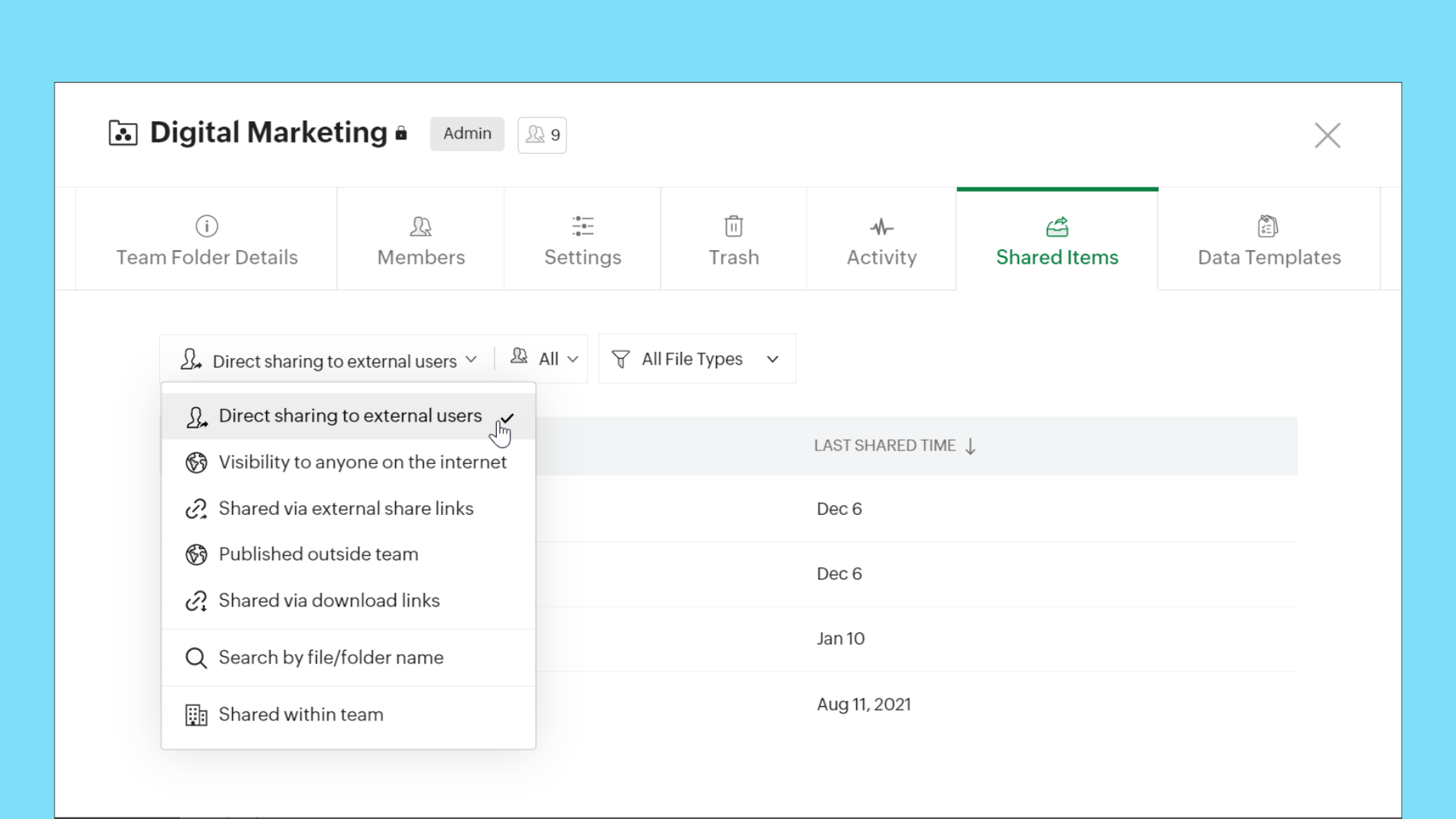
When you're working with multiple stakeholders, such as external users and organization members, it is important to keep your team's data safe and maintain full control over it. Now, Team Folder Admins and Organizers can easily view and manage all items shared internally and externally, make sure data is secure, and update or remove permissions whenever required.
Path: Team Folders > Manage > Shared Items
This feature is available for all WorkDrive team plans.
Manage all shared items in My Folders
We are making it easier to manage shared items in My Folders too! You can now view and manage all your shared items from My Folders. Quickly check which items are shared with external users, team members, and more.
Path: My Folders > Manage > Shared Items
This feature is available for all WorkDrive plans.
Find all files in members' My Folders
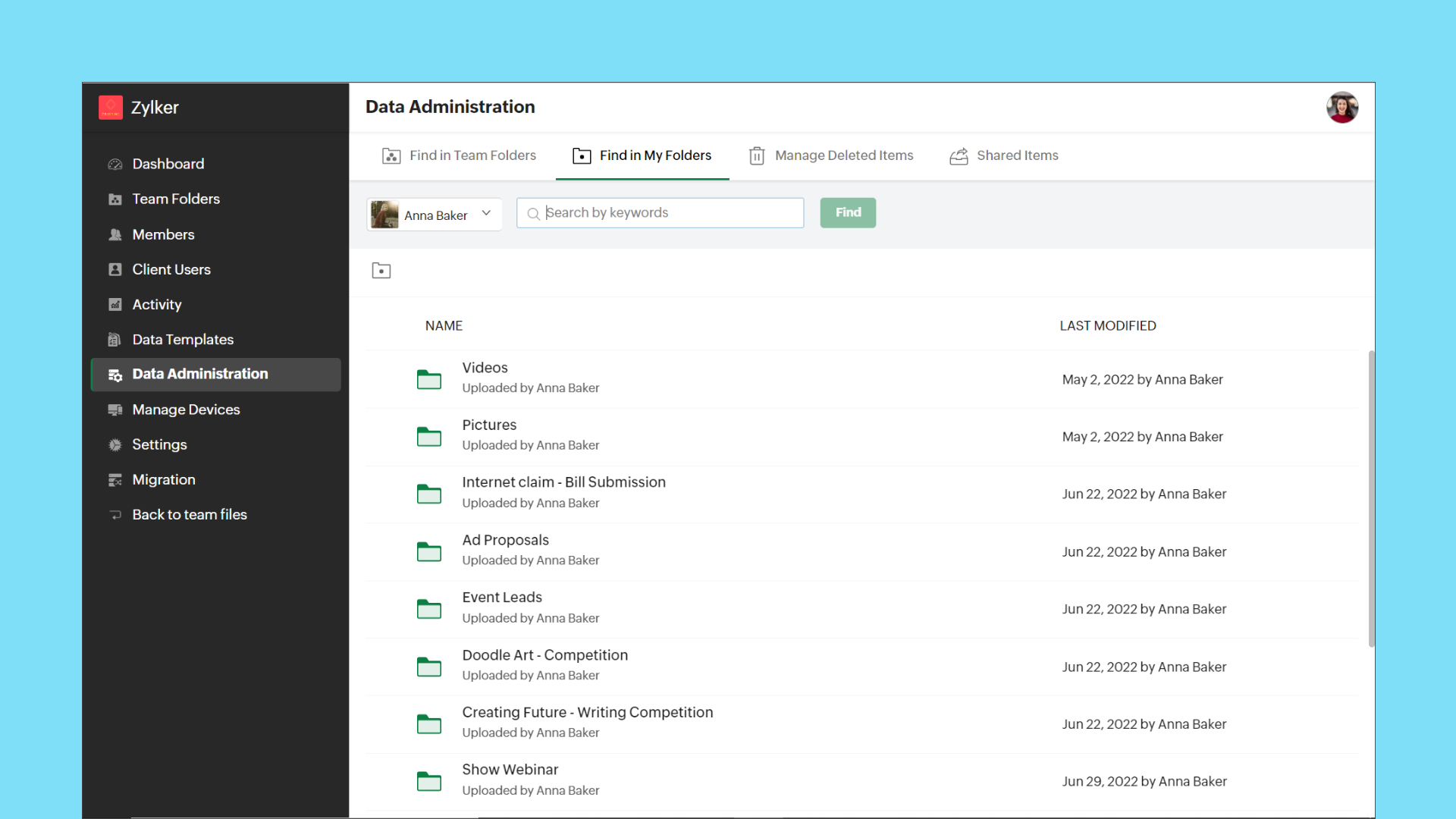
Admins can now view the entire list of files and folders in a team member's My Folders from the Admin Console. This gives Admins full control over each team member's data. They can share the files with other team members, or transfer ownership to themselves or another team member, if required.
Path: Data Administration > Find in My Folders > (Select User)
Transfer ownership of files and folders
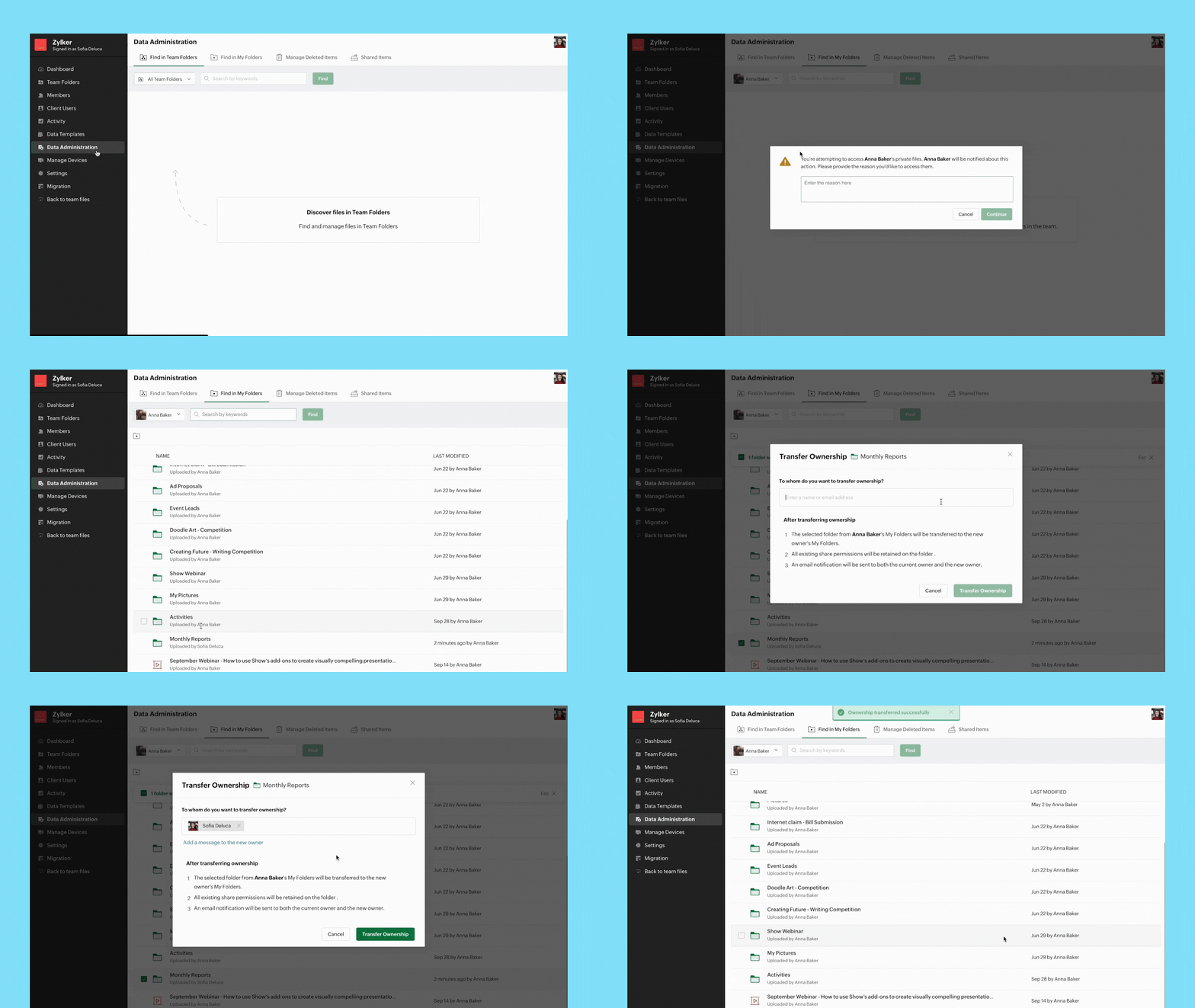
When an employee is not available temporarily or leaves an organization permanently, it's important to transfer their data to another employee securely. Admins can now transfer ownership of files and folders from one user's My Folders to another.
Path: Data Administration > Find in My Folders > (Select User) > (Select Files/Folders) > Transfer Ownership
Note:
- Data Administration features are only available with WorkDrive's Business plan.
Integrations
Bigin's integration with Zoho WorkDrive simplifies file management
Bigin's integration with Zoho WorkDrive helps you exchange files with your customers or leads in a secure and organized way. You can now create a File Cabinet for each customer and efficiently send, receive, and store related files.
With this integration, you can:
- Generate unique links to collect customer files
- Get notified whenever customers upload files
- Configure workflows to automate file management
Cliq/WorkDrive integration: Share files from WorkDrive
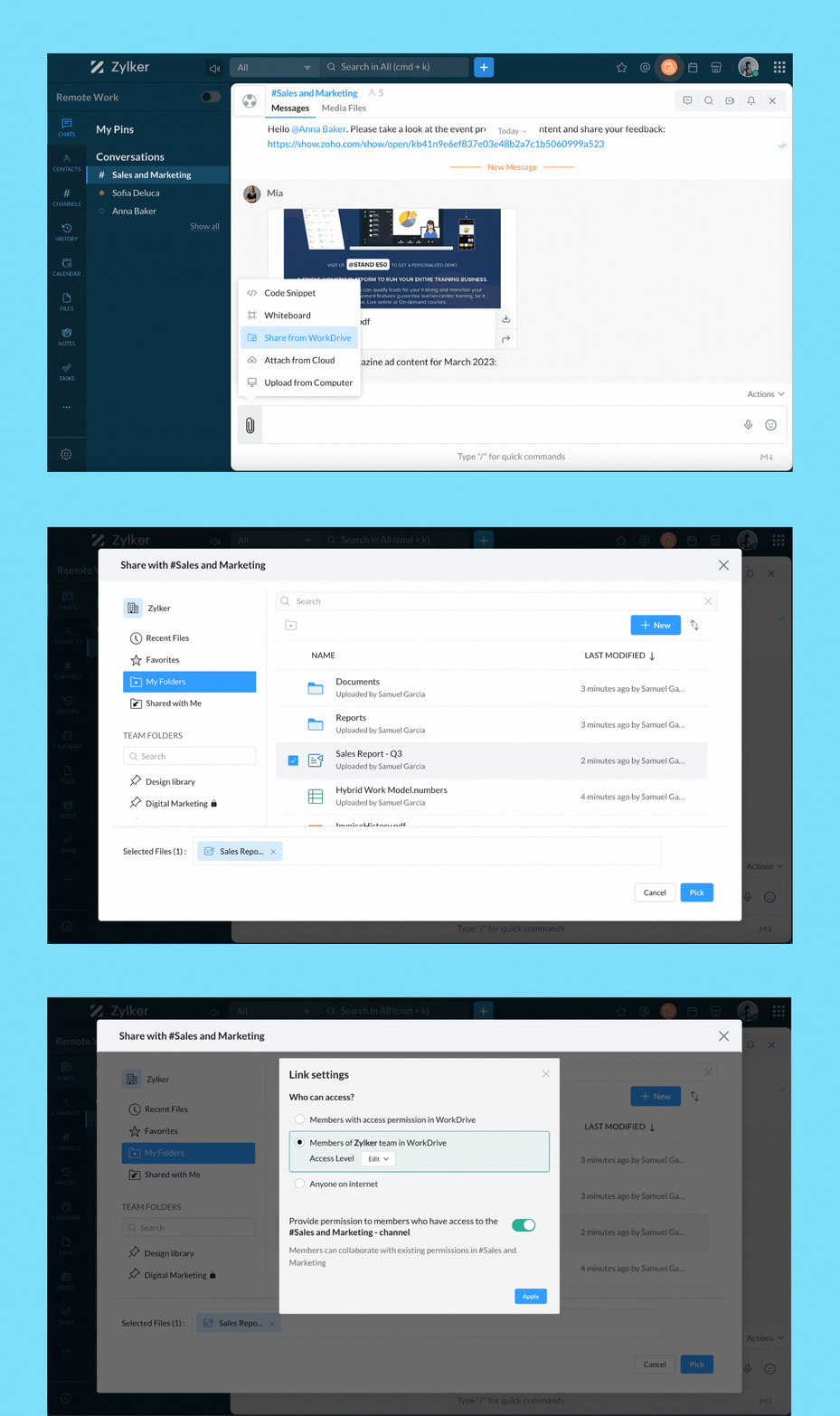
You can now share files directly from WorkDrive to your Cliq chats and channels. When you share files from WorkDrive, you have the option to choose the share type and set permissions.
When sharing to channels, you have the option to share the selected file(s) with channel members, org members, or anyone on the internet.
Group Team Folders for easy access
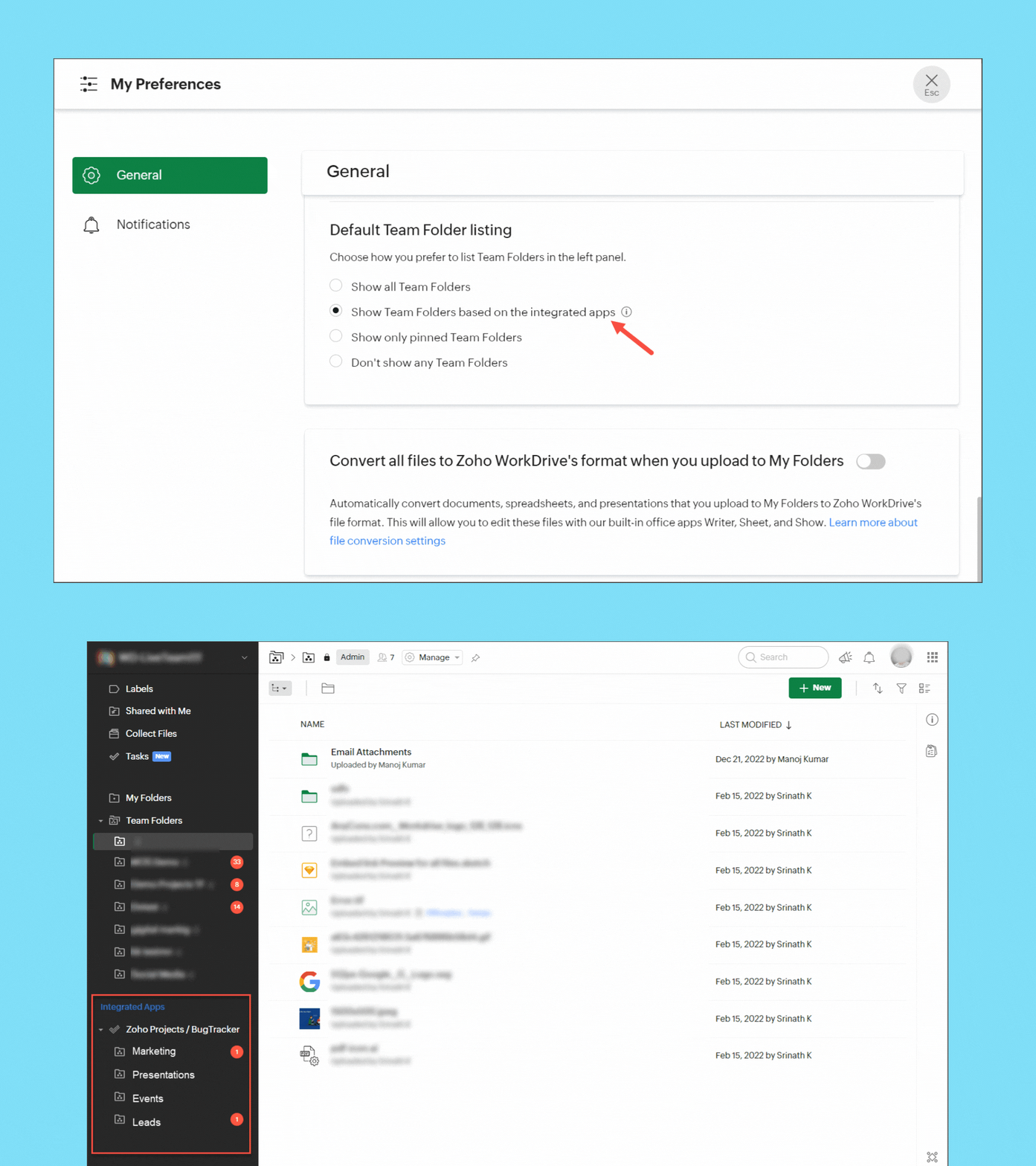
If you have integrated Zoho Projects or Zoho Marketing Plus with WorkDrive, you can now group the Team Folders created in Projects and Marketing Plus in the left panel of your WorkDrive account for easy access and management. Team Folders created directly in WorkDrive will be listed separately.
Save emails from Zoho Mail as EML files in WorkDrive
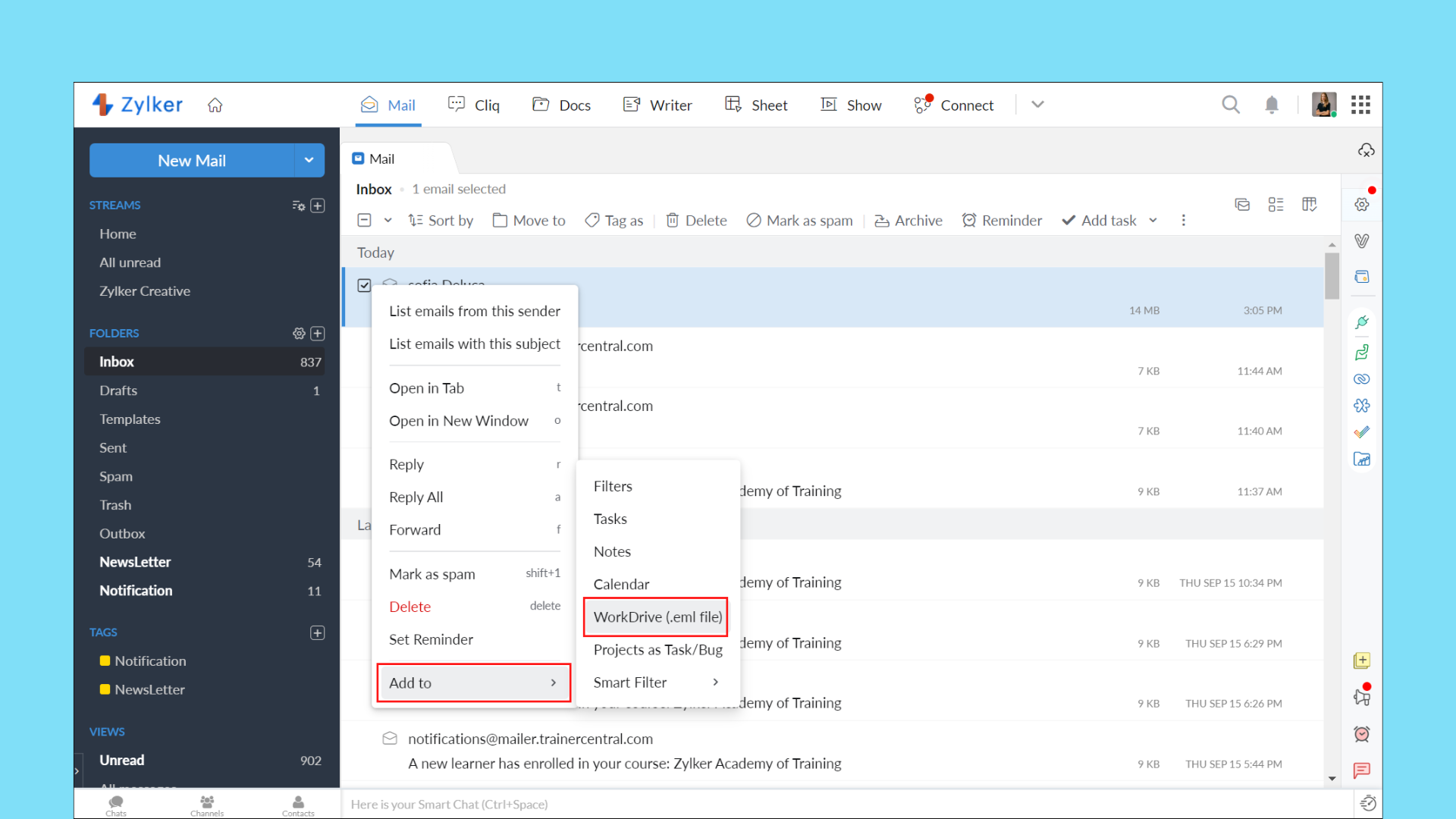
With the Zoho Mail/WorkDrive integration, you can now save an entire email as an EML (Electronic Mail Format) file in WorkDrive. This way, you can keep a backup of important emails and preview them right from WorkDrive.
Your EML file will contain the email content along with details, such as the subject, sender email address, recipient email address, date and time of the email, and attachment details (if any).
User experience
Tree view for efficient navigation
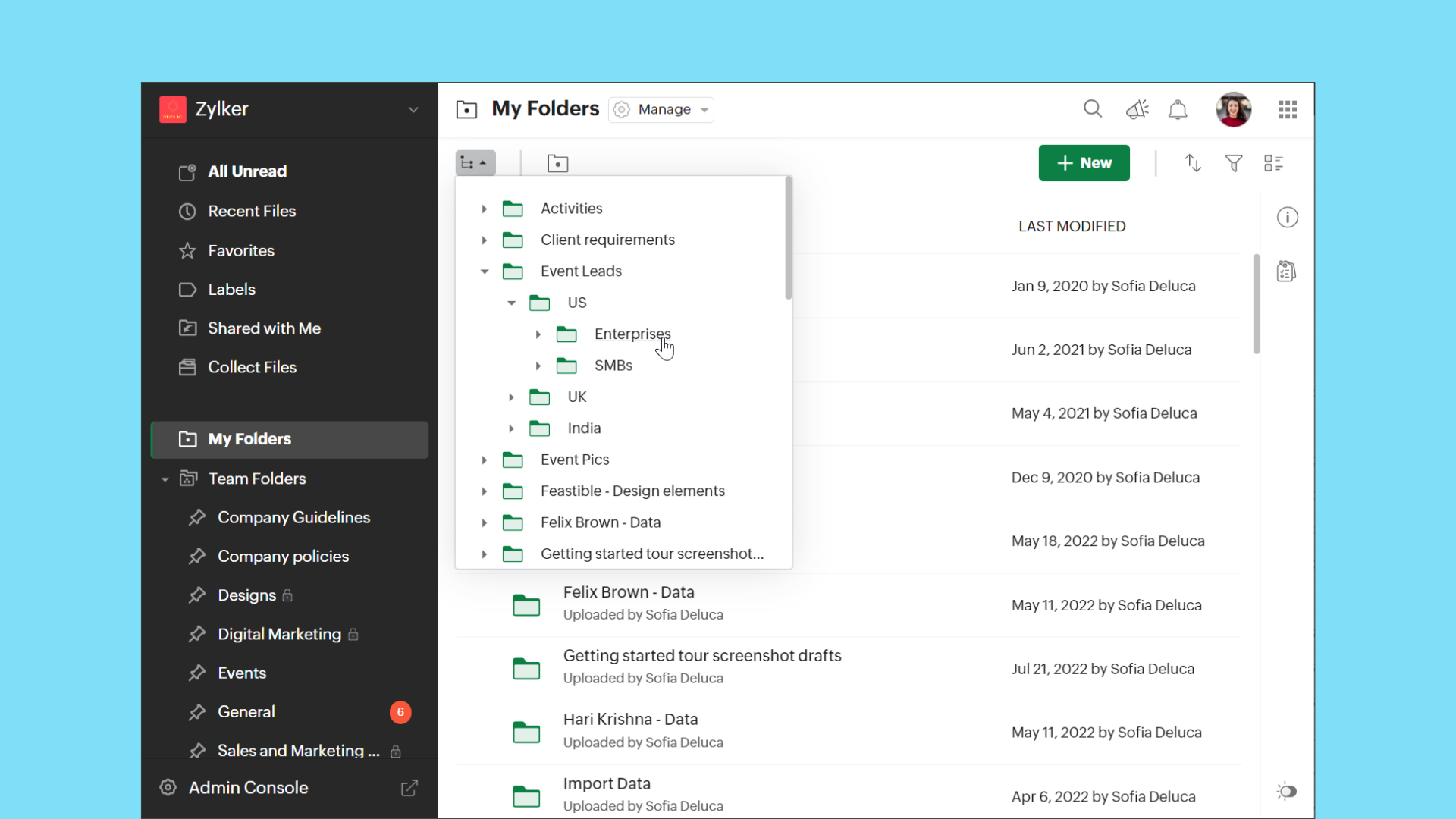
The new tree view in WorkDrive makes it easier to access folders from any location in Team Folders or My Folders based on hierarchy.
Support for editing comments
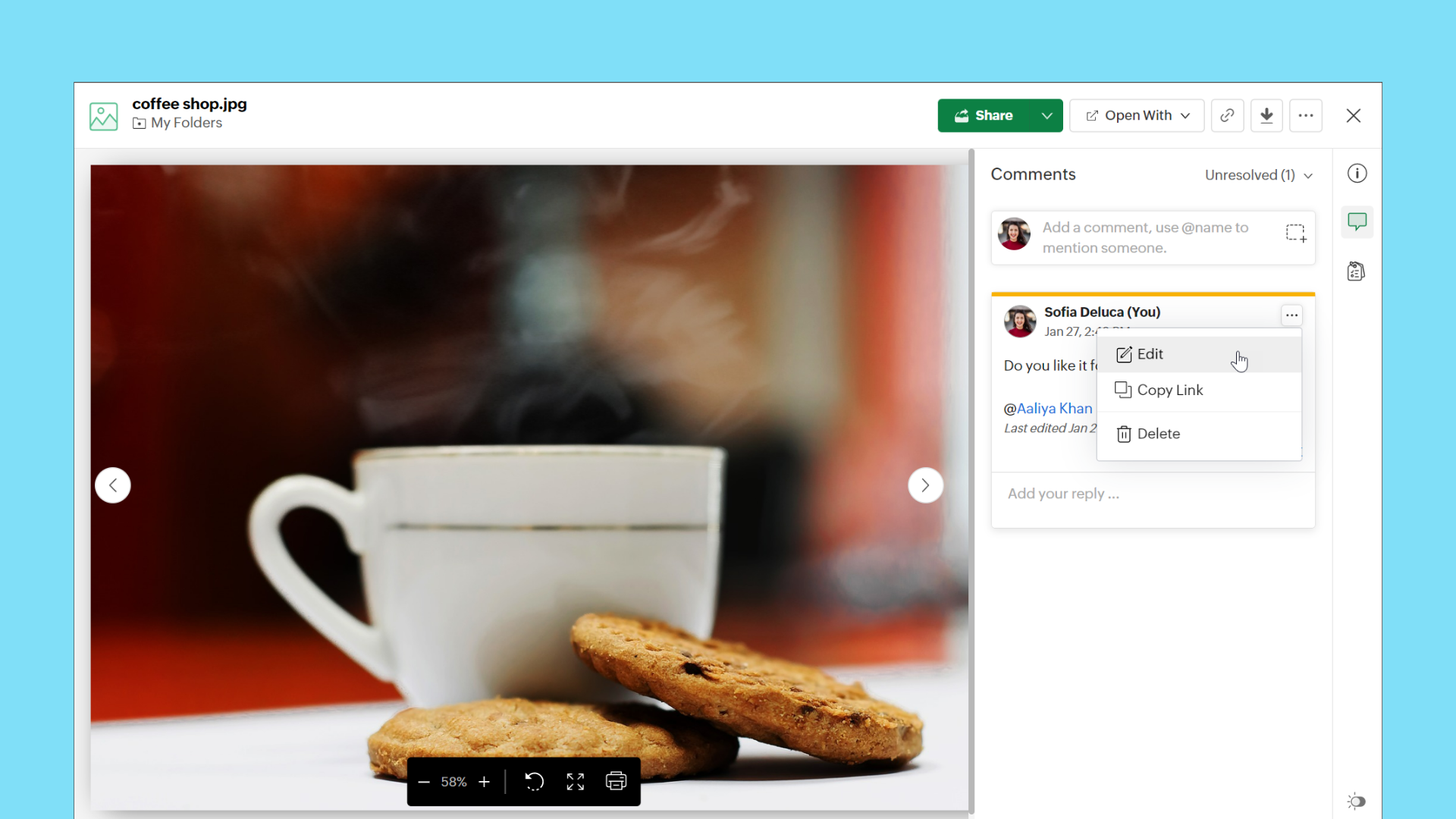
WorkDrive now supports the Edit option for comments. This allows users to modify their existing comments at any time without deleting them.
Copy or move enhancements
Copy or move files using keyboard shortcuts
Keyboard shortcuts are now supported in WorkDrive for copy and move actions.
Copy files and folders
Copy: Ctrl+C (Cmd+C on MacOS)
Paste: Ctrl+V (Cmd+V on MacOS)
Move files and folders
Cut: Ctrl+X (Cmd+X on MacOS)
Paste: Ctrl+V (Cmd+V on MacOS)
Note: Ensure you have permissions in both the source and destination folders for copy and move actions.
View progress of copy and move actions
We have added a progress bar to show clear details of ongoing copy and move actions for your convenience.
Watch this space, as we will share the WorkDrive 4.0 Phase 2 updates in the next few months.
Recent Topics
Tip #66 - Exploring Technician Console: Network Statistics - 'Insider Insights'
Hello Zoho Assist Community! Have you ever wondered why a remote session feels sluggish, or wanted to check whether connectivity issues are on your end or the customer's? That's exactly where the Network Statistics feature in Zoho Assist comes to the
Syncing zoho books into zoho crm
I was wondering how I can use zoho books in crm as I have been using them separately and would like to sync the two. Is this possible and if so, how? Thanks
Introducing a smarter, faster, and more flexible charting experience
Hello Zoho Sheet users, We're delighted to share the latest news about a major update to charts in Zoho Sheet! The new version supports dynamic data ranges, granular styling options, faster loading, and other interesting enhancements that allow you to
REFUND REQUEST FOR PLAN SUBSCRIPTION CANCELLED
I have cancelled my Zoho Books subscription and would like to request a full refund for the subscription. Kindly process the refund at your earliest convenience.
Connecting Airwallex in Zoho Books
I have a question. I’m trying to connect our Airwallex account to Zoho Books, but the integration does not seem to work. Could you please guide me on how to properly connect Airwallex? I need to see the expenses also, since it only shows the profits now
purchasing a pagkage
goodmorning i want to pay for my monthly package but your app is sayinng i have insufficient funds yet i loaded money on my account yesterday though in our currency of ugx
Edit Receipt, how?
Do you notice the big blank space in Receipt? I want to remove that. I know there is a template but that blank space, I can't seem to remove it. Please help. Thank you!
Can I export a TXF (TurboTax exchange format) file out of Zoho Books?
Hello, I'm trying to do my US Small Business Taxes using Intuit's Turbo Tax. Can I export my expenses from Zoho Books to a TXF format file, so that it can then be imported into Turbo Tax? Thanks, Rajnesh
Tax inclusive and exclusive for Sales invoices
Hello, where can I set my tax to be inclusive or exclusive for invoices in Zoho Books? There used to be a button for me to do that right above the products table. Can someone help me please? Thank you!
Unable to produce monthly P&L reports for previous years
My company just migrated to Books this year. We have 5+ years financial data and need to generate a monthly P&L for 2019 and a monthly P&L YTD for 2020. The latter is easy, but I'm VERY surprised to learn that default reports in Zoho Books cannot create
ZOHO Reports are taking longer time to get refresh
Hi Team, Since last few days, I'm facing issues in getting updated reports. For eg: right after making an expense entry or even posting a journal, it is taking longer then expected for the updated reports. Refer below: "You are viewing the report that
audio and video comments in tasks in zoho projects
Hi, is it planned to have the ability to post audio and video comments? the whatsapp wechat format of communicating is a reality... tools like zoho project would facilitate a lot teamwork by facilitating the way in which we can give feedback in audio and video rather than only text. thx!
Looking for Zoho + Twilio Automation Specialist (Duda Website Integration)
Hi everyone, I’m looking for an experienced Zoho specialist to help build a mostly automated CRM and booking system for my service business. I already have a live website built on Duda.co and need help integrating my existing forms into Zoho CRM (no rebuild
Zoho CRM For Everyone UI Rollout Begins for All Users
Hello Partners, We have started rolling out the new Zoho CRM For Everyone UI as the default experience for all users. This update is being released in three phases based on organization size and account type. We want to keep you informed of the rollout
How to retreive the "To be received" value of an Item displayed in Zoho inventory.
Hi everyone, We have our own Deluge code to generate a PO according to taget quantity and box quantity, pretty usefull and powerful! However, we want to reduce our quantity to order according to "To be received" variable. Seems like this might not even
Introducing Explainer Videos for Zoho Desk: Solve everyday challenges with simple configurations
Dear everyone, We have created a set of short explainer videos that show how common support scenarios can be handled using simple configurations within the product. The solutions often lie in the plain sight, but go unnoticed. Through these videos we
Notifications Feeds unread count?
How do I reset the unread count on feeds notifications? I've opened every notification in the list. And the count never goes to zero.
Simple reliable solution to convert MSG files for AOL Mail?
A simple and reliable way to convert MSG files for AOL Mail is by using a professional tool MacGater Mac MSG Converter. This software allows users to quickly convert MSG files into formats compatible with AOL, such as MBOX or direct email migration. It
Zoho One Support is non existent...
I've tried through Email, Chat, this community and finally through Phone. There is no way to receive an answer. Email = over a week and no answer Chat = not available Community = no answer at all Telephone = after clicking myself through the callcenter
Disable Zoho Contacts
We don't want to use this app... How can we disable it?
Custom module - change from autonumber to name
I fear I know the answer to this already, but thought I'd ask the question. I created a custom module and instead of having a name as being the primary field, I changed it to an auto-number. I didn't realise that all searches would only show this reference.
Edit a previous reconciliation
I realized that during my March bank reconciliation, I chose the wrong check to reconcile (they were for the same amount on the same date, I just chose the wrong check to reconcile). So now, the incorrect check is showing as un-reconciled. Is there any way I can edit a previous reconciliation (this is 7 months ago) so I can adjust the check that was reconciled? The amounts are exactly the same and it won't change my ending balance.
How to add "All Open AND Overdue" back to the Home Page Task Component?
Hi everyone, I’m looking for a way to restore the Tasks component dropdown list on the Zoho CRM Home Page. Since the recent update to the Task area in my Home Page Classic View, the dropdown options (e.g., My Next 7 Days + Overdue) are too restrictive
Dynamic Questions in Zoho Forms
Is it possible to add dynamic questions (like displaying a user’s name) in Zoho Forms? I know this is possible in surveys, but can we implement similar functionality in Zoho Forms?
Introducing Zoho MCP for Bigin
Hello Biginners! We're excited to introduce Zoho MCP for Bigin, a completely new way of interacting with Bigin data using AI. With Zoho MCP, you can securely connect your Bigin account with popular AI tools like Claude, Cursor, Windsurf, and VS Code,
Three Zoho Billing Limitations Blocking Standard Subscription Operations
After working through Zoho Billing support for over a year on these three issues without resolution, we wanted to flag them to the broader community. We are curious whether other businesses are running into the same walls. 1. Cannot Prepone (Move Earlier)
SAP Business One(B1) integration is now live in Zoho Flow
We’re excited to share that SAP Business One (B1) is now available in Zoho Flow! This means you can now build workflows that connect SAP B1 with other apps and automate routine processes without relying on custom code. Note: SAP Business One integration
[Action Required] : Update Shopify Access Scope to fetch complete order history
Hello Shopify Users! Shopify has updated the access scope for apps under developer portal. With this change, the read_orders scope now provides access only to the last 60 days of order history. To access older historical orders, Shopify requires a separate
Advance Payment Record Removed When Deleting Applied Credit from Bill
Hello, So while working with vendor advance payments, I noticed that removing the applied credit from a bill also removes the corresponding entry from the Payments Made section. What I did : Recorded an advance payment to a vendor through Payments Made.
How to Connect Zoho Books with e-Way Bill Portal (Step-by-Step Guide)
Integrating Zoho Books with the e-Way Bill portal helps automate your logistics and compliance process. Follow the steps below to set it up easily: 🚀 How to Connect Zoho Books with e-Way Bill Portal (Step-by-Step Guide) Integrating Zoho Books with the
Is there a way to update all the start and end dates of tasks of a project after a calendar change?
Hi! Here's my situation. I've built a complete project planning. All its tasks have start dates and due dates. After completing the planning, I've realized that the project calendar was not the right one. So I changed the project calendar. I now have
Lookup fields can't be used for anything important
Hi It seems the lookup fields are mostly.... informative, you can at most link stuff between modules... You can't use lookup fields in blueprints, you can't use them in layout rules or anything... It that correct?
Sales Allowed Beyond Available Stock and Payment Recorded Without Restriction
Hi, While testing in Zoho Inventory, I noticed that a sales order can be created with a quantity exceeding the available stock in the selected warehouse. In my case: Available stock: 5 units Ordered quantity: 6 units Despite this: I was able to convert
Internal Fillable Contract with Zoho Writer (Before Sending to Client)
Hi everyone, I’m trying to automate the following process in Zoho CRM and would appreciate some guidance. Process: When a Deal moves to a specific stage, CRM triggers an automation. CRM sends a contract template to an internal team member so they can
Zoho Writer Frequently not loading
I've reported this as a problem already but I can't log into my email right now or get onto the main site so you're going to hear about it again here: at least once a week, Zoho Writer will just refuse to load entirely. The main page will load and load
Read Thread Details
Does anyone know how to "read" the complete thread details in a ticket? I figured out how to pull a summary of the threads using a webhook, but it doesn't have all the details I want. I tried to create a loop in flow, which should have worked, but instead
How to Structure Data in Zoho Creator Applications
Data structure is undoubtedly one of the most critical pillars in application development within Zoho Creator. Well-structured projects scale easily, enable more robust automations, and drastically reduce rework. Poorly modeled applications, on the other
Application Architecture in Zoho Creator: Why You Should Think About It from the Start
Many companies begin using Zoho Creator by building simple forms to automate internal processes. This is natural — the platform is extremely accessible and allows applications to be built very quickly. The challenge begins to appear when the application
Client Script: Any plans to add support for multi-select field with onChange
Client Script is fantastic and the documentation lists multiselect form fields as unsupported. Just wondering if there are any plans to make this a supported field. https://www.zoho.com/crm/developer/docs/client-script/client-script-events.html 2. Field
Set another Layout as Standard
We created a few layouts and we want to set another one to standard:
Next Page