Introducing WorkDrive 4.0: Enhanced productivity. Advanced data administration. (Phase 1)

Introducing WorkDrive 4.0: Enhanced productivity. Advanced data administration. (Phase 1)

Hello All,

We're excited to share the release of WorkDrive 4.0, which includes important new features and enhancements focused primarily on productivity, secure collaboration, data administration, integrations, and user experience.


Productivity

WorkDrive Snap: Record and share files quickly


Couldn't schedule meetings across time zones?
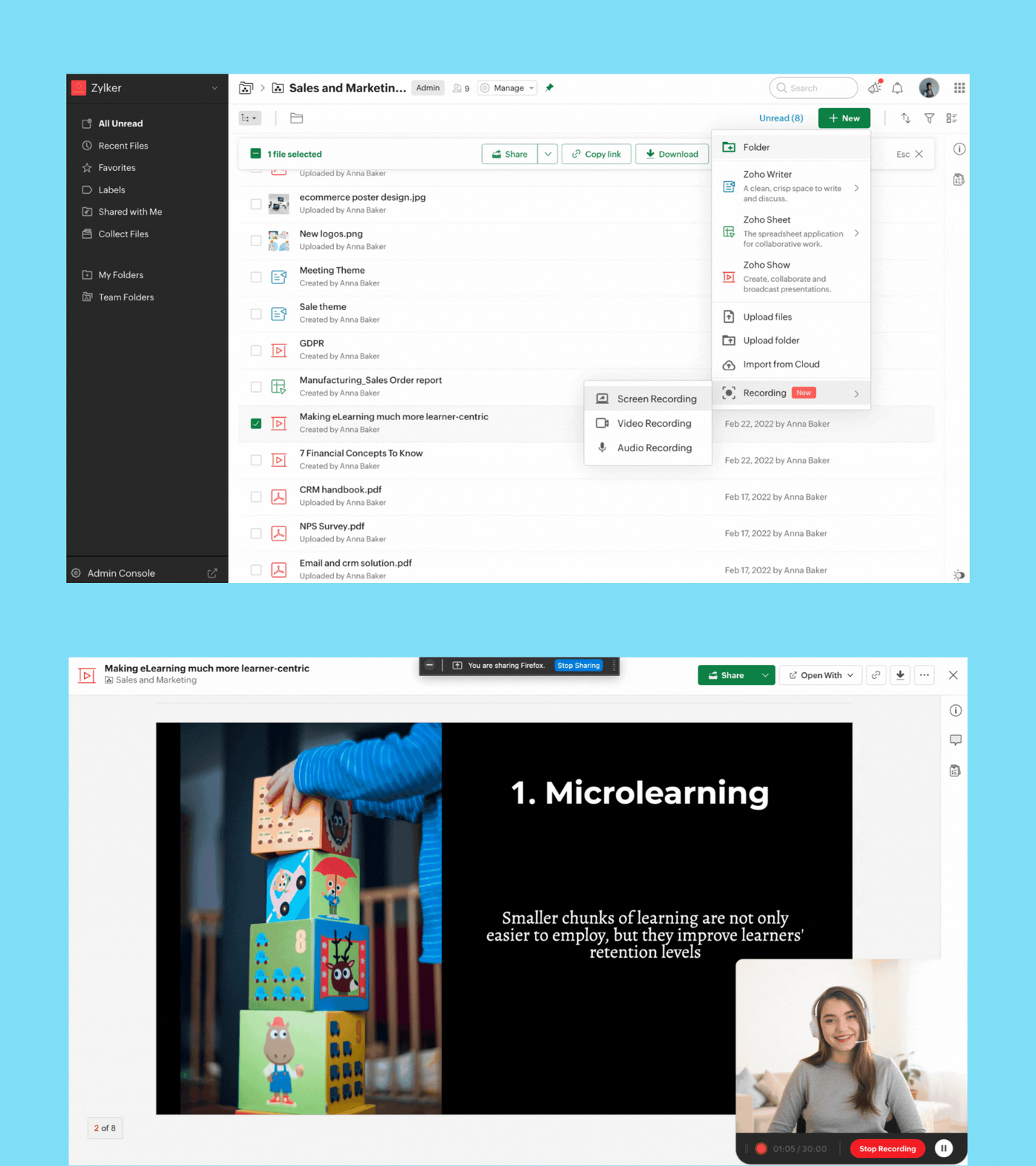
Now, you can quickly record video, audio, or your screen from right within the WorkDrive app and share it with your team. 

Screen recording: Whether you're sending a proposal, or reviewing a document, you can now record your screen along with your video for better clarity and impact.

Video recording: If you want to share a message or announcement with your team, simply record your video and share it with your entire organization.

Audio recording: Take audio notes or record meeting audio so you never miss key points discussed in your team or project meetings.

You can record while offline, but to upload the file, you must be connected to the internet.

Note: You can currently record for a maximum of 30 minutes.


Security and collaboration

External sharing just got better—and more secure!
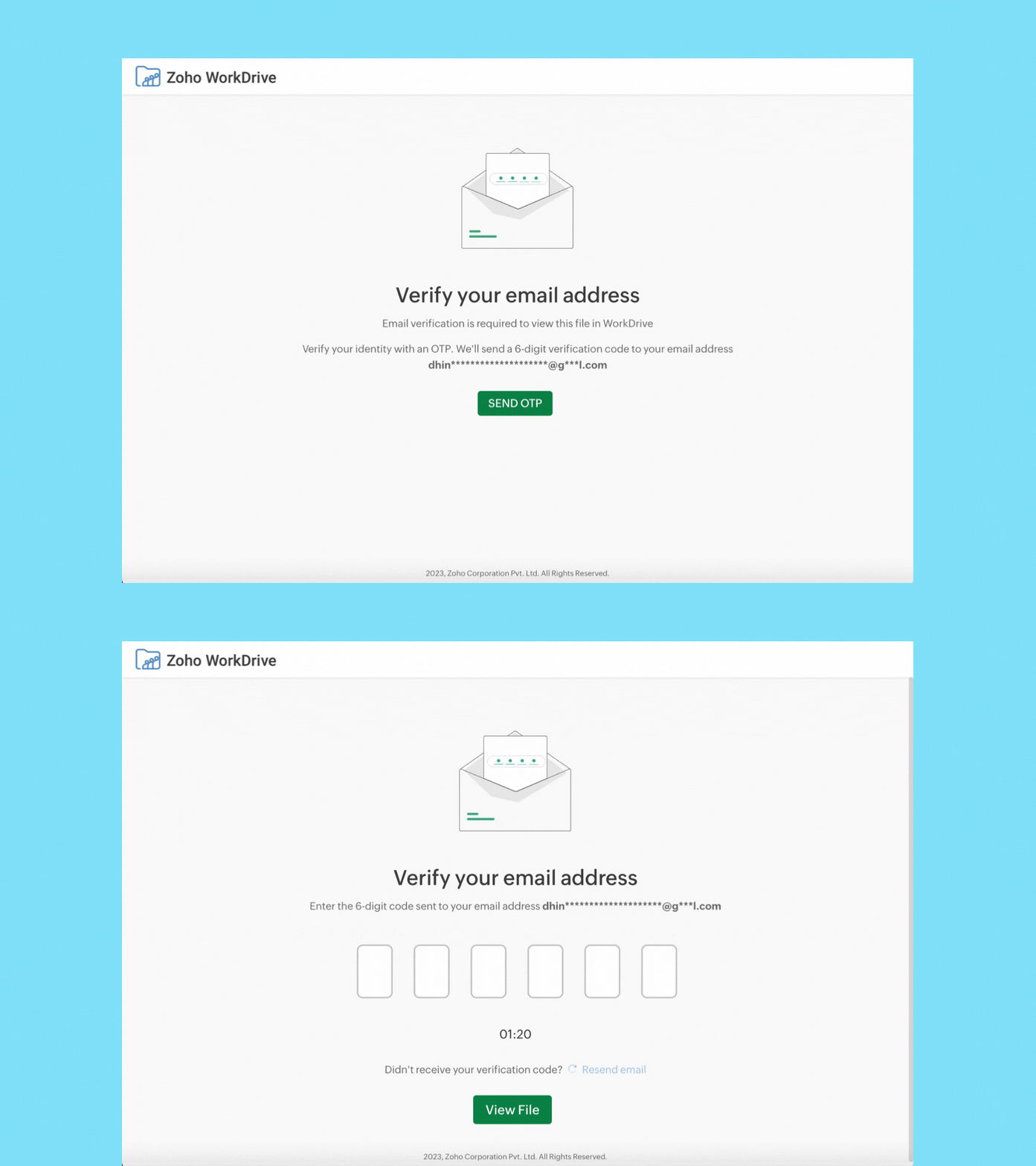


When you share a file or folder with external users (who don't have a Zoho account) using email addresses, they must now verify their email addresses via OTP authentication to access it. 

External users can now upload files, and add or reply to comments. WorkDrive signup is not required. We'll soon enable the Edit option for external users as well.


Data administration

Manage all your team's shared items in one place
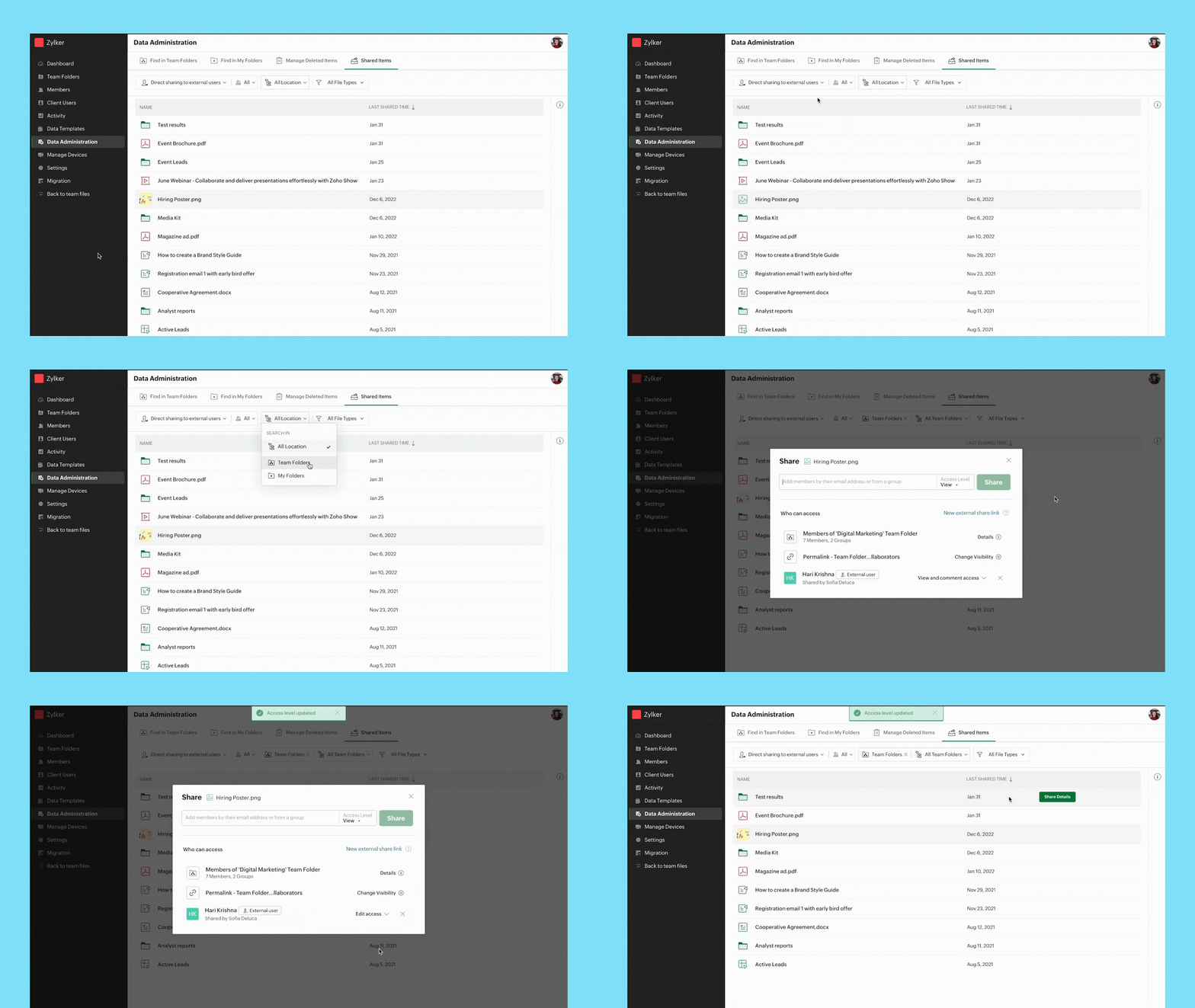


Admins can view a list of all shared items and track who they're shared with, whether they're shared externally or within a team, and more.

You can easily search for shared files and folders by applying the following filters
  • Share type
  • User
  • Location
  • File type
Path: Data Administration > Shared Items


Manage all shared items in a Team Folder
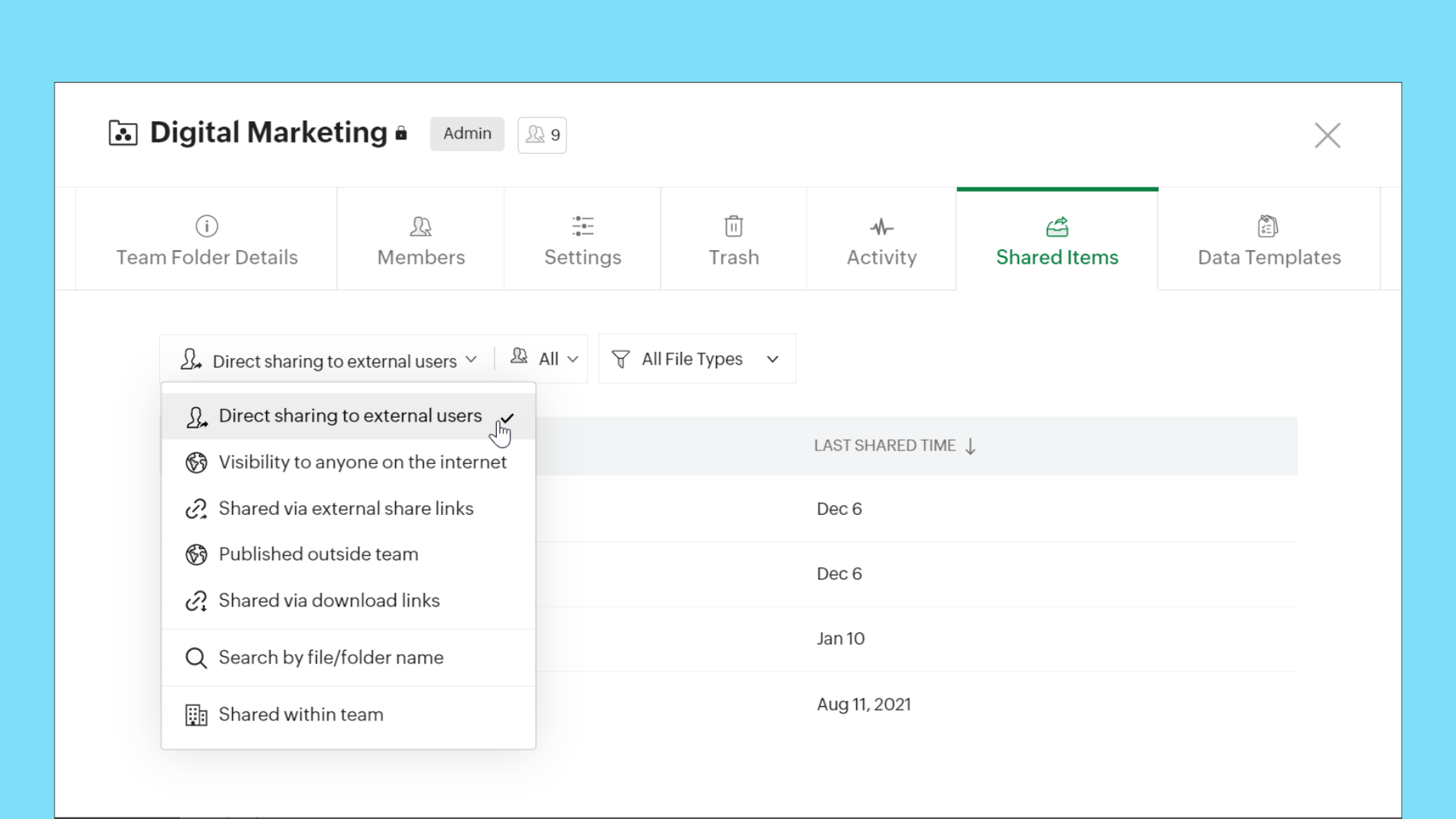


When you're working with multiple stakeholders, such as external users and organization members, it is important to keep your team's data safe and maintain full control over it. Now, Team Folder Admins and Organizers can easily view and manage all items shared internally and externally, make sure data is secure, and update or remove permissions whenever required.

Path: Team Folders > Manage > Shared Items

This feature is available for all WorkDrive team plans.


Manage all shared items in My Folders

We are making it easier to manage shared items in My Folders too! You can now view and manage all your shared items from My Folders. Quickly check which items are shared with external users, team members, and more.

Path: My Folders > Manage > Shared Items

This feature is available for all WorkDrive plans.


Find all files in members' My Folders
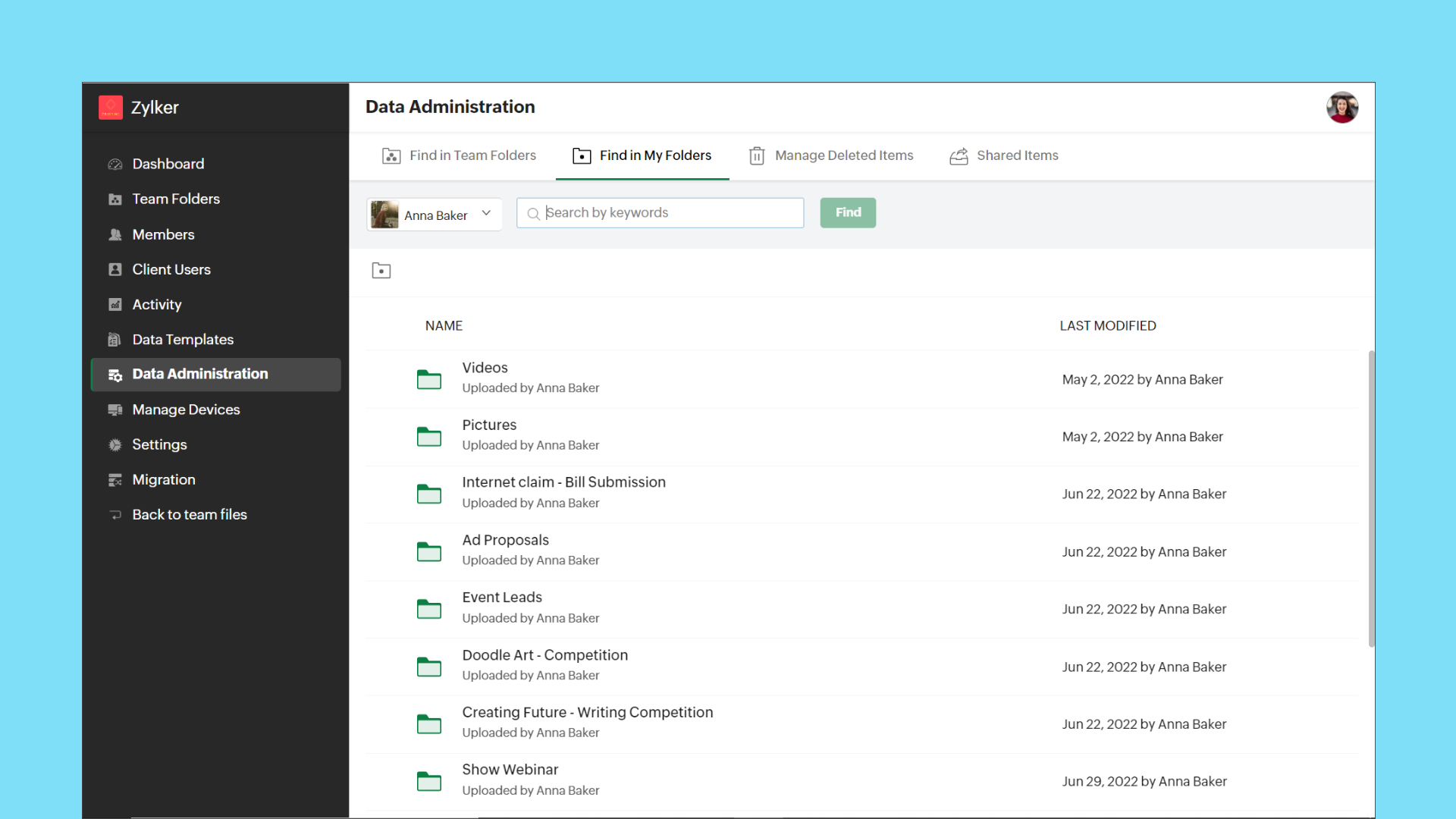


Admins can now view the entire list of files and folders in a team member's My Folders from the Admin Console. This gives Admins full control over each team member's data. They can share the files with other team members, or transfer ownership to themselves or another team member, if required.

Path: Data Administration > Find in My Folders > (Select User)


Transfer ownership of files and folders
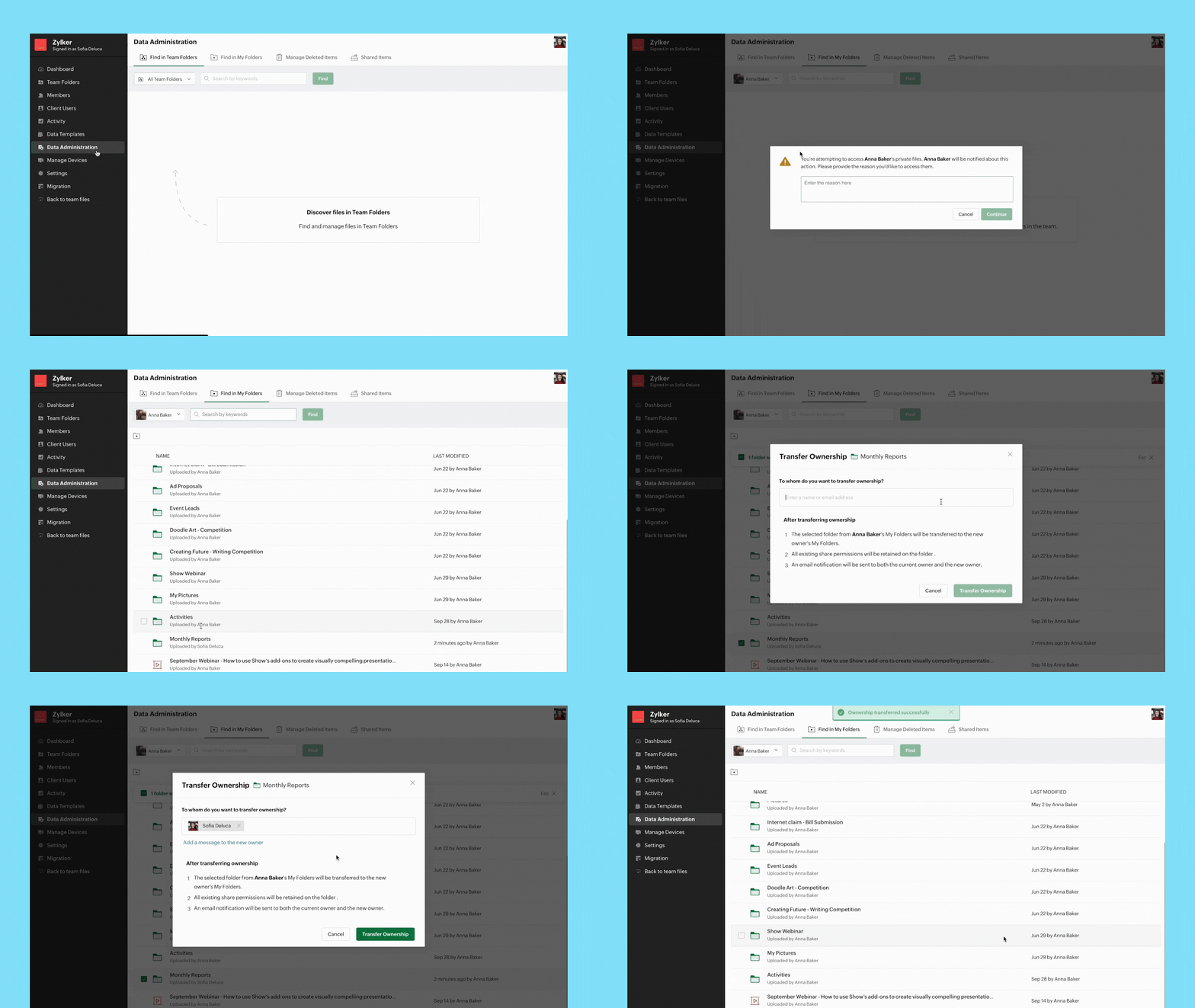


When an employee is not available temporarily or leaves an organization permanently, it's important to transfer their data to another employee securely. Admins can now transfer ownership of files and folders from one user's My Folders to another.

Path: Data Administration > Find in My Folders > (Select User) > (Select Files/Folders) > Transfer Ownership


Note:
  • Data Administration features are only available with WorkDrive's Business plan.

Integrations

Bigin's integration with Zoho WorkDrive simplifies file management


Bigin's integration with Zoho WorkDrive helps you exchange files with your customers or leads in a secure and organized way. You can now create a File Cabinet for each customer and efficiently send, receive, and store related files.

With this integration, you can:
  • Generate unique links to collect customer files
  • Get notified whenever customers upload files
  • Configure workflows to automate file management

Cliq/WorkDrive integration: Share files from WorkDrive
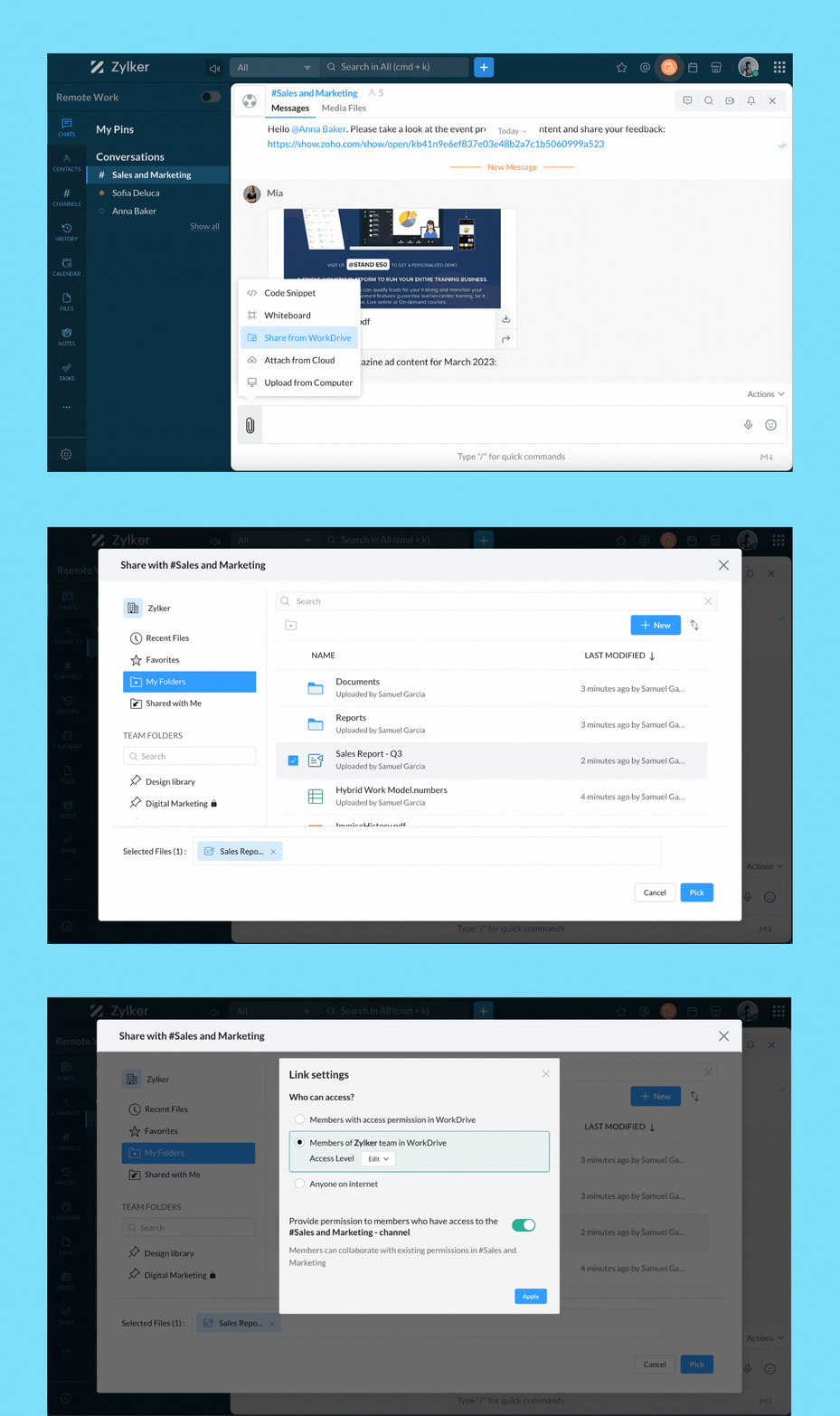


You can now share files directly from WorkDrive to your Cliq chats and channels. When you share files from WorkDrive, you have the option to choose the share type and set permissions.

When sharing to channels, you have the option to share the selected file(s) with channel members, org members, or anyone on the internet.


Group Team Folders for easy access
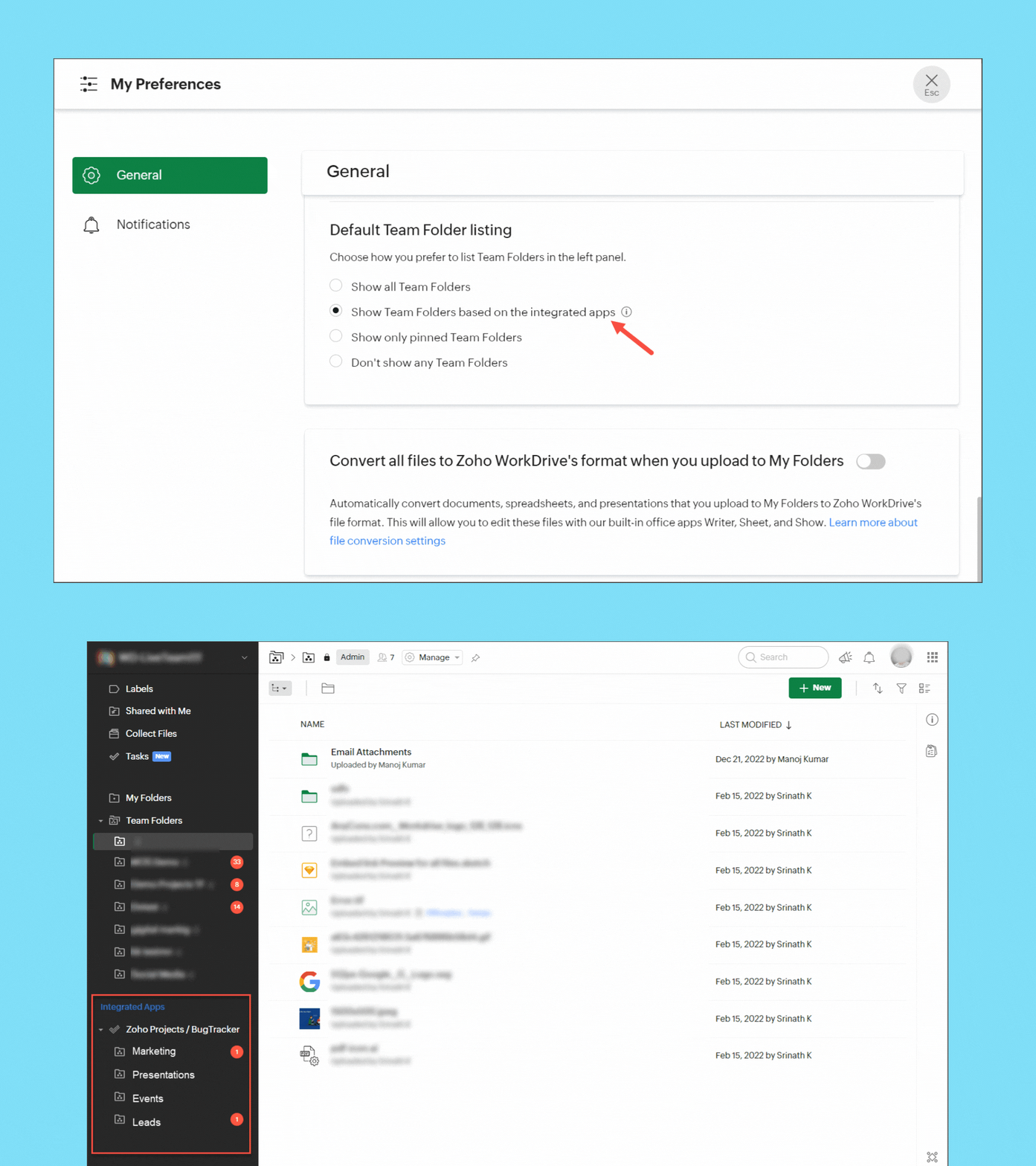


If you have integrated Zoho Projects or Zoho Marketing Plus with WorkDrive, you can now group the Team Folders created in Projects and Marketing Plus in the left panel of your WorkDrive account for easy access and management. Team Folders created directly in WorkDrive will be listed separately.


Save emails from Zoho Mail as EML files in WorkDrive
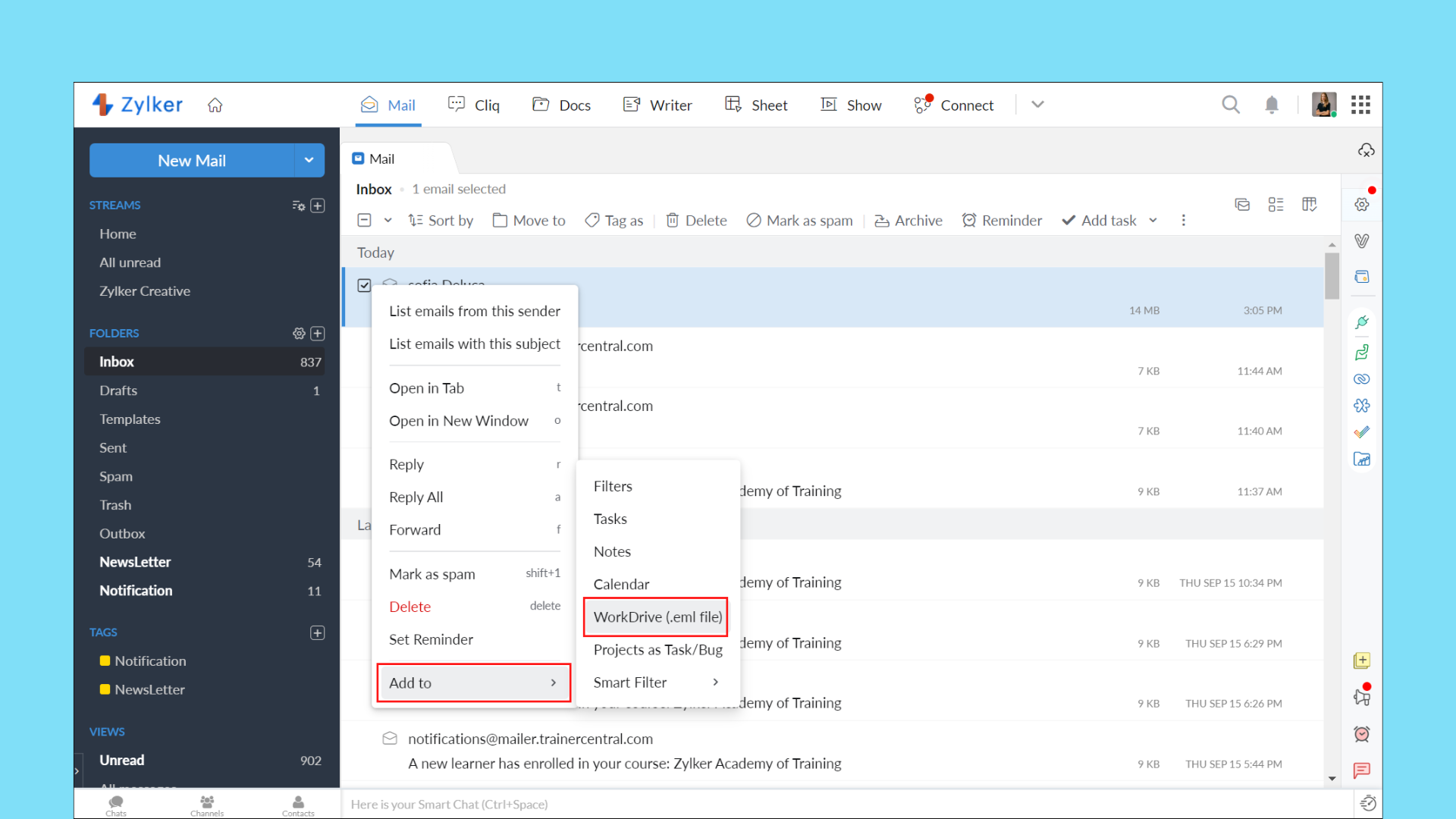


With the Zoho Mail/WorkDrive integration, you can now save an entire email as an EML (Electronic Mail Format) file in WorkDrive. This way, you can keep a backup of important emails and preview them right from WorkDrive.

Your EML file will contain the email content along with details, such as the subject, sender email address, recipient email address, date and time of the email, and attachment details (if any).


User experience

Tree view for efficient navigation
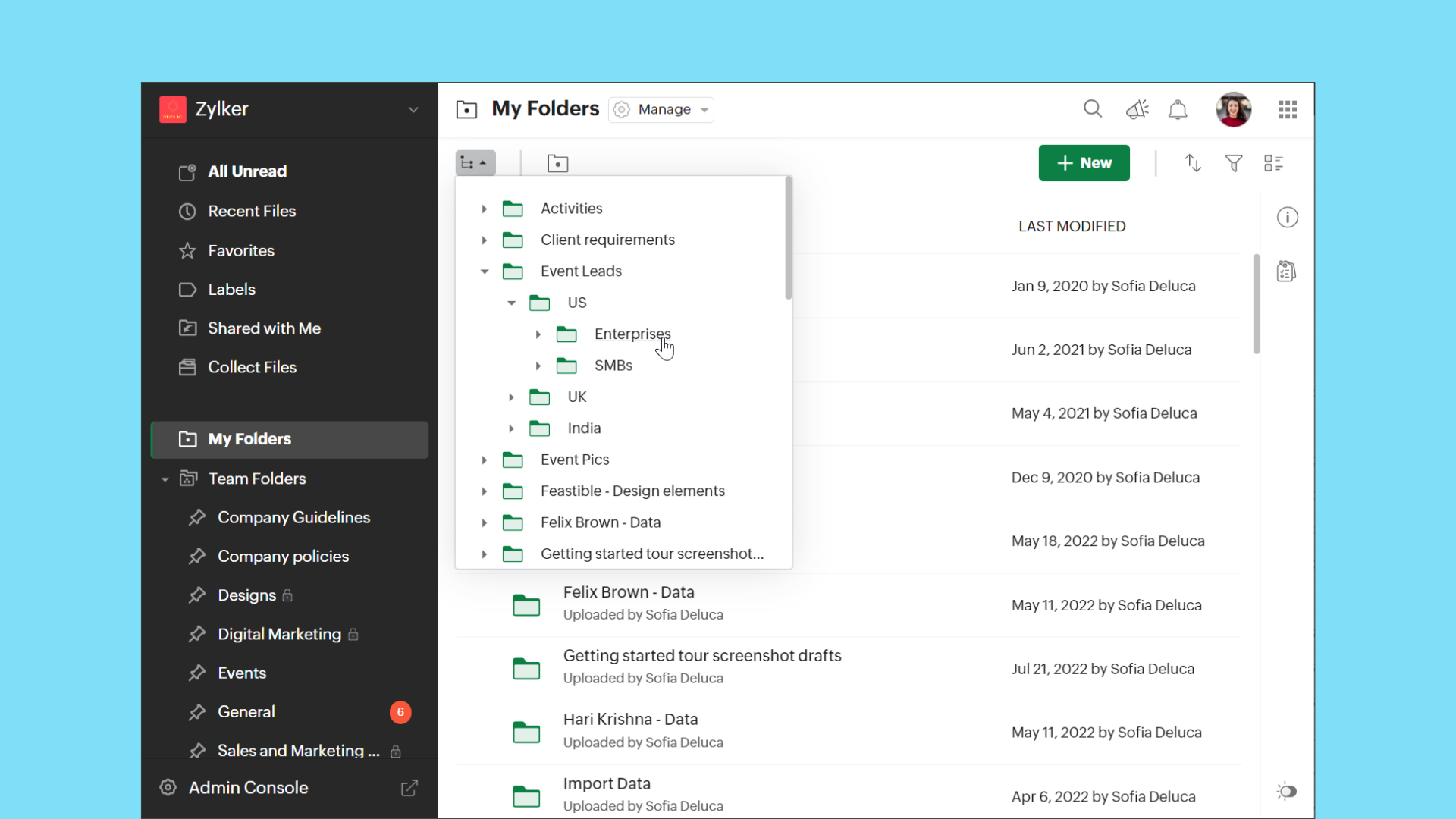


The new tree view in WorkDrive makes it easier to access folders from any location in Team Folders or My Folders based on hierarchy.

Support for editing comments
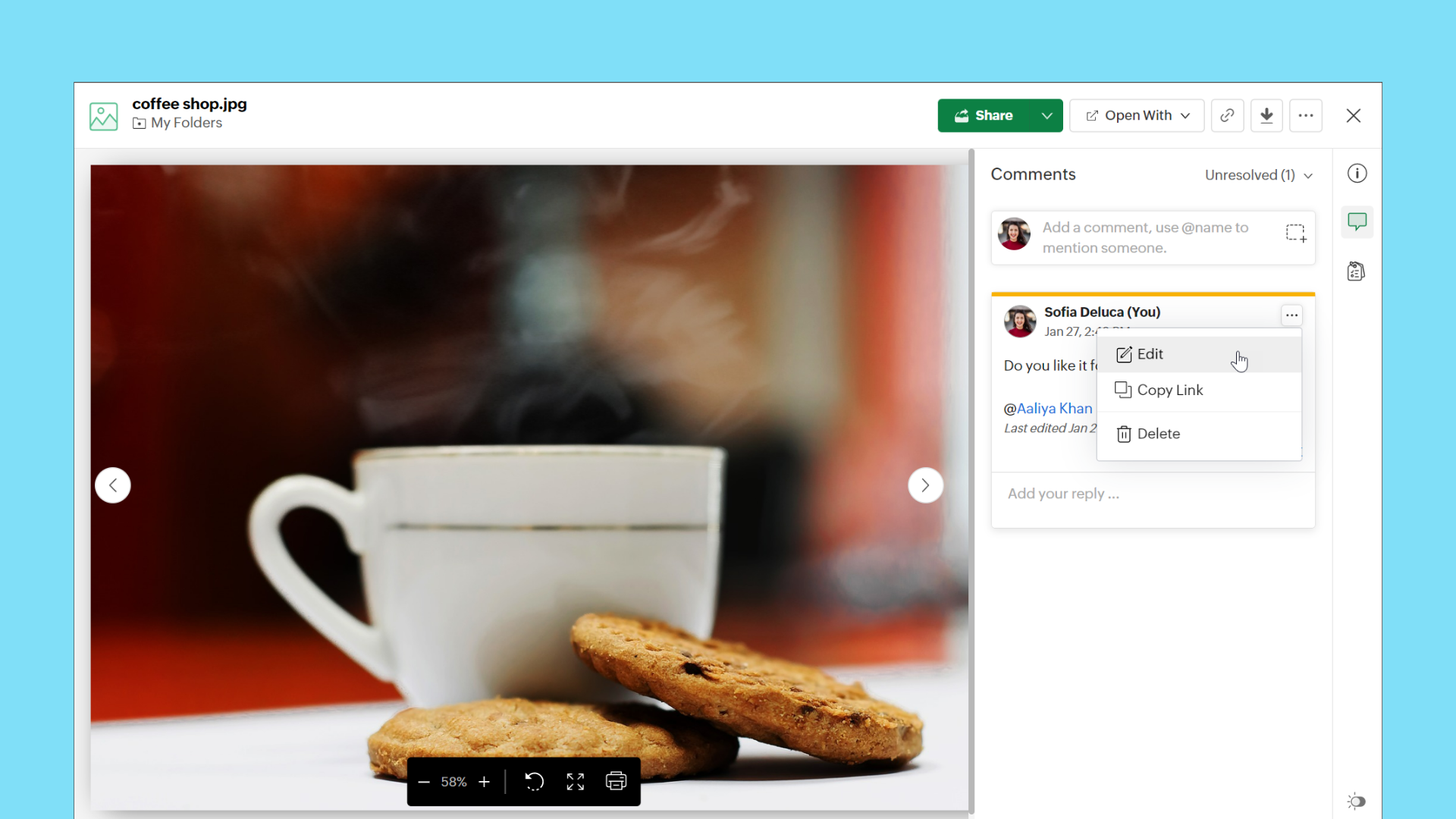


WorkDrive now supports the Edit option for comments. This allows users to modify their existing comments at any time without deleting them.


Copy or move enhancements

Copy or move files using keyboard shortcuts
Keyboard shortcuts are now supported in WorkDrive for copy and move actions.

Copy files and folders
      Copy: Ctrl+C (Cmd+C on MacOS)
      Paste: Ctrl+V (Cmd+V on MacOS)

Move files and folders
      Cut: Ctrl+X (Cmd+X on MacOS)
      Paste: Ctrl+V (Cmd+V on MacOS)

Note: Ensure you have permissions in both the source and destination folders for copy and move actions.

View progress of copy and move actions
We have added a progress bar to show clear details of ongoing copy and move actions for your convenience.


Watch this space, as we will share the WorkDrive 4.0 Phase 2 updates in the next few months.

As always, you can contact our support with any questions, or simply add your comments below.
    • Sticky Posts

    • Ask the Experts: Five-hour live Q&A session with Zoho WorkDrive product experts

      Have questions about WorkDrive 5.0? Let’s talk! We recently launched Zoho WorkDrive 5.0, packed with powerful updates to help your team work smarter, stay secure, and get more value from your business content. From content-centric workflows and AI-powered
    • Support for auto-upgrade in TrueSync (for Windows)

      WorkDrive TrueSync app now supports auto-upgrading to the latest version for Windows OS. You must manually download and install the TrueSync app version 3.4.0 to avail this feature. Download the latest TrueSync app for Windows (version 3.4.0) Supported
    • WorkDrive API Documentation

      WorkDrive provides users and developers an extensive set of APIs to help integrate functionalities of Zoho WorkDrive with other Zoho applications and third-party tools. We have published the official WorkDrive API Documentation page for all external users.
    • March 15, 2023: Zoho Docs is discontinued

      As of today (March 15, 2023) Zoho Docs is discontinued for all users. We would like to thank our customers for trusting us for so many years! Going forward, we're confident you'll enjoy using Zoho WorkDrive for all your advanced file management and collaboration
    • Introducing WorkDrive 4.0: Enhanced productivity. Advanced data administration. (Phase 1)

      Hello All, We're excited to share the release of WorkDrive 4.0, which includes important new features and enhancements focused primarily on productivity, secure collaboration, data administration, integrations, and user experience. Read the official announcement
    • Recent Topics

    • Deleted User Emails

      I need to delete a user as I need to re-use their license, but I'd like to keep all their emails that are attached to various contacts in the CRM. Their emails are hosted externally on an M365 license. Anyone any idea how best to engineer this? TIA
    • #14 Get Paid Without Spending Time on Manual Follow-ups

      It's the end of the month. Payroll is due next week. A software subscription is about to renew. A vendor payment is waiting for approval. On paper, the business is doing great. Projects are getting completed. Customers are happy. Invoices have already
    • Client Script | Update - Client Script Support For Custom Buttons

      Hello everyone! We are excited to announce one of the most requested features - Client Script support for Custom Buttons. This enhancement lets you run custom logic on button actions, giving you greater flexibility and control over your user interactions.
    • Function #11: Apply unused credits automatically to invoices

      Today, we bring you a custom function that automatically applies unused credits from excess payments, credit notes, and retainer payments to an invoice when it is created. Prerequisites: Create a Connection named "zbooks" to successfully execute the function.
    • Add spaces to input format

      In Zoho Inovices, I am trying to do a custom input format for a custom field. I have tried a few variations, but this is my most recent: ^[a-z][A-Z][0-9][,][-][_][:][ ]$ In this field, I will be entering different alphanumeric information, depending on
    • Zoho CRM Deal API returning null pipeline in case of default pipeline

      Hey team, We are writing to report an issue with the Deals module pipeline API behavior that we believe stems from how the default (Standard) pipeline is handled when no custom pipelines have been configured. When the "Manage Pipelines" page under CRM
    • Quebec Canada Tax GST and QST

      Hello Expert, Whenever we I create invoice for Quebec, Canada, it calculating wrong tax amount, can you please validate Attached the screenshot, which is calculating wrong tax amount on QST
    • Function #1: Convert an accepted Estimate to Sales Order automatically in Zoho Books

      As you’re aware, Zoho Books provides a default option to have the estimates automatically converted to invoices once your customer accepts them. Many of you wanted a similar option for sales orders, so here’s a workflow that converts accepted estimates
    • Facturation électronique 2026 - obligation dès le 1er septembre 2026

      Bonjour, Je me permets de réagir à divers posts publiés ici et là concernant le projet de E-Invoicing, dans le cadre de la facturation électronique prévue très prochainement. Dans le cadre du passage à la facturation électronique pour les entreprises,
    • Adding Taxes to paid consultations in Zoho Bookings

      I created a 'paid' consultation under Zoho Booking and integrated it with payment gateways for online/instant payment before a booking is done. How can I add 'taxes' to the price of consultation? I can add taxes to other Zoho apps (liks Books, Checkout,
    • What's New in Zoho Forms

      Hey there, We've been heads-down shipping this quarter. Because every update we ship is about making your forms do more, with less effort from you. This quarter too, we expanded what Zoho Forms can do. Here's everything that shipped. Spotlight Forms Some
    • Zoho Creator and Bluetooth Beacons?

      Hi all, Has anyone developed anything in Zoho Creator that leverages Bluetooth? Specifically to detect bluetooth beacons (iBeacon, Eddystone, etc.)? Thank you, Josh
    • Zoho Books | Product updates | June 2026

      Hello users, Welcome to this month's roundup of what's new in Zoho Books! We have an exciting line-up this time. The highlight is the launch of the all-new France Edition with full ISCA compliance. We're also introducing features such as Layout Rules
    • API to post drafts for social media

      I we want to post draft posts to our zoho social account and then approve and schedule them within Zoho social. is this possible with for example: https://apis.zoho.com/social/v2/post TIA Jon
    • What's New in Zoho Inventory | April & May 2026

      Hello users, We're excited to roll out the latest Zoho Inventory updates for April and May 2026. These enhancements are designed to make your daily operations smoother and more efficient, from advanced inventory management and flexible pricing to automated
    • Bullet Charts Stuck Loading Without Data

      I have a dashboard with some widgets in bullet chart format, but some of them do not have data. Since there is no data, they keep loading indefinitely instead of displaying “No Data,” as happens with the percentage widget next to them. This issue prevents
    • How to get Monday as 1st day of the week?

      Hi, The first day of the week is Sunday in Zoho Creator calendar.So it is hardly usable as in Europe the 1st of the week is always Monday. How can I get Monday as 1st day of the week? Best regards, Chris
    • Shall we play a game?

      Presenting the very first game created using ZOHO Creator: Tic-Tac-Toe (or noughts and crosses) I made this to challenge myself and employ some of the new features of ZOHO Creator. I must admit that the code is very literal and not too elegant. There are plans to improve on the machine AI and streamline the code over time. Currently the code makes extensive use of functions for the machine "AI" - there are 12 of these.   The machine AI can be tricked, so to counteract that I made it exceedingly arrogant
    • Check printing alignments always changes

      Hello, We have a frustrating problem with printing checks. We use Quickbooks voucher checks, which works okay for us. The problem is the printing alignment for the check's "Date, Pay to the Order of, Amount, and Amount in Words" changes every time we
    • name change of company in same GSTIN registration . how to retain historical company name for past transactions?

      hello I have recently change my company name from BHANU DIAM to BHANUMATI IMPEX in same GSTIN registration number While i have update the company name in profile name that change all my historic data like sale invoices and purchase bill , i would like
    • iOS Books app shows filtered view after changing to All sales orders

      My boss often checks sales orders on his iPhone. The app is mostly working fine, but there's an ongoing issue: When switching between different filters (also called custom views on the web), going back to All doesn't often work. It typically gets stuck
    • Recurring Invoices

      I'm looking to set up recurring invoices on a monthly basis, using GoCardless as a payment gateway. I've done this successfully, however there's a big problem with the Invoice Date and Due Date. We prefer to provide sufficient notice of collection (10
    • Layout Rules Don't Apply To Blueprints

      Hi Zoho the conditional layout rules for fields and making fields required don't work well with with Blueprints if those same fields are called DURING a Blueprint. Example. I have field A that is used in layout rule. If value of field A is "1" it is supposed to show and make required field B. If the value to field A is "2" it is supposed to show and make required field C. Now I have a Blueprint that says when last stage moves to "Closed," during the transition, the agent must fill out field A. Now
    • Ability to Use Both AND and OR When Creating Rules (Advanced Conditions)

      I'd like to be able to use more complicated logic when setting up rules. E.g. in Zoho Mail, I can choose "Advanced conditions (AND/OR) to create a rule that can be applied to multiple subject lines from the same sender. But in Zoho TeamInbox, I will have
    • How to record GST amount for Value of Service on Inward remittance charged by bank

      Hi please advice I have a situation.    1. I have HDFC bank account 2. I have a customer who has done inward remittance for purcahses from overseas. 3. HDFC is showing Value of Service say $100 and GST @ 18%. 4. Value of Service is not charged. But  CGST
    • Resources - Sort by rows consumed

      Please add the ability to sort by the total rows consumed in the Resources section of Settings. I would like to see which table is consuming the most rows by sorting from high to low.
    • Zoho Books - France

      L’équipe de Zoho France reçoit régulièrement des questions sur la conformité de ses applications de finances (Zoho Books/ Zoho Invoice) pour le marché français. Voici quelques points pour clarifier la question : Zoho Books est un logiciel de comptabilité
    • Editing a bundle

      How can I edit a bundle?
    • Approval escalation

      Hi I would like to have an approval escalation if Approver 1 does not approve/reject a request with a certain SLA. Currently I have a status field that changes to "Pending approver 2 approval" after a certain time, however the challenge I am faced with
    • Referral module for our Zoho People employees

      I have been requested to create a user in Zoho Recruit for each Zoho People user to allow them to refer a candidate in Zoho Recruit. Only the interviewer and guest profiles are free. The use of a custom profile is on the paid basis. Any user linked to
    • Conflicts on zoho project Tasks

      Hi We want to use ZOHO Project for scheduling our technicians. We have maintenance contract with our customers. We schedule interventions on customer sites. So we created projects for each contract and task for interventions. So if a technician need to go to customer I create task and schedule them after depending of availibility. When I need to assign a date I use start Date and due date on the task. But I realized there is no conflict management. I called support and they told me it is not developped.
    • Upcoming webinar : Build high-converting sales pipelines with Zoho LandingPage and Bigin

      For small businesses, generating leads is only half the battle. The real challenge is staying organized, following up consistently, and turning those leads into customers. Join us for this webinar to learn how Zoho LandingPage and Bigin can help you create
    • New UX Improvements in the Zoho Expense iOS and Android Apps

      Hello users, We're excited to share the latest updates and enhancements we've made to the iOS and Android apps of Zoho Expense. These updates have been designed to make your day-to-day expense and travel management even simpler. Note: We will be rolling
    • User Permission Log

      Our external auditors are asking for a way to view changes made to user permissions (basically, a user permission change log). Is this feature built into Creator? 
    • What's New in Zoho Billing | May 2026

      We're back with another round of updates in Zoho Billing! This month brings new capabilities designed to give you more flexibility and control over your billing operations. From associating price lists with business locations, and including annexures
    • ZOHO SURVEY to ZOHO CRM integration

      I am trying to use the ZOHO SURVEY to ZOHO CRM integration but the integration won't allow me to choose a record layout and that means there is a erquired field that i cannot input, is there any way around this?
    • Why don't Zia agents support file uploads?

      I am trying to build a Zia Agent that allows uploading of a PDF file and uses the GLM5 model to process it and extract information. But agents.zoho.com has no way to enable file uploads on the agent. Additionally, GLM5 based agents keep outputting their
    • Zoho Forms - Failed CRM Sync Improvement

      I'd like to suggest an enhancement to the Zoho Forms and Zoho CRM integration. Currently, once a form entry has been submitted, there is no simple way to push that individual entry to CRM again if needed. Before anyone mentions it, I am aware that the
    • How to show product cards in your chatbot

      Hey everyone, If you are using Guided Conversations to help customers find products, you have probably run into this problem: the bot gives customers a list of options, but they still have no idea which one to pick. There will be no images, no specs,
    • "Make online" not clearing previously downloaded files from disk

      I downloaded a large folder via "Make offline" so I could copy it to another location. This worked. When I was done I hoped that "Make online" would restore it to the previous state where those files are not stored locally in TrueSync. This did not work—Finder
    • Next Page