[Early Access] Introducing Connected Pipelines for seamless transition of information between Pipelines
Hello Everyone!
Recently we've rolled out early access for Team Pipelines - Bigin's next major leap to transform and unify customer operations for small businesses. One constant feedback we've received from our early adopters is that once a record reaches a certain stage in a Team Pipeline, they want a new record to be created in another Team Pipeline with the information carried over from the previous pipeline. To address this we're introducing Connected Pipelines - a new feature that automates this seamless transfer of records from one pipeline to another.
Recently we've rolled out early access for Team Pipelines - Bigin's next major leap to transform and unify customer operations for small businesses. One constant feedback we've received from our early adopters is that once a record reaches a certain stage in a Team Pipeline, they want a new record to be created in another Team Pipeline with the information carried over from the previous pipeline. To address this we're introducing Connected Pipelines - a new feature that automates this seamless transfer of records from one pipeline to another.
How can Connected Pipelines help your business?
Let's take an example of an Interior Design Firm - Zylker Interiors that caters interior workspace for office spaces. They have setup 3 different Team Pipelines in Bigin.
Sales Pipeline | Production Pipeline | Installation Pipeline |
Zylker's sales team uses this pipeline to engage with prospects looking for office interiors and converts them into customers. | Once a new customer is onboard, Zylker's factory unit uses this pipeline to manage production orders for the customer. | After a production order is completed, shipment to the customer's site and subsequent installation process is managed in this pipeline. |
In Zylker's case, whenever the sales team closes a deal in the Sales Pipeline, it would be ideal if a new order is instantly created in the Production Pipeline. Also once the order has been completed in the Production Pipeline it would be great to create a corresponding Installation Request automatically in the Installation Pipeline.
Connected Pipelines can help you automate this whole process thereby eliminating manual work and errors associated with human intervention.
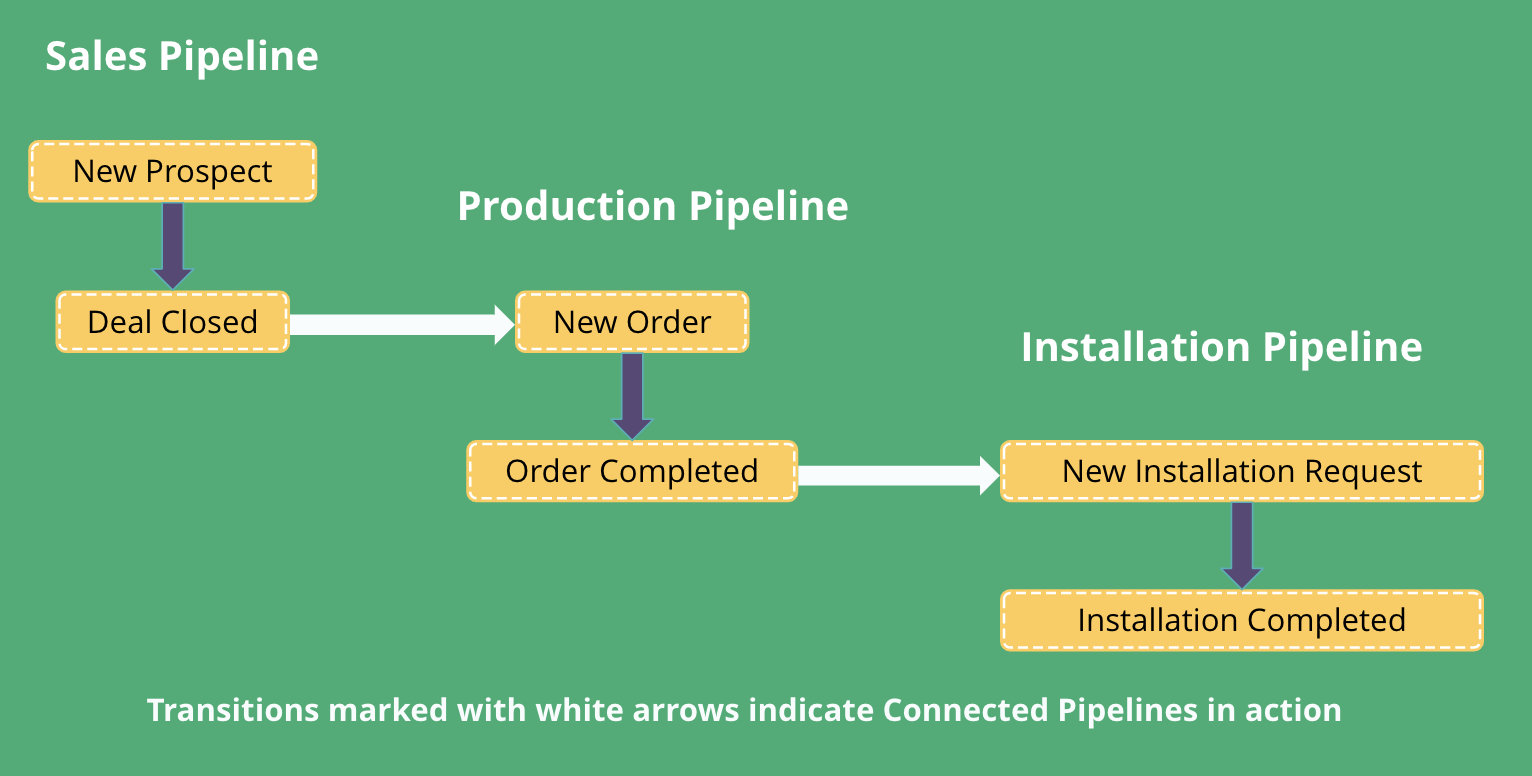
How does this work?
To achieve Connected Pipelines, we're introducing a new Action in Workflows - 'Create Connected Records'.
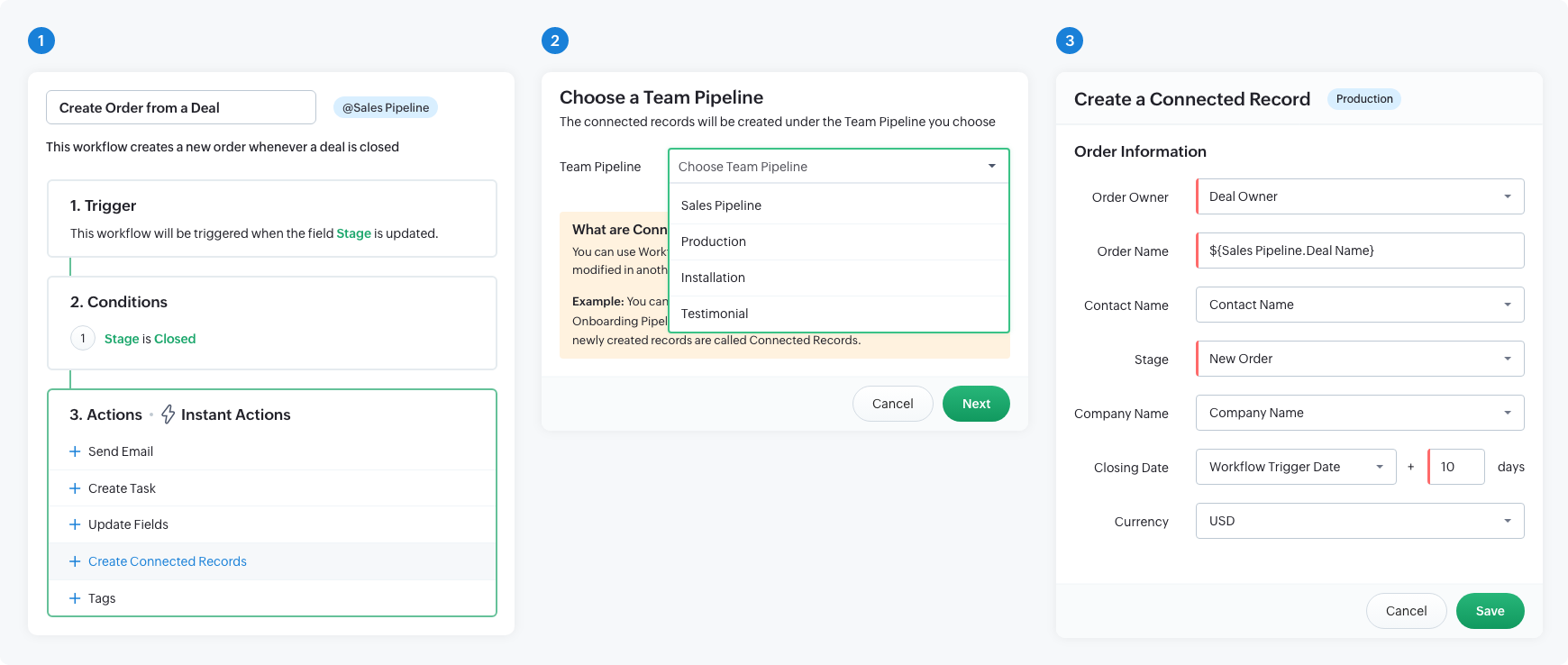
1. With this update, you can setup a Workflow that is triggered whenever a Deal's stage is modified. You can specify the exact Stage in the Conditions section.
2. Under the Actions section you can click the 'Create Connected Records' action and choose the next Team Pipeline in your business process. In Zylker's Case, it will be the Production pipeline after a deal is closed in the Sales pipeline.
3. In the Create a Connected Record screen that pops-up, you can map the fields between the two pipelines so that the information in the deal record is properly carried over to the order record when it reaches the Production pipeline.
From now on, whenever the sales team closes a deal in the Sales Pipeline, a new order is automatically created in the Production pipeline instantly. This takes out manual effort and saves time as the next step in the customer's journey will be instantly started once a team completes the previous step.
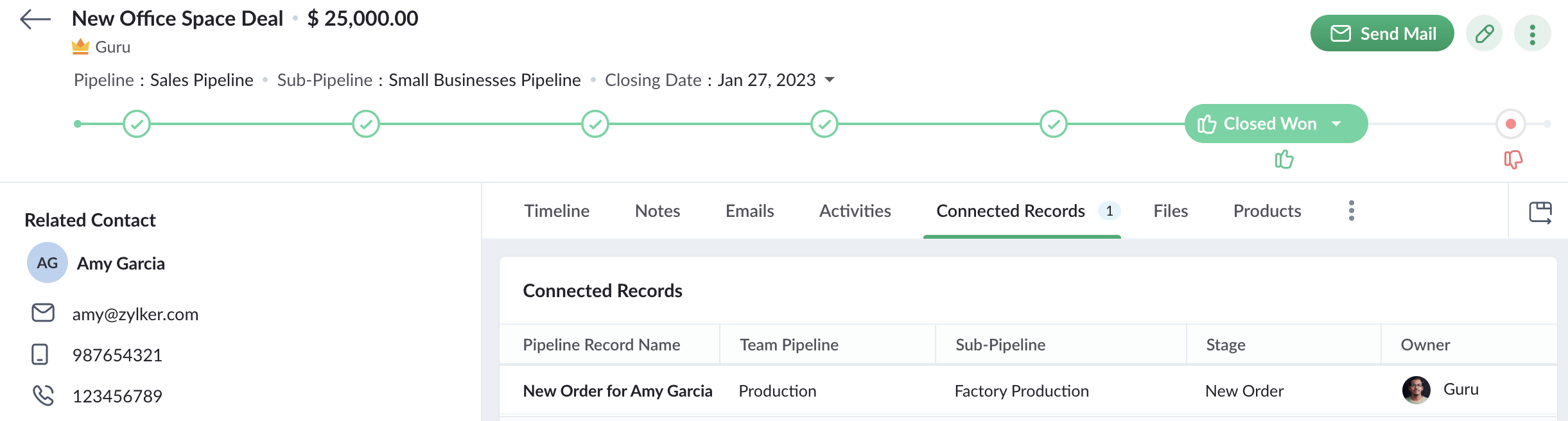
Not just that, now when a sales person opens a deal record that has triggered the Workflow to create a new order, they can see the Order record too under the Connected Records tab. This lets the sales person keep track of the order status as well. This way, Connected Pipelines keeps your teams together with the information loop connected across Team Pipelines.
Availability
If you're already using the Team Pipelines version of Bigin, then Connected Pipelines will be already available for you. You can verify this by checking if you can see 'Create Connected Records' action when you create a Workflow.
We've published a detailed help guide for you to get started with Connected Pipelines.
Do try this new enhancement and let us know your feedback as comments below this announcement.
For those who are yet to try Team Pipelines, we would suggest you to fill in this form and we'll enable Team Pipelines for your account. We suggest you to switch to Team Pipelines sooner as we gear up for the general rollout of the same to all Bigin users.
What else are we working on?
We've been actively listening to your feature requests and are working on a bunch of enhancements including Whatsapp integration, Calendar View for Activities, Online Booking Pages, Web forms for Team Pipelines and more.
Stay tuned for further updates!
Thanks,
Guru | Product Manager | Bigin
Topic Participants
Guru Raja Subbaiah
Sticky Posts
Schedule mass emails, view mass emails status and more!
Hello everyone, Mass emails help you communicate with multiple customers in a couple of clicks. We have introduced a Mass Emails dashboard in Bigin so that users can see the status of the mass emails like how many emails were opened, clicked and bounced.Introducing Bigin 360: Our new pricing edition with increased feature limits and pre-installed toppings
Dear Biginners Club, Today, we're pleased to launch a brand-new pricing edition called Bigin 360, our highest pricing edition that will sit on top of Express and Premier editions. It's been over four years since our launch, and we're receiving some great[New] Create invoices and contracts in minutes with Zoho Writer's Merge Templates for Bigin!
Do you often find yourself manually entering customer information in your business documents like invoices and contracts? This can be a time-consuming process that can take up valuable time from your business operations. With Zoho Writer's Merge TemplatesAnnouncing #BiginnersClub meetups in US, Middle East, India & UK (Free Event)
Exciting news, Bigin enthusiasts! #BiginnersClub meetups are back, and we're hitting some major cities this time, starting from October. Here's what you can expect: Meet our experts face-to-face Deep dive into Bigin and its advanced features PersonalisedIntroducing Forms: Streamline data collection with Bigin's new form builder.
Hello everyone, Bigin's web forms just got a makeover! We are excited to introduce Forms: an online form builder designed to meet all your data collection need. This revamp was inspired by your feedback, resulting in an upgraded and versatile version
Recent Topics
Deluge scripts
Why is there not a search function to make it easier to find the script of interest when modifications are required.bulk edit records and run internal logic
hi there is few logics in manner "it this than that" logics work well when i edit entry openning it one by one (via workflow "on add/edit - on success" , for custom field "on update/on user input") but when i try bulk edit records - logic does not work. how can i turn on logic to work as programmed - for mass editing records via bulk edit?WebDAV / FTP / SFTP protocols for syncing
I believe the Zoho for Desktop app is built using a proprietary protocol. For the growing number of people using services such as odrive to sync multiple accounts from various providers (Google, Dropbox, Box, OneDrive, etc.) it would be really helpfulPossible for first Signer of Sign Form to specify the next signer in the sequence
We have many use cases where multiple signers need sign the same document. We'd love to be able to use sign forms, where the a signer who uses the Sign Form link can specify the name and email address for the next person in the sequence.BUG: Can't copy-paste data outside Sheet
Currently I can't paste data copied from inside any of my Zoho Sheet files to any other app. Copy-paste works inside the sheet It does NOT work between two different sheets These sheets are built from automation templates Everything works fine if I createZoho CRM Community Digest - November 2025 | Part 1
Hello Everyone! Here’s what came through in the first half of November: new updates and a few helpful community discussions with real, notable solutions. Product Updates: Android App Update: Inctroducing Swipe Actions You can now swipe left or right onUpload own Background Image and set Camera to 16:9
Hi, in all known online meeting tools, I can set up a background image reflecting our corporate design. This doesn't work in Cliq. Additionally, Cliq detects our cameras as 4:3, showing black bars on the right and left sides during the meeting. WhereTruesync for Linux
Is Truesync available on linux ?Question about upgrade and storage space Zoho Notebook
After upgarding my Zoho Notebook plan, I am running into the following issue. I just upgraded from a free Zoho Notebook subscription to Pro Lite after I got a notification in my Window Zoho Notebook desktop app saying that I had run out of space. However,Hidding/excluding specific picklist options from filter
Hi. Is it possible to hide/exclude specific picklist options from this filter? I don't want them to be shown when someone tries to filter in the leads moduleSubforms to Capture Multi-Row Data in Job Sheets
Subforms transform your job sheets from simple checklists to powerful, data-rich forms. In field service work — whether maintenance, inspection, installation, or repair — a single job can involve multiple repeatable entries: readings, parts used, activitiesAdd "Fetch Composite Item" Action for Inventory
I want to make a Flow that uses information returned in the GET call for Composite Items, and it's not currently available in Zoho Flow. Please consider adding this functionality.Adress Labels for sending of the oder und barcode
We want to print with my address labels to stick on the order of the ware can. there are these options?printing individual labels - Dymo LabelWriter
I am trying to print individual labels to my Dymo LabelWriter - has anyone done this? Latest Update (December 2025): The Canvas Print View is now available! We encourage you all to try it out and share your feedback with us. Learn more here: Zoho CRMZoho Creator for Agriculture
Greetings, I am starting to work on Zoho Creator specifically for the agricultural field, any recommendations, tips or ideas that might be helpful ? Also, if you are interested by any means in working on such project, kindly contact me. The project isCustom Print Layout
I would like to create a custom print layout of a Lead or Contact. Is there a way to do that? What I mean is that if I'm viewing a specific lead or contact I'd like to be able to print or export that lead/contact and only print and/or export certain information.Print View
Nothing happens when I'm in a module , ie; Contacts, and I hit the Print View Button. Even when it does come up and say "loading", nothing loadsGet Holiday ready with Zoho Mail's Offline mode
With the holiday season right around the corner, this is the perfect time to get ready to unplug, relax, and enjoy a well-deserved break. In addition to preparing yourself, you can also make sure your organization members are set for their time away fromZoho CRM Kiosk issues
Firstly this is for a system on the AU servers if that makes a difference. Issues are as follows (For Kiosk): 1. Re-ordering fields in the screen builder is broken. The fields seem to be re-ordering themselves, unless you order everything by moving theZoho Books emails suddenly going to Spam since 11 Nov 2025 (Gmail + now Outlook) — anyone else?
Hi everyone, We migrated to Zoho Books in July 2025 and everything worked fine until 11 Nov 2025. Since then, Zoho Books system emails are landing in customers’ Spam (first Gmail, and now we’re seeing Outlook/Office 365 also starting to spam them). ImpactedEmail Template Edits Not Saving
I can make an edit, click save, and see the blue bar annimation at the top, but the edits don't actually save. Important, because my email templates are now broken and clients are receiving bad emails. Tried on Chrome, Firefox and IE.Default Ticket View - Table?
Guys, We mostly use the table view to queue tickets. Maybe I am missing it - but how can I set that view as 'default" for all our agents? Thanks JVCan I have different users see different pick list values for Potential Stage?
We have some users focusing on new business and others focusing on existing business, and they follow different sales processes/cycles, so we would like them to see different pick list values for Stage (eventually leading up to Closed Won/Lost in both cases). And just to keep it interesting - some of these users will of course do a combination, so would need to see one pick list for their New business potentials and a different pick list for their Existing business ones. Salesforce does thisTracking Snippet not working in Zoho Marketing Automation!
First off, the fact that you have to wait about 12-24 hours for every response is terrible. How are we supposed to conduct business? Second, we have been trying for several days to get the Tracking Code Snippet in marketing automation to work, to no avail.Is there any way to send an Excel received by email to Dataprep?
Every day I receive an email alert with an Excel file that I want to process through a Dataprep pipeline. To do this, I need to: -Save the file to disk -Open the pipeline -Run the pipeline -Update the source -Several clicks to select and open the savedRead webpage - MSXML2.ServerXMLHTTP
I have the following VBA script, put together from various sources (mainly zoho forum/help/support, so it once worked, I guess): private Sub GetListOfSheets() Dim url As String Dim xmlhttp As Object Dim parameters As String Dim html As String range("B1").valueZoho Creator Form Search
I'm new to Zoho Creator and so far i do like it but im shocked there seems to be no easy way to add a search function and/or navigation to there forms as this readily available in every platform i have used in the past. Anyway i have a form which i haveHow to setup DKIM / SPF in Zoho Mail
Hello there! I'm having a hard time understanding how to setup the TXT records for SPF and DKIM with Zoho Mail. I'm following the instructions here: https://www.zoho.com/campaigns/help/setup-spf-dkim.html Specifically, when it comes to the value for theMass update cant trigger a workflow?
Hello there, Is this a normal Creator behaviour? In a report, if I manually edit each data row, it will pass those changes to all other reports. However, if I perform a Mass Update on a few data rows at once, the new data is not pushed to other reports.search and Smart Bar both missing in Mail
One of the users on my account does not have the search bar at the top right or the Smart Bar at the bottom left of the desktop Mail app. Any ideas how to get those back?"Wrong password or login" Problem to configure Zoho on MAIL App on my Macbook
Hi, I'm having problems to configure my e-mail on my MAIL App(Macbook pro). My e-mail is hari@trespontoum.net Actually was working perfectly, and still working on my Iphone. My MAIL App prompt me that my login or password is wrong. I tried to change 3Remote Control Functionality During Screen Sharing in Zoho Cliq
Hello Zoho Cliq Team, We would like to request the addition of remote control functionality during screen sharing sessions in Zoho Cliq. Currently, while screen sharing in Cliq is very useful, it lacks the ability for another participant to take controlLet us add Lookup fields in the Blueprint Transitions
We are unable to add Lookup Fields in the blueprint transitions in Zoho Desk, we wanted to make it a requirement for our workflow but since it's not available in the transition we cannot. The lookup field exists in the Layout: But it cannot be added/selectedZoho Projects API Scope for Issue Attachments
I try to download issue attachments via the API, unfortunately I always get the following error code when trying to download the file from the supplied URL: {"ERROR_MESSAGE":"INVALID_OAUTHSCOPE","ERROR_CODE":401} indicating an auth scope error. I've triedHow to fetch custom fields for time entries in Zoho Project API v3
In the previous Zoho Projects REST API, we were able to retrieve custom field details for time entries, including picklist options, using the endpoint: GET /restapi/portal/[PORTAL_ID]/timesheetcustomfields In the new Zoho Projects API v3, we tried usingZoho Survey Enhancements
We love Survey. We use it a ton. It needs some enhancements. Maybe some of these are already on the roadmap? API - this is crucial. We have some complex surveys that take place and need to update records, trigger other functions/automations, etc. I wouldImages Don't Display on Blog
Hi, I've just posted a new blog entry, but regardless of format (png or jpeg) Images that display in Preview mode do not display on any browser in the published post. I've not done anything different with this post than others regarding images, please advice. Thanks! Edit: I've discovered that moving the image files from a my sub directory folder "Pics for Blog" to the top level of the "Files" folder on my site allows the images to display live. This, even though my other blog posts are correctlyCheckbox Field Mapping Zoho Forms to Zoho Sign
I have an application that will be filled out via Forms that I am mapping into a PDF Filler on Zoho Sign. I need to have a series of checkboxes mapped to the corresponding fields in Sign and I only see single checkboxes available via the mapping, thoughBooks P&L by Customer
Lately, we have found that the Customer field filter for the Profit & Loss report in Zoho Books is no longer available. We have several projects with the same customer and look at the P&Ls by project AND by Customer (overall). Can you please add back in this field selection alongside the Project field to the P&L report filter? Thanks! -GinaSent mail sort by date disappeared
Hello, We used to be able to sort the emails by date in the sent folder, but this feature has recently disappeared. Can we bring it back?Next Page