Plug Sample #10 - Simplify Ticket Management (Zoho Desk) with Chatbots

Plug Sample #10 - Simplify Ticket Management (Zoho Desk) with Chatbots

Hi everyone! 

We're here with another simple yet effective plug for your chatbot to integrate with Zoho Desk. 

When a customer reports an issue/request during chat, it's logged as a ticket on Desk. When they return for updates, you end up searching through past tickets, reading conversations, and updating them manually. Imagine if your bot could automate this, retrieving ticket details and providing updates effortlessly.

Are you new to SalesIQ? Wondering what plugs and bots are?

SalesIQ offers chatbots to automate customer interactions. Using the Codeless bot builder, you can build chatbots by using cards in the bot-builder gallery. However, at times, businesses would require unique actions from the bot and for those instances, we have plugs. With plugs, you can create any specific action and bring it as a card inside the codeless bot builder, like the rest of the cards. 

In this post, we will learn how to create a plug and list the customer's recent support tickets from Zoho desk.

How does this Plug work?
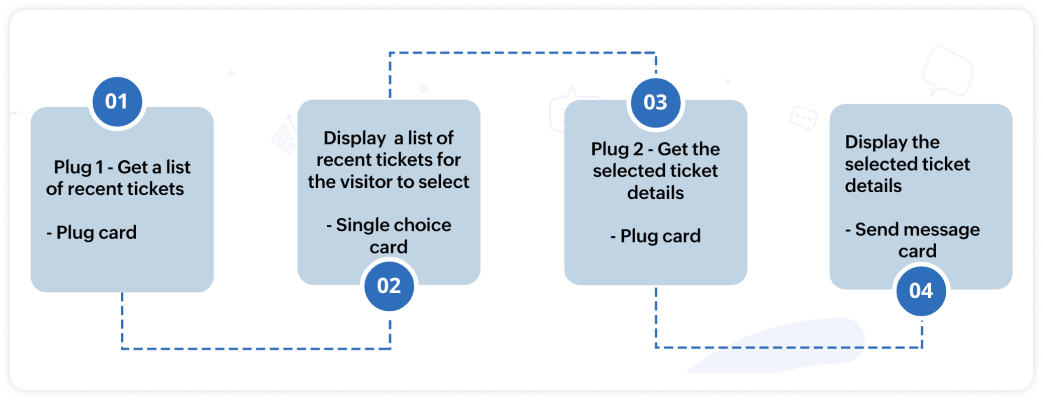
  • The bot will get the email address of the visitor (Email card)
  • Next, the bot will search and get a list of tickets associated with the respective email from Desk (Plug 1). 
  • Then, this ticket list will be displayed to the visitor (Single choice card). 
  • When the visitor selects one of the displayed tickets, the bot will fetch the neccessary ticket details. (Plug 2)
  • And these details will be displayed to the visitor (Any response/input card).
Note:
  • There are two plugs involved in this process, one is to display the ticket list and another is to display the ticket details. 
  • In this post, we will look at the plug to display the ticket list. 
  • The plug sample to display the ticket details is already available, click here to know more. 

Plug output
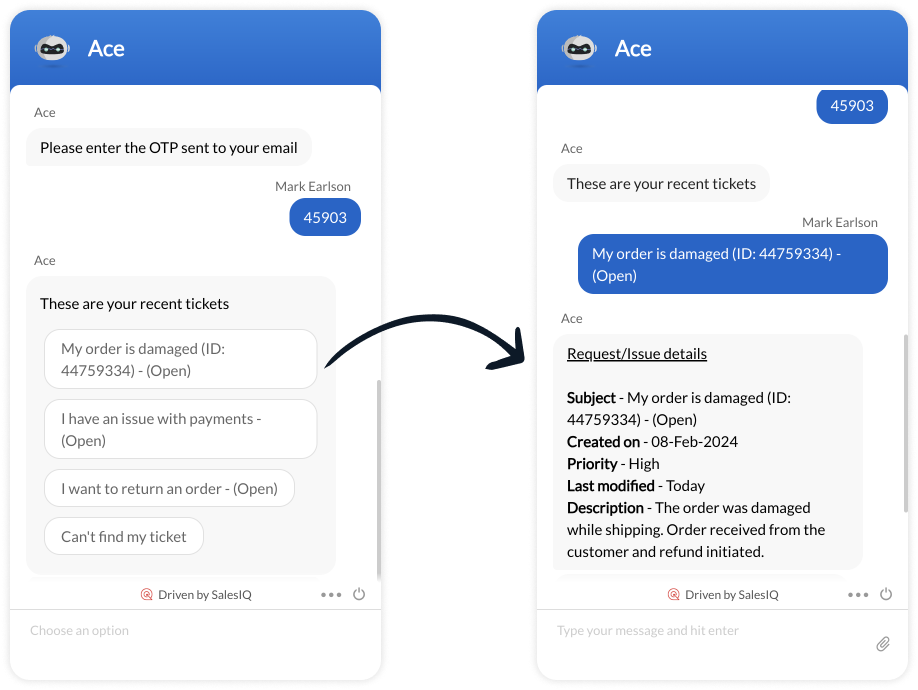


How to build this Plug?

Step 1 - Create connection with Zoho Desk
  • On your SalesIQ dashboard, navigate to Settings > Developers > Plugs > click on Add.
  • Provide your plug a name, and description, select the Platform as SalesIQ Scripts, and finally, click on Connection to your left bottom. You will be redirected to the connection interface.
  • Click on Create connection at the top right corner. 
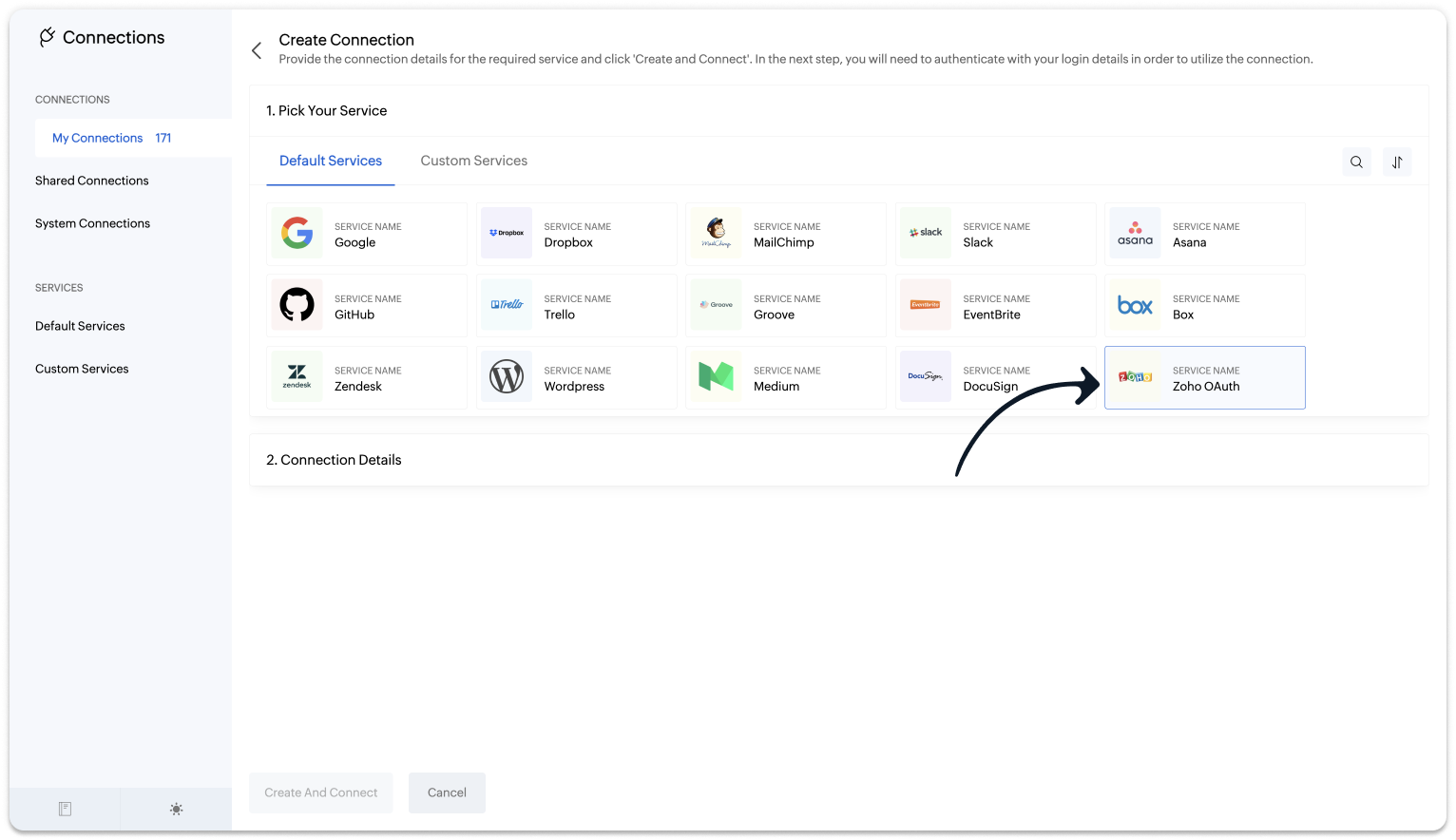
  • Under Default connection, select Zoho OAuth service

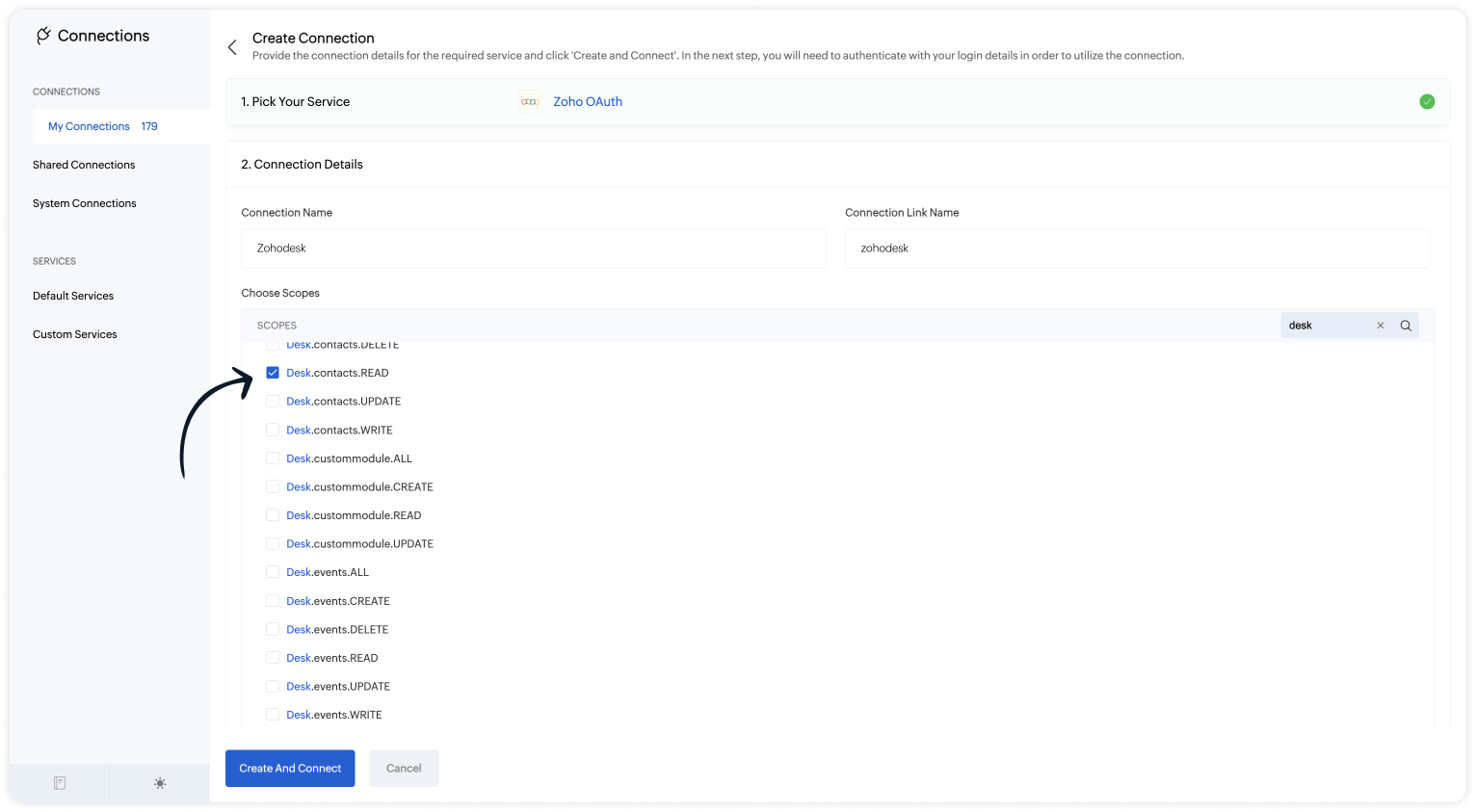
  • Provide your connection name, connection link name, and choose the scopes below.
    • Desk.search.READ
    • Desk.contacts.READ
    • Desk.tickets.READ

Note: The Connection Link Name will be used in the scripts to invoke URL tasks.
  • Click on Create And Connect to connect Zoho SalesIQ and Zoho Desk.
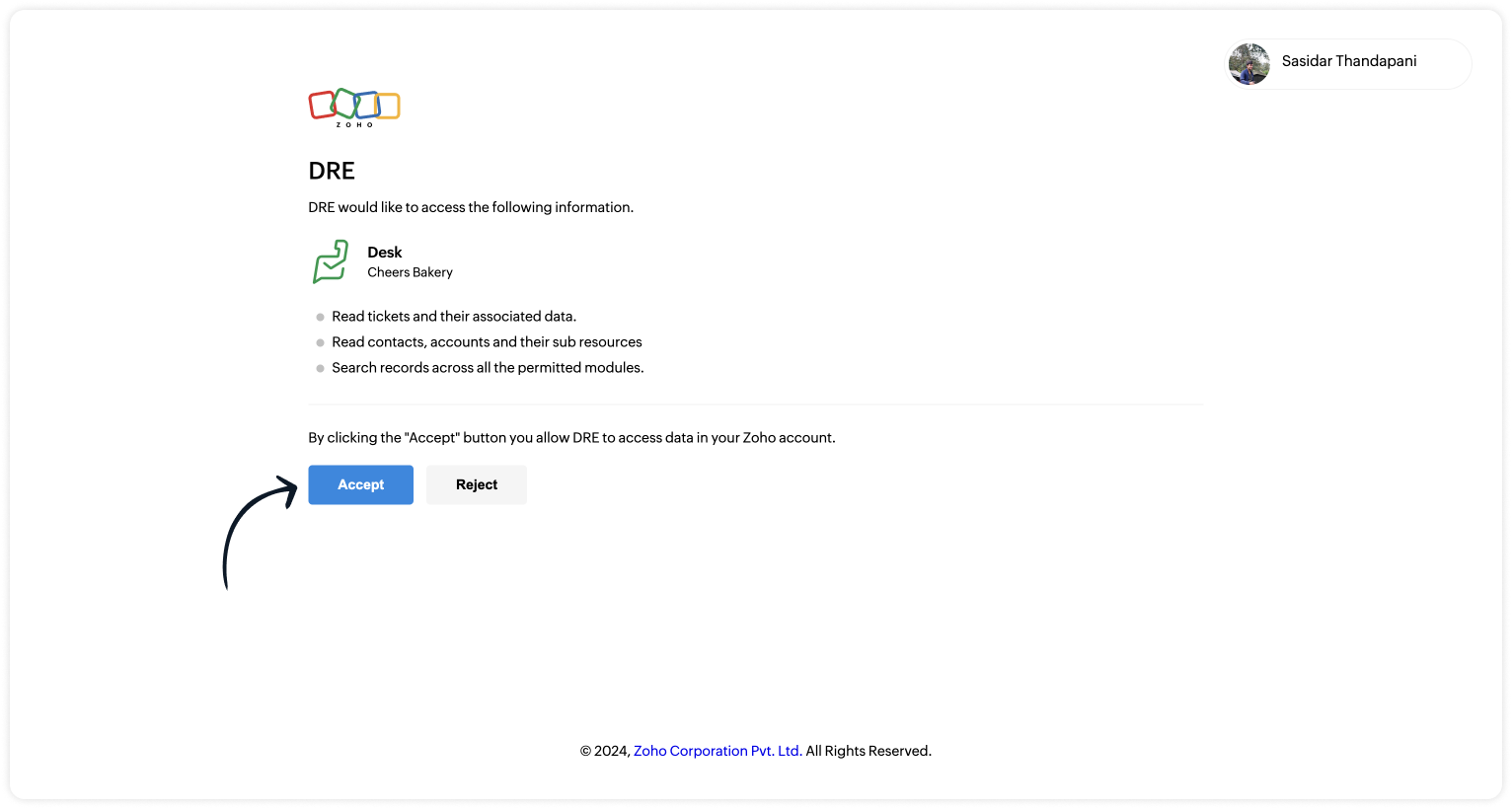
  • Upon successful authentication,  Zoho SalesIQ will be connected with Zoho Desk.
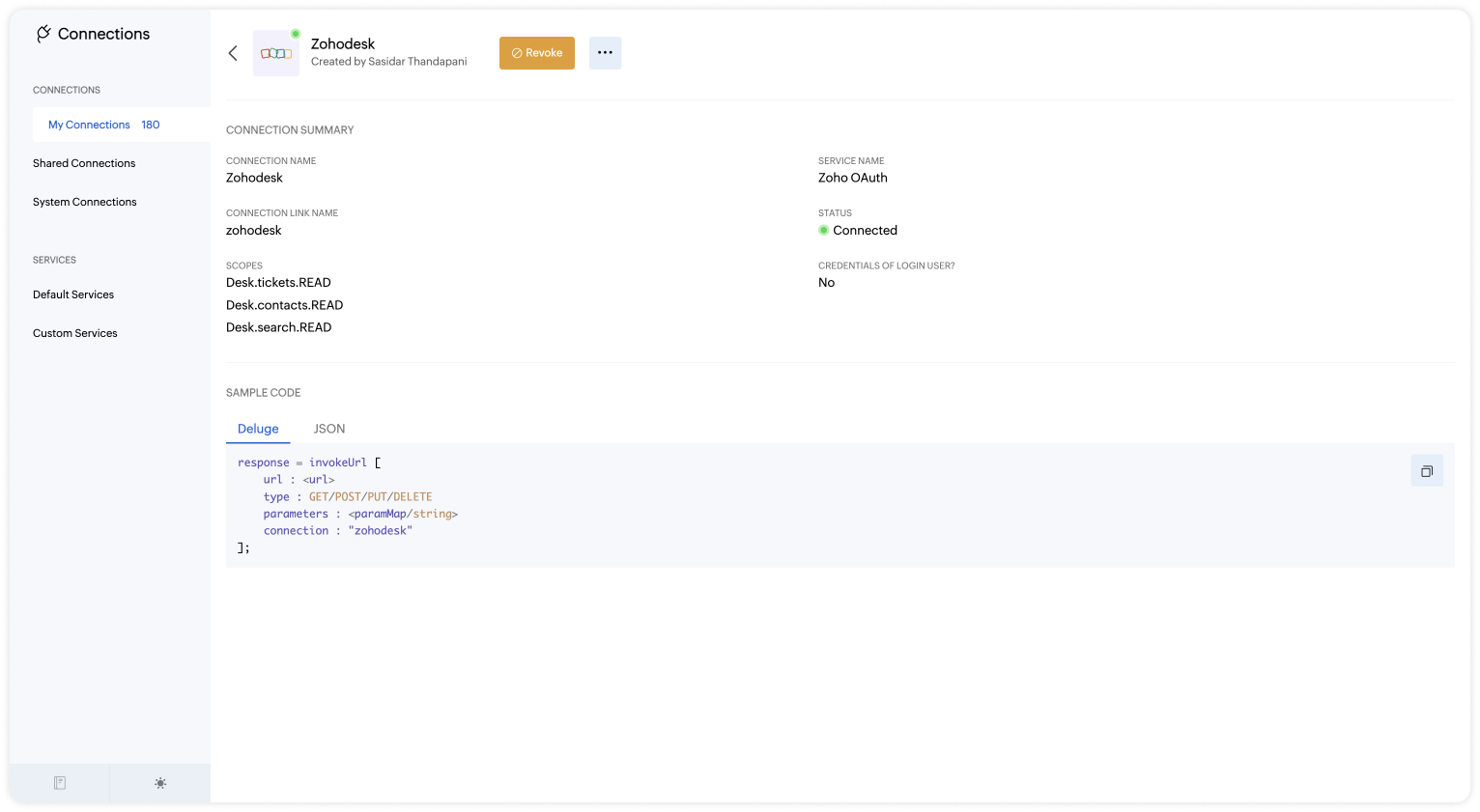
  • The connection is successfully established. 

Step 2 - Build the Plug

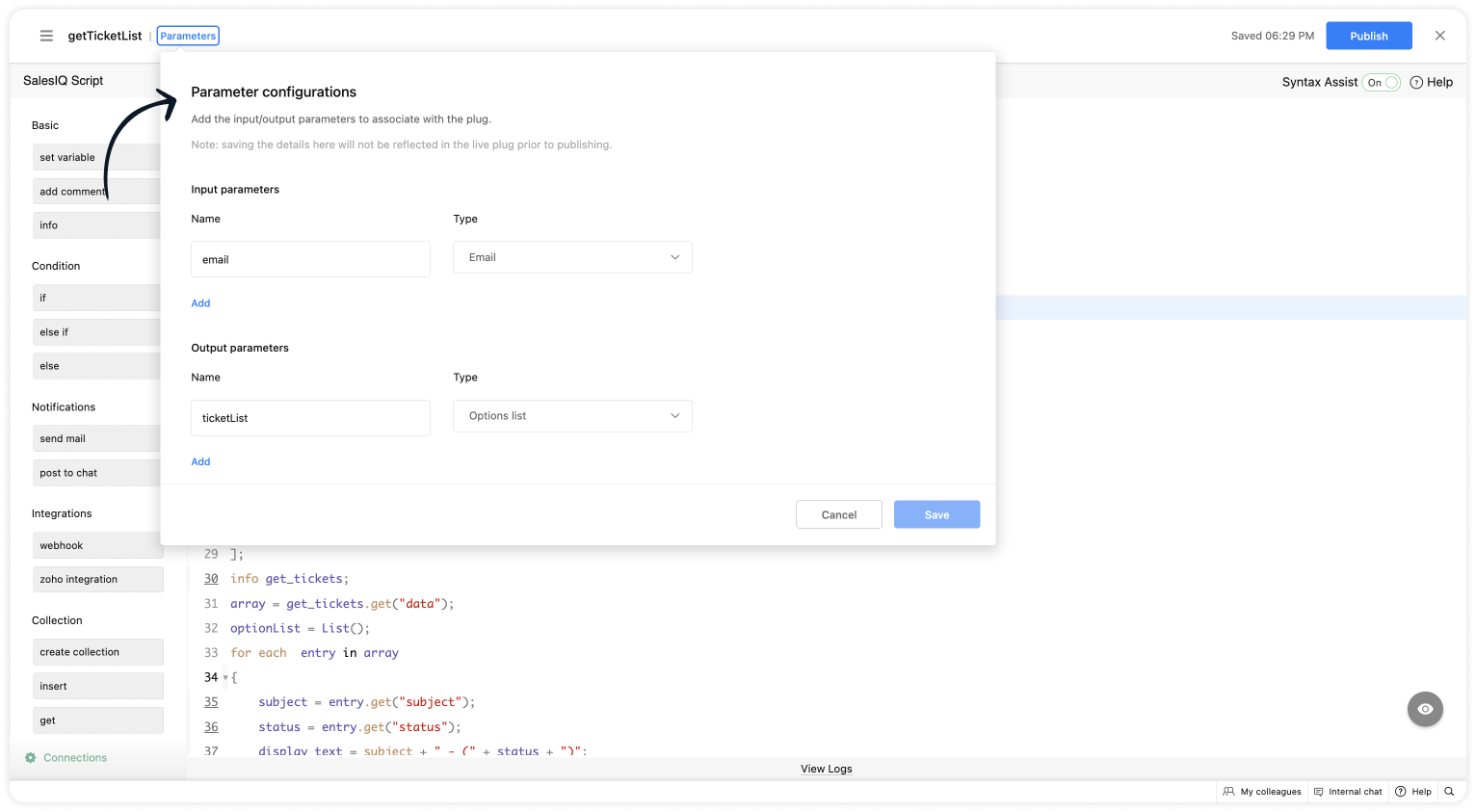
As we have created a connection between SalesIQ and Desk successfully, it's time to build the plug. The first step in building the plug is defining the parameters. 

Input Parameters
  • Name : email | Type : Email
Output Parameters
  • Name : ticketList | Type : Option List

Script to get the list of tickets
  • Copy the code below and paste it into your plug builder. Then, make the following changes. 
  • In line #8, get your Desk org ID (Settings > Developer Space > API > Scroll down to find the "OrgId").
  1. if(session.containsKey("email"))
  2. {
  3. email = session.get("email").get("value");
  4. }
  5. // Getting the contact ID from the email - https://desk.zoho.com/DeskAPIDocument#Search#Search_SearchContacts
  6. url = "https://desk.zoho.com/api/v1/contacts/search?email=" + email;
  7. header = Map();
  8. header.put("orgId","012345");
  9. //Change your org ID (Settings > Developer Space > API > Scroll down > "OrgId")
  10. getcontact = invokeurl
  11. [
  12. url :url
  13. type :GET
  14. headers:header
  15. connection:"zohodesk3"
  16. ];
  17. info getcontact;
  18. contact_id = getcontact.get("data").getJSON("id");
  19. info contact_id;
  20. url_ticket = "https://desk.zoho.com/api/v1/contacts/" + contact_id + "/tickets?sortBy=-createdTime&limit=3";
  21. // Get associate ticket of a contact - https://desk.zoho.com/DeskAPIDocument#Contacts#Contacts_ListContactsByIds
  22. get_tickets = invokeurl
  23. [
  24. url :url_ticket
  25. type :GET
  26. headers:header
  27. connection:"zohodesk3"
  28. ];
  29. info get_tickets;
  30. array = get_tickets.get("data");
  31. optionList = List();
  32. for each  entry in array
  33. {
  34. subject = entry.get("subject");
  35. status = entry.get("status");
  36. display_text = subject + " - (" + status + ")";
  37. ticketNumber = entry.get("ticketNumber");
  38. optionList.add({"id":ticketNumber,"text":display_text});
  39. }
  40. response = Map();
  41. response.put("ticketList",optionList);
  42. return response;
  • Then, click Save, preview the plug and Publish it. 
 
Step 3 - Adding the plug to the Codeless bot builder
  • Navigate to Settings > Bot > Add, provide the necessary information, and select Codeless Bot as the bot platform. You can also open an existing bot.
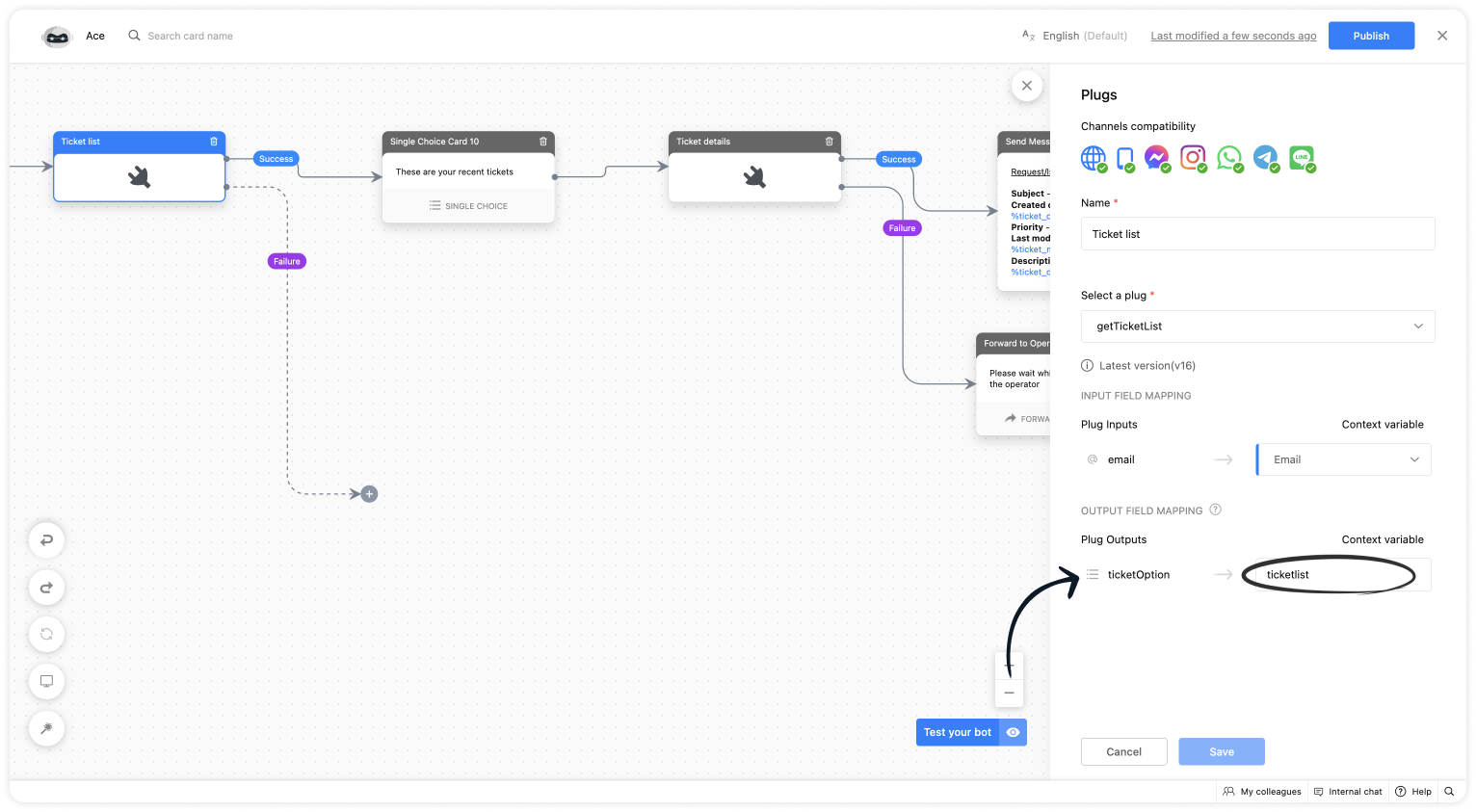
  • Click on Plugs under Action cards, select the plug you have created and provide the input values for the parameters defined in the plug builder.
  • Choose the %visitor.email% variable for the name.
  • Provide a variable name for the ticket list.
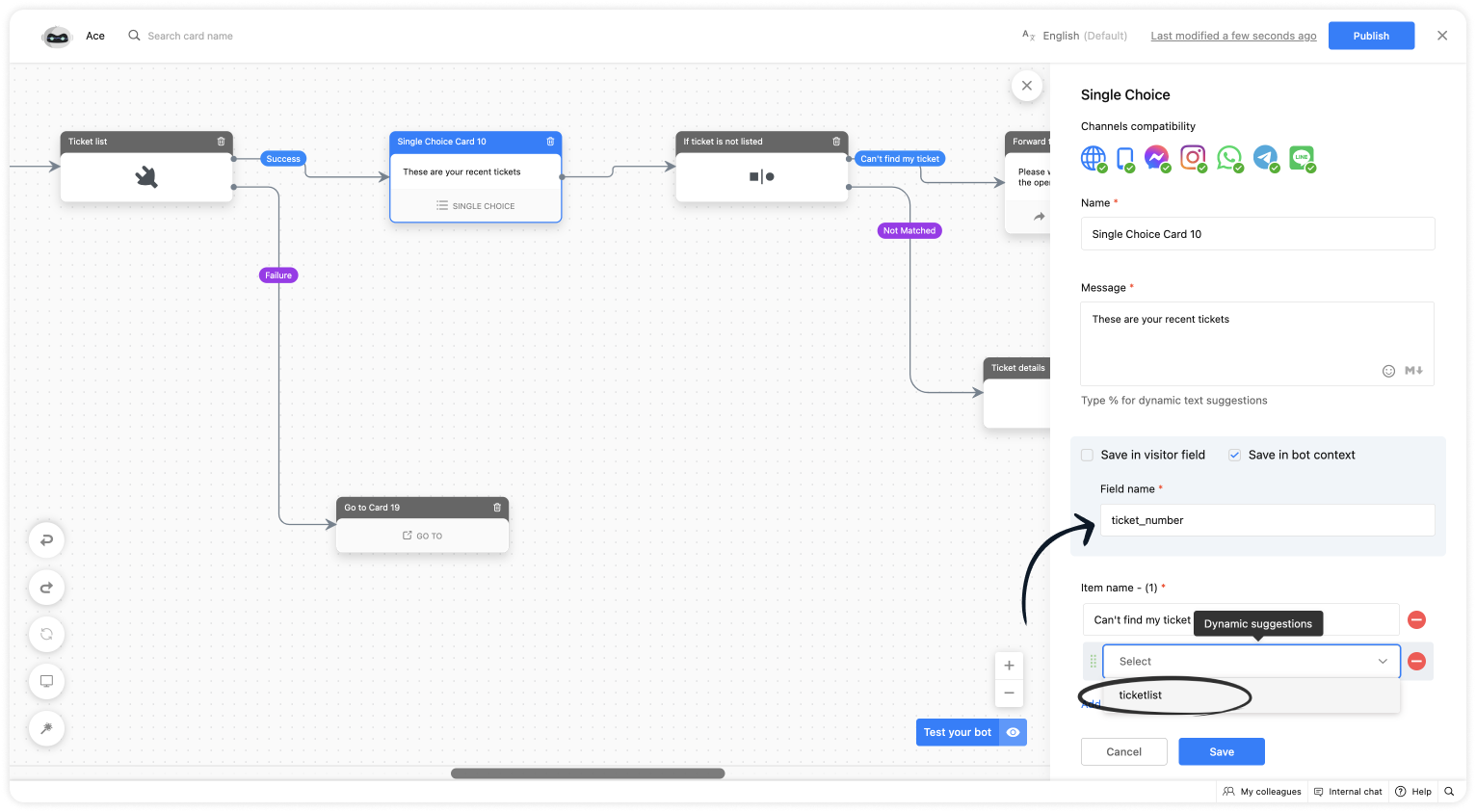
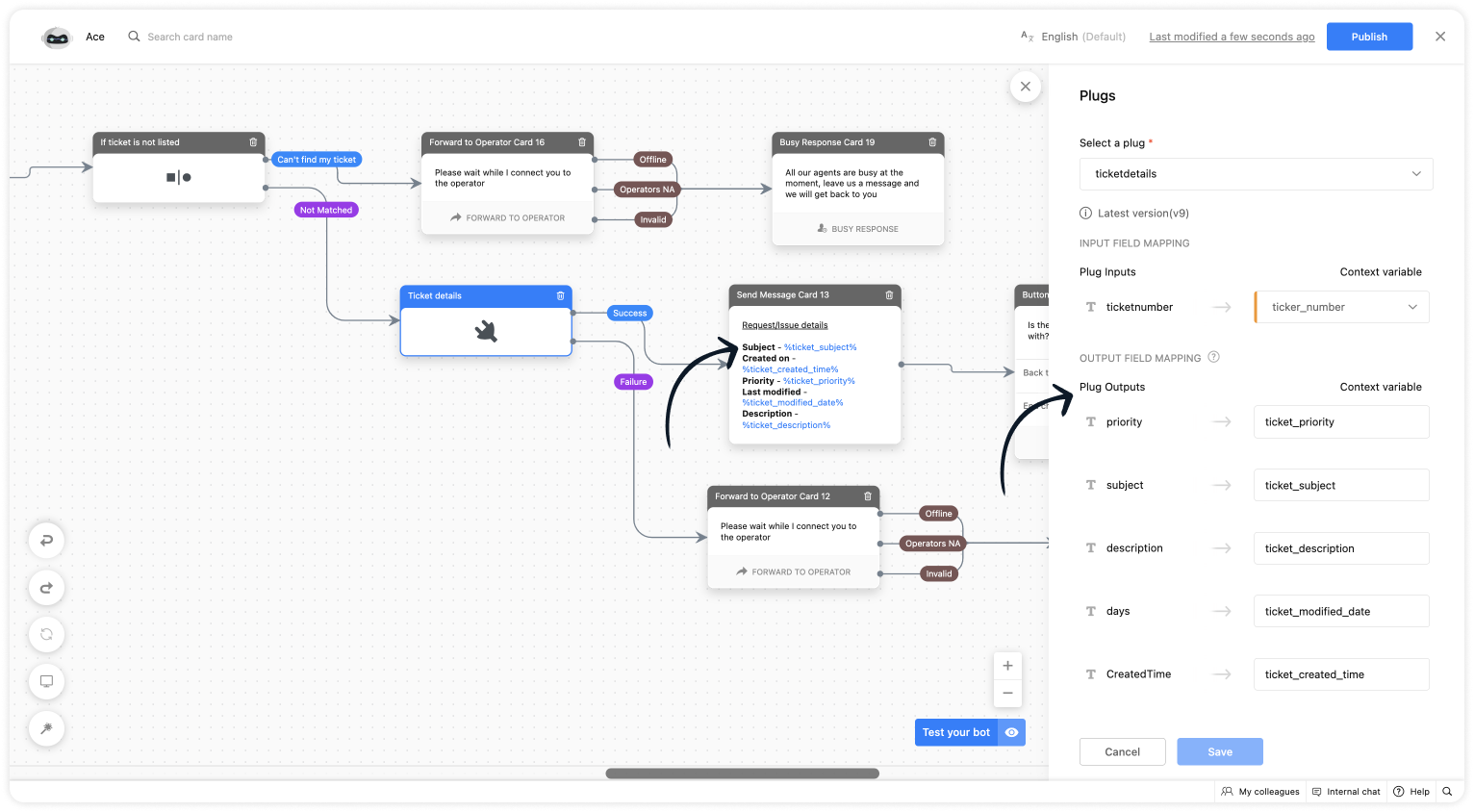
  • Use a single choice card, click on Save in bot context, give a variable name and select the context variable under dynamic suggestion

  • Then, use this plug to show the ticket details.

I hope this was helpful. Please feel free to comment if you have any questions. I'll be happy to help you. 


Best regards
Sasidar Thandapani

    • Recent Topics

    • Invalid scope choice: Workdrive integration in CRM

      Bug: There is an invalid option in the permission choices for Workdrive integration in CRM. If the entry "WorkDrive.teamfolder.CREATE" is selected, it will return a message indicating invalid OAuth scope scope does not exist.
    • How to add line breaks in zoho.cliq.postToUser(...) message?

      In a CRM function using Deluge I'm sending this message and attempting to add some line breaks but they are ignored. Is there another way to add these breaks? My message: message: New urgent task\nDescription \nThis is a fake description.\n A new line?
    • Enable Free External Collaboration on Notecards in Zoho Notebook

      Hi Zoho Notebook Team, I would like to suggest a feature enhancement regarding external collaboration in Zoho Notebook. Currently, we can share notes with external users, and they are able to view the content without any issue. However, when these external
    • emailing estimates

      Shows up in the customer mail logs as sent but nobody is receiving them, even when I send them to myself I don't get them ??? Something wrong with the mail server or my end ?
    • Powering Customer Support with our women

      In Zoho Desk support, women make up 50% of our team. We see this as one of our strengths, reflecting the spirit of this year’s theme, "Give to Gain". Our women find their balance Women carry many responsibilities — they represent frontline support, lead
    • How to use OR when filtering using two fields

      I want to create return a list of Account Names by filtering on Field1 = "yes" OR Field 2 = "no" I can't see how to use the OR in the filter.
    • Mobile phone version not working well

      I am working on the Zoho Site Builder. In the preview the desktop version looks okay, but in the mobile phone preview many words are cut off in the weirdest (wrong) way. How can I fix that?
    • Zoho - Please explain difference between Thread view and Conversation view on Ticket

      I have reviewed the help document here but am still not clear on the difference between the two views. As an example, I just had a back and forth on a ticket: - Customer emails support email. - I email back from Desk. - Customer responds back. - I email back from Desk. On the upper left drop down box on the ticket Zoho Desk now says this is "4 Threads" and "4 Conversations" . How is that 4 threads?? By my count it is 1 thread and 4 conversations (assuming by "conversation" Zoho means number of total
    • Can't rename groups on Mac desktop app

      I'm working on an up-to-date Mac with a freshly downloaded Notebook app. I'm trying to rename a group within a notebook. Here I have, left to right, a note, a group, and a note. I select the group. On the top left, I select Action. On the dropdown, "Rename"
    • Zoho Forms - Feature Request - Year Field

      Hi Zoho Forms Team, You currently have the following date and time fields: Date Time Date and Time Year and Month It would be useful if you could include a "Year" field For example a recent application I completed said "What year was your house built?"
    • I need help to take Reports for tickets moved between departments.

      Hi, I need help to take Reports for tickets moved between different departments. Pls guide Shyam
    • Export to excel stored amounts as text instead of numbers or accounting

      Good Afternoon, We have a quarterly billing report that we generate from our Requests. It exports to excel. However if we need to add a formula (something as simple as a sum of the column), it doesn't read the dollar amounts because the export stores
    • Increase Round Robin Scheduler Frequency in Zoho Desk

      Dear Zoho Desk Team, We hope this message finds you well. We would like to request an enhancement to the Round Robin Scheduler in Zoho Desk to better address ticket assignment efficiency. Current Behavior At present, the Round Robin Scheduler operates
    • Automation #6 - Prevent Re-opening of Closed Tickets

      This is a monthly series where we pick some common use cases that have been either discussed or most asked about in our community and explain how they can be achieved using one of the automation capabilities in Zoho Desk. Typically when a customer submits
    • Zoho Desk EU slow/unresponsive

      Has anyone else got issues with ZohoDesk today in the EU? It takes an age to come back and if you do start typing something and try and send or save it looks like it times out. We are also getting this pic. ot I can't see anything on https://status.zoho.eu/
    • EU DC Partial Outage Resolved: A Detailed RCA

      Incident Summary Due to an overload on one of the nodes in the EU DC for Zoho Desk, the system was unable to handle the heavy load, causing a slowdown in requests and resulting in a partial outage for customers with data residing in that node. On May
    • Use Zoho Creator as a source for merge templates in Zoho Writer

      Hello all! We're excited to share that we've enhanced Zoho Creator's integration with Zoho Writer to make this combination even more powerful. You can now use Zoho Creator as a data source for mail merge templates in Zoho Writer. Making more data from
    • Perfomance Management - Zoho People

      Hi team, I am looking for performance management data such as KRA, goals, feedback, appraisals, etc., in Zoho Analytics. However, I am unable to find these metrics while editing the setup. Could you please confirm whether these fields are available in
    • Deprecation of the Zoho OAuth connector

      Hello everyone, At Zoho, we continuously evaluate our integrations to ensure they meet the highest standards of security, reliability, and compliance. As part of these ongoing efforts, we've made the decision to deprecate the Zoho OAuth default connector
    • Good news! Calendar in Zoho CRM gets a face lift

      Dear Customers, We are delighted to unveil the revamped calendar UI in Zoho CRM. With a complete visual overhaul aligned with CRM for Everyone, the calendar now offers a more intuitive and flexible scheduling experience. What’s new? Distinguish activities
    • Zoho Mail iOS app update: Display recipient's nickname on contact suggestion

      Hello everyone! In the most recent version(v3.3.1) of the Zoho Mail iOS app update we have brought in support to display recipient's nickname in contacts suggestion. Please update the app to the latest version directly from the App Store or using the
    • Digest Février - Un résumé de ce qui s'est passé le mois dernier sur Community

      Bonjour chers utilisateurs, Le 26 février, nous avons organisé notre première session Ask the Expert de 2026. Nous sommes heureux de partager que ce fut une session très interactive, avec de nombreuses questions intéressantes posées par nos clients. Si
    • Zoho CRM Case Notes - Share to Customer

      Hi team does anyone know the Api to set a note, against a case, to shared with customer? i cant seem to find it  cheers 
    • Zoho Forms - Feature Request - Past Into Scanning/OCR Field

      Hi Zoho Forms Team, You recently introduced the OCR/Scanning field which I have found great use for with one client who receives work orders as a screenshot from one customer. I want to raise a feature request here which would make that field even more
    • Synching changes to Stripe when changes are made in Zoho Billing

      We have a situation where we have merged customers in Zoho BIlling and then found out later that the payment in Stripe was not updated and still associated with the old customer record. The card gets updated and billed, but that payment is still associated
    • Send out follow-up email in the same thread (threaded conversations in individual emails) from Zoho CRM

      Hi, I'm new to Zoho. I'm trying to send individual emails to my leads one by one. And I'll send out follow up email if I don't hear back from them later. However, instead of sending a new email, I want to reply in the same email thread so that the recipients
    • Depositing funds to account

      Hello, I have been using Quickbooks for many years but am considering moving to Zoho Books so I am currently running through various workflows and am working on the Invoicing aspect. In QB, the process is to create an invoice, receive payment and then
    • Is Zoho Sites still actively being developed?

      Hello, Is Zoho Sites still actively being developed as part of the Zoho ecosystem? I noticed that the What's New page (https://www.zoho.com/sites/whats-new.html) does not show any updates since Q1 2025. We were considering migrating our website from Squarespace
    • FSM integration with Books

      Hi, I have spent a few months working with FSM and have come across a critical gap in the functionality, which I find almost shocking....either that, or I am an idiot. The lack of bi-directional sync between Books and FSM on Sales Orders/ Work Orders
    • web to lead

      Can anyone help me how to create web to lead from zoho marketing automation
    • Introducing Workqueue: your all-in-one view to manage daily work

      Hello all, We’re excited to introduce a major productivity boost to your CRM experience: Workqueue, a dynamic, all-in-one workspace that brings every important sales activity, approval, and follow-up right to your fingertips. What is Workqueue? Sales
    • UI issue with Organize Tabs

      When looking at the organize Tabs window (bellow) you can see that some tabs are grayed out. there is also a "Add Module/Web Tab" button. When looking at this screen it's clear that the grayed out tabs can not be removed from the portal user's screen
    • I created a signup form in Zoho Marketing Automation with the correct field mapping, but the data is not being reflected under Leads in Zoho CRM.

      web to lead from zoho marketing automation
    • Pasted Images not being embedded in custom mail

      Hi, I'm making a custom report by email based on commentaries. I have the email ready, all working great except for images that are being pasted in the commentaries. Zoho deals with them as temp images and so it requires authentication to view them, something
    • Kaizen #232 - Building a Ticket Escalation Mechanism from Zoho CRM

      Howdy, Tech Wizards! Picking up the thread from last week, we will continue our Zoho CRM and Zoho Desk integration. In Kaizen #231 - Embedding Zoho Desk Tickets in Zoho CRM, we built a Related List widget that displays open Zoho Desk tickets within the
    • Inactive License for free account.

      I recently upgraded my Cliq subscription not my team (on the free version), are unable to login to their accounts. The error message received is Inactive License Looks like you have not been covered under the current free plan of users. Please contact
    • Deluge scripts

      Why is there not a search function to make it easier to find the script of interest when modifications are required.
    • Zoho Sheet for Desktop

      Does Zoho plans to develop a Desktop version of Sheet that installs on the computer like was done with Writer?
    • Zoho Books (and other Finance Suite Apps) - Clickable Item Name on Invoices and Reports

      Hi Zoho Books team, It would be really helpful if the Item Name on Reports were clicable to take me to the item. The same on Invoices, often I am looking at an invoice and I want to look at the deails of a product. A link here would be helpful to jump
    • Zoho Books - Payment Gateway - Revolut

      Hi Books Team, My feature request if to include the popular platform Revolut as a payment collection option on invoices in Zoho Books. Please upvote if you are also looking for this option.
    • Next Page