Create Your Own Issue Management System
Effective issue management is a cornerstone of project success. Every bug or issue, no matter how small, needs to be tracked and resolved in time to maintain project momentum. In this post, we’ll explore how an issue management system in Zoho Projects is used to manage issues in our own product management process.
Real-time Example:
During the software testing process, when the tester identifies an issue impacting the Global Web Tab feature task where the alignment breaks in certain browsers, it follows a predefined process for resolution. Here’s how the issue management system handles this end-to-end.
Submit Issues using Custom Fields
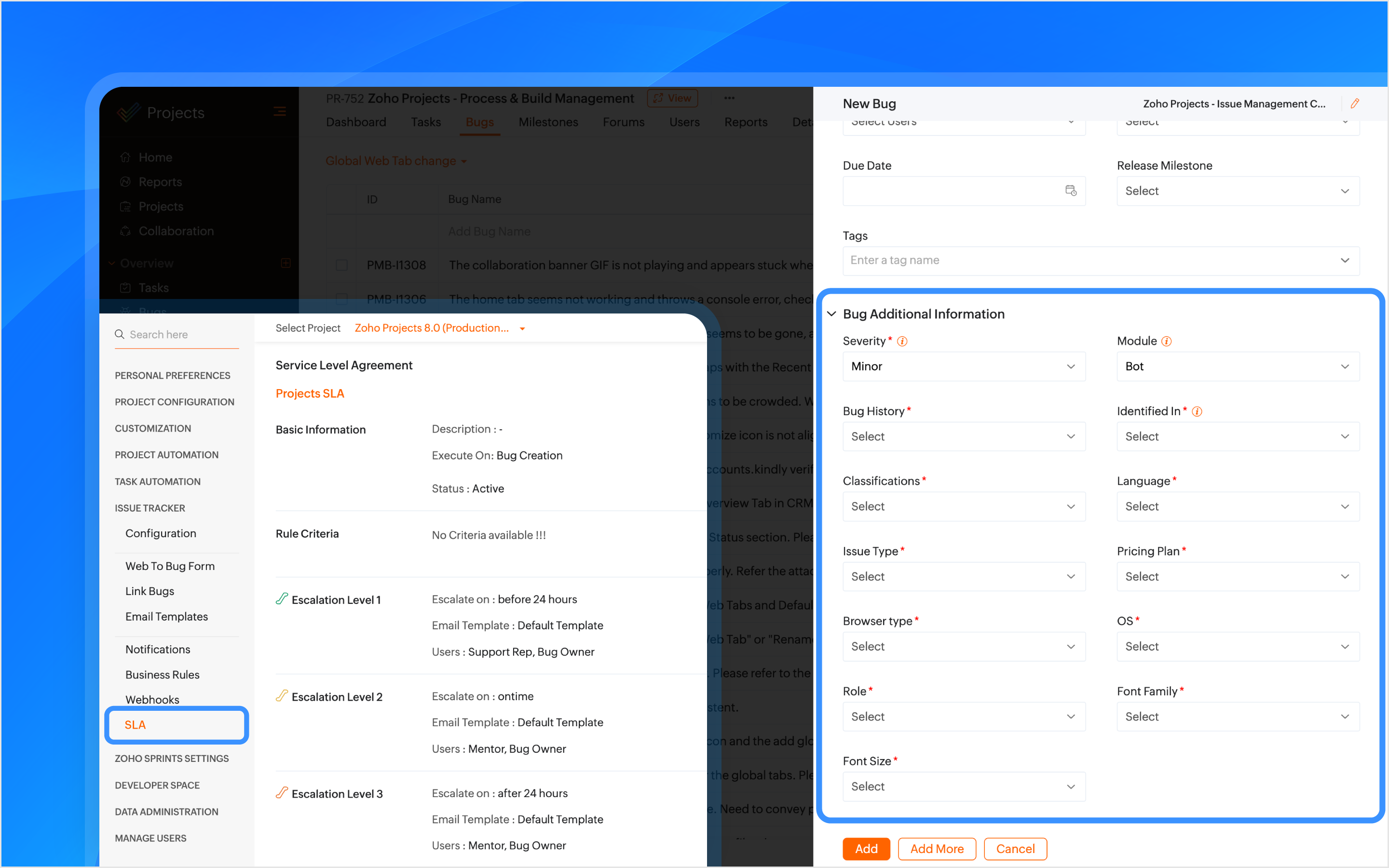
Custom fields are created within the Issue Layout, allowing testers to submit issues with key details like severity, module, browser type, and font family. In the case of the Global Web Tab alignment issue, the browser type field helps pinpoint which environment is affected.

How Other Industries Can Use Issue Layouts In This Process:
Construction: Track issues like material defects or design flaws using custom fields such as location, material type, grade, etc.
Manufacturing: Track production line breakdowns or machine malfunctions issues with custom fields like product phase, machine type, location, etc.
SLAs Based on Issue Type
SLAs are configured based on the issue type, such as Support, Security, Privacy, or Performance, to set resolution deadlines. If the issue is categorized as one of these types, the SLA triggers a resolution within 24 hours. If the issue remains unresolved, it escalates through Levels 1–4.
How Other Industries Can Use SLAs In This Process:
Construction: Set SLAs to resolve critical issues like safety violations or structural failures quickly.
Manufacturing: Set SLAs for issues like production line stoppages to minimize downtime.
Automate Assigning Issues
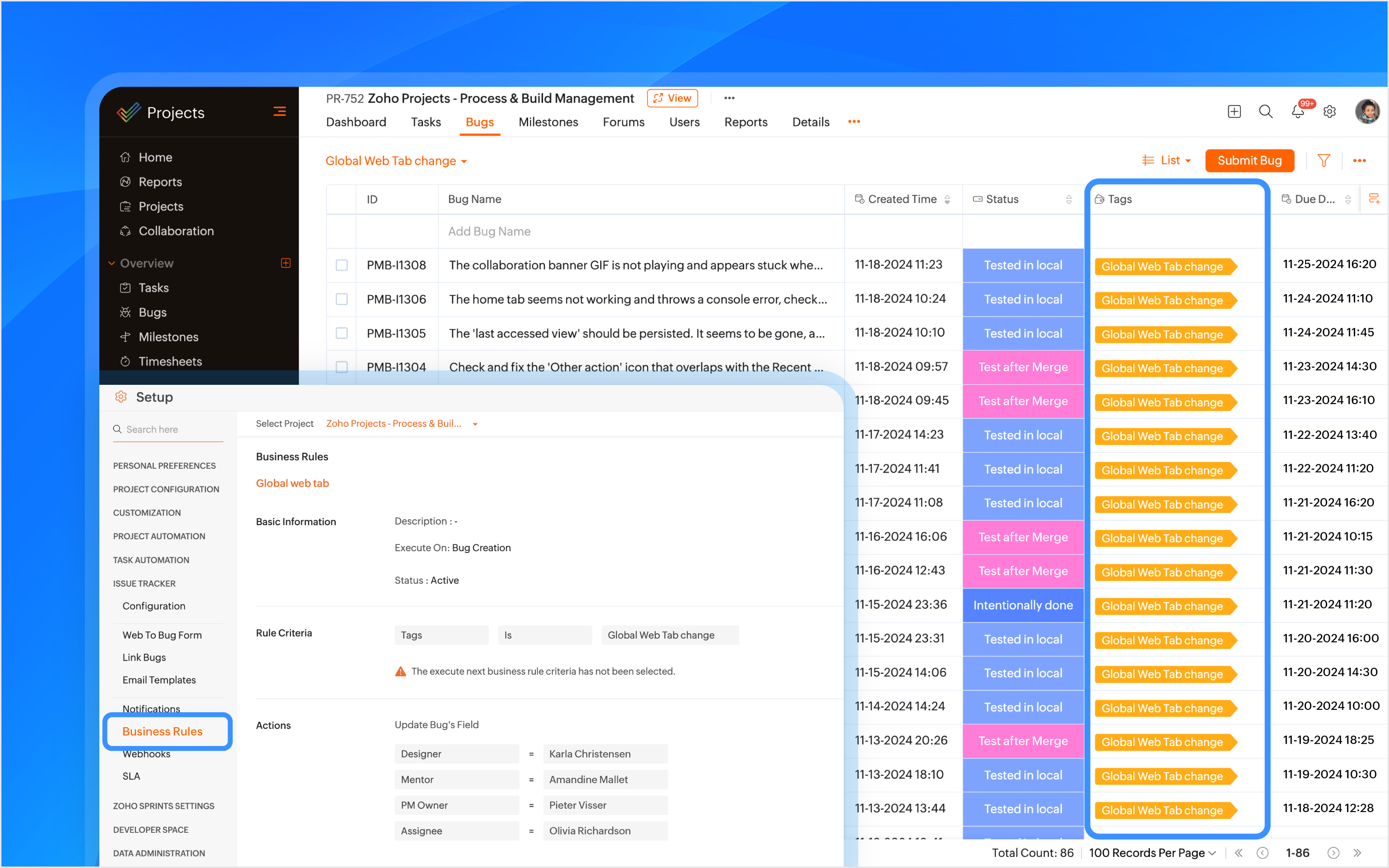
A tag is created using the feature name and is associated with the issue when it is submitted. Business rules are created using the tags as criteria to automatically assign the issue to the relevant developers, designers, managers, and project managers (PMs).
How Other Industries Can Use Tags In This Process:
Construction: Automatically assign issues using the issue type as tags, such as plumbing or electrical, to the appropriate contractors or subcontractors.
Manufacturing: Use tags like machinery or production to assign issues to maintenance teams or shift managers automatically.
Bulk Update Issues
A custom view is created to track and bulk update all issues related to the feature using the tag as a criteria.
How Other Industries Can Use Custom Views In This Process:
Construction: Create custom views to track and update issues related to electrical work.
Manufacturing: Create custom views to track and update production-related issues.

Manage Duplicate Issues
If a duplicate issue is submitted, the developer can link it to the original issue using the is duplicate of link type for identification. A custom function is created to ensure that duplicate issues are closed only when the original issue is closed ensuring no redundancy in the issue tracking process.
How Other Industries Can Use Link Issues In This Process:
Construction: Link duplicate issues like multiple reports of the same electrical fault.
Manufacturing: Link duplicate maintenance issues to the original issue to ensure a single resolution.

Associate Tasks to Issues
The Global Web Tab task is associated with the issue, allowing both the development and QA teams to monitor the progress of the work item from a single place. When a tester opens the task, they can view all associated issues, and when opening an issue, they can easily track the associated task.
How Other Industries Can Use Task Association In This Process:
Construction: Associate tasks like Foundation to issues like Cracked Foundation for easy tracking.
Manufacturing: Associate maintenance tasks to machinery issues to track progress.
Automating Status Updates
A custom function is created to automate the update of issue statuses. when the tester updates the task status to Started Testing, the associated issue status is automatically updated to In QA Process. Similarly, when a developer resolves the issue and updates the task status to Resubmit for QA, the associated issue status is updated to To be tested. Issue Tracker Notifications are used to send notifications to all team members to keep everyone informed about such status updates.
How Other Industries Can Use Custom Functions In This Process:
Construction: When the Electrical Safety Check issue status is updated to Passed, the associated task, such as Wiring Installation, will automatically update its status to Inspection Complete.
Manufacturing: When the Material Shortage issue is updated to Resolved, the task status for Electrical Installation will automatically update to Work Completed.
Automate Adding Followers
Sometimes issues need further validation before they are resolved. Developers can update the issue status, such as Intentionally Done or Discuss with the PM. Business rules are created to automatically add relevant product managers (PMs) and other team members as followers with such statuses as criteria. This ensures that decisions are validated and any necessary inputs are added through comments before moving forward.
How Other Industries Can Use Business Rules In This Process:
Construction: Automate adding followers to validate electrical safety checks or structural issues before moving forward.
Manufacturing: Automate adding followers to validate machine repair statuses before completing maintenance tasks.
Checklist for Testers
Once the feature is reviewed and tested, the Checklist Extension is used for the associated task. The tester is required to complete a predefined checklist within the task to verify that all relevant testing scenarios have been covered. This checklist ensures that no critical testing aspects are missed.
How Other Industries Can Use Checklist Extension In This Process:
Construction: Use checklist to create a punch list to ensure all inspections, tests, and final verifications are completed before a task issue is marked as completed.
Manufacturing: Create a compliance checklist to ensure product assembly and quality control steps are completed before a task issue is marked as completed.
Note: Checklist extension can be used for both tasks and issues.

Resolve Issues
Upon resolving the issue, the developer can resolve the issue from the issue details page with the context.
Custom Notifications
Custom email templates in Issue Tracker Notifications are used to automate communication. Developers and the relevant team members are automatically notified about reopened issues. This helps prevent delays in the project.
How Other Industries Can Use Email Templates In This Process:
Construction: Create customized email template and use it in issue tracker notifications for critical issues like safety violation when reopened.
Manufacturing: Create customized email template and use it in issue tracker notifications for maintenance issues when reopened.
Features used in the process: Issue Layouts, SLAs, Tags, Business Rules, Issue Tracker Notifications, Link Issues, Custom Function, Checklist Extension, and Email Templates.
Topic Participants
Navya Nune
frankn66
François
Monica P
Sticky Posts
Introducing Version-3 APIs - Explore New APIs & Enhancements
New Update - The end of life timeline for V2 APIs has now been extended to 30th June, 2026 Happy to announce the release of Version 3 (V3) APIs with an easy to use interface, new APIs, and more examples to help you understand and access the APIs better.CodeX Scripts for Enforcing Custom Project Logic
Every organization has a defined way of executing projects. There are clear expectations around how tasks should move, when projects should progress, and which actions require validation. When these rules are consistently followed, projects remain structuredAutomation Series: Auto-create Dependent Task on Status Change
In Zoho Projects, you can automatically create and assign a dependent task when a task’s status is updated. This helps teams stay aligned, ensures reviews happen on time, and reduces manual effort. In this post, we’ll walk through an easy setup usingTime Log Reminder
Tracking the time spent on tasks and issues is one of the most important functions of a timesheet. However, users may forget to update the time logs because they have their own goals to achieve. But, time logs must be updated at regular intervals to keepIntroducing the Zoho Projects Learning Space
Every product has its learning curve, and sometimes having a guided path makes the learning experience smoother. With that goal, we introduce a dedicated learning space for Zoho Projects, a platform where you can explore lessons, learn at your own pace,
Recent Topics
Hiding / removing Currency field from Layout
Hello, I'm working on the LEAD standard layout of Zoho CRM. I like to have it as minimal as possible for our team. I could remove most of the field, but Currency is not possible. As lead, I don't quite understansd the necessity to have Currency as mandatory.Updating Sales orders on hold
Surely updating irrelevant fields such as shipping date should be allowed when sales orders are awaiting back orders? Maybe the PO is going to be late arriving so we have to change the shipment date of the Sales order ! Not even allowed through the api - {"code":36014,"message":"Sales orders that have been shipped or on hold cannot be updated."}Can we have Backorder Management ?
Can we have Backorder Management ?Accept credit card payment for multiple invoices
We have a problem with Zoho Books. While we can charge a customer's credit card for an individual customer invoice, we cannot charge a customer's credit card for more than one invoice. In our business, it is common for a client to phone up and say, "HereAnyone in Australia using Zoho Books AND has their account with NAB?
Hi I have an account with both NAB and Suncorp. Suncorp transaction come in the next day however NAB transactions take 4-5 business days to appear. eg: A deposit made today in my Suncorp will be imported into Zoho tomorrow. A deposit made today to the NAB account will be imported maybe Saturday (Friday overnight). I have contacted both Zoho and NAB but noone seems to know why. I was just wondering if anyone else in Australia uses NAB and has this issue (or doesn't) maybe we could compare notes andNewby Questions - Vendors, Customers, and Income vs. Other Income Clarifications
Q1. For Deposits, there does not seem to be an option for "Income". "Other Income" is an option however. What is the process to add the option to assign a deposit to type "Income"? Q2. In many cases Vendors and Customer are the same. Vendors may purchaseISO 3166-2 Compliant Country and Regions
Zoho should consider implementing ISO 3166-2 standards for countries and regions in address dropdowns. It adds a lot of noise in the data when items added programmatically conform to ISO 3166-2 (e.g., TX for Texas, CA for Canada, etc.), but the few itemsTax on Imported goods charged by Shipping Company
Hi Folks, I imported goods from outside Canada, for better understanding I will give an example data. imported goods value: 2000$ The shipping company sent me an invoice containing the following information: Custom duty on imported goods: 400$ AdministrationInvoice Import Error: "Either Tax or Tax Exemption Reason is required" - Recurring Across All Attempts
Issue Description: I'm experiencing a critical issue with invoice imports in Zoho Books. Every import attempt fails with the same error message, regardless of the tax data provided: Either Tax or Tax Exemption Reason is required. This error is blockingZia Agents in Zoho CRM: a better way to set up digital employees
Hello everyone, If you've been using Zia Agents in Zoho CRM, so far using Connections was the only deployment method you're familiar with. You create an agent in Zia Agents (define its objective, write instructions, use tools, add knowledge base) andAmazon FBA integration - Handle invoice reconciliation under different GSTINs,
Dear Zoho Community, Thank you for the clarification regarding the Amazon FBA integration, default warehouse, and GSTIN mapping in Zoho Inventory. I understand that Zoho currently supports only one warehouse for Amazon FBA, and that all FBA orders areZoho CRM Copilot Connector
Hello, Are there plans to release a connector for Zoho CRM and Copilot? I'm in the early research stages of potentially switching our CRM solution to Microsoft Dynamics because of its out of the box integration with Copilot. The advantage being that weZoho Sheet for Desktop
Does Zoho plans to develop a Desktop version of Sheet that installs on the computer like was done with Writer?Automation Series: Notify Admin When User Accepts an Invitation
In Zoho Projects, a portal is an organisational-level workspace where user can manage multiple projects. To join a portal, a user will have to accept the portal invitation. However, it is important for admins to be in the loop when a user accepts theLimitation in Using Images or Icons within Dropdown Options in Zoho Survey
Zoho Survey does not support the inclusion of images or icons within dropdown (select box) options. Dropdown question types are limited to text-only choices, which restricts the ability to present visually rich options such as product images or icons.Zoho Bookings - Feature Request - Services Which Include A Resource and Consultant
Hi Bookings Team, My feature request is to have the ability to add Consultants and Resources to Services. Use case: Your business provides first aid training and there are certain equpment you require to provide the half day training. There are only specificWhat's New in Zoho Invoice | January – March 2026
Hello everyone! We're back with the latest updates and enhancements we've rolled out in Zoho Invoice from January to March 2026. Here's what's new this quarter: Compact Bilingual Template [GCC Editions] Tax Calculation on MRP for Tobacco Products [IndiaWhat is a realistic turnaround time for account review for ZeptoMail?
On signing up it said 2-3 business days. I am on business-day 6 and have had zero contact of any kind. No follow-up questions, no approval or decline. Attempts to "leave a message" or use the "Contact Us" form have just vanished without a trace. It stillcan change deal colors in bigin?
can be super useful if we can change colors deals process any way to do it?Facturation électronique 2026 - obligation dès le 1er septembre 2026
Bonjour, Je me permets de réagir à divers posts publiés ici et là concernant le projet de E-Invoicing, dans le cadre de la facturation électronique prévue très prochainement. Dans le cadre du passage à la facturation électronique pour les entreprises,Subform edits don't appear in parent record timeline?
Is it possible to have subform edits (like add row/delete row) appear in the Timeline for parent records? A user can edit a record, only edit the subform, and it doesn't appear in the timeline. Is there a workaround or way that we can show when a userZoho One - White Label
Releasing a white-label feature for Zoho One, or any software or service, can offer several advantages and benefits for both the company providing the software (Zoho in this case) and its users. Here are some key reasons for releasing a white-label featureGoogle Fonts Integration in Pagesense Popup Editor
Hello Zoho Pagesense Team, We hope you're doing well. We’d like to submit a feature request to enhance Zoho Pagesense’s popup editor with Google Fonts support. Current Limitation: Currently, Pagesense offers a limited set of default fonts. Google FontsClient Script | Update - Client Script Support For Custom Buttons
Hello everyone! We are excited to announce one of the most requested features - Client Script support for Custom Buttons. This enhancement lets you run custom logic on button actions, giving you greater flexibility and control over your user interactions.Analytics : Highlighting a single bar in a bar chart
I have a bar chart showing values across a year by week. I have a user filter to change the selected week, however the year graph will remain as showing the full year. Is there anyway to conditionally format or construct the year graph to highlight the selected week ?Zoho CRM with Built-In MCP Support
Zoho CRM now provides built-in support for Model Context Protocol (MCP), enabling AI tools to connect and perform CRM actions using natural language. Zoho CRM MCP servers act as a bridge between AI agents and Zoho CRM, exposing CRM capabilities as callableChoose Component for User Filter
This filter in the Choose Component for User Filter would be better if had an Order or Group by function. Also, the Specify the default filter values: is very confusing and limiting.Inviting client to setup brand and more
Hello, There are two most critical functions which must be added in Zoho Social for Agency. Invite user/client to setup brand and link social media. As a agency we tell our clients, we don't want your social media credentials to manage your account. ThenDisable - order online at zoho store
I'm running cafe with Zoho POS. Doing good, however this enablement (Disable online order only on zakyastore.in) would enhance the business. Support asked to close -> "We can close the store from more options in the Mobile store > Overview > Store detailsSchedule from AI with Zoho Bookings MCP Server
Greetings from the Zoho Bookings team! We’re excited to introduce the Zoho Bookings MCP (Model Context Protocol) Server integration, a powerful new way to bring AI-driven automation into your scheduling workflows. With MCP, you can connect Zoho BookingsCreate your own Zoho CRM homepage using Canvas - Home View!
Hello everyone We are excited to share a new enhancement to Canvas in Zoho CRM that gives users more control over how their homepage looks and works. Introducing Canvas Home View! What is Canvas Home View? You can now create and design a custom homepageHow to make separate ledgers for GST (different types). Based in India
Hello Everyone, I am trying to configure GST for a small business and I am not able to create separate ledgers for the different types of GST. In the reports all of it is mentioned under one heading which is not allowed. How do I make sure that the differentZoho mail admin panel not opening
Canadian Banks ?
Can you advise which Canadian Banks can be used to fully sync credit cards and bank accounts? ThanksCombined Tasks and Issues View (Jira-Style Unified Workload)
Hello Zoho Projects Team, We hope you are doing well. We would like to submit a feature request regarding task and issue visibility in Zoho Projects. Current Behavior: At the moment, Zoho Projects separates Tasks and Issues into different modules, eachScale up your support with Zia actions
Hi there, Have you explored how Zia can help automate repetitive tasks? In customer support, every detail matters when delivering the right solutions to customers, and Zia is here to support you. This edition highlights how Zia can simplify and streamlineDisable Zoho Contacts
We don't want to use this app... How can we disable it?My Zoho mail stopped receiving or sending emails about 3 hours ago
Its a pop 3 account. The emails get into the actual mailbox on the server and I can send emails directly from the server, but they are no longer in Zoho, in neither of my Zoho accounts. All green ticks under Mail Accounts under SettingsPOP mailbox limits
If I am accessing a remote POP mail server using Zoho Mail is there a mailbox quota for the account or is it all related to my mail account storage limits?SPF: HELO does not publish an SPF Record
I am using Zoho mail. Completed all of the required prerequisites from the dashboard to avoid any issues with mail delivery. But when checking on mail-tester.com getting the following error. Can anyone help me solve this?Next Page