2025 Ask the Experts sessions wrap-up : Key highlights from the experts

Here is a rewind journey of our Ask the Experts (ATE) Sessions, where we brought you expert insights and practical best practices together in one place. This recap highlights the key takeaways, learnings, and best practices from all these sessions so you have everything in one place.
Insights from Zoho Desk: A year of listening, learning, and connecting
In every Ask the Expert (ATE) session, we received a diverse mix of questions. We addressed a variety of requests, ranging from tailored business solutions to customized feature requests and tips to support their businesses better.
In 2025, we hosted 11 ATE sessions covering a wide range of Zoho Desk features and modules, designed to help teams get the most out of the platform. We brought together panelists from across Zoho Desk to share real-world expertise for every business.
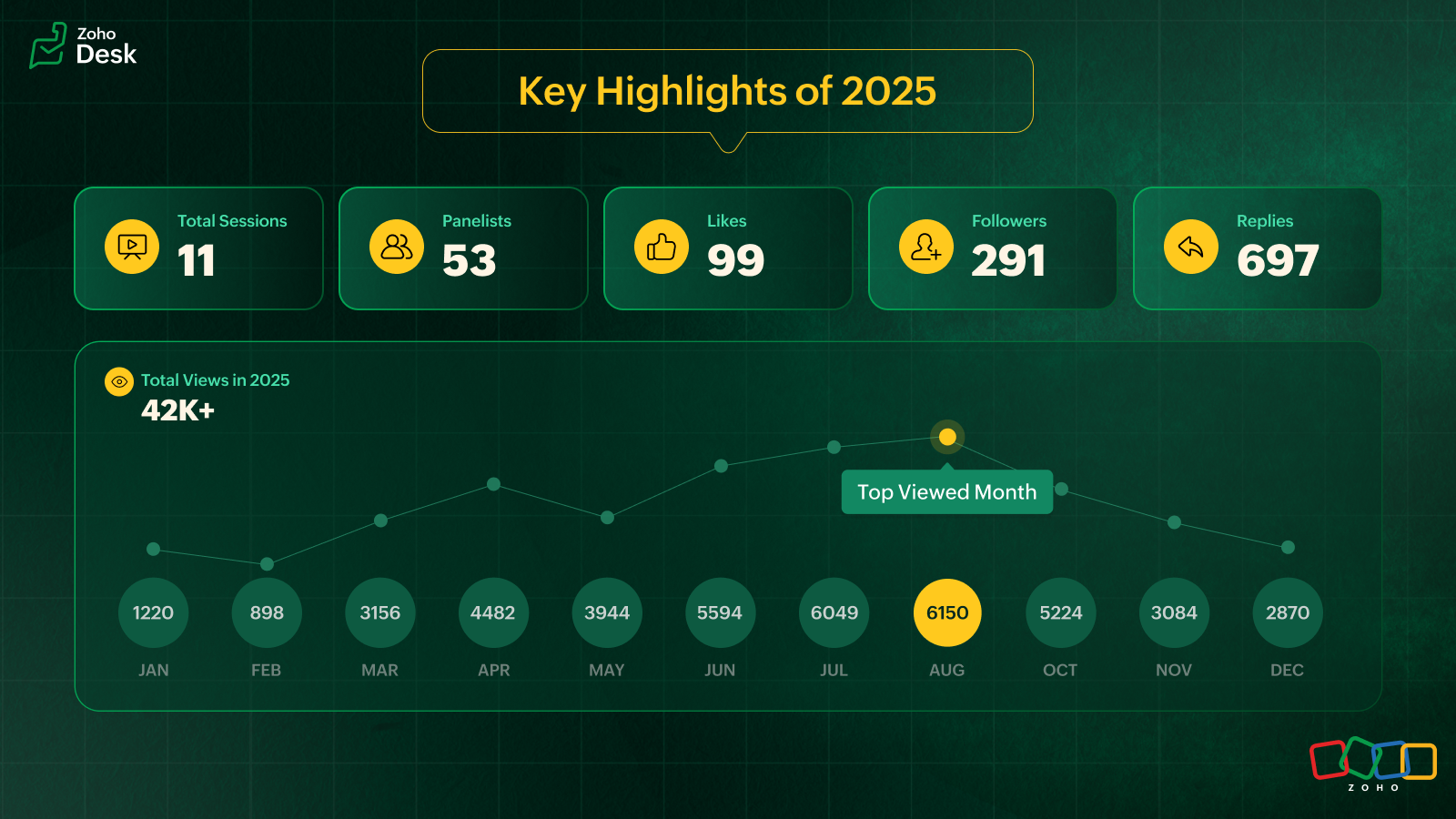
Live video ATE
ATE 19 focused on the 2025 Spring release. We hosted live sessions in a webinar style. This session was eventful as users got to interact with and listen to our panelists live. After the session, the panelists followed up with all the users over tickets and offered sessions to help users with customized solutions.
In an attempt to cater to as many of our users across the globe as possible, we hosted two live sessions: one serving users in Australia, Asia, and the Middle East, and the other to connect with users across the US and Europe. Here's a walkthrough of the sessions: Inside Zoho Desk Spring Release 2025 and Zia in Focus.
Ask the Experts, 2025, addressed various topics covering all the modules within Zoho Desk
- Onboarding and getting started with Zoho Desk
- Multichannel support and self-service portals
- Automation and AI with Zia
- Integration, accessibility, and personalization
- Analytics, data administration, and mobile apps
- Spring and Autumn releases for 2025
We wrapped up the ATE series in December with The Merry Metrics Edition = Best of Zoho Desk [Best Practices + Holiday Automation + Year-End Insights]
Guest panelists
In the ATE themed around integrations and extensions, we partnered with RingCentral. Luis Vargas and Matthew Ludwig from RingCentral shared the panel with Zoho Desk experts to discuss best practices for integrating RingCentral's telephony system with Zoho Desk.
ATE 2025 highlights: Best practices you should know
I. Migrating to Zoho Desk? Here's what you shouldn't miss
For simple and straightforward CSV imports, try the UI import feature to import data into your Zoho Desk account. Zoho Desk is equipped with dedicated templates to process and accept data from known help desk services like Freshdesk, Zendesk, Salesforce, Kayako, Help Scout, HappyFox, and others. For unsupported services, a CSV file is accepted.
To export data from the source service, submit a Zwitch form for migration. Share the required details relating to department mapping, agent mapping, and more in the Zwitch note section of the form.
Once the data is evaluated, the migration will be initiated. The migration engineer will follow up with you regarding the import and if there are cases of invalid files, source portal inaccessibility, or destination OAuth issues.
The migration time depends on the queue length and the volume of data being handled. On completion, a migration report will be shared.
You can also share the residual/delta backup via Zwitch. Residual requests are normally expected within two weeks of the full data import. The migration process for the residual import happens like the Zwitch migration.
Points to remember
- The migration data and information will be retained for 30 days and then wiped off from our import engine. This is in compliance with GDPR and its regional counterparts across the globe.
- Upon migration completion, a report will be shared with a module-wise list of all completed and failed entities with reasons for failure. Data availability and integrity are assured by the end of data transit.
Precaution
Please ensure imported entities aren't deleted/trashed from your help desk service until the completion of the last import batch.
From @Gopalavasan G G Ask the Experts 16: A 5-hour Live Q&A - Tackling Zoho Desk's Onboarding Challenges

II. Optimizing customer support across messaging platforms with Zoho Desk
Automate first-level support with Zia Answer Bots to reduce response times.
- Utilize chatbots to address frequently asked questions (FAQs), provide troubleshooting steps, and handle simple queries.
- Use preset replies and guided responses to help customers find quick solutions.
- Automate ticket creation and status updates to keep customers informed without human intervention.
Enable seamless hand-offs to human agents
- Design workflows where chatbots can connect to live agents based on the complexity of the queries.
- Provide agents with customer history from prior conversations across different platforms to avoid repetition.
Optimize response time with structured workflows
- Implement prioritization rules in IM tickets for priority cases (for example, billing issues or service disruptions).
- Set up automated notifications via custom notification for customers when their issue is being processed.
Utilize rich media for effective communication
- Allow customers to send screenshots, videos, or PDFs to clarify issues faster.
- Use videos to serve as engaging and quick troubleshooting guides.
Ensure channel-specific compliance
- WhatsApp: Requires approved message templates if beyond 24 hours.
- Facebook Messenger: Allows direct messaging for up to 7 days.
- Telegram: No restriction; allows an agent to message anytime.
- WeChat: Allows direct messaging within 48 hours.
- Line: Allows an agent to messages without restrictions.
- Instagram: Enables direct messaging within a 24-hour window.
Provide proactive support and notifications
- Send order updates, payment reminders, and appointment confirmations via automated messages.
- Implement triggered proactive chats based on customer behavior via WhatsApp (for example, abandoned cart reminders).
- Use push notifications on WhatsApp messaging apps to alert customers about service changes or outages.
Create a unified customer experience
- Ensure conversations remain consistent across platforms even if customers switch between apps and resume conversations from another app.
- Provide multi-language support via answer bots with automated translation where necessary.
@Ralph Martin from Ask the Experts 17: Elevate Customer Communication With Multichannel & Instant Messaging
III. Best practices for setting up an email channel
Setting up your email channel in Zoho Desk is key to streamlining your customer support process. The following approaches protect your brand and build trust with your customers.
- Default setup & branded forwarding: Use the default Zoho Desk support email (support@yourcompany.zohodesk.com) and configure email forwarding to your company's email (support@yourcompany.com) to auto-create a ticket for every customer's email.
- Email aliases for departments: Create specific email aliases like sales@yourcompany.zohodesk.com or billing@yourcompany.zohodesk.com for each department, and set up a forwarding rule from your from addresses (like sales@yourcompany.com or billing@yourcompany.com). This will automatically route emails to the appropriate departments, ensuring efficient query management.
- Forwarding verification: After setting up email forwarding, verify the process by checking for the confirmation ticket in Zoho Desk to complete the configuration.
- Secure email with SPF & DKIM: Update your domain’s DNS settings with SPF and DKIM records to prevent spam and spoofing. To bolster email security, DKIM is mandatory for all business-owned domains used in your "From Address" configuration. DKIM cannot be configured for "From" addresses hosted on public domains like Google, Outlook, or AOL; in such cases, you must use your own SMTP servers.
- Custom “From Address": Add and verify your custom "From Address" in Zoho Desk, and update your DNS with the necessary SPF and DKIM values. Verify your domain using the DKIM keys.
- Default domain name: In Zoho Desk, you cannot change the domain name in the default support email address. This domain name is set automatically based on your portal name when you sign up (for example, support@<mycompany>.zohodesk.com). Update it with a unique portal name by reaching out to support@zohodesk.com.
@Sumaya Howth from Ask the Experts 17: Elevate Customer Communication With Multichannel & Instant Messaging
IV. How does a telephony system enhance customer support in Zoho Desk?
Instantly identify your caller
- When a call comes in, the telephony system in Zoho Desk pulls up the caller’s name, phone number, and recent tickets.
- Agents can view contact details and related tickets before picking up the call.
Track every call automatically
- Every call, answered and missed, is logged as a Call Activity in Zoho Desk.
- Answered calls update in real time, while missed calls get recorded at the end of the ring.
- Call duration and status update automatically, keeping your records accurate.
Convert missed calls into actionable tickets
Configure Zoho Desk to create tickets for missed calls: inbound, outbound, or both. This ensures no customer inquiry falls through the cracks.
Handle unknown callers effortlessly
Zoho Desk automatically creates a new contact using the caller’s phone number for new contacts. Agents can edit and update details instantly.
Link calls to tickets for seamless tracking
- Agents can create a new ticket and associate the call activity with it or associate the call activity with an existing ticket.
- Zoho Desk automatically logs a call thread inside the ticket, keeping everything in one place.
- Call activity will be automatically associated with the ticket when you use click-to-call from the Ticket Detailed View.
Record call duration & summarize conversations
- A call timer runs in the background, helping agents track time spent on each call.
- Agents can add notes during the call and after the call.
- This call summary will be added to the call activity and to the ticket, if associated.
Never miss a voicemail or call recording
- If the PBX provider supports it, call recordings and voicemails appear in the call thread, complete with an audio player for easy access.
- Ensure fail-proof call handling
- If the system doesn’t detect an answered or ended call, agents can manually mark the call as answered or ended, ensuring accurate records despite vendor failures.
Keep calls organized with multiple tickets
Agents can create multiple tickets from a call while keeping the call linked to a single ticket.
Note: Creating a ticket automatically for every answered call is possible in Zoho Desk's enterprise edition via a custom function.
@Srini | Zoho Desk from Ask the Experts 17: Elevate Customer Communication With Multichannel & Instant Messaging

V. Enhancing self-service through Guided Conversations (GC) in Zoho Desk
Guided Conversations (GC) empowers businesses with structured, intuitive self-service through conversational flows. GC provides around-the-clock support and ensures a smooth transition from the bot to the support rep. It reduces agents' workload, minimizes response times by automating dynamic responses, and personalizes interactions based on user inputs. GC functions across the web, instant messaging, and mobile apps.
Tips to get the best out of GC
Structuring your flow
To prevent exceeding the 500-block limit, optimize your flow using the action blocks:
- Jump to flow – Redirect users to another flow instead of adding more blocks. It aids transition between different conversation sections.
- Fork – Split the conversation or branches logically into multiple paths efficiently.
- Button Block – Use buttons for seamless navigation across flows.
- Operation block – Executes predefined actions in a flow.
- Webhook – Connects with external services for data transfer
Maintain consistency in cards
Ensure uniform formatting on all cards. If the first card includes a title, image, and description, make sure all subsequent cards follow the same structure.
Ensure uniform formatting on all cards. If the first card includes a title, image, and description, make sure all subsequent cards follow the same structure.
GC uses different types of variables to store and retrieve user information, enabling personalized interactions across IM channels, web, and mobile apps.
- Block Variables – Store responses within a specific block (for example, a user’s name after input).
- Local Variables – Available only within the flow where they are defined (for example, a discount percentage used within the same flow).
- Global Variables – Shared across all departments and flows (for example, company name or logo).
- Session Variables – Specific to a user’s session and accessible across all flows (for example, country-based redirection using the Fork block).
- IM-specific variables – IM variables can retrieve user details and automate tasks. These help identify users by name and unique ID, associate contact details from IM channels, customize experience based on the IM channels, and perform automated actions like creating and updating existing tickets.
Transfer to Agent Block (IM-Specific)
To enable agent transfer in GC on ASAP, GC must be linked to a business messaging channel, that should be connected to the ASAP widget.
You can use Integration Blocks to connect Zoho Desk with Zoho Cliq instead of webhooks, which require manual setup and coding.
Track performance with GC flow metrics
GC flow metrics track performance at each block level, identify areas for optimization, and improve flow performance based on real user interactions.
Get the best out of your Guided Conversations (GC) flows, ensuring a smooth, efficient, and user-friendly experience across instant messaging (IM) channels, web, and mobile apps.
@Chaya Jayasankar from Ask the Experts 22: Scale up your customer support with integrations & extensibility
VI.I Key insights on the RingCentral and Zoho Desk integration
Seamless user experience: RingCentral call recordings play natively within Zoho, and the WebRTC integration ensures calls are logged from any endpoint, including mobile. This means no app switching and a complete view of the communication history within Zoho Desk.
Boost team efficiency: Agents can save time with click-to-call and instant screen pop-ups, providing customer context. Automated call logging reduces manual work, leading to faster resolutions and a better customer experience.
Enhanced collaboration & coaching: Easy access to call recordings within Zoho Desk helps with training and quality assurance. A unified view of all interactions fosters better teamwork.
Luis Vargas with RingCentral from Ask the Experts 22: Scale up your customer support with integrations & extensibility
VI.II Mistakes to avoid while using RingCentral
Poor setup & training: Don't skip defining workflows or training users; it's crucial for adoption.
Ignoring mobile logging: Ensure calls from the RingCentral mobile app are logged in Zoho Desk for full visibility.
Underutilization: Don't just use basic features; leverage custom dispositions and analytics for maximum benefit.
Expert insight: The core value is unified, accurate customer data. The native recording, playback, and universal call logging (even from mobile) are game-changers for seamless, efficient customer interactions.
Matthew Ludwig with RingCentral from Ask the Experts 22: scale up your customer support with integrations & extensibility
VII. Handling the Instant Messaging module in Zoho Desk
The Instant Messaging (IM) module in Zoho Desk provides a unified interface to manage customer conversations across multiple messaging channels.
Messaging channels
Zoho Desk supports the following instant messaging (IM) channels: WhatsApp, Facebook Messenger, Instagram, Telegram, WeChat (primarily used in China and its regions) and Line (commonly used in Japan and its regions).
Business Messaging
Zoho Desk supports its native-live chat application: Business Messaging (BM). Add the Business Messaging widget to your website to connect your customers with your support reps.
Tips for IM configuration (Across all channels)
- Channel integration: Integrate your official IM apps' business accounts with Zoho Desk's IM module to handle conversations from a single platform.
- Agent association: Associate agents with specific messaging channels to ensure a dedicated point of contact for the agents to improve response time and service quality.
- Embed channel options: Each channel provides embeddable options such as links, QR codes, or buttons to place on your website to make it easy for customers to reach out.
- Canned messages: Canned messages save time by responding to common questions with standard message formats. They can be used across all IM channels, and associated with specific departments for better control and consistency.
- Welcome messages: Configure a Welcome Message to greet customers automatically when they initiate their first conversation through IM.
- Offline notifications & business hours: Set business hours for each IM channel to manage availability effectively. When agents are offline or on a holiday, an offline message can notify customers about the availability of support.
IM offerings for 24/7 support
- Answer bot: Use the Answer Bot to handle Level 1 (L1) queries during out-of-business hours and holidays.
- Guided conversations: For structured customer interactions, configure Guided Conversations based on your business flow and associate them with IM to guide the customers.
- Automate notifications via workflows: Zoho Desk workflows support IM-based notifications using Reply via Instant Messaging and Notify via Instant Messaging. Define the criteria in workflows and select the appropriate channel and use templates for custom messages.
Note: WhatsApp supports template-based messages, and other channels support custom templates.
Tracking IM conversations as tickets: IM conversations → Tickets
You can configure IM preferences to automatically convert conversations into tickets. Under Preferences in the Instant Messaging modules, if you select None, IM conversations will not be converted into tickets. If you select Always, all conversations for a contact will be tracked in a single ticket. Configure a time interval to track ticket creation based on your business requirements.
- Auto-closing conversations: Use Auto-Close to automatically close conversations when agents or bots remain idle beyond a configured timeout period.
- Automatic agent assignment (chat routing): Enable Chat Routing in IM to automate agent assignment where online agents are assigned conversations sequentially, while offline agents are excluded from assignment.
Leverage Instant Messaging in Zoho Desk to collaborate effectively with your customers.
@Hareesh P from Ask the Experts 26: Brighten every customer interaction with Zoho Desk all year long
From feature walkthroughs within Zoho Desk to personalized follow-ups via tickets, emails, and one-on-one meetings, every session reflected how Zoho Desk helps businesses grow and benefit customers worldwide. The ideas, questions, and feature requests shared during these sessions continue to guide us in crafting Zoho Desk into a more intuitive, accessible, and human-centered platform.
We thank everyone who participated and contributed to the 2025 ATE series. We look forward to continuing our conversations in the upcoming sessions.
Happy New Year, everyone!

Cheers,
Lydia | Zoho Desk
Lydia | Zoho Desk
Topic Participants
Lydia | Zoho Desk
Sticky Posts
Ask the Experts 10: A 5-hour online Q&A on Zoho Desk Best Practices
Welcome to Zoho Desk's Ask the Experts session! This is a monthly discussion on our forums; wherein a panel of experts will take on questions specific to topics related to Zoho Desk. The panel will be available for a 5-hour period and will answer anyAsk the Experts 7: A 5-hour online Q&A on Telephony and Call Module
Welcome to Ask the Experts session! This is a monthly discussion in forums; each session, a panel of experts will take questions on specific topics related to Zoho Desk. The panel will be available for a 5-hour period and answer any questions posted here.Ask the Experts 5: Online Q&A on Zoho Desk Extensibility
Welcome to Ask the Experts session! This is a monthly discussion in forums; each session, a panel of experts will take questions on specific topics related to Zoho Desk. The panel will be available for a 5-hour period and answer any questions posted here.Ask the Experts 4: A 5 hour online Q&A on agent productivity
Welcome to Ask the expert session! This is a monthly discussion in forums; each session, a panel of experts will take questions on specific topics related to Zoho Desk. The panel will be available for a 5-hour period and answer any questions posted here.Ask the Experts 3: A 5 hour online Q&A on reports and dashboards
Welcome to Ask the expert session! This is a monthly discussion in forums; each session, a panel of experts will take questions on specific topics related to Zoho Desk. The panel will be available for a 5-hour period and answer any questions posted here.
Recent Topics
Getting “mandatory field missing: Service_Line_Items” When Creating Work Order via Zoho Flow Deluge
Hi Team, I’m trying to create a Work Order in Zoho FSM with only a Service Line Item (no Parts). However, I keep getting this error: Work Order Response: {"code":"MANDATORY_NOT_FOUND","details":{"api_name":"Service_Line_Items"},"message":"required fieldHow to customize the colors of the Client Portal login screen and add the company logo?
As title, how to customize the colors of the Client Portal login screen and add the company logo?Daily updates/fixes and how to see what was changed?
When I receive the notification that zoho was updated and I need to refresh it. How can I see what was changed or fixed? Sometimes they change things that effect my books and I need to know what they did. For example over this past weekend something wasUpcoming Change: Snowflake Username/Password Authentication Deprecation – Action Required
Hello Users, Snowflake has officially announced that username and password-based authentication will be deprecated by November 2025. You can find the official announcement [here]. If you're using a Snowflake connection in Zoho Analytics to import data,Why should I choose Zoho Inventory vs Odoo?
Hello there! I have used Zoho in different companies I've worked in, and I have a positive perception of it. I am starting a new import business for pipes, tubes, fittings, valves, elbows, etc., which all have serial numbers, cast numbers, etc., so IProduct Updates in Zoho Workplace applications | July 2025
Hello Workplace Community, Let’s take a look at the new features and enhancements that went live across all Workplace applications this July. Zoho Mail Import bookmarks from Pocket Worried about losing your Pocket bookmarks? Don't worry we have got you.PLEASE FIX YOR BUGS
PICTURES ARE BEING REJECTED DESPITE THEM FOLLOWING THE GUIDELINES ON DIMENTIONS.Kaizen# 204 - Answering Your Questions | Perform Field Updates before Blueprint transition via Client Script
Hello everyone! Welcome back to another exciting Kaizen post. One of the questions we received through your Kaizen feedback was: “How can I update fields before Blueprint transition and how to prevent a transition based on a condition using Client Script?”Create online meetings for Booking Pages with Zoho Meetings and Zoom
Greetings, We hope you're all doing well. We're excited to share some recent enhancements to Bigin's Booking Pages. As you know, Booking Pages let you create public pages to share your availability so that your customers can easily book time slots withFilters in audit logs
Greetings, I hope all of you are doing well. We're happy to announce a few recent enhancements we've made to Bigin. We'll go over each one in detail. Previously, there were no filters available to narrow down data in audit logs. Now, we've introducedEnhanced help options in Bigin
Greetings, We're excited to introduce a new enhancement to Bigin's Help section: a comprehensive Help Options panel that brings together all your support resources in a single, well-organized space. Previously, the Need Help? menu provided only a limitedZoho FSM API Developer Needed
Hi, I’m looking for a developer with experience using Zoho FSM APIs. Scope: Connect WordPress website booking form to Zoho FSM Check availability (date, time, region) Create Work Orders + Service Appointments automatically Notify both customer and schedulerRevenue Management: #4 What if there are uncertainties in project or service delivery?
Our previous post taught us how Zoho Billing makes life easy for businesses with its automated revenue recognition rule. However, certain businesses have more challenges that an automated system cannot handle, and there are certain situations where automatedThis mobile number has been marked spam. Please contact support-as@zohocorp.com
Bom dia, estou tentando colocar o número 11 94287-6695 e esta com erro "This mobile number has been marked spam. Please contact support-as@zohocorp.com" pode me ajudar, por favor?Items Serial Tracking Issue
We enabled Zoho Items inventory tracking then disabled it after some time now we want to enable it again When I check the missing serial number reports I see one item But I cant see any option to Add the serial numbers Where and how to add the serialZoho Payroll integration with Zoho Books - unable to match multiple bank feeds to one wage payment
For one employee's wage, I make two partial payments. Those bank feed transactions come into Zoho Books via bank integration. I make one pay-run for the month in Zoho Payroll and that comes into Zoho Books via the Zoho integration. Zoho Books doesn't let me match multiple bank feed transactions against a single wage item. Please fix urgently. I can't complete my books because of this.Add Checkbox Selection & Bulk Actions to Delivery Challans Module
Hi Zoho Team, I’ve noticed that in the Sales Orders module, there are checkboxes beside each entry that allow users to select multiple records for bulk actions such as print, email, or delete. However, in the Delivery Challans module, this option appearsCan't be able to check-in in laptop
even after giving location access still i can't be able to check-in in laptop.Compensation Cess on Coal ₹400 per tonne. ?????
The compensation cess rate varies by the type of product. And the cess is calculated based on the value of the product without GST. Coal, for example, comes with a cess of ₹400 per tonne. That means that if you sell 2 tonnes of coal that have a value7 month over zoho book purchase but still not immpliments Golive
7 month over zoho book purchase but still not immpliments Golive one problems zoho team short out then other problems come still very poor mangments and immliments team . struggling with the templates in ZOHO Books. Especially with the placement of someParent & Member Accounts (batch updating / inheritance)
Hello, I find the Parent Account functionality very useful for creating custom views and reports, but was wondering if I can also carry out batch editing on all members (aka children) of a Parent Account at the same time. Alternatively, can I set members to automatically inherit the values of the parent? For example: We have a chain of supermarkets that buy our products. These supermarkets are all members of a Parent Account in our CRM. We release a new product and all of the member stores wish toEdit Legend of Chart
I would like to edit the legend of the chart. Every time I enable the legend, I get a very unhelpful (1), and when I try to type to change to what I would desire, nothing happens, which is very frustrating. I've gone through your online tutorials and nowhere can I find a legend settings button. This seems a simple fix, where can edit the legend? Thanks.Extended timeouts for APIs beyond 40secs for to accomodate LLMs
A 40 second max response time for API calls is fine when connecting to most services, however is unsuitable when dealing with LLMs (ChatGPT/Claude/Gemini) where the response timing is very uncertain. Is there any way to increase this? It would be greatDeletion of Zoho Account
To whom it may concern, Good day, My account has been created incorrectly in Zoho and I am not able to join my Company's Zoho account - attached screenshot for your kind reference Alphatronmarine - Portal Kindly advise procedure to delete this currentWorkflow for deposit to bank account
Hello, Is it possible to make a workflow when a deposit is made to your bank account which is coupled to Zoho books? I want Zoho to sent an email each time a deposit is made to our bank account via a workflow. Regards, StevenMarking Retainer invoice paid through Deluge
Hey Everyone, We have a scenario where we are collecting deposit payments on our website. Now, in zoho books, we need to create a retainer invoice and mark it as paid automatically using deluge just like we can mark normal invoices as paid. I have triedCreate a new record in custom module vi custom button
I have zoho books premium plan . I have 2 custom modules in zoho books. 1. Goods Receipt 2. Delivery Order, I need to select multiple records from Goods Receipt and create a new Delivery order from these multiple records. (like multilple sales order intoProfile date settings
At present I have "EEE, MMMM dd, yyyy" but this takes an exessive amount of column space, we should be able to input our own format. I would like to use "EEE, MMM dd, yy" - a much shorter version of the above but with the same abbreviated info, requiringDelivery Method Field in Sales Order Module
In Books and in Sales orders, the "Delivery Method" field seems to allow for anything to be entered and it seems to store those entries for future use. When you chose to convert a sales order to a purchase order, the related field is now called "ShipmentEditing / Removing stages for pipeline
Hello, I'm trying to create a new pipeline. I created a new stage and made an error when entering the probability. How can I edit fields in stages that I created? Can I delete these stages from "Add Stages" list?Dynamically Filter User Lookup in CRM Subform
We have a subform called Pricing Calculator in the Zoho CRM Opportunity module and need some assistance. Current Setup: First column: Picklist (Level) Second column: User Lookup field When a Level is selected, we want the User lookup to display only userschange time zone
can't seem to figure out how to change the time zone of the projectBigin iOS app update: Built-in telephony and RingCentral support
Hello everyone! We are excited to introduce Built-In Telephony and RingCentral support in the latest iOS version(v1.11.13) of the Bigin mobile app. Once the integration is completed on the Bigin desktop site(bigin.zoho.com), you can choose the Built-InAdd Image or Update Image API - for Items Module
I am trying to add new Items to Zoho Inventory from Zoho Creator. I achieved this using Zoho Inventory Create Item API, but how to add or update the item image from Zoho Creator to Zoho Inventory Item Module?Introducing Booking Pages—a topping for your Calendar Scheduling needs!
Greetings, We're here with a new topping for Bigin! Let's dive into the details. What does this topping do? Scheduling appointments with customers is one of the most common challenges small businesses face on a daily basis, as it often involves frequentDebugging `try` blocks : Tip
I find it annoying that if one line inside a `try` block has an error, the Deluge arser points the beginning of the block to the location of the error. BUT, if you temporarily comment out the initial `try {`  The parser goes through the whole block andUse approval workflow comments in record scripts
Greetings, i'm running an approval workflow for my records, during approval/rejection there is a step where comments are entered. i want to add there comments to the record and to use them in various deluge scripts like sending emails and so on. howZOHO Store
Not able to make a payment We are using Zoho One, and we are from India. The payment currency, which shows for us, is in USD. But the system says we can choose Country/Region India if it shows INR only. Attaching screenshots for more info.Support Migration into Aliases in Zoho Mail
Hello Zoho Mail Team, How are you? We are in the process of migrating some of our users from Google Workspace (Gmail and Google Drive) to Zoho. During this process, we noticed that Zoho Mail currently only supports migration into a primary mailbox andAPI for Z Workdrive Flow Make-Integromat ?
We are zoho workdrive fans Also we would like to have an api to work with Zoho Flow or with Make better known by its old name INTEGROMAT Is it planned and when? 3 months -6 months or more?Next Page