Now connect and engage with your LINE chat users right from SalesIQ!

Now connect and engage with your LINE chat users right from SalesIQ!

As we widen SalesIQ's feature base to cater to a wider audience, this integration emerged as the best path forward. Happy to introduce the integration of LINE with SalesIQ, our newest addition to the IM channels family on SalesIQ. This channel will allow you to conveniently connect and interact with your customers who are on LINE, all from within your favourite SalesIQ dashboard. 
With LINE easily being one of the most popular instant messaging platforms in the world, this integration opens up a new channel of possibilities, allowing your customers from various regions to reach your business on their preferred messaging app instantly. 
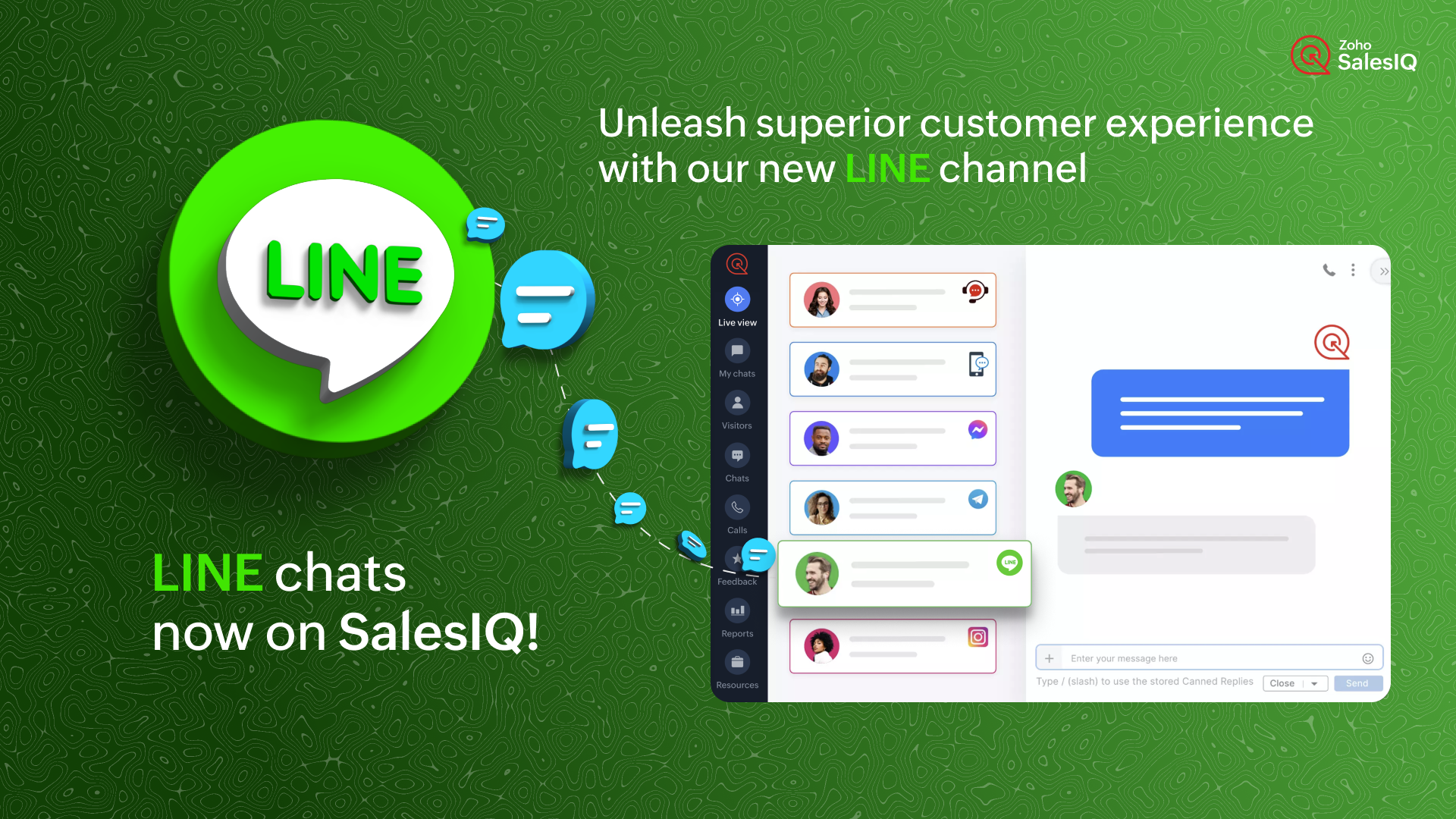

How does it work?

Configuring the LINE channel on SalesIQ allows you to bring in all the chats received on your LINE account directly into your SalesIQ dashboard. This means that you can send and receive messages effortlessly, from the comfort of your SalesIQ dashboard. 

Business Use Case

When you have your business profiles up on social media, chances are you may have a specific person responsible for the chats from LINE along with other social media apps as well. To respond to every single chat and provide reasonable customer support from an instant messaging app will be tedious, to say the very least. Why?
  • There will be no additional support features specifically designed to give the customer the best possible service.
  • Also, the chances of the chats being missed in these cases are quite high.
Although instant messaging platforms are suitable for personal use, leveraging them for business purposes, particularly customer support, comes with limitations. To truly meet customer needs and deliver exceptional engagement and support, a robust platform specifically designed for these tasks is essential.
By bringing the LINE chats inside a powerful tool like SalesIQ, you not only ensure familiarity for your existing operators but also equip them with all the tools necessary to deliver exceptional customer assistance. This seamless combination goes beyond ordinary support, elevating your customer service to a whole new level.

A customer's journey using SalesIQ's LINE channel

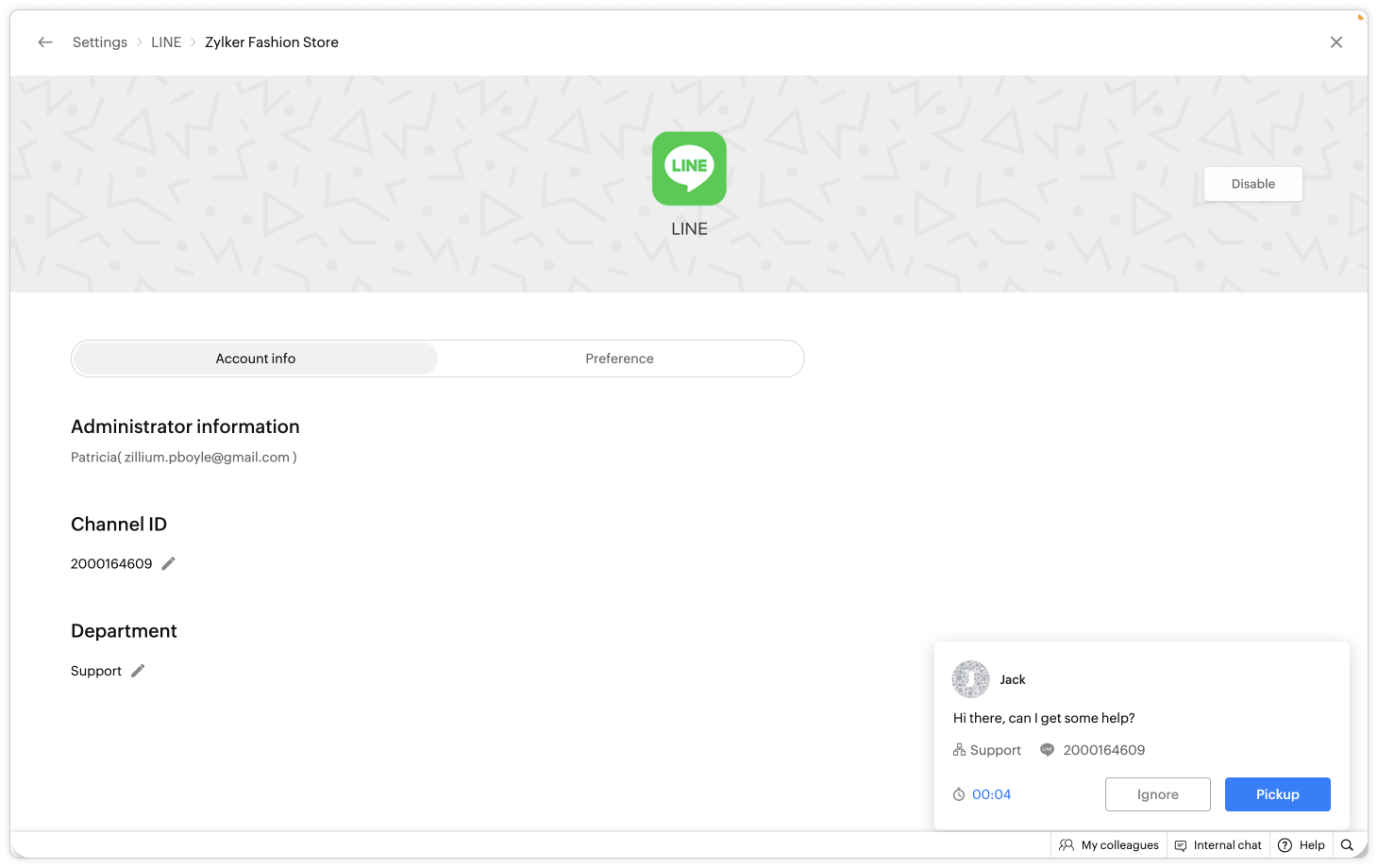
Jack is attempting to connect with your business and sends a message to your business' official LINE account. You, the SalesIQ operator, will immediately receive a chat invite on the SalesIQ dashboard. 
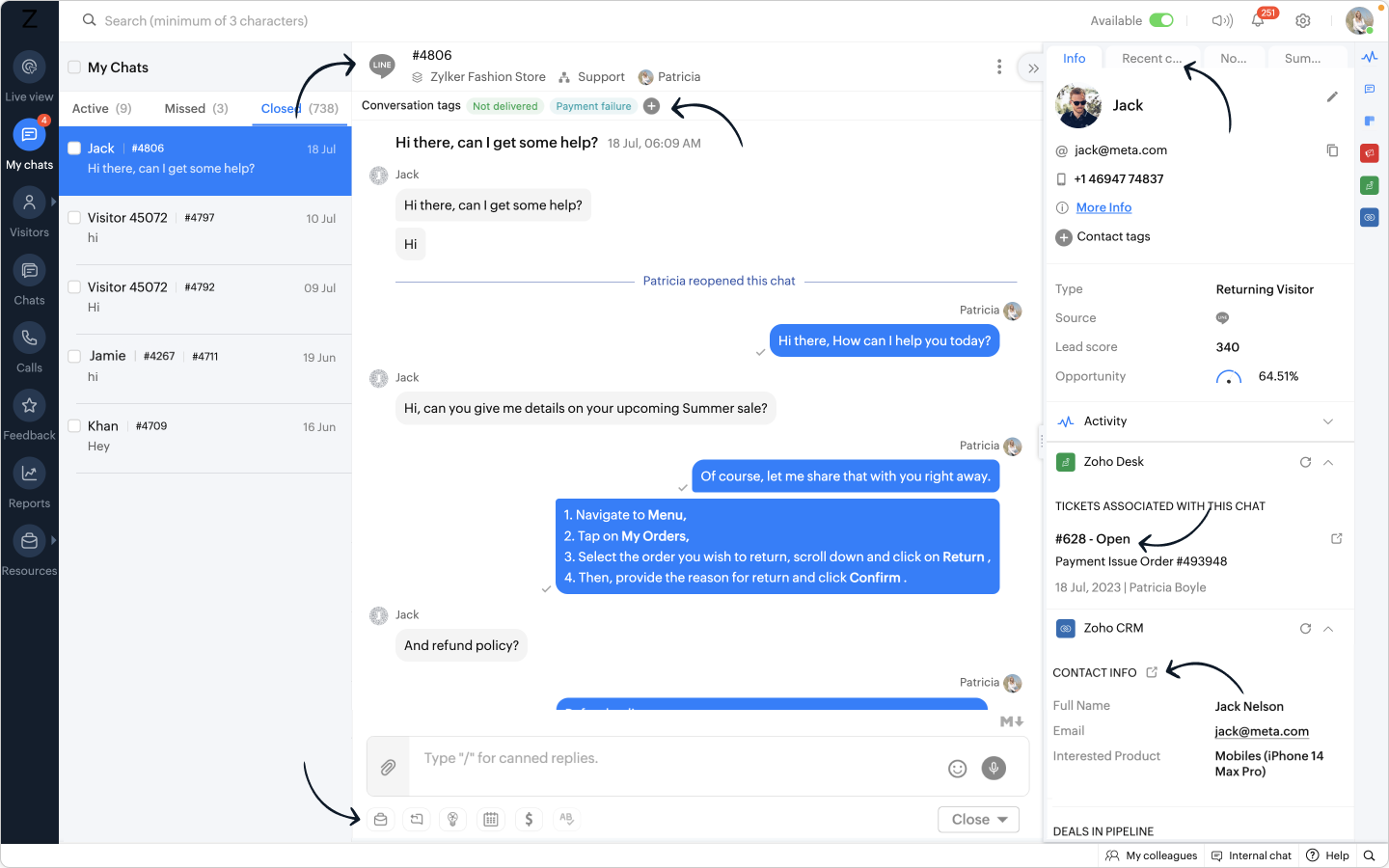
  • You greet Jack using your favourite Canned replies and after conversing, you find out that Jack seems to have a problem with his refund. 
  • You immediately share an FAQ relating to your business' refund policy to Jack.
  • You also instantly create a ticket on the help desk software using the Zoho Desk widget right from the SalesIQ operator chat window, without ever navigating to another window. 
  • You also add relevant Tags to the conversation to categorize it effectively for easy filtering in the future.
Bonus:

  • In case a completely new visitor approaches your business from LINE, their name will get automatically populated on the operator chat window, making it easy for you to personalise your conversation. 
  • You can get their contact details and immediately create a lead on CRM with the Zoho CRM widget , pushing their details to CRM right from SalesIQ's operator chat window.
When these customers reach out to your business again after a few days from LINE, 
  • their CRM details will be available in the Zoho CRM widget.
  • Their desk tickets will be available in the Zoho Desk widget.
  • Their past conversations will be stored in the Recent chats section.

See the potential here?

  • You are essentially linking your business' LINE account to SalesIQ, getting all the incoming LINE chats with in the SalesIQ dashboard. 
  • You also have all the essential visitor/customer information stored on the SalesIQ dashboard for future reference.
  • You are able to use the powerful features of SalesIQ's operator chat window, maximising productivity and efficiency.
Added Benefits:

  • Expanded reach: With the LINE integration, you can tap into a vast user base and connect with customers who prefer using LINE as their preferred messaging platform. Reach a wider audience and engage with them in real-time using this integration.
  • Use of SalesIQ features: The use of features like widgets, canned replies, FAQs, OpenAI integration etc. can be utilized by the operators for wholesome support and engagement, enabling you to have more meaningful and contextually relevant conversations.
  • Efficient support: You have the flexibility to allocate specific operators or a dedicated department solely for managing LINE channel chats, allowing you to optimize efficiency based on your unique needs.
  • Easy setup: The configurations for setting up the LINE integration is quite simple with just a few steps, to start receiving LINE conversations within SalesIQ.
Note: Zobot is available for the LINE channel, along with the Facebook, Instagram, Whatsapp, and Telegram IM platforms, allowing seamless automation engagement across all the channels and elevating your customer experience.

LINE channel set-up process

The LINE channel on SalesIQ allows you to connect with your contacts seamlessly by linking your LINE account with SalesIQ in a few simple steps. 
The set-up process primarily involves getting your Channel ID and Channel secret from your LINE account and then pasting it on the LINE channel page on SalesIQ.

Check out the below video to get a clear idea of the integration procedure.


For the complete process, check out our help guide here !

SalesIQ also has integrations with other IM platforms like Whatsapp , Facebook messenger , Instagram and Telegram which are currently being used by our users extensively. We have now included LINE channel into our range of channels to expand our reach further and provide seamless communication options for our users.

    Access your files securely from anywhere

        All-in-one knowledge management and training platform for your employees and customers.


                              Zoho Developer Community


                                                    • Desk Community Learning Series


                                                    • Digest


                                                    • Functions


                                                    • Meetups


                                                    • Kbase


                                                    • Resources


                                                    • Glossary


                                                    • Desk Marketplace


                                                    • MVP Corner


                                                    • Word of the Day


                                                    • Ask the Experts


                                                              Manage your brands on social media


                                                                    Zoho TeamInbox Resources


                                                                        Zoho CRM Plus Resources

                                                                          Zoho Books Resources


                                                                            Zoho Subscriptions Resources

                                                                              Zoho Projects Resources


                                                                                Zoho Sprints Resources


                                                                                  Qntrl Resources


                                                                                    Zoho Creator Resources


                                                                                        Zoho CRM Resources

                                                                                        • CRM Community Learning Series

                                                                                          CRM Community Learning Series


                                                                                        • Kaizen

                                                                                          Kaizen

                                                                                        • Functions

                                                                                          Functions

                                                                                        • Meetups

                                                                                          Meetups

                                                                                        • Kbase

                                                                                          Kbase

                                                                                        • Resources

                                                                                          Resources

                                                                                        • Digest

                                                                                          Digest

                                                                                        • CRM Marketplace

                                                                                          CRM Marketplace

                                                                                        • MVP Corner

                                                                                          MVP Corner


                                                                                            Design. Discuss. Deliver.

                                                                                            Create visually engaging stories with Zoho Show.

                                                                                            Get Started Now


                                                                                              Zoho Show Resources

                                                                                                Zoho Writer

                                                                                                Get Started. Write Away!

                                                                                                Writer is a powerful online word processor, designed for collaborative work.

                                                                                                  Zoho CRM コンテンツ


                                                                                                    Nederlandse Hulpbronnen


                                                                                                        ご検討中の方


                                                                                                                • Recent Topics

                                                                                                                • Canvas View bug

                                                                                                                  I would like to report a bug. When clone a canvas view from an existing canvas view, if the original canvas view have canvas button with client script. Then the new create canvas view will have canvas button, it is make sense. But when I try to delete
                                                                                                                • Actual vs Minimum

                                                                                                                  Hi all, I am sure I am not the only one having this need. We are implementing billing on a 30-minute increment, with a minimum of 30 minutes per ticket. My question is, is there a way to create a formula or function to track both the minimum bill vs the
                                                                                                                • Zoho CRM for Everyone's NextGen UI Gets an Upgrade

                                                                                                                  Hello Everyone We've made improvements to Zoho CRM for Everyone's Nextgen UI. These changes are the result of valuable feedback from you where we’ve focused on improving usability, providing wider screen space, and making navigation smoother so everything
                                                                                                                • Multiple header in the quote table???

                                                                                                                  Hello, Is it possible in Zoho CRM to add multiple headers or sections within the Quote product table, so that when the quote is printed it shows separate sections (for example “Products” and “Services”)? To clarify, I’m asking because: This does not appear
                                                                                                                • One Support Email Managed By Multiple Departments

                                                                                                                  Hello,  We use one support email (support@company.com). Incoming emails come to the "Support Department" and based on what the customer is asking, we route that ticket to different departments (billing, technical support, etc.). When users in these different
                                                                                                                • big 5 accounts

                                                                                                                  how do you find what accounts are listed as Big 5 ?
                                                                                                                • RSC Connectivity Linkedin Recruiter RPS

                                                                                                                  It seems there's a bit of a push from Linkedin Talent Solutions to keep integrations moving. My Account Manager confirmed that Zoho Recruit is a Certified Linkedin Linkedin Partner but does not have RSC as of yet., (we knew that :-) She encouraged me
                                                                                                                • Error AS101 when adding new email alias

                                                                                                                  Hi, I am trying to add apple@(mydomain).com The error AS101 is shown while I try to add the alias.
                                                                                                                • New UI in Zoho One CRM

                                                                                                                  Hello, Just switched to the new UI for Zoho One CRM, do not like it, especially the search functions. What are the steps to backstep to the previous UI? UPDATE: I found it.
                                                                                                                • ZOHO.CRM.UI.Record.open not working properly

                                                                                                                  I have a Zoho CRM Widget and in it I have a block where it will open the blocks Meeting like below block.addEventListener("click", () => { ZOHO.CRM.UI.Record.open({ Entity: "Events", RecordID: meeting.id }).catch(err => { console.error("Open record failed:",
                                                                                                                • Python - code studio

                                                                                                                  Hi, I see the code studio is "coming soon". We have some files that will require some more complex transformation, is this feature far off? It appears to have been released in Zoho Analytics already
                                                                                                                • 🚀 WorkDrive 6.0 (Phase 1): Empowering Teams with Content Intelligence, Automation, Accessibility, and Control

                                                                                                                  Hello, everyone! WorkDrive continues to evolve from a robust file management solution into an intelligent, secure, and connected content collaboration platform for modern businesses. Our goal remains unchanged: to simplify teamwork, strengthen data security,
                                                                                                                • Introducing Workqueue: your all-in-one view to manage daily work

                                                                                                                  Hello all, We’re excited to introduce a major productivity boost to your CRM experience: Workqueue, a dynamic, all-in-one workspace that brings every important sales activity, approval, and follow-up right to your fingertips. What is Workqueue? Sales
                                                                                                                • Department Overview by Modified Time

                                                                                                                  We are trying to create visuals to show the work our agents do in Zoho Desk. Using Zoho Analytics how can we create a Department Overview per modified time and not ticket created time? In order for us to get an accurate view of the work our agents are
                                                                                                                • Zoho Commerce

                                                                                                                  Hi, I have zoho one and use Zoho Books. I am very interested in Zoho Commerce , especially with how all is integrated but have a question. I do not want my store to show prices for customers that are not log in. Is there a way to hide the prices if not
                                                                                                                • Support Custom Background in Zoho Cliq Video Calls and Meetings

                                                                                                                  Hello Zoho Cliq Team, We hope you are doing well. We would like to request an enhancement to the video background capabilities in Zoho Cliq, specifically the ability to upload and use custom backgrounds. Current Limitation At present, Zoho Cliq allows
                                                                                                                • Upload own Background Image and set Camera to 16:9

                                                                                                                  Hi, in all known online meeting tools, I can set up a background image reflecting our corporate design. This doesn't work in Cliq. Additionally, Cliq detects our cameras as 4:3, showing black bars on the right and left sides during the meeting. Where
                                                                                                                • ISO 27001 Compliance

                                                                                                                  What are people doing to ensure ISO 27001 compliance for their Zoho environments? It would make sense for Log360 Cloud to integrate natively with the Zoho suite, but that is not the case. It requires a gateway cluster, which is not an option for a fully
                                                                                                                • Zoho People - Retrieve the Leave Details - get("LeaveCount")

                                                                                                                  Hi, Zoho People I need to collect all of an employee's leave requests for the calendar year and check how many half-days they have taken. If I run the script on the query he just modified, I can retrieve the information related to that query and use the
                                                                                                                • Export blueprint as a high-resolution PDF or image file

                                                                                                                  This would be a good feature for organizations that want to share the blueprint process with their employees but don't want them to have access to the blueprint in the system settings. At the moment all that users can do is screenshot the blueprint or
                                                                                                                • Importing into Multiselect Picklist

                                                                                                                  Hi, We just completed a trade show and one of the bits of information we collect is tool style. The application supplied by the show set this up as individual questions. For example, if the customer used Thick Turret and Trumpf style but not Thin Turret,
                                                                                                                • What's new in Zoho Sheet: Simplify data entry and collaboration

                                                                                                                  Hello, Zoho Sheet community! Last year, our team was focused on research and development so we could deliver updates that enhance your spreadsheet experience. This year, we’re excited to deliver those enhancements—but we'll be rolling them out incrementally
                                                                                                                • Marketer's Space: New to Campaigns? Some common early mistakes that might occur

                                                                                                                  Hello Marketers, Welcome back to another post in Marketer's Space. If you're just getting started with Zoho Campaigns, things can feel exciting and slightly confusing at the same time. You're not alone. Most early frustrations come from setup gaps rather
                                                                                                                • This user is not allowed to add in Zoho. Please contact support-as@zohocorp.com for further details

                                                                                                                  Hello, Just signed up to ZOHO on a friend's recommendation. Got the TXT part (verified my domain), but whenever I try to add ANY user, I get the error: This user is not allowed to add in Zoho. Please contact support-as@zohocorp.com for further details I have emailed as well and writing here as well because when I searched, I saw many people faced the same issue and instead of email, they got a faster response here. My domain is: raisingreaderspk . com Hope this can be resolved.  Thank you
                                                                                                                • New 2026 Application Themes

                                                                                                                  Love the new themes - shame you can't get a little more granular with the colours, ie 3 different colours so one for the dropdown menu background. Also, I did have our logo above the application name but it appears you can't change logo placement position
                                                                                                                • Workflow Rule - Field Updates: Ability to use Placeholders

                                                                                                                  It will be great if you can use placeholder tags to update fields. For example if we want to update a custom field with the client name we can use ${CONTACT.CONTACT_FIRSTNAME}${CONTACT.CONTACT_LASTNAME}, etc
                                                                                                                • Need a Universal Search Option in Zohobooks

                                                                                                                  Hello Zoho, Need a Universal Search Option in Zohobooks to search across all transactions in our books of accounts. Please do the needful Thanks
                                                                                                                • Implement Date-Time-Based Triggers in Zoho Desk

                                                                                                                  Dear Zoho Desk Support Team, We are writing to request a new feature that would allow for the creation of workflows triggered by specific date-time conditions. Currently, Zoho Desk does not provide native support for date-time-based triggers, limiting
                                                                                                                • Why is my Lookup field not being set through Desk's API?

                                                                                                                  Hello, I'm having trouble setting a custom field when creating a Ticket in Zoho Desk. The endpoint I'm consulting is "https://desk.zoho.com/api/v1/tickets" and even though my payload has the right format, with a "cf" key dedicated to all custom fields,
                                                                                                                • How exactly does "Reply assistance" work in Zoho Desk? What context is sent to the LLM?

                                                                                                                  Hi, Im trying to better understand the technical behavior of the feature "Reply assistance" in Zoho Desk, and I couldn’t find detailed information in the current documentation. Specifically, I have questions about what data is actually being sent to the
                                                                                                                • Deletion Workflows

                                                                                                                  Hello, Unless I missed it, we can't create deletion workflows. My usecase is to auto-delete junk leads. We have field called lead status, and an agent qualify all our new leads. When it's a junk lead she chose the correspondant value in the picklist. My goal is that the system delete them automatically. Is that possible? Planed ?
                                                                                                                • URGENTImpossible to book an appointement

                                                                                                                  J'essaie plusieurs fois mais aucun créneau n''est disponible Message d'erreur lorsque j'essaie de sélectionner une date
                                                                                                                • Sendpulse SMTP/IMAP Issues

                                                                                                                  It’s possible Zoho made some changes on their side. Sometimes, even if your regular password works, Zoho requires an app-specific password for external apps like SendPulse to connect via IMAP. You can create this in Zoho’s security settings and use it
                                                                                                                • Insane mail security

                                                                                                                  I cannot access my email... anywhere. For some reason the password for the Mail app on my Mac is being rejected, it worked yesterday but now it doesn't? Ok let's try the web interface. I can access my general Zoho login with the password but if I want
                                                                                                                • UI issue with Organize Tabs

                                                                                                                  When looking at the organize Tabs window (bellow) you can see that some tabs are grayed out. there is also a "Add Module/Web Tab" button. When looking at this screen it's clear that the grayed out tabs can not be removed from the portal user's screen
                                                                                                                • Task list flag Internal/External for all phases

                                                                                                                  Phases are commonly used in projects to note milestones in the progression of a project, while task lists can be used to group different types of tasks together. It makes sense to be able to define a task list as either internal or external however the
                                                                                                                • HAVING PROBLEM WITH SENDING EMAIL

                                                                                                                  Hi all, I'm unable to receive emails on info@germanforgirls.eu. I'm getting an error code 550. 5.1.1. invalid email recipients. Moreso, I would like info@germanforgirls.eu to be the default "send from" email and not solomon@germanforgirls.eu. Kindly see
                                                                                                                • Sharing my portal URL with clients outside the project

                                                                                                                  Hi I need help making my project public for anyone to check on my task. I'm a freelance artist and I use trello to keep track on my client's projects however I wanted to do an upgrade. Went on here and so far I'm loving it. However, I'm having an issue sharing my url to those to see progress. They said they needed an account to access my project. How do I fix this? Without them needing an account.
                                                                                                                • Different Task Layouts for Subtasks

                                                                                                                  I was wondering how it would be possible for a subtask to have a different task layout to the parent task.
                                                                                                                • Subscription went to default (@zoho.com) address instead for custom domain

                                                                                                                  Hello! So I bought a lite sub to test things out, wanting to use my own domain. However, after passing through all the verification steps (completed now), it seems that the sub I bought was assigned to the default email that I already had with Zoho and
                                                                                                                • Next Page