Manage Devices - Device Management | Admin Guide - Zoho One

Device Management - Overview

When it comes to ensuring that your employees are handling corporate data responsibly, managing their devices is just as important as managing their online identities. This aspect of resource management is called Mobile Device Management (MDM).
Zoho One offers MDM capabilities that help you ensure that only authorized users and devices are accessing privileged resources. With Zoho One's MDM, you can:
  1. Enroll company-owned devices and employees' personal devices into your organization.
  2. Distribute the necessary apps to your employees' devices.
  3. Control what your employees can do with their devices by setting up policies and restrictions.
As an IT admin, managing the lifecycle of the devices in your organization is important. Zoho One helps you manage every stage of a device's lifecycle, i.e., from enrollment, through assignment and policy configuration, to deprovisioning when an employee leaves. A device's lifecycle starts with being enrolled in your organization. After enrollment, a device is assigned to an employee. As the employee progresses through different designations and different teams, the permissions, apps, and restrictions on their device may change. When an employee finally leaves the organization, their device will be deprovisioned.


If you are currently using ManageEngine MDM or ManageEngine MDM (MSPs) for managing your devices, you can also integrate and manage them in Zoho One. Learn more.
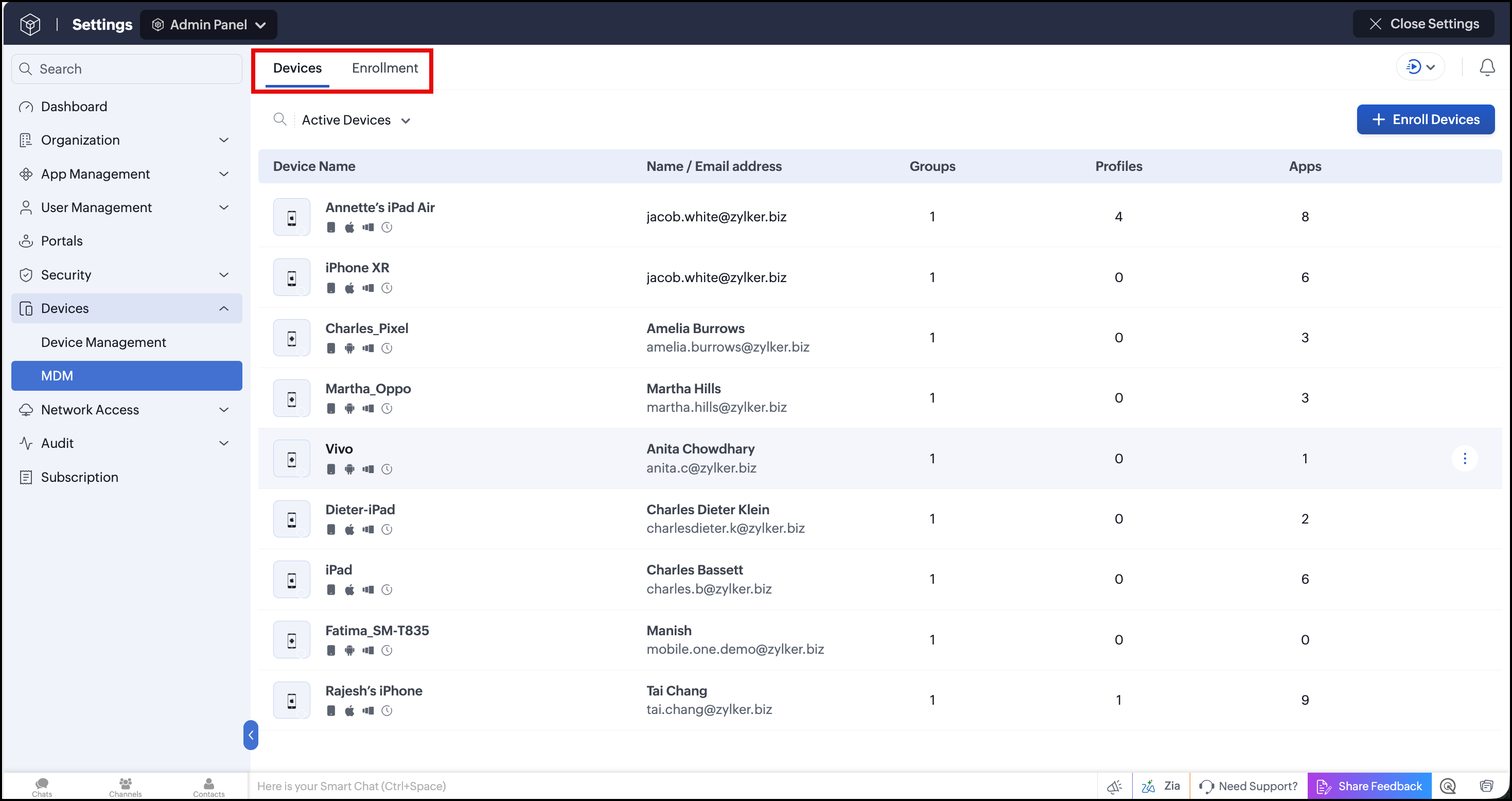
When you open the Device Management tab, you'll see two tabs along the top: Devices and Enrollment. Together, these let you enroll devices, configure policies, and manage enrolled devices throughout their lifecycle.


Enrollment

The Enrollment tab is where you manage how devices join your organization in Zoho One. It is split into three tabs: BYOD Enrollment, Corporate Enrollment, and Settings.


BYOD Enrollment lets you enroll employees' personal devices, either by sharing an enrollment link with users or groups over email, or by generating a link to enroll each device individually. Before enrolling Apple devices this way, you'll need to have an Apple Push Notification service (APNs) certificate configured.
Corporate Enrollment is used for company-owned devices, allowing your organization to fully manage and control them. Available enrollment types are:
  1. For iOS devices: Apple Enrollment (ABM/ASM), Apple Configurator
  2. For Android devices: EMM Token Enrollment, Zero Touch Enrollment, NFC Enrollment, and Knox Mobile Enrollment
Demonstration videos for each enrollment type are available on the page.
Settings contains the link to configure your APNs certificate. This certificate creates a secure connection between your apps and iOS devices so information can be shared between them, and it's required before you can enroll any iOS device in Zoho One.

Assign users and utilize groups

Once devices are enrolled, you can assign them to your employees. After assigning the devices, you will be able to distribute apps and set restrictions on them. You can also use groups to configure devices in bulk. This will be helpful when you need to set up devices based on which group of users will be using them.

Devices

The Devices tab is where you monitor and manage all enrolled devices. It lists every enrolled device along with its name, email address (the assigned user's email), the number of groups it belongs to, the number of profiles associated with it, and the total number of apps assigned to it. Each device also shows its device type, security status, and network information.


Every device carries an enrollment status of Active, Staged, or Enrollment pending. You can use the filter option to view devices by a specific status.
To enroll more devices, click Enroll Devices. This takes you to the Enrollment tab, where you can either share an enrollment link or enroll the device yourself.
If a device needs to move to a new user, hover over the device and select Reassign Device. Once reassigned, the profiles associated with the previous user are removed and replaced with the profiles associated with the new user.
Click on any device's name to open its detailed view, which is organized into four tabs:
  1. Summary - A snapshot of the device's memory, network, and OS.
  2. Info - Detailed information about the device, its SIM, and its network.
  3. Associated Profiles - Shows each profile's name, when it was assigned, the deployed profile version, and its execution status. Click Associate Profiles to add more, or disassociate a profile at any time.
  4. Installable Apps - Shows each app's name, when it was assigned, the version distributed, and its execution status. Click Distribute Apps to assign more, or remove an app at any time.

Profiles

These policies and restrictions are configured through Profiles. Profiles let you impose policies and restrictions on enrolled devices. The Profiles tab lists each profile's name, email address (the assigned user's email), the number of groups it's added to, and the total number of devices associated with it.
To create a new profile, click Create Profile and select the required device model from the list. New profiles start in draft mode. Once you've configured all the required policies and restrictions, hover over the draft profile and select Publish Profile to make it active. You can delete a profile at any stage.
Clicking on a profile opens its detail page, organized into two tabs:
  1. Associated Groups - Lists the groups the profile is added to, the number of devices in each group, the version distributed, the version currently running, and its execution status. You can disassociate a profile from a group at any stage.
  2. Associated Devices - Lists each device's name and email address, the version distributed, the version currently running, and its execution status. You can disassociate a profile from a device at any stage.

Install and manage required apps

Manually installing and managing apps on every device can be tedious and time-consuming. With Zoho One, you can distribute both Zoho and third-party apps to devices individually or in bulk using groups. Depending on the distribution method you choose, apps can either be installed silently or made available for users to install from the App Catalog. You can also remotely uninstall apps from managed devices when needed.

Control and secure devices

When you allow your employees to access your organization's resources from their devices, you have to make sure those resources are not mishandled or compromised. You can achieve this by configuring policies (through the Profiles tab) that govern device access and monitor device usage.
If a device is lost, misplaced, stolen, or compromised, Zoho One offers various methods to secure devices and protect the data on them. You can execute the following security actions on the devices to keep your data safe:
  1. Remote lock - Secure device data by locking a device remotely.
  2. Remote alarm - Trigger an alarm on a lost or misplaced device to locate it. This action requires Lost Mode to be enabled on the device first.
  3. Clear/Reset passcode - Remove or reset device passcode remotely.
  4. Complete wipe - Erase all the data on the device, including the user's personal data. This action is unavailable on unsupervised iOS devices or on Android devices enrolled as Profile Owner/BYOD.
  5. Corporate wipe - Removes the profiles distributed by Zoho One, leaving personal data intact. On iOS devices and Android Knox devices, this also removes the distributed apps. On other Android devices, the apps remain installed but lose their corporate configuration and data.
  6. Lost Mode - Secure and locate a lost device.

Deprovision devices

When an employee leaves the organization, you can deprovision their device to remove it from management. During deprovisioning, you can also choose to wipe the corporate data from the device. This is particularly important in the case of personal devices, as you wouldn't want an employee to access your resources after they leave. As for company-owned devices, you can deprovision, re-enroll, and assign them to another employee.
You may also want to deprovision devices when they are damaged, under repair, or out of commission in any other way so as to protect your corporate data from unauthorized access.

        Create. Review. Publish.

        Write, edit, collaborate on, and publish documents to different content management platforms.

        Get Started Now


          Access your files securely from anywhere

            Zoho CRM Training Programs

            Learn how to use the best tools for sales force automation and better customer engagement from Zoho's implementation specialists.

            Zoho CRM Training
              Redefine the way you work
              with Zoho Workplace

                Zoho DataPrep Personalized Demo

                If you'd like a personalized walk-through of our data preparation tool, please request a demo and we'll be happy to show you how to get the best out of Zoho DataPrep.

                Zoho CRM Training

                  Create, share, and deliver

                  beautiful slides from anywhere.

                  Get Started Now


                    Zoho Sign now offers specialized one-on-one training for both administrators and developers.

                    BOOK A SESSION


                                Quick LinksWorkflow AutomationData Collection
                                Web FormsEnterpriseOnline Data Collection Tool
                                Embeddable FormsBankingBegin Data Collection
                                Interactive FormsWorkplaceData Collection App
                                CRM FormsCustomer ServiceAccessible Forms
                                Digital FormsMarketingForms for Small Business
                                HTML FormsEducationForms for Enterprise
                                Contact FormsE-commerceForms for any business
                                Lead Generation FormsHealthcareForms for Startups
                                Wordpress FormsCustomer onboardingForms for Small Business
                                No Code FormsConstructionRSVP tool for holidays
                                Free FormsTravelFeatures for Order Forms
                                Prefill FormsNon-Profit

                                Intake FormsLegal
                                Mobile App
                                Form DesignerHR
                                Mobile Forms
                                Card FormsFoodOffline Forms
                                Assign FormsPhotographyMobile Forms Features
                                Translate FormsReal EstateKiosk in Mobile Forms
                                Electronic Forms
                                Drag & drop form builder

                                Notification Emails for FormsAlternativesSecurity & Compliance
                                Holiday FormsGoogle Forms alternative GDPR
                                Form to PDFJotform alternativeHIPAA Forms
                                Email FormsFormstack alternativeEncrypted Forms

                                Wufoo alternativeSecure Forms

                                TypeformWCAG

                                  Zoho FSM Video Tutorials


                                        All-in-one knowledge management and training platform for your employees and customers.

                                                  Create. Review. Publish.

                                                  Write, edit, collaborate on, and publish documents to different content management platforms.

                                                  Get Started Now


                                                                    You are currently viewing the help pages of Qntrl’s earlier version. Click here to view our latest version—Qntrl 3.0's help articles.


                                                                        Manage your brands on social media


                                                                          • Desk Community Learning Series


                                                                          • Digest


                                                                          • Functions


                                                                          • Meetups


                                                                          • Kbase


                                                                          • Resources


                                                                          • Glossary


                                                                          • Desk Marketplace


                                                                          • MVP Corner


                                                                          • Word of the Day


                                                                          • Ask the Experts


                                                                            Zoho Sheet Resources


                                                                                Zoho Forms Resources


                                                                                  Secure your business
                                                                                  communication with Zoho Mail


                                                                                  Mail on the move with
                                                                                  Zoho Mail mobile application

                                                                                    Stay on top of your schedule
                                                                                    at all times


                                                                                    Carry your calendar with you
                                                                                    Anytime, anywhere


                                                                                          Zoho Sign Resources

                                                                                            Sign, Paperless!

                                                                                            Sign and send business documents on the go!

                                                                                            Get Started Now


                                                                                                    Zoho TeamInbox Resources


                                                                                                              Zoho DataPrep Demo

                                                                                                              Get a personalized demo or POC

                                                                                                              REGISTER NOW


                                                                                                                Design. Discuss. Deliver.

                                                                                                                Create visually engaging stories with Zoho Show.

                                                                                                                Get Started Now


                                                                                                                                    • Related Articles

                                                                                                                                    • Device Management - Overview

                                                                                                                                      When it comes to ensuring that your employees are handling corporate data responsibly, managing their devices is just as important as managing their online identities. This aspect of resource management is called Mobile Device Management (MDM). Zoho ...
                                                                                                                                    • Devices enrollment - Overview

                                                                                                                                      Enrollment allows you to manage your organization's devices through Zoho One. Zoho One supports various enrollment methods to enroll multiple devices according to the needs of your organization. If you are currently using ManageEngine MDM or ...
                                                                                                                                    • Enroll BYOD devices

                                                                                                                                      The Bring Your Own Device (BYOD) enrollment enables users to enroll their personal devices. You can enroll your devices in the following ways: By sharing enrollment links to users or groups through email. By generating an enrollment link to enroll ...
                                                                                                                                    • Lite Users in Zoho One - Overview

                                                                                                                                      Lite users provide a cost-effective way to provide limited app access to specific users in your organization without requiring full Zoho One licenses. This guide explains what Lite users are, which add-ons are available, and how to use them ...
                                                                                                                                    • Profiles in Zoho One - Overview

                                                                                                                                      After enrolling devices with Zoho One, you can create and associate them with profiles. Profiles are used to impose policies (such as passcode, Wi-Fi, and VPN policies) to configure the device, and restrictions (such as camera and app restrictions) ...
                                                                                                                                      Wherever you are is as good as
                                                                                                                                      your workplace

                                                                                                                                        Resources

                                                                                                                                        Videos

                                                                                                                                        Watch comprehensive videos on features and other important topics that will help you master Zoho CRM.


                                                                                                                                        eBooks

                                                                                                                                        Download free eBooks and access a range of topics to get deeper insight on successfully using Zoho CRM.


                                                                                                                                        Webinars

                                                                                                                                        Sign up for our webinars and learn the Zoho CRM basics, from customization to sales force automation and more.


                                                                                                                                        CRM Tips

                                                                                                                                        Make the most of Zoho CRM with these useful tips.


                                                                                                                                          Zoho Show Resources