Create Your Own Issue Management System
Effective issue management is a cornerstone of project success. Every bug or issue, no matter how small, needs to be tracked and resolved in time to maintain project momentum. In this post, we’ll explore how an issue management system in Zoho Projects is used to manage issues in our own product management process.
Real-time Example:
During the software testing process, when the tester identifies an issue impacting the Global Web Tab feature task where the alignment breaks in certain browsers, it follows a predefined process for resolution. Here’s how the issue management system handles this end-to-end.
Submit Issues using Custom Fields
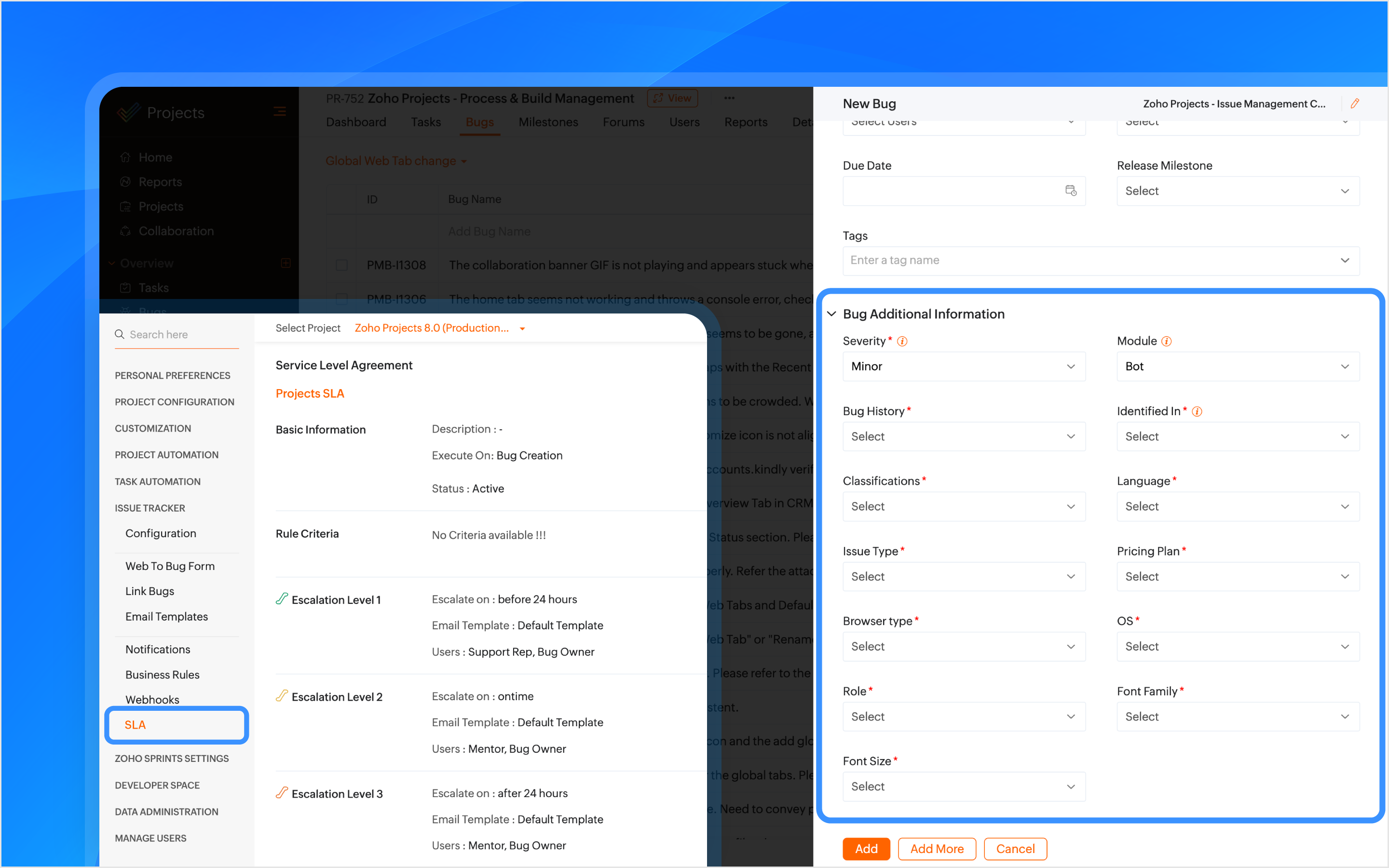
Custom fields are created within the Issue Layout, allowing testers to submit issues with key details like severity, module, browser type, and font family. In the case of the Global Web Tab alignment issue, the browser type field helps pinpoint which environment is affected.

How Other Industries Can Use Issue Layouts In This Process:
Construction: Track issues like material defects or design flaws using custom fields such as location, material type, grade, etc.
Manufacturing: Track production line breakdowns or machine malfunctions issues with custom fields like product phase, machine type, location, etc.
SLAs Based on Issue Type
SLAs are configured based on the issue type, such as Support, Security, Privacy, or Performance, to set resolution deadlines. If the issue is categorized as one of these types, the SLA triggers a resolution within 24 hours. If the issue remains unresolved, it escalates through Levels 1–4.
How Other Industries Can Use SLAs In This Process:
Construction: Set SLAs to resolve critical issues like safety violations or structural failures quickly.
Manufacturing: Set SLAs for issues like production line stoppages to minimize downtime.
Automate Assigning Issues
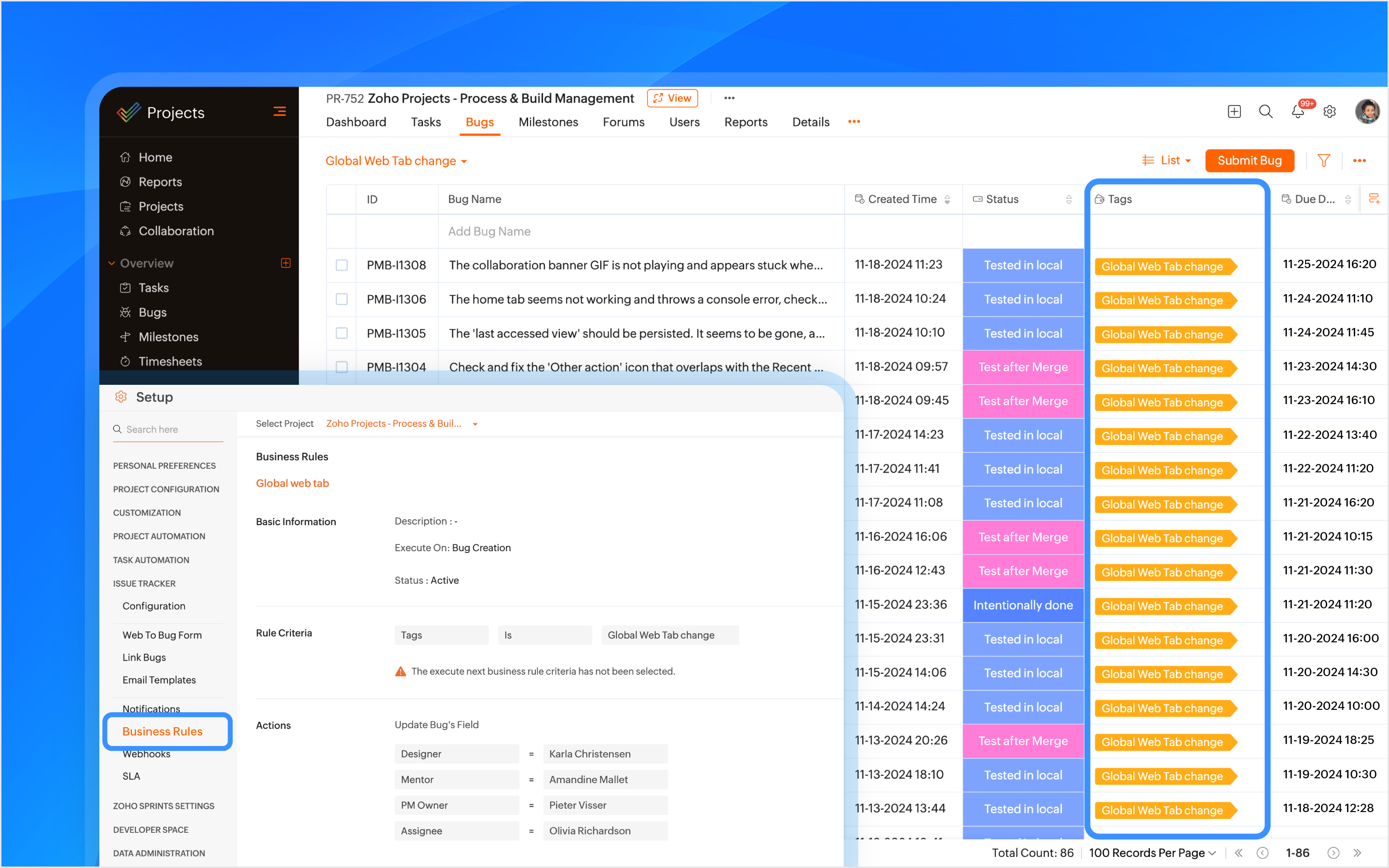
A tag is created using the feature name and is associated with the issue when it is submitted. Business rules are created using the tags as criteria to automatically assign the issue to the relevant developers, designers, managers, and project managers (PMs).
How Other Industries Can Use Tags In This Process:
Construction: Automatically assign issues using the issue type as tags, such as plumbing or electrical, to the appropriate contractors or subcontractors.
Manufacturing: Use tags like machinery or production to assign issues to maintenance teams or shift managers automatically.
Bulk Update Issues
A custom view is created to track and bulk update all issues related to the feature using the tag as a criteria.
How Other Industries Can Use Custom Views In This Process:
Construction: Create custom views to track and update issues related to electrical work.
Manufacturing: Create custom views to track and update production-related issues.

Manage Duplicate Issues
If a duplicate issue is submitted, the developer can link it to the original issue using the is duplicate of link type for identification. A custom function is created to ensure that duplicate issues are closed only when the original issue is closed ensuring no redundancy in the issue tracking process.
How Other Industries Can Use Link Issues In This Process:
Construction: Link duplicate issues like multiple reports of the same electrical fault.
Manufacturing: Link duplicate maintenance issues to the original issue to ensure a single resolution.

Associate Tasks to Issues
The Global Web Tab task is associated with the issue, allowing both the development and QA teams to monitor the progress of the work item from a single place. When a tester opens the task, they can view all associated issues, and when opening an issue, they can easily track the associated task.
How Other Industries Can Use Task Association In This Process:
Construction: Associate tasks like Foundation to issues like Cracked Foundation for easy tracking.
Manufacturing: Associate maintenance tasks to machinery issues to track progress.
Automating Status Updates
A custom function is created to automate the update of issue statuses. when the tester updates the task status to Started Testing, the associated issue status is automatically updated to In QA Process. Similarly, when a developer resolves the issue and updates the task status to Resubmit for QA, the associated issue status is updated to To be tested. Issue Tracker Notifications are used to send notifications to all team members to keep everyone informed about such status updates.
How Other Industries Can Use Custom Functions In This Process:
Construction: When the Electrical Safety Check issue status is updated to Passed, the associated task, such as Wiring Installation, will automatically update its status to Inspection Complete.
Manufacturing: When the Material Shortage issue is updated to Resolved, the task status for Electrical Installation will automatically update to Work Completed.
Automate Adding Followers
Sometimes issues need further validation before they are resolved. Developers can update the issue status, such as Intentionally Done or Discuss with the PM. Business rules are created to automatically add relevant product managers (PMs) and other team members as followers with such statuses as criteria. This ensures that decisions are validated and any necessary inputs are added through comments before moving forward.
How Other Industries Can Use Business Rules In This Process:
Construction: Automate adding followers to validate electrical safety checks or structural issues before moving forward.
Manufacturing: Automate adding followers to validate machine repair statuses before completing maintenance tasks.
Checklist for Testers
Once the feature is reviewed and tested, the Checklist Extension is used for the associated task. The tester is required to complete a predefined checklist within the task to verify that all relevant testing scenarios have been covered. This checklist ensures that no critical testing aspects are missed.
How Other Industries Can Use Checklist Extension In This Process:
Construction: Use checklist to create a punch list to ensure all inspections, tests, and final verifications are completed before a task issue is marked as completed.
Manufacturing: Create a compliance checklist to ensure product assembly and quality control steps are completed before a task issue is marked as completed.
Note: Checklist extension can be used for both tasks and issues.

Resolve Issues
Upon resolving the issue, the developer can resolve the issue from the issue details page with the context.
Custom Notifications
Custom email templates in Issue Tracker Notifications are used to automate communication. Developers and the relevant team members are automatically notified about reopened issues. This helps prevent delays in the project.
How Other Industries Can Use Email Templates In This Process:
Construction: Create customized email template and use it in issue tracker notifications for critical issues like safety violation when reopened.
Manufacturing: Create customized email template and use it in issue tracker notifications for maintenance issues when reopened.
Features used in the process: Issue Layouts, SLAs, Tags, Business Rules, Issue Tracker Notifications, Link Issues, Custom Function, Checklist Extension, and Email Templates.
Topic Participants
Navya Nune
frankn66
François
Monica P
Sticky Posts
Introducing Version-3 APIs - Explore New APIs & Enhancements
New Update - The end of life timeline for V2 APIs has now been extended to 30th June, 2026 Happy to announce the release of Version 3 (V3) APIs with an easy to use interface, new APIs, and more examples to help you understand and access the APIs better.CodeX Scripts for Enforcing Custom Project Logic
Every organization has a defined way of executing projects. There are clear expectations around how tasks should move, when projects should progress, and which actions require validation. When these rules are consistently followed, projects remain structuredAutomation Series: Auto-create Dependent Task on Status Change
In Zoho Projects, you can automatically create and assign a dependent task when a task’s status is updated. This helps teams stay aligned, ensures reviews happen on time, and reduces manual effort. In this post, we’ll walk through an easy setup usingTime Log Reminder
Tracking the time spent on tasks and issues is one of the most important functions of a timesheet. However, users may forget to update the time logs because they have their own goals to achieve. But, time logs must be updated at regular intervals to keepIntroducing the Zoho Projects Learning Space
Every product has its learning curve, and sometimes having a guided path makes the learning experience smoother. With that goal, we introduce a dedicated learning space for Zoho Projects, a platform where you can explore lessons, learn at your own pace,
Recent Topics
click to call feature
I've Zoho CRM and in that i want click to call feature.Can the Product Image on the Quote Template be enlarged
Hello, I am editing the Quote Template and added ${Products.Product Image} to the line item and the image comes up but it is very tiny. Is there anyway that you can resize this to be larger? Any help would be great! ThanksCreating Parent Child relationship in Accounts
We have customers with multiple locations, I setup the HQ as an account, then I setup the different sites marking the HQ as the parent to that location. If I then do a Deal for one of the locations, is there a way to show by looking at the parent accountLearner transcript Challenges.
Currently i am working on a Learner Transcript app for my employer using Zoho Creator. The app is expected to accept assessment inputs from tutors, go through an approval process and upon call up, displays all assessments associated with a learner inClient and Vendor Portal
Some clients like keeping tabs on the developments and hence would like to be notified of the progress. Continuous updates can be tedious and time-consuming. Zoho Sprints has now introduced a Client and Vendor Portal where you can add client users and#7 Tip of the week: Delegating approvals in Zoho People
With Zoho People, absences need not keep employees waiting with their approval requests. When you are not available at work, you can delegate approvals that come your way to your fellow workmate and let them take care of your approvals temporarily. Learn more!Admin Tip: Manage sub-domain emails using sub-domain stripping
As an admin, you may need separate domains for different departments such as sales, support, and marketing. While this approach offers flexibility, creating and managing multiple domains can quickly become overwhelming, especially since each domain requiresQuick Copy Column Name
Please add the ability to quickly copy the name of a column in a Table or Query View. When you right-click the column there should be an option to copy the name, or if you left-click the column and use the Ctrl+C keyboard shortcut it should copy theAbility to Edit YouTube Video Title, Description & Thumbnail After Publishing
Hi Zoho Social Team, How are you? We would like to request an enhancement to Zoho Social that enables users to edit YouTube video details after the video has already been published. Your team confirmed that while Zoho Social currently allows editing theHow do I remove a data source from Zoho Analytics?
I am unable to find a delte option on a datasource that i put in the system as an error. On teh web it refers to a setup icon but I do not see that on my interface?Add Employee Availability Functionality to Zoho People Shift Module
Hello Zoho People Product Team, Greetings and hope you are doing well. We would like to submit a feature request to enhance the Zoho People Shift module by adding employee availability management, similar to the functionality available in Zoho Shifts.Bigin, more powerful than ever on iOS 26, iPadOS 26, macOS Tahoe, and watchOS 26.
Hot on the heels of Apple’s latest OS updates, we’ve rolled out several enhancements and features designed to help you get the most from your Apple devices. Enjoy a refined user experience with smoother navigation and a more content-focused Liquid GlassIs Desk Down?
Across department - always an error. [Status Mode] - error [Table View and the rest] - workingHow do I change the wording of the tile of SignForm?
When my user opens a SignForm url, the title that is presented is always "SignForm signer Information" and a form is displayed asking for the username and email address. This can be confusing to the end user. How can I change the title at least (Or atHow to link tickets to a Vendor/Vendor Contact (not Customer) for Accounting Department?
Hi all, We’re configuring our Accounting department to handle tickets from both customers and vendors (our independent contractors). Right now, ticket association seems to be built around linking a ticket to a Customer / Customer Contact, but for vendor-originatedUnify Overlapping Functionalities Across Zoho Products
Hi Zoho One Team, We would like to raise a concern about the current overlap of core functionalities across various Zoho applications. While Zoho offers a rich suite of tools, many applications include similar or identical features—such as shift management,Automation #7 - Auto-update Email Content to a Ticket
This is a monthly series where we pick some common use cases that have been either discussed or most asked about in our community and explain how they can be achieved using one of the automation capabilities in Zoho Desk. Email is one of the most commonlyTicket to article and Ticket to template
Hello! I would like to know if it is possible (and how) to do the following actions: 1. To generate an article from a ticket (reply + original message) 2. Easy convert an answer to an email templateIs there API Doc for Zoho Survey?
Hi everyone, Is there API doc for Zoho Survey? Currently evaluating a solution - use case to automate survey administration especially for internal use. But after a brief search, I couldn't find API doc for this. So I thought I should ask here. ThanWebDAV / FTP / SFTP protocols for syncing
I believe the Zoho for Desktop app is built using a proprietary protocol. For the growing number of people using services such as odrive to sync multiple accounts from various providers (Google, Dropbox, Box, OneDrive, etc.) it would be really helpfulChange the "from" field
Hello, I used some random word to create the account ID to later host the domain based emails. That username shows up in the "from" field on test emails. How do I change that to a custom one, like first name/last name or business name? I tried to create second user and "named" it the way I want and it worked to a degree, although the "from" field shows all lower case letters, while original had some capital letters. So the "all-low-case" is another issue I am having... Thank you[Free Webinar] Learning Table Series - AI-Enhanced Logistics Management in Zoho Creator
Hello Everyone! We’re excited to invite you to another edition of Learning Table Series, where we showcase how Zoho Creator empowers industries with innovative and automated solutions. About Learning Table Series Learning Table Series is a free, 45-60How to use Rollup Summary in a Formula Field?
I created a Rollup Summary (Decimal) field in my module, and it shows values correctly. When I try to reference it in a Formula Field (e.g. ${Deals.Partners_Requested} - ${Deals.Partners_Paid}), I get the error that the field can’t be found. Is it possibleZoho Creator to Zoho CRM Images
Right now, I am trying to setup a Notes form within Zoho Creator. This Notes will note the Note section under Accounts > Selected Account. Right now, I use Zoho Flow to push the notes and it works just fine, with text only. Images do not get sent (thereError Logs / Failure logs for Client Scripts Functions
Hi Team, While we are implementing client scripts for the automation, it is working fine in few accounts but not working for others. So, it would be great if we can have error Logs for client scripts also just like custom functions. Is there any way thatZoho Books blocks invoicing without VeriFactu even though it is not mandatory until 2027
I would like to highlight a very serious issue in Zoho Books for Spain. 1. The Spanish government has postponed the mandatory start of VeriFactu to January 1st, 2027. This means that during all of 2026 businesses are NOT required to transmit invoicesProblem : Auto redirect from zoho flow to zoho creator
Hi there, I've been waiting for zoho team to get back on this for last couple of days. Anyone else have the problem to access zoho flow? everytime I click on zoho flow it redirects me to zoho creator. I tried incognito mode but it still direct me to zohoWhy am I seeing deleted records in Zoho Analytics syncing with Zoho CRM?
I have done a data sync between Zoho CRM and Zoho Analytics, and the recycle bin is empty. Why do I see deleted leads/deals/contacts in Zoho Analytics if it doesn't exist in Zoho CRM? How can I solve this problem? ThanksZoho Books is now integrated with Zoho Checkout
Hello everyone, We're glad to be announcing that Zoho Books is now integrated with Zoho Checkout. With this integration, you can now handle taxes and accounting on your payment pages with ease. An organization you create in Zoho Checkout can be added to Zoho Books and vice-versa. Some of the key features and benefits you will receive are: Seamless sync of customer and invoice data With the end-to-end integration, the customer and invoice details recorded via the payment pages from Zoho CheckoutSync Issue
My Current plan only allows me with 10,000 rows and it is getting sync failure how to control it without upgrading my planAdd Zoho PDF to Zoho One Tool Applications
It should be easy to add from here without the hassle of creating a web tab:JOB WISE INVOICE PROCESS
I WANT TO ENABLE JOB WISE TRACKING OF ALL SALES AND PURCHASEPDF Template have QTY as first column
I want to have the QTY of an item on the sales orders and invoices to be the first column, then description, then pricing. Is there a way to change the order? I went to the Items tab in settings but don't see how to change the order of the columns onRAG (Retrieval Augmented Generation) Type Q+A Environment with Zoho Learn
Hi All, Given the ability of Zoho Learn to function as a knowledge base / document repository type solution and given the rapid advancements that Zoho is making with Zia LLM, agentic capabilities etc. (not to mention the rapid progress in the broaderIn App Auto Refresh/Update Features
Hi, I am trying to use Zoho Creator for Restaurant management. While using the android apps, I reliased the apps would not auto refresh if there is new entries i.e new kitchen order ticket (KOT) from other users. The apps does received notification but would not auto refresh, users required to refresh the apps manually in order to see the new KOT in the apps. I am wondering why this features is not implemented? Or is this feature being considered to be implemented in the future? With theIMAP mail after specify date
Hi My customer's mail server is on premise and mail storage is very huge. So It never finish sync. and finally stop sync. Cloud CRM have a option like zoho mail sync mail after some date.Claude + MCP Server + Zoho CRM Integration – AI-Powered Sales Automation
Hello Zoho Community 👋 I’m excited to share a recent integration we’ve worked on at OfficehubTech: ✅ Claude + MCP Server + Zoho CRM This integration connects Zoho CRM with Claude AI through our custom MCP Server, enabling intelligent AI-driven responsesSearch Bar positioning
Why is the Search bar on the far right when everything is oriented towards the left?Import Error: Empty values for mandatory fields - Closing Date
Hello, I've tried multiple times to import a CVS Potential list from another Zoho account. But the error message I get is: Empty values for mandatory fields - Closing Date There are valid dates in this field, so I don't understand why this error messagesFeature Requests - Contact Coloured Picklist Visibility & Field Visibility During Ticket Creation
Hi Desk Team, I have 2 feature requests for you. Since Coloured Picklists are now available in Desk, It would be great if the colours were visible on the Related Details (Contact Information) when creating a ticket. In the screenshot below, I have 2 fieldsNext Page