Automating Attendance Tracking with Zoho Cliq Developer Platform
I wish remote work were permanently mandated so we could join work calls from a movie theatre or even while skydiving! But wait, it's time to wake up! The alarm has snoozed twice, and your team has already logged on for the day.

How does this solution benefit a business?
- Real-time reminders reduce instances of ghost check-ins and ensure accurate recording of everyone's logged hours.
- Essential for attendance tracking, payroll accuracy, compliance with labour laws, and audits.
- The entire team stays informed, fostering a cohesive workflow that eliminates the need for micromanagement.
Before beginning to script the code below, we must create a connection in Cliq with Zoho People. Once a connection is created and connected, you can use it in Deluge integration tasks and invoke URL scripts to access data from the required service.
Create a Zoho People default connection with any unique name with the scopes - ZohoPeople.Attendance.ALL , ZohoPeople.forms.ALL and ZohoPeople.leave.ALL
ⓘ Document for reference : Connections in Cliq
How to obtain or locate the channel unique name in Cliq?
Navigate to the top right corner of the channel and locate the three dots. Click it.
In the menu that appears, select "Channel info" and a pop-up will open, displaying detailed channel information.
- After a successful login in Cliq, hover to the top right corner and click your profile. Post clicking, navigate to Bots & Tools > Schedulers.
- On the right, click the "Create Scheduler" button.
- To learn more about schedulers and their purposes, refer to the Introduction to Schedulers.
- Create a scheduler using your preferred name. Specify the following details: the scheduler name and a description.

- For the recurring period, choose the type "Weekly." Select Monday through Friday and set the time of execution to 11 AM or any other time that aligns with your company's check-in time, or customise the recurring period based on your specific use case.
- Finally, click "Save & edit code" and paste the following code.
- currentDate = zoho.currentdate;
- currentDateString = currentDate.toString("dd-MMM-yyyy");
- fromIndex = 1;
- toIndex = 200;
- // Get all active users
- users = zoho.people.getRecords("employee",fromIndex,toIndex,{},"{CONNECTION_LINK_NAME}");
- usersList = List();
- usersList.addAll(users);
- iterations = {1,2,3,4,5,6,7,8,9,10,11,12,13,14,15,16,17,18,19,20,21,22,23,24,25};
- // Get All Employees ( 4000 MAX )
- if(users.size() == 200)
- {
- for each iteration in iterations
- {
- fromIndex = fromIndex + toIndex;
- toIndex = toIndex + 200;
- users = zoho.people.getRecords("employee",fromIndex,toIndex,{},"{CONNECTION_LINK_NAME}");
- if(users.size() > 0 && users.size() == 200)
- {
- usersList.addAll(users);
- }
- else if(users.size() > 0 && users.size() < 200)
- {
- usersList.addAll(users);
- break;
- }
- else
- {
- break;
- }
- }
- }
- // Get all the employees checkedin from the morning.
- getAttendenceEntries = invokeurl
- [
- url :"https://people.zoho.com/api/attendance/fetchLatestAttEntries?duration=240"
- type :GET
- connection:"{CONNECTION_LINK_NAME}"
- ];
- latestAttendanceRecords = getAttendenceEntries.get("response").get("result");
- checkedInUsers = List();
- for each userRecord in latestAttendanceRecords
- {
- checkedInEmployeeEmail = userRecord.get("emailId");
- checkedInUsers.add(checkedInEmployeeEmail);
- }
- // Get all the employees who applied for leave both approved and pending ( Remove PENDING to exclude only the leave approved employees )
- leaveApprovedEmployees = invokeurl
- [
- url :"https://people.zoho.com/api/v2/leavetracker/leaves/records?from=" + currentDateString + "&to=" + currentDateString + "&dateFormat=dd-MMM-yyyy&approvalStatus=[APPROVED,PENDING]"
- type :GET
- connection:"{CONNECTION_LINK_NAME}"
- ];
- info leaveApprovedEmployees;
- leaveApprovedEmployeesList = List();
- for each member in leaveApprovedEmployees.get("records")
- {
- leaveApprovedEmployeesList.add(member.get("EmployeeId"));
- }
- info leaveApprovedEmployeesList;
- // Add the users to yet to checkin list if they are not checked from the morning and not applied for leave
- usersYetToCheckIn = list();
- for each user in usersList
- {
- employeeEmail = user.get("EmailID");
- employeeId = user.get("EmployeeID");
- employeeStatus = user.get("Employeestatus");
- if(!checkedInUsers.contains(employeeEmail) && !leaveApprovedEmployeesList.contains(employeeId) && employeeStatus.equals("Active"))
- {
- usersYetToCheckIn.add(employeeEmail);
- }
- }
- // Mention the list of users in the channel.
- if(usersYetToCheckIn.size() == 0)
- {
- info "No users were found yet to checked-in at 11 PM today. Great to see everyone wrapping in on time! ✅";
- }
- else
- {
- usersYetToCheckInString = "";
- for each user in usersYetToCheckIn
- {
- usersYetToCheckInString = usersYetToCheckInString + "[" + user + "](mail:" + user + ") \n";
- }
- usersYetToCheckInString = usersYetToCheckInString.subString(0,usersYetToCheckInString.length() - 2);
- response = Map();
- card = Map();
- card.put("title","Employees who haven’t checked in yet ( " + usersYetToCheckIn.size() + " )");
- card.put("thumbnail","https://i.pinimg.com/originals/85/e9/f3/85e9f3f5ac31fc5aab586e208297f43d.gif");
- card.put("theme","modern-inline");
- response.put("card",card);
- response.put("text",usersYetToCheckInString);
- info zoho.cliq.postToChannel("{CHANNEL_UNIQUE_NAME}",response);
- }
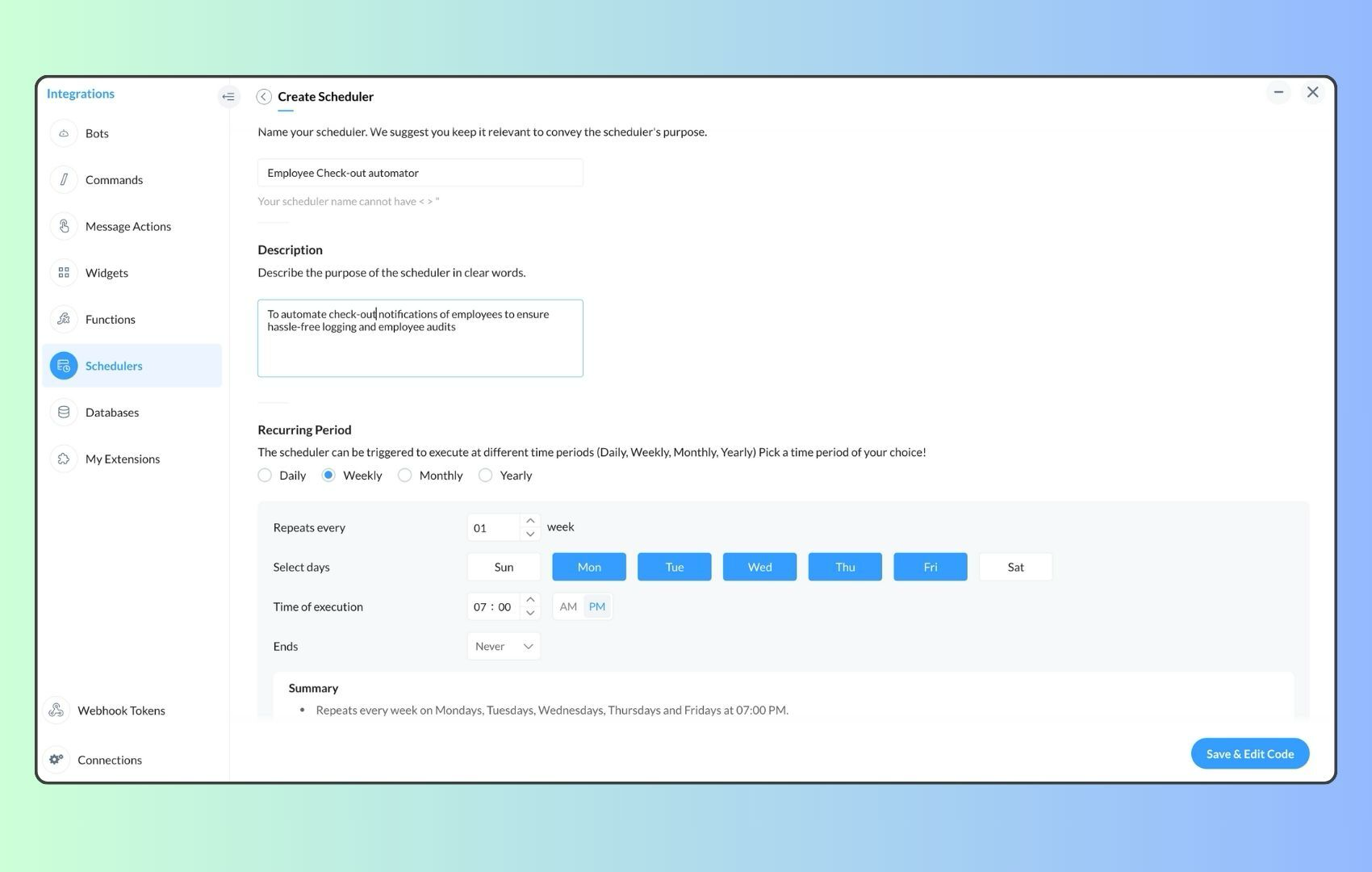
- Now, let's follow the same steps and create a scheduler for checkout reminders. Under the recurring period, choose the type as "Weekly." Select Monday through Friday and set the time of execution to 7 PM or any other time that aligns with your company's checkout time, or customise the recurring period based on your specific use case.
- Click "Save & edit code" and paste the following code.
- attendanceResponse = invokeurl
- [
- url :"https://people.zoho.com/api/attendance/fetchLatestAttEntries?duration=600"
- type :GET
- connection:"{CONNECTION_LINK_NAME}"
- ];
- info attendanceResponse;
- todayDate = zoho.currenttime.toString("YYYY-MM-dd");
- latestAttendanceRecords = attendanceResponse.get("response").get("result");
- usersWithoutCheckout = list();
- if(latestAttendanceRecords.size() > 0)
- {
- for each userRecord in latestAttendanceRecords
- {
- userEmail = userRecord.get("emailId");
- dailyEntries = userRecord.get("entries");
- for each dailyEntry in dailyEntries
- {
- if(dailyEntry.containsKey(todayDate))
- {
- todayEntryDetails = dailyEntry.get(todayDate);
- attendanceLogs = todayEntryDetails.get("attEntries");
- for each logEntry in attendanceLogs
- {
- if(!logEntry.containsKey("checkOutTime"))
- {
- usersWithoutCheckout.add("{@" + userEmail + "}");
- }
- }
- }
- }
- }
- }
- usersWithoutCheckoutString = usersWithoutCheckout.toString("\n");
- if(usersWithoutCheckoutString.trim().length() == 0){
- usersWithoutCheckoutString = "No users were found checked-in after 7 PM today. Great to see everyone wrapping up on time! ✅";
- }
- response = Map();
- card = Map();
- card.put("title","List of users who remain checked in ( " + usersWithoutCheckout.size() + " )");
- card.put("thumbnail","https://media.tenor.com/Hd8nLZZTPRYAAAAi/alarm-clock-alarm.gif");
- card.put("theme","modern-inline");
- response.put("card",card);
- response.put("text",usersWithoutCheckoutString);
- info zoho.cliq.postToChannel("{CHANNEL_UNIQUE_NAME}",response);
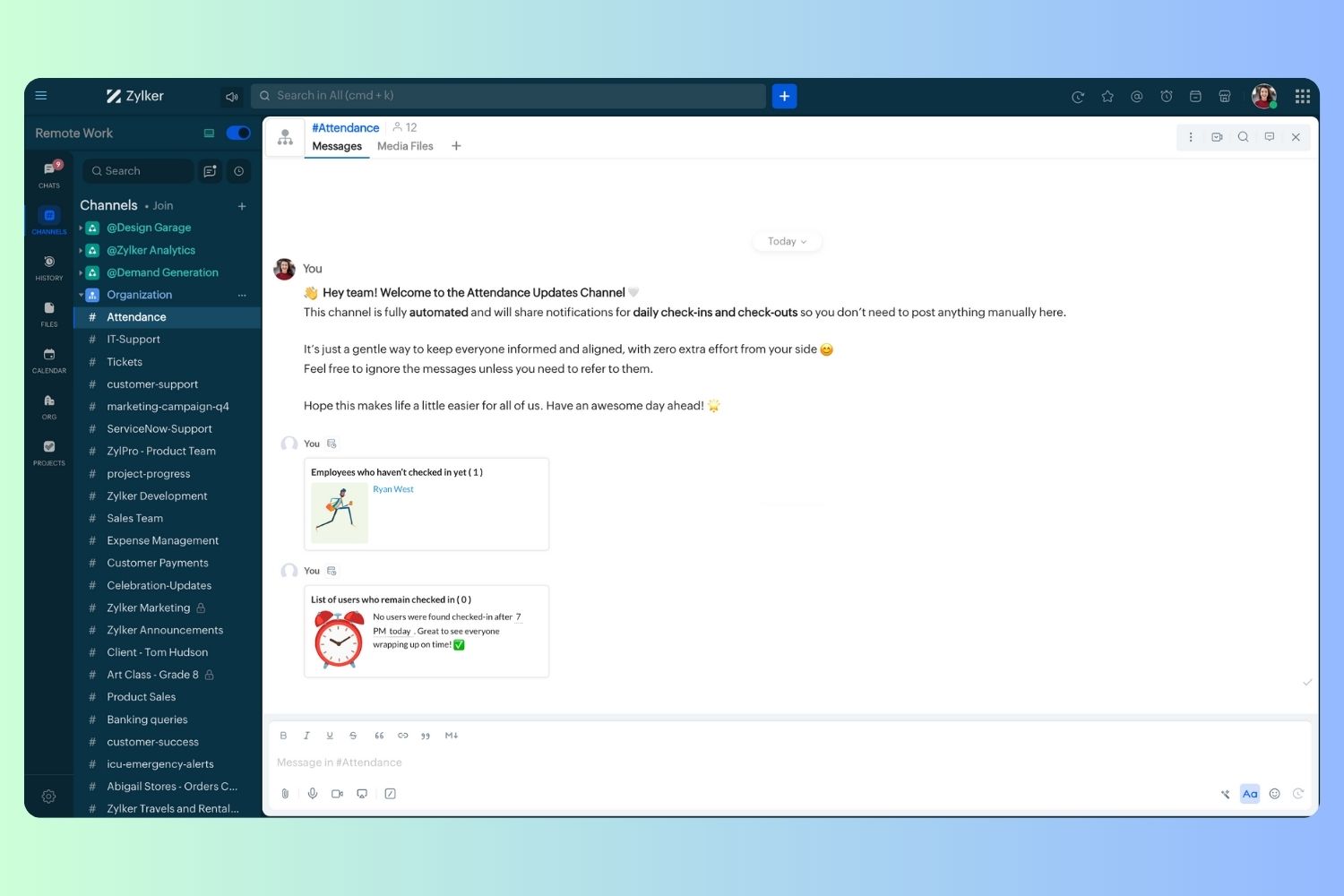
Wrapping up and checking out for the day, hopefully
Zoho Campaigns Resources





Topic Participants
Harsha SS
Ram Freedman
Sticky Posts
Automate attendance tracking with Zoho Cliq Developer Platform
I wish remote work were permanently mandated so we could join work calls from a movie theatre or even while skydiving! But wait, it's time to wake up! The alarm has snoozed twice, and your team has already logged on for the day. Keeping tabs on attendanceAutomating Employee Birthday Notifications in Zoho Cliq
Have you ever missed a birthday and felt like the office Grinch? Fear not, the Cliq Developer Platform has got your back! With Zoho Cliq's Schedulers, you can be the office party-cipant who never forgets a single cake, balloon, or awkward rendition ofCustomer payment alerts in Zoho Cliq
For businesses that depend on cash flow, payment updates are essential for operational decision-making and go beyond simple accounting entries. The sales team needs to be notified when invoices are cleared so that upcoming orders can be released. In contrast,Accelerate Github code reviews with Zoho Cliq Platform's link handlers
Code reviews are critical, and they can get buried in conversations or lost when using multiple tools. With the Cliq Platform's link handlers, let's transform shared Github pull request links into interactive, real-time code reviews on channels. ShareApp Spotlight : PagerDuty for Zoho Cliq
App Spotlight brings you hand-picked apps to enhance the power of your Zoho apps and tools. Visit the Zoho Marketplace to explore all of our apps, integrations, and extensions. In today's fast-paced world, seizing every moment is essential for operational
Zoho CRM Plus Resources
Zoho Books Resources
Zoho Subscriptions Resources
Zoho Projects Resources
Zoho Sprints Resources
Zoho Orchestly Resources
Zoho Creator Resources
Zoho WorkDrive Resources


Zoho CRM Resources
Get Started. Write Away!
Writer is a powerful online word processor, designed for collaborative work.
-
オンラインヘルプ
-
Webセミナー
-
機能活用動画
-
よくある質問
-
Ebook
-
-
Zoho Campaigns
- Zoho サービスのWebセミナー
その他のサービス コンテンツ
ご検討中の方
Recent Topics
Advanced Deluge help needed with custom function and COQL limits
I have a scheduled function that takes a snapshot of specific metrics and saves them to a custom module. However I'm struggling with the limits of COQL. I attach my full code, but an example of the issues I'm having is that it's erroring with a 'LimitTip of the Week - Conditional Formatting Chart
Conditional formatting allows you to highlight your data series based on a pattern or a trend in your data. This makes it easy for you to identify when your data reaches certain values or when it deviates from the trend. Zoho Analytics allows you toZoho Campaign says "null"
Here is what I did: 1. Created a list in CRM, made a form to fill information in the list. - This is working fine. 2. Created a flow to connect CRM (chose a the list) and want to add an event in Google Calendar. (Calendar is connected). Problem 1 - WhenZoho Learn - AI Translate
Hi Learn team, I had a situation today where I was providing training to a client team and I had written articles into their Zoho Learn to support their learning. I realised that one of the team members was a non-native English speaker and they were strugglingPower of Automation :: Auto-Sync Custom Date Field Between Related Tasks via Blueprint Transition
Hello Everyone, A custom function is a software code that can be used to automate a process and this allows you to automate a notification, call a webhook, or perform logic immediately after a workflow rule is triggered. This feature helps to automateIntroducing auto-upgrade in Zoho LandingPage
Hi everyone, We’re excited to share an upcoming update to help you get the most out of your landing pages — the auto-upgrade option, launching on October 22, 2025. Your landing pages are designed to bring in leads, and we want to make sure you never missWebhook Authentication Key
As Google Ads' lead form extension does not integrate with Zoho CRM at the moment other than Zapier. I want to use the Zoho Flow webhook feature to send leads to Zoho CRM. Meaning creating a flow in Zoho Flow that triggers based on Webhook and then webhookWorkdrive comment links stopped working.
I have marked a PDF file with 95 comments, they have worked for a while. When i clicked on them they brought me to the correct page and showed me the outline that i had drew on the plans. The comments included the page number of the outline, but now itHow to Bulk-Update Sales Orders in CRM
Hi - I need to bulk update existing sales orders with dates from our ERP of when the sales orders were created. I made a date field on the Sales Order module where I want to insert that data. I can't Mass Update because I am not updating the fields toZoho ToDo in Cliq
Our organization utilizes Zoho ToDo in the Zoho Mail Desktop app. Is there a way for these to show up in Cliq Desktop app as well?【Zoho CRM】サンドボックス機能のアップデート:カスタムビューが利用可能になりました。
ユーザーの皆さま、こんにちは。コミュニティチームの中野です。 今回は「Zoho CRM アップデート情報」の中から、サンドボックス機能のアップデートをご紹介します。 目次 1. カスタムビューとは 2. 今回の機能アップデートについて 1. カスタムビューとは カスタムビューは、ユーザーが設定した条件に基づいてデータをフィルタリング・整理し、 重要な情報へ効率的にアクセスできるようにする機能です。 「過去15日間の見込み客」や「受注間近の商談」、「特定の優先度レベルが設定された案件」など 条件を指定してわずか数クリックで設定できます。Changing an agents email address
How do you change an agent's email address? I keep getting a red circle even though I am an admin. And on one of my agents he has two email addresses? How is that possible?Zoho CRM - Potentials Tab
Hi! When I create a Deal (Potentials tab) the header looks like this: After a refresh on the page it looks like this: What should I do so that it is displayed like in the second pic without refresh? Also I have a user that as of recently, cannot see thisUnable to create embed code for resource of workdrive using API
Hello Team, I am trying to create embed code for a resource using workdrive api in powershell, however facing some issues with injecting data in body. Followed Doc: https://workdrive.zoho.com/apidocs/v1/filefoldersharing/shareeveryone Please help, belowFeature Request - Insert URL Links in Folders
I would love to see the ability to create simple URL links with titles in WorkDrive. or perhaps a WorkDrive extension to allow it. Example use case: A team is working on a project and there is project folder in WordDrive. The team uses LucidChart to createnot able to convert pdf to jpg and other forms and vice versa.
i want to change my pdf to jpg, word, etc and some times jpg to pdf. i don't know how to do in this.Enable / show scroll bar when Mega Menu is opened
Hey there I am using the mega menu add-on and experience a "flicker" whenever the mega menu opens. The reason is, that the scrollbar, which has a width of a few pixels, stops showing when the mega menu opens. As the scrollbar disappears the whole pageReports: Custom Search Function Fields
Hi Zoho, Hope you'll add this into your roadmap. Issue: For the past 2yrs our global team been complaining and was brought to our attention recently that it's a time consuming process looking/scrolling down. Use-case: This form is a service report withHow can I transfer data from Production to Development environment?
Hi, I am using Creator V6 and would like to bring all the data in production to the Development and Testing environments? Is there an easy way of doing that or I have to export and import each table?New portal SAML authentication error: User not found
Dears, Has anyone else been experiencing this lately? I am creating a new portal authenticated by SAML (Entra ID). I followed the same process as I did with other portals, but any new portal created after this always encounters this error. I’ve been reportingDevis et facture multi page
Bonjour, je suis sur Zoho invoice et je rencontre un problème sur mes devis et factures lorsqu'ils dépassent 1 page. je me retrouve souvent avec des lignes coupées ou le sous total page 1 et le total page 2. j'aimerai savoir s'il existe une possibilitéHelp with Filtering Records, HTML Pages, and Automatic File Uploads in Zoho Creator
Hi Zoho Creator Community, I’m building a Zoho Creator application and need guidance on a few features I’ve been struggling with. I want to implement them safely and efficiently, and I’d appreciate any examples, tips, or best practices. I want users toFeature Suggestion for Zoho Websites – Inspired by Squarespace Systems
Dear Zoho Team, I’m a Zoho user and also a Squarespace Platinum Circle member, and I recently noticed the launch of Zoho Websites in India. I wanted to share some ideas for features that could enhance the platform for professional users and agencies.Custom View - Sort by Custom Field
I created a custom field for our Engineering team to know which tickets to work first by numbering them. I created a custom view to general data which includes the Engineering Priority. However, I cannot sort the Engineering Priority column ascendingZoho Indeed Intergation not pulling candidate details
We have recently integrated zoho with indeed. Prior to this our candidates came into the candidates tab via the zoho.resumes email address from indeed and it pulled through the candidates mobile number, and majority of the time a postcode. However sinceCustom View of tickets created today
How can I create a custom view that list all my ticked created in the current date? Currently, if I select the "Created Time" criteria, the "Current Time" option does not work as today. Actually, I don't know how it works this "Current Time".Lifecycle Reports
From data to decisions: A deep dive into ticketing system reports A lifecycle report captures and visualises the sequential states that a ticket undergoes across its lifespan. For instance, when a customer submits a support ticket for a faulty product,Zoho Forms - Print Button on Forms
Hi Forms team, I'm replicating a form for a client which is currently based on JotForm. I noticed that at the end of the form there is a button to print the completed form. I thought this would be something worth sharing and a nice to have in Zoho Forms.Putting Watermark on Zoho Sheet
Can this be done?Validation function not preventing candidates under 18 or over 30 from submitting the web form
Hello everyone, I’m trying to create a validation rule for the Candidate Webform in Zoho Recruit. I added a custom field called “Date of Birth”, and I want to make sure that candidates cannot submit the form unless their age is between 18 and 30 years.Report to know the history of certain Tickets on Desk
Hi there guys, As the title implies we're wondering if there's any way to get some kind of Report that allows us to check the History of various Tickets at the same time since as of today if we want to know that we have to check them 1 by 1 which is notAdvanced Usage Billing: Prepaid with Drawdown
Picture yourself at your favourite coffee shop, Bean & Brew. You come by every morning for your usual cappuccino, and occasionally you get an extra cold brew and a muffin or two in the afternoon. Interestingly, Bean & Brew has a new idea of offering aZoho Commerce in multiple languages
When will you be able to offer Zoho Commerce in more languages? We sell in multiple markets and want to be able to offer a local version of our webshop. What does the roadmap look like?Urgent Zoho Creator down!!!???
Now my zoho creator faced this issue. Anyone has idea? Urgent!!!The Social Wall: September 2025
Hello everyone, As we step into the fall season, some major updates are on the horizon. Meanwhile, here are the exciting updates we rolled out this September. Approvals in iOS Managing approvals just got more seamless on mobile. With this update, theIntroducing Detailed View for Candidates in Vendor Portal
We’ve added a new Details sub-tab inside the Vendor Portal to help vendors easily view complete candidate information after submission. With this update, vendors can now access all candidate details, from personal information to associated job openings,Zoho One Down
Zoho Team, Checking if when the services up - currently Zoho One is downHow can I track which zoho users are actively using Zoho CRM
I have several licenses of Zoho CRM. We now need to add a new user. I could purchase a new license, but before I do, I would like to see if any of our existing users are not actively using the license assigned to them. How can I determine the activityAccess to Detail View From HTML Snippet
Zoho Creator displays a detail view that slides out from the right onClick of a record in a report. Am I able to access that detail view from an html snippet, e.g. click a record in a list and display the detail view? The zc_LoadIn dialog is a bit clunky,Billing Management: #10 Solving Common Mistakes in Billing
Over the past few weeks, we have explored different facets of billing, from the simplicity of traditional one-time billing to the evolving landscape of subscriptions, retainers, and usage-based models. We've unpacked how billing isn't just about sendingNext Page