Collaboration autour des fichiers
S'il est aujourd'hui évident de travailler sur des outils de bureautique, la technologie a elle-même pu mettre des obstacles sur son propre chemin. En effet, bien que l'objectif ait été de simplifier les opérations et de partager l'information, de nombreux chefs d'entreprise constatent que leurs employés sont confrontés à un ensemble frustrant de problèmes courants liés aux documents et à la collaboration parce que les systèmes qu'ils utilisent ne sont pas alignés.
7 problèmes courants liés à la collaboration autour des documents :
- Duplication de fichiers et difficulté d'accéder à la version la plus récente du document. Les utilisateurs sont ne sont pas sûrs de savoir quelle est la version finale.
- Des documents importants sont accidentellement supprimés.
- Perte de temps à rechercher des documents qui, souvent, ne sont jamais retrouvés.
- Les conventions de dénomination des documents sont compliquées.
- Les autorisations d'accès aux documents portent à confusion.
- La collaboration avec les clients et le partage des fichiers ne sont pas clairement définis.
- Les utilisateurs sont incapables d'accéder aux documents, formulaires et modèles standard.
Le temps où nous annotions nos documents au stylo est derrière nous ; aujourd'hui, nous disposons d'outils qui permettent de co-créer en temps réel dans le cloud et tout est en zéros et en uns derrière des couches de cryptage et des mots de passe.
Dans WorkDrive, la collaboration n'a pas besoin d'être présentée ; mais il convient de rappeler qu'il ne s'agit pas d'un simple stockage de documents : depuis WorkDrive, on peut collaborer directement.
Les dossiers d'équipe
Le travail d'équipe à l'aide de plateformes de collaboration de contenu traditionnel implique le partage de fichiers avec vos coéquipiers, la gestion de leurs autorisations d'accès, mais cela ne s'arrête pas là. Chaque fois que vous avez besoin d'accéder à un fichier créé par quelqu'un d'autre, vous devez demander l'accès et attendre qu'il le partage avec vous. Il est encore plus difficile de garder ces fichiers organisés pour un accès facile. Ces problèmes de collaboration font désormais partie du passé. Zoho WorkDrive introduit une toute nouvelle façon de créer, stocker et partager des fichiers pour collaborer avec les membres de votre équipe - les dossiers d'équipe.
Les dossiers d'équipe sont de deux types : les dossiers d'équipe privés et les dossiers d'équipe publics.
Dossiers d'équipe privés
Vous pouvez créer des dossiers d'équipe privés pour stocker et travailler sur des fichiers qui sont exclusifs à votre département ou liés à un projet spécifique. Seuls les membres de l'équipe qui ont été ajoutés à un dossier d'équipe privé peuvent accéder à ceux-ci.
Dossiers d'équipe publics
Vous pouvez créer des dossiers d'équipe publics pour stocker des fichiers d'équipe communs auxquels tous les membres de votre équipe ou organisation peuvent accéder. Tout membre de l'équipe ou de l'organisation peut rejoindre un dossier d'équipe public et accéder à ses différents fichiers et dossiers.
Les dossiers d'équipe facilitent votre travail quotidien
Une intégration en toute simplicité pour les nouveaux membres de l'équipe.
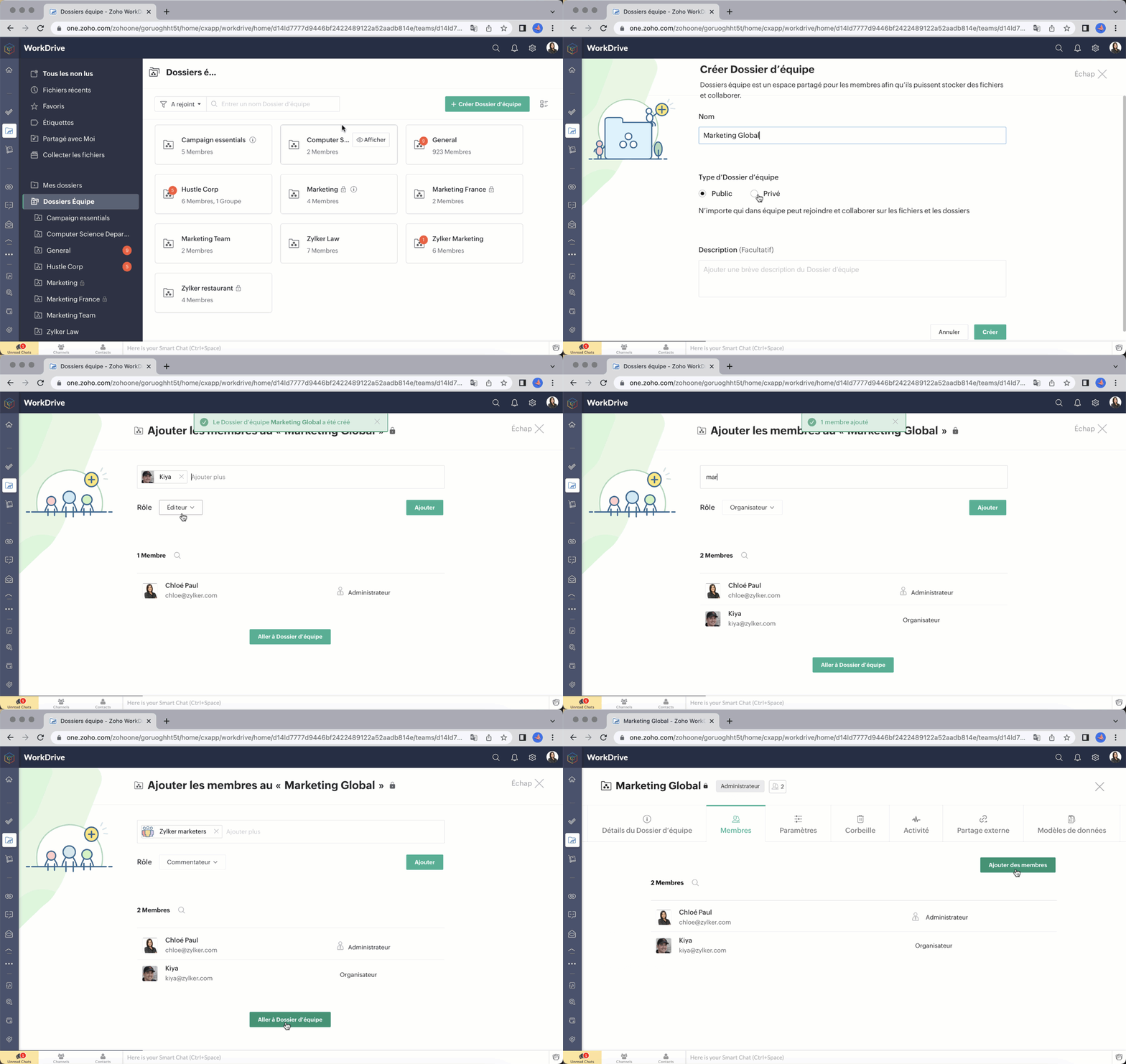
Ajouter des membres à votre dossier d'équipe est simple et rapide. Il suffit de saisir l'adresse e-mail, d'attribuer un rôle approprié (administrateur/ organisateur/ éditeur/ commentateur/ visiteur) et de les ajouter.
Vous pouvez également ajouter des groupes à un dossier d'équipe. Si votre équipe ou organisation utilise des groupes dans WorkDrive, vous pouvez facilement ajouter un groupe entier à un dossier d'équipe et attribuer au groupe un rôle spécifique au lieu d'ajouter chaque membre individuellement. Tous les membres du groupe recevront le rôle attribué à leur groupe dans ce dossier d'équipe. Vous pouvez ajouter des groupes, modifier les rôles des membres et supprimer des groupes des dossiers d'équipe à tout moment.
Rôles et autorisations à structure précise
WorkDrive vous permet d'attribuer à un membre d'un dossier d'équipe des autorisations d'accès plus élevées à un fichier ou à un dossier au sein de celui-ci. Par exemple, un membre ayant le rôle de visiteur dans un dossier d'équipe peut recevoir un accès de modification ou un accès plus élevé à un sous-dossier ou à un fichier.

Partage de fichiers avancé
L'objectif des dossiers d'équipe est de réduire le nombre de fois où vous devez partager des fichiers individuellement avec vos coéquipiers. Les fichiers ajoutés à un dossier d'équipe sont déjà disponibles pour tous ses membres.
Notre fonction avancée de partage externe vous permet de créer plusieurs liens pour partager le même fichier avec différentes personnes, comme des clients et des partenaires. Vous pouvez définir des autorisations d'accès, des mots de passe et des dates d'expiration, et décider qui peut télécharger un fichier. Vous pouvez également demander les données de l'utilisateur, comme son nom, son numéro de téléphone et son e-mail.
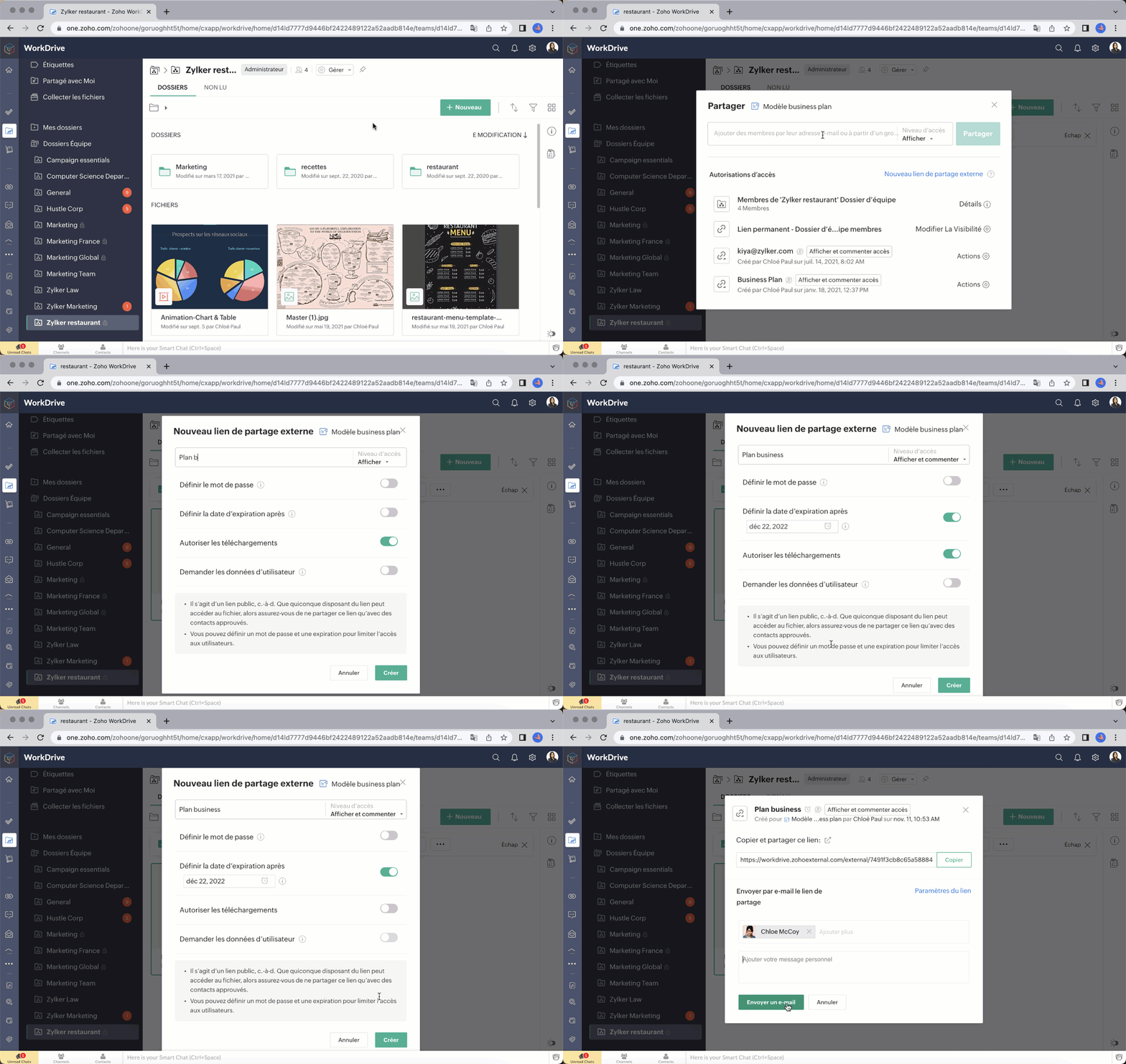
Bon à savoir : en tant qu'administrateur, vous pouvez désactiver complètement le partage externe pour votre Dossier d'équipe si nécessaire.
Souhaitez-vous nous faire part de votre expérience avec Zoho Work Drive ? N'hésitez pas à laisser vos commentaires dans la section ci-dessous.
L'équipe Zoho France
New to Zoho Recruit?
Zoho Campaigns Resources





Topic Participants
Kinjal Lodaya
François Ehret
Mariam Abrahamyan
Sticky Posts
Collaboration sans faille avec Zoho One
Bonjour à tous, Dans cet article nous allons voir comment Zoho One permet une collaboration à différents niveaux . La façon dont nous travaillons évolue. À mesure que les entreprises se mondialisent, la plupart des activités sont menées en équipe.
Zoho CRM Plus Resources
Zoho Books Resources
Zoho Subscriptions Resources
Zoho Projects Resources
Zoho Sprints Resources
Zoho Orchestly Resources
Zoho Creator Resources
Zoho WorkDrive Resources


Zoho CRM Resources
Get Started. Write Away!
Writer is a powerful online word processor, designed for collaborative work.
Zoho CRM コンテンツ
-
オンラインヘルプ
-
Webセミナー
-
機能活用動画
-
よくある質問
-
Ebook
-
-
Zoho Campaigns
- Zoho サービスのWebセミナー
その他のサービス コンテンツ
ご検討中の方
Recent Topics
Recurring Tasks and Reminders in Projects
Recurring tasks are tasks that are created once, and then recreated automatically after a designated time period. For example, the invoice for your billable tasks is due every week. You can set that task to recreate itself every week. Also, the futureUnable to remove the “Automatically Assigned” territory from existing records
Hello Zoho Community Team, We are currently using Territory Management in Zoho CRM and have encountered an issue with automatically assigned territories on Account records. Once any account is created the territory is assigned automatically, the AutomaticallyImproved Functionality PO Bill SO Invoice
Hello, I need to enter over 100 items, it's frustrating to scroll a few item rows and wait for more to load, then scroll again. It would be nice to have buttons that scroll to the top or bottom with one click. Furthermore, these items I'm adding are VATWishes for 2026
Hello, and a happy new year 2026! Let's hope it's better for everyone. I'd like to share some thoughts on Zoho One and what could be useful in the short, medium, and long term. Some things are already there, but not applied to Zoho One. Others seem likeHow to Integrate Zoho Books with Xero (No Native Connection Available)
Hi everyone, I’m currently facing an issue with integrating Zoho Books invoices with Xero, as I’ve noticed Zoho does not provide a native integration with Xero at this time. I would like to ask: What are the common or recommended solutions for syncingZohoSalesIQ.Chat cannot send messages
Chat cannot send messages. Our app implements the customer service chat window functionality by integrating the Mobilisten SDK. Recently, we encountered an issue: after successful SDK initialization and visitor registration, when the `startWithQuestion`Markup instead of discount??
Is it possible to have the discount field on an invoice or estimate be a markup instead? It's the very same functionality that I am looking for - to be able to markup an individual item by either a $ or a % and have that cost added (instead of subtracted) to the item cost. Currently, I use the tax feature to accomplish this, but it's very awkward to have "Markup 15%" listed after the subtotal. Plus, if I want to markup items at different rates, I end up with several "markup" lines in the totalsPlan switch
I thought I pressed the Free button, but after they set up the account, I see that I am on a Premium trial. Is this usual? How do I get onto the Free version?'Tax registration date'?
The second question in setting up is 'Tax registration date'. My first question: which tax? My second question: why do you need the registration date?What if we don't have an ABN?
Australian business. Setting up. We have no ABN. It's not compulsory. Field not allowed to be blank. What to do?Keeping track of project expenses
I have talked to a few support techs and it is very hard for me to believe that Zoho's project accounting software can't keep accounts for my projects. I must not understand what they're saying. We get a contract to build something. So the project revenueLinking Multi-UOM Barcodes to Products in Zoho Books
Greetings, I'm using Zoho Books for retail shop and I'm running into a bit of a challenge with products that have multiple Units of Measurement (UOMs) and corresponding barcodes. For example, I sell cigarettes both as individual packets and in cartonsHow to change "from" email address when invoicing.
HELP! I'm new to Zoho Books and when I first set it up used a different email address than I currently want to use. I've tried to go to settings and change the default email address but when I generate an invoice it still shows the old email address (although I can't find it anywhere else). I really need to get this changed before I can use the program. Any help would be appreciated.Critical Issue: Tickets Opened for Zoho Support via the Zoho Help Portal Were Not Processed
Hi everyone, We want to bring to your attention a serious issue we’ve experienced with the Zoho support Help Portal. For more than a week, tickets submitted directly via the Help Portal were not being handled at all. At the same time no alert was postedHide/Show Subform Fields On User Input
Hello, Are there any future updates in Hide/Show Subform Fields "On User Input"?Cloning Item With Images Or The Option With Images
Hello, when I clone an item, I expect the images to carry over to the cloned item, however this is not the case in Inventory. Please make it possible for the images to get cloned or at least can we get a pop up asking if we want to clone the images asCustom validation in CRM schema
Validation rules in CRM layouts work nicely, good docs by @Kiran Karthik P https://help.zoho.com/portal/en/kb/crm/customize-crm-account/validation-rules/articles/create-validation-rules I'd prefer validating data input 'closer to the schema'Adding Default Module Image into mail merge field
As with most people finding their way to these forums i have a specific requirement that doesn't seem to be supported by Zoho I have created 2 custom modules to suit my purpose 1 is an inventory type module that lists aluminium extrusions, and all relevantIs it possible to roll up all Contact emails to the Account view?
Is there a way to track all emails associated with an Account in one single view? Currently, email history is visible when opening an individual Contact record. However, since multiple Contacts are often associated with a single Account, it would be beneficialManaging credit cards
Hi, I'm hoping someone on this forum can help me out managing credit card accounts. Transaction are entered as expenses using the credit card account and, as expected, the card balance shows as a negative since this is clearly money I owe them. Once I make a payment, of the full amount owed, I woudl expect the balance to become zero. It doesn't, the negative balance just keeps on increasing even though the payment is reflected correctly in my main operating account. No-one at Zoho seems to understandFree Training - Explore What’s New in Zoho One 2025
Greetings! We hope you have all had a chance by now to get hands-on with the new features and updates released as part of ZO25. Yes, we understand that you may have questions and feedback. To ensure you gain a comprehensive understanding of these updates,Quick way to add a field in Chat Window
I want to add Company Field in chat window to lessen the irrelevant users in sending chat and set them in mind that we are dealing with companies. I request that it will be as easy as possible like just ticking it then typing the label then connectingHow to create a two way Sync with CRM Contacts Module?
Newbie creator here (but not to Zoho CRM). I want to create an app that operates on a sub-set of CRM Contacts - only those with a specific tag. I want the app records to mirror the tagged contacts in CRM. I would like it to update when the Creator appZoho Sheet for Desktop
Does Zoho plans to develop a Desktop version of Sheet that installs on the computer like was done with Writer?How to import data from PDF into Zoho Sheet
I am looking to import Consolidated Account Statement (https://www.camsonline.com/Investors/Statements/Consolidated-Account-Statement) into zoho sheet. Any help is appreciated. The pdf is received as attachment in the email, this document is passwordTrigger Workflow, Approval Process, Blueprint by Deluge in Zoho CRM
#Tips & Trick If you intend to activate your Workflow, Approval Process, or Blueprint through either the deluge script or Zoho CRM API during the creation, updating, or deletion of a record Try this Script mp = Map(); trigger = List(); // Workflow trigger.add("workflow");Zoho Projects Android app: Integration with Microsoft Intune
Hello everyone! We’re excited to announce that Zoho Projects now integrates with Microsoft Intune, enabling enhanced security and enterprise app management. We have now added support for Microsoft Intune Mobile Application Management (MAM) policies throughCant't update custom field when custom field is external lookup in Zoho Books
Hello I use that : po = zoho.books.updateRecord("purchaseorders",XXXX,purchaseorder_id,updateCustomFieldseMap,"el_books_connection"); c_f_Map2 = Map(); c_f_Map2.put("label","EL ORDER ID"); c_f_Map2.put("value",el_order_id); c_f_List.add(c_f_Map2); updateCustomFieldseMapAdmin asked me for Backend Details when I wanted to verify my ZeptoMail Account
Please provide the backend details where you will be adding the SMTP/API information of ZeptoMail Who knows what this means?Kaizen #223 - File Manager in CRM Widget Using ZRC Methods
Hello, CRM Wizards! Here is what we are improving this week with Kaizen. we will explore the new ZRC (Zoho Request Client) introduced in Widget SDK v1.5, and learn how to use it to build a Related List Widget that integrates with Zoho WorkDrive. It helpsSet connection link name from variable in invokeurl
Hi, guys. How to set in parameter "connection" a variable, instead of a string. connectionLinkName = manager.get('connectionLinkName').toString(); response = invokeurl [ url :"https://www.googleapis.com/calendar/v3/freeBusy" type :POST parameters:requestParams.toString()Possible to connect Zoho CRM's Sandbox with Zoho Creator's Sandbox?
We are making some big changes on our CRM so we are testing it out in CRM's Sandbox. We also have a Zoho Creator app that we need to test. Is it possible to connect Zoho CRM's Sandbox to Zoho Creator's Sandbox so that I can perform those tests?I Need Help Verifying Ownership of My Zoho Help Desk on Google Search Console
I added my Zoho desk portal to Google Search Console, but since i do not have access to the html code of my theme, i could not verify ownership of my portal on Google search console. I want you to help me place the html code given to me from Google searchTimeline Tracker
Hi Team, I am currently using Zoho Creator – Blueprint Workflows, and I would like to know if there is a way to track a timeline of the approval process within a Blueprint. Specifically, I am looking for details such as: Who submitted the record Who clickedPrimary / Other Billing Contacts
If you add an additional contact to a Zoho Billing Customer record, and then mark this new contact as the primary contact, will both the new primary and old primary still receive notifications? Can you stop notifications from going to the additional contactsIs it possible to enforce a single default task for all users in a Zoho Projects ?
In Zoho Projects, the Tasks module provides multiple views, including List, Gantt, and Kanban. Additionally, users can create and switch to their own custom views. During project review meetings, this flexibility creates confusion because different users[Free Webinar] Zoho Creator webinars - Learning Table and Creator Tech Connect Series in 2026
Hello everyone, Wishing you all a wonderful new year! May 2026 and the years ahead bring more opportunities, growth, and learning your way 🙂 We’re excited to kick off the 2026 edition of the Learning Table Series and Creator Tech Connect Series ! LearningReply and react to comments
Hi everyone! We're excited to bring to you a couple of new features that'll make your sprint process simpler. A cloud application brings with it an array of social media features that can be efficiently used in your organizational setup. As an agile scrumModule Customisation - Lookup function not available
Good evening, Within my business, I can have multiple customers, who have multiple mobile assets. When I set these assets up, I enter information such as vehicle registration, Vehicle identification number (VIN), Unit number, YOM, in addition to others.zoho click, and nord VPN
Unfortunately, we've been having problems with Zoho Click, where essentially the line cuts off after about a minute's worth of conversation every time we are on VPN. Is there a way we can change this within the settings so it does not cut the line offNext Page