[Early Access] Circuits in Zoho CRM- Orchestrate Functions in Zoho CRM
Early Access | |
Resources | |
Feature availability | Currently supported for CRM accounts in US Data Centers |
Editions | CRM Enterprise & Ultimate, CRMPlus, Zoho One |
Default credits added | 15,000/Month - Enterprise | 20,000/Month - Ultimate |
Usability | For Workflows, Blueprints, and Custom Buttons |
Customers often need a way to extend their CRM functionality through various means. Functions, a simple way to write code, can define business logic on top of the CRM offerings.
Often, functions become bloated as the business needs grow. Invariably, they become big monolithic blocks of code. Their maintenance, re-use, debugging, etc., become a challenge.
Moreover, when you want to offload the series of operations to be orchestrated by functions, based on various business scenarios, customer touch points, or any third party application’s status, etc., it becomes even more cumbersome to make the functions work.
This is where Circuits in Zoho CRM come in very handy. Through Circuits, you can orchestrate the business flow through functions asynchronously offloaded from the CRM layer, still meaningfully hooked into the salesforce automation. It offers a great platform to write a typical step-function with easy using drag-and-drop(DIY builder) interface, adding great value to the business users.
Circuits offer a cascading structure to different states in a business process, allowing you to write functions that each individually feed their output into the next one, or any other one you pre-define. Not just that, it allows you to reroute, park for a certain period, or feed it in batches to enable just about any sort of action.
Circuits offer the following benefits that allow developers to focus more on business logic:
- Low-code - Create a circuit effortlessly with the visual drag-and-drop interface, which makes it easier for the users with minimum coding knowledge.
- Developer-friendly - Circuits help you manage parallel processes, service integrations, spot failures, retry, and view logs, within minutes. Developers can focus on the business logic and not worry about these factors.
- Orchestrate CRM Functions - Use various CRM functions on your circuit to integrate multiple third-party apps and Zoho CRM, seamlessly. Write functions once, and orchestrate them in circuits to solve different business needs.
- Automate IT and business processes within CRM - Create a circuit, associate it to a workflow, blueprint, or button, and automate your entire business process. With high availability, scalability, and fault tolerance, circuits ensure the performance of your workflow remains consistent even with changing states and an increase in frequency.
Sample business scenario
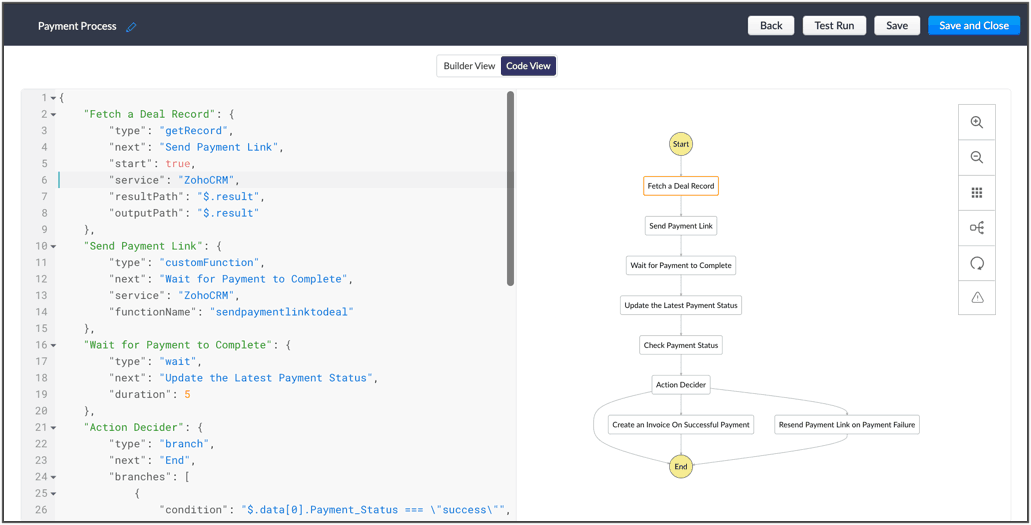
To put it in action, let's talk about payment processes, that are a part of most business processes. Say for your business process, once a deal is won, you'd like to send a payment link to said deal, and then generate an invoice on successful payment. If the payment is unsuccessful, the link is re-sent.
Here, we're building a circuit with two functions, in the order as mentioned below, and with the output of the former feeding into the consecutive function
A function that parses the details of the deal record, fetches the email ID, fetches the right payment URL and sends it to the deal.
A function that checks the payment status and updates the corresponding fields in CRM and generates an invoice on successful payment or resends the payment link to the deal upon payment failure.
So, let's understand why circuits are necessary in this business scenario.
- The order of orchestration - While CRM offers the option to write individual functions, as and when necessary for custom actions and workflows let you automatically execute them, Circuits goes one step further and streamlines the flow of your functions' logic, and simultaneously performs error handling. This ability to pick the order and states of your functions lets you pull in different third-party or external services to address minute use-cases.
- A single, editable space - A flow diagram that uses states and flows that include everything from functions to trigger record movement, using wait or parallel actions as others simultaneously occur, to record states that give you the record details. This not only gives you a bird's eye view of all that's configured in your circuit, but also, allows you to pinpoint issues, modify or reorganize it.
- Diagnose errors and view audit logs - A detailed log of each execution provides the status of each state's task execution, the payload and parameters passed, and the responses and exceptions generated.
- Use Existing Functions - From picking functions you've already tried, tested, and are up and running in your CRM account, to using a circuit within another circuit, this flexibility opens up possibilities of handling so much of your out-of-the box requirements in a single space.
The flow of action here:
Other examples of actions that can be performed with Circuits:
- Generate reports automatically, track inventory, fulfil orders and track them, and generate receipts.
- Trigger a circuit when a deal is won, update the deal's details in a sheet, calculate the commission based on the revenue, and update the details back in CRM.
- Manage users, send custom push notifications based on specific conditions, and manage user-generated files in applications, automatically.
Once enabled for your account, Circuits will be available under:
Setup > Developer Space > Circuits
Learn more about the components of Circuits and how you can make the most of it in the help documentation. Once we enable early-access to Circuits for your account, we'll send out an email confirming the same.
Cheers!
Shylaja
Shylaja
New to Zoho Recruit?
Zoho Campaigns Resources





Topic Participants
Shylaja S
Ryan N.
Sunderjan Siddharth
Greg Robson
Praveen Sankar
Sticky Posts
Announcing Early Access to "Zoho CRM for Everyone" — A new and exciting update to Zoho CRM
Update : Zoho CRM For Everyone's Nextgen Interface gets an upgrade! Hello everyone, We’ve updated the Zoho CRM for Everyone Nextgen interface based on your feedback. The UI is now simpler with a unified sidebar, a more visible global search and features[Early Access] Voice of the Customer (VoC) for Zoho CRM
Happy new year, everyone! We have an exciting addition to our suite of features and would like to introduce you to VoC (Voice of the Customer) for Zoho CRM, powered by Zia. 2023 is definitely the best time to be a customer with rapid innovations and advancementsAdding calls as a channel in Voice of the Customer
Dear All, We hope you're well! It's been almost a year since we opened Zoho CRM's Voice of the Customer solution up for early access. We are grateful for the reception and support you have been showing us with regards to its adoption and feedback. Since
Zoho CRM Plus Resources
Zoho Books Resources
Zoho Subscriptions Resources
Zoho Projects Resources
Zoho Sprints Resources
Zoho Orchestly Resources
Zoho Creator Resources
Zoho WorkDrive Resources


Zoho CRM Resources
Get Started. Write Away!
Writer is a powerful online word processor, designed for collaborative work.
Zoho CRM コンテンツ
-
オンラインヘルプ
-
Webセミナー
-
機能活用動画
-
よくある質問
-
Ebook
-
-
Zoho Campaigns
- Zoho サービスのWebセミナー
その他のサービス コンテンツ
ご検討中の方
Recent Topics
Can we have Backorder Management ?
Can we have Backorder Management ?Display a field of an Account on the Ticket view
Hi there, We would like to display of the Account of the user submitting a ticket on the ticket view. See for example: How can this be achieved? It doesn't really matter where it will be placed as long as it is shown there. Thanks, SnirInsurance Agencies
I am reaching out to see if anyone has any experience in the Insurance Agency world with using Zoho exclusively for the CRM and commissions side of things. Lots of strong features like drip campaigns, meeting, calendars, emails, can all be found in here.Problem with Egyptian internet ISP
Dears, We have problem with our ADSL internet SP, That your site not working with. So, we contact them and they asking us to contact you to solve this problem. The problem that when we are connecting to Tedata ADSL your website not working (Business Email). BR,, Mohamed OmarMail Not Showing In Inbox or Sent Box
Hi, there are mails that are not displaying in both my inbox and sent box. I just tried the iPad app and it is the same but there is a blank field where a mail should be and it refers to a server error. Please fix this.Marketing Automation List Entry Criteria is no longer an option
For a couple of years now we have used the "List Entry Criteria" option to filter our Journey recipient list. All of a suddent the option no longer exists for New Lists and I can only delete the option from existing lists but can no longer edit it. AnyoneGCLID arrives not in CRM with iframe integrated ZOHO Form
Hello amazing community, I enabled Adwords integration in ZOHO CRM. I have a ZOHO Form integrated in a wordpress. I tested iframe and Javascript. I enabled the "handover" GCLID in the ZOHO Form. When I add a GLID with http://www.example.com/?gclid=TeSter-123.Bidirectional sync between Zoho Bookings and Zoho CRM - Part 1
Hey, community members! The default integration between Zoho CRM and Zoho Bookings is unidirectional, which means that any appointments booked, rescheduled, or deleted in Zoho Bookings will be reflected in Zoho CRM. However, any modifications made toIs it possible to edit placeholder text?
In the master slides I want to make sure my templates have more meaning for the users and want to replace the standard placeholder text with something more instructional. Instead of "Click to edit Mast subtitle styles" I want to have "Click to enter reportingHow to allow download of a file AFTER information is collected?
I can't find this anywhere. Can someone help with what seems to be a pretty basic web function today? - File is stored in Workdrive - Prospect goes to a URL where the file is located - System requests prospect to enter "Name" and "Email" - An email isAdd Baseline methods to API
There are no API methods for creating or querying baselines, Use case: Customer is notified of the current project start date according to plan via another product/integration. We would like to auto create a baseline (Automated via API) at the pointFixed Assets beg balance
Hello, I trust you are well I'm a new zoho books user and I find it difficult to plug in the fixed assets balance and here's what I have done: 1- I imported the fixed assets data into the fixed assets module as per the instructions 2- the import processCRM Deluge how can link attach file with workdrive file.
Hi, We have create file at workdrive and would like to link to attachment at crm module by deluge. Right now can only upload it to attachment but can not link the file from workdrive. Thank youFeature announcement: AI-powered document generator in Zoho Sign
Hi there! We recently announced manual document creation by offering an editor within Zoho Sign. Today, we are excited to announce AI-powered document generation to help you draft agreements, purchase orders, and other important business documents inPermanently deleted files
Is there a way to get back permanently deleted files from your account if they were accidentally deleted and no longer recoverable from the recycling bin? I know I am probably screwed but I just figured I would ask.Shared Mailbox in iOS app
Hi, On the desktop I am using a Shared mailbox for our company's general mailbox that somebody else should be able to view. In the iOS app however I can't find it? Old sources on the internet says this isn't possible but that can't be right? SomebodyTip #41- Simplify Compliance and Efficiency with Zoho Assist’s Data Cleanup Feature- 'Insider Insights'
Managing device data efficiently is just as important as securing remote access. With Zoho Assist’s Data Cleanup feature, admins can easily remove outdated or unnecessary device records, keeping the console organized and secure. This action is carriedRevenue Management: #6 Revenue Recognition in Professional Services Industry
If you run a consulting firm, agency, or any service-based business, you have a situation where you have signed the contract, maybe even sent the invoice, and have received some initial payments. So, can you consider this as revenue? What if the projectZoho fsm scheduled maintenance dispatch
Hi, I'm reaching out regarding an issue I'm encountering with the Scheduled Maintenance feature in Zoho FSM. I’m trying to configure it so that it automatically dispatches all maintenance jobs scheduled within the next 150 days, starting from today. However,zoho.inventory.getRecords returns no records
I running a custom function (Deluge) in Zoho Flow with a connection to Zoho Inventory. To debug the problem, I created the test function below. It returns "Number of contacts fetched: 0". This confirms that there's no issue with the org ID or connectionFeature announcement - Simplifying document creation with Zoho Sign
Hi there, We are pleased to announce the release of our document creation feature, enabling you to create, edit, and finalize documents like agreements, purchase orders, and contracts without relying on external tools or applications. <br> ThisIntegrating File Attachments in Zoho Flow Email Notifications
Hi, I would like to be able to send an email once an entry is made in a form, and in this email, I would like to attach a file that has been added to the form using the ImageUpload (or FileUpload) widget. So, I started by creating a flow that will triggerZoho project purchases
Hi Folks, I think having a purchase module in projects will help in putting together a project p and L. Project wise purchases and expenses. Do let me know your thoughts.How can I restore all the deleted Time entries of a Task in Zoho Projects
How can I restore all the deleted Time entries of a Task in Zoho Projects? Query: In Zoho Projects, I cloned a task and deleted the time entries from the cloned task. However, this also deleted the time entries from the original task. How can I restoreIs there a way to make an account inactive in ZoHo Desk
We have a few Clients "Accounts" that we no longer do business with. It would be beneficial for them to not show up in lists. However, we want to go back and view tickets, time, etc.How to set the value of the Phone field importing contacts in Zoho Desk
Hi everyone, i'm new in Zoho Desk, we're setting up the environment and i'm importing contacts from another CRM using a file CSV and i'm getting a problem with phone numbers (italian): the leading zero is cut away, also if the value is inside double quotes.How to center a field inside a section?
I’ve been trying to center a field inside a section in Zoho Canvas. When I align it visually, it looks centered in the editor, but after clicking Save, the field appears misaligned on the actual canvas. I also tried setting the field to full width, butKaizen #192 - Implementing Custom Token Persistence in Python SDK
Welcome back to another week of Kaizen! Last week, we discussed how to implement Login with Zoho using OAuth 2.0 and saw how to bring it to life in a real-world application with the Zoho CRM Python SDK. We also discussed how Zylker Academy built a customShowing the map along with mileage expense
When you use the GPS to track mileage, it shows you the map of the actual path travelled. It would be very useful and practical to save that map with the mileage expense, so that when the report is created, it provides a map of each mileage expense associatedEnable Validation Rule for Multi-Select Picklist Field
Zoho, Please allow validation rules for multi-select fields.File Upload field not showing in workflow
Hi, I have added a field on Zoho CRM. I want to use it in a workflow where that particular field is updated based on another field, however it is not showing up in the field list to select it in the workflow. Why is this please?CRM Custom function updating a module record shows the Super Admin user as the record modifier
Dear Zoho CRM Team, Is there any way to update this so that when a custom function has updated a record the Super Admin user doesn't become the modifier? This happens on the record as a modifier and shows up in the audit logs. It would be more usefulBest way to fetch employee names from Zoho People into Zoho Creator Inventory Stock Form field Employee Name Lookup
Hi Team, I have a requirement in my Zoho Creator application (Inventory Stock Adjustment) where I need to fetch employee names from Zoho People and use them as a lookup in a form. Currently, I am considering using an integration field to fetch this dataget file api is returning Junk data
I am working on extension development where at one point I need to retrieve attachments on records I found out I can use only invokeconnection and not invokeurl in extension development The invoke connection returns the image in raw binary format. WhenNeed help with message box
End user updates many records at once. Each have unique serial number. They want a confirmation box that says starting number, ending number and qty. Is there any way to do this? I been searching and asking support but seems like no great solution.[Webinar] The Transformative Power of Gen BI
Traditional decision-making tools are no longer enough. The integration of generative AI into business intelligence (BI) is proving to be a true game changer—enabling businesses to make faster, smarter, and better informed decisions. Early adopters ofBackorder process review - Automating Removal of Sales Order from "On Hold" When PO is Received
Hello Zoho Inventory Team, Currently, sales orders in On Hold status are released only when the bill for the purchase order is created. In our workflow, it would be much more efficient if the sales order could automatically move out of On Hold as soonHow to access the saved Query using API?
I have created a query in setting. Is it possible to access it from a API? What's the endpoint? I tried /v8/queries/important_deals but didnt' work.création d'une base de données
base de donnee d'un lycéeUser Session variables to recall after form submit & redirect to menu
Hey, Forgive me if this is a simple answer I have overlooked. I have built a big onboarding process for my SAAS platform which is built and managed by an external Dev team. I am hoping to embed my new creator app on the SAAS platform. I have a menu pageNext Page