Featurecast Story 17 - IM via the Desk mobile app
IM'ing (Instant Messaging) Feature Story Series
Featurecast Story 17 - IM via the Desk mobile app
Carry your support desk wherever you go!
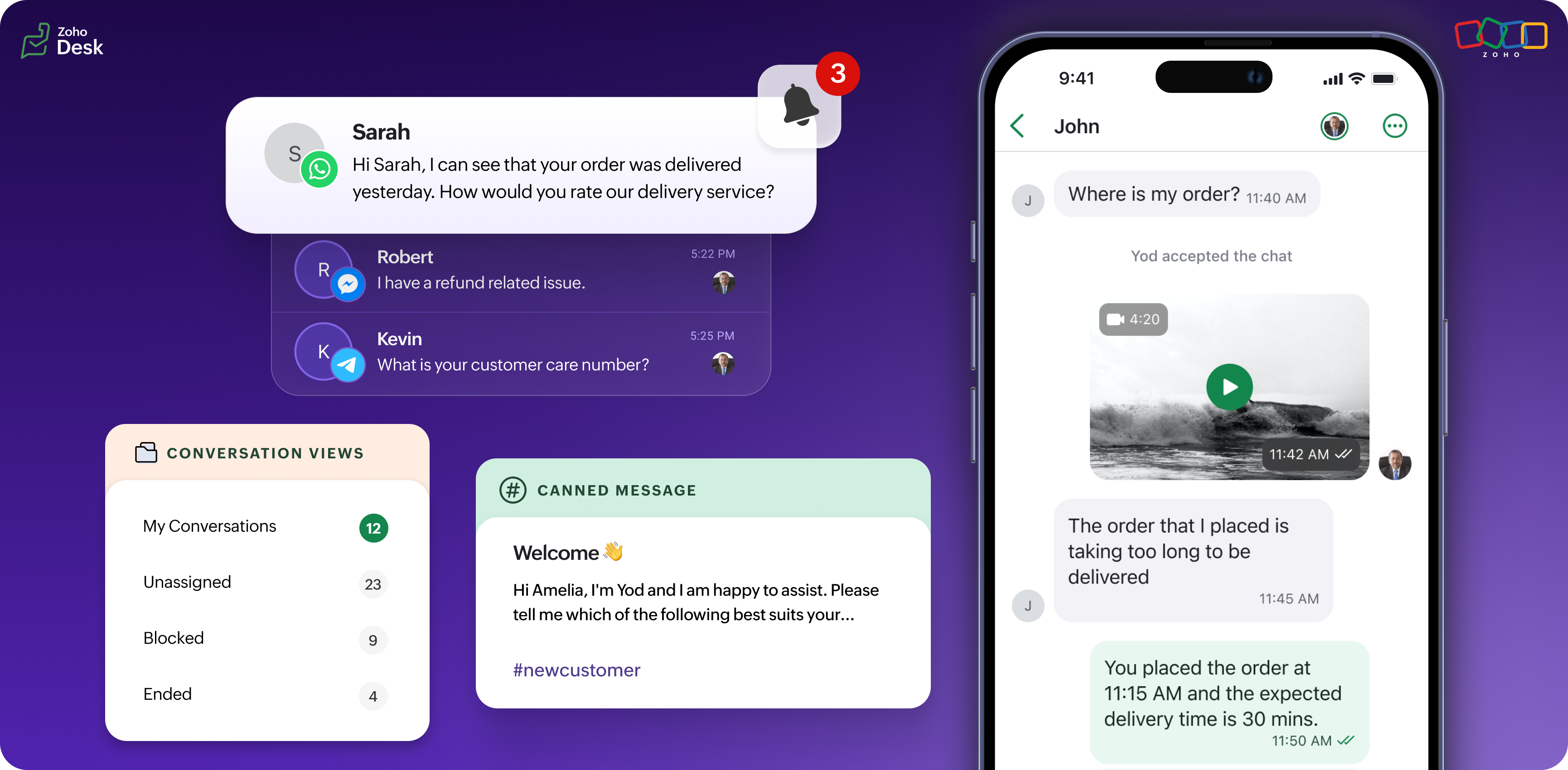
We're delighted to introduce you to our Zoho Desk's IM mobile software development kit (SDK). Zoho Desk is the first app to integrate the instant messaging SDK.
These days, comprehensive mobile app development means there are apps for just about everything: shopping, travel, fitness, gaming, entertainment, and much more. There are also many business apps to support productivity, planning, and communication. There are multiple factors that have contributed to the growing popularity of mobile apps, including convenience, the growth of broadband network availability, and the increasing power of mobile devices.
It's also important to realize that apps are so popular because they empower people to take control of their lives and manage their work more effectively. Let me illustrate this with a short story.
Mobile apps empower business users
Once upon a time, a busy professional named Kia had many tasks to complete every day. She found it challenging to keep track of everything and often felt burned out at the end of the day. One day, she discovered a mobile app that promised to simplify her life and make things easier.
At first, Kia was hesitant to use the app. She wondered whether setting it up and learning how to use it would be worth her time and effort. But eventually, she decided to try it, and she was pleasantly surprised by how helpful it was.
The app allowed her to track her tickets, set reminders for important tasks, and manage her activities. As she continued to use the mobile app, Kia found that it saved her a lot of time and stress. She no longer had to worry as much about deadlines because she felt more organized and in control of her life.
At Zoho Desk, we love to make it easier for people to succeed at work! So, if you're like Kia and feel overwhelmed by your daily job, why not try the IM mobile SDK for your business communication needs?
Integrated messaging boosts mobile app development
Technology must constantly evolve to maintain a modern appearance and keep up with changes in users' requirements. That's why we've provided the SDK with access to the IM features on your Desk mobile apps.
We have introduced the easy click-to-send option, enabling you to send templates through the Desk mobile app.
You can seamlessly integrate your favorite messaging apps, such as WhatsApp, Telegram, LINE, WeChat and Facebook Messenger with Zoho Desk. You can also choose templates and send them to your mobile device's preferred platform.
We have introduced the easy click-to-send option, enabling you to send templates through the Desk mobile app.
You can seamlessly integrate your favorite messaging apps, such as WhatsApp, Telegram, LINE, WeChat and Facebook Messenger with Zoho Desk. You can also choose templates and send them to your mobile device's preferred platform.
Desk's IM mobile SDK offers advantages for customer support
Real-time communication
Instant messaging allows rapid communication between customers and support agents, leading to quicker issue resolution and improved customer satisfaction.
Convenience
Customers can access support anytime using their mobile devices, allowing them to get assistance without waiting on hold or sending emails.
Multimedia support
Many messaging apps support multimedia content such as images, videos, and documents. This enables customers to easily share screenshots or videos of their issues, which can help support agents understand and resolve problems more effectively.
Chat history
Messaging apps often maintain chat histories, allowing customers and support agents to refer to previous conversations. This can help track the team's progress toward resolving issues or enable them to review past solutions to similar problems.
Multiple conversations
Support agents can simultaneously handle multiple customer inquiries through instant messaging, increasing efficiency and reducing customer wait times.
Notifications
Instant messaging apps can send notifications to users, alerting them when a support agent responds to their message. This ensures that customers stay informed and engaged throughout the support process.
Integration
Many instant messaging apps integrate with other business tools and systems, such as CRM software or help desk platforms. This streamlines support agents' work and enables better customer interaction management.
Let's review IM SDK features
Sessions view
The sessions view will list the chat sessions and show the available options for switching between conversation views and integrated channels. Users can also apply status-based filters.
Conversation view
The conversation view shows all the conversations in that chat session with a clean in-and-out message bubble UI. You can also perform chat-specific actions, such as ending a chat, reopening chat sessions, and blocking or unblocking chats. The compose-message view also supports canned messages and pre-approved template messages. By typing the hotkey "#," you can invoke the saved canned messages from your library.
Themes and fonts
You can choose brand colors and fonts in light or dark themes.
Settings
Set the date and time format, the default contact image type, and your contact avatar or the first letter of your name.
Options
You can control the contacts' names, messages in a conversation, URL handling, attachment selection, and presentation style.
Push notifications
The client apps can receive push notifications.
Privacy
Our mobile SDK was developed with a focus on ensuring privacy and data protection. Any data that is of concern is sent to the client app via the error listeners and direct callbacks.
Database encryption
Database encryption is functional in Android and iOS.
Benefits of using the mobile SDK
• Facilitating teams' communication and productivity
• Remaining "top of mind" with customers
• Ensuring ease of use
• Capturing data
• Remaining "top of mind" with customers
• Ensuring ease of use
• Capturing data
I hope you found this story helpful. Start using the IM SDK via the Desk mobile apps to accelerate your business communications and provide comprehensive support to your customers.
There's more to come, so please watch this space for more IM feature stories.
Until next time,
Kavya Rao
The Zoho Desk Team
New to Zoho Recruit?
Zoho Campaigns Resources





Topic Participants
Kavya Rao Addepalli
Sticky Posts
Register for Zoho Desk Beta Community
With the start of the year, we have decided to take a small step in making the life of our customers a little easier. We now have easy access to all our upcoming features and a faster way to request for beta access. We open betas for some of our featuresShare your Zoho Desk story with us!
Tell us how you use Zoho Desk for your business and inspire others with your story. Be it a simple workflow rule that helps you navigate complex processes or a macro that saves your team a lot of time; share it here and help the community learn and grow with shared knowledge.Tip #1: Learn to pick the right channels
Mail, live chat, telephony, social media, web forms—there are so many support channels out there. Trying to pick the right channels to offer your customers can get pretty confusing. Emails are most useful when the customer wants to put things on record. However, escalated or complicated issues should not be resolved over email because it's slow and impersonal. When you need immediate responses, live chat is more suitable. It's also quick and convenient, so it's the go-to channel for small issues.Welcome to Zoho Desk Community - Say hello here!
Hello everyone! Though we have been here for a while, it’s time to formally establish the Zoho Desk Community; we’re really happy to have you all here! This can be the place where you take a moment to introduce yourself to the rest of the community. We’d love to hear all about you, what you do, what company or industry you work for, how you use Zoho Desk and anything else that you will like to share! Here’s a little about me. I am Chinmayee. I have been associated with Zoho since 2014. I joined hereWebinar 1: Blueprint for Customer Service
With the launch of a host of new features in Zoho Desk, we thought it’ll be great to have a few webinars to help our customers make the most of them. We’re starting off with our most talked about feature, Blueprint in Zoho Desk. You can register for the Blueprint webinar here: The webinar will be delivered by our in-house product experts. This is a good opportunity to ask questions to our experts and understand how Blueprint can help you automate your service processes. We look forward to seeing
Zoho CRM Plus Resources
Zoho Books Resources
Zoho Subscriptions Resources
Zoho Projects Resources
Zoho Sprints Resources
Zoho Orchestly Resources
Zoho Creator Resources
Zoho WorkDrive Resources


Zoho CRM Resources
Get Started. Write Away!
Writer is a powerful online word processor, designed for collaborative work.
Zoho CRM コンテンツ
-
オンラインヘルプ
-
Webセミナー
-
機能活用動画
-
よくある質問
-
Ebook
-
-
Zoho Campaigns
- Zoho サービスのWebセミナー
その他のサービス コンテンツ
ご検討中の方
Recent Topics
Items should display under specific warehouse
I have configured the multi warehouse but it show all the items under all warehouse which is not correct according to our business logic, so i want that items should only display under that specific warehouse not under all the warehouses not even with zero quantity. Some items should be common but not all so is there any option for that purpose so i can specific the items to its warehouse. RegardsPartial refunds
I am trying to process refund for a one item invoice, however the refund is partial: i am getting this error while creating credit note, can anyone share some wisdom about thisBest practice importing items and matching assemblies
Hi, I was wondering what would be the best practice to import items and composite items (assemblies) From my backup, what should I import first? The items or the composite items? I am on Zoho one, using inventory and books. Kind regards, SabineBulk Fill In & Edit PO/Bill/SO/Invoice
Hello, I am adding stock in bulk on a PO, the system is automatically populating the Rate (price) and Tax from the item data. Problem is that the bill rate is different from the rate on the item data, so I have to manually erase each and enter the price.Separate Items & Services
Hi, please separate items and services into different categories. Thank youItems Below Reorder Point Report?
Is there a way to run a report of Items that are below the Reorder Point? I don't see this as a specific report, nor can I figure out how to customize any of the other stock reports to give me this information. Please tell me I'm missing something sAllocating inventory to specific SO's
Is there a way that allocate inventory to a specific sales order? For example, let's say we have 90 items in stock. Customer 1 orders 100 items. This allocates all 90 items to their order, and they have a back order for the remaining 10 items which couldCancelled Transfer order problem
Hello, We've canceled a transfer order, and we can't add the related items to a new Transfer Order. The system tells us that the bin doesn't have the required quantity, but when we check the item, it indicates that there are 2 units in the bin. It alsoCreating a Chart from a Report
In Zoho Analytics, is it possible to create a chart from a Pivot View report? We are looking to use Zoho Analytics to replace Excel for Sales reports and would like to be able to show both the table and the chart together.Client Portal ZOHO ONE
Dear Zoho one is fantastic option for companies but it seems to me that it is still an aggregation of aps let me explain I have zoho books with client portal so client access their invoice then I have zoho project with client portal so they can access their project but not their invoice without another URL another LOGIN Are you planning in creating a beautiful UI portal for client so we can control access to client in one location to multiple aps at least unify project and invoice aps that wouldEmail Insights included in Bigin emals are marked as SPAM everywhere
Today I noticed that email recipients who use Office 365 never receive emails sent from Bigin. Further examination showed that all Email Insights links in email headers are marked as spam/phishing by Office 365. Example screen included. The problem isData Import | Zoho Analytics Custom Query Window Size
Please increase the window size for the Custom Query Data Import. It's impossible to work with such a small query window.Name changed in settings for mailbox but still not changed when typed in To field
In the email account secretary@ i have updaetd the new staff members details but the old members name still appears when I type secretary@ in the To field. I cant work out where Zoho is finding the old name from. I have deleted the browser cache. If ICannot add my name to my domain name
I want to have My name@mydomain.com and it says my name is linked to another account already. Please fix it since I do not have another account.Invoice status on write-off is "Paid" - how do I change this to "Written off"
HI guys, I want to write off a couple of outstanding invoices, but when I do this, the status of the invoices shows as "Paid". Clearly this is not the case and I need to be able to see that they are written off in the customer's history. Is there a wayEstablishing new Zoho email account on laptop
Good Morning: I am very long time Outlook business user and decided to try your email service last night and had established an account. I am trying to verify my account; how do I establish my Zoho email account on my laptop? I opened the account withunable to send message reason 550 5.4.6 unusual sending activity
My email account can't send message. It shows unable to send message reason 550 5.4.6 unusual sending activity detectedhow to add email to existing organization i w
I am already registered my organization and i have an email id. I need one more email id but i can't find anywhere .i want the cheapest email id . how to add ?e-mail bloqueado
Estou com meu e-mail lucas@peplus.me bloqueado, preciso desbloquear para retorno de usos em minhas atividades.zoho labels api not working
We're using n8n to automte email reply using zoho api. I'm facing issue with label api. I added the required scopes but its not working. i followed zoho api documentation but didn't work. also, where do i find/how do i create zoho oauth token mentioneeedDesk DMARC forwarding failure for some senders
I am not receiving important emails into Desk, because of DMARC errors. Here's what's happening: 1. email is sent from customer e.g. john@doe.com, to my email address, e.g info@acme.com 2. email is delivered successfully to info@acme.com (a shared inboxStreams/Shared email doesn't show up in windows trident app. It works fine on MAC. Is there any difference between 2 install ?
I can see streams/share email boxs on my MAC version of trident app but i can't see them in windows version of trident app. Is there any difference between 2 install? I try to find setting but not able to see any setting to add stream/share email boxes.add zoho account
How to add a zoho mail to previous zoho account? I have twoZoho Desk Mobile App Year-End Roundup - 2025
Dear Zoho Desk users, Greetings! As you gear up for the festive season, we are excited to share a quick journey into all that is released in 2025! Zia's generative AI capabilities Zia insights can be highly beneficial in helping agents manage daily supportNarrative 17: The role of Zia AI in customer support
Behind the scenes of a successful ticketing system: BTS Series Narrative 17: The role of Zia AI in customer support Overview Zia in Zoho Desk is a layered AI assistant that combines generative AI, prediction, and automation to support agents, automateDomain Transaction
I have purchased a domain name called trainedworkforce.co.in I made the payment got the receipt but the domain is still not purchased after successful transaction .Ability to Set a Unified Tab Order/View for All Users in Zoho Projects
Hello Zoho Projects Team, We hope you are doing well. We would like to submit a feature request regarding tab/menu organization in Zoho Projects. Current Behavior: The tab (module) order in Zoho Projects is user-specific. Each user (internal or external)Zohomail - The "All Messages" vs "In Box"
Why do some new email message appear under the all messages view but not in my inbox? That's really annoying but to be fair I've experienced the same with gmail.error while listing mails
I can't access email in any of my folders: Oops, an error occurred - retry produces the second error response: error while listing mails (cannot parse null string). I've signed in and out of Zoho, restarted my iMac.Introducing the Zoho Projects Learning Space
Every product has its learning curve, and sometimes having a guided path makes the learning experience smoother. With that goal, we introduce a dedicated learning space for Zoho Projects, a platform where you can explore lessons, learn at your own pace,Where to show Customization Field ?
Dear Sir, I have made some New Field in Item Field Customisation. Now I don't require that field in Estimate, Sales Orders etc. I just wants that field in Sales Invoice to Show/Hide... Is that possible ?Zoho Desk 2025 round-up: Key highlights on feature releases
Hello everyone, As we gear up for 2026, here is a detailed round-up of all feature releases in Zoho Desk web throughout the year. For consolidated information on releases check out the What’s New page You can also watch these webinars. Zia in web ZiaPrint Sales Orders, Purchase Orders or Invoices from API
Hello, Is it possible to use the print option that is available in Sales Orders Purchase Orders and Invoices with the API?. I don't see any information in the docs about this. ThanksHow to show a hided report??
in CRM Report , I clicked Hide incidently , how to show the floder again? Nowhere I can find the hided report floder...Converting Customer Invoice to Purchase Bill
Hi, In my service-based business, I sometimes create the customer invoice first, and later I receive the purchase bill from the vendor for the same job. Is there any option in Zoho Books to: Convert a customer invoice into a purchase bill, or Link/associateEmail tracking inquiry
I am trying to track when my emails are opened and clicked like I previously did in HubSpot. HubSpot pretty much did the entire process automatically. After digging through, I finally found in settings --> emails --> BCC Dropbox there is an email I canMass Update of Lookup Fields not possible
Hello List I've created a custom field for Leads and Contacts 'Current Campaign'. This is very Handy as I can filter leads and then related them to a campaign. Everything ready, but then I realized that mass update doesn't work for lookup fields... aCollapsible Sections & Section Navigation Needed
The flexibility of Zoho CRM has expanded greatly in the last few years, to the point that a leads module is now permissible to contain up to 350 fields. We don't use that many, but we are using 168 fields which are broken apart into 18 different sections.Quick Create needs Client Script support
As per the title. We need client scripts to apply at a Quick Create level. We enforce logic on the form to ensure data quality, automate field values, etc. However, all this is lost when a user attempts a "Quick Create". It is disappointing because, fromDownload Attached Files
Hi everyone, Brand new to Zoho Creator. I have a form with a subform. The subform has a field for "File Upload" I have this in a subform to allow multiple files to be uploaded to the parent form. Once the files are uploaded, how can i download or view them? Is this a setting I am just not seeing? If there isn't a way to download them, could i create another form field that dynamically creates the file's URL? That way a user can click the URL to get to the file? Any help with this would be greatlyNext Page